
Shift Calendar App: The Ultimate Guide for 2026
Discover how a shift calendar app helps frontline and office teams stay aligned. Learn key features and real workflows to reduce scheduling chaos.
Dan Robin

A manager finishes a schedule in a spreadsheet, sends screenshots to three team chats, then spends the afternoon answering the same question: “Which shift am I working?” By dinner, someone has called in sick, a swap is waiting for approval, and the version on the office computer no longer matches the one on everyone's phones.
That isn't a calendar problem. It's an operations problem.
A useful shift calendar app keeps the schedule connected to the conversations, approvals, handoffs, and time records that keep a frontline team moving. The calendar is only the visible part. The value appears after the schedule is published, when a worker needs a swap, a supervisor needs coverage, or a team at another location needs to know what changed.
Why Scheduling Feels Broken for Frontline Teams
Frontline scheduling often starts with good intentions. A supervisor opens a spreadsheet, checks availability, fills the busiest periods first, and sends the finished roster by text or email. Then reality arrives. A worker's childcare changes, a delivery runs late, a colleague calls in sick, or a manager realizes that two people were assigned to the same role while another station has nobody.
The spreadsheet didn't fail because spreadsheets are incapable of showing time. It failed because it has no reliable way to carry the schedule into the rest of the day. Workers ask questions in private messages, managers approve swaps in different threads, and the latest change gets buried under unrelated updates. People aren't looking at one schedule anymore. They're looking at fragments of several schedules.
The problem is widespread across the labor market. The Bureau of Labor Statistics schedule data reports that 16.4% of wage and salary workers usually worked a non-day schedule, including evening, night, rotating, and irregular schedules. The share reached 36.8% in leisure and hospitality, a setting where coverage and handoffs matter every day.
The calendar is only the starting point
A restaurant manager might create a strong dinner roster, then lose visibility when a server swaps with a colleague. A warehouse supervisor may find a replacement for a sick picker but forget to tell the person running the next handoff. A healthcare coordinator might approve a shift change at one location while another site still expects the original worker.
Those failures come from the gap between schedule creation and schedule maintenance. A static calendar shows who was assigned. A working coverage system shows who is assigned now, what changed, who approved it, and what the next team needs to know.
That distinction is why I recommend reading scheduling as an operating rhythm, not an administrative task. Resources such as Pebb's guide to shift work schedules are useful when a team needs to think beyond the roster and account for the realities of rotating hours, handoffs, and employee communication.
Practical rule: If a schedule change requires a manager to copy information into another tool, the process is already vulnerable.
A shift calendar app should give workers a clear mobile view, let them request changes, and keep approved updates visible to the people responsible for coverage. It should also give managers enough context to make a sound decision, including availability, time off, roles, and recorded hours. The goal isn't to create a prettier grid. It's to keep the grid accurate after the first version leaves the manager's desk.
Core Features Every Shift Calendar App Should Have
The right features follow the moments when scheduling breaks. Start with the worker who needs to check a shift quickly, not the administrator who wants another dashboard.
Mobile access comes first. Shift workers often check schedules between tasks, during a commute, or before leaving home. A phone-friendly app should show the date, location, role, start time, end time, and any relevant update without forcing the employee to open a desktop site. A 2023 mobile user-testing study on shift workers connects mobile access with the reality of night and rotating work patterns, and explains why standard office assumptions don't fit this audience (SAGE research).
Shift swaps need a controlled path. A nurse shouldn't have to find a colleague, agree in a private chat, and hope a coordinator notices. The worker can request a swap, the replacement can accept, and the manager can approve it while the app keeps the official schedule current. Without that approval trail, a friendly agreement can become an uncovered shift or a payroll dispute.
Time-off requests belong beside the schedule. A retail manager planning a weekend roster needs to see approved leave while assigning people. If time off sits in a separate email inbox, conflicts appear late. The same principle applies to clock-in data. When scheduling and time records can connect, supervisors have a clearer view of planned coverage versus actual attendance. Integrated scheduling platforms commonly combine schedules, swaps, time off, time records, and team communication in one cloud system, reducing the gaps created by text and email workflows (Workforce scheduling software).
Notifications should clarify, not create noise
A notification should answer a practical question: what changed, who needs to act, and by when? Workers need alerts for published schedules, approved swaps, cancellations, and important updates. Managers need warnings about conflicts, missing coverage, or pending requests. Sending every message to everyone trains people to ignore the app.
Role-based visibility matters just as much. A worker may need their shifts and team updates. A supervisor may need staffing for one location. An operations leader may need a broader view across sites. Permissions keep the experience focused while protecting sensitive information.
The same logic applies outside traditional shift industries. A gym coordinating instructors, rooms, and member reservations can look at resources on how to streamline class bookings for gyms, then apply the same operational lesson: bookings, availability, communication, and changes work better when they stay connected.
How Schedule Quality Affects Productivity and Retention
A schedule affects more than attendance. It shapes how much control workers have over their time, how confidently they arrive for work, and how much energy managers spend repairing avoidable mistakes.
The Harvard Shift Project paper on schedule instability reports that two-thirds of workers received less than two weeks' notice of their schedules. Half of those workers received less than a week's notice. The same paper reports that 14% had at least one cancelled shift in the previous month and 70% had at least one timing change to a shift in that period.
Those changes spill into ordinary life. A worker rearranges childcare, transportation, sleep, or a second job around a schedule that may change after the plan is supposedly finished. A shift calendar app can't remove every operational surprise, but it can make changes visible, traceable, and easier to communicate.
Predictability has a measurable operational effect
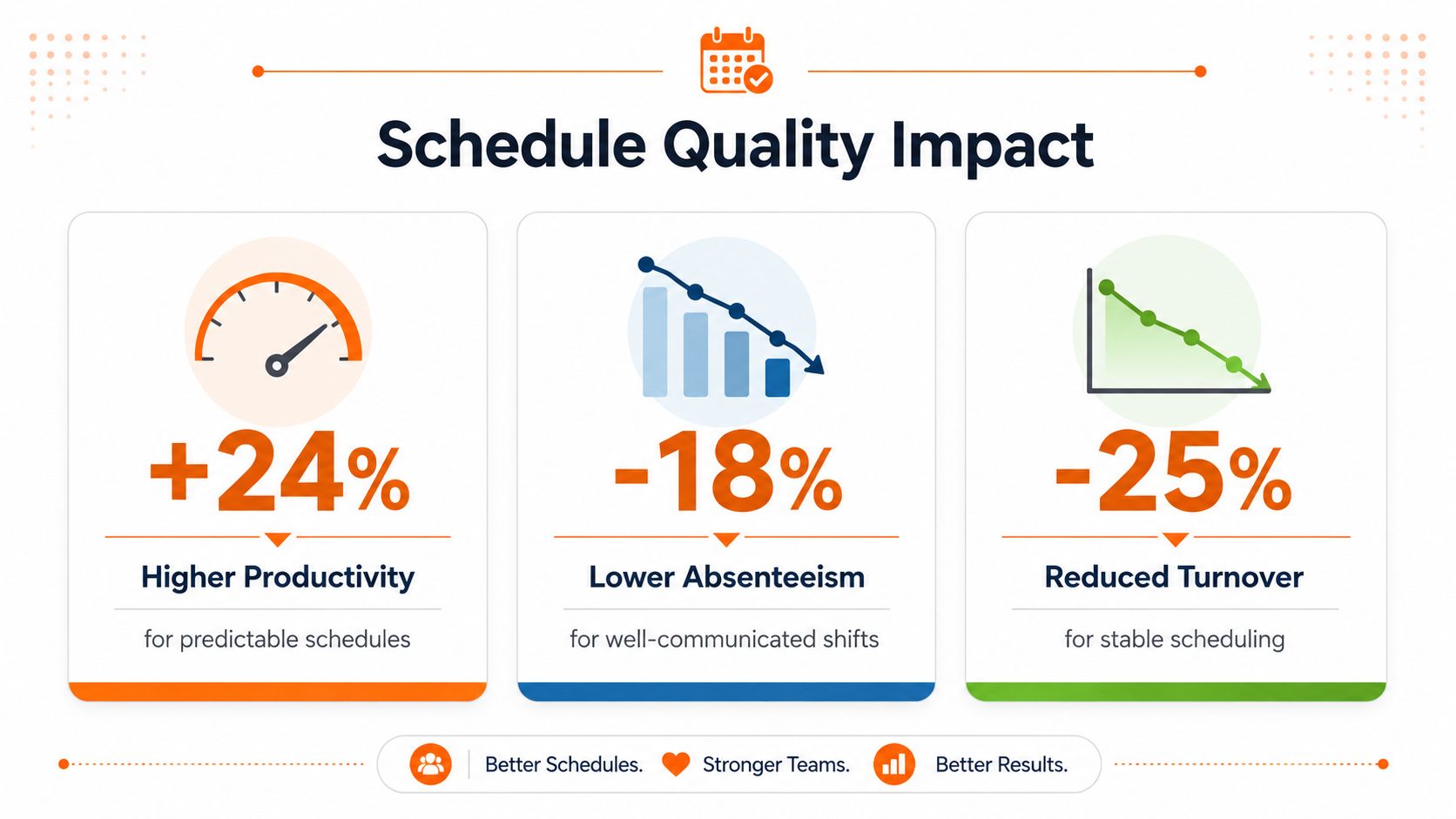
Schedule consistency also connects with productivity. Academic research summarized by Turno found that hour-of-the-day consistency increased cashier productivity by 0.95% on average, while day-of-the-week consistency increased it by 1.63%. For inexperienced cashiers, the reported gains were 3.39% and 7.93%, respectively (Turno's shift work statistics).
The point isn't that every team will reproduce those results. The point is that schedule design can affect how well people perform. Familiar timing helps workers build routines, understand demand patterns, and arrive prepared for the work in front of them.
A good app supports that by helping leaders see whether schedules are stable, whether employees can influence changes, and whether coverage decisions create recurring friction. It also helps separate a genuine staffing problem from a communication problem.
Retention starts with trust
Workers don't expect every week to be convenient. They do expect the published schedule to mean something. When managers change shifts without a clear process, employees lose trust even if the business is meeting its staffing targets.
A schedule that gives reasonable notice, exposes approved time off, and provides a fair swap process signals respect. That matters in retail, hospitality, healthcare, logistics, and any workplace where employees carry the customer experience directly.
Buyer Checklist and Implementation Tips
Choose a shift calendar app by tracing the work, not by counting features. Ask what happens from the moment a manager builds a roster to the moment a worker clocks in, requests a change, and hands work to the next person.
Start with the connections
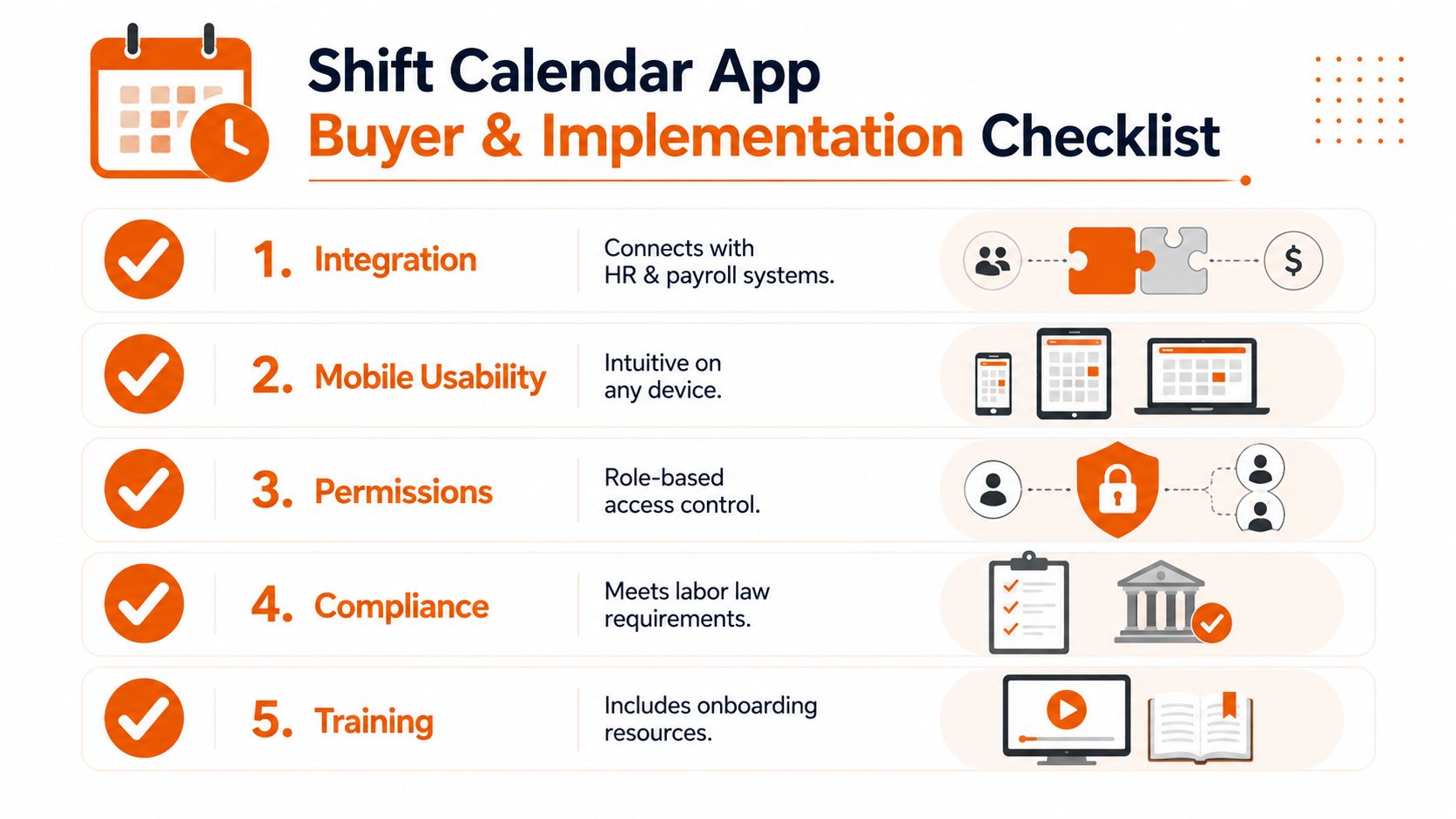
HR and payroll integration should be near the top of the list. Employee records, roles, locations, and hours shouldn't require repeated manual entry. Ask how the tool handles new hires, departures, transferred employees, approved leave, and time records. A schedule that looks accurate but doesn't agree with payroll creates a different kind of administrative work.
Mobile usability needs a real test. Don't accept a polished sales demo on a large screen. Give the app to a few workers on the phones they use daily and ask them to find a shift, request time off, and respond to a change. If any of those actions feels slow or confusing, adoption will suffer.
Permissions should match responsibility. A location supervisor may edit one team, while a regional manager may need a cross-site view. Workers should see what helps them do their jobs without exposing information they don't need.
Compliance belongs in the workflow. Scheduling rules can involve rest periods, overtime, fair-workweek requirements, and local labor obligations. Advanced planning tools increasingly use forecasting and auto-scheduling to balance demand, staffing, labor cost, and compliance rules (Workforce shift planning). Treat those features as support for judgment, not a replacement for reviewing the schedule.
Decide how much complexity you actually need
Forecasting can be valuable for a large operation with changing demand. It can also overwhelm a small team that mainly needs a reliable roster, quick swaps, and clear messages. A simple tool that people use consistently beats an advanced system that managers avoid.
Implementation advice: Buy for the decisions your team makes every week, not the features someone might need someday.
Run a pilot with one location or one department. Publish a real schedule, process an actual swap, and collect feedback from both managers and workers. Fix naming, permissions, notification rules, and training materials before expanding.
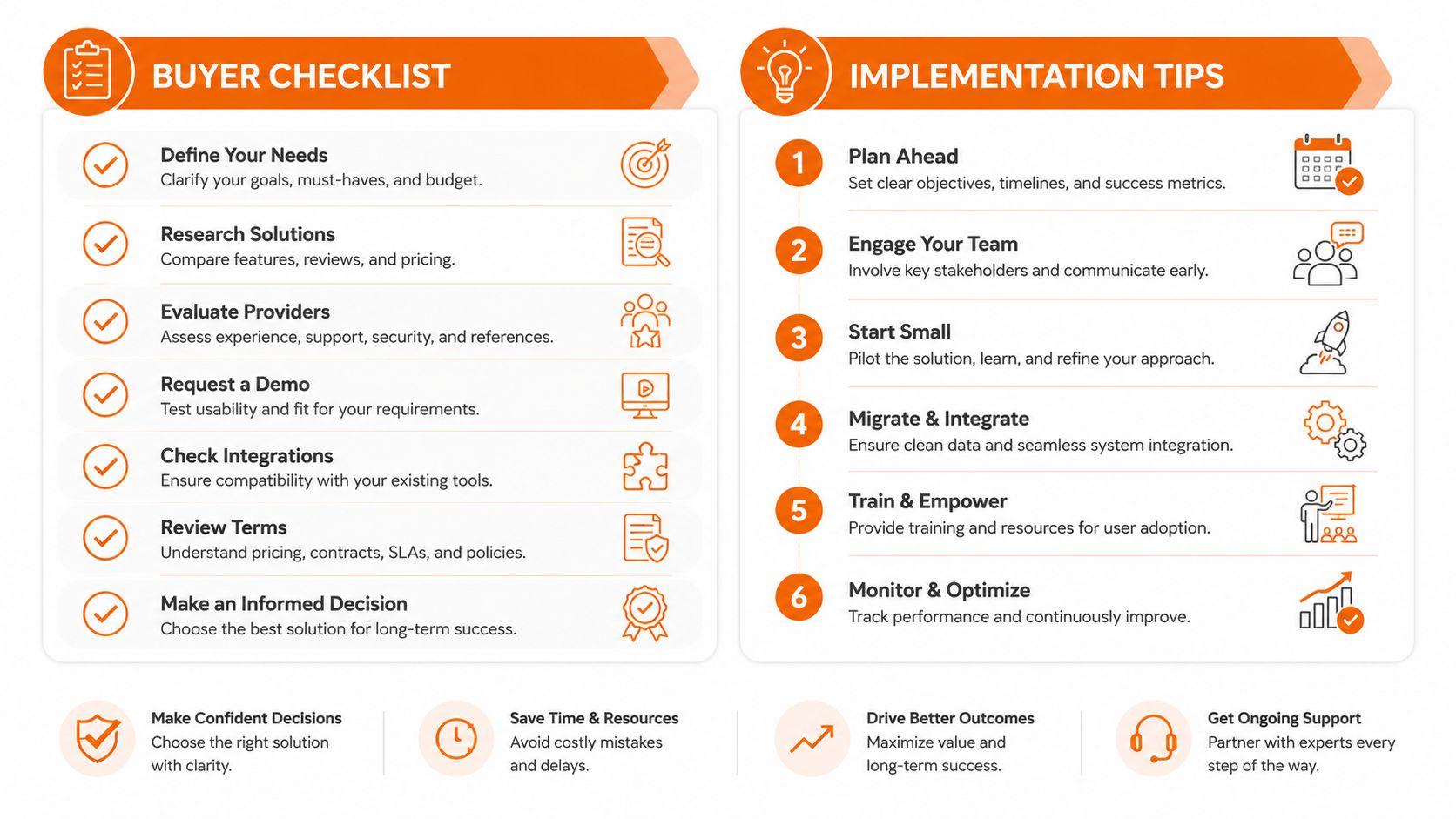
During rollout, keep the old process available only long enough to protect continuity. If managers publish in the app but continue confirming every change through scattered texts, the team will learn that the app isn't the source of truth. Set a clear rule: the approved schedule lives in one place, and important changes happen there.
Real Workflows Where a Shift Calendar App Changes the Day
At a restaurant, the published dinner roster looks fine until a large group arrives early and one server calls out. The manager checks who is nearby, sees which workers are already scheduled, and posts a coverage request to the relevant team instead of sending a broad text to everyone. A worker accepts the open shift, the manager approves it, and the updated assignment reaches the people who need it.
The useful part isn't the calendar view. It's the short path from coverage problem to confirmed person. Managers can also review demand patterns and staffing plans with guidance on how to optimize delivery peak scheduling, especially when service volume and delivery work compete for the same employees.
A sick call in the warehouse
A picker reports an absence shortly before a shift. The supervisor opens the schedule, checks the role requirement, and contacts eligible workers through the team channel tied to that operation. Once someone accepts, the supervisor updates the assignment and posts a handoff note explaining the priority orders and the staging area.
That last message matters. Replacing a person without transferring context can leave the incoming worker guessing. Scheduling and communication should travel together.
A swap across healthcare locations
A healthcare worker needs to exchange a night shift at one site. The request goes to colleagues with the right role and availability, rather than becoming a private agreement that a coordinator discovers later. The coordinator reviews the request, confirms the change, and leaves the original schedule history intact.
Across all three workflows, the app acts as a live record. It tells people what is planned, what changed, and what they need to do next. That is the difference between digitizing a roster and giving a frontline team a dependable operating system for the day.
How Pebb Fits Into a Modern Frontline Stack
Standalone scheduling tools can work well when the only job is assigning shifts. The gaps appear when a team needs to connect that assignment to a conversation, task, document, handoff, or clock-in record.
Pebb places scheduling inside configurable Spaces alongside chat, posts, tasks, file sharing, events, clock-in, and PTO tracking. That structure lets a team keep the shift plan near the practical information needed to carry it out. Mobile access supports workers away from desks, while roles and permissions help managers control what each group can view or change.

The trade-off is straightforward. A focused scheduling product may offer deeper tools for complex labor forecasting. A unified work app reduces the number of places employees must check during a shift. For teams that already struggle with scattered communication, reducing that switching can matter more than adding another planning layer.
Pebb also includes a knowledge library, file sharing, searchable profiles, analytics, and integrations with HR, payroll, and authentication systems. Quick onboarding through a single invite link can help teams get started without a long technical project, though every rollout still needs clear ownership and training.
The same operational discipline applies beyond schedules. A fleet team, for example, can use a resource on pre-trip inspection blind spots to identify what gets missed before work begins, then apply that thinking to shift handoffs and daily readiness. The broader lesson is simple: the tool should expose the small gaps that create larger failures.
For a closer look at the connection between communication and scheduling, see how Pebb helps frontline teams stay organized with smarter shift management.
Rethinking What a Good Schedule Really Means
A good schedule isn't a grid with every name in the right box. It's a shared, current understanding of who is working, where they need to be, what changed, and what the next person must know.
Measure fewer last-minute changes, clearer handoffs, faster coverage, and more employee control. Those signals tell you whether scheduling is helping the operation or only documenting its problems.
The strongest teams treat the schedule as a living conversation. What would improve first in your operation, the roster itself, or everything that happens after it is published?
If your team needs scheduling, communication, tasks, PTO, clock-in, and frontline updates in one mobile work app, visit Pebb to see how the pieces fit together. Start with one team, test the workflow, and make the next shift easier to run.
