
Secure File Sharing: A Practical Guide for Modern Teams
Learn how secure file sharing actually works, from encryption and protocols to real-world policies. A clear, no-jargon guide for IT leaders and managers.
Dan Robin

If you manage files across shifts, job sites, laptops, and phones, you already know the gap between policy and reality. The handbook says “use approved tools.” The floor supervisor texts the schedule. HR sends the policy PDF. A contractor asks for one more form, and somebody drags it into a consumer app because it's faster.
That's how secure file sharing usually starts, not with a grand platform rollout, but with a hundred small shortcuts that feel harmless until they aren't. The old Ponemon Institute study on workplace file sharing showed that 62% of IT respondents rated file-sharing risk as high or very high, while only 18% called it low, and 45% said their company was actively looking for a secure file-sharing tool, which tells you this wasn't a niche concern even back then Ponemon Institute study. The risk hasn't become less real just because the workflow got more mobile.
A good place to start is with the kind of material people move around, shift rosters, onboarding packets, policy updates, client files, photos, and incident reports. If you're thinking about protecting confidential business data, this practical guide from Paradigm International Inc. is a useful companion because it treats file handling as part of the broader data-protection problem, not a separate IT hobby protecting confidential business data.
Why Everyday File Sharing Is Riskier Than You Think
A site manager in retail or hospitality usually is not trying to break policy. They are trying to get tomorrow's schedule to the right people before the first shift starts, so they text it, email it, or drop it into whichever app opens fastest on their phone.
That habit feels harmless because it solves an immediate problem. The risk shows up later, after the file has moved into places nobody planned for. Once a document leaves a controlled system, you lose visibility into who opened it, who forwarded it, and whether it is still sitting on a personal device two weeks later.
The hidden cost of convenience
Consumer sharing tools win because they are easy. In an organization with policies, audits, and real consequences for mistakes, that ease becomes a trade-off. The more a workflow depends on memory and goodwill, the more it breaks when people are busy, tired, or offsite.
A nurse sending a form to a specialist, an HR lead circulating a policy update, or a field team sharing photos from a job site all run into the same issue. The content is not always top secret, but it is often sensitive enough that casual handling creates exposure. The file itself may be fine. The path it takes is the problem.
Practical rule: if a document matters enough to restrict access, it matters enough to track, too.
There is a reason secure sharing keeps showing up as a governance concern instead of a neat collaboration feature. People do not share files in ideal conditions. They share them under time pressure, on mobile devices, across departments, and sometimes with external partners who do not work inside your standards.
The file is not just a file once it leaves the originator. It becomes a decision trail, a compliance concern, and sometimes a liability. The operational reality many teams face is documented in industry guidance on client file security, and it lines up with the broader issue of protecting confidential business data.
Why frontline teams feel the pain first
Frontline workers rarely sit at a desk with ten open tabs and a tidy folder structure. They move between devices, locations, and people. That makes them the first group to work around friction, not the last.
If the approved tool is clumsy, they will use the fastest path available. Secure file sharing cannot be written as a back-office rule and expected to hold on the floor. It has to fit the way work gets done, or people will route around it without asking.
What Secure File Sharing Means
At its simplest, secure file sharing means a file can move from one person to another without turning into a free-for-all along the way. The point is not only to hide the file. It is to control who can open it, when they can open it, and what happens after that.
Email attachments do not handle that well. A file attached to an email can be copied, forwarded, saved, printed, or buried in someone's inbox forever. That is closer to handing out photocopies than issuing access.
The difference between encryption and control
Encryption matters, but it is only one layer. The baseline called out in the available guidance is AES-256 encryption at rest and TLS 1.2 or higher in transit, paired with MFA and audit logging secure file sharing control baseline. That combination matters because a file can be encrypted and still be shared badly.
A sealed envelope works as a simple comparison. Encryption keeps strangers from casually reading what is inside while it is moving or stored. If you hand the envelope to the wrong person, the seal does not help much. That is why authentication, permissions, and logs matter just as much as crypto.
NIST is clear that organizations exchanging files over the internet should use only NIST-approved cryptographic algorithms in FIPS-validated modules NIST guidance on validated cryptography. That distinction matters in regulated environments because strong-sounding encryption is not the same thing as validated implementation.
What the controls are doing in practice
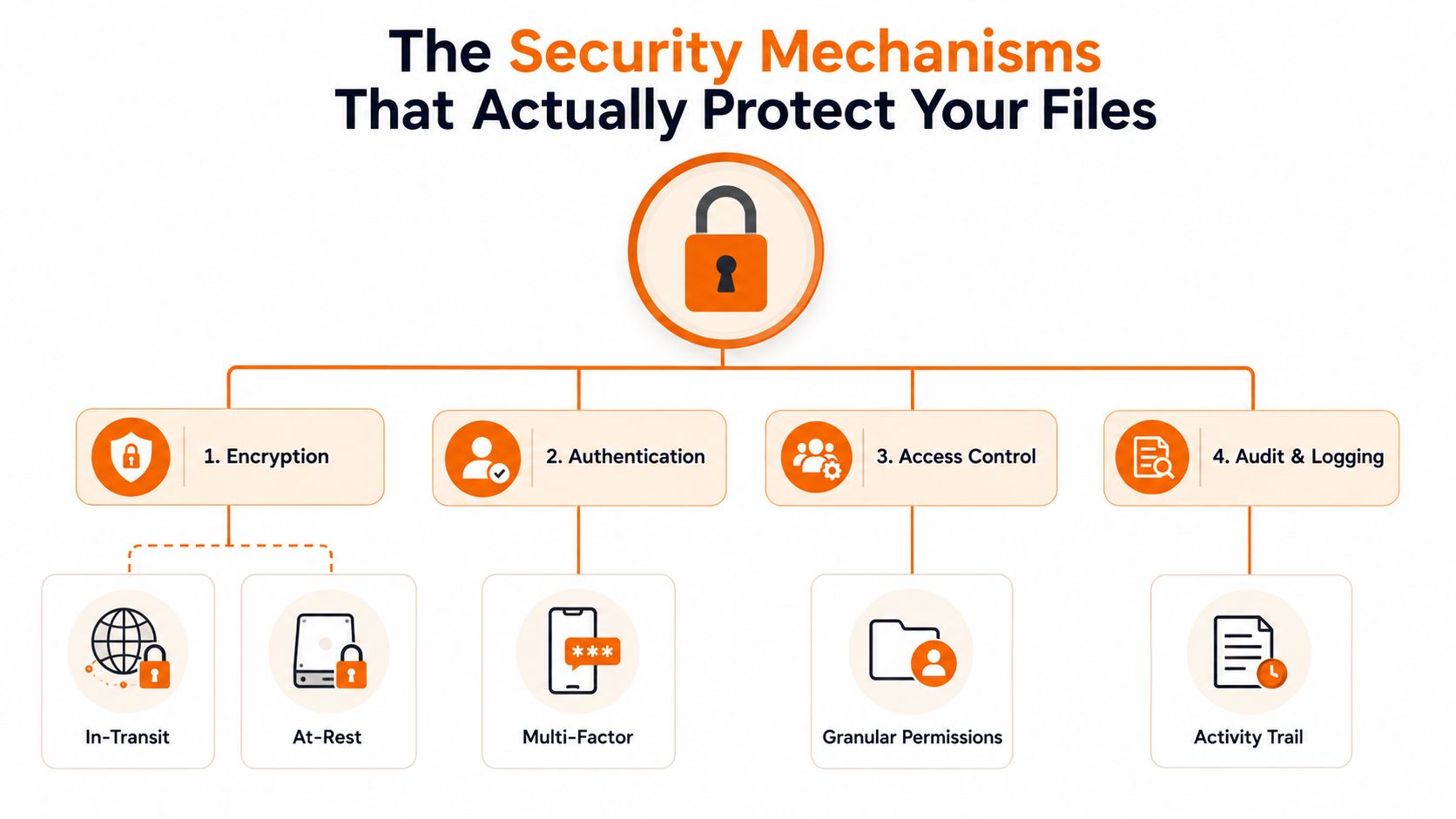
Authentication checks identity. Access control limits what a person can do with the file. Audit logging records the trail. Together, they turn file sharing from a one-time handoff into something you can govern.
A locked briefcase is useful. A locked briefcase with a known owner, limited keys, and a record of every opening is better.
That is the practical test. If a vendor only talks about encryption, they are describing one layer of the story. If they also cover identity, permissions, and activity records, you are getting closer to something you can run in a real organization.
The gap shows up fast with external partners and mobile staff. A document can be protected well on paper, then handed around in ways the policy never intended once people are under time pressure. The guide on client file security is a useful reminder that sharing has to work as a controlled business process, not just as a feature the IT team turned on.
The Security Mechanisms That Protect Your Files
The tools that hold up in real use do not depend on one control. They layer protections so a single mistake does not expose the whole file. That is the difference between a policy that looks good on paper and one that survives phished accounts, forwarded links, and shared devices left signed in on a job site or in a break room.
Encryption, authentication, access, and logs
Encryption protects content while it moves and while it is stored. It is the first barrier, not the full answer. If a link is intercepted or a laptop is lost, encryption helps keep the data unreadable, but only if the system uses it correctly and the keys are managed well.
MFA reduces the impact of stolen passwords. That matters because compromised credentials are one of the easiest ways for a file-sharing system to go sideways. A password alone is a weak gate, especially when people reuse it across work and personal accounts.
Granular permissions control who can view, download, edit, or forward. That is where governance becomes real. If a partner only needs read access, they should not have a path to reshare the document with a broader group.
Audit logs are the part teams often value too late. When something goes wrong, you need a record of who accessed what, when, and from where. Without that trail, investigations turn into guesswork, and it gets harder to separate a real incident from a routine handoff.
What each control blocks
A stolen password is not the same problem as a stolen file. A forwarded link is not the same as approved access. A downloaded copy on a personal phone is not the same as a tracked business record. The controls exist because each of those situations needs a different response.
The FTC's guidance on peer-to-peer file sharing also points to a practical control gap. It advises businesses to block outbound traffic through approved P2P file-sharing programs so sensitive file types do not move through channels the company never intended to use. That is not a theory exercise. It is traffic control, and it matters any time frontline staff or mobile workers are under pressure to get a file out fast.
For teams that need a practical starting point on day-to-day file exchange, this guide to sharing files at work is a useful reference for how sharing habits shape real risk.
How to spot a weak security claim
If a vendor says “encrypted,” ask what is encrypted, when it is encrypted, and how access is limited after the file is shared. If they mention audit logs, ask whether those logs are searchable and usable during an incident. If they mention MFA, ask whether it is enforced across the whole workflow or only on certain sign-ins.
The comparison that matters is simple. Encryption reduces exposure. Authentication reduces impersonation. Permissions reduce over-sharing. Logs reduce blindness. If one of those pieces is missing, the setup is weaker than the brochure suggests.
Choosing Between Architectures and Protocols
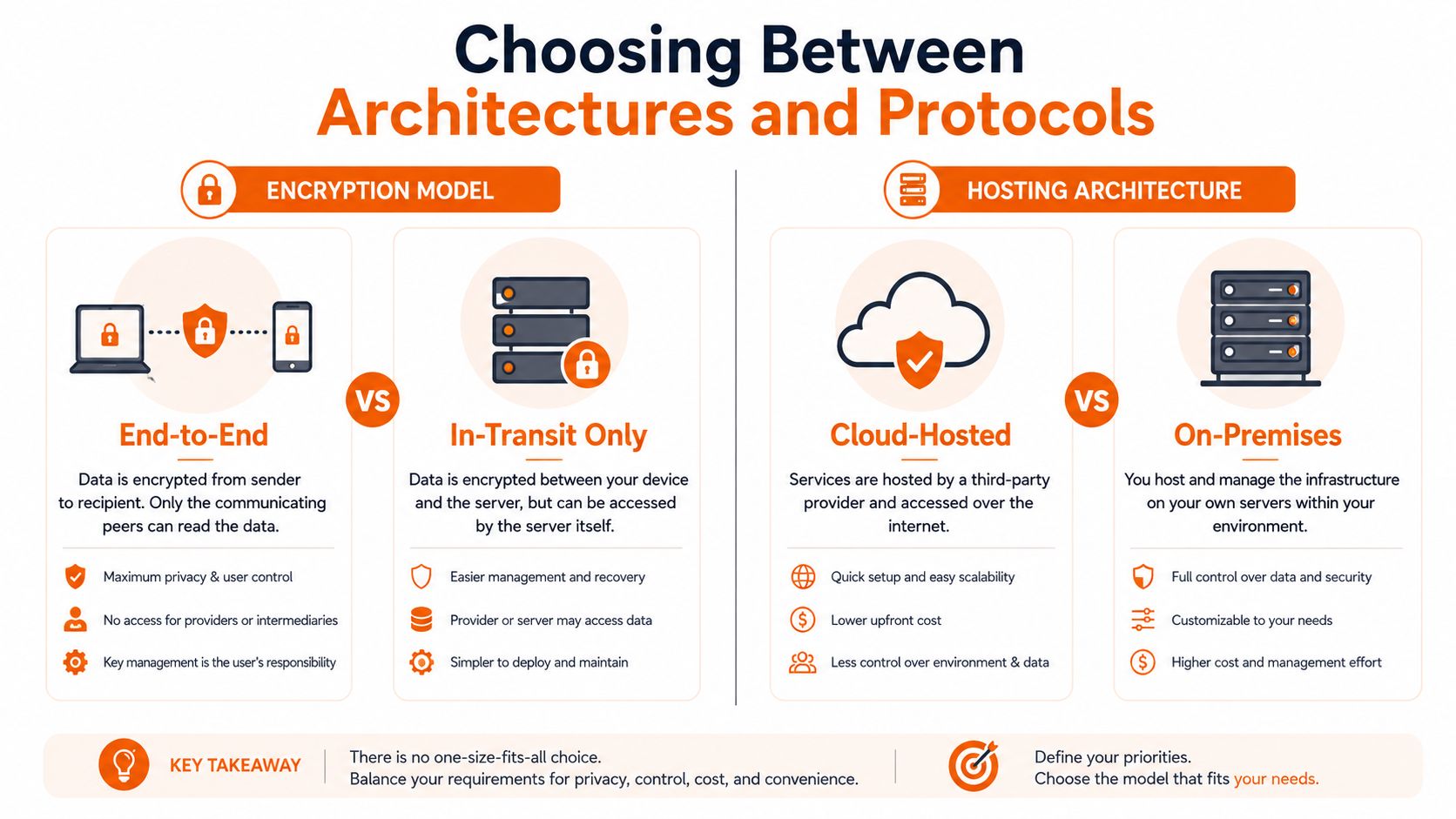
Teams usually get stuck here because they are comparing ideals instead of operating realities. End-to-end encryption sounds safer, and cloud hosting sounds easier, but the right answer depends on who is sharing, what they are sharing, and how much friction your people can tolerate.
End-to-end versus in-transit encryption
End-to-end encryption gives the sender and intended recipient more control over who can read the content. In plain terms, fewer middle layers can inspect the file. That helps with sensitive material, but it can also remove some of the collaboration features teams rely on, such as previewing, indexing, or automated scanning.
In-transit encryption protects the file while it moves across the network. That still matters, but it says little about what happens once the file reaches storage or gets shared again. If your workflow requires documents to pass through several internal teams, the usability trade-off can be real.
If your people need to open, review, approve, and move files all day, security that slows every handoff will get bypassed.
Cloud-hosted versus on-premises
Cloud-hosted tools reduce the operational burden on your team. You do not have to manage as much infrastructure, and that matters when the IT staff is already stretched. For distributed teams, cloud access also tends to match how people work now, from many places and many devices.
On-premises gives you more direct control. That can matter when data residency, legacy systems, or internal policy push you toward tighter ownership of storage and access. The trade-off is that your team owns the maintenance burden, the patching, and the discipline required to keep the system healthy.
A retail chain rolling out mobile access may prefer cloud because staff need quick, consistent access across stores. A hospital or similar regulated environment may care more about tighter control, stronger governance, and clearer boundaries around sensitive records. There is no single clean answer.
What to ask before you pick
Start with the identity stack you already use, because adding another login island creates more problems than it solves. Then ask whether the platform fits the people who will use it every day, not just the admin team who approves it.
For a more workflow-centered perspective, our guide on practical file-sharing workflows at work is useful because it treats sharing as part of day-to-day coordination, not a separate security lane. That is the right frame. People do not work in compartments.
You should also check how the platform handles external collaborators, temporary access, and file expiry. Those are the places where theory and practice usually split. A tool can look strong in a demo and still force employees into email attachments, consumer storage, or manual workarounds when the job gets messy.
The final filter is governance. If admins cannot set sane defaults, review activity, and remove access without a support ticket every time, the platform will drift. The goal is not the most locked-down system on paper. It is the system your frontline and hybrid teams will use without creating new risk.
Compliance and Policy Considerations You Cannot Ignore
Policy gets treated like paperwork until it fails. Then it becomes the only thing anyone wants to read. Compliance and governance cannot sit in a binder while employees keep using whatever is easiest.
Secure file sharing has to fit data rules, retention rules, and user behavior at the same time. If policy says one thing and the tool makes something else easier, people will follow the path of least resistance. That is normal human behavior in stores, warehouses, offices, and on the road.
Why policy has to match the workflow
A policy tells people what they are allowed to do. The tool has to make the allowed path simple enough to use on a busy shift or between meetings. If those two do not line up, shadow sharing grows in the cracks. Files end up in personal email, consumer storage, or ad hoc apps when nobody intended that outcome.
Regulatory guidance on outbound traffic controls makes the same point in practical terms, rules only work when the organization can enforce them. A written policy without real controls is just a statement on paper.
For teams that handle personal data, the guide to GDPR compliance is a useful companion because it stays focused on process, documentation, and daily discipline instead of slogans.
What governance should cover
At a minimum, governance should answer who can share what, with whom, for how long, and how that sharing is reviewed. It should also define what happens when an employee leaves, a vendor relationship ends, or a document must be deleted.
The goal is not to make sharing painful. The goal is to make the safe path obvious enough that people use it without thinking. If a policy forces workers to remember five exceptions before lunch, it is already losing.
Shadow sharing is a design problem
People use consumer apps because they are handy, not because they are reckless. If you want to reduce shadow sharing, remove the friction that pushes people there in the first place. That means mobile access, sane permissions, and a system that does not feel like a punishment.
The internal remote team data security guide fits here because remote and hybrid work make it obvious that control has to travel with the user. Policy alone will not do that, and neither will admin rules that ignore how frontline staff move between devices, locations, and collaborators.
A Practical Checklist for Evaluating Secure File Sharing Tools
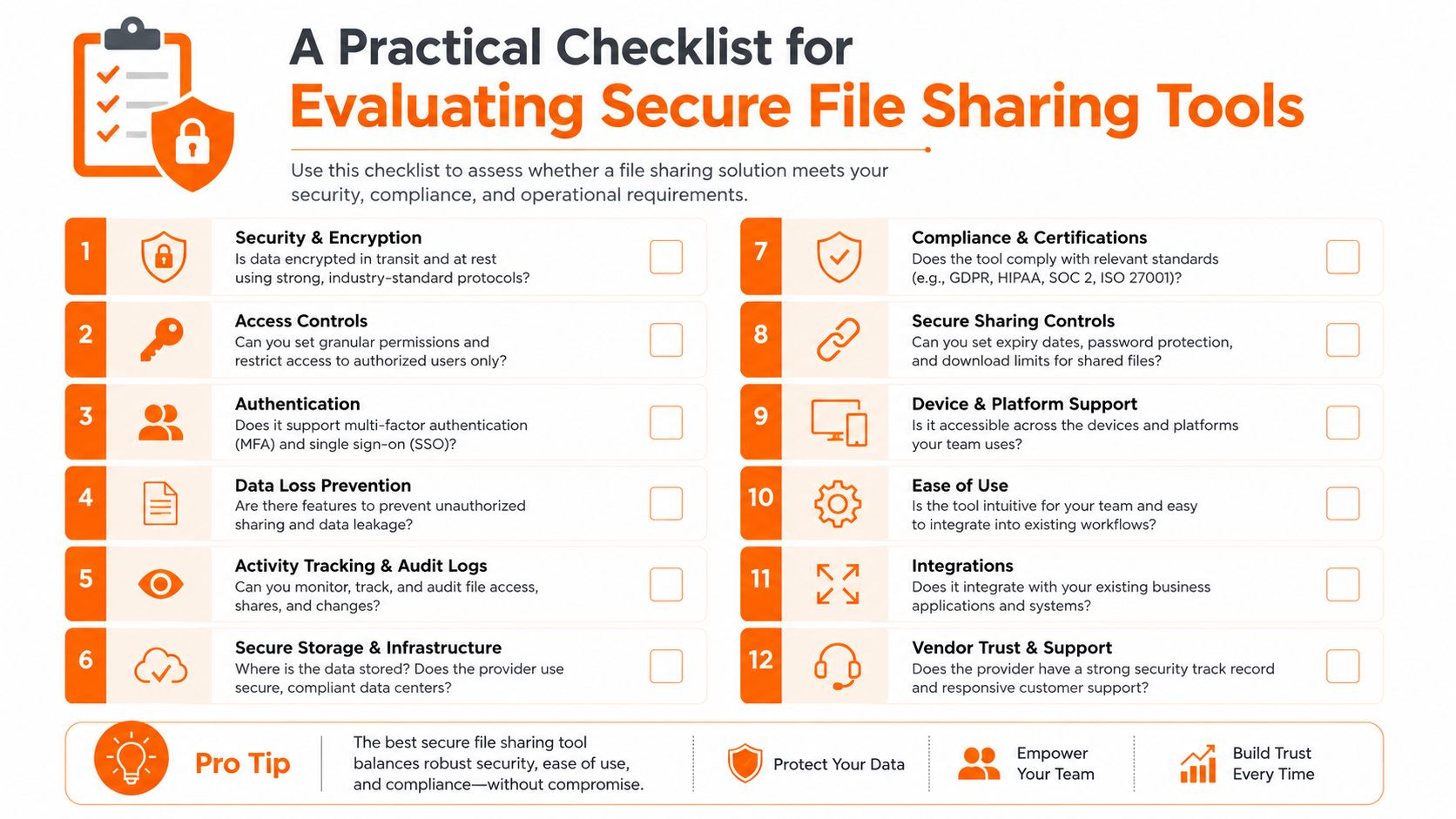
A good rollout starts small. Pick a real workflow, not a sandbox fantasy, and test the tool with the people who live in the mess. If it works for them, it has a chance.
What to verify in the pilot
Start with mobile use. If a frontline manager can't open, share, and revoke access from a phone without calling IT, adoption will suffer. Then check permissions, because the default share settings usually reveal how serious the tool really is.
I'd also test logging before I tested the marketing claims. Can you see who opened the file, when it was shared, and whether a link expired as expected? Can you trace a mistake without digging through half a dozen screens? Those questions tell you whether the tool will help during a real incident.
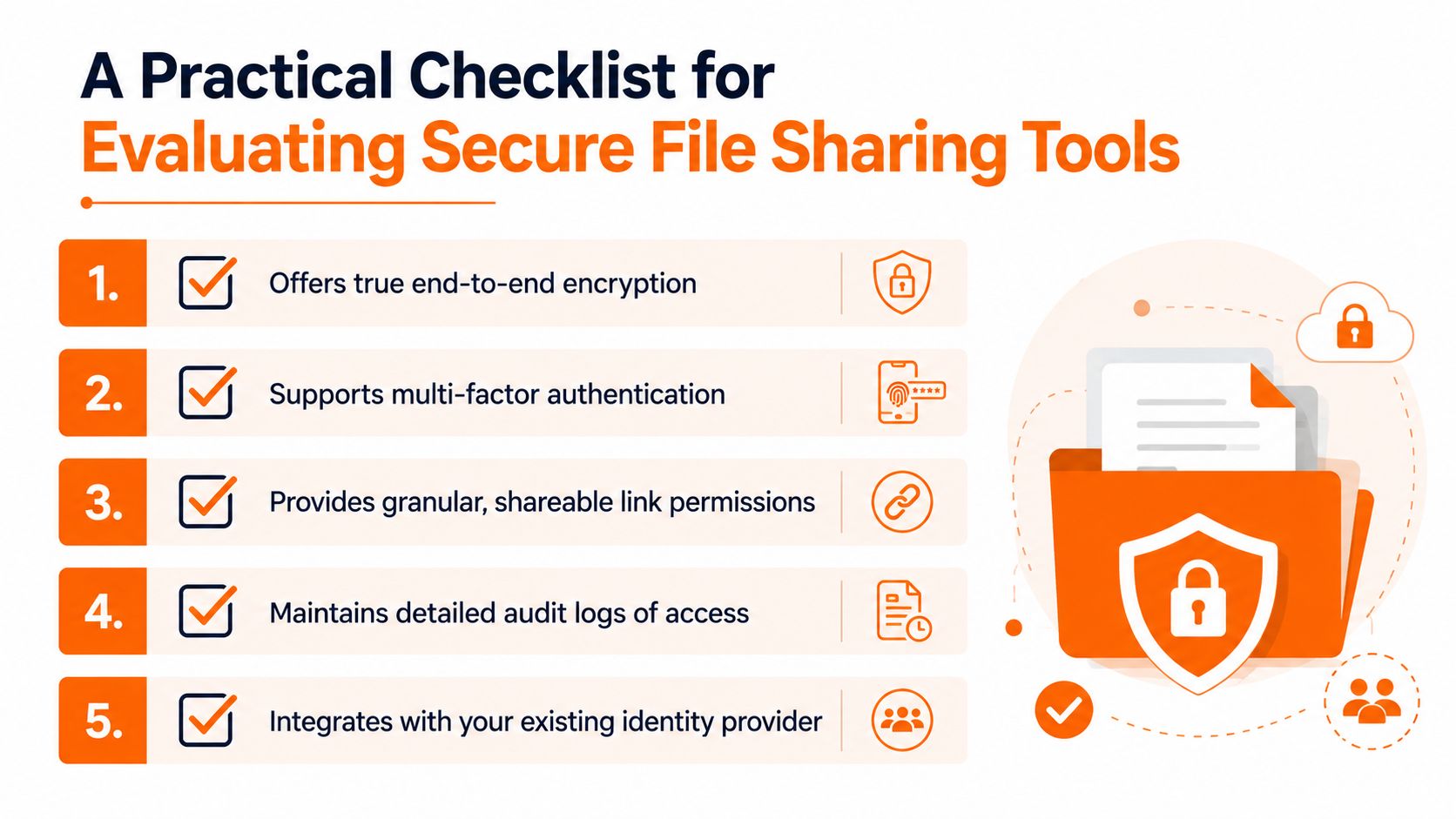
A useful pilot should include these checks:
Identity fit: does it work with the account system people already use?
Permission clarity: can a manager easily set view-only, edit, and revoke rules?
Mobile behavior: does the workflow hold up on a phone, not just on a laptop?
Auditability: can admins find access history without guesswork?
External sharing: can you control link expiration and limit forwarding where needed?
What to watch in the first month
Watch the workarounds. If people keep exporting files to email or personal storage, the platform is too awkward or the policy is too strict. Neither is a win. The tool needs to fit the daily rhythm of the team, or it becomes another unused subscription.
A platform like Pebb can fit naturally for organizations that want file sharing inside the same space where people already chat, post updates, manage tasks, and handle shifts. I'm mentioning it as one option among others, not as a blanket answer, because the core question is whether the file-sharing flow matches how your team already communicates.
The rollout test
If you want a clean test, ask three people from different roles to use the tool for a week and narrate where it slows them down. Then ask your admin to find the same file's access trail without help. If those two exercises feel smooth, you're on the right track.
The internal role-based access control best practices guide is helpful here because strong sharing always comes back to who should see what, and when. That's the part that keeps the whole system from turning into chaos.
Making Secure File Sharing a Habit, Not a Project
The common error in secure file sharing is treating it like a deployment. Install the tool, write the policy, send the email, move on. Real life doesn't stay still long enough for that to work.
The better model is boring in the best way. Keep tightening permissions, keep checking logs, keep removing friction, and keep asking whether people are still using the approved path when nobody is watching. If they aren't, the system needs adjustment, not applause.
What matters most is not whether your team has a security statement. It's whether a busy person on a phone can still do the right thing without thinking too hard. That's the line where security stops being theoretical and starts being part of the culture.
If you want secure file sharing to work in practice, bring it into the same place people already use to talk, assign work, and move documents. Pebb combines chat, tasks, spaces, and file sharing so teams can keep work organized without scattering it across too many tools. If you're rethinking how your people share files across shifts and locations, it's worth a look.
