
The Profile of Employee: A Human-First Guide
Ditch lifeless data files. Our guide shows how to create a profile of employee that builds real connection, culture, and collaboration. For modern teams.
Dan Robin
You probably know this feeling.
You need to message someone across the company. You’ve seen their name in a thread, maybe in a task, maybe in a late-night Slack mention. You open the directory and get the usual thin slice of identity: name, title, department, gray avatar. That’s it. No context. No clue what they do, what they know, where they sit, or whether they’re even the right person.
That’s the quiet failure behind most systems built around the profile of employee. They store people. They don’t introduce them.
I’ve spent years looking at how teams connect at work, especially the messy, real-world version of work. The version with shift changes, handoffs, different time zones, warehouse floors, clinic desks, field teams, and office staff all trying to get through the day without dropping the thread. In that world, a profile isn’t an HR file with better fonts. It’s the smallest unit of workplace trust.
When profiles are built like compliance records, people treat them like paperwork. When they’re built like human context, people use them. That difference changes how fast new hires settle in, how easily teams find expertise, and whether a company feels cold or connected.
More Than a Digital Rolodex
A lot of companies still treat employee profiles as a side effect of payroll setup. Someone joins, the system pulls in a job title, maybe a manager name, maybe an office location, and that becomes their identity at work. It’s tidy. It’s also lifeless.
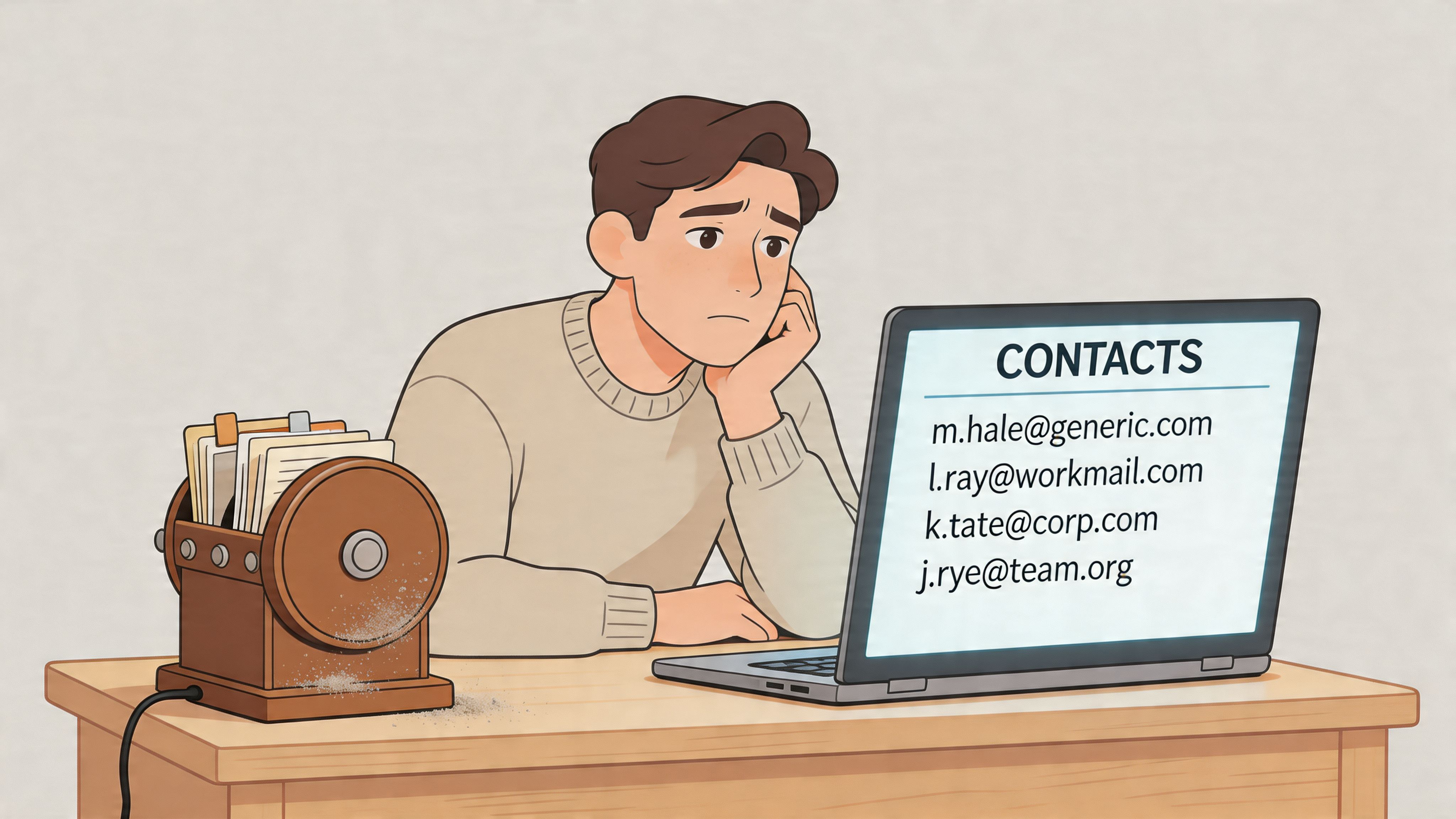
The problem isn’t that HR data is bad. It’s that it’s incomplete. A Human Resources Management System (HRMS) is useful for records, approvals, and structure. It was never meant to do the whole job of helping people know each other.
I’ve seen this over and over. A company says it wants better collaboration, but the first experience employees get is a directory that feels like a filing cabinet. Then leaders wonder why cross-team communication stays awkward and slow.
A good profile should answer the question behind the question. Not just “who is this?” but “how do I work with this person?”
That’s why I don’t think of employee profiles as administrative objects. I think of them as digital handshakes. The profile of employee should tell a small, useful story. It should help a teammate understand who someone is, what they do, and how to approach them.
What most directories miss
Most directories optimize for storage. Better ones optimize for discovery. The best ones help with connection.
That sounds subtle, but it isn’t. A searchable list of names is one thing. A living directory where people can find expertise, context, and shared ground is something else entirely. If you’re trying to tighten that gap, this practical guide to creating an employee directory in minutes is a useful place to start.
Here’s the standard progression I’ve seen:
Basic record means name, title, and reporting line
Useful profile adds contact details, team context, and expertise
Human profile includes enough personality and work context to make outreach feel natural
The shift that matters
The shift is simple. Stop asking, “What data do we need to store about this employee?” Start asking, “What context does another human need in order to work with them well?”
That one change fixes a surprising amount.
The Anatomy of a Great Employee Profile
Great employee profiles are designed for action. A coworker should be able to open one and answer a few practical questions fast. What does this person do? What do they know well? How should I reach them? What context will help me work with them without creating extra back-and-forth?
That standard sounds simple. It is not. A lot of companies still build profiles like HR records with a headshot attached. The result is neat data and weak connection. If the goal is to help people find each other, trust each other, and get work done, the profile has to carry more useful signal than a title and a reporting line.
A good profile needs two things at once. It needs enough consistency that people can scan it quickly, and enough humanity that reaching out feels natural.
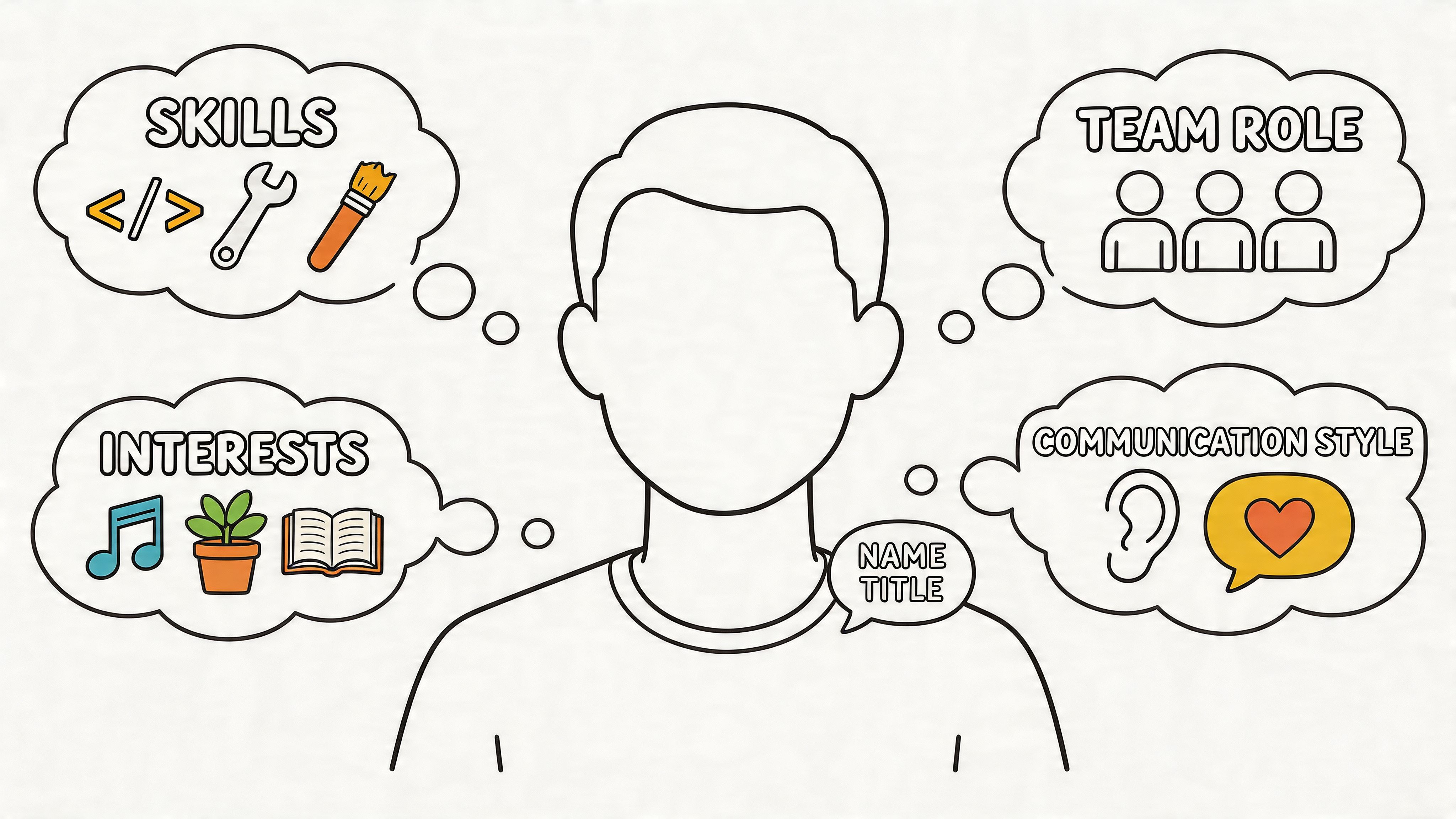
The operational part should be standardized. Keep titles, teams, locations, managers, and contact details synced from your source systems so people are not maintaining basic facts by hand. That cuts errors and keeps the profile current. Then leave room for the parts only the employee can add, like focus areas, communication preferences, and the kind of help they are happy to offer.
The fields that earn their keep
Some fields belong in every profile because people use them constantly.
Field | Why it matters |
|---|---|
Photo | Helps coworkers recognize and remember the person |
Job title | Gives immediate role context |
Team or department | Shows where they sit in the organization |
Contact options | Saves time hunting for the right way to reach them |
Location or timezone | Helps teammates communicate at the right time |
Those basics help people identify someone. They do not yet help people work with them.
The next layer does that job. Skills and areas of expertise turn a directory into a useful map. Current projects show what someone is close to right now. Working hours and timezone set expectations early, which matters a lot on distributed teams. If someone supports a system, owns a region, speaks a language other coworkers need, or holds a certification that affects day-to-day decisions, that belongs in the profile too.
This is the test I use. If a field helps coworkers make a better decision this week, it deserves space in the profile. If it only exists for an annual process, keep it in the HR system.
The fields that make people approachable
The strongest profiles do one more thing. They lower the social cost of starting a conversation.
A short bio helps, but broad open text fields usually produce either nothing or a stiff corporate summary. Better results come from a few tight prompts that are easy to answer and easy to scan. For example:
Ask me about a system, customer segment, workflow, or subject you know well
Current focus so people understand what has your attention
Working hours so teammates know when to expect a reply
Languages spoken for customer-facing or global teams
Mentorship topics for people who are open to coaching others
Interests outside work to create a bit of common ground
These fields matter because connection at work often starts small. A shared language, a known specialty, or a clear signal about how someone likes to communicate makes outreach easier. That is the difference between a profile people ignore and one they use.
What usually goes wrong
The first failure mode is over-collection. A company sees sparse profiles and responds by adding more required fields. People then rush through them, write generic answers, or stop updating them altogether. More fields do not create more value. Better fields do.
The second failure mode is the opposite. Profiles become social bios with plenty of personality and very little work context. That can be pleasant, but it does not help someone find the right person for a pricing question, a safety issue, or a customer escalation.
The best profiles sit in the middle. They are structured enough to scan, specific enough to be useful, and human enough to start a conversation.
My firm rule is this: If you can’t explain what a field is used for, don’t ask for it.
One Size Does Not Fit All
A single profile template for every role sounds efficient. It usually means somebody in headquarters made a form for people who work like they do.
That’s not enough.
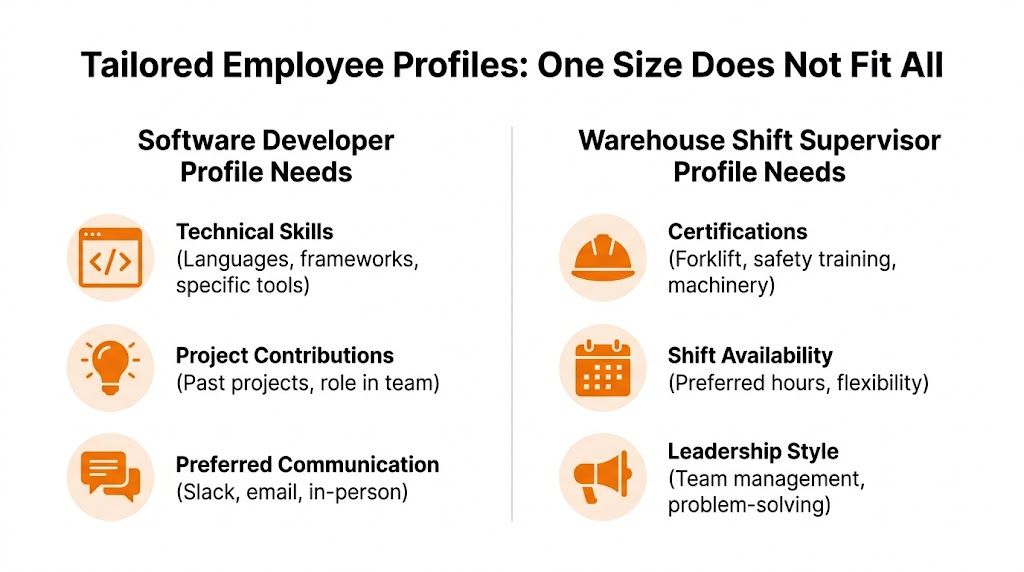
The context of work changes the shape of a useful profile. The details that help a software developer find the right teammate are not the same details a warehouse shift supervisor needs during a busy handoff.
U.S. Bureau of Labor Statistics data shows how different roles can be. Management occupations have a median age of 47, while frontline food service roles have a median age of 32, according to the BLS occupation data. That gap is a useful reminder that a one-size-fits-all profile misses the varied ways different teams function.
Two profiles, two jobs
Here’s a simple comparison.
Role | Most useful profile details |
|---|---|
Software developer | Technical stack, project history, preferred communication style, mentorship topics |
Warehouse shift supervisor | Location, certifications, shift availability, languages spoken, safety responsibilities |
A developer might care whether someone works in Python or React, whether they’ve touched the billing system, or whether they prefer a quick chat versus written documentation.
A frontline supervisor usually needs different context. Which site do they work at? What certifications do they hold? Are they available for early shifts? Can they help bridge communication across languages on a busy floor?
Customize the frame, not the standard
Companies often get stuck. They hear “customize” and assume chaos. That’s not the right trade-off.
The better move is to keep a shared core for everyone, then add role-based fields where they matter. Every employee should have a recognizable profile structure. But the profile of employee for a nurse, retail associate, dispatcher, or engineer should include the fields that reflect how that person contributes.
A practical setup looks like this:
Shared core for name, role, team, contact, location, and a short intro
Role-specific fields for certifications, technical stack, licenses, languages, or shift pattern
Optional human fields for interests, communication style, or mentoring topics
If a field helps one team make better decisions every day, it deserves a place. If it only exists because “someone might want it someday,” leave it out.
Respect the real work
This isn’t a design preference. It’s respect.
When a company asks a warehouse lead to fill out the same profile prompts as an office-based designer, it sends a message, even if nobody means to. It says the system wasn’t built with their work in mind.
The opposite is also true. A customized profile says, “We understand how your day runs. We built this to be useful to you.”
Employees notice that. Especially the ones who are usually asked to adapt to tools built for someone else.
Weaving Profiles into the Fabric of Work
A profile nobody visits is dead weight. It doesn’t matter how well it’s designed if it only gets opened when HR changes a title.
Profiles need to show up where work already happens. That’s when they stop being records and start becoming infrastructure.
Onboarding should feel like meeting people
The first week at a new company is still weird, even when the process is organized. New hires are trying to decode names, teams, responsibilities, acronyms, and informal rules all at once.
A good directory softens that landing. Instead of staring at a list of unfamiliar names, a new employee can click through actual people and understand who’s who. They can see who runs operations in their region, who owns payroll questions, who knows the scheduling system, and who else joined recently.
That’s one reason I like tools that connect profiles directly to a searchable team directory. A practical example is this guide to building a robust team directory, which shows how directory design affects daily collaboration rather than just org chart hygiene.
Search changes the value of the whole thing
The biggest leap happens when profiles become searchable by more than name.
That’s when someone can look up “Spanish,” “food safety,” “returns process,” “Q3 launch,” or “forklift certification” and get to the right person without three layers of forwarding. It also helps managers spot talent that would otherwise stay buried in local teams or outdated spreadsheets.
Detailed profiles can improve internal promotion fill rates by 35%, according to Qandle as cited in TestGorilla’s article on employee profiling. That makes sense. When skills and experience are visible, internal candidates stop being invisible.
The value of a profile rises when it shortens the path between a question and the person who can answer it.
That principle matters in daily work more than people expect. Searchable profiles reduce interruption chains, reduce guesswork, and make a company feel smaller in the good way.
Context should travel with the person
Most workplace apps still make you work too hard for context. You see a name on a post, in a comment, or in a task update, and you have to leave the flow of work to figure out who they are.
That’s a miss.
A profile should sit close to activity. When someone appears in a feed, a chat, a shift update, or a task thread, one tap should answer the basic questions. What team are they on? What do they handle? Where are they based? What else should I know before I message them?
This is also where product choices matter. In systems like Pebb, profiles and people directories can include contact details, role descriptions, skills, and customizable fields that make this context visible inside the flow of work. Used well, that turns a random name into a known colleague.
The quiet payoff
None of this is flashy. That’s why some leaders underestimate it.
But the payoff is real. Fewer “who owns this?” messages. Faster warm-up for new hires. Better handoffs. More internal mobility. Less dependence on informal gatekeepers who happen to know everyone.
Profiles work best when they disappear into the rhythm of the company. Not as a separate initiative. Just as part of how people find, understand, and help each other.
Building Trust Through Privacy and Compliance
Connection without trust turns sour fast.
If you ask employees to share information and then handle it carelessly, the profile stops feeling helpful and starts feeling extractive. People pull back. They leave fields blank. They stop believing the tool exists for them.
The line here is simple. Employees should know what is visible, to whom, and why. Anything less creates suspicion.
Permission is part of the product
Not every field belongs in public view inside a company. Some information should be visible to everyone, like role, team, work contact details, and maybe timezone. Some should be visible only to managers or HR. Some should stay tightly restricted.
That separation isn’t bureaucracy. It’s what makes openness safe.
In the 2023 U.S. federal workforce, which employs over 2 million people, the workforce was 55% male and 45% female, compared with 53% male and 47% female in the total U.S. labor force, and women made up 73% of GS-6 employees, while men remained more prevalent in senior levels, according to the 2023 federal workforce profile. Data like that is exactly why detailed HR profiles matter for compliance and equity tracking. It’s also why secure, permission-based systems matter. Sensitive demographic data can support fairer decisions, but only if it’s handled with care.
What employees should control
I’m opinionated about this. Employees should be able to edit the parts of their profile that help coworkers know them better. Their photo, pronunciation, bio, skills, interests, and communication preferences should not require a ticket and a waiting period.
Core HR data is different. Legal name, compensation data, protected demographic information, and employment records should follow stricter controls.
A clean split usually works best:
Employee-editable fields for human context and day-to-day utility
Manager or HR-reviewed fields for role alignment or certifications
Admin-only fields for sensitive records and compliance data
Non-negotiable: If people can’t tell what a field is used for, don’t ask for it yet.
A lot of teams also benefit from reviewing plain-language privacy policies as a model for how to explain data handling clearly. Not because every workplace system is the same, but because clarity builds confidence.
Trust shows up in completion rates
People don’t fill out profiles well when they feel watched. They fill them out when they feel respected.
That means no surprise visibility. No vague “optional” fields that become implicitly expected. No pretending that every piece of employee data belongs in the social layer of the company.
The profile of employee should help people connect. It should never feel like surveillance with a profile picture attached.
Designing for the Pocket
Most companies still design profiles like the user is sitting calmly at a desk with three browser tabs open and time to spare. That’s not how a lot of work happens.
Real work happens in motion. On a sales floor. In a back room. Between patient rounds. In a loading bay. In a car between stops. If the profile isn’t useful on a phone, it isn’t useful enough.
Mobile changes what matters
A desktop profile can get away with sprawl. A mobile profile can’t.
On a small screen, every field has to justify itself. The top of the profile should answer the immediate questions fast. Who is this person? How do I contact them? What team are they on? What do they know? Are they on shift or available now?
That means designing for scan speed, not decoration.
A strong mobile profile usually prioritizes:
Immediate identity with photo, name, role, and location
Action buttons for tap-to-call, tap-to-chat, or tap-to-email
Work context such as shift details, certifications, or current team
Useful expertise that can be read in seconds
Visibility without performance
This matters especially for people who do excellent work without broadcasting it.
Many organizations overlook what David Zweig calls “the invisibles”, high-performing employees who are ambivalent toward public recognition. CultureMonkey argues that a mobile-accessible profile can surface their skills and contributions in a non-performative way, especially in frontline roles, as discussed in its article on undervalued employees and the invisibles.
That point deserves more attention than it gets. Not everyone wants a public shoutout. Plenty of great employees just want coworkers to know what they handle, trust their judgment, and bring them in when it counts.
A profile allows for this. It makes contribution visible without demanding self-promotion.
Some people don’t want the spotlight. They still deserve to be findable.
Inclusion starts with the device people actually use
A mobile-first profile is also an inclusion choice. It gives non-desk workers the same shot at being known for their skills, not just their shift assignment or job code.
That’s one reason the broader case for mobile-first platforms for frontline engagement matters. If the primary doorway to company information lives in people’s pockets, then the profile needs to be designed for that doorway first, not adapted later.
When companies get this right, the profile of employee stops being a passive card in a directory. It becomes a practical tool people use in the moment. To ask for help. To make a handoff. To find the person with the right certification. To understand who just commented on an urgent update.
That’s the whole point.
A good employee profile doesn’t just tidy up HR data. It helps people know who they work with, how to reach them, and why they matter. If you’re rethinking your directory, Pebb is one option to look at for teams that want profiles, search, communication, and daily operations in one place, especially across frontline and office environments.
