
Nonprofit Volunteer Shift Signup Chat: A Complete Guide
Nonprofit Volunteer Shift Signup Chat. Use chat for volunteer shift signups. Learn how to automate reminders, cut no-shows, and build reliable coverage
Dan Robin

Thursday afternoon is a bad time to discover that three volunteers have dropped out of Saturday's food distribution shift. The spreadsheet says who originally signed up. Your inbox contains two old confirmations. A group text is filling with questions about parking, arrival times, and whether someone can take the empty slot. You're trying to coordinate people, not reconstruct a paper trail.
That's why nonprofit volunteer shift signup chat matters. A signup portal can collect names, but the real work starts after someone clicks “join.” Volunteers need to ask questions, confirm details, request swaps, and hear quickly when coverage changes. Those conversations already happen on phones. Your scheduling system should meet them there.
Why Chat Is the Missing Link in Volunteer Coordination
A static signup page solves one narrow problem: it gives someone a place to claim a shift. It doesn't solve the Thursday-afternoon problem. It doesn't show whether a volunteer saw the change, give a team lead a clean way to approve a swap, or help fill an opening without sending the same message to everyone.

I've seen coordinators build elaborate workarounds around this gap. They keep the official roster in a portal, copy open shifts into a spreadsheet, send reminders by email, and use personal phones when something changes. Every extra handoff creates another place for information to go stale. The volunteer sees one version, the coordinator sees another, and the empty chair remains everyone's problem.
The audience has changed
The volunteer pool has also become harder to reach consistently. Formal volunteer participation in the United States fell from 30% in 2019 to 23.2% in 2021, a decline of more than 23%, according to the Census and AmeriCorps participation data summarized for nonprofit volunteer management. That historical drop matters operationally. A smaller, more selective audience means coordinators have less room for missed confirmations and informal guessing.
The latest U.S. volunteering data cited in 2025 reports that 75.7 million people aged 16 and older formally volunteered between September 2022 and September 2023, representing 28.3% of that population. The same source reports that 137.5 million Americans, or 54.2%, provided informal help to neighbors during that period. The opportunity is broad, but interest still has to become a confirmed shift through a path that feels easy.
Chat closes the distance
A chat thread gives the shift a living home. The coordinator can post the role, location, arrival instructions, and remaining capacity. A volunteer can reply with a question, claim the opening, or say they can cover a late cancellation. A team lead can approve the change without asking everyone to search through a separate system.
That doesn't mean every nonprofit needs to throw out its volunteer database. Keep the system of record for profiles, qualifications, hours, and reporting. Use chat for the human moments that portals handle poorly. Tools such as communication software for nonprofit organizations can connect daily conversation with operational updates, but the principle is more important than the product: put the next action where volunteers already look.
Practical rule: A signup link records intent. A conversation turns intent into attendance.
The “no app” promise can also be misleading. Removing an app download doesn't remove friction if the volunteer still has to open a link, create a password, find the right event, select a role, and return later to find the instructions. Chat works when it reduces the number of decisions, not merely the number of downloads.
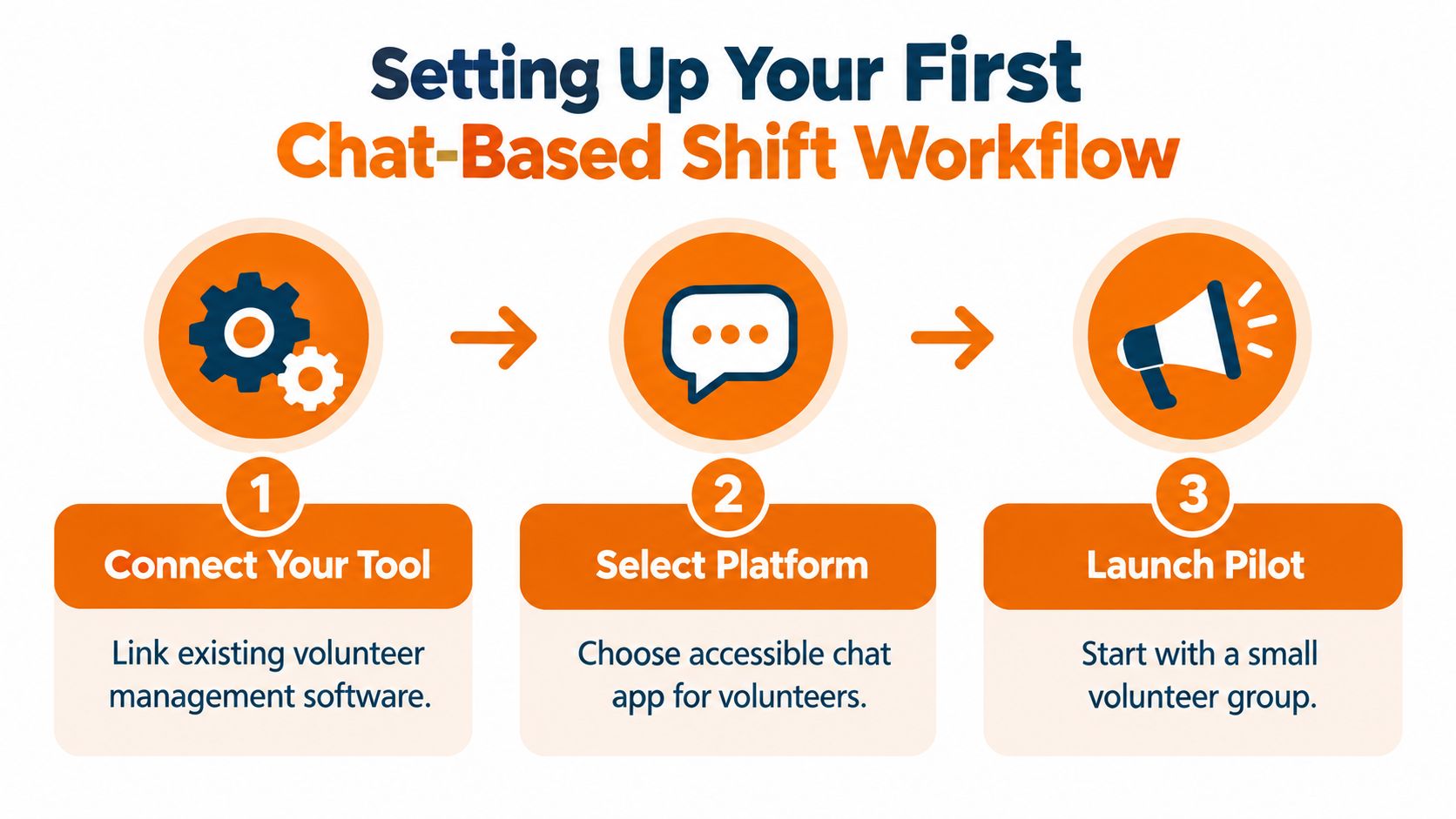
Setting Up Your First Chat-Based Shift Workflow
Start small. A chat-based workflow should extend your existing volunteer management process, not force your team to rebuild it during a busy season. Choose one recurring program, one location, or one weekend event where the current process regularly breaks down.
Create one clear space for each operating group
A useful space has a name people understand immediately, such as “Saturday Pantry,” “Shelter Intake,” or “Community Garden.” Inside it, keep the shift schedule, current openings, instructions, and discussion together. Don't create a maze of channels divided by tiny distinctions that only administrators understand.
Your core setup should answer four questions without a private message:
What shift needs people?
What role is still open?
What does the volunteer need to know before arriving?
Who approves a change?
Connect the chat layer to the volunteer system where possible. The roster should remain accurate when someone claims a slot, declines an assignment, or receives approval for a swap. If your organization also coordinates staff shifts, review whether an employee shift scheduling app can handle open shifts, team communication, and mobile access in one workflow. The same operational habits apply to volunteer teams, even when the participants aren't employees.
Design for a phone, not an office desk
A volunteer should be able to finish signup on a phone in under three minutes, including required forms or waivers, according to VolunteerHub's coordinator guidance. That means the first screen should show the shift and the action. Don't make people hunt for a calendar, download a document, or complete a long profile before they can express interest.
Use plain labels. “Claim Saturday morning” is clearer than “Submit availability for Program A.” Put the date, time, location, role, capacity, and contact person in the same message. If a waiver is required, link it directly and make the next step obvious.
Give coordinators control without bottlenecking everything
Set a small number of roles. Volunteers can claim or request a shift. Team leads can approve requests and confirm substitutions. Administrators can edit the roster, close a full shift, and resolve disputes. Everyone else should be able to read the current details without accidentally changing the schedule.
Launch the pilot with volunteers who are comfortable giving honest feedback. Ask where they hesitated, which message they missed, and what they expected to happen after tapping the signup button. The goal isn't a polished launch. It's a workflow that behaves predictably when someone is late, confused, or unavailable.
Mastering the Art of Automated Reminders
The best reminder system feels like a helpful colleague who remembers the details you forgot. It doesn't send a stream of alerts. It gives the volunteer enough notice to plan, then a final prompt close to the shift.
Use a three-touch cadence:
Immediate confirmation: Send it as soon as the volunteer signs up or receives approval. Include the role, date, start time, location, arrival instructions, and a way to report a problem.
48-hour reminder: Ask the volunteer to confirm that the commitment still works. This is the right moment to catch conflicts while there's still time to find a replacement.
Two-hour reminder: Keep it short. Repeat the start time, location, and the one action that matters before arrival.
This sequence appears in nonprofit SMS guidance from Evant's volunteer shift management resource, which reports no-show rates of 5–10% for organizations using the pattern compared with 20–30% without automation. The same source reports SMS open rates consistently above 98%, compared with roughly 20–30% for nonprofit email. Those figures aren't a reason to text every thought. They're a reason to reserve the channel for time-sensitive information.
Write like a coordinator, not a notification system
A good confirmation might say:
You're confirmed: Saturday Pantry, Saturday at 9:00 a.m. Please arrive at the rear entrance by 8:45 a.m. Reply in this chat if you need help or can no longer attend.
The message works because it answers the practical questions. It doesn't bury the location beneath a welcome paragraph or force the volunteer to open another page.
Segment before you send. A message about a bilingual intake role should go to people who have that skill and have indicated availability. A late opening at one site should go to volunteers connected to that location. Nonprofit SMS guidance from EZ Texting recommends short, targeted messages matched by availability, skills, and location. It also reports that about 90% of SMS conversions happen within 15 minutes and that clean, personalized reply campaigns commonly see 15–25% response rates.
Make consent and frequency visible
Texting should be optional and specific. Ask whether the volunteer wants shift reminders, separate from the signup itself, and explain what those messages will contain. A guide from Volunteer Shift Manager on SMS communication recommends a clear opt-in and keeping most programs to one reminder per shift, with a maximum of two.
Email still has a place for training materials, policy updates, and longer instructions. Chat or SMS is better for a commitment that starts soon. Keep the operational message to three sentences or fewer when possible, and never make volunteers decode what you want them to do.
A broader communication plan should also protect attention. One nonprofit guide recommends roughly 3 to 5 messages per month per individual volunteer, plus one group message per week, with a rhythm that may include a shift reminder, an optional 24-hour text, a thank-you, and a weekly group update. See SkillRe's volunteer communication plan for the full cadence. The principle is simple: use automation to reduce chasing, not to increase noise.
Handling Last-Minute Changes and Swaps
A cancellation is not a communication failure. A cancellation that sits unseen until the shift starts is a workflow failure.
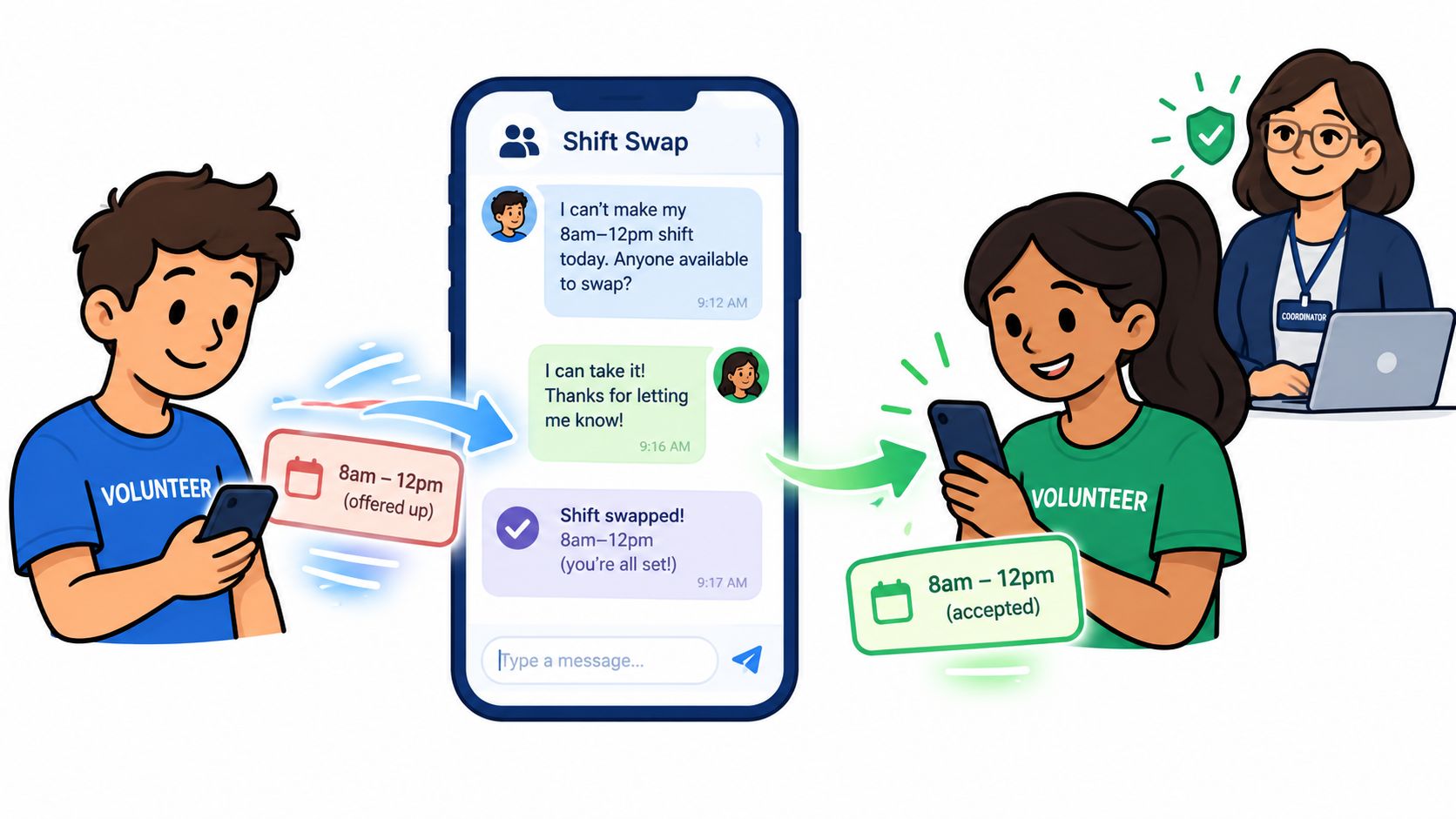
There are two common ways to handle a swap. In the first, the volunteer emails the coordinator, waits for a reply, and privately contacts possible replacements. In the second, the volunteer posts the need in the shift chat, qualified people can respond, and a designated lead approves the change. The second approach is faster and more visible, but it needs rules.
Separate interest from approval
Let volunteers say, “I can cover,” without making that response an automatic assignment. The team lead should confirm that the person has the required training, can reach the site, and understands the role. Once approved, update the roster and post a clear final message.
A simple thread might follow this order:
Original volunteer: “I can't make the 9:00 a.m. pantry shift. I need a replacement.”
Potential replacement: “I can cover it.”
Team lead: “Approved. Maria is now assigned. James, you're released.”
Coordinator: “Roster updated. Arrival remains 8:45 a.m. at the rear entrance.”
That last confirmation matters. Without it, two people may believe they're covering, or nobody may realize the swap was accepted.
Keep urgency visible
Use a consistent phrase for open coverage, such as “Coverage needed,” followed by the shift, site, role, and response deadline. Pin or highlight the current opening. Close the thread when the shift is filled so volunteers don't keep replying to an outdated request.
Don't solve every problem in one giant group chat. A general channel is useful for broad updates, but shift-specific changes belong with the people affected. A task-level or site-level thread keeps the conversation useful while preserving context for the coordinator.
This is also where recruitment and retention meet operations. If you're improving the whole volunteer experience, Alignmint's guidance on how to recruit and retain volunteers is a useful companion because reliable scheduling alone won't make people return. Volunteers come back when the work feels organized, respectful, and connected to a clear purpose.
The chat should support that experience, not replace judgment. A lead still needs to make the final call when a role involves safeguarding, specialist skills, or sensitive participants. Automation can surface the opening. People should own the approval.
Tracking Attendance and Measuring Success
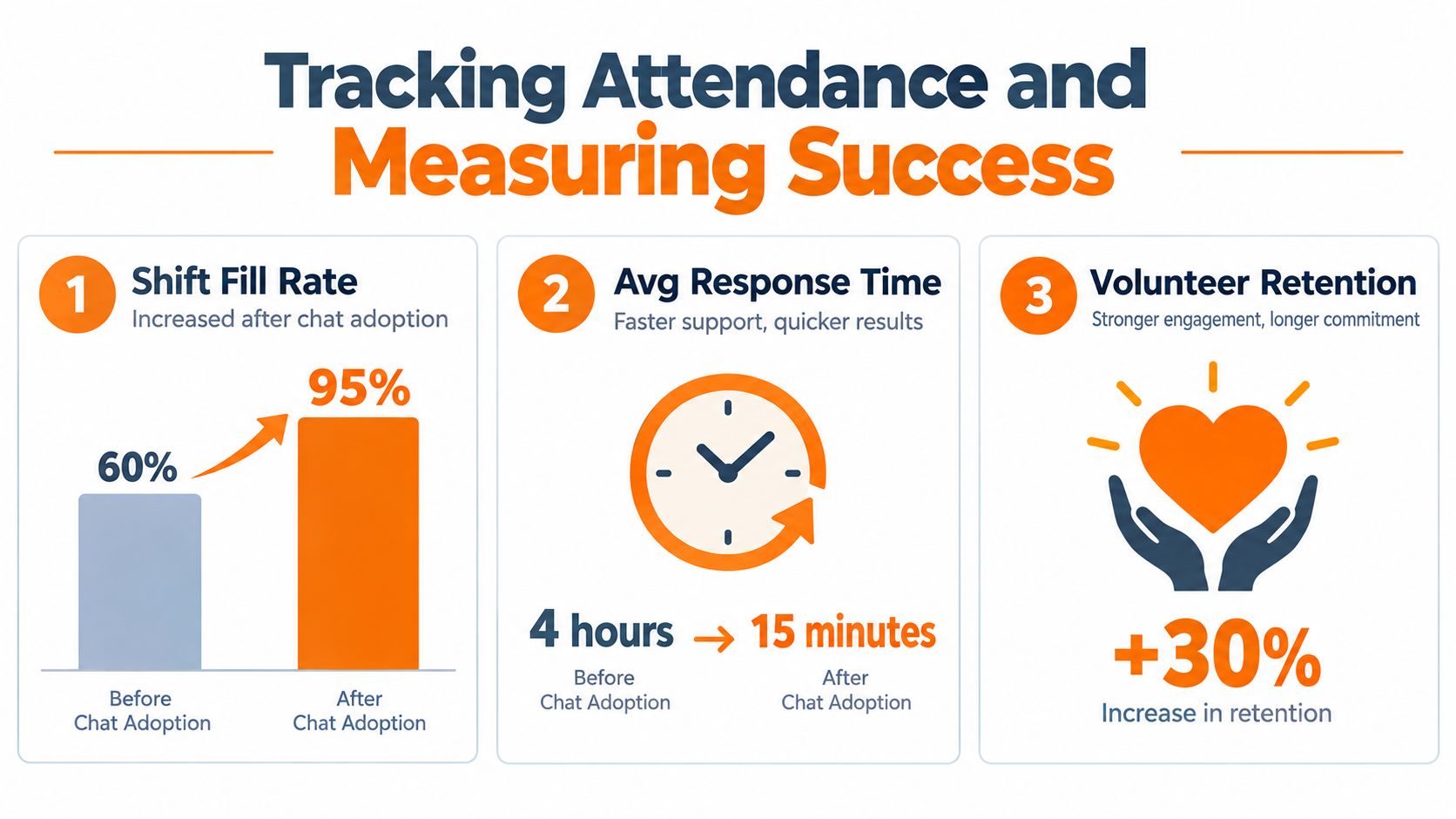
Once chat is active, resist the temptation to measure activity for its own sake. A busy channel can still produce empty shifts. The useful question is whether the workflow helps you move from open slot to confirmed person to actual arrival.
Track the path of each shift:
Point in the workflow | What to record | Why it matters |
|---|---|---|
Posted | When the opening appeared | Shows how early you start recruiting |
Claimed | Who expressed interest | Reveals whether the message reached the right people |
Approved | When the roster became final | Identifies approval delays |
Confirmed | Whether the volunteer acknowledged details | Separates passive signup from active commitment |
Attended | Whether the person arrived | Shows the operational result |
You don't need an advanced dashboard on day one. A shared report from the scheduling system and a simple export from chat may be enough. What matters is consistency. Record dropped shifts, late cancellations, approved swaps, unanswered reminders, and arrivals using the same definitions each time.
Measure response before you blame attendance
A no-show can begin much earlier than the shift. Perhaps the volunteer never saw the reminder. Perhaps the shift details were unclear. Perhaps they replied that they couldn't attend, but nobody noticed the response. Response time helps you find the break.
The practical measures are:
Confirmed-to-dropped ratio: Shows how often an apparent commitment becomes an opening.
Time to fill a late vacancy: Shows whether the chat can mobilize suitable people.
Approval time: Shows whether coordinator review is holding up coverage.
Reminder acknowledgment: Shows whether volunteers received and acted on the message.
Attendance by role and site: Shows where instructions, timing, or training may be weak.
Repeat participation: Shows whether the experience gives people a reason to return.
For teams managing recurring programs, compare these measures by shift type rather than blending everything together. A morning pantry role may have different reliability issues from an evening outreach role. A site with poor transit access may need earlier reminders or a different recruitment segment.
Attendance systems in other settings often make the same distinction between recording presence and improving compliance. Vanta Sports' strategies for player attendance can offer useful ideas for reminders, accountability, and follow-up, even though nonprofit shifts have their own constraints.
A mobile employee clock-in app can also be relevant when a nonprofit needs a clearer record of arrival and departure for staff or volunteer operations. Choose the lightest tool that gives you trustworthy information. The goal is not to create another reporting burden. It's to learn why a shift went uncovered and fix that specific point.
Building a Sustainable Volunteer Culture Through Chat
A volunteer who only hears from your organization when a shift is empty will feel like a spare part. They may still help, but the relationship becomes transactional. Chat gives coordinators a chance to make the work feel organized and human at the same time.
That starts with what you say after the shift. Thank people for the specific work they did. Share a short outcome from the day. Let volunteers see that their hours changed something beyond the roster. A message such as “The intake team helped families move through the morning without a long wait” carries more meaning than an automated “Thank you for volunteering.”
Give the space a social purpose
A useful volunteer space can hold more than open slots. It can include a welcome post, role instructions, photos from the field when appropriate, a place for questions, and a lightweight recognition habit. None of this needs to become a constant stream of announcements. The channel should feel alive, not noisy.
Use different kinds of posts for different reasons:
Operational updates answer what people need before the next shift.
Stories from the field connect the task to the mission.
Recognition posts make reliable participation visible.
Questions and polls help coordinators learn what volunteers need.
Post-shift notes close the loop and invite the next commitment.
The order matters. If every post asks people to fill a gap, volunteers learn to associate the space with pressure. If the space also contains useful information and genuine appreciation, a last-minute request feels like part of a shared effort rather than an emergency dumped on whoever happens to be online.
Protect the informal trust
Formal scheduling tools are good at records. They are often poor at tone. A portal can tell someone where to report, but it can't easily reassure a new volunteer who is nervous about the first day or help an experienced volunteer answer a practical question.
Chat handles those small moments well, provided someone moderates it. Set expectations about respectful replies, private information, photos, and urgent safety issues. Make it clear which questions belong in the group and which should go directly to a coordinator.
A reliable volunteer program isn't built from reminders alone. People return when the work is clear and the people around it are considerate.
The coordinator still sets the standard. Reply when a volunteer asks a reasonable question. Close the loop after a swap. Thank someone who covers at short notice. Notice when the same person keeps rescuing empty shifts, because reliability can become exhaustion if the organization only rewards it with more requests.
Let the system carry logistics, not relationships
The best use of chat is not to turn every volunteer into a permanent notification recipient. It's to remove the administrative friction that makes good people hard to retain. When volunteers can claim a suitable shift, find the details, ask for help, and handle a change without starting an email hunt, they have more energy for the work itself.
Pebb can support this kind of workflow by combining team chat, Spaces, tasks, events, open shifts, and clock-in tracking in one mobile and web app. It's one option to consider alongside a dedicated volunteer management platform, especially when the same organization needs conversation and shift operations in the same place.
Start with one program, define the approval rule, and watch what happens when the first cancellation arrives. The measure of a volunteer shift signup chat isn't how polished it looks on launch day. It's whether a real person can say, “I can cover,” and whether the right coordinator can turn that reply into a dependable plan.
If missed shifts and scattered messages are costing your nonprofit time, try Pebb for a shared space where volunteers can see open shifts, claim work, ask questions, and coordinate changes from their phones. Visit Pebb to see how chat and shift operations can live together without another spreadsheet.
