
Multi-Site Team Spaces Notice Board How to Scale It
Learn how to create a multi-site team Spaces notice board that scales — roles, templates, push settings, cadence and analytics for frontline teams.
Dan Robin

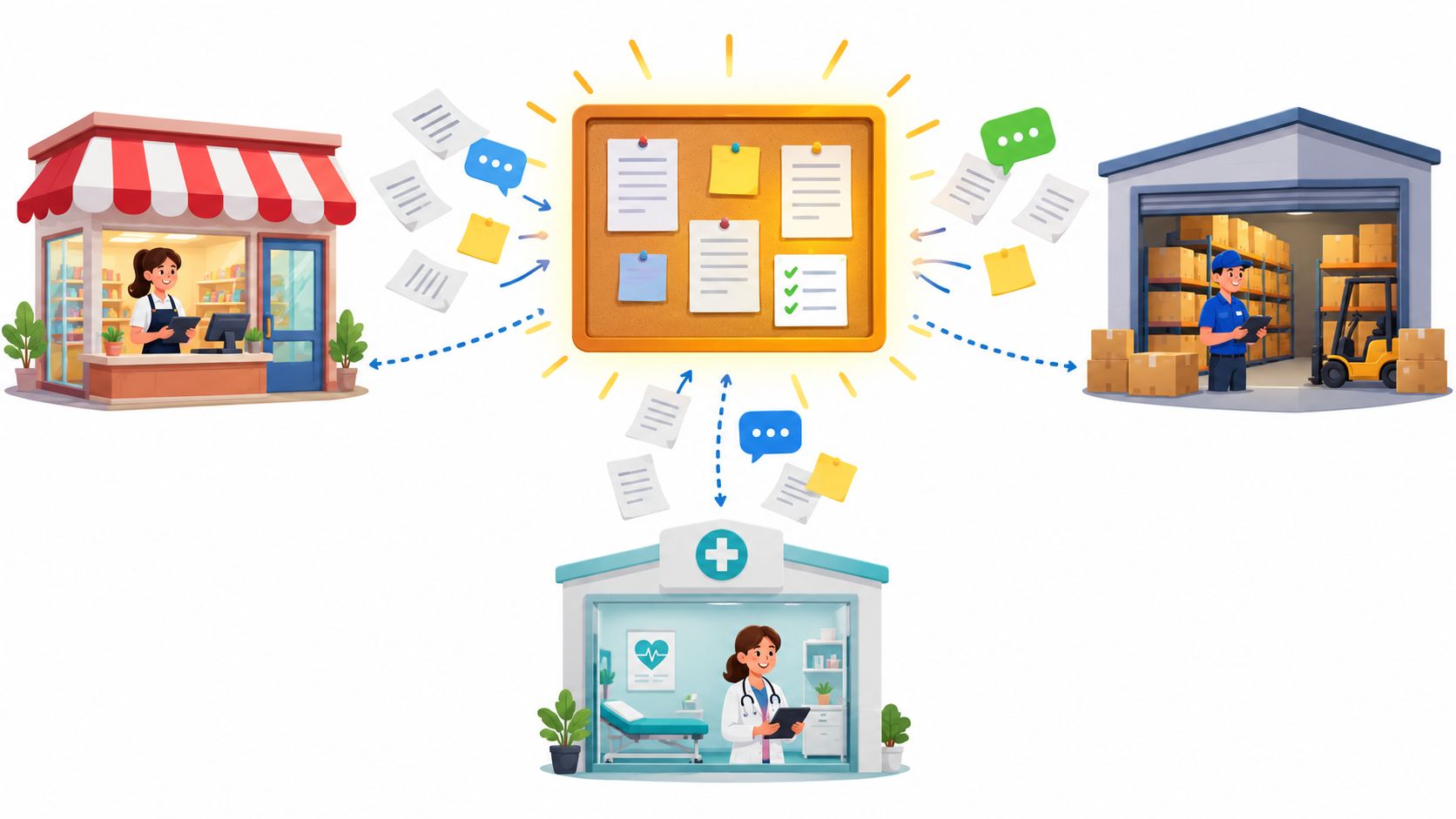
The morning starts before the laptops come open. A store manager is checking yesterday's close, a warehouse supervisor is trying to find the latest safety update, and a clinic lead is answering questions about a schedule that changed after the last email went out. Everyone is working from the same company, but they're not working from the same context.
That's where a multi-site team Spaces notice board earns its place. Not as another feed to scroll, and not as a replacement for every urgent message, but as a governed front door for each location. People should be able to open their Space and quickly understand what matters to their site, their role, and their shift.
Why a Multi-Site Notice Board Still Matters
At 6 a.m., the warehouse supervisor sees a safety change. The store manager is handling a queue, and the clinic lead is working from a local roster. None of them has time to search five channels for the current instruction. A multi-site team Spaces notice board gives each site one governed place to find what changed, who owns it, and when it stops applying.
The board is not another feed. It is an operating control organized by site and shift. Email may carry a company-wide policy, while a local Space records the action, owner, and expiry for that location. That separation prevents a broad announcement from being mistaken for a complete local instruction.
The pattern predates digital work. Ancient Athens used an official public bulletin board in the 5th century BC, and church doors served as community notice boards during the Middle Ages. George Brooks later received a U.S. patent in 1925 for corkboard-style bulletin board use. That patent expired in 1941, helping office notice boards spread more widely, as documented in the history of bulletin boards. Software bulletin board systems appeared in 1978, extending a 2,000-plus-year practice of keeping shared information visible.
Shared context reduces avoidable friction
Retail, warehouse, and clinic teams often work across different schedules, devices, and local priorities. Without a controlled source, employees reconstruct the latest version from email, chat, shared drives, and manager conversations. That creates repeated questions and leaves room for an old instruction to remain in use.
Research on geographically distributed team communication identifies unclear roles, inconsistent communication, information overload, and limited interaction between offices as recurring barriers. A site board addresses part of that problem by making the working context visible. Staff can see the active notice, the responsible person, the due action, and the point at which the update expires.
The board still needs governance. An owner must review posts, remove expired guidance, and measure whether each shift can find and acknowledge relevant information. Visibility alone does not resolve every conflict, but it reduces avoidable ambiguity.
The board is a management system
The practical test is simple: can the night shift at one site find the update that affects its work without asking a manager?
Measure that by location and shift, not by a company-wide impression count. A useful board has a named owner, current content, clear expiry rules, and evidence that employees found what they needed. Pilot the approach at one site, compare it with a control site, then adjust the operating rules before expanding.
Create and Configure Your Spaces Notice Board for Scale
Start with the organization, not the post. If the structure is confusing, even excellent content will disappear into channel sprawl.
Create one company-wide Space for information that applies to everyone. Then create a dedicated Space for each meaningful location or operating group, such as North Store, Central Clinic, or West Warehouse. Use names that employees recognize immediately. Avoid internal project codes that make sense only to headquarters.
Build around real operating boundaries
A Space should reflect how work happens. If a store has its own manager, roster, safety routines, and local actions, it deserves a local Space. If several small locations share one supervisor and the same daily workflow, a regional Space may be more practical.
Don't create a new Space for every topic. A separate Space for safety, another for schedules, another for announcements, and another for files can force frontline employees to hunt across the app. Keep the notice board close to the work it supports.
Pebb keeps chat, posts, tasks, files, events, and scheduling inside the same Space, so the announcement can connect directly to discussion and action instead of becoming an isolated bulletin. Its file tools can also support a controlled team file management workflow when policies, forms, or operating documents sit beside updates.
Set permissions before inviting everyone
Give each Space a named owner. That person is responsible for the board's order, not for writing every post. A site manager, operations lead, or trained communications coordinator can own the editorial standard while supervisors contribute approved content.
Separate posting rights from approval rights where the operation needs control. For example, a warehouse supervisor may draft a shift-specific reminder, while the site manager approves safety notices. Employees should have clear access to read, acknowledge, comment, or complete assigned tasks, depending on the message.
Practical rule: If nobody can answer who removes an expired post, the board isn't ready to launch.
Protect sensitive information through role-based access. A clinic may need a private management area for staffing matters, while the general site Space contains operational updates. A warehouse may need restricted access for incident documentation. The board should make useful information easy to reach without making confidential information broadly visible.
Clone the pattern, not the clutter
Once one Space works, copy its naming, zones, permissions, and templates. Don't copy every post. Each location should inherit the operating system, then publish only what its people need.
That gives headquarters consistency without forcing every site into identical content. The structure scales. The noise doesn't.
Templates Content Zones and a Cadence That Prevents Clutter
A digital board can become cluttered faster than a physical one because publishing feels free. The answer is a small editorial system that limits what earns attention.
Start by auditing the top two high-traffic locations at each pilot site. Look at where employees wait, pass through, start shifts, or gather for handoffs. A board placed in an unused corner won't become useful just because the content is accurate.
Give every message a home
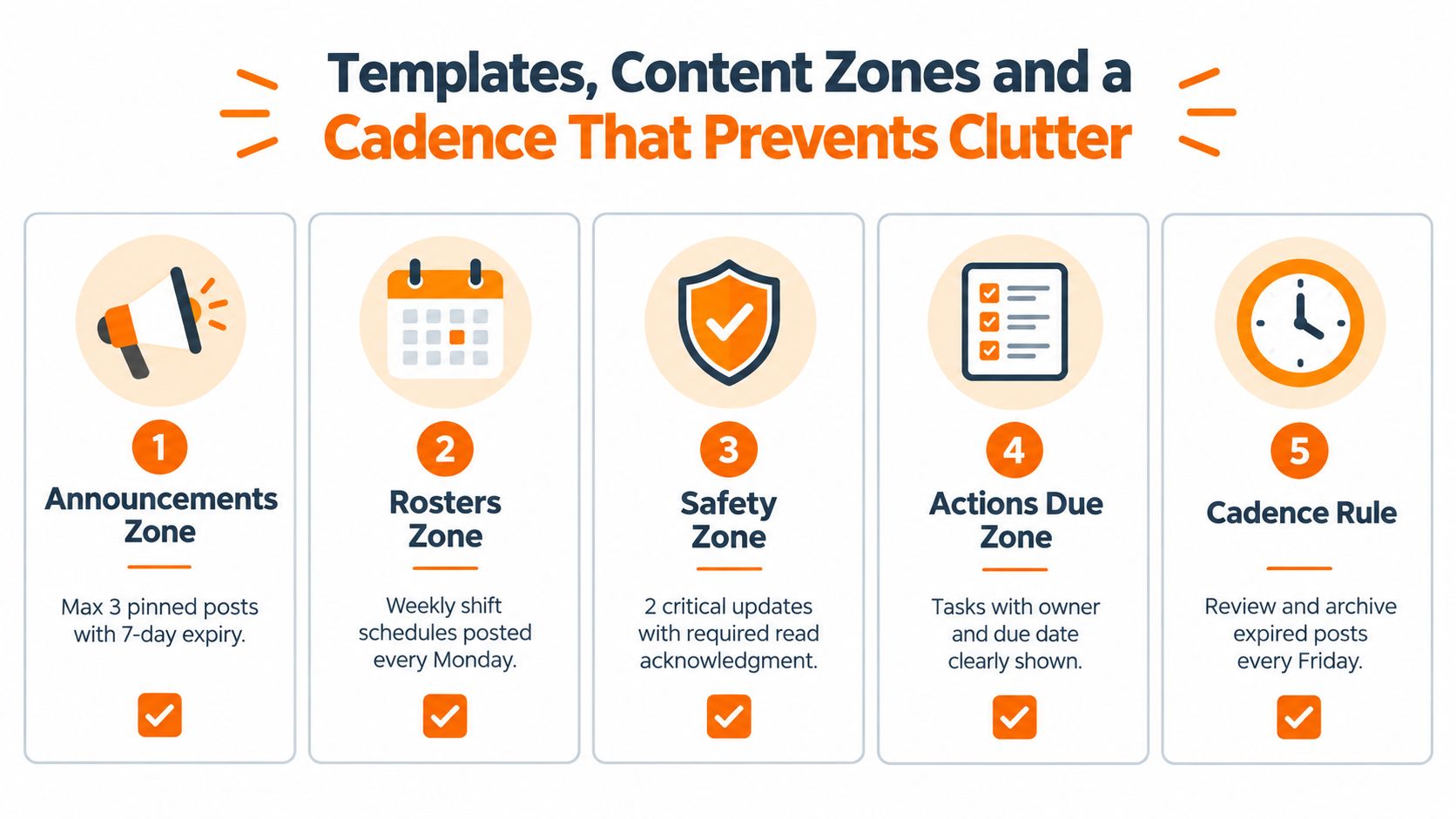
Use four practical zones:
Announcements: Changes, decisions, and reminders that need broad site visibility.
Rosters: Current schedules, coverage notes, and shift information.
Safety: Critical instructions, incidents, and required acknowledgments.
Actions due: Tasks with an owner, a due date, and a clear definition of done.
Keep each zone to three to five items, following the practical notice-board rollout guidance. Every item needs a posted date and an expiry date. Assign one board owner who removes or archives content that no longer helps.
The limit matters more than the label. When every update is marked important, employees stop knowing where to look. A short board creates a useful constraint. If a new announcement doesn't fit, the owner has to decide what it replaces.
Write templates that force clarity
A good template makes the author answer the questions employees have:
What changed?
Who needs to act?
When does it apply?
Who owns the question?
When does this post expire?
For a schedule post, show the week, the affected shift, and where the full roster lives. For a safety post, state the action first, then provide the supporting detail and acknowledgment requirement. For an action post, name the owner and due date in the first lines.
Don't turn every post into a memo. The board is for quick orientation. Put background documents in the relevant Space files and link to them from the post.
Pilot the reading habit
Pilot the board with one team first. Run a standup at the board, then ask employees what they ignored, what they couldn't find, and what they expected to see. The point isn't to collect compliments. It's to find friction before copying the structure across sites.
Set a weekly rhythm. Publish recurring roster information on a known day, review safety content after operational changes, and archive expired items during a fixed weekly review. A Friday cleanup, for example, gives the owner a reliable moment to remove stale posts before the next work cycle.
A board earns trust when employees know yesterday's notice won't still be pretending to be today's priority.
Push Visibility and Channel Mix for Frontline and Office Teams
A well-organized board still fails if nobody sees it. Visibility should match the message.
Use the board as the durable home for information people may need to revisit. Use pinned posts for current priorities. Use push notifications or direct messages when timing matters. For urgent, site-specific updates, pair the board with a mobile channel so employees don't have to discover the message by chance.
A benchmark summary from deskless worker communication guidance reports that bulletin boards or site-wide email alone achieve 47% or lower message reach, while four or more coordinated channels reach 94%. The same summary reports 24 hours to reach half of an audience through digital signage alone, compared with under 2 hours for multi-channel delivery. These figures don't mean every message needs four channels. They show why a board shouldn't carry urgent communication alone.
Choose visibility deliberately
Message Type | Board Placement | Push Setting | Paired Channel |
|---|---|---|---|
Routine roster | Rosters zone, clearly dated | Usually off | Shift conversation or schedule tool |
Site announcement | Announcements zone, pinned while active | On for affected site | Mobile update feed |
Critical safety instruction | Safety zone, prominent and acknowledgment-required | On | Supervisor message or team chat |
Action due soon | Actions due zone with owner and deadline | On for assigned people | Task notification |
Background policy | Linked from the relevant zone | Off | File or knowledge library |
The board handles persistence. Push handles interruption. Mixing those jobs creates either missed updates or notification fatigue.
Respect shift work
Frontline employees don't experience the company in one shared moment. A morning employee may see a post that a night employee never encounters. Keep the post available in the Space, but target notifications by site, role, and shift whenever the tool supports it.
Use a short lead sentence that makes the relevance obvious. “Night shift, loading-bay access changes tonight” is more useful than “Important operational update.” Employees shouldn't need to open a post to learn whether it concerns them.
The team update news feed can serve as a broader visibility layer, while each local Space remains the source for site-specific information. That separation prevents company news from burying operational instructions.
Don't confuse reach with interruption
A push notification is not proof that someone understood the message. Reserve it for content that needs timely attention, and use acknowledgment or a task when the recipient must demonstrate completion.
For everything else, make the board easy to encounter repeatedly. High-traffic placement, simple titles, and predictable zones beat a constant stream of alerts.
Track Engagement and Prove Impact by Site and Shift
A company-wide average can make a weak location look healthy. One well-run site may carry the rest of the network, while a night shift misses updates that daytime staff see every day.
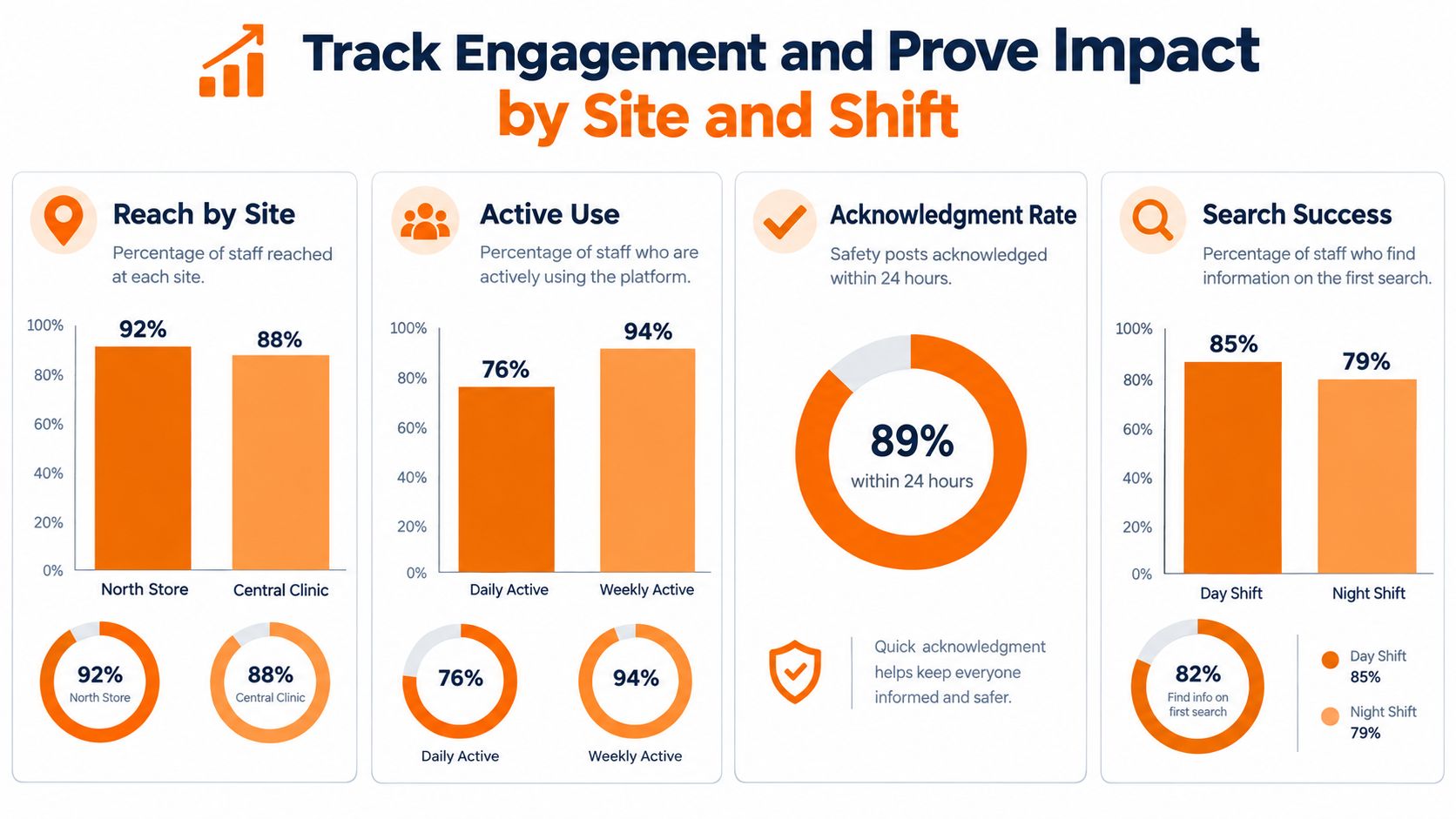
Measure behavior where managers can act. Track reach by site, daily and weekly active use, acknowledgment rates, and search success by location and shift. The 2026 frontline adoption guidance recommends segmented measurement instead of averaging usage across the workforce, alongside a daily anchor workflow and fewer email-based login barriers. Use a practical framework for how to measure employee engagement when choosing which signals to review.
Start with a site-level baseline
Before changing the board, record how employees receive important updates now. Note where managers repost information, where staff ask the same questions, and which shifts regularly miss changes. The baseline should support decisions, not pretend that every communication problem fits one score.
Give each Space a daily anchor. For a store, that might be the opening checklist. For a warehouse, it may be shift handoff. A clinic may use a morning coordination routine. Employees are more likely to open the Space when it supports a work task, rather than serving only as headquarters' news page.
Use analytics to compare locations, not to rank individuals. A weak result may come from poor manager reinforcement, difficult login access, irrelevant content, or a board that combines too many audiences.
Run a pilot that can teach you something
A credible test needs a comparison. Select locations with reasonably similar operating conditions. Roll out the governed notice board to the pilot group, while the comparison group keeps its existing approach.
Run the pilot for at least 90 days, as recommended in the adoption guidance. Review activation, weekly active use by location, acknowledgment of important posts, search success, and the speed of employee feedback. The purpose is to learn whether the board changes daily behavior, not to produce a flattering dashboard.
Measure the shift that struggles, not just the company that averages well.
Review day and night shifts separately where the data allows it. A site may show strong daytime participation and almost no overnight usage. That indicates a problem with content relevance, access, or manager routines across the operation.
Turn weak signals into fixes
Low reach calls for a check on Space awareness and login access. Low acknowledgment may mean that posts lack a clear required action, or that employees receive too many requests. Weak search success points to better titles, tags, and zone names before anyone adds more content.
Set an owner for each site and shift view. That person records the issue, changes one operating condition, and sets a review point. Compare the pilot and control groups again after the change. This ownership and expiry discipline turns engagement data into management action, rather than another report that sits unread.
Troubleshooting Best Practices and Keeping It Alive
A notice board usually fails in the gaps between sites and shifts. The software publishes correctly, but nobody owns the content, removes expired posts, or checks whether teams can act on what they see.
The recurring problems are clear: unclear roles, inconsistent channels, too much information, weak feedback, and limited contact between locations. Research on communication challenges in distributed teams describes these pressures in distributed work. A governed Space can reduce them only if leaders retire duplicate channels instead of adding another destination.
Fix the common failure modes
Stale posts need an owner and an expiry date. Do not depend on authors to remember. The site or shift board owner should review active content on a fixed cadence and archive anything that no longer guides action. Expiry rules should apply to local announcements as well as company-wide notices.
Conflicting channels need a source-of-truth rule. Decide whether the Space, scheduling tool, or formal policy library owns each information type. Link to that source when needed. Copying several versions into multiple channels creates avoidable disputes.
Unclear responsibility needs visible ownership. Each action should name a person or role, not “the team.” Every site should know who approves local announcements, who handles questions, and who covers the board owner's absence.
Information overload needs subtraction. If employees cannot scan the board quickly, remove content before adding categories. A smaller board with clear dates supports faster decisions than a complete archive presented as a homepage.
Separate the kinds of communication
Operational updates, social connection, and change communication serve different purposes. Research on internal communication in distributed organizations examines these areas separately, which provides a useful design cue.
Keep daily work visible without letting it bury culture posts or major change notices. Use distinct zones, labels, or Spaces where necessary. Employees should know whether a post tells them what to do, helps them connect, or explains why the organization is changing. That distinction also makes expiry decisions easier.
Keep the routine human
A digital board works when it appears in normal work routines. Research on digital community bulletin boards points to high-traffic places where people pass, wait, or socialize as useful settings for visibility and community value. In a Space, make the board part of handoffs, standups, opening routines, and supervisor check-ins.
The keeper's checklist is short:
Name the owner: One person maintains each local board.
Date the content: Every post has a posted date and expiry date.
Target the audience: Site, role, and shift should be clear.
Match the channel: Persistent updates stay on the board, urgent ones get a paired push.
Review behavior: Check reach, use, acknowledgment, search success, and feedback by location.
Remove without hesitation: Old content is not proof of productivity.
Curation keeps the system useful. Pebb gives multi-site teams dedicated Spaces where announcements, chat, tasks, files, schedules, and acknowledgments can stay connected by location. Visit Pebb to see how you can pilot a governed notice board with stores, warehouses, clinics, or other distributed teams.
