
Multi-Site Team Spaces Notice Board Setup Guide for Pebb
Learn how to set up a multi-site team Spaces notice board in Pebb — from cross-site visibility to posting, notifications and measurement.
Dan Robin

The first time a site manager pings me about a notice nobody saw, it's usually not because the message was unclear. It's because the system behind it was sloppy. One office got the update. One warehouse didn't. HQ assumed “posted” meant “seen,” and the shift lead is the one left explaining why the wrong schedule went live.
That's the core job of a multi-site team Spaces notice board. Not to look tidy. Not to replace email. It's there to move the right update to the right people, at the right time, without making every location dig through noise. A decent notice board is a governed system. A bad one is just a digital wall with better fonts.
What works is simple. One place to publish. Clear ownership. Location-aware visibility. A way to tell whether the people on the floor saw the thing that mattered. The minute you treat the board like a broadcast dump, you get the same mess a generic portal creates, just with more steps. That gap is why intranet use often looks strong on paper, yet daily use stays weak, with employees spending too much time searching for what they need instead of finding it fast, as noted in this intranet statistics summary.
If you want a cleaner model for multi-site communication, start with a simple rule. The board should behave like a controlled system, not a pinboard. That mindset lines up with the thinking in internal communication best practices 2026, and it's the difference between “we sent it” and “people got it.” For a broader operating model, I also point teams to Pebb's multi-site management guidance when they're trying to stop updates from scattering across locations.
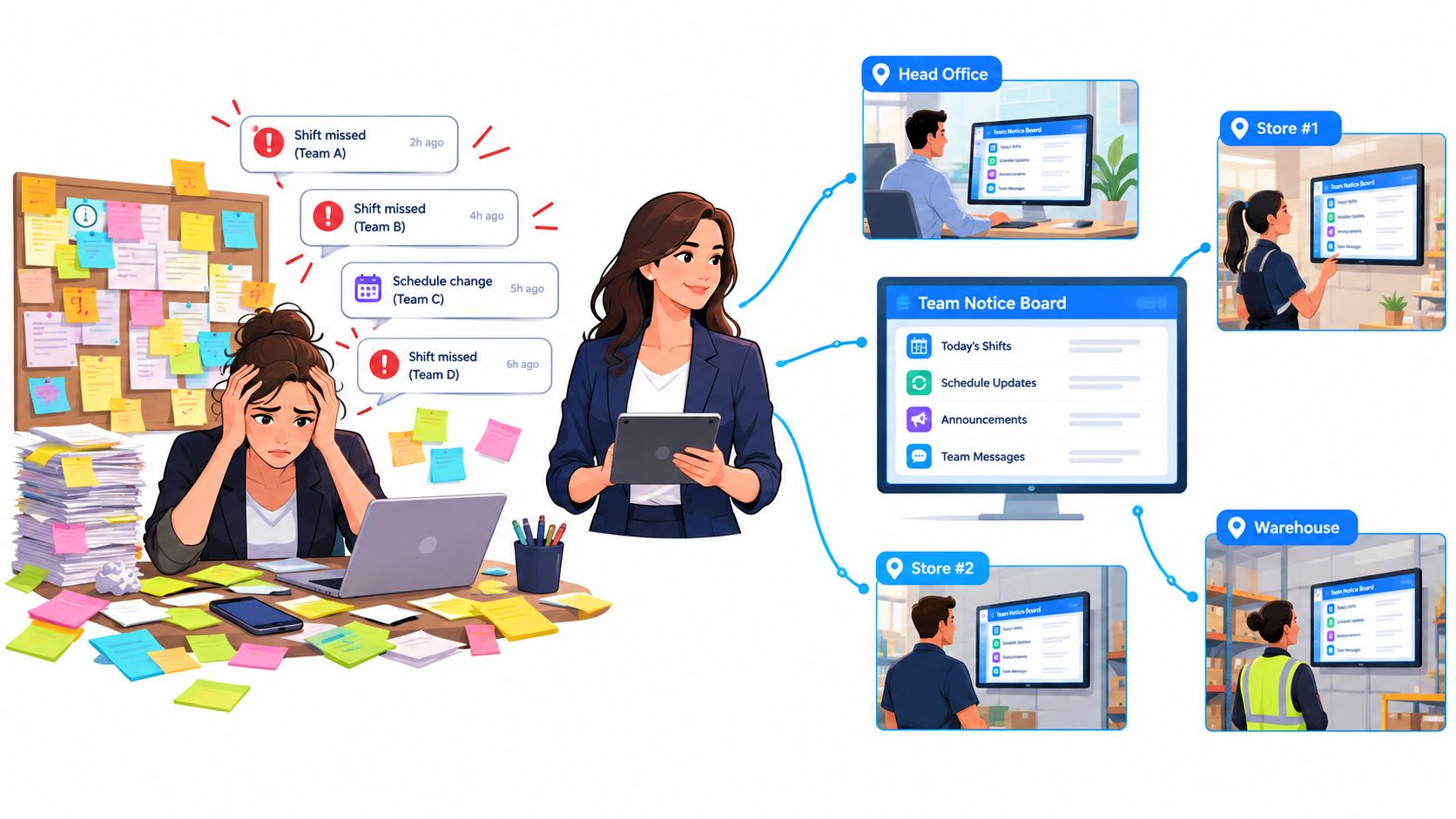
A good board makes success look boring. Frontline people see only what applies to their site or shift. Office teams get the company-wide notice without hunting for it. And local managers stop playing telephone with headquarters.
Why Multi Site Notice Boards Fail and What Good Looks Like
A broken notice board usually starts with good intentions. HQ posts everything in one stream, local managers repost it in their own words, and by midweek nobody knows which version is official. The result isn't more communication. It's confusion with timestamps.
The usual failure pattern
The problem is rarely design. It's governance. If every update lands in the same place with no rules about ownership, relevance, or escalation, the board becomes a junk drawer. That's why the smarter approach is to run the board as a location-aware system with clear boundaries, not a loose collection of announcements.
There's also a channel problem. A generic company portal can be technically available to everyone and still be used by almost no one, which is exactly the kind of adoption gap cited in independent intranet research from 2024, where organizations had intranets but daily use stayed low and many employees never used them at all. That same research also noted people spending time searching for information they can't easily find, while intranet use can be very brief. The lesson is plain. Availability isn't visibility, and visibility isn't action.
Practical rule: if a frontline employee needs to scroll, search, or guess, the board is already losing.
A well-run notice board does three things at once. It makes the right update obvious. It keeps irrelevant noise out. And it gives leadership a path to prove the message reached the people who needed it. That's the shift from broadcasting to operating.
What good looks like in Pebb
Inside Pebb, the useful pattern is a dedicated Space for the notice board, with posts, files, tasks, chat, and shift-related context living in one controlled area. That matters because a site manager shouldn't need five tools to tell a team what changed. The 2026 SharePoint intranet benchmarking report found 95% of employees used the intranet during a three-month benchmark period, up from 93% in 2025 and 86% in 2024 benchmark report. That's a strong reminder that centralized hubs can work, but only when people can find the right content fast.
The catch is mobile. That same report noted one cited study where only 2% of access came from mobile benchmark report. For multi-site teams, that's a warning sign, not a curiosity. If your workforce includes warehouses, stores, clinics, or shifts, the board has to work where they work.
Success looks calm. HQ publishes once. Local owners manage their own updates without stepping on each other. Frontline staff see only what matters. That's the whole game.
Creating Your Spaces Notice Board Foundation in Pebb
The first thing I do is create a Space that's clearly named for the function, not for my own convenience. If people in three regions can't tell what the Space is for at a glance, it's already too clever. Keep the name plain. Austin Store Updates, North Region Notices, Warehouse Ops Board. The point is recognition, not branding poetry.
Build the Space like a work area, not a folder
The board works better when the Space holds the full work pattern around it. Posts carry announcements. Files hold the supporting documents. Tasks track follow-up. Chat handles quick questions. That structure keeps people from bouncing between disconnected tools just to understand one update.
Ownership comes next. Pick one accountable owner for the Space, then make local managers responsible for their own site-level content. I don't like shared ownership when no one knows who closes the loop. It sounds collaborative. In practice, it often means nobody wants the mess. A clean rule is better: one owner for the Space, local contributors for location-specific posts, and a clear backup if the owner is off.
Keep the setup light enough that a new site can be added without rethinking the whole system.
That's especially useful for retail, hospitality, and logistics teams. A restaurant group may need one Space per branch or market. A logistics operation may group by depot and shift. A retail chain may group by region first, then local store content inside that structure. The exact shape matters less than the fact that it stays legible to the people who use it.
Make rollout boring on purpose
The easiest rollout is one invite link and a simple naming rule. Don't make people request access through three layers of admin just to join the board. The more friction you add at setup, the more people fall back to text messages and side chats. That's how the official channel gets bypassed on day one.
A practical structure also helps when you expand. If each Space follows the same basic pattern, new sites don't need a training manual the size of a small book. They just need to know where notices live, who posts them, and where to check first. That's enough. Boring is good.
For teams standardizing the setup, I'd pair this with how to set user permissions so the Space structure and access model match from day one.
Configuring Cross Site Visibility and Permissions That Actually Work

The hard part isn't posting. It's deciding who should see what without creating another layer of noise. That's where teams get tangled. They either open everything to everyone or lock so much down that the people on the floor miss what matters.
Use role-based visibility with a simple rule set
Think in layers. HQ Admin handles global notices. Regional Managers handle their assigned locations. Site Managers post local updates and moderate comments. Team Members see the targeted content that applies to their site, shift, or role. That hierarchy keeps the channel clean and cuts down on accidental overlap.
The logic behind that model is familiar in other systems too. In how handles BI security, the useful idea is the same, role-based access beats broad access when the information has different audiences. Notice boards work the same way. Not every update belongs in front of every person.
Here's the trade-off. Broad visibility reduces the risk of someone missing a message, but it increases noise fast. Narrow visibility keeps the feed useful, but it requires discipline from the people posting. I'd rather deal with a little structure than let the board become a fire hose.
Audience | Visibility Setting | Who Can Post | When to Use |
|---|---|---|---|
HQ Admin | All sites, global notices | HQ Admin | Policy changes, company-wide announcements, urgent escalations |
Regional Manager | Assigned locations only | HQ Admin, Regional Manager | Region updates, seasonal shifts, cross-site coordination |
Site Manager | Single site or local group | Site Manager, approved HQ users | Shift changes, site closures, local reminders |
Team Member | Targeted updates for their site or role | No posting by default | Reading notices, confirming updates, reacting to posts |
Resolve conflicts before they happen
The biggest governance mistake is letting a site-specific notice collide with a company-wide one and hoping people sort it out. They won't. Set a simple rule for priority. Critical company notices override local chatter. Local managers can still post context, but they shouldn't bury the official message.
This is also where approval rules matter. If HQ and local managers both post freely, the board drifts. If every post needs two approvals, the board goes stale. Find the middle ground. Let local managers post routine updates, reserve escalation rights for HQ, and define who can override what. That's enough structure for a typical team.
The old message-approval habit often feels safe until it slows everything down. Then people stop using it. Better to keep permissions specific and workflows short. Clear roles. Clear reach. No drama.
For a tighter access model inside Pebb, the internal guide on how to set user permissions is worth aligning with this setup. It keeps the permission story consistent instead of patchy.
Posting Templates and Schedules That Keep Every Site in Sync
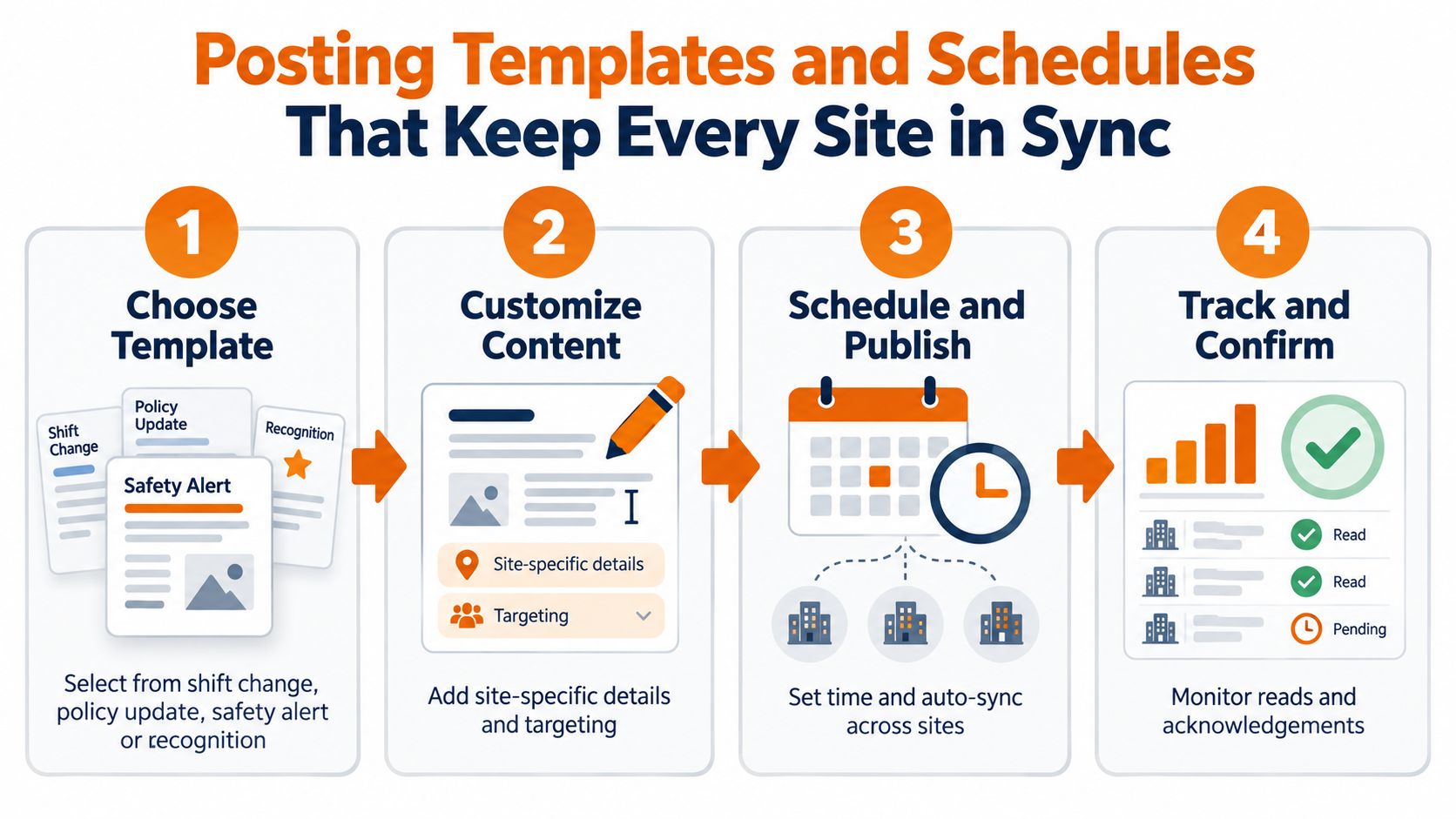
A notice board gets easier to manage when posting stops being an improvisation exercise. The best teams I've worked with use repeatable templates for the common stuff, then adjust the details for each site. Shift change. Policy update. Safety alert. Recognition. The shape stays the same, which makes the message faster to write and easier to trust.
Template first, then local detail
A good template saves time without making the post sound robotic. I like to keep the opening line consistent, then leave one field for the site-specific detail. That way a policy change looks familiar across every location, but the local manager can still name the shift, floor, branch, or depot that it affects.
A centralized publishing flow makes this cleaner still. One master update. One branding pass. One push to all connected screens or Spaces. A digital bulletin-board workflow for multi-location offices recommends exactly that approach, including automatic expiration so outdated content disappears without manual cleanup digital bulletin-board workflow. That matters because stale content erodes trust faster than bad design does.
If a message can expire, set it to expire. The board should not become a museum of old reminders.
Schedule by rhythm, not by habit
Some updates belong on a weekly rhythm. Others belong to a shift change. Others should land just before a policy takes effect. The trick is matching the timing to how people work, not how convenient it is for the person writing the post. A warehouse night shift does not need a noon announcement that arrived after the handoff.
That's where a scheduling tool earns its keep. You write the notice once, set the time, and let the board do the rest. The scheduled posts guide is useful here because it aligns with the practical demands of multi-site operations, where timing beats volume almost every time.
Keep the formats small and reusable
You don't need a different process for every kind of message. You need a few reliable ones. Use one structure for urgent notices, one for routine updates, one for recognitions, and one for events or reminders. That keeps the board readable across sites and makes it less likely that people skip the post because it looks like more of the same.
The point isn't to squeeze life out of the board. It's to make communication repeatable enough that it survives busy weeks. That's how the system stays alive after launch.
Notification and Engagement Settings for Frontline Reach
A notice board that sits in a browser tab won't help a shift worker who's moving between tasks, gloves, and break rooms. Frontline reach needs delivery mechanics that fit the reality of the day. That means notifications, nudges, and engagement tools need to be chosen with care, not turned on because they're there.
The important thing is channel fit. If the update is urgent, it should trigger a strong signal. If it's routine, it should stay quieter. If it needs a response, it should ask for one. The board shouldn't behave like every post is an emergency. People tune that out fast.
Match the notification to the job
A safety alert is different from a lunch menu update. So is a schedule change. Critical notices deserve stronger nudges for unread posts, especially when the audience is split across shifts. Routine news can live in the feed and be checked when the team has a minute. That distinction keeps you from training people to ignore every ping.
The mobile piece matters more than leaders sometimes admit. The benchmark data cited earlier showed intranet access was overwhelmingly desktop-based in one study, with only 2% of access from mobile benchmark report. For deskless teams, that's not a minor detail. If the board only works well on a desk screen, half the room is already behind.
Use engagement tools with intent
Reactions, comments, pulse polls, and acknowledgements can help, but they can also create clutter if every post invites a conversation. I use them sparingly. Reactions are fine for recognition or quick confirmation. Comments help when a notice needs clarification. Pulse polls are useful when you need a fast read on a local issue. For anything critical, an acknowledgement is better than hoping someone nodded while walking past.
There's a reason this matters. Microsoft's digital employee experience research says workers spend 58% of their time on communication and coordination Microsoft DEX research. That's already a lot of time spent moving information around. If your board adds friction instead of reducing it, it becomes part of the problem.
The other side of that coin is recognition. An EY and Workhuman survey found 51% of employees feel they receive no recognition for their work EY/Workhuman survey context. A board that only carries rules and reminders misses a chance to reinforce behavior. Recognition posts can pull a lot of weight when they're real and specific.
Don't confuse visibility with proof
A read receipt is useful, but only if it's tied to action. The board should help you answer whether the right people saw the right message and whether anyone had to follow up. That's where a combined hub can help, because one source describes using digital notice boards, instant messaging, pulse polls, and mobile access together to share news, collect feedback, and keep communication transparent across locations communication management system. The mix matters more than any one feature.
The goal is simple. Fewer missed handoffs. Less guesswork. More people who know what to do next.
Measuring Impact Troubleshooting Issues and Best Practices to Sustain It
If the board is working, you should be able to see it without hunting. If it's not working, the failure usually shows up in the same few places. People don't read. Local managers post around the system. Old content hangs around too long. Or the permissions are muddy enough that nobody knows who owns the update.
Watch the board like an operator
The useful question isn't “Did we post?” It's “Did the right people engage, and did the notice lead to action?” Analytics in Pebb should be used for that kind of review, not vanity. Look for read patterns, activity trends, and which locations consistently miss critical notices. That gives you a real picture of whether the system is helping or just taking up space.
The adoption gap from the earlier research is still the caution flag here. 91% of organizations operate an intranet, but only 13% of employees use it daily and 31% never use it at all intranet adoption research. That's the kind of split that tells you a board can exist and still fail in practice. Don't assume the tool is enough.
Fix the usual problems before they spread
Low visibility usually means the post was aimed too broadly or the board is buried too deep in the workflow. Permission conflicts usually mean HQ and local managers weren't given clean boundaries. Stale content means nobody owns expiration or cleanup. Each of those problems is fixable, but only if you treat them as operating issues, not user mistakes.
A notice board needs an owner the way a site needs a manager. Without that, everything gets fuzzy.
That's why ownership between HQ and local managers has to stay explicit. HQ owns global notices and standards. Local managers own site context and timing. When both groups post, the rules need to be clear enough that nobody has to guess which message wins. If the board can't answer that, it's too loose.
The 2024 Microsoft Work Trend Index found 60% of managers said they lack enough time and energy to do their jobs Work Trend Index context. That doesn't leave much room for manual follow-up. The board has to do more of the coordination work on its own, or leaders will fall back into side messages and hallway updates.
Keep the board from turning into noise
Sustainability is mostly discipline. Prune old content. Tighten post ownership. Keep the templates short. Review what gets read and what gets ignored. Then make small adjustments instead of redesigning the whole thing every quarter.
A good test is to compare the board's promise with the board's actual behavior. If it's supposed to help frontline teams act faster, are they acting faster? If it's supposed to reduce confusion, are local managers asking fewer clarifying questions? If not, the system needs work. Not more posts. Better rules.
Pebb gives teams one place to run communication, tasks, and location-based Spaces without scattering updates across tools. If you're trying to build a real multi-site team Spaces notice board, not just another announcement feed, take a look at Pebb and see how it handles posts, permissions, and mobile-first access in one place.
