
A Knowledge Base for Employees That Actually Works
Stop building digital graveyards. Learn how to create a knowledge base for employees that saves time, answers questions, and keeps your entire team in sync.
Dan Robin

Monday morning always finds the weak spots. Someone needs the updated travel policy, the shop floor needs the latest return rules, and HR is getting the same three questions again because nobody can remember where the answer lives. The shared drive is full, Slack is noisy, and the right document is usually the one nobody trusts anymore.
That's why a knowledge base for employees matters. Not because it sounds modern, but because it gives people one place to check before they start asking around. When that place is clear, current, and easy to search, work gets calmer fast. When it isn't, every small question turns into a scavenger hunt.
The All-Too-Familiar Search for That One Document
The worst part of information chaos isn't that the answer doesn't exist. It's that the answer exists in five places, and three of them are wrong. I've watched teams burn time bouncing between a shared drive, an old email thread, a wiki nobody updates, and a coworker who “thinks” they saw it somewhere last quarter.
That's the daily reality a knowledge base is meant to fix. It's a single, trusted place for policies, how-tos, onboarding notes, and operational steps, so employees don't have to guess where to look. When teams still rely on scattered files, the work slows down in ways people barely notice until the week is already gone.
A clean paperless workflow helps too, because it cuts the habit of treating every policy like a file to be emailed around. Firacard's guide on going paperless is a useful reminder that the goal isn't more digital clutter, it's less friction. The same logic applies here, if the document isn't easy to find, it might as well not exist.
For deskless teams, the bar is even higher. A policy hidden in a desktop-only system won't help a warehouse lead on a break, or a retail associate at the register. That's why mobile access matters, and why a searchable company library built for frontline workers needs to live where people work, like this searchable company knowledge library approach for deskless teams.
Practical rule: if someone has to ask twice for the same answer, the system failed, not the employee.
More Than a Wiki A Central Brain for Your Company
A wiki sounds tidy until it becomes a dumping ground. Then it turns into the digital version of a back room with unlabeled boxes, where everyone knows something is in there, but nobody wants to open it. A real knowledge base for employees should feel less like storage and more like a working brain for the company.
The business case is simple. Employees spend about 1.8 hours per day, or roughly 9.3 hours per week, searching for and gathering information, and some knowledge workers can spend up to 2.5 hours per day on retrieval work, according to the knowledge-management data summarized by Speakwise (source). In the same benchmark, 60% of employees said they spend too much time searching for information, and that was tied to an average annual productivity loss of $47 million for companies in the cited benchmark (source). That isn't a nice-to-have problem. That's a structural drag.
What a central brain actually does
A good knowledge base does three things at once. It gives people fast answers, it keeps policy and process consistent, and it reduces the pile of repeat questions hitting HR, IT, and operations. It also becomes the place new hires learn how the company really works, not how one manager happens to explain it.
It's also a control point. If onboarding docs, leave rules, shift procedures, and escalation paths all live in one governed place, employees stop improvising from memory. That matters even more in fast-moving teams where policies change, shifts rotate, and nobody has time to dig through ten threads to find one update.
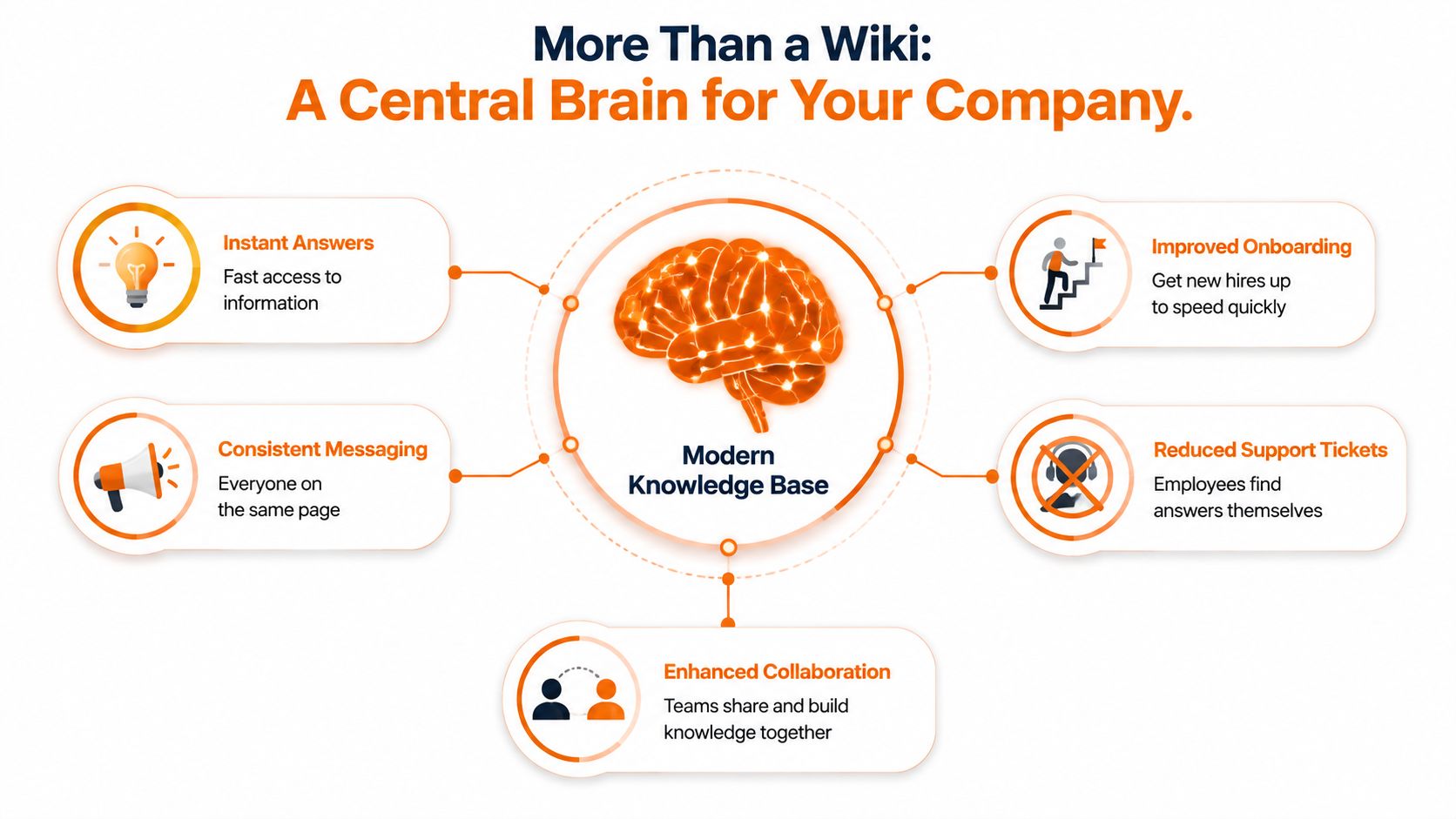
The structure matters as much as the content. A strong information architecture groups content by user intent and jobs-to-be-done, not by department, because employees rarely think in org-chart terms when they're trying to get work done (source). That's why a knowledge base works best when search, metadata, and clear categories all point to the same answer.
A note from the field, if the same article can't be found quickly, nobody cares how complete it is. People will always choose the path of least resistance, even if that path leads to a coworker's memory instead of the official answer.
The Essential Parts of a Knowledge Base People Actually Use
A useful knowledge base doesn't feel like another app to manage. It feels like relief. The employee asks a question, the answer appears fast, and nobody has to open five tabs or send a message that starts with “sorry to bother you.”
Search comes first
Search is the engine. If employees can't find what they need in seconds, they'll stop trusting the system and go back to asking people directly. InvGate is blunt about this, a powerful search tool can make or break usability, because employees usually arrive with a specific question, not a desire to browse (source). GoLinks adds the practical detail, metadata such as tags, content type, and topic labels makes filtered search work better (source).
Structure should match work
That's why the information architecture has to stay simple. The content should be grouped by what people are trying to do, not by which department owns the file. The reference point is the employee's task, not your internal org chart (source).
The other part is discipline. Every article should have an owner, a review date, and enough context to stand on its own. Stravito recommends fields like topic, audience or role, market or region, product or brand, stage or workflow, content type, and a review date, plus an owner, contributor, and reviewer for accountability (source). That's not bureaucracy. It's how you stop a library from turning stale.
The screenshot below shows the kind of clean, mobile-friendly layout that makes this practical for employees who are already moving between tasks and devices.

A knowledge base gets used when it feels like the fastest path, not the most official one.
For teams looking at tools, Pebb's Knowledge Library is one option that puts documents, guides, policies, onboarding materials, procedures, and company knowledge in one place on web and mobile. That kind of access matters because a library only helps if people can reach it when they need it.
You'll also want a simple place for common questions. A well-built FAQ layer can catch the everyday stuff before it turns into ticket traffic, which is why resources like 1chat's FAQ page are worth studying if you're thinking about how employees move from question to answer without friction.
How Different Teams Find Their Answers
The value of a knowledge base shows up in ordinary moments. A retail associate standing on the shop floor doesn't want a policy deck. They want the return rule, on their phone, right now. A logistics supervisor between shifts needs the latest safety step, not a meeting to explain where the PDF lives.

Frontline work needs speed, not ceremony
Frontline teams live in short windows. They check something between customers, between calls, or during a shift handoff. If the answer takes too many taps, they won't use it twice. They'll ask the nearest person and hope that person is right.
That's why the highest-value content is usually the content employees ask for most often, especially time off, benefits, SOPs, templates, and FAQs (source). Those are the repeat questions that keep showing up because they're tied to daily work, not abstract policy language.
Office teams need consistency
An HR manager onboarding a remote hire has a different use case, but the same problem. They need one link that collects the basics, so the new person doesn't spend the first week piecing together half-answers from inboxes and meetings. That's where the knowledge base becomes a shared playbook instead of a pile of documents, and it's the same reason knowledge libraries matter for employee onboarding.
AI is starting to help in places where teams need quick, guided answers. The way medical teams use chat-based tools to sort through urgent questions is a good reminder that speed matters when people are trying to act, not browse, and this ProMed Certifications piece on AI in healthcare shows how structured answers can reduce back-and-forth in high-pressure settings.
The common thread is obvious. The best knowledge base content maps to real work. If it answers the question employees ask, the platform earns trust. If it's written around company language instead of employee language, it becomes wallpaper.
A Simple Plan to Build Your Knowledge Base
Starting small is the only sane way to do this. A lot of companies freeze because they think they have to document everything at once. They don't. They need to solve the questions that come up over and over, then keep going.
Many companies still haven't built the habit. One industry summary says 61% of HR departments are not yet using a knowledge management system, and 70% of these projects start with a need to retain critical knowledge after employee turnover (source). That tells you two things. The need is real, and it is still often treated as an emergency project instead of operational infrastructure.
Start with repeated questions
I'd begin with the 20 questions people ask most often. Not the questions leadership finds interesting, the questions employees ask on repeat. Those are usually the ones tied to access, policy, onboarding, pay, schedules, and basic process steps.
Then write the shortest useful answer. If the answer needs context, add it. If it doesn't, stop there. The point is to create usefulness early, because usefulness drives adoption far more than volume.
Clean up before you publish
Old docs need a hard look. Keep what's current, merge what overlaps, and retire what no longer helps. A migration that copies everything into a new system just creates a cleaner mess.
Useful rule: ten used articles beat forty unread ones.
That line from HelpDocs is the right standard to hold onto, because it cuts through the urge to document every corner of the company at once (source). Build from repeated employee questions, assign owners, and set review dates from day one, or the new library will decay the same way the old one did.
For a practical maintenance checklist, this guide on maintaining knowledge bases is worth keeping nearby. The main lesson is simple, don't launch a museum, launch a working system.
The Hardest Part Keeping Your Knowledge Fresh
Launching a knowledge base is easy compared with keeping it trustworthy. Freshness is where most systems break down. An outdated article doesn't just waste time, it teaches employees not to trust the library next time.
Ownership beats hope
Every article needs a human owner. Not a vague team, a person who knows they're responsible for checking whether the content still matches reality. That owner should have a review date and a clear path to update the article when policy or process changes.
The same advice keeps coming up from different angles because it works. HelpDocs' warning that ten used articles beat forty unread ones identifies the key issue, usefulness matters more than size, and repeated employee questions should drive what gets written and what gets refreshed (source).
Review cycles need to be ordinary
A knowledge base stays alive when review becomes routine, not a rescue mission. That means scheduled audits, simple analytics, and a habit of checking what people search for, what they ignore, and where they still end up asking a human instead of reading the article.
The practical gap is usually not lack of content. It's lack of follow-through across shifts, locations, and devices. Frontline teams feel that pain first, because a policy update can hit the store, the floor, or the warehouse long before it reaches the shared drive.
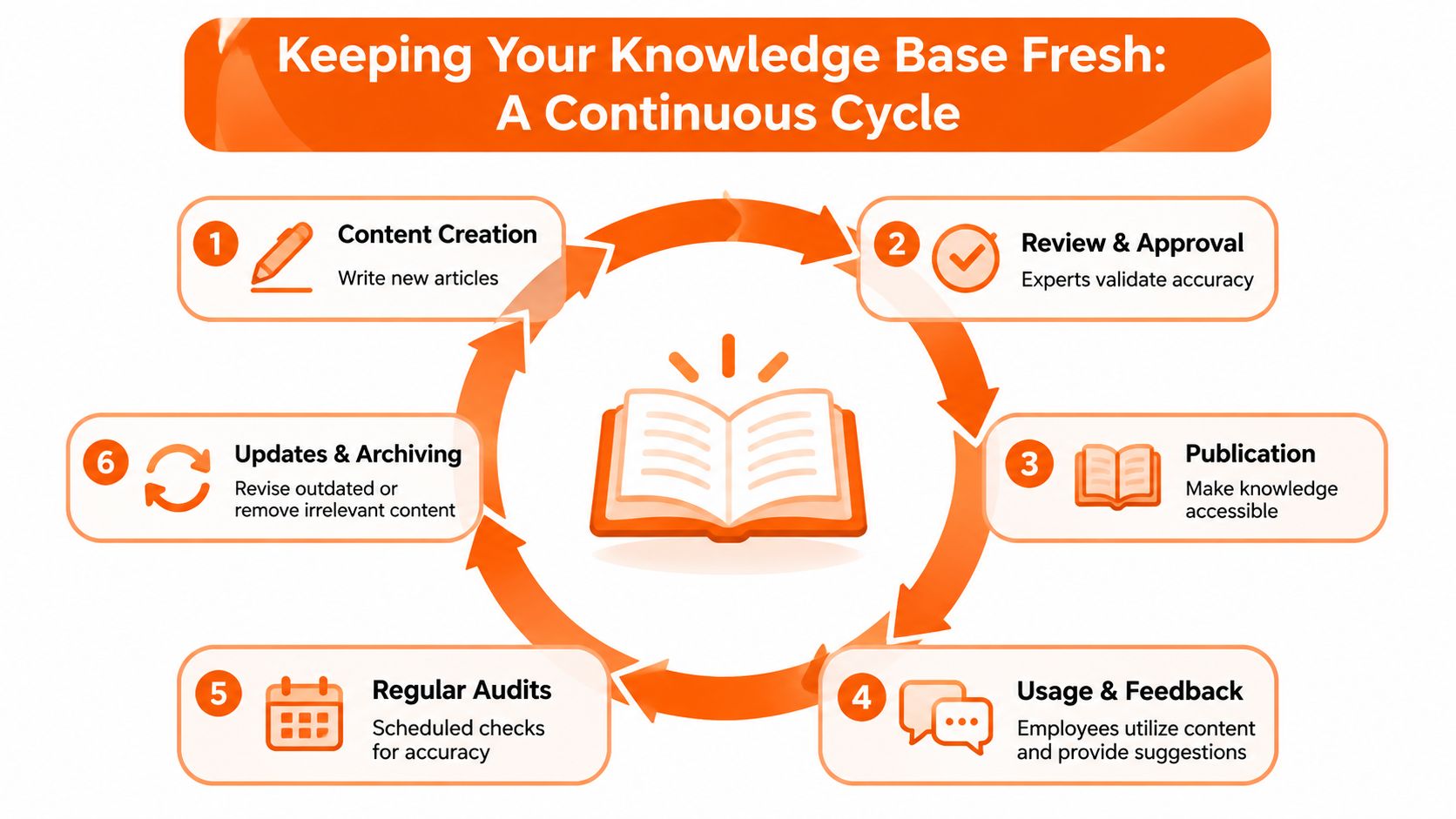
The cycle only works if it's boring in the best way. Someone creates the content, someone reviews it, it gets published, employees use it, feedback comes in, and the article gets corrected or retired. That's what makes the system feel reliable instead of fragile.
For teams that want a tighter operational loop, tools with analytics and direct update workflows can help, especially when employees can flag what changed from the interface itself. The point isn't automation for its own sake. The point is keeping the knowledge base from drifting away from the work it's supposed to support.
Its Not a Library It Is a Conversation
A strong employee knowledge base says something about the company using it. It says the company respects people's time, expects questions to repeat, and is willing to turn scattered know-how into something anyone can use. That's a healthier sign than any polished folder tree.
The best systems aren't static. They grow from the questions people ask, they stay tied to owners and review dates, and they get sharper as teams use them. That's why the true measure isn't how much you've published, it's whether employees trust the answer enough to stop asking around.
A knowledge base for employees should feel alive because work is alive. Policies change, people move, shifts rotate, and the answer that mattered last month may be wrong today. The companies that get this right don't just store knowledge, they keep a conversation going.
If you want one place to keep policies, onboarding, procedures, and everyday answers within reach on web and mobile, take a look at Pebb. It's built to help teams keep information organized, searchable, and close to the work people are doing.
