
Your Intranet Is Probably a Ghost Town. Here's Why.
Is your company intranet a content graveyard? We'll show you how modern intranet content management software should work to connect teams and simplify work.
Dan Robin
Your intranet. That place where company news goes to be forgotten.
Let’s be honest. For most people, the company intranet is a digital attic. It’s dusty, cluttered, and you only go there when you absolutely have to find something you buried years ago. Trying to locate a simple policy feels like an archaeological dig through layers of outdated announcements and cryptic folder names. If that sounds familiar, you’re not alone. It’s the quiet frustration of anyone stuck with a tool that was designed for a different era.

The Old Model Is Broken
Here’s the thing: those old platforms were never built for the way people actually work. They were designed as top-down information dumps—a one-way street where corporate news was posted and then promptly ignored. There was no conversation. No connection. No pulse.
This model completely fails the modern workforce.
For your distributed and frontline teams—the people in warehouses, on sales floors, or in clinics—an intranet chained to a desk is useless. They need information on their phones, right in the moment, not hidden behind a VPN and a clunky login they forgot months ago. A recent Gallup report highlighted that disengagement is a massive issue, and a silent, irrelevant intranet is a major contributor.
This disconnect isn't just an inconvenience; it's a quiet crisis. When people can't find what they need, they get frustrated, disengage, and eventually, stop looking. Your single source of truth becomes a source of confusion.
The real problem is that most intranets are treated like IT projects instead of communication channels. All the focus goes into features and folder structures, not the flow and feeling of connection. We've talked before about why no one uses your intranet and how to fix it, but the diagnosis always starts here: a tool that doesn’t respect how its people work is destined to become a ghost town.
A Different Way Forward
For companies struggling with outdated platforms, exploring incremental legacy modernization strategies can help transform that "content graveyard" into a valuable hub, one step at a time. This isn't just about swapping out one tool for another. It's about changing how you think about your company's internal world.
It’s about shifting from a silent, dusty library to a vibrant, bustling town square where people want to show up. The goal isn't just to store information—it's to make every single person on your team feel seen, heard, and connected, no matter where they clock in.
What Your Intranet Is Supposed to Do
So, how do we escape that digital graveyard? A modern intranet isn't just another place to dump files. It should be the central nervous system for your company—the one place where communication, knowledge, and culture connect.
Think of it this way: a traditional intranet is like a dusty, silent library. You go there, find a specific book (if you're lucky), and you leave. There's no conversation, no life, no shared experience. It's a static collection of stuff.

A proper intranet content management software, on the other hand, is more like a lively town square. It’s where people gather, news is shared, and real connections are made. It's a living, breathing part of the organization.
The Real Job of an Intranet
Let's be honest, the technical jargon doesn't matter. What matters is the job the tool is meant to do, and it’s surprisingly simple. An intranet's real purpose is to get the right information to the right people at the right time, in a way that’s helpful.
This isn’t just about posting a corporate update and crossing your fingers. It’s about building a reliable flow of information that keeps everyone in sync, from the C-suite to your frontline teams. When it works, essential documents are instantly accessible, not buried in some maze of folders someone created five years ago.
More than anything, it has to connect people. It should bridge the gaps between departments, shifts, and locations, making the company feel like one cohesive team instead of a collection of disconnected silos.
More Than Just a Digital Filing Cabinet
This shift in thinking is critical. We're seeing a huge move away from clunky, on-premise systems because the old way just doesn't work anymore. The global intranet software market was valued at USD 18.78 billion in 2024 and is projected to hit USD 49.19 billion by 2031. This isn't just some trend; it's a worldwide recognition that companies need a better way to communicate. You can discover more about this market growth and what's driving it.
Here’s what that looks like in practice. For HR and Internal Comms, it’s a single place to share benefits info and company-wide announcements, knowing everyone will actually see them. For Operations leaders, it's a direct line to frontline teams for sharing new procedures or safety protocols without relying on printed notices. And for employees, it’s their go-to source for everything they need to do their job.
An effective intranet answers an employee's question before they even have to ask it. It anticipates their needs and removes the friction that makes work feel harder than it has to be.
But that's only half the story. The best intranets aren't just about pushing information down; they're about pulling people together. They create a space where a new hire in one city can learn from a veteran in another, where a frontline worker’s feedback can actually be seen by leadership, and where successes are celebrated by everyone.
Ultimately, it's not about adding another piece of software to manage. It's about building the digital home for your company—a place that's useful, reliable, and maybe even a little delightful.
The Tools That Actually Make a Difference
It’s easy to get lost in feature lists. Software companies love to show off endless menus and options, but most of it is noise. When it comes to intranet content management software, it’s not about having every bell and whistle. It’s about having the right tools that solve real problems.
These tools should make someone’s job easier, not add another layer of complexity. They should make a frontline worker feel connected, not like they’re shouting into a void. Let’s skip the boring checklist and talk about what matters.
A Feed with a Pulse
Think about the apps you use outside of work. Information flows. It’s timely, relevant, and easy to glance at. Now think about the typical corporate news page—a static wall of text that hasn’t been updated since last quarter. A dead end.
A modern intranet needs a living, breathing news feed. We like to think of it as the company’s heartbeat. It should feel more like a clean social feed than a series of stiff corporate memos. New hires, company wins, important safety updates—it all flows into one central place where people can react and comment. This isn't trivial. It's how you make information feel alive and keep your culture from feeling like a series of mandates.
A Library You Can Actually Use
The old way was to build a digital filing cabinet. We created complex folder structures—Departments > HR > Benefits > 2024 > Medical—and expected people to navigate them. It never worked. Nobody has time for that kind of digital archaeology.
A knowledge library should work like Google. You have a question, you type it in a search bar, and you get the right answer. Instantly. Its job is to hold all the essential stuff—policies, procedures, training guides—and make it findable in seconds. For organizations aiming to centralize information effectively, exploring the top tools for collaborative knowledge management can offer valuable insights. The goal is to eliminate the need for an employee to ever say, “I couldn’t find it.”
Your knowledge base succeeds when it becomes the most reliable source of truth in the company, trusted more than asking a coworker who might know the answer. That trust is built on speed and accuracy.
Sending the Right Message to the Right People
One of the biggest frustrations with old intranets is the "all-company" email for a message relevant only to the night shift in one location. It’s noise. It trains people to ignore everything you send. This is where granular permissions become essential.
You need the ability to send a message directly to “all cashiers in California” or “the overnight warehouse team.” This isn’t just about convenience; it’s about respect. You’re respecting people’s time by only sending them information that matters. This simple act of targeting communication makes every message more powerful.
Tools That Work Where Your Team Works
Let's be blunt: if your intranet doesn’t work beautifully on a phone, it doesn’t work for a huge portion of your team. Frontline employees don’t live behind a desk. They need to access schedules, read updates, and find procedures from the shop floor or the stockroom.
Mobile-first access isn’t a feature; it’s the price of entry. A modern intranet should be an app that feels as intuitive as the others on your phone. And simple integrations with tools you already use—like payroll or HR systems—are key to making the intranet the central hub for work, not just another app to check.
The market is also getting smarter. The latest analysis shows that AI is becoming a key part of the best tools, helping with things like content creation, summarizing long posts, and powering a much smarter search. Leading platforms are even bundling AI assistants with analytics that show how content impacts engagement. You can read the full analysis of these market trends to see where things are headed.
These components aren’t just features. They’re the foundation for a more connected and efficient workplace.
Moving from a Filing Cabinet to a Communication Hub
Switching systems feels like a huge undertaking. It conjures images of painful data migrations, a mountain of IT tickets, and the biggest fear of all: employees ignoring the new tool after all that effort.
We’ve seen this anxiety play out many times. It's why so many companies hang on to broken tools for years. But here’s the thing: moving on from a legacy system doesn't have to be a chaotic, "rip and replace" project. It can be a calm, gradual, and surprisingly human process.
The goal isn't just to launch new software. It’s to build a better way for your people to connect and find what they need. That requires a thoughtful, people-first approach.
Start Small and Solve a Real Problem
The biggest mistake is the "big bang" rollout. A company spends months configuring every detail, then pushes it out to everyone at once. It’s a recipe for confusion and overwhelm.
A much better way is to start with a small pilot group of enthusiastic users. Find a team that’s been vocal about their frustrations and is eager for a better solution.
From there, focus on solving one high-impact problem first. Don't try to boil the ocean. For a retail team, maybe it’s simplifying how they find shift schedules. For a warehouse crew, it could be getting daily safety updates on their phones instead of a crumpled sheet of paper. Prove the tool's value in one specific, tangible way. When that group starts telling their colleagues how much easier their jobs are, you've created real, organic momentum.
Clean the Attic Before You Move
You wouldn't move all the junk from your old house into a new one, would you? The same applies to your content. A migration is the perfect opportunity for spring cleaning.
Before moving a single file, be honest about what’s useful. That policy document from 2011? Time to let it go. Work with department heads to identify the essential documents people actually use day-to-day.
This isn't just about deleting old files. It's an act of respect for your employees' time. A clean, curated intranet signals that you value clarity over clutter.
Establish clear governance from day one. Assign ownership for each piece of content. Who is responsible for keeping benefits information current? Who owns operational procedures? This clarity prevents the new system from becoming the same content graveyard you just left.
Show, Don’t Just Tell
Getting people on board isn’t about sending more emails or making training mandatory. It’s about showing them how the new intranet content management software makes their work life easier.
This is especially true for companies with distributed workforces. The U.S. market for social intranet software was valued at USD 2.9 billion in 2023 and is projected to soar to USD 7.81 billion by 2031. This explosive growth shows a clear demand for better communication tools that just work. You can discover more insights about this trend and its drivers.
The key is to frame the change around personal benefits. Instead of saying, “We’re launching a new intranet,” say, “Here’s a tool that lets you access your schedule from your phone.” The focus should always be on the employee's experience, not the company's project.
This diagram shows how the core features of a modern intranet support this new way of working.
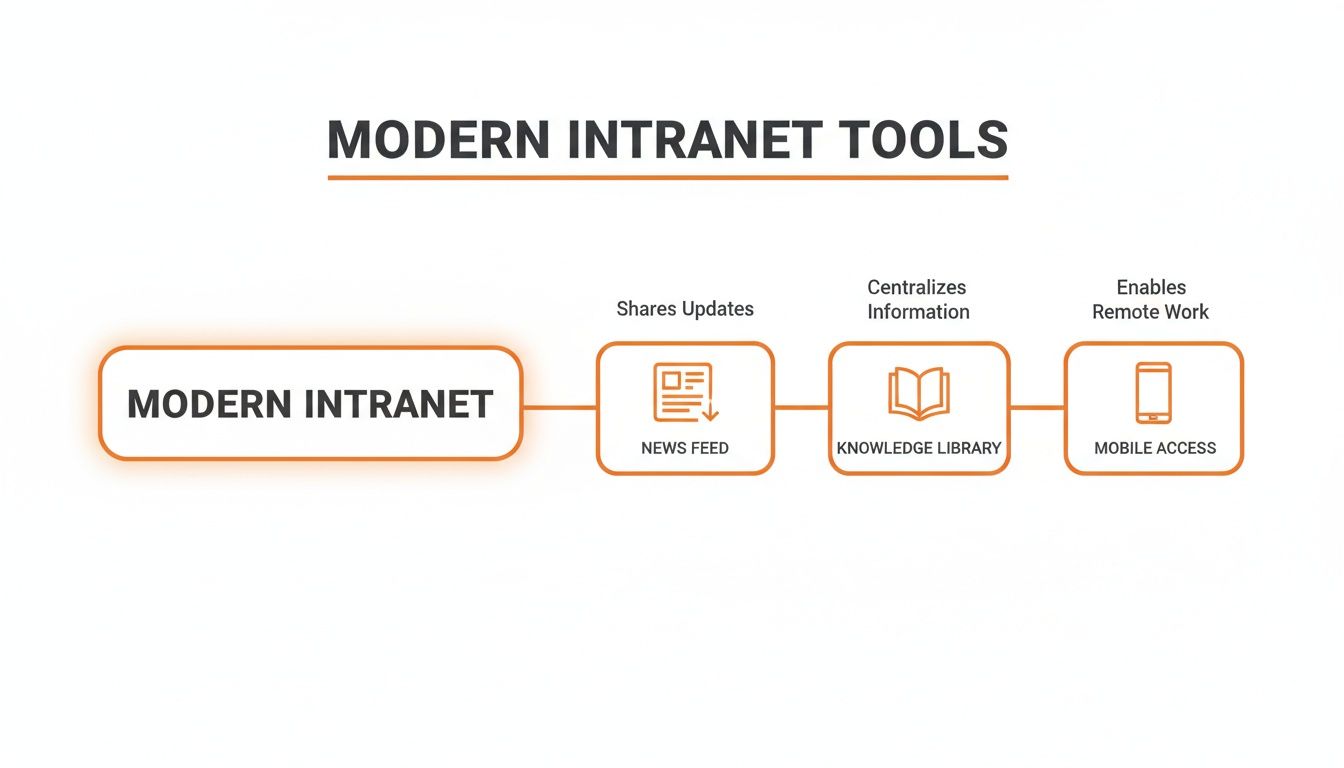
It’s the combination of a dynamic news feed, an accessible knowledge library, and go-anywhere mobile access that turns an intranet from a static repository into a tool people actually want to use.
A successful transition is a human-centric one. It’s a gradual process of building trust and proving value—one team at a time.
How to Tell if Your Intranet Is Actually Working
The launch is over. The confetti has settled. Now what? The true test of any new tool isn't the fanfare—it's whether people use it and find it valuable. Everything else is noise.
For years, we've been taught to measure success with hollow metrics like ‘page views’ or ‘time on site.’ Let’s be real. Those numbers don't tell you much. Someone could have a page open in a forgotten browser tab all day, and it would count as a win. That’s not a victory. It’s a vanity statistic.
We need to be smarter. Instead of chasing meaningless numbers, let's focus on real-world outcomes. The biggest signs of a healthy intranet are often found in what stops happening.
Look for Shifts in How People Work
The proof isn’t in a dashboard; it’s in the day-to-day flow of your teams. Are frontline employees chiming in on company updates instead of just hearing about them through the grapevine? Is the time it takes to get a new hire up and running shrinking because they can find everything themselves?
These are the real signs you’re on the right track. Fewer “all-staff” emails. Faster problem-solving. Real, honest-to-goodness interaction, where people are commenting and asking follow-up questions, not just passively reading posts.
This shift from passive viewing to active participation is the whole ballgame. It’s the difference between a tool that’s merely tolerated and one that’s woven into the fabric of how your company communicates.
Measure What Actually Matters
Just because we're ditching vanity metrics doesn't mean we stop looking at data. We just need to track the right things—the numbers that show us what people are really doing and give us a clear picture of how the intranet content management software is performing.
The goal isn't to 'launch an intranet'—it's to build a more connected and efficient workplace. The right metrics tell you if you're actually getting there.
Instead of page views, look at adoption rates by department. Is the operations team as engaged as the folks in marketing? Track who is engaging with critical posts—how many people on the night shift saw that crucial safety update?
And maybe the most important metric of all: how often does the search bar deliver a useful result on the first try? A successful search is one of the quietest but most powerful signs of a healthy system.
These are the numbers that tell a story. They show you where the tool is hitting the mark and where it might need a nudge. They’re honest, actionable, and focused on the only thing that really counts: making work better for your people.
Should You Just Build Your Own Intranet?
Sooner or later, every leader with a few developers on staff has the same thought: "We could probably just build this ourselves."
It's a tempting idea. The dream is a perfectly customized tool, built from the ground up to fit your company’s exact workflows. No bloated features, no workarounds. A pure, bespoke solution. We get the appeal.
But let's be frank. This path is often a minefield of hidden costs and spiraling complexity. What starts as a "simple" internal project almost always balloons into a full-blown software development marathon—a marathon you never signed up to run.
The True Cost of Building It Yourself
Getting the first version built is just the opening act. The real drain on your resources is the endless, ongoing maintenance. Technology marches on. New security threats pop up overnight. A new iOS update is released, and just like that, the app your team built is broken for half your employees.
Suddenly, the talented developers you hired to innovate on your actual product are spending their days squashing bugs on an internal tool. Their focus—your most valuable asset—is pulled away from the core business that makes you money. You've accidentally become a software company on the side.
Building your own intranet isn't a one-time project; it's a forever commitment. You’re signing up to maintain, secure, and innovate on a product that isn't the one you sell.
If your organization is leaning toward this massive undertaking, know that mastering IT infrastructure project management strategies is non-negotiable to sidestep common disasters. But even with the best project managers, the core question stands.
We've seen a comprehensive guide to building intranets that lays out the stark differences between buying a ready-made tool and building one. The best intranet content management software on the market is the product of years of feedback from thousands of companies. Their features have been battle-tested and refined. Can an internal team really replicate that?
This isn’t about selling you something. It’s an honest perspective from seeing too many great companies get bogged down in a project that distracted them from their real mission.
So, the question isn't whether you can build it. It’s whether you should. What is the problem you're trying to solve? The right tool is the one that solves it with the least friction, freeing you to focus on the work that truly matters.
Your Top Questions About Intranet Software, Answered
We talk to leaders in HR, Internal Comms, and Operations every day. They're often fed up with clunky old systems and looking for a better way to connect with their teams. Over time, we've noticed the same questions pop up again and again.
Let's get right to them.
How Is a Modern Intranet Different from SharePoint?
Ah, the classic question. While SharePoint can be a powerhouse for document storage, making it feel like a friendly intranet often turns into a massive IT project. It usually requires a ton of custom development just to get the basics right.
Modern platforms are built with a different philosophy. They’re designed for communication from day one, right out of the box. Think intuitive mobile apps, social-style news feeds, and practical tools built right in. The goal isn't to be a digital filing cabinet. It's to create a true digital hub for the employee experience, especially for frontline teams who work on their phones, not at a desk.
What’s the Biggest Challenge When Rolling Out a New Intranet?
Honestly? The technology is rarely the hard part. The real challenge is human—it’s changing habits and getting people to use the new tool. You could have the most amazing intranet content management software on the planet, but if employees don't see the value, it will just collect digital dust.
Success hinges on one thing: clearly showing how this change makes an employee's daily work life genuinely better. You have to answer their unspoken question: "What's in it for me?"
That’s why a phased rollout beats a massive, all-at-once launch. Start with a pilot group to solve one specific problem. Get your leaders actively using it and find a few enthusiastic champions to show their coworkers the ropes. That’s how you build real, lasting momentum.
How Should We Handle Content Governance?
Good governance isn't about creating a bureaucratic fortress. It's about establishing clarity and empowering people. The best systems use a distributed model, where different departments—like HR, Operations, and Marketing—own their specific sections.
You just need a few simple guidelines on tone, formatting, and a schedule for reviewing old content. A great platform makes this easy by letting you set permissions, schedule content for archival, and track versions without a headache. The goal is to make it simple for the right people to contribute while maintaining quality, not to create a single, overwhelmed admin who becomes a bottleneck for every update.
Ready to build a digital home your teams will actually love? Pebb brings communication, operations, and engagement together in one simple app for every employee. See how it works.
