
Homebase Per Location Fees vs Seat Pricing: A Real Guide
Homebase per location fees vs seat pricing explained clearly. See when each model fits, with cost examples and a practical recommendation framework
Dan Robin

Tuesday at 2:17 p.m. is when bad software pricing decisions usually show up.
A district manager is between calls, a store lead is texting about coverage, payroll closes tomorrow, and someone opens the renewal quote. Two new sites went live. The invoice jumped. Nobody's shocked, exactly. But everyone suddenly wants to know the same thing: would a seat-based plan have hurt less?
I've sat through that meeting more than once. It never starts as a pricing debate. It starts as an ops problem. Too many rotating staff, too many approvals, too many logins, too much manager cleanup. Then the bill lands, and now finance cares too.
That's why Homebase per location fees vs seat pricing isn't a side question. It's a real operating choice. The wrong model taxes the way you staff. The right one fits the shape of your business and stays boring, which is what software bills should be.
The Pricing Question That Hits Every Multi-Site Operator
Multi-site teams don't run on neat org charts. They run on shift swaps, last-minute callouts, floaters who bounce between sites, and managers who approve things from a parking lot. When you're in that world, pricing isn't abstract. It hits payroll hours, labor planning, and the time your managers spend cleaning up access and schedules.
I've seen this happen with café groups, clinic operators, and retail chains. You start with one site, maybe two. The price feels fine. Then growth changes the math. Add locations and the bill moves one way. Add people and it moves another way. If you picked the wrong model early, expansion turns into a tax you didn't plan for.
Practical rule: Your software bill should follow the constraint you can predict best. For some teams, that's headcount. For others, it's site count.
That's the part too many buyers miss. They treat pricing like a finance checkbox when it's really an operations design choice. If your staffing is volatile but your footprint barely changes, one model makes life easier. If your locations expand faster than your rosters, another one does.
For multi-site scheduling, this matters even more because the tool sits in the middle of daily work. Schedules, clock-ins, approvals, payroll exports. You don't just buy a price. You buy a meter. If you want another take on that problem, this piece on multi-location scheduling without per-location fees gets at the same pressure from the scheduling side.
What's really at stake
There are three costs in play, and only one shows up on the invoice:
Software spend: The obvious one. Monthly or annual platform fees.
Manager time: The hidden one. Adding users, removing users, checking permissions, fixing payroll mistakes.
Planning friction: The expensive one nobody budgets for. The wrong pricing model changes how willing you are to add staff access, cross-train people, or open a new site.
That's why I care less about the headline number than the cost curve. Some models reward dense staffing. Some reward lean teams. Some look cheap until you add payroll and support. We'll get into that next.
What Per-Location Fees and Seat Pricing Actually Mean
A three-store operator with stable storefronts and constant hiring pressure should not evaluate pricing the same way as a five-site business with a fixed management team. The question is simple: do your costs move more often with staffing changes or with new locations?
Per-location pricing charges for each operating site in the system. One store, one clinic, one warehouse, one branch. Add a site, the bill goes up. Keep the same footprint, and the software fee usually stays flat even if staffing inside that site changes. Homebase uses that model on its public plans, with a free tier for one location and paid tiers charged per location, as listed on the Homebase pricing page.
Seat pricing charges for each user account with access. The bill moves when you add managers, supervisors, admins, or frontline staff, depending on who needs a paid seat. In scheduling software, that model is commonly framed as a per-user monthly charge, as noted in this overview of employee scheduling software cost.
Model | What you pay for | What usually changes the bill | Best fit |
|---|---|---|---|
Per-location | Each site | Opening, splitting, or adding sites | Businesses with stable footprints and fluctuating rosters |
Seat pricing | Each user | Hiring, access changes, permission sprawl | Businesses with controlled headcount or limited paid users |
Here is the part buyers gloss over. Per-location pricing feels predictable because it gives you a clean site-based anchor. That works fine until payroll, compliance tools, and support upgrades sit on top of it. Then the invoice stops behaving like a simple location count and starts reflecting how messy your staffing is.
A simple example
Take one café with 14 staff and regular turnover.
Under a per-location model, the software fee for that café can stay the same month after month while you hire, replace, and cross-train people at that site. Under a seat model, each added paid user changes the math. Same operation. Different exposure to staffing volatility.
Now open two more cafés. A per-location tool counts three billable sites. A seat-priced tool counts the users who need access across all three. If your store count barely changes but your staffing swings every quarter, per-location pricing is easier to forecast at the software level. If your sites multiply faster than your user base, seat pricing can hold the line better.
What counts as a location or a seat
Quotes go sideways. Vendors use familiar words, then bill them differently.
A location usually means a physical operating unit. A storefront, clinic, office, warehouse, or venue. Some vendors also count kiosks, satellite counters, or temporary sites as separate billable locations.
A seat usually means a user account with platform access. That can include hourly staff, shift leads, store managers, regional managers, payroll admins, and HR. If access rules are loose, seat counts drift up fast.
That billing logic affects behavior. Teams become stingier about who gets access. Managers postpone setting up new sites. Payroll admins work around the system instead of through it. The same cost logic shows up in other service categories too. This piece on the ROI of managed IT providers makes the same point clearly. You have to know what unit the vendor charges for before you decide whether the model will still make sense at scale.
A pricing model tells you which kind of growth the vendor expects you to absorb. More people, or more places.
That matters more than the headline rate.
Where the Two Models Diverge in Practice
You feel the difference between these models the first time staffing stops behaving neatly.
One month, a store runs with a stable team. The next month, you add seasonal hires, borrow staff across sites, give a district manager broader access, and open a temporary counter inside an existing location. Your bill changes for very different reasons depending on the pricing model you picked. That is the decision. Not which vendor posts the prettier base rate, but which bill stays predictable when labor moves around.
Per-Location Fees vs Seat Pricing at a Glance
Dimension | Per-Location Fees | Seat Pricing |
|---|---|---|
Primary cost driver | Physical site count | User count |
Spend predictability | Better when sites stay fixed | Better when active users stay fixed |
Reaction to staffing surges | Usually stays flat within an existing site | Increases as more workers need accounts |
Reaction to footprint growth | Increases when new sites are added | Less affected if access stays limited |
Admin overhead | Less user cleanup, more site definition | More user cleanup and permission control |
Fit for frontline access | Strong if broad staff access is expected | Strong if paid access is limited to a smaller group |
What each model actually rewards
Per-location pricing favors operations with heavy staffing inside a small number of sites. If one café has 12 employees and another has 32, the software fee can still stay tied to the same location count. That looks efficient on paper, especially for labor-heavy businesses.
Seat pricing favors strict access discipline. If only managers, supervisors, and a small admin group need full accounts, the bill stays tighter. If every hourly worker needs app access, schedule visibility, or workflow actions, seat pricing gets expensive fast.
That is the clean version. Real operations are messier.
Where the bill starts to drift
Seat pricing drifts with labor churn. New hires get invited. Terms sit active longer than they should. Floaters need access at multiple sites. Seasonal workers come in for eight weeks and stay on the invoice longer than eight weeks unless someone is policing user cleanup every month.
Per-location pricing drifts in a different way. The problem is not headcount. The problem is how the vendor defines a billable site. A pop-up counter, event booth, detached prep kitchen, satellite clinic room, or seasonal stand can all trigger arguments if your org chart does not match the vendor's location logic.
This is the practical rule: choose the model that matches the thing in your business that changes less often.
If headcount swings every month but your footprint is stable, per-location pricing usually gives you cleaner budgeting. If site count changes often but system access is tightly limited, seat pricing is easier to control.
Why Homebase's location anchor can mislead buyers
Homebase looks simple because the entry pricing is anchored to location count. That works well for a dense frontline team in a fixed store footprint. It stops feeling simple once you add payroll, upgraded features, or other paid layers that do not behave as neatly as the base location fee.
That is where buyers get tripped up. They compare location pricing against seat pricing as if the whole stack follows the same billing logic. It does not. The base subscription may stay flat while payroll costs, premium features, or admin needs rise with workforce complexity. At that point, the location anchor is still useful, but it is no longer the full story.
Where ops teams feel pain first
The pain shows up in admin habits.
With seat pricing, someone has to own access hygiene. Every hire, transfer, leave, and termination needs cleanup. If nobody owns it, waste creeps in monthly.
With per-location pricing, someone has to own location governance. You need written rules for what counts as a site, when a temporary operation becomes billable, and how shared teams are managed across locations.
Choose the cleanup burden your team can handle. If your managers already struggle to keep employee records current, do not buy a pricing model that depends on perfect seat management. If your footprint changes constantly through pop-ups, mobile units, or temporary sites, do not assume location-based pricing will stay neat just because the homepage says "per location."
Cross-site workflows complicate both models
Multi-site operators rarely run in tidy boxes. Regional managers oversee several locations. HR supports everyone. Payroll runs centrally. Staff pick up shifts across stores.
That cuts against both pricing models in different ways. Seat-priced systems get more expensive as more people need legitimate access. Location-priced systems get more awkward when approvals, reporting, and workflows live above the site level.
The right question is simple. Is your cost volatility driven more by people changes or place changes?
Answer that first. The better pricing model usually becomes obvious.
Real Cost Examples for Multi-Site Businesses
You approve a scheduling tool for three stores because the per-location price looks cheap. Six months later, payroll is separate, one store split into two operating units, and your “simple” cost model is no longer simple. That is the buying problem for multi-site operators. Predictability matters more than the headline rate.
Keep the math plain. Use the earlier baseline figures already established in this article: Homebase at a per-location base rate, and a seat-priced comparison at an average monthly seat cost.
Scenario A for a three-location café group
A café group runs 3 locations with 55 employees. Staffing is fairly stable. Almost everyone needs schedule access.
Using the same assumptions from earlier, the annual comparison looks like this:
Scenario | Per-Location (Homebase) | Per-Seat (avg $5) | Break-even Insight |
|---|---|---|---|
3-location café group, 55 employees | $1,080 per year | $3,300 per year | Per-location wins when headcount is high relative to site count |
12-location retail chain, 180 employees | $4,320 per year | $10,800 per year | Per-location stays flatter if many frontline workers need access |
For this café group, the base subscription answer is obvious. A location-based core plan is cheaper.
That does not mean the spend is more predictable.
If the group adds payroll, tip handling, or another paid module, the clean per-location story starts to blur. The base platform may still look favorable, but the total bill now reacts to employee count and extra modules, not just site count. That is the part buyers miss when they stop at the homepage number.
What Scenario A actually tells you
Dense staffing inside a small number of established sites usually favors a location-based base plan. That is the easy part.
The harder question is whether your costs stay calm when staffing changes. If your café group hires fast in summer, rotates part-timers often, or adds payroll later, the cheap location anchor stops being the full picture. Use your real roster, your real manager count, and your actual add-ons before you sign anything. If you want a plain seat-based reference for comparison, Pebb's employee communication and scheduling pricing shows that model directly.
Scenario B for a twelve-location retail chain
Now take a 12-location retail chain with 180 employees. This operation has more seasonal churn, more floaters, and more exceptions.
On base subscription math alone, the location-priced model still comes out lower. That is exactly why Homebase can look like the easy winner in early comparisons.
But operators get fooled. Retail chains with volatile staffing do not just buy software. They buy spend behavior.
A seat-based model rises and falls with active access. That can hurt if every associate needs an account, but at least the cost logic is visible. A per-location model feels flatter at first, yet that stability can break once payroll and paid extras enter the stack. If employee count is the thing changing every month, your real cost volatility is still tied to people, even if the base plan is tied to locations.
The practical read on both examples
These examples are useful for one reason. They show the difference between a cheap starting point and a predictable long-term bill.
If your workforce is large, site-based, and steady, per-location pricing usually gives you a stronger base subscription outcome. If your staffing swings hard by season, by region, or by payroll volume, judge the model by total spend behavior, not by the entry plan. That is the safer way to buy.
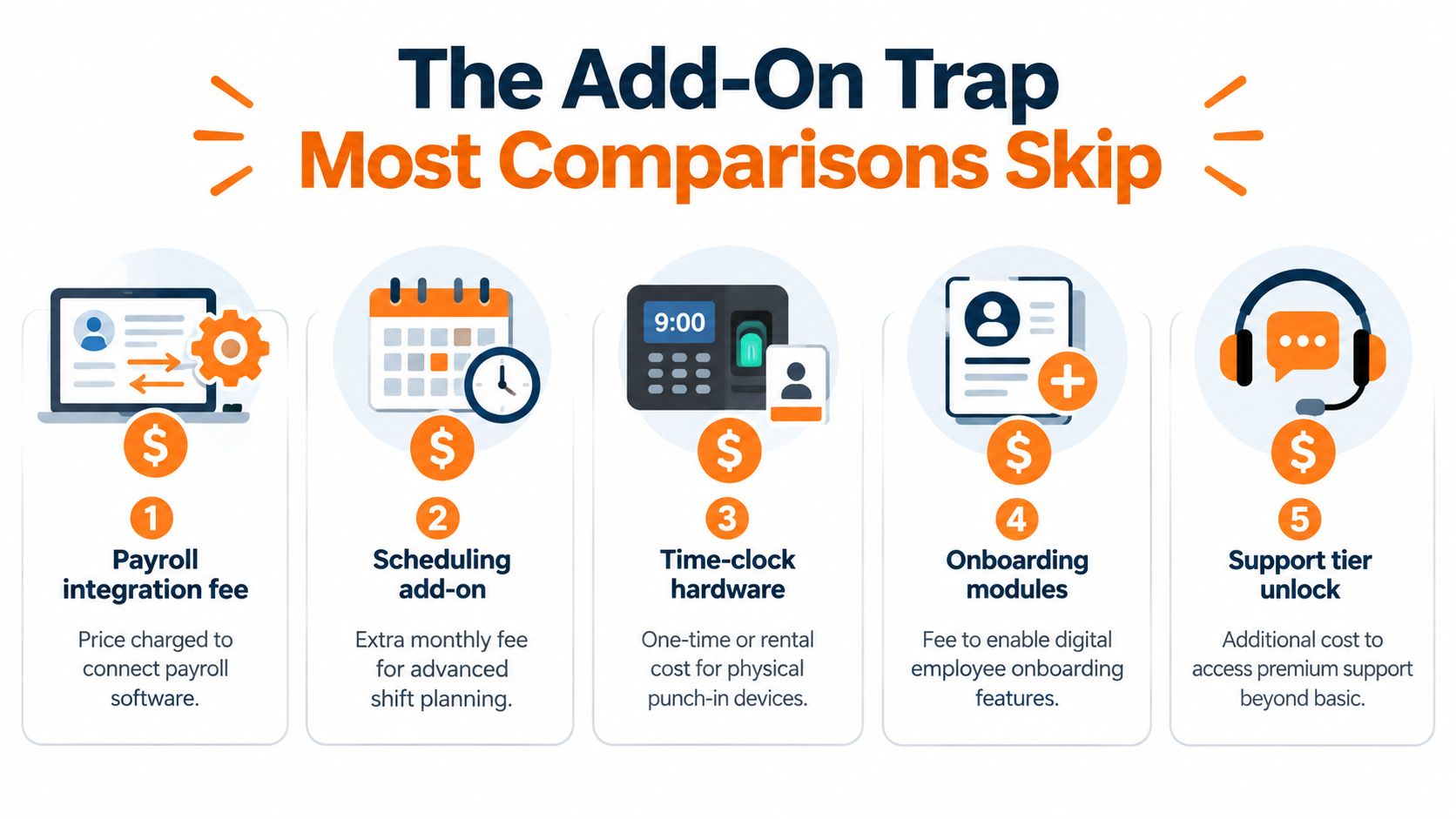
The Add-On Trap Most Comparisons Skip
Run the buying process the way multi-site operators usually do. You compare base plans, pick the cheaper monthly number, and move on. Then payroll gets added, tip handling comes up, and the invoice starts following headcount again.
That is the trap.
Homebase leads with per-location pricing, but your full spend does not stay per location once payroll is part of the setup. Payroll is sold separately on a base-plus-per-employee model, so the cost logic shifts the minute you need more than scheduling and time tracking.

Where the clean story breaks
The sales story sounds simple at first. One fee per site. Easy budget. Predictable rollup.
Opinion needs math here.
Once payroll and extra modules enter the stack, you are no longer buying a clean per-location product. You are buying a blended pricing model with two different cost drivers. Locations on one side, employees on the other. If your staffing swings hard by season, that second driver matters more than the headline plan suggests.
Tip Manager adds another layer because it is billed separately by location. So even if your payroll volume drops in a slow month, some extras stay fixed at the site level. That creates a bill that is partly stable and partly variable, which is exactly the kind of structure that causes budget misses if nobody maps it out upfront.
Five questions to ask before you sign
What part of this quote rises with employee count? Get the payroll logic in writing.
What part rises with site count? Add-ons tied to locations change expansion math fast.
Which tools we already expect to use are outside the base plan? Do not approve a plan based on features you will have to buy later.
What happens during seasonal ramps, float coverage, or temporary hires? That is when pricing model shows itself.
Who owns monthly reconciliation? Mixed pricing always creates admin work, and admin work has a cost.
Pricing mistakes usually happen before procurement, when an operator treats the entry plan like the operating cost.
My blunt take
Per-location pricing works well when the workforce is dense, the site footprint is stable, and add-ons stay light. That is the clean version of the model.
A lot of multi-site teams do not live in that clean version. They add payroll. They add location-based extras. They hire up for peak periods, then cut back. At that point, Homebase is no longer a simple per-location buy. It is a hybrid bill, and you should judge it on spend predictability, not on the entry price that got your attention.
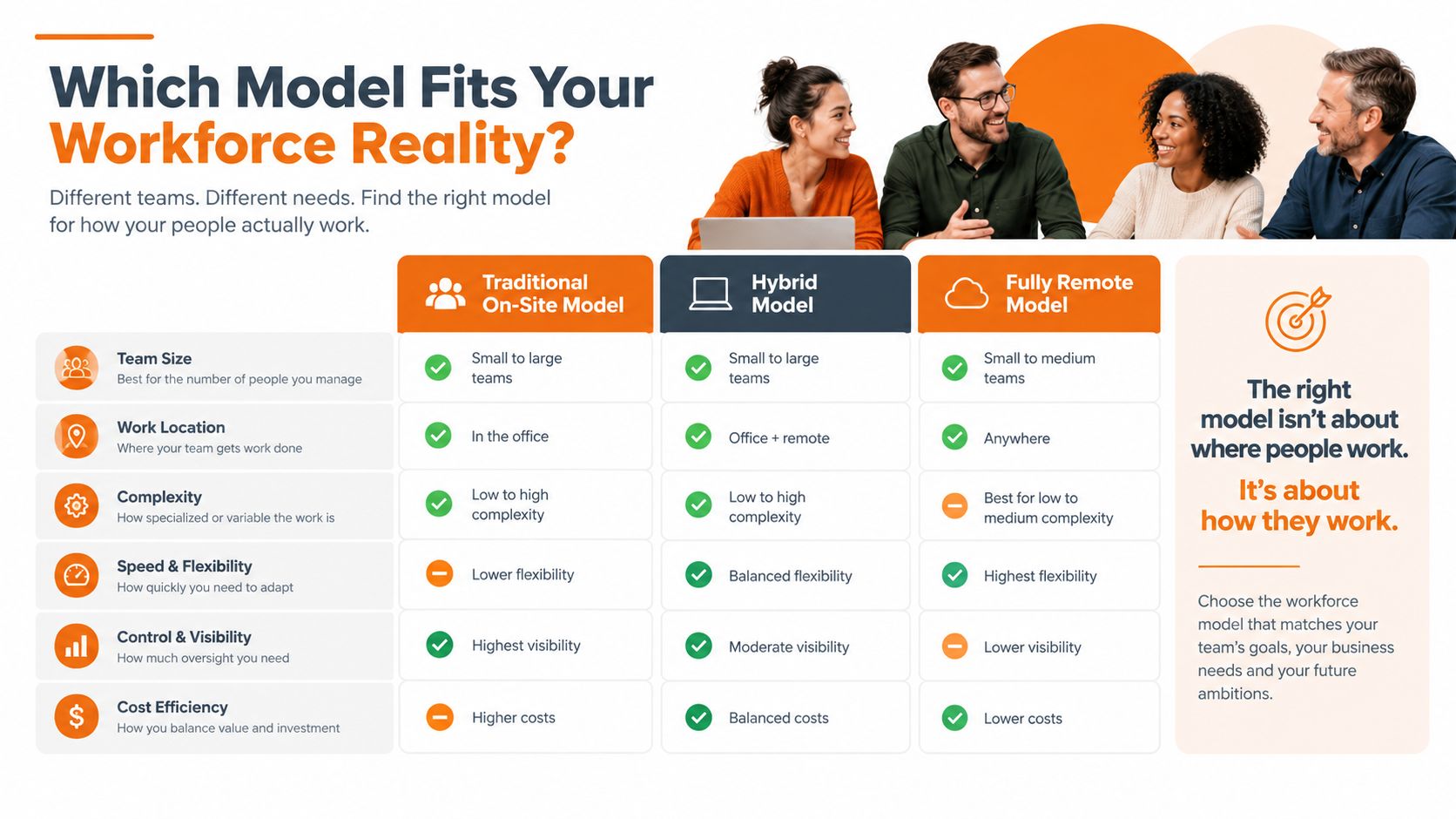
Which Model Fits Your Workforce Reality
If you want the short version, stop asking which model is “better.” Ask which one matches the shape of your workforce.
Three signals matter more than anything else: location count, staffing density per site, and shift volatility.
Start with your site shape
If you run a lot of employees inside each site, per-location pricing often makes sense. That's the cleanest use case for Homebase. One site fee. Lots of workers. Predictable base cost.
If you run a smaller number of employees with tighter access controls, seat pricing usually feels more honest. You pay for the users who need the tool.
Then look at volatility
This is the part I think operators should weight more heavily.
When staffing changes week to week, seat pricing can mirror reality better if only active users need paid access. But if your frontline model requires broad access across many employees, the admin burden can become its own cost center.
Per-location pricing works best when your physical footprint is stable and you want invoices that don't bounce around with every staffing change. It gets worse when your growth plan depends on adding sites fast.
My recommendation matrix
If your business has many workers per site and your site count changes slowly, lean per-location.
If your business has tighter user groups and your roster changes more than your footprint, lean seat-based.
If you're a franchise, seasonal operator, or hybrid org with some shared services across sites, push vendors on custom structures. A cap or blended arrangement can be smarter than either pure model.
I'd also keep one more option on the table. Some teams don't just need scheduling and time tracking. They need communication, tasks, policies, and shift coordination in one app. In that case, a tool like Homebase alternative discussions are useful because they widen the decision beyond the narrow “scheduler only” lens. Pebb, for example, uses a per-user model and combines communication, operations, and workforce coordination in one place. That changes the comparison if you're replacing multiple tools, not just one.
Migration, Governance, and the Decision That Sticks
The best pricing choice still fails if rollout is sloppy.
I've seen teams save money on paper and lose it back in migration headaches, poor training, and contract terms nobody read carefully enough. Auto-renewals, location true-ups, seat audits. Those details matter because they define how painful it is to live with the contract after the demo glow wears off.
What to check before you move
Contract mechanics: Watch for automatic renewals, seat minimums, and location-count adjustments during the term.
Data migration: Employee records, schedules, historical exports, and payroll handoff need a real owner.
Governance: Decide who manages access, who approves new sites, and how often manager training gets refreshed.

The discipline each model demands
Seat-based contracts need tighter monthly seat hygiene. If no one owns user cleanup, the bill drifts up and nobody notices until renewal.
Per-location contracts need tighter location governance. If your org invents shadow sites, temporary sites, or weird exceptions, the invoice gets harder to predict and harder to defend.
Good governance makes the pricing model work. Bad governance makes every model look overpriced.
My advice is simple. Score your options on four things: location count, employee density, turnover rate, and integration count. Then run a 90-day pilot with one site before you sign anything broad. That pilot should test cost, manager workload, payroll flow, and employee adoption. If a pricing model only looks good in a spreadsheet, it's not ready for your operation.
If you're weighing Homebase against seat-based tools, don't just compare scheduler prices. Compare the whole operating stack. Pebb gives teams a per-user model that brings chat, updates, tasks, knowledge, scheduling, clock-in, and PTO into one app, which is useful when you're trying to replace tool sprawl instead of adding another system to it.
