
How to Handle Field Crew Timesheet Approval Without Payroll
Learn field crew timesheet approval without payroll: approval roles, verification checks, exception handling, audit trails, and a practical Pebb workflow.
Dan Robin

Monday morning usually starts the same way. A supervisor is trying to line up hours from three sites, two text threads, one spreadsheet, and a foreman's memory, while payroll is already asking for clean numbers. That's where the pressure builds, but the common mistake is thinking approval exists only to please payroll.
Field crew timesheet approval without payroll is about trust in the hours before anyone pays them, bills them, or loads them into a project report. If the record isn't approved, it shouldn't move. That simple rule keeps job-costing, billing, and compliance from running on guesswork, and it fits the way field work unfolds, across shifts, sites, and devices. If you're comparing tools, it helps to look at the basics first, so I'd start with compare time tracking features and then decide what your approval flow really needs.
Why Approve Time Before Payroll Ever Sees It
The best approval process starts long before payroll. It starts when the crew finishes the shift, the supervisor has the work fresh in mind, and the hours are still connected to the job that produced them. That's the moment when time becomes useful, because it can still be checked against the work itself.
Capture is not approval. Capture is the raw record, the clock-in, the note, the job code, the location, the break. Approval is the control step that says, “This is the version we trust.” One workflow guide describes approved timesheets flowing to payroll after manager review, and that same idea holds even when payroll isn't the destination, because the approved record is still the one other systems should rely on (Timesheet approvals guidance). If you're looking for a simple mental model, think of approval as the gate between field reality and every downstream process that depends on it.
That matters in practice. Billing wants clean hours. Job-costing wants work tied to the right job. Compliance wants a record that can survive questions later. Payroll is just one consumer of that record, not the reason it exists.
A useful way to think about the setup is this: the crew records time at the source, the supervisor reviews it while the work is still current, and the approved record gets locked before it moves on. That pattern shows up in field workflows that separate capture from approval and freeze the record before export. It's also why a good approval process can stand on its own, even when payroll lives in another system or gets handled later (timesheet app small business notes).
Approved time is not a clerical finish line. It's the point where the record becomes dependable.
Approval Roles and Rules That Actually Hold Up
The role model has to be boring, or it'll fail. The person who saw the work should approve it. The person who corrects it should not be the same person who signs it off. And nobody should approve their own time. That's the standard worth defending, because once self-approval slips in, the whole review step starts looking decorative.
Start with direct knowledge
A supervisor, foreman, or manager with firsthand knowledge of the shift should approve the hours. That approval should be tied to the job, crew, location, and day they observed. In field work, those details matter more than people admit. A sheet that says the right number of hours but leaves out the job, task, or location can still be wrong in a way payroll won't catch.
That's why mandatory context fields help before payroll is even involved. Job, cost center, location, break status, and classification give the approver enough context to judge whether the time makes sense. If your crew splits a day between a service call and a maintenance run, the approver needs that split visible, not buried in a note nobody reads.
Separate approval from correction
The most useful rule is simple. One role approves. Another role reopens or corrects. That separation keeps the record honest and keeps edits visible. If the same person can create, edit, and approve every entry, you lose the trail that explains what changed and why.
I've seen too many teams drift into that habit because it feels faster. It isn't. It just pushes the mess into the next pay period.
For teams that want a clean comparison point, the approval discipline around time looks a lot like clean AP with Loopfour, where separation of duties and controlled edits matter more than speed for its own sake. Different process, same instinct, keep the person who verifies separate from the person who fixes.
If one person can create, edit, and approve everything, you don't have an approval process. You have a shortcut.
Verification Checks Worth Your Time Each Period
Supervisors don't need another admin ritual. They need a short review that catches the things that go wrong. The strongest routine is usually the simplest one, because it fits inside the day instead of fighting it.
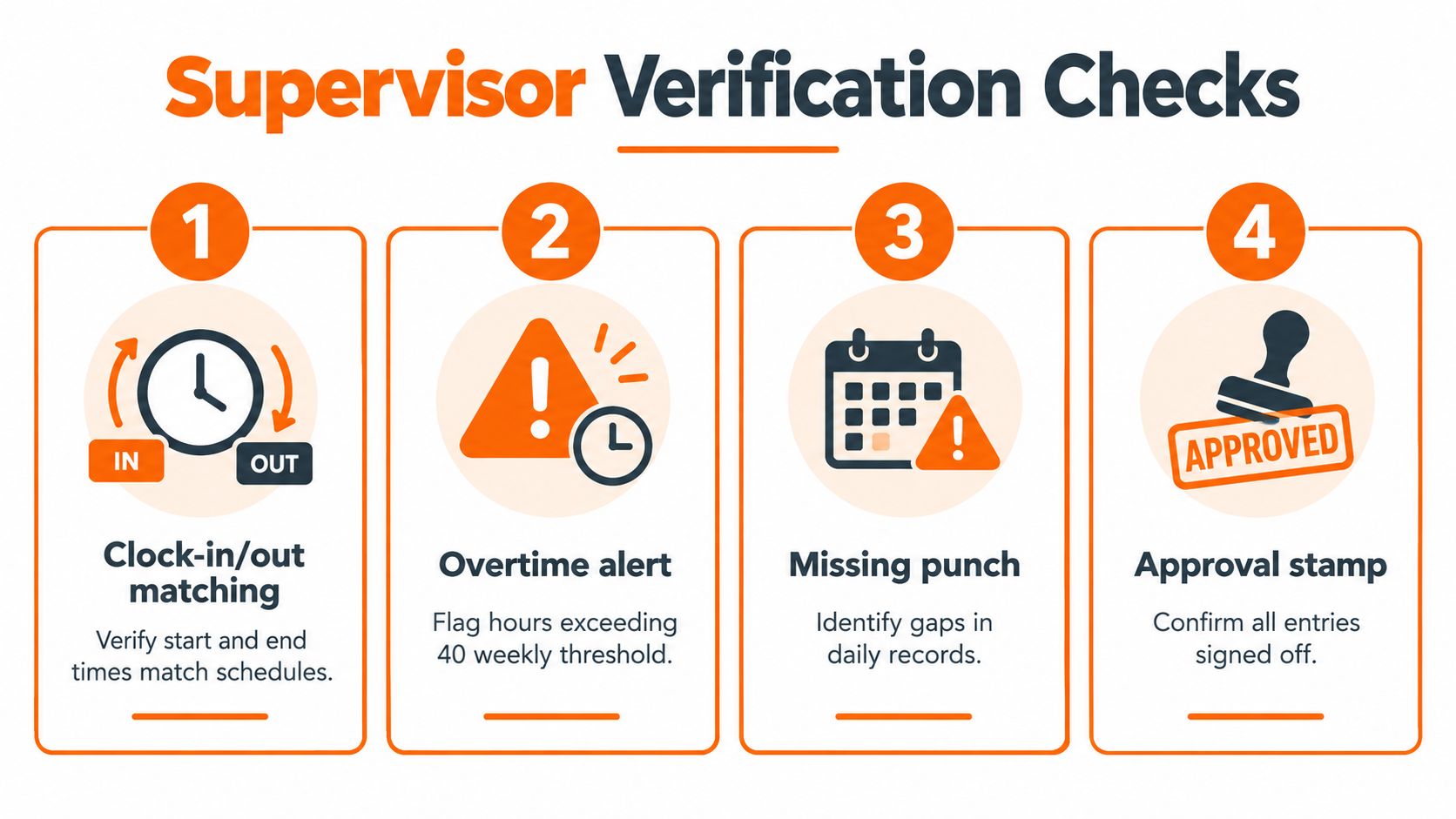
Review in the order the work happened
Start with the schedule. Does the time line up with the shift, the site, and the crew assignment? Then check the job and cost-code assignment. After that, look at break status and missing punches. Finish with a quick scan for duplicates, impossible overlaps, or entries that just don't match the day.
That order matters because it mirrors how a supervisor thinks about the work. First, who was there. Then, what they were doing. Then, whether the day was recorded cleanly. If the timesheet says a three-person crew was on one site but the job record says two different locations, you've found a real problem, not just noise.
A practical benchmark says managers should spend only 2 to 5 minutes reviewing each employee's weekly timesheet, with a 10-person team taking under 30 minutes total per week (workflow benchmark). The same benchmark says submission rates below 90% usually point to a process or reminder problem, and approval cycles longer than 48 hours usually signal a review bottleneck, not an employee issue. Those numbers are useful because they keep everyone honest about where the delay lives.
Here's the thing. If the review takes much longer than that, the system is probably asking the supervisor to do too much. A good review should feel like a quick inspection, not detective work.
Check | Healthy Signal | Red Flag |
|---|---|---|
Schedule match | Hours align with the assigned shift | Start or end times don't fit the day |
Job or cost code | Time is tied to the right work | Labor is sitting on the wrong job |
Break status | Breaks are recorded clearly | Breaks are missing or unclear |
Final approval | The record is complete and signed off | Approvals sit open for days |
For a practical walkthrough of the clock-in side of the workflow, the how clock-in works in Pebb article is a useful companion because it shows where the review starts, not just where it ends.
Handling Exceptions, Missing Punches, and Late Approvals
The happy path is easy. The week you had is not. Someone forgets to clock out. A supervisor goes on vacation. Three approvals pile up. Then somebody suggests bulk-approving the whole stack and moving on. That's where teams get sloppy.
Treat exceptions as records, not afterthoughts
A missing punch should be tagged, not hidden. A late approval should be visible, not forced through. The point isn't to punish anyone. The point is to preserve the story of the record. If a worker forgot to clock out, the correction should say that plainly. If a supervisor had to reopen a timesheet, that action should be deliberate and documented.
Daily approval rhythms fit field work better than end-of-week cleanup. Crew time doesn't arrive in one neat pile, and the work itself changes too fast for memory to do the heavy lifting. Systems for field teams support daily approval, multi-level review, rejections with correction, and email reminders because the job keeps moving while paperwork doesn't (Pacific Crew Mobile App).
Don't make bulk approval the default
Bulk approval can be useful, but it's a blunt tool. If you approve twenty records at once, you've made speed the main feature of the process. That's fine only when the records are already clean and the approver has context. Otherwise, you're just washing the problem downstream.
Mobile reality makes this harder, not easier. Crews may clock in from shared tablets, supervisors may enter time on behalf of workers, and some teams need approval to move through more than one reviewer before anything is final. Field-service tools also support quick approval, edit, or rejection flows, which is useful when the crew is spread across sites and the record needs to keep moving (Hubstaff field tracking software). Another workflow pattern routes approved hours to billing or payroll only after supervisor review, with multiple reviewers checking the same time against job and cost code before money moves (Aimsio timesheets).

Daily correction beats end-of-week cleanup almost every time. The longer the gap, the weaker the record becomes.
Building an Audit Trail That Protects Your Records
An approved timesheet only helps if someone can reconstruct what happened later. That means the audit trail has to show more than a final stamp. It has to show the path that got there.
A strong record starts with capture by shift and job context. The worker reviews the full period. A separate supervisor signs off. Then the record freezes before export. That pattern is defensible because it leaves less room for confusion and more room for explanation. One mobile-first workflow even supports employee review, supervisor sign-off, exception tagging, and an audit trail for edits and late adjustments, which is the right shape for field crews that move fast and still need clean records (Gide time approvals and payroll export).
The weak version is easier to spot. Spreadsheet imports. After-the-fact supervisor edits. Copy and paste fixes with no note attached. Those habits create records that may look complete but can't explain themselves. When the record is challenged, nobody wants to untangle which cell changed, who changed it, or why the change happened.
Employee approval should be period-based, not partial. Partial sign-off creates fragments, and fragments are hard to defend. Blanket approvals aren't much better. They skip the judgment step and erase the distinction between work that was reviewed and work that was merely passed along.
A good audit trail doesn't have to be fancy. It has to be clear. If the approved record says who worked, what job they were on, who reviewed it, and what changed along the way, you can answer questions months later without guessing.
Running the Workflow in Pebb With Spaces, Shifts, and Approvals
The cleanest setup is the one people open. In Pebb, that usually means putting the crew in a dedicated Space where shifts scheduling, clock-in, PTO, and approvals live together instead of being scattered across tools and inboxes. That keeps the review close to the work, which is where it belongs.
A practical flow looks like this. Crew members log time from their phones. A supervisor with the right role reviews the timesheet, approves it, or reopens it if something needs fixing. The approved record is then ready for handoff to payroll, billing, or job-costing when you need it. Pebb's Spaces model is built for that kind of connected workflow, where the team, the schedule, and the time record stay in one place (how Spaces work in Pebb).
Keep the crew in one working space
That matters more than it sounds. Field teams hate hunting through chat threads for the latest schedule and then switching to another system to check time. One space cuts down the drift between what happened and what gets reviewed. It also makes it easier for supervisors to see the work in context, which is the whole point of approval.
Pebb also includes clock-in and timesheet review controls, so managers can track total time, break time, locations, and the timesheet record without turning approval into a separate project. That's useful for mobile crews because the approval step sits next to the day they just worked, not in some office-only lane nobody remembers to check.
The best workflow is the one that keeps the approver close to the work and the record close to the crew.
Measuring Your First Cycle and What Comes Next
Don't change five things at once. Run one full cycle, then compare it to the old way. Look at rework, late approvals, and exception volume. Those three tell you more about the health of the process than a feature list ever will.
If rework stays high, the capture step is still weak. If late approvals keep piling up, the bottleneck is probably manager behavior, not employee submission. If exception volume is climbing, that's a sign your rules are unclear or your crews need better prompts in the field. The earlier benchmark about approval time and submission rates is useful here because it gives you a way to tell friction from noise (workflow benchmark).
Teams discover the same thing. Approval quality depends less on payroll integration than on exception management. That's where the record either stays defensible or gets messy. So before you ask whether the system has enough bells and whistles, ask a simpler question, where are your hours getting stuck?
If you want one place to keep crew time, shifts, approvals, and team communication together, Pebb gives you that working space. It's built to keep frontline work organized without forcing your team into a separate approval maze. If this process is on your desk right now, take a look and see whether one connected space would fit the way your crews already work.
