
Difference Between Synchronous and Asynchronous Communication: A Practical Guide
Learn the real difference between synchronous and asynchronous communication, when each one helps your team, and how to blend them
Dan Robin

You know the meeting. The one that lands on your calendar at 9 a.m. with a title like “quick sync,” even though nobody in the room has anything new to say. By 9:30, the update could've been an email, the room feels tired, and the rest of the morning gets chopped into scraps.
That's the core problem behind the difference between synchronous and asynchronous communication. It's not about style. It's about workload design. If you choose the wrong mode, you don't just waste time, you spread interruption through the whole week.
I've watched teams fix this the hard way. The first win usually comes from stopping the habit of turning every question into a live call. If you need a clean way to capture what happened in a meeting so the note survives after everyone leaves, iScribe Live Transcribe for note-taking is the kind of tool people reach for when they're trying to make live time less disposable.
The Meeting That Should Have Been a Note
The bad meeting rarely feels bad while it is happening. It looks harmless on the calendar, a routine update, a few familiar faces, maybe a screen share nobody needed. Then the meeting ends, and the bill shows up in the rest of the day, the half-finished work, the slow restart, the irritation nobody says out loud.
The central question is not whether a team should meet or message. It is what kind of attention the work deserves. A status update needs a different shape than a safety issue. A policy note needs a different pace than a coaching conversation.
Practical rule: if the work does not change by being discussed live, write it first.
A lot of teams still default to live time because it feels productive. It feels decisive. Live time is expensive, and not just in minutes. It asks everyone to stop, align, and stay present at the same moment, which works when the problem is messy or urgent, and wastes time when it is not.
That is the workload design problem. Decide in advance which conversations need real-time attention, and the rest of the week gets lighter. iScribe Live Transcribe for note-taking helps when the meeting does deserve live discussion, but the record still has to survive after people leave.
Teams that get this right keep both modes on purpose. They do not worship meetings, and they do not worship chat. They design the week so the right work lands in the right channel, then they protect that choice instead of drifting back into habit.
What Synchronous and Asynchronous Communication Actually Mean
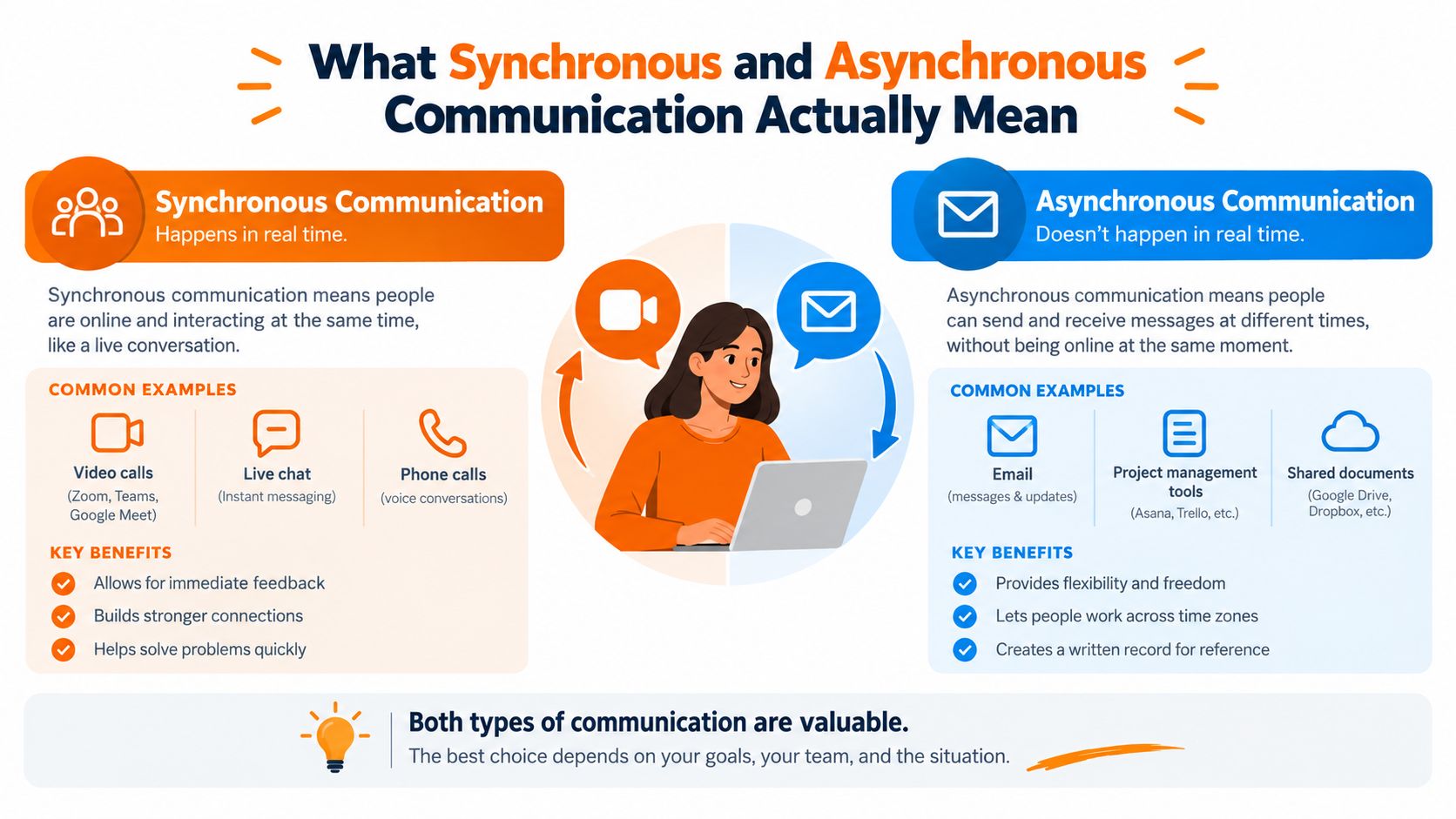
The split is simple, but the workload impact is not. Synchronous communication means people are present at the same time, the response comes back immediately, and tone, expression, and fast clarification all travel with the message. A video call, a phone call, or a live chat during a crisis belongs here.
Asynchronous communication breaks that timing. A message, document, recorded update, or task comment goes out now and gets answered later, when the other person is ready. Email, a post in a team Space, or a knowledge article someone reads after a shift all fit that side. If your team already runs on an employee communication platform, these definitions map directly to the channels you already use.
The easiest way to remember it
Synchronous communication works like a phone call. Both people have to be there, and the conversation moves at the speed of the moment. Asynchronous communication works like a letter stored in a shared filing cabinet. It stays available, it can be searched, and nobody has to stop what they are doing to deal with it right away.
That difference changes how work gets handled. Live communication fits ambiguity, emotion, and time-sensitive issues. Async fits information that needs to be read, reused, or checked later. One mode pulls people together in time. The other gives them room to think.
Use live channels when the work gets worse without immediate back-and-forth. Use async when the message should stay visible and reusable after the conversation ends. Crowning a winner is the wrong goal. Match the mode to the task, and live attention stops being wasted on work that never needed it.
What Each Mode Buys You, and What It Costs
Synchronous communication buys speed, nuance, and shared focus. It also brings interruptions, schedule friction, and conversations that vanish the moment they end unless someone captures them. Asynchronous communication buys a searchable record, continuity across shifts and locations, and room to think. It also brings slower decisions and the slow drip of messages people never read.
What the research says
A study of 447 U.S. workers found that phone calls, email, and instant messaging were linked with greater role clarity and coworker support, while video calls were linked with higher workload and burnout risk, according to research published in Sustainability. That matches day-to-day management experience. Live interaction helps when people need fast alignment, emotion, or immediate clarification. Written exchange works better when the goal is to preserve information and keep work moving without dragging everyone into the same moment.
The choice is operational, not ideological. Pick the mode that fits the work.
Dimension | Synchronous Communication | Asynchronous Communication |
|---|---|---|
Speed | Immediate back-and-forth | Delayed response by design |
Focus | Interrupts current work | Protects deep work |
Record | Needs notes or recording | Leaves a built-in trail |
Inclusion | Requires shared availability | Works across schedules and locations |
Best use | Urgent, ambiguous, sensitive work | Updates, documentation, handoffs |
For a practical lens on distributed team communication that works, use this rule, fit the communication mode to the task instead of forcing the task to fit the channel. The same principle shows up in how team chat works in Pebb, where chat, updates, and live calls each serve a different job.
Live time should earn its place. If a message can be understood, stored, and acted on later, it does not deserve a meeting.
What Happens When a Team Tilts Too Far One Way
A calendar packed with meetings doesn't just waste time, it fractures the day. Microsoft telemetry reported that employees using Microsoft 365 were interrupted, on average, every two minutes by a meeting, email, or notification, about 275 interruptions in a workday Microsoft WorkLab. The same analysis found that half of all meetings landed between 9–11 a.m. and 1–3 p.m., which is exactly where a lot of people do their best thinking.
That's one failure mode. The other is quieter.
When remote work pushes teams apart
A large-scale study of more than 61,000 Microsoft employees looked at communication before and after the 2020 shift to firm-wide remote work and found a 5% decrease in synchronous video and audio communication, an 8% increase in email volume, and a 50% increase in instant-message volume, all using normalized communication metrics University of California, Berkeley Haas research. It also found that employees spent about 25% less of their collaboration time working with colleagues outside their immediate groups.
That matters because it shows the hidden cost of written-only drift. Async scales well, but if it replaces too much real-time contact, collaboration gets more siloed. People still get the message, but they lose the easy cross-team friction that helps information move.
So yes, meetings can become a tax on attention. But a culture that goes too far the other way can lose connection, context, and the informal overlap that makes teams feel like teams. The trick is not to eliminate one side. The trick is to keep either side from taking over.
Matching the Mode to the Moment
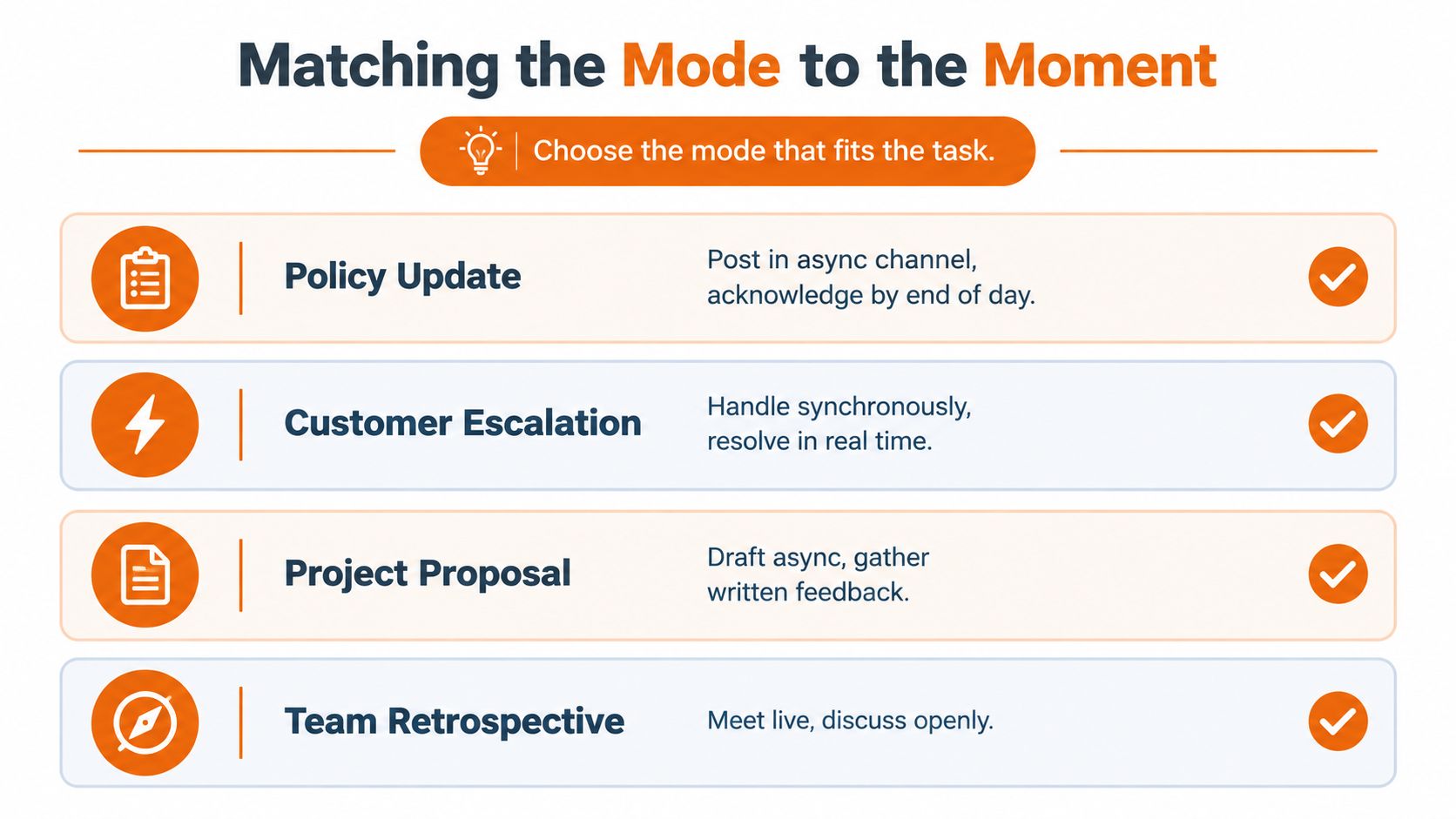
Teams typically get practical at this point. A policy update doesn't need a live meeting. Put it in a searchable post, ask people to acknowledge it, and move on. A shift handoff does need structure, because the next team needs enough context to act without guessing.
A safety incident is different again. That belongs on a synchronous escalation path, because delay can make the problem worse. A coaching conversation needs live time too, because tone matters and people deserve a chance to respond in the room instead of after the fact.
Use the right channel for the work in front of you
A project proposal is usually better drafted asynchronously first, then refined live if needed. A status update belongs in writing, where people can read it between tasks. A team retrospective works better live, because the value is in the open discussion, not just the record.
The BMJ Innovations study makes the case for this kind of discipline. Researchers reported that an asynchronous communication platform cut average task-completion time by 20.1 minutes, a 58.8% reduction, compared with the synchronous method used for comparison, in an observational study published in BMJ Innovations. That doesn't mean async wins every time. It means the right async tool can be faster than forcing everybody online at once.
If you manage a distributed or frontline team, gestione della collaborazione a distanza is a useful phrase to keep around, because distance changes the cost of every conversation. Pebb's how news feed works in Pebb also points in the same direction, since a shared feed is built for updates people can read when they're ready, not when a meeting starts.
Policy update: post it asynchronously, then set a clear acknowledgment deadline.
Customer escalation: handle it synchronously, because speed beats elegance.
Project proposal: draft it async, then invite written comments before any live review.
Team retrospective: meet live, because the value comes from the conversation.
The Hidden Cost of an Async-First Rule
An async-first rule sounds fair until it starts deciding who gets real-time access and who waits. That is a workload choice, not a neutral policy.
Harvard Business Review reported that as time-zone gaps grew, routine workers reduced synchronous calls while non-routine workers kept them by shifting meetings later, which suggests that a blanket async-first culture can create hidden inequity across worker groups HBR podcast. In plain English, one group loses live access while another keeps bending the schedule to preserve it.
Frontline work makes the trade-off obvious
A 2025 internal communications survey found that 62% of respondents cited information overload, and 62% also cited workloads that limited time to check communications, while 31% pointed to limited digital access, especially for frontline employees Modus internal communications survey. The same source reported that 53% of frontline manufacturing workers lost at least 24 minutes of each shift waiting for safety-critical information or approvals, and 64% operated under partial or complete smartphone restrictions on the production floor.
A shared feed like how news feed works in Pebb is one way to close that gap, because updates reach people on the floor without requiring them to be online at a set moment.
That is why slogans fail here. Async helps, but it does not fix access problems on its own. If people cannot check messages easily, or if the issue is urgent, a slow channel becomes a new bottleneck.
Better rule: start async for routine work, then keep a clear live escape hatch for anything safety-critical, ambiguous, or time-sensitive.
That rule keeps the team honest. Deliberate beats dogmatic. Choose the mode for each conversation, and write that choice down where everyone can see it.
Designing a Week That Uses Both on Purpose
The best teams don't pick a side. They decide in advance what deserves live attention and what should live in writing. That means a small number of standing meetings with clear owners, a shared async space for updates and decisions, and a simple rule for when a post becomes a call.
I like one more habit. Every few weeks, ask whether people are reading the async channels and whether live time is being spent on the right work. If the answer is fuzzy, the system is leaking.
The question isn't whether your team is sync or async. It's whether your week is designed with intent, or assembled from habits that nobody ever questioned.
Pebb gives teams one place for chat, updates, tasks, files, and calls, so synchronous and asynchronous work can live side by side without scattering context. If you're trying to cut noisy meetings and keep the important conversations visible, take a look at Pebb and see whether it fits the way your team works.
