
Author: Ron Daniel
Top Workforce Management Software for Multi-Location Companies
Compare unified workforce tools for multi-location teams—communication, scheduling, engagement, pricing, and trade-offs.
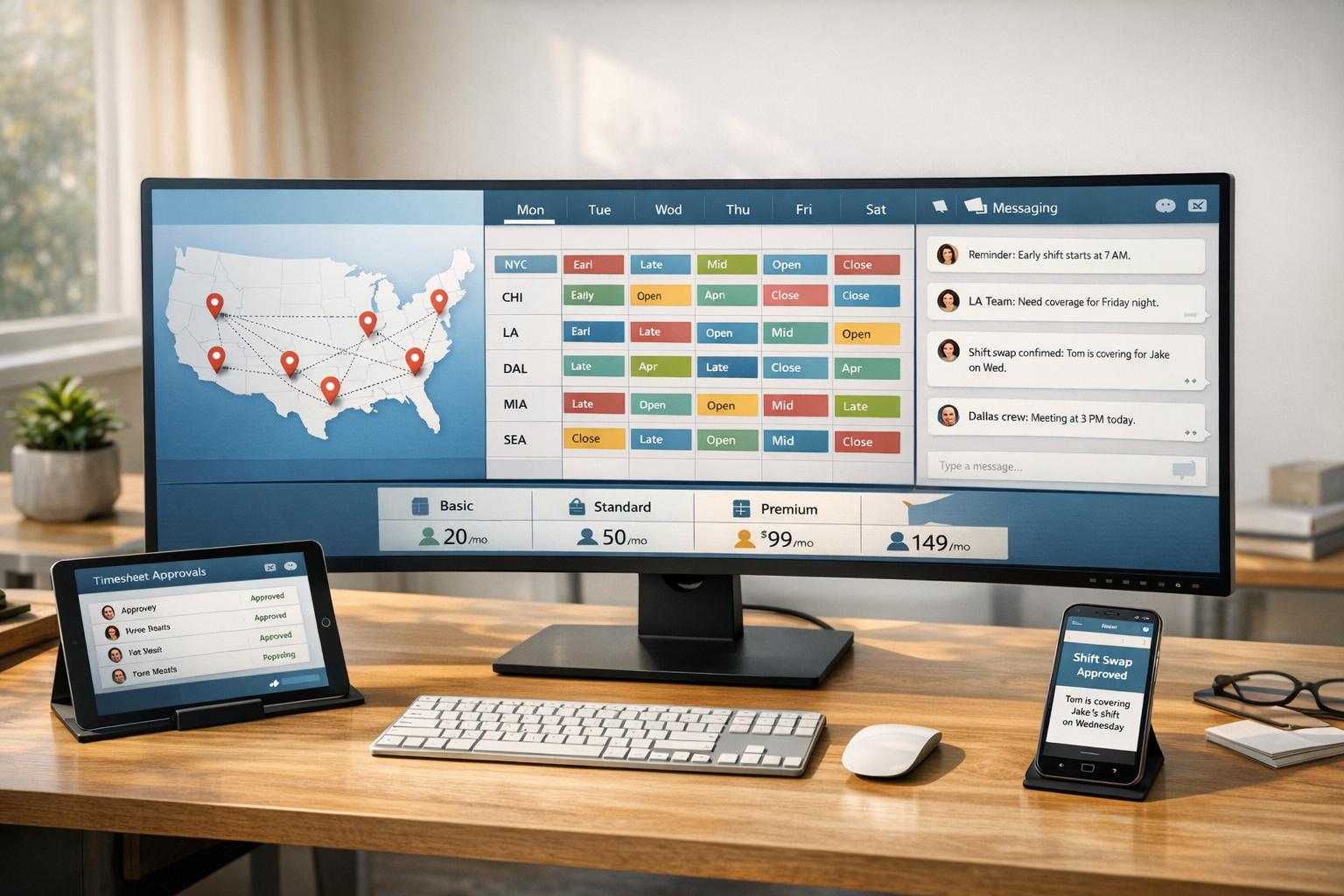
"Juggling schedules for a multi-location team feels like herding cats." That’s what a manager once told me during a demo call. And honestly? I get it. When your team is spread across cities - or even continents - small issues like missed messages or scheduling conflicts can snowball into major headaches.
Here’s the kicker: it’s not just about logistics. It’s about connection. Studies show that companies with engaged employees see 23% higher profitability, but keeping everyone aligned—especially when fostering engagement in remote teams—is no small feat. I’ve been there, watching teams struggle with fragmented tools, siloed data, and endless email threads.
That’s exactly why we built Pebb. In this article, I’ll walk you through how Pebb stacks up against other platforms like Slack, Microsoft Teams, and Workvivo. Whether you’re managing a small team or a global operation, I’ll share what works, what doesn’t, and how to choose the best tool for your team. Let’s dive in.
1. Pebb
At Pebb, we set out to tackle a challenge we saw in multi-location teams: the chaos of juggling fragmented messaging tools, paper schedules, and endless email threads. The solution? A single app that seamlessly integrates communication, scheduling, tasks, and engagement - all designed with mobile-first teams in mind. Today, over 10,000 businesses worldwide trust Pebb to keep their teams connected and organized.
Communication Features
Let’s talk about how Pebb simplifies communication. Instead of relying on a hodgepodge of personal messaging apps, we created a structured, company-controlled communication hub. Here’s what that looks like:
1:1 and group chats for quick conversations
A news feed that feels like your favorite social app, but tailored for company updates
Built-in voice and video calls
One of my favorite features is how Pebb organizes communication for multi-location teams. Channels can be set up by location, department, or role. For instance, a regional manager might use a "Northeast Store Managers" channel to coordinate shifts, while HQ can push policy updates through the news feed. And with read acknowledgments, you know exactly who’s seen the message - no more wondering if it got lost in the shuffle.
Scheduling and Task Management
Scheduling and task management are where Pebb really shines. Everything from shift schedules to PTO requests and daily checklists lives in one place. Managers can:
Build rosters specific to each location
Flag potential overtime issues
Approve shift swaps through a simple workflow
Meanwhile, employees can check their schedule and daily tasks - like their opening checklist - right from their phone. This eliminates confusion and reduces no-shows. It’s all about making life easier for both managers and team members.
Employee Engagement Tools
Creating a sense of connection, especially for frontline workers, is a big deal. Pebb includes tools like interest-based groups (think "Wellness" or "New Hires"), a searchable people directory with profiles, and polls for quick feedback. The news feed also doubles as a recognition board where managers can celebrate wins, anniversaries, or even customer shoutouts. For employees who rarely sit at a desk, these features help foster a sense of belonging that extends beyond their immediate shift.
Pricing and Scalability
We believe in keeping pricing straightforward. Here’s how it works:
Standard Plan: Free for up to 15 users. It includes everything you need to get started - chat, scheduling, PTO management, tasks, and a news feed. Perfect for small teams or pilot programs.
Premium Plan: $4 per user/month. This unlocks advanced features like analytics, unlimited admins, voice and video calls, SSO, and 50+ integrations.
Let me break it down: a 150-person team on Premium costs $600/month total. That’s often less than what many companies pay for a single scheduling tool.
Plan | Price | Best For | Key Additions |
|---|---|---|---|
Standard | Free (up to 15 users) | Small teams or pilots | Chat, scheduling, PTO, tasks, news feed |
Premium | $4/user/month | Growing multi-location orgs | Analytics, SSO, voice/video, 50+ integrations |
As your team grows from a few locations to a nationwide operation, Pebb scales with you. The centralized admin console lets HQ set global policies and structures, while local managers have the freedom to manage their own groups and content. It’s built to grow with your business.
Next up, we’ll dive into how platforms like Slack and Microsoft Teams tackle these same challenges. Spoiler: they’re not quite the same.
2. Slack
Slack has made a name for itself as the go-to communication tool for teams spread across different locations. It organizes conversations by team, project, or location, making it easier to find information while cutting down on email overload. With more than 2,600 third-party integrations, Slack connects with nearly every tool your team already uses.
Communication Features
Slack’s biggest strength lies in how it handles communication - both in real time and asynchronously. Features like Huddles let you hop on a quick audio or video call without needing to schedule anything. Meanwhile, Clips allow you to record short videos or screen shares, perfect for teammates working across time zones. And then there’s Slack Connect, which enables secure collaboration with up to 250 external organizations in a single channel. It’s a game-changer for replacing endless email threads. Plus, the mobile app ensures that even field workers can stay connected with the main office in real time.
"The thing that keeps us connected the most is Slack. It's a very immediate and straightforward method of communication, and really the only channel that people prefer and enjoy using."
While these tools make communication seamless, Slack’s functionality takes a different turn when it comes to managing schedules and tasks.
Scheduling and Task Management
Here’s where Slack shows its limitations. Unlike Pebb, which offers native scheduling and PTO management, Slack relies on third-party integrations like Google Calendar or Asana. This adds extra setup time and costs, not to mention the potential for a disconnected system.
Employee Engagement Tools
Slack does offer features to engage employees, like shared channels, interest-based groups, and automated workflows. In fact, over 30 million workflows run on the platform every week. Teams also use emoji reactions to update task statuses, pin key documents, and set up dedicated alert channels. However, it’s missing some key elements. There’s no built-in recognition system, no social-style news feed, and no structured employee profiles. Compared to Pebb’s all-in-one engagement suite, Slack can feel more like a basic messaging platform.
Pricing and Scalability
Slack’s pricing starts with a free plan, but it comes with limitations - like restricted message history and integration options. Paid plans begin at $7.25 per user/month, offering features like user groups, Slack Connect, and Slack AI on higher tiers. For large enterprises, the Enterprise Grid plan adds multi-workspace management and advanced compliance controls. However, as your team grows, costs can quickly add up, especially when you factor in the need for separate scheduling and HR tools. This fragmented setup stands in stark contrast to Pebb’s integrated solution, which offers native scheduling, PTO management, and more - all starting at just $4 per user/month.
Here’s a quick comparison:
Feature | Pebb | Slack |
|---|---|---|
Native Scheduling | Yes | No (integration required) |
Native PTO Management | Yes | No (integration required) |
Starting Price | Free (up to 15 users) / $4 per user/month | $7.25 per user/month |
Built-in News Feed | Yes | No |
Voice & Video Calls | Yes | Yes (Huddles) |
Slack’s pricing structure and reliance on integrations highlight a key difference: Pebb offers a more unified and cost-effective solution for multi-location teams.
3. Microsoft Teams
Let me tell you, Microsoft Teams is a powerhouse when it comes to office-based collaboration, especially if your company is already using tools like Outlook, SharePoint, or OneDrive. Being part of the Microsoft 365 ecosystem gives it a natural edge in those environments. But here’s the catch: it’s not exactly the best fit for frontline workers.
Communication Features
Teams does a solid job with its communication tools. You’ve got persistent chat, video conferencing, and organized channels that make it easy to keep departments or locations in sync. For teams spread across multiple locations, the ability to host large video calls and share files directly in a channel can save a ton of time. But, and it’s a big but, Teams is designed primarily for desktops. That desktop-first approach makes it less practical for employees who aren’t tied to a desk all day. This is where it starts to show some cracks when you look at its performance in areas like scheduling and engagement.
Scheduling and Task Management
On the scheduling front, Teams gives you the Shifts tool. It’s got some handy features like drag-and-drop roster building, recurring shift templates, and time-off management. For task management, you’ve got Planner and To Do, which integrate directly into Teams. Sounds great, right? Well, here’s the rub: if you’re trying to tailor these tools for frontline workers - say, restricting app access outside of work hours - you’ll need to bring in additional tools like Microsoft Intune or Graph API. That extra layer of complexity can be a headache, especially if you’re trying to streamline operations.
Employee Engagement Tools
When it comes to engagement, Teams leans on Microsoft Viva for things like internal communications, learning, and employee wellbeing. Viva is a strong tool, no doubt, but it’s a separate add-on with its own pricing and setup requirements. And here’s something I’ve noticed: Teams doesn’t include a built-in social news feed or recognition system. If you’re looking for a one-stop engagement solution, you’ll need to integrate other products, which can feel like a lot of moving pieces.
Pricing and Scalability
Now, let’s talk dollars and cents. Teams’ pricing can get complicated fast. The entry-level Teams Essentials plan is $4.00 per user/month, but it’s pretty bare-bones - just meetings and chat, no workforce management features. Business plans are capped at 300 users, which means if your company grows, you’ll have to move to an Enterprise plan. Here’s a quick breakdown of the pricing tiers:
Plan | Price (per user/month) | User Limit |
|---|---|---|
Teams Essentials | $4.00 | 300 |
M365 Business Basic | $6.00 | 300 |
M365 Business Standard | $12.50 | 300 |
Teams Enterprise | $8.55 | Unlimited |
M365 E3 | $36.00 | Unlimited |
M365 E5 | $57.00 | Unlimited |
If you’re after advanced features like enhanced security or dedicated frontline management, you’ll need higher-tier licenses like M365 E3/E5 - or even the Teams Premium add-on at $10.00 per user/month. Compared to an all-in-one platform like Pebb, these extra costs can stack up quickly as your team grows. For companies juggling office and frontline staff across multiple locations, these added expenses can make Teams a tougher sell.
4. Workvivo
Workvivo focuses on enhancing the employee experience by offering an internal social network aimed at strengthening connections across distributed teams. If you're prioritizing culture and connection in a dispersed workforce, this platform might be worth exploring.
Communication Features
One of Workvivo's standout features is its Smart Feed, which tailors updates based on an employee's location and role. This ensures that workers only see relevant information, avoiding unnecessary clutter. Departments or sites can create their own Spaces for sharing updates, shout-outs, and hosting Q&A sessions. For frontline teams, Workvivo TV broadcasts company news and alerts directly to digital screens on-site, eliminating the need for personal devices or logins. The platform even supports auto-translation in over 90 languages, making it accessible to a global workforce.
"Workvivo has been instrumental in driving our culture forward. It's living and dynamic, and allows our people to really be themselves and share what's important to them." - Caz Meech, Head of Internal Comms and Employee Engagement, Keyloop
Scheduling and Task Management
Here's where Workvivo falls short - it doesn’t have built-in scheduling, time tracking, or task management tools. Instead, users need to rely on third-party integrations like When I Work, Google Calendar, ADP, or Workday. While the platform connects with over 40 HR systems, juggling multiple tools can add complexity and extra costs for users. That said, Workvivo’s focus on engagement tools addresses cultural gaps, which is a common challenge for teams spread across multiple locations.
Employee Engagement Tools
This is where Workvivo truly shines. The platform revolves around recognition, surveys, and social-style interactions that encourage employees to actually enjoy using it. AI-powered sentiment analysis provides internal communications teams with insights into how messages resonate with different workforce segments. Many users praise Workvivo’s familiar, social-network-like experience, which feels more engaging than traditional intranets.
Pricing and Scalability
Workvivo caters to mid-size and large organizations. Its Business Plan is designed for teams of 100–2,000 employees, while its Enterprise Plan, meant for companies with over 2,000 employees, includes perks like a dedicated account manager, custom branding, and unlimited live-streaming. However, pricing isn’t publicly available - you’ll need to request a quote.
For comparison, Pebb offers an all-in-one solution with embedded scheduling and operational tools for just $4 per user/month. This affordability and comprehensive feature set make Pebb a better fit for smaller teams or companies looking for a unified workforce management platform.
While Workvivo excels in creating a social, engagement-driven environment, it lacks the all-in-one functionality that Pebb delivers, especially when it comes to scheduling and task management.
5. Staffbase
Staffbase is built with large enterprises in mind, particularly those needing to connect with every employee - including non-desk workers. Its core strength lies in delivering consistent and targeted communication to frontline staff spread across various locations.
Communication Features
Staffbase acts as a centralized communication hub, reaching employees through multiple channels: a branded mobile app, desktop intranet, email, SMS, and even digital signage. What sets it apart is its ability to tailor messages based on role, location, and context. For instance, a warehouse worker in Dallas might receive updates that differ completely from those sent to a corporate employee in New York. With support for 110 languages and auto-translation, it’s no surprise that Staffbase boasts an impressive 94% monthly active usage rate among frontline workers - a stark contrast to the typical 20–30% seen with standard desktop intranets. A great example of this success is Alaska Airlines, which used Staffbase in January 2026 to connect over 30,000 employees, including flight and ground crews, achieving a 96% monthly active usage rate.
Scheduling and Task Management
Here’s where Staffbase has its limitations: it doesn’t offer native scheduling or task management features. Instead, it relies on its AI-powered Navigator to help employees find answers to HR policy questions, which does help reduce administrative burdens. But if you’re looking for shift scheduling or task tracking, you’ll need to integrate with external tools. This reliance on third-party solutions stands in contrast to its robust content and engagement features, which we’ll touch on next.
Employee Engagement Tools
Staffbase places a strong emphasis on targeted communication, backed by stringent content governance. It assigns content owners and uses automated review workflows to ensure accuracy. On top of that, its survey tools come with analytics to measure how well messages resonate with employees.
"Staffbase is designed for the employees most platforms miss, including frontline staff, shift workers, and distributed teams." - Staffbase
Pricing and Scalability
Unlike Pebb’s free all-in-one platform - complete with built-in scheduling and task management - Staffbase requires additional integrations, which can drive up costs and extend deployment timelines for smaller or mid-size businesses. As an enterprise-level tool, it doesn’t publicly share its pricing. Deployments, which include migration and content strategy, typically take three to four months. However, its native integration with platforms like Microsoft 365, Workday, and ServiceNow makes it a natural choice for large organizations.
6. Simpplr
Simpplr positions itself as an AI-powered intranet platform designed to centralize communications, search, and everyday tasks into one place. It’s earned recognition as a "4x Leader" by Gartner, Forrester, G2, and IDC - a rare accomplishment - and currently serves over 2 million active users across more than 1,000 organizations.
Communication Features
Simpplr shines as a content-driven platform, tailoring the employee experience based on factors like role, location, and department. For instance, a field technician in Phoenix might see entirely different updates than a finance manager in Chicago. While Pebb offers a more integrated approach, Simpplr emphasizes content personalization. Recently, in Spring 2025, it introduced instant messaging, helping teams reduce reliance on separate chat tools. For leadership, the Leadership Center offers a dedicated space for executives to share strategic updates and host interactive Q&A sessions. This feature directly addresses a key challenge: only 13% of employees feel their leadership communicates effectively. However, while its communication tools are robust, Simpplr falls short in offering built-in scheduling features.
Scheduling and Task Management
When it comes to scheduling and task management, Simpplr doesn’t offer native solutions. Instead, it leans on AI Agents to handle routine HR and IT tasks. Teams needing shift scheduling or task tracking will need to rely on external third-party tools.
Employee Engagement Tools
Simpplr provides peer-to-peer recognition tools with redeemable points, personalized news feeds, and content governance features that help flag outdated information. However, tools like surveys and employee listening features are only available as paid add-ons, which can limit the base engagement package. Despite this, some users have reported impressive adoption rates, with G2 citing rates as high as 97% in certain deployments.
"Simpplr makes it incredibly easy for us to create, organize, and share content... It has truly become the central hub for our internal communication and collaboration." - G2 User Review
Pricing and Scalability
Simpplr’s pricing is tailored to each organization, factoring in size and complexity. Larger companies can take advantage of volume discounts. However, several key features - such as enterprise search, video calling, surveys, and newsletters - are offered as paid add-ons. This can make it tricky to estimate total costs upfront. For companies already using Microsoft 365 or Google Workspace, Simpplr integrates seamlessly with over 200 tools. This pricing model contrasts with Pebb's straightforward, all-in-one offering at just $4 per user/month, which simplifies budgeting.
Pros and Cons of Each Platform
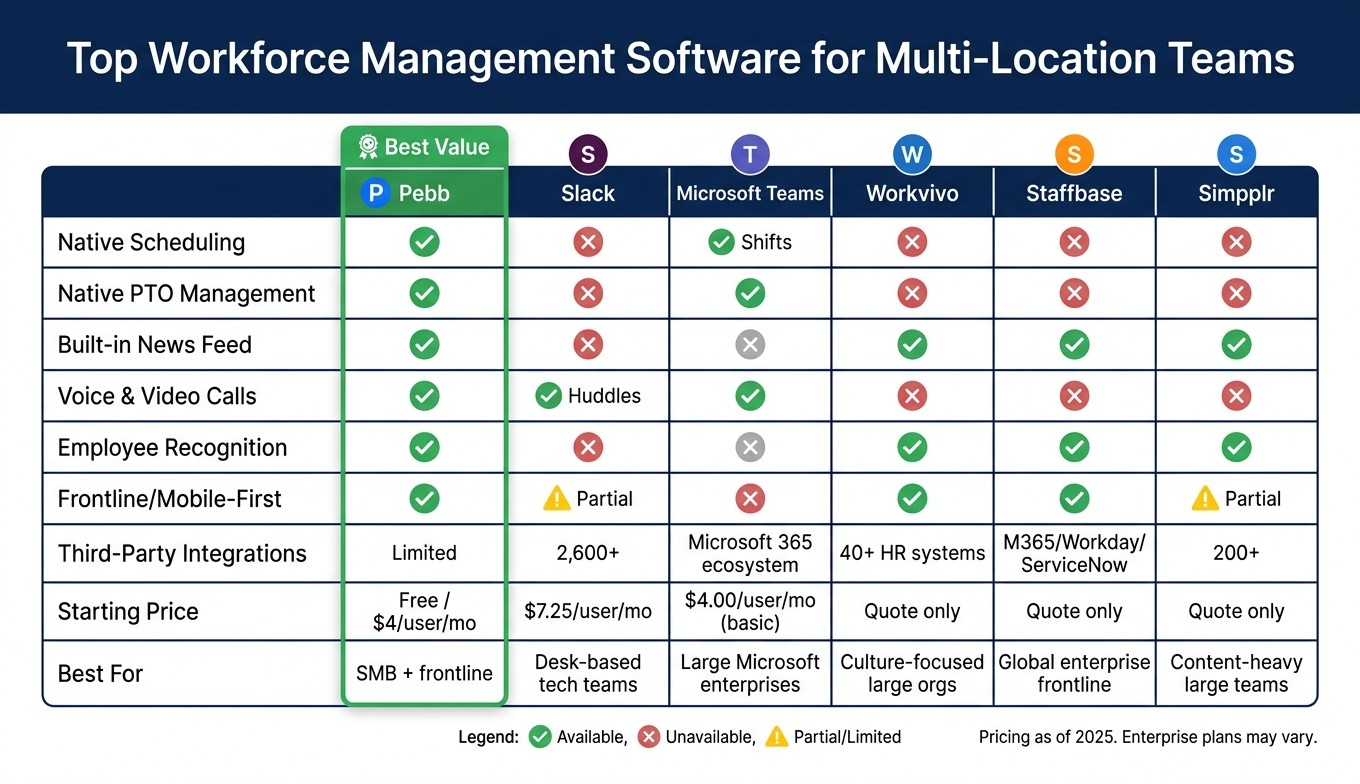
Top Workforce Management Software for Multi-Location Teams: Feature & Pricing Comparison
Let me share a quick breakdown of the strengths and drawbacks of some of the top platforms for multi-location teams. As Dan Robin from Pebb perfectly put it:
"The real challenge isn't just managing schedules; it's closing the gap between your operations and your culture."
This summary will help you see where each platform shines - and why Pebb takes a different approach.
Platform | Strengths | Limitations | Best For |
|---|---|---|---|
Pebb | Combines chat, scheduling, PTO, and clock-in in one place; free for up to 15 employees; premium plan at $4/user/month; rated 4.9/5 on G2 & Capterra | Limited third-party integrations | Small to mid-sized businesses with both frontline and office teams |
Slack | Over 2,600 integrations; easy-to-use interface | Lacks native scheduling and PTO features; costs can add up | Tech-savvy, desk-based teams |
Microsoft Teams | Seamless integration with Microsoft 365; strong security for enterprises | Steep learning curve; mobile experience could be better | Large enterprises already using Microsoft tools |
Workvivo | Encourages social engagement; supports over 90 languages | No built-in scheduling; high price tag | Large companies focused on culture and engagement |
Staffbase | Offers branded apps, offline functionality, and supports 110 languages | Expensive; lacks native video call features | Global enterprises with frontline employees |
Simpplr | Features AI-powered search, no-code admin tools, and geofencing | No built-in video calls; complex for smaller teams | Large teams managing heavy content loads |
Here’s the issue: most platforms excel in one or two areas but fall short elsewhere, leaving teams to juggle multiple tools. For instance:
Slack doesn’t handle scheduling or PTO without add-ons.
Simpplr requires separate video conferencing software.
Staffbase’s high costs and lack of video functionality can be a barrier.
Using several platforms not only drives up costs but also creates operational headaches. That’s where Pebb comes in. It’s designed to cut through the chaos with a truly unified platform. Whether it’s communication, scheduling, PTO tracking, or clock-in features, Pebb has it all under one roof. Plus, with a free plan for small teams and a premium tier at just $4 per user/month, it’s an affordable solution that keeps both frontline and office teams connected seamlessly.
Wrapping It Up
Managing teams across multiple locations comes with its fair share of hurdles. Things like scheduling conflicts and communication gaps might not always be obvious, but over time, they chip away at both performance and team culture.
Here’s what we’ve learned: most frontline worker solutions only solve pieces of the puzzle. Slack, Workvivo, Staffbase - they’re great in specific areas, but they don’t offer the kind of full integration that truly simplifies life for multi-location teams. And that’s where Pebb steps in to fill the void.
Dan Robin from Pebb summed it up perfectly:
"The real issue isn't a lack of features. It's the quiet chaos that comes from stitching together too many different apps."
That’s exactly why we created Pebb. By bringing everything - chat, scheduling, PTO tracking, clock-ins, and company news - under one roof, we’ve built a platform your team will actually use. And when your tools work together seamlessly, you’ll see the difference in both engagement and your bottom line. It’s more than just an operational tool; it becomes a driver for your company’s culture. This is a key benefit of integrating technology in frontline employee management.
For multi-location teams looking for a solution that works across the board - whether in the office or out on the frontlines - Pebb is the best all-in-one option. Plus, it’s free for teams of up to 15 and only $4 per user per month when you need more features.
FAQs
How do I choose workforce software for multiple locations?
When managing multiple locations, the key is choosing workforce software that makes your life easier, not harder. You want something that simplifies scheduling, offers real-time tracking, and centralizes management - all in one place. That’s where platforms like Pebb come in. It combines everything you need - work chat, scheduling, PTO management, and more - into a single, streamlined solution.
Here’s the thing: steer clear of tools that are overly complicated or require juggling multiple apps. The right software should bring everything together, making communication, scheduling, and operations seamless. Not only will it save you time, but it’ll also keep your team more engaged and connected across all your locations.
Can Pebb handle shift swaps, overtime, and PTO approvals?
Managing shift swaps, overtime, and PTO can be a headache, but at Pebb, we’ve got it covered. With features like shift scheduling, PTO management, and built-in communication tools, we make these processes smooth and hassle-free. Whether your team is spread across multiple locations or working under one roof, everything stays organized and easy to handle.
How fast can we roll out Pebb across all locations?
While we don’t have exact rollout timelines for Pebb, I can tell you this: the platform's all-in-one design makes deployment a breeze. With tools like work chat, scheduling, and PTO management all under one roof, it’s built to streamline the process. That means implementation is typically quicker compared to more complicated systems. If you're curious about a timeline specific to your organization, reaching out to Pebb directly is the best way to get the details.
