

Author: Ron Daniel
The most user-friendly staff apps for non-technical employees
Compare mobile-first staff apps to find the easiest option for frontline, hourly, and non-technical teams.
83% of frontline workers say they miss important information at work. When I saw that number, it didn’t feel like a stat on a slide deck. It felt like a shift missed, a policy update buried, or a manager stuck sending the same text three times just to keep the day on track.
At Pebb.io, I keep seeing the same pattern: teams don’t fail because people refuse to use software. They fail because the software asks too much on day one. If someone works the store floor, a delivery route, or a busy front desk, they need an app that makes sense in minutes, not after a training session. And when only 23% of frontline workers say they have the digital tools they need, that gap gets expensive fast.
So I pulled the comparison back to basics. I’m looking at Pebb, Slack, Microsoft Teams, Connecteam, and Workvivo through one simple lens: can a non-technical employee open the app and get stuff done without getting stuck? I’ll walk through where each app fits, where it falls short, and which teams I’d point to each one based on what I’ve seen firsthand.
Quick overview:
Pebb: best if you want chat, shifts, clock-in, PTO, forms, and knowledge in one app
Slack: best if messaging is the main job
Microsoft Teams: best if your company already runs on Microsoft 365
Connecteam: best for deskless teams that need scheduling and time tracking
Workvivo: best for company updates, recognition, and engagement
1. Pebb
I’ve seen this play out again and again at Pebb.io: frontline teams don’t want five apps, three logins, and a training doc nobody reads. They want one place that just works on their phone.
That’s the lane Pebb sits in.
We built it for frontline teams that need a simple, mobile-first app for communication and day-to-day work. And honestly, that focus matters more than most people think. When someone’s on a store floor, in a warehouse, or moving between shifts, they don’t have time to dig through clunky software.
Daily staff communication
When employees open Pebb, they land in a news feed with company updates, announcements, and recognition posts. That sounds small, but it changes the feel of internal communication for frontline employees. Instead of hunting through email threads or random chat messages, people see what matters right away.
From there, they can:
Open chat
React in one tap
Find coworkers in the employee directory
No messy setup. No long learning curve.
I like that part because it removes friction on day one. If a tool feels hard in the first five minutes, frontline adoption usually drops fast. On G2, Pebb has a 4.8/5.0 rating across roughly 150 reviews, and I think a lot of that comes back to ease of use.
That same no-fuss setup carries into scheduling and time tracking.
Shift and time workflows
Scheduling, clock-in, and PTO requests all live in the same app. So instead of bouncing between tools, employees can check shifts in a clean calendar, clock in, and request time off in one place.
Managers get a clearer view too. They can track attendance and spot coverage gaps without piecing data together from spreadsheets, messages, and paper notes. In plain English, that helps cut missed shifts and coverage gaps.
Here’s the thing: when shift workflows are split across too many systems, small problems turn into big ones. A missed update becomes a missed shift. A buried PTO request becomes a staffing headache. Keeping it all together helps avoid that mess.
Onboarding
One detail I’ve always liked is how employees can join by QR code or SMS invite. Let me tell you why that matters.
A lot of frontline workers don’t use corporate email every day, and some don’t have one at all. If onboarding depends on email access, the rollout slows down before it even starts. QR code and SMS sign-up make it much easier to get people in fast.
That simple entry point also helps keep rollout costs lower.
Tool consolidation and pricing
I’ve worked with teams that were juggling chat apps, email, spreadsheets, and paper forms all at once. It’s exhausting. Pebb replaces that patchwork with one system, which makes daily work much easier to manage.
Plan | Price | Key Features |
|---|---|---|
Standard | Free (up to 15 users) | Chat, news feed, shifts, clock-in, PTO, tasks, digital forms, knowledge library |
Premium | $4/user/month | Everything in Standard + voice & video calls, analytics, SSO, advanced permissions |
If you care more about ease of use for frontline teams than deep messaging layers, that difference becomes pretty clear once you start comparing tools side by side.
2. Slack
I’ve seen teams fall in love with Slack fast. The first time we rolled it out for a mixed team, office staff jumped in from their laptops, frontline teammates checked updates on their phones during shifts, and for a moment it felt like we’d cleaned up a messy group chat situation overnight. That part is where Slack shines.
If Pebb combines communication and frontline operations in one app, Slack stays centered on messaging, offering many benefits of mobile apps for frontline employee communication. It organizes staff communication into channels and direct messages, which makes updates easier to find by team, location, or topic. And because Slack works on desktop, web, and mobile, frontline staff can keep up on their phones during shifts while office staff use laptops.
Daily staff communication
At a basic level, Slack is easy to pick up. Channels keep conversations sorted, direct messages handle one-on-one chats, and Huddles give employees a fast way to start live audio or video conversations without putting a formal meeting on the calendar.
Here’s the thing, though: Slack can get messy in a hurry. I’ve watched teams start with five clean channels and end up with dozens, plus bots firing off alerts and integrations sending noise from every direction. That’s usually when people stop reading updates and start missing stuff.
The smoothest rollouts I’ve seen start small:
A few clear channels
Basic messaging rules
More workflows only after people are comfortable
That approach lines up with what works in practice: start simple, then add more later.
That makes Slack strong for messaging, but it still falls short for teams that need schedules and time tracking in the same place.
Shift and time workflows
This is where the gap gets harder to ignore. Slack has no built-in scheduling or time clock, so teams need other tools for shift work. I’ve seen what that looks like on the ground: one app for chat, another for shifts, another for time tracking, and then someone misses a schedule change because they didn’t check the right place.
On paid plans, Workflow Builder lets managers automate simple tasks without coding, like shift confirmations or reminder messages, while admins handle setup behind the scenes. That can help with routine tasks. But for frontline teams, it also means more logins, more switching, and more room for missed updates.
For non-technical teams, Slack stays simple for chat, while day-to-day operations still sit in other systems.
Training and rollout speed
One thing I’ll give Slack credit for: the chat layout feels familiar, so basic use is simple. Most people can figure out channels and messages without much hand-holding. But once you pile on too many channels or workflows, frontline staff can get overwhelmed fast.
I’ve seen that happen during rollouts. The tool itself didn’t confuse people at first. The setup did.
Tool consolidation and pricing
Slack works well for communication, but it is not one of the more comprehensive frontline worker solutions because scheduling, time tracking, and HR workflows still live elsewhere. Once you add separate tools for scheduling and time tracking, Slack becomes more of a communication layer than a complete staff app.
Slack's current U.S. pricing starts like this:
Plan | Monthly (per user) | Annual (per user) | Notes |
|---|---|---|---|
Free | $0 | $0 | 90-day message history, 10 app integrations, 1:1 video calls |
Pro | $8.75 | $7.25 | Unlimited history, unlimited integrations, group Huddles, Workflow Builder |
Business+ | $15.00 | $12.50 | SSO, audit logs, advanced compliance features |
Enterprise Grid | Custom | Custom | Enterprise security and admin controls |
Let me tell you what happened next on one team I worked with: the Slack price looked fine at first, then the extra cost showed up somewhere else. Scheduling needed its own system. Time tracking needed another one. Before long, the per-user total was a lot higher than the first number on the pricing page.
For larger frontline teams, that per-user pricing climbs fast, especially once you add the separate tools needed for scheduling and time tracking.
So yes, Slack is user-friendly for communication. But in my experience, that simplicity stops at communication.
3. Microsoft Teams

I’ve seen this play out a lot with teams we talk to at Pebb.io: Slack feels light and easy, but Microsoft Teams goes much further. It’s not just a chat tool. It’s more like a full workplace hub. That sounds great on paper, and in some cases it is, but there’s a catch. For non-technical frontline staff, that extra depth often means extra friction.
Compared with Pebb’s simpler all-in-one setup, Teams usually asks for more configuration before people can just jump in and use it.
Daily staff communication
On the communication side, Teams covers the basics well. Staff can use 1:1 chat, group channels, and push-to-talk voice over Wi‑Fi or cellular, which is handy for distributed teams in retail, hospitality, or warehouse settings that need to coordinate fast.
Here’s the thing: when I’ve looked at tools from the view of a frontline worker, too many options on day one can feel like walking into a control room instead of a staff app. Teams can feel crowded unless IT steps in and simplifies the experience.
Microsoft does have a frontline home layout that puts Shifts, Tasks, and Approvals right up front. That helps. But it usually takes IT setup, not frontline onboarding, to get there.
Shift and time workflows
For everyday shift work, Teams handles the main actions people care about. Employees can view upcoming shifts, request time off, swap shifts, and clock in and out from a phone.
That’s the part most managers want to hear, because if staff can’t do those four things fast, adoption tends to fall apart.
Teams also supports optional location detection for clock-in, which can help confirm that employees are at the right worksite. In practice, that can be useful for teams spread across multiple locations.
Where it gets a bit messier is with more advanced time rules or bigger HR workflows. Teams often still depends on outside systems, with Shifts working as the front end rather than the whole system.
Training and rollout speed
Let me tell you what happened next in a lot of these rollouts: the feature list stopped mattering as much as the setup process.
For non-technical frontline teams, that setup burden is a big deal. Microsoft’s own rollout guidance leans toward a phased launch. The playbook is pretty clear:
Start small
Use a pilot group
Appoint frontline champions
Keep early training short and practical
Honestly, that advice makes sense. Teams usually works better when companies don’t dump everything on everyone at once.
Tool consolidation and pricing
If a company is already deep in Microsoft, Teams can help cut down on app sprawl. It brings chat, meetings, basic task management, file sharing, and scheduling into one login.
That can make life easier for IT and for managers who are tired of stitching together five different tools.
On pricing, Microsoft 365 F1 starts at $3.00 per user/month, and F3 starts at $10.00 per user/month, with both billed annually. Teams Essentials, as a standalone option, runs around $4.00 per user/month.
From what I’ve seen, Teams makes the most sense when a company already has IT resources to set it up and keep it running. That’s where its value shows up fastest, and it’s also where the next tool heads in a different direction.
4. Connecteam
When I first tested Connecteam at Pebb.io, one thing stood out fast: it felt narrower than Teams, but in a good way. Teams can do a lot, no doubt, but it also asks you to set up a lot. Connecteam felt more dialed in for frontline teams. You get chat, scheduling, and time tracking in one place without a pile of setup.
Daily staff communication
What I liked most was how direct the Communications hub felt. Employees get chat, targeted updates, polls, a directory, and multilingual translation all in one spot. That matters more than people think.
Let me tell you what happened next. When a manager needs to message only a night-shift warehouse crew, they don’t have to blast the whole company and hope the right people notice. They can send the update to that group only, then use seen confirmations to check who actually read it. No guessing. No “I never saw that” the next morning.
That same no-fuss feel shows up in the day-to-day workflow too, which is where this kind of app either helps or gets in the way.
Shift and time workflows
Clocking in and out is simple: one tap. For teams that need tighter attendance checks, managers can turn on location checks to confirm workers are on-site. There’s also a shared-tablet punch clock, which gives teams a fixed place to check in.
I’ve seen setups like this work well when not everyone has a company device. It cuts down on confusion.
Schedules are easy to scan on mobile, and that’s a bigger deal than it sounds. Staff can see shift notes, claim open shifts right from the app, and get automatic notifications when the schedule changes.
That last part saves time. A lot of time, actually. Fewer missed updates. Fewer side messages. Fewer “Wait, am I still on for Friday?”
Training and rollout speed
Here’s the thing: with tools like this, too much too soon can backfire. I’d start with Operations and Communications, then add more only after people know the basics.
That approach usually makes rollout smoother, especially for teams that don’t live in software all day.
Connecteam also lowers the risk of testing it. The free forever plan covers up to 10 users, so a team can run a real pilot before spending anything.
Tool consolidation and pricing
This is where I’d pause and do the math.
Connecteam can replace a bunch of loose tools at once:
scheduling spreadsheets
time clocks
group chats
paper forms
It splits all of this across three hubs: Operations, Communications, and HR & Skills. That structure can be handy, but the pricing is the catch. It’s not a flat per-user setup, so budgeting takes a bit more work.
Basic starts at $29/month when billed annually for up to 30 users per hub. So if a team uses all three hubs, they’re looking at about $87/month before adding users beyond 30.
That doesn’t make it a bad deal. It just means the sticker price can climb faster than you might expect if you need the full package.
And if you’re wondering whether teams like using it, the review numbers are strong. On Capterra, Connecteam has a 4.6/5 overall rating from more than 5,300 reviews, plus a 4.7/5 ease-of-use score.
5. Workvivo

I’ve seen a lot of workplace apps promise “engagement” and then turn out to be little more than a clunky bulletin board. Workvivo by Zoom isn’t that. When I first looked at it from a Pebb.io lens, what stood out to me was simple: it’s built first for communication and employee engagement, not frontline operations.
That matters.
If I compare it with Pebb and Connecteam, Workvivo is easier to get people using for communication. But when the day gets messy and a team needs help with schedules, coverage, or clock-ins, it doesn’t go as far. For non-technical employees, the big test is pretty basic: does this feel familiar enough to use right away without a training session? In many cases, Workvivo does.
Daily staff communication
The heart of Workvivo is a social-style feed that feels familiar to most employees. People can scroll, react, comment, and post with very little training. That cuts down the learning curve, which is a big deal when you’re rolling out a new app to a busy workforce.
I’ve learned that when a tool feels like something employees already know how to use, adoption gets a lot easier. You don’t spend weeks begging people to log in. They just start using it.
Recognition and celebration features sit in that same flow, so managers can post updates and give credit to team members without bouncing between apps. That’s a nice touch, especially for companies trying to keep internal communication from feeling dry or forced.
Spaces help organize content by location, department, or shift group. So if you’ve got a warehouse night crew, they can see what matters to them without digging through company-wide chatter. But here’s the thing: if you set up too many notifications or create Spaces with no clear logic, people can get overwhelmed fast. I’ve seen this happen with plenty of communication tools. Good setup makes a huge difference.
That ease matters most when the app needs to do more than just push announcements.
Shift and time workflows
This is where Workvivo starts to show its limits.
It doesn’t handle scheduling or clock-in on its own. Those jobs sit inside connected HR and payroll systems instead. What Workvivo does well is act as the front door. It integrates with more than 40 HR and payroll systems, including Workday, SAP, BambooHR, and UKG, so employees can open schedules, time-off balances, or payslips from inside the app.
So yes, it gives employees one place to access that info. But no, it is not the system of record.
That gap matters for teams dealing with the shift problems mentioned earlier in this article: missed schedule changes, coverage gaps, and clock-in mix-ups. Workvivo doesn’t fix those issues by itself. From my point of view at Pebb.io, that’s the key tradeoff. It works best as a communication layer, not a full staff-operations hub.
Training and rollout speed
One thing I do like here is how fast people can get in. Workvivo supports QR code and magic-link onboarding, which helps employees join quickly even if they don’t have a corporate email.
That can save a lot of friction during rollout. I’ve worked on enough employee app launches to know that onboarding is where momentum often dies. If people can’t get in fast, they check out.
For more structured onboarding, Employee Journeys can send training content into a new hire’s feed as a sequence of posts and tasks. That means companies may not need to send people off to a separate LMS login just to get through early training.
Tool consolidation and pricing
Workvivo pulls together news, chat, recognition, surveys, intranet content, and analytics in one place. If a company is juggling an old intranet, a separate survey tool, and a stand-alone recognition platform, that can make day-to-day work a lot cleaner for both managers and employees.
I’ve seen this kind of consolidation help teams cut down on tool fatigue. Fewer tabs. Less bouncing around. Less “where do I find this?” energy.
The catch is the price.
Workvivo uses quote-based pricing and is aimed at the enterprise end of the market rather than small teams. That setup makes more sense for large company rollouts than for small frontline teams that need to get started fast without a big budget.
So from where I sit, Workvivo is easy to adopt for communication, but it’s weaker for teams that need built-in operations.
Strengths and tradeoffs at a glance
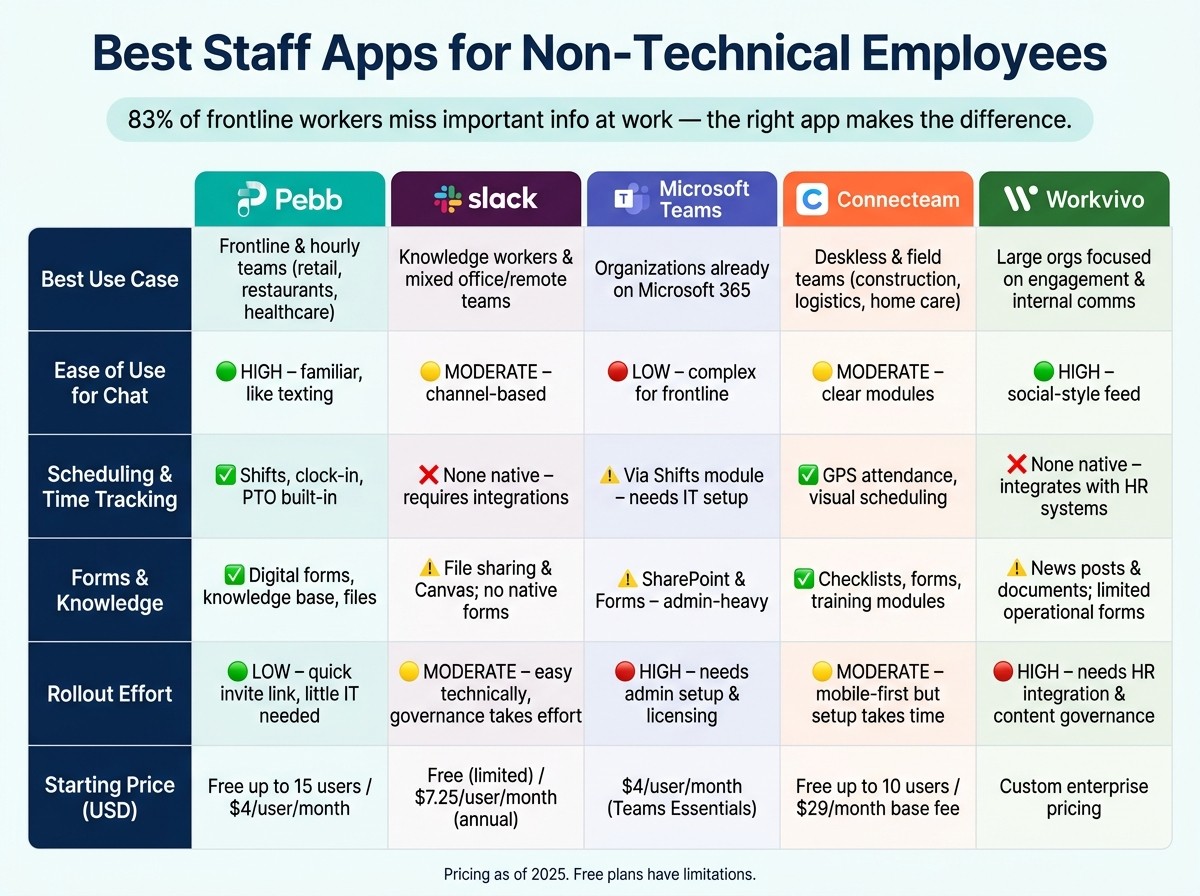
Best Staff Apps for Non-Technical Employees: Side-by-Side Comparison
A few months ago, I was talking to a team lead who said, “My staff can text all day, but the moment we hand them a work app, everything slows down.” That stuck with me. At Pebb.io, we hear some version of that all the time.
Here’s the thing: the big question usually isn’t which app has the most features. It’s which one people will actually use every day without training sessions, IT tickets, or endless follow-ups.
After reviewing each app on its own, here’s the side-by-side view.
App | Best Use Case | Ease of use for chat | Scheduling and time tracking | Forms and knowledge | Rollout effort | Starting Price (USD) |
|---|---|---|---|---|---|---|
Pebb | Frontline and hourly teams in retail, restaurants, and healthcare | High - feels familiar, like texting | Shifts, clock-in, PTO | Digital forms, knowledge base, files | Low - quick invite-link rollout, little IT needed | Free (up to 15 users) / $4/user/month |
Slack | Knowledge workers and mixed office/remote teams | Moderate - channel-based | None native - requires third-party integrations | File sharing and Canvas; no native form builder | Moderate - easy technically, but governance takes effort | Free (limited) / paid plans start at $8.75/user/month |
Microsoft Teams | Organizations already on Microsoft 365 | Low - complex for frontline teams | Available through Shifts, but setup usually needs IT support | SharePoint, Lists, Forms - powerful but admin-heavy | High - needs admin setup, licensing, and tenant management | Starts at $4/user/month with Teams Essentials or is bundled with Microsoft 365 |
Connecteam | Deskless and field teams in construction, logistics, and home care | Moderate - clear modules, but more complex | Strong: GPS-based attendance, visual scheduling, and job-specific shifts | Built-in checklists, digital forms, training modules | Moderate - mobile-first, but setup takes time | Free (up to 10 users) / $29/month base fee for the Basic hub |
Workvivo | Large, distributed organizations focused on engagement and internal comms | High - social-style feed is intuitive | None native - usually used alongside a separate scheduling app | News posts and documents; limited operational forms | High - needs HR integration, content governance, and more planning | Custom / enterprise pricing |
When I look at this chart as someone at Pebb.io, the pattern is pretty clear.
Pebb is the only app in this group that puts chat, shifts, clock-in, PTO, forms, files, and knowledge in one place. That matters a lot for frontline teams. I’ve seen what happens when those tools live in three or four apps: managers spend half their day chasing people, and employees miss updates they were supposed to see.
Slack is still the pick for messaging-first teams. If your company lives in channels and doesn’t need built-in scheduling or forms, it does that job well. But if you’re trying to run shifts or track time, you’ll hit the wall fast and start stacking add-ons.
Microsoft Teams can do a lot, but in my experience, it asks more from admins and end users too. For companies already deep in Microsoft 365, that tradeoff may be fine. For busy frontline teams, though, the setup and day-to-day use can feel heavier than expected.
Connecteam stands out for deskless operations. It has solid scheduling, GPS attendance, and job-based workflows. The flip side is that setup can take more time, especially when teams want to dial in modules and processes from day one.
Workvivo feels easiest on the communication side. The social-style feed is simple, and it works well for engagement and internal updates. But for operations like scheduling, time tracking, and forms used in the field, most teams still need another app beside it.
If I were narrowing the field with a team over coffee, I’d keep it this simple:
Choose Pebb if you want one app for frontline worker management and day-to-day operations.
Choose Slack if chat is the main job.
Choose Microsoft Teams if you’re already committed to Microsoft 365.
Choose Connecteam if field operations come first.
Choose Workvivo if internal communication and engagement are the main focus.
That snapshot usually helps teams cut through the noise and get closer to the right fit without dragging the decision out for weeks.
Which app should you choose
I’ve seen teams get stuck here for way too long. They open five tabs, compare 40 features, sit through demos, and still end up asking the same thing a week later: Which app will our team actually use?
Here’s the thing: for non-technical teams, the best app is the one that cuts steps out of daily work. That’s the test we use at Pebb all the time. Can employees find chat, schedules, forms, and updates without training? If the answer is no, the tool is going to drag people down instead of helping them move.
This decision isn’t about who has the longest feature list. It’s about adoption by non-technical employees. I’d match the app to the way people work, not the org chart.
Business scenario | Primary needs | Best fit |
|---|---|---|
Single-location restaurant or retail store (20–80 hourly staff) | Chat, shift sharing, clock-in, minimal training | Pebb |
Multi-location retail chain or franchise (100–500 frontline employees) | Centralized announcements, schedules, time tracking, mobile-first | Pebb |
Deskless frontline teams (construction, logistics, home care) | Scheduling, time tracking, forms, mobile access | Connecteam |
Small office team | Channel-based chat, file sharing, lightweight integrations | Slack |
Mid-sized to large company already on Microsoft 365 | Integrated chat, meetings, Shifts, and file collaboration | Microsoft Teams |
Large organization focused on culture, engagement, and internal comms | Company news feed, recognition, surveys, mobile access for all | Workvivo |
From what I’ve seen inside Pebb, teams that need one app for communication and operations usually get moving fastest with Pebb. That’s been a big part of the appeal. If your team is mostly frontline, I’d start there. You get chat, news, scheduling, PTO, clock-in, forms, and knowledge in one app, plus a free plan and premium at $4/user/month.
Let me tell you what happened next in a few of the rollouts I’ve watched. Teams that were juggling texts, printed schedules, and last-minute calls didn’t need more features. They needed fewer handoffs. When everything lived in one place, managers spent less time patching holes with side work.
If your workforce is mostly desk-based and already spends the day inside Microsoft 365, Microsoft Teams is usually the easiest move. If you run a messaging-first office team and you’re not tied to Microsoft, Slack works when chat is the main job. And if your biggest problem is keeping a large, spread-out workforce connected to company culture, Workvivo deserves a close look.
If two choices still feel neck and neck, I wouldn’t overthink it. Run a 4–8 week pilot in one location and compare what happens in the field. Look at:
adoption
scheduling errors
manager workarounds
time to first message
weekly logins
missed shifts
how often managers still fall back on texts or calls
That last one matters more than people think. If managers are still texting and calling all day, the app didn’t fix the problem. It just gave it a nicer screen.
FAQs
How do I choose the right staff app for my team?
I’ve seen this play out more times than I can count at Pebb.io: a company buys one more app to fix a workflow problem, and suddenly the team has even more tabs, more logins, and more confusion. What looked like a fix turns into extra drag.
Here’s the thing: the right staff app should cut down the moving parts, not pile on features for the sake of it. The best setups pull communication, scheduling, and day-to-day ops into one place, so employees aren’t bouncing between disconnected tools all day.
When I look at what works in the field, I keep coming back to three must-haves:
A mobile-first, easy design so people can use it without training manuals or a desk
The ability to replace several tools instead of sitting beside them
Quick setup so teams can get up and running fast
I’d stay away from clunky, desktop-first platforms. In my experience, if a tool feels heavy from day one, adoption drops fast. People don’t want another system to wrestle with. They want something that helps them check shifts, send a message, and handle time off without jumping through hoops.
That’s one reason we built Pebb the way we did. It brings chat, shifts, and PTO tracking into one simple app, which makes day-to-day work a lot less messy.
What makes a staff app easy for non-technical employees to use?
I learned this one fast at Pebb.io: if a staff app feels like it needs a manual, most frontline employees won’t touch it for long.
That’s not a knock on the team. It’s just life on the floor. When someone is juggling customers, stock, breaks, and shift changes, they don’t have time to hunt through five menus just to read an update or swap a shift. We’ve seen it again and again. The apps that stick are the ones that feel natural from the first tap.
A staff app is easy for non-technical employees to use when it starts with a mobile-first design that feels familiar and simple. That matters a lot for frontline teams, because their phone is often the main device they use at work. In many cases, they don’t have desktop access, and they’re not checking a company email inbox all day.
Here’s the thing: the app also has to bring the day-to-day basics into one place. If communication lives in one tool, scheduling in another, and ops updates in a third, people get lost fast. At Pebb.io, we’ve found that frontline workers do far better when communication, scheduling, and operations sit together in one app instead of being split across scattered tools.
The features that help most are usually the simplest ones:
Simple chat for fast team communication
Clear news feeds so updates don’t get buried
Easy shift management so people can check, swap, or confirm shifts without friction
When those pieces are in place, employees can get what they need on their own devices, without relying on desktop access or corporate email. That sounds small, but in practice it changes a lot. People spend less time chasing info and more time getting on with the job.
I’ve also seen that speed matters at the start. If a staff app takes too long to set up or needs a lot of training, adoption drops. The best ones are ready to use fast, with little training needed, so teams can jump in without feeling like they’re learning a whole new system.
Can one app replace chat, scheduling, and time tracking?
I’ve seen this play out up close at Pebb.io. Early on, a lot of teams were juggling one app for chat, another for schedules, something else for PTO, and yet another tool for time tracking. It sounds manageable on paper. In day-to-day work, it’s a mess.
That’s why Pebb combines chat, scheduling, PTO management, and time tracking in one mobile-first app, so teams don’t need separate tools.
Here’s the thing: when everything lives in one place, work just feels lighter. Frontline staff can check updates, confirm shifts, request time off, and track hours without bouncing between apps. Office teams get the same view, which cuts down on confusion and those annoying “Wait, where was that posted?” moments.
I’ve found that this helps frontline and office employees stay aligned with real-time updates and makes daily operations simpler by reducing tool switching and admin work.
And honestly, that time adds up fast. Fewer logins. Fewer missed messages. Less back-and-forth. More time spent doing the job instead of managing the tools around it.
