
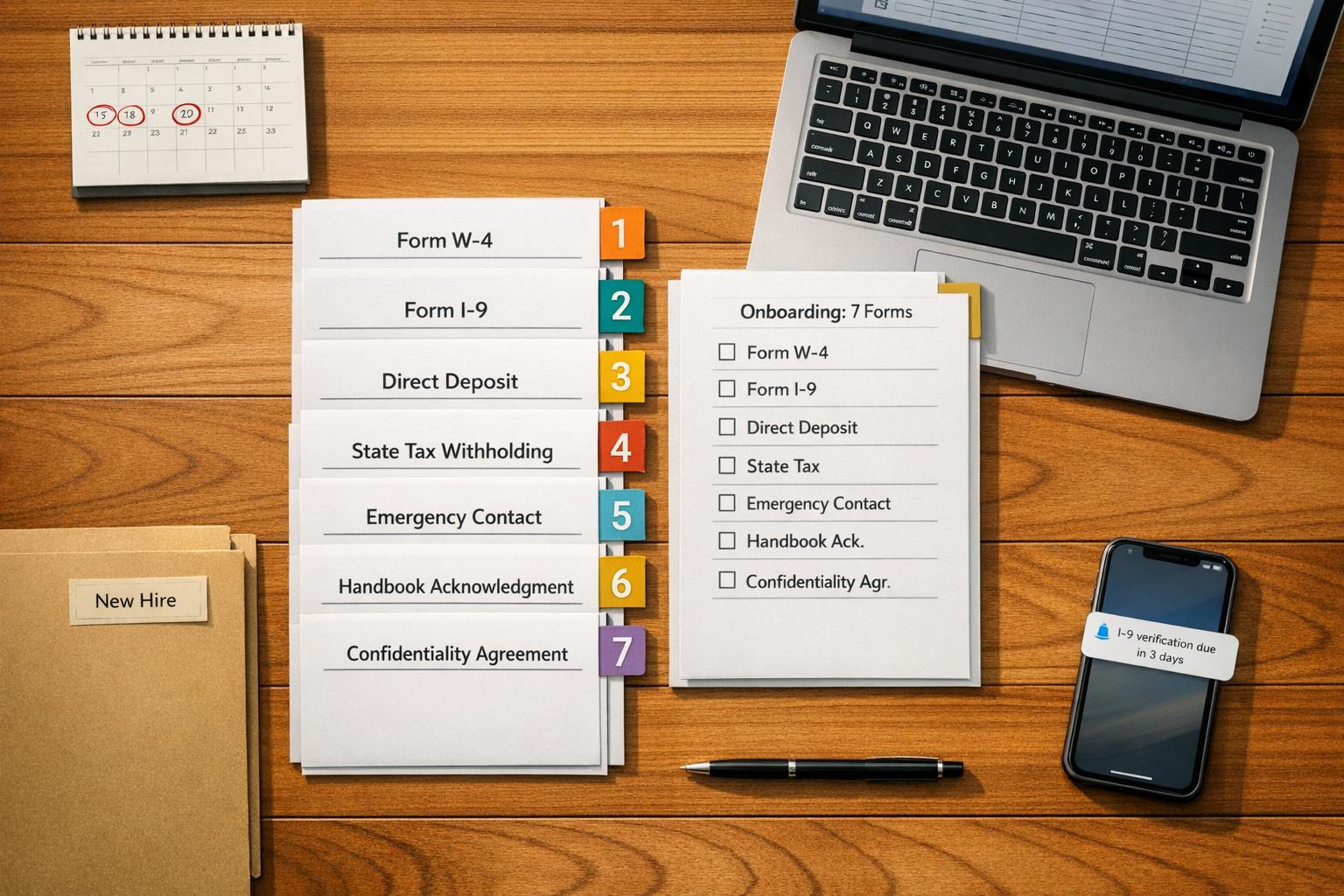
Author: Ron Daniel
Free Employee Onboarding Checklist: The Only 7 Forms You Need
Streamline new-hire paperwork with the seven must-have forms, deadlines, and digital tips to stay compliant and save time.
Have you ever had a new hire show up on their first day, excited to start, only to spend hours drowning in forms? I’ve seen it happen more times than I can count. It’s not just frustrating for the employee - it’s a headache for managers too. I remember one time when we missed an I-9 deadline, and the fine? Let’s just say it wasn’t pretty. Federal penalties can climb as high as $27,894 per form for repeat offenders. Ouch.
Here’s the thing: onboarding doesn’t have to feel like a paperwork marathon. In fact, when done right, it can boost productivity by over 70% and cut down on early turnover. But to make that happen, you need a plan - and the right forms. That’s why we’ve boiled it down to just seven essentials. These forms aren’t just about compliance (though they’ll save you from those nasty fines); they’re about setting your new hires up for success from day one.
Let me walk you through what works, what doesn’t, and how we’ve simplified this process at Pebb. By the end, you’ll have everything you need to streamline onboarding and make a great first impression. Let’s dive in.
Why These 7 Forms Matter for Onboarding
Let me tell you, these seven forms aren’t just a stack of paperwork - they’re your lifeline to staying compliant and running a smooth operation. Each one plays a critical role, from shielding your business against hefty federal fines to ensuring your payroll runs like clockwork. They also help establish a clear understanding of roles and responsibilities for your new hires right from the start.
Here’s a story that stuck with me: One employer was slapped with a $64,500 fine because they didn’t store employee medical records separately from general personnel files, as required by the Americans with Disabilities Act (ADA). Imagine that - one oversight cost them tens of thousands of dollars. Forms like the W-4 and I-9 aren’t optional either; they’re mandated by the Internal Revenue Code and federal immigration law, with strict deadlines that can result in penalties if missed. And don’t forget about new hire reporting under the Personal Responsibility and Work Opportunity Reconciliation Act (PRWORA). It’s designed to help state agencies enforce child support orders and meet federal tracking requirements.
But here’s the thing - it’s not just about compliance. These forms simplify everything for both you and your new hire. Instead of chasing down tax info, direct deposit details, or benefits elections spread across emails and paper piles, you’ve got everything centralized in one neat packet. For busy frontline managers, this clarity is a lifesaver. Nobody has time to dig through a mess of documents when they’re juggling a packed schedule.
Let’s talk numbers. Manual onboarding with paper forms eats up around 2.5 to 4 hours per hire. Switch to digital, and you’re looking at just 30 to 60 minutes. That’s not just a time saver - it’s a faster ramp-up for your new hire and a much better first impression.
Bottom line? These forms are the backbone of compliant and efficient onboarding. When you get them right, you’re not just dodging fines - you’re setting your new team member up for success from day one. And if you’re using Pebb’s digital-first platform, you’ve got the added bonus of keeping everything organized and accessible in one place. It’s a win-win.
The 7 Required Onboarding Forms
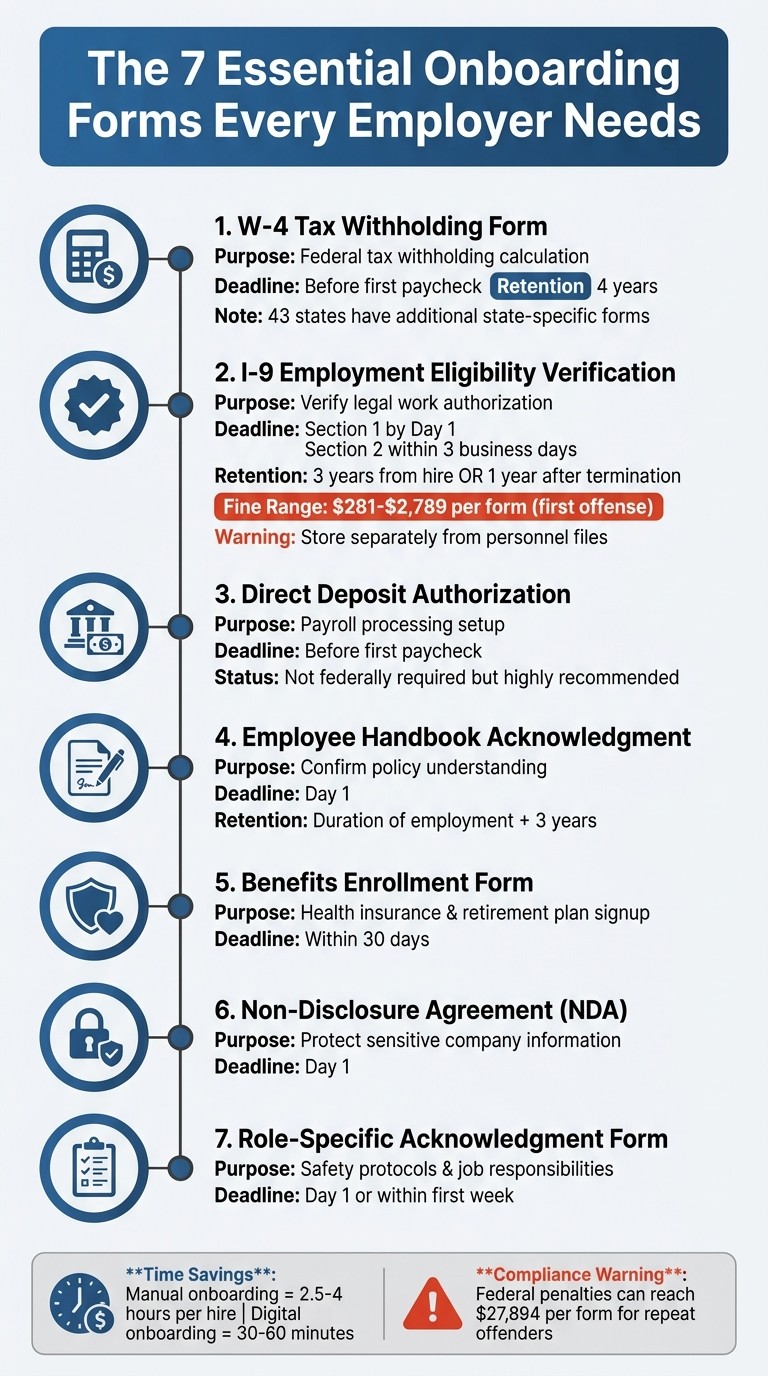
7 Essential Employee Onboarding Forms with Deadlines and Requirements
When it comes to onboarding new employees, having the right forms in place isn’t just about staying compliant - it’s about protecting your business and making the process as smooth as possible. Trust me, I’ve seen how chaotic it gets without a solid system. At Pebb, we’ve figured out how to digitize and manage these forms so you can cut down on errors and save time. Let me walk you through the seven forms every new hire needs and why they matter.
1. W-4 Tax Withholding Form
This one’s a must-have. The W-4 tells you how much federal income tax to withhold from your employee’s paycheck. It’s based on their filing status, dependents, and any extra withholding they request. You’ll need this form before their first paycheck, and don’t forget to hold onto it for at least four years. If you’ve got remote employees, check their state requirements too - 43 states have their own forms, like California’s DE-4 or New York’s IT-2104. Trust me, skipping this step can cause payroll headaches you don’t want.
2. I-9 Employment Eligibility Verification Form
The I-9 is your proof that an employee is legally authorized to work in the U.S. Here’s the breakdown: the employee fills out Section 1 by their first day, and you complete Section 2 within three business days of their start date. Be careful not to tell them which documents to bring - just provide the official USCIS list to avoid any discrimination issues. And a tip: keep these forms separate from personnel files. It’ll make life easier if you ever face an ICE or USCIS audit. Oh, and those fines? They range from $281 to $2,789 per form for first offenses. Ouch.
3. Direct Deposit Authorization Form
While not required by federal law, this form is a game-changer for payroll. It lets you deposit wages straight into your employee’s bank account. No paper checks, no hassle. Make sure to collect this before the first payday to keep things running smoothly.
4. Employee Acknowledgment of Company Handbook
This one’s your safety net. It confirms that your employee has received, read, and understood your company policies. If any disputes pop up later - whether it’s about attendance or workplace conduct - you’ll be glad you have this on file. Get their signature on Day 1 and keep the form for the duration of their employment plus three years.
5. Benefits Enrollment Form
Your new hires need this to sign up for health insurance, retirement plans, and other perks you offer. Make sure this gets done within 30 days of their start date so they can access these resources without delays. It’s a small step that shows you care about their well-being.
6. Non-Disclosure Agreement (NDA)
An NDA is essential for protecting your company’s sensitive information. Whether it’s customer data, proprietary processes, or trade secrets, you’ll want this signed on Day 1. It sets clear boundaries about what can and can’t be shared, giving you peace of mind.
7. Role-Specific Acknowledgment Form
This form is all about ensuring your new hire understands their responsibilities and any safety protocols tied to their role. It’s especially important in industries like logistics or manufacturing, where tasks and hazards can vary. Aim to get this within their first week to confirm they’ve completed any necessary training.
Form Type | Purpose | Deadline |
|---|---|---|
W-4 Form | Federal tax withholding | Before first paycheck |
I-9 Form | Work eligibility verification | Section 1: Day 1; Section 2: Day 3 |
Direct Deposit | Payroll processing | Before first paycheck |
Handbook Acknowledgment | Policy compliance | Day 1 |
Benefits Enrollment | Health/Retirement access | Within 30 days |
NDA / IP Agreement | Data & IP protection | Day 1 |
Role-Specific Form | Safety & expectations | Day 1 / First Week |
When you’ve got these forms organized, onboarding becomes a breeze. Next, I’ll show you how Pebb takes the hassle out of managing all this paperwork. Stay tuned!
How Pebb Digitizes These Forms
Let me tell you, onboarding has never been easier than with Pebb. We’ve taken all those seven must-have forms and put them into one simple, digital space. Here’s how it works: when you bring on a new hire, they get a single invite link. That link opens the Pebb app and takes them straight to their very own Welcome Space. From there, everything they need - W-4s, I-9s, direct deposit forms, you name it - is just a tap away.
What’s even better? Pebb’s automated task system does the heavy lifting for you. It schedules forms based on the new hire’s start date or role. So, whether you’re onboarding a store associate or a manager, Pebb knows which forms and permissions to assign. And here’s a bonus: you can start the preboarding process early by sending that invite link before their first day. This way, they can knock out their W-4 and I-9 Section 1 ahead of time, saving everyone a headache down the line.
But Pebb isn’t just about forms. Once the onboarding is done, the app connects your new hire to everything they need - shift schedules, PTO management, team chats, and even the employee directory. And since we integrate with payroll systems like ADP, moving from onboarding to payroll is as smooth as it gets. Forget juggling separate tools; Pebb keeps everything in one place, right on their smartphone. This is a game-changer, especially for frontline workers who rely on mobile access.
We also take security and compliance seriously. Pebb uses role-based access, meaning only authorized HR or admin staff can view sensitive documents. Plus, we handle document retention for you: I-9s are stored for three years from hire (or one year after termination), and W-4s are kept for four years. No more tracking paperwork manually - we’ve got you covered.
Here’s the kicker: our Standard plan is free for up to 15 employees. If you need more advanced features, it’s just $4 per user each month. Think about it - why pay for multiple tools like Slack for chat and Staffbase for updates when Pebb does it all in one app? It’s seamless, secure, and affordable. And with everything in one place, you can stop stressing about onboarding and start focusing on what really matters - building a great team.
Printable Onboarding Checklist
Let me share a handy checklist that can make your onboarding process smoother and more organized. It includes all seven forms we’ve talked about, along with their deadlines and main purposes. Trust me, having this on hand can save you from unnecessary stress and ensure everything stays compliant.
Form Name | Primary Purpose | Deadline |
|---|---|---|
W-4 Form | Calculates federal tax withholding | Before first paycheck |
I-9 Form | Verifies employment eligibility | Section 1: Day 1; Section 2: Day 3 |
Direct Deposit | Sets up payroll account | Before first paycheck |
Handbook Acknowledgment | Confirms policy compliance and legal protection | Day 1 |
Benefits Enrollment | Sets up health and retirement plans | Typically within 30 days |
NDA / IP Agreement | Protects company secrets | Day 1 |
Role-Specific Forms | Covers training and equipment accountability | First week |
This checklist is a quick reference to keep deadlines and purposes clear while reinforcing the streamlined process we’ve been discussing.
Pro Tips for Staying Organized
Group by Timeline: Break down the forms into categories like Pre-boarding, Day 1, Day 3, and the First 30 Days. This way, you can stay on top of deadlines and avoid any last-minute scrambles.
State-Specific Compliance: If you’re hiring remote employees, double-check that you’re following the tax regulations for their specific work location. It’s an easy detail to overlook but can save headaches later.
Separate Your Files: Keep things tidy and compliant by storing documents in the right places:
I-9 forms in their own binder
Medical records in a restricted-access file
General personnel documents in a separate folder
Mixing these up isn’t just messy - it can lead to ADA violations. Keeping them organized helps you avoid compliance issues.
Oh, and here’s a little insider tip: Pebb’s platform lets you upload this checklist digitally. It’s a lifesaver for tracking everything and making sure no form slips through the cracks.
Wrapping It All Up
When it comes to onboarding, every form has a purpose. The seven essentials - W-4, I-9, Direct Deposit, Handbook Acknowledgment, Benefits Enrollment, NDA, and Role-Specific Forms - aren't just paperwork. They’re the backbone of a smooth, compliant, and efficient process. These forms protect your business, ensure payroll accuracy, and help set the right tone from day one.
Now, let’s talk about the real game-changer: going digital. Paper-based onboarding can be a huge time sink, but switching to a digital-first system? That’s where the magic happens. It frees up time, keeps things organized, and creates a seamless experience for everyone involved.
At Pebb, we’ve designed our platform to handle all of this in one place. You can upload forms, send them directly to new hires’ phones, track their progress in real time, and securely store everything - no need to juggle multiple tools. Plus, our system is always up to date with the latest IRS and E-Verify regulations, so you can stay compliant without breaking a sweat.
But here’s the thing: onboarding doesn’t stop at forms. With Pebb, once your new hire wraps up their paperwork, they’re instantly plugged into their team. From shift schedules to work chats, company updates, and PTO management, they’re set up to hit the ground running. It’s not just about ticking boxes - it’s about making them feel like part of the team from day one, whether they’re in the office or out in the field.
Ready to simplify your onboarding? Start with these seven forms and let Pebb take care of the rest.
FAQs
What happens if I miss the I-9 deadline?
Missing the I-9 deadline can hit hard, with penalties ranging from $288 to $2,861 per form. And here’s the kicker - if a company knowingly hires unauthorized workers, the fines can skyrocket to $28,619 per offense. With enforcement ramping up, staying on top of these regulations isn’t just a good idea - it’s a must to dodge those hefty fines.
Do remote hires need extra state tax forms?
When hiring remote employees, there’s an extra layer of paperwork to consider - state tax forms. If an employee works in a state different from where they live, things can get tricky. Without a reciprocal agreement between the two states, they might have to file both resident and nonresident tax returns.
It’s essential to review the tax requirements for each state involved to make sure everything is handled correctly. Missing this step could lead to compliance issues down the road.
How should I store I-9s and medical records?
When it comes to handling sensitive employee information like I-9s and medical records, security is non-negotiable. These documents contain personal details that demand extra care - not just for compliance but to safeguard privacy.
Here’s how we approach it:
Separate storage is key: We always keep I-9 forms in their own space, away from other employee records. This minimizes the risk of accidental access or misuse.
Limit access: Only authorized personnel can view these documents. Whether it’s digital or physical, access is on a strict need-to-know basis.
Secure storage solutions: For digital files, we rely on encrypted systems that add an extra layer of protection. Physical copies? They’re locked away in secure cabinets.
Follow the rules: Federal and state privacy regulations are our north star. Staying compliant not only protects our employees but also shields us from potential legal headaches.
Taking these steps ensures that sensitive information stays confidential and out of the wrong hands. It’s all about being proactive and diligent.
