
Author: Ron Daniel
Free All-in-One Employee App for Small Businesses
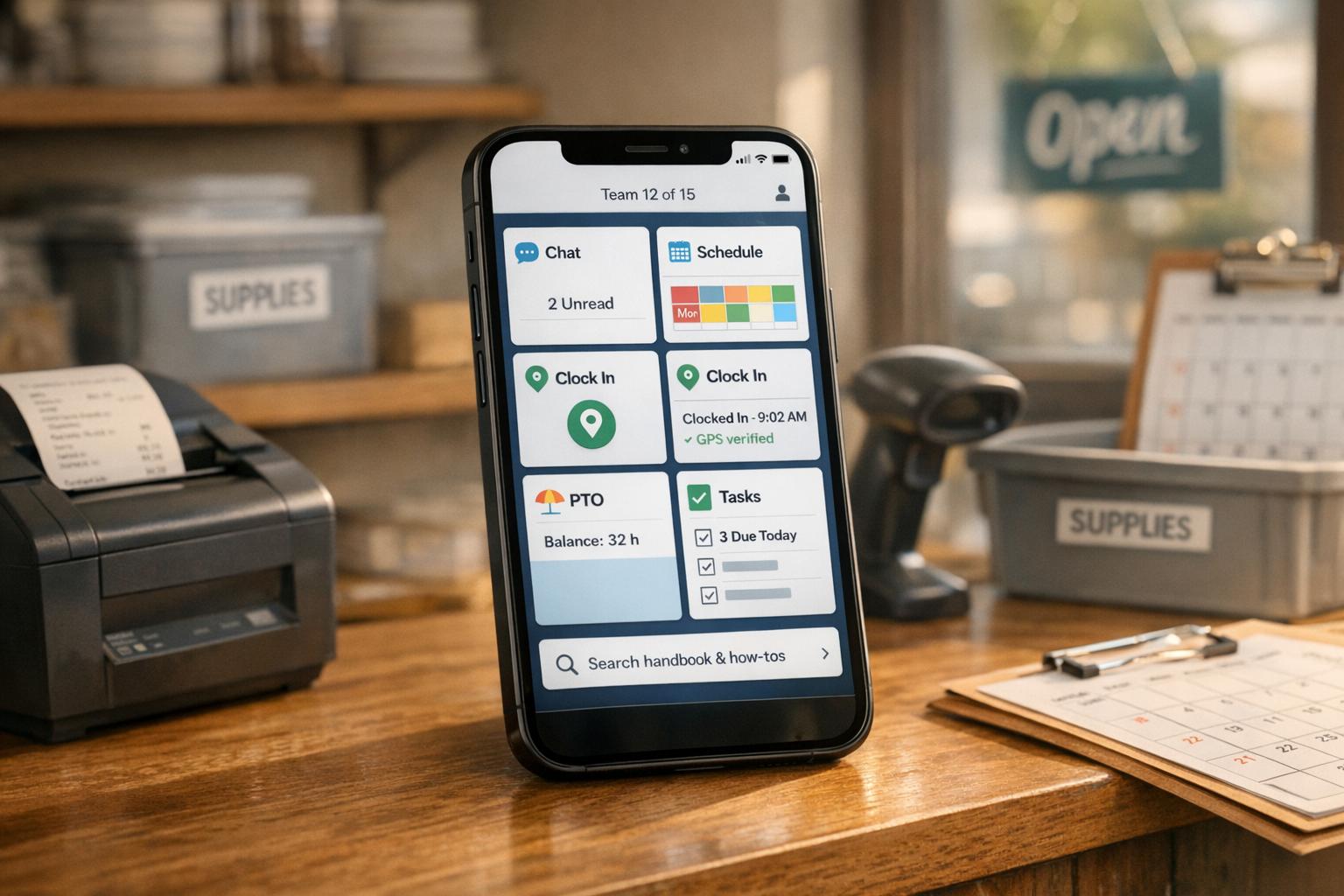
Free app for teams up to 15 with chat, scheduling, GPS clock-in, PTO, tasks, and a searchable knowledge base to simplify small business operations.
It’s wild how much time I used to spend jumping between apps just to keep things running smoothly at work. One minute, I’d be updating a schedule in Google Sheets, the next, chasing down approvals in email, and then scrambling through WhatsApp to find out who could cover a shift. Sound familiar? If you’ve ever managed a small team, you know the chaos I’m talking about. It’s not just frustrating - it’s expensive. Studies show that small businesses lose 20-30% of productivity from all this juggling. That’s hours of wasted time every week - and let’s be honest, none of us can afford that.
Here’s where Pebb comes in. We built it to tackle these exact headaches. Imagine having internal communication tool, scheduling, time tracking, task management, and even company updates - all in one app. No more switching between five different tools. And the best part? It’s completely free for teams of up to 15 people. Yep, free. No strings, no hidden fees.
Stick with me, and I’ll walk you through how Pebb can simplify your day-to-day, save you time, and help your team work smarter - not harder. Let’s dive in.
Pebb's Free Standard Plan: Full Features for Teams Up to 15
What's Included in the Free Plan
Let me tell you, our Standard plan is a game-changer - and yes, it's completely free. If your team has 15 or fewer members, you get access to a suite of tools that cover all the essentials. Here's what you can expect:
Unlimited work chat with full message history: Unlike Slack’s free tier that caps you at 10,000 messages, we keep your entire history intact.
Drag-and-drop scheduling: Simplify shift planning with just a few clicks.
Mobile clock-in: Employees can clock in accurately, right from their phones.
PTO management: Handle time-off requests directly within the app.
Task management: Create digital checklists to keep everyone on track.
News feed: Share company updates in a central spot.
People directory: Quickly find contact details for anyone on the team.
Knowledge base: Store training materials and standard operating procedures (SOPs) in one accessible location.
Digital forms: Collect data seamlessly without the hassle of paper.
Calendar: Keep track of events and deadlines with ease.
And the best part? You can access all these features from any device. It's like having a fully loaded toolbox for team communication and operations, all in one place.
Replacing Multiple Tools with One Platform
Now, here's where it gets even better. Pebb doesn't just add value - it simplifies your entire workflow by replacing the patchwork of tools you might be using now. Think about it: WhatsApp for group chats, Google Sheets for schedules, email chains for PTO approvals, paper timesheets, and even those old-school bulletin boards. Pebb takes all of that and brings it together into a single platform.
For example, post a shift in Pebb, and team members get notified instantly. Employees clock in and out in real-time right from the app. PTO requests? They’re approved or managed without ever leaving the platform. This streamlined approach saves time, reduces errors, and keeps everyone on the same page. It’s efficiency redefined.
How Pebb Works: Features That Run Your Business
At Pebb, we focus on three essential areas: communication, operations, and engagement. Together, these pillars replace the need for multiple tools, giving small businesses a single, streamlined platform to manage their teams and workflows.
Communication: Chat, Calls, and Team Directory
Let’s talk communication first. Our work chat keeps all professional conversations in one place, so there’s no need to mix work and personal messages. And here’s the kicker - your entire message history is available at no extra cost. Compare that to Slack’s free tier, which limits you to 10,000 messages, and you’ll see the difference.
Then there’s the People Directory, a game-changer for onboarding. Team members can complete profiles with their roles and expertise, helping new hires quickly figure out who handles what. And with Spaces, introduced in December 2025, you can organize conversations, updates, and files by team or location. For instance, you might have a Space for your downtown store and another for your warehouse, keeping everything focused and easy to find.
Premium users get even more with built-in voice and video calls, so there’s no need to jump between apps. Plus, as of March 2026, we’ve added a faster interface and support for Spanish, French, and Portuguese.
While communication tools keep everyone on the same page, our operational features tackle the nitty-gritty of scheduling and task management.
Operations: Scheduling, Time Tracking, and Task Management
Here’s where Pebb really shines for day-to-day operations. Our drag-and-drop shift scheduler makes assigning shifts a breeze. You can even set up recurring templates for regular schedules and add notes like “train new hire” directly on the timeline. Share the finalized schedule at a consistent time - say, every Wednesday at 2:00 PM - through the News Feed for instant visibility.
Employees can clock in and out right from their phones using GPS verification, completely eliminating the hassle of paper timesheets. PTO requests and shift swaps? Those happen in-app, too. You’ll get a notification, and with a single tap, you can approve or deny the request, automatically updating the schedule. Need to send out an urgent announcement? Use @mentions like "@everyone" to trigger push notifications for things like last-minute coverage needs.
Our task management tool is another lifesaver. It organizes daily checklists with clear priorities and tracks progress in real time. The Knowledge Library centralizes everything from training materials to company policies, making it searchable and accessible on any smartphone. And with digital forms, you can collect reports or feedback without drowning in paperwork.
But it’s not just about getting things done - Pebb also helps you build a stronger, more connected team.
Engagement: News Feed, Calendar, and Knowledge Sharing
The News Feed is your go-to hub for everything from quarterly updates to celebrating team wins and work anniversaries. It’s not just a one-way street, though. Employees can react, comment, and even share their own thoughts, turning traditional memos into real conversations. Want to make your posts pop? Use images, videos, or even screen recordings. And with dashboard analytics, you can see what’s resonating with your team.
“Organizations with robust recognition systems see a 22.5% increase in alignment, 20.6% higher retention, a 19.3% boost in productivity, and employees who feel heard are 4.6 times more likely to perform at their best”.
Recognition plays a big role here. Encouraging team members to give public shout-outs fosters a culture of appreciation. The Calendar keeps everyone aligned on deadlines and events, while hobby-based clubs - like photography or fitness groups - help employees connect over shared interests. And if you’re looking to break down silos, the People Directory makes it easy to find mentors or collaborators based on skills or interests.
With these tools, Pebb isn’t just about running your business - it’s about building a workplace where people feel connected, supported, and empowered to do their best work.
How Small Businesses Use Pebb: 3 Industry Examples
Let me walk you through how real businesses are using Pebb to simplify their operations and cut through the chaos of juggling multiple tools. These examples show how Pebb’s features turn everyday challenges into manageable tasks across different industries.
Retail: Keeping Schedules on Track
Picture this: you're running a boutique clothing store with 12 employees, and it’s Black Friday - the busiest day of the year. You’ve built your weekly schedule using Pebb’s drag-and-drop tool, even adding notes like "Black Friday prep" to key shifts. But then, disaster strikes - two employees call out sick. With Pebb, it’s not a nightmare. You can instantly check who’s available, swap shifts in seconds, and notify the team using an '@everyone' mention in your "Retail Shifts" channel. Push notifications go out immediately, and the schedule updates automatically. No scrambling, no chaos - just a smooth recovery from what could have been a scheduling nightmare.
Hospitality: Keeping Service Flowing
Now, let’s step into a 20-room hotel during dinner service. The front desk posts, "Housekeeping needed for Room 12 checkout", directly to the News Feed. Within minutes, housekeepers get the notification, complete the task, and confirm it via chat - keeping guest delays to a minimum. Meanwhile, restaurant managers are assigning tasks like "Restock bar at 7:00 PM" in real time. Dedicated chat groups for front-of-house and back-of-house teams keep everyone in sync, and for premium users, urgent kitchen issues can be resolved even faster with a quick voice call. It’s all about speed and coordination when the pressure’s on.
Logistics: Keeping Distributed Teams Connected
Imagine managing a small logistics company with 10 drivers and 5 warehouse staff spread across multiple locations. When schedules change - say Driver John needs to pick up a load earlier than planned at the Dallas warehouse - Pebb sends instant app notifications to everyone involved. The warehouse team shares delivery updates in a dedicated chat thread, while safety alerts like "New route policy starts Monday" are pushed to the News Feed, making sure no one misses critical updates. GPS-verified clock-ins and clock-outs ensure accurate time tracking, and drivers can access key training documents in the knowledge base, staying informed no matter where they are.
These examples highlight how Pebb becomes the backbone of operations for small businesses, turning potential chaos into smooth, efficient workflows.
Pebb Premium: $4 Per User for Advanced Features
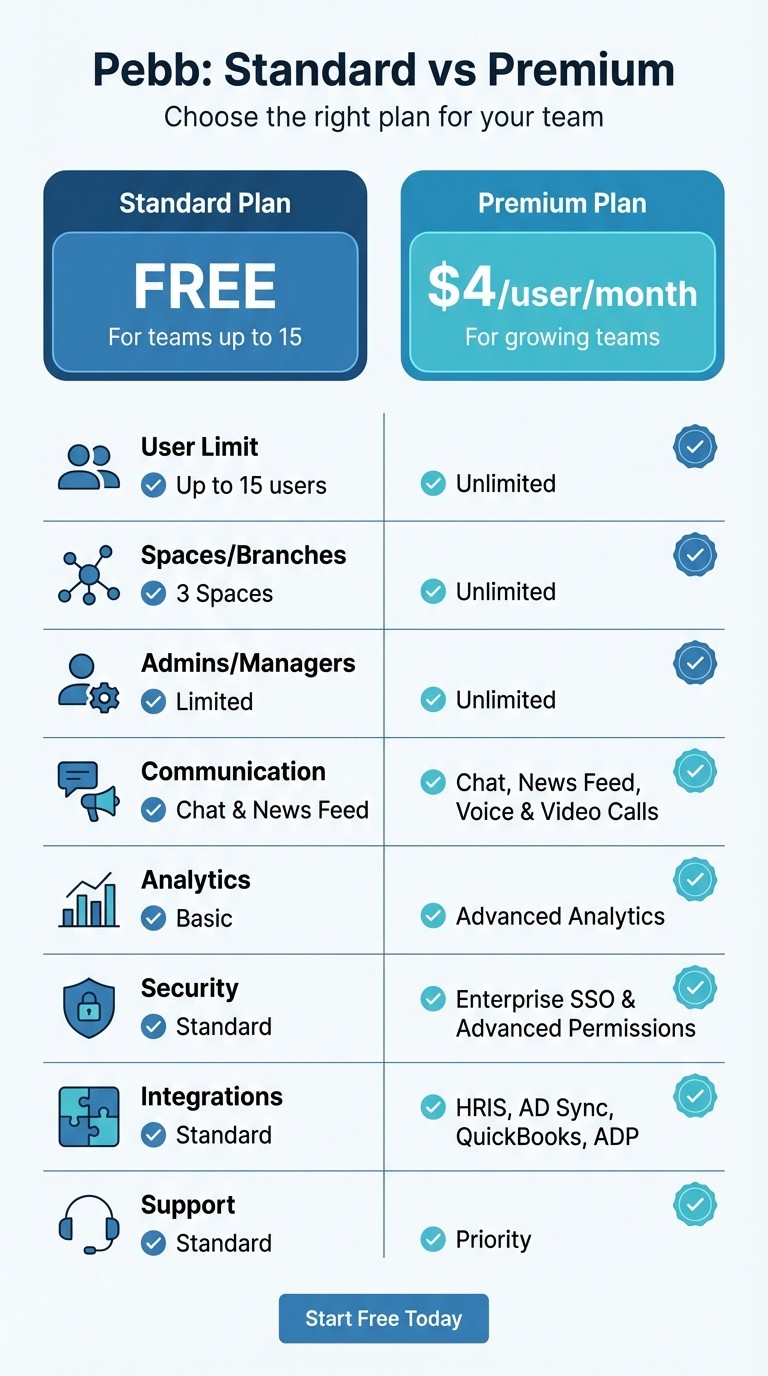
Pebb Standard vs Premium Plan Comparison for Small Businesses
When your team grows beyond 15 members or starts needing more robust tools, upgrading to Pebb Premium for just $4 per user/month is a no-brainer. It combines multiple subscriptions into one cost-effective plan, designed to grow with your team. Let me walk you through what makes Premium worth it.
What You Get with Pebb Premium
Premium unlocks a suite of advanced tools to keep your team connected, productive, and organized. Here’s what’s included:
Unlimited everything: Users, spaces, and admins - no limits holding you back as your team expands.
Built-in voice and video calls: Forget juggling multiple apps; handle quick updates or urgent discussions right within Pebb.
Advanced analytics: Gain insights into engagement, attendance, and communication trends to make smarter decisions.
Enhanced security: Enterprise Single Sign-On (SSO) and granular permissions give you full control over access.
Seamless integrations: Sync with HRIS and Active Directory for up-to-date employee data, and streamline payroll with QuickBooks and ADP.
Priority support: Need help? Premium users jump to the front of the line for assistance.
While the free Standard plan is perfect for small teams, Premium ensures your platform evolves as your business grows.
Standard vs. Premium: Which Is Right for You?
Here’s a side-by-side look at what each plan offers:
Feature | Standard (Free) | Premium ($4/user/month) |
|---|---|---|
User Limit | Up to 15 users | Unlimited |
Spaces/Branches | 3 Spaces | Unlimited |
Admins/Managers | Limited | Unlimited |
Communication | Chat & News Feed | Chat, News Feed, Voice & Video Calls |
Analytics | Basic | Advanced Analytics |
Security | Standard | Enterprise SSO & Advanced Permissions |
Integrations | Standard | HRIS, AD Sync, QuickBooks, ADP |
Support | Standard | Priority |
If you’re bumping up against the 15-user limit or finding 3 spaces too restrictive, it’s time to level up. Premium ensures you’re equipped with the tools your growing team needs to stay connected and efficient.
Setting Up Pebb: 3 Steps to Get Started
At Pebb, we’ve made it ridiculously simple to get your team up and running - no drawn-out setup or IT nightmares. Believe it or not, many small businesses have transitioned their entire teams in just one day. Let me walk you through how to make that happen.
Step 1: Create Your Account and Invite Your Team
First, head over to the Pebb website and sign up. It’s quick - just a few minutes, and your workspace is live. Once you’re set up, you’ll get a single invite link that you can share with your team however you like - text, email, or even a group chat. Forget about tedious spreadsheets or manual data entry; just send the link, and your team can join in no time.
From there, assign admin roles for tasks like managing schedules, approving time-off requests, or sharing company updates. The best part? Pebb works seamlessly on web, mobile, and desktop, so your team can access it from wherever they are.
Once everyone’s in, it’s time to set up the tools they’ll rely on every day.
Step 2: Configure Your Core Tools
Now comes the fun part - getting your team’s daily essentials in place. If you’ve got hourly workers, start with shift scheduling. Add your first week’s schedule so employees can easily check their shifts right from their phones. For field teams, enable the clock-in tool with GPS verification to ditch those messy paper timesheets. Set up PTO policies so employees can request time off directly in the app, and post a welcome message or kudos on the News Feed to show off how updates work and get that first spark of engagement.
Don’t forget to upload key documents - like SOPs, handbooks, or policies - into the Knowledge Library. This way, everything your team needs is in one searchable spot, not buried in email threads or random folders. Say goodbye to juggling multiple systems; Pebb ties it all together for a smoother workflow.
Once the basics are covered, it’s time to bring the team onboard and get them excited.
Step 3: Onboard Your Team and Build Momentum
To avoid overwhelming your team, introduce the essentials first - like checking schedules, clocking in, and using chat. Save the more advanced features for later, rolling them out gradually over the following weeks.
Here’s a tip: assign a peer mentor to help new hires navigate Pebb. This informal support system lets them ask quick questions without feeling stuck. And don’t underestimate the power of public shout-outs - celebrate small wins on the News Feed, like an employee completing their first shift, submitting a time-off request, or finishing a training module. It’s a simple way to create buzz and show that Pebb is where everything’s happening.
For new hires, go the extra mile by sending a welcome note through Pebb before their first day. It’s a small gesture, but it builds excitement and helps them feel comfortable with the platform right away.
Wrapping Things Up
Running a small business means every minute and dollar matters. That’s why we created Pebb - to help you manage your team without the headaches. With our Free Standard Plan, teams of up to 15 can access a full suite of tools without worrying about hidden fees or missing features. It’s already proven its worth in industries like retail, hospitality, and logistics.
Pebb simplifies everything. Say goodbye to juggling group texts, paper schedules, and endless email chains. Instead, you get one streamlined platform that grows with you. If your team expands beyond 15 or you’re ready for advanced tools like analytics and enterprise SSO, our Premium Plan is just $4 per user per month. It’s one of the best deals out there for a complete solution.
Getting started is a breeze. Send out one invite, and you can have your team fully onboarded the same day using frontline employee onboarding best practices.
Why wait? Try our free plan today and see how much easier managing your business can be. Trust me, your team - and your bottom line - will appreciate it.
FAQs
Does Pebb work offline or in low-signal areas?
Pebb works best in areas with stable internet connectivity. At the moment, it doesn't support offline use or operation in environments with weak or low signals.
Can I migrate schedules, contacts, and documents into Pebb?
Yes, you can bring over your schedules, contacts, and documents into Pebb without a hitch. All you need to do is export your data from your current platform and grant Pebb access to it. This way, the transition for your team stays smooth and hassle-free.
How does GPS clock-in protect employee privacy?
When it comes to GPS clock-ins, employee privacy is a top priority. Employers must get written consent from employees before using GPS tracking. This step ensures that everyone is aware of and agrees to location monitoring during work hours. Plus, tracking is strictly limited to approved times and specific purposes, so there's no overreach into personal time or activities. It’s all about keeping things transparent and respectful.
