
Author: Ron Daniel
The 5 Best Staff Management Apps in 2026
An opinionated guide comparing five staff management apps — features, pricing, integrations, and best use cases to help teams choose the right tool.
Have you ever felt like managing a team is a bit like trying to organize a family road trip with no GPS? You’ve got schedules to juggle, messages flying in from every direction, and just when you think you’ve got it under control, someone needs to swap shifts. I’ve been there. And trust me, it’s not a good time.
Here’s the deal: In 2026, the workplace is more chaotic than ever. Teams are spread across time zones, apps are multiplying like rabbits, and keeping everything in sync feels impossible. But that’s why staff management apps exist - to bring order to the madness. The problem? Not all of them get it right. Some are bloated with features no one uses, while others are so barebones they leave you scrambling for workarounds.
At Pebb.io, we’ve spent years helping teams ditch the chaos and find tools that actually work for them. Today, I’m breaking down the five best staff management apps of 2026. I’ve seen firsthand what works, what doesn’t, and how the right app can transform your internal communication and stays on track. Let’s dive in.
1. Pebb
At Pebb, we set out to tackle a challenge we saw everywhere: teams drowning in a sea of apps. You know the drill - one app for chat, another for scheduling, yet another for updates. It’s exhausting. So, we built Pebb to be your team’s all-in-one employee app for communication and operations, a digital headquarters that streamlines everything from shift scheduling and PTO requests to work chat and news feeds.
Features and Functionality
Pebb combines everything your team needs into one mobile-first app: work chat, live news feeds, shift scheduling, PTO management, tasks, calendar events, digital forms, groups, a people directory, voice and video calls, and more. We kept the design simple and intuitive, so anyone can jump in with little to no training. In fact, you can onboard entire teams in just minutes using a single invite link.
What’s more, Pebb integrates seamlessly with major HR and payroll systems. That means it becomes your operational hub without disrupting the tools you’re already using. Whether you’re managing a retail store, a restaurant, or a tech team, everything stays in sync without a hitch.
Pricing and Plans
Here’s where Pebb really shines: it’s affordable without cutting corners. Our Premium plan comes in at just $4 per user/month - a bargain compared to competitors like Workleap, which starts at $5 per user with a minimum fee, or Leapsome, which charges $7 per user.
For smaller teams, our Standard plan is completely free for up to 15 employees. You’ll get access to work chat, live news feeds, shift scheduling, PTO management, tasks, digital forms, calendar, and clock in without spending a single dollar. If you’re part of a larger organization with specific security needs, our Premium plan includes Enterprise SSO, permissions control, and integrations.
Best-Suited Use Cases
Pebb is a game-changer for hybrid teams across industries like retail, healthcare, and beyond. With teams across industries using Pebb worldwide, we’ve seen firsthand how consolidating tools into one platform can transform team communication. If your team is scattered across multiple apps and missing key updates, Pebb is the solution that brings everyone together.
Integration Capabilities
One of Pebb’s strongest features is its ability to integrate with the tools you’re already using. With connections to major HR, payroll, and productivity platforms, Pebb acts as the front door to your operations. Your existing systems keep running smoothly, while Pebb provides a unified interface to tackle the staffing and communication challenges teams face today. It’s all about making your workday easier and more connected.
2. Deputy
While Pebb shines as an all-in-one communication and team management tool, Deputy takes a different path, focusing on scheduling and compliance for shift-based workplaces. With over 385,000 workplaces worldwide relying on it, Deputy has become a favorite in industries like hospitality, retail, healthcare, and manufacturing. Its standout feature? An AI-powered scheduling engine that builds rosters based on employee availability, labor costs, skills, and legal requirements. Let’s dive into what makes Deputy tick.
Features and Functionality
Deputy’s AI-driven demand forecasting is a game-changer. It predicts staffing needs by analyzing sales data and foot traffic. The platform even includes biometric facial recognition to prevent buddy punching and ensure accurate time tracking. When it comes to compliance, Deputy doesn’t miss a beat, sending alerts for overtime, required breaks, and Fair Workweek rules.
Here’s a real-world example: Michelle Wilcox, a manager at University Veterinary Hospital, shared that Deputy cut clock-in and clock-out errors by 50% after they adopted its time and attendance tools.
The mobile app adds another layer of convenience. Employees can swap shifts, request PTO, and check schedules, while managers assign tasks, get real-time updates, and communicate with teams using read receipts. Plus, Deputy integrates seamlessly with payroll giants like ADP, Gusto, and Xero, as well as POS systems such as Square and Shopify.
Pricing and Plans
Deputy’s pricing starts at $5 per user/month, covering basic scheduling, timesheets, and labor law compliance. For $6.50 per user/month, the Core plan adds AI auto-scheduling and demand forecasting. The Pro plan, at $9 per user/month, includes advanced features like custom access levels, SSO, and bundled Analytics+ and Messaging+. Enterprise plans kick off at a minimum spend of $30 per invoice per month, effective September 1, 2025.
Sure, Deputy’s pricing is higher than Pebb’s $4 per user/month Premium plan, but its specialized AI tools can be a lifesaver for businesses with heavy shift demands. For instance, companies using Deputy Payroll powered by Paycor have reported slashing payroll processing time by up to 50%.
Best-Suited Use Cases
Deputy thrives in environments where compliance and labor cost control are make-or-break factors. Think restaurant chains, retail stores with unpredictable traffic, and healthcare facilities juggling complex schedules. It’s particularly useful for businesses with multiple locations, offering roll-up visibility across all sites.
Integration Capabilities
Deputy doesn’t just stop at scheduling. It integrates with over 300 platforms, including HR systems like BambooHR and People HR, and accounting tools such as QuickBooks and Xero. For those looking to customize workflows, its Open API provides the flexibility to tailor integrations to fit existing tech stacks.
3. Connecteam
Connecteam is designed with deskless workers in mind, catering to industries like construction, healthcare, and cleaning. Since these workers usually aren't tied to desks or computers, Connecteam's mobile-first platform fits seamlessly into their daily routines. With over 1.2 million managers and employees worldwide, it's become a go-to tool for consolidating operations, communications, and HR into a single app.
Features and Functionality
Connecteam organizes its tools into three main hubs: Operations, Communications, and HR & Skills. Here's how it breaks down:
Operations: Features like AI-powered auto-scheduling, GPS time clocks with geofencing, and digital forms help streamline workflows.
Communications: Includes an in-app chat, a social newsfeed, and searchable employee directories.
HR & Skills: Handles frontline employee onboarding, training courses (complete with quizzes), and secure document storage.
Real-world examples? Biggby Coffee saw a 98% daily app usage rate among employees and reduced staff turnover by simplifying scheduling and mobile training. Similarly, Caremark Home Care Services cut their training time for care assistants by 50% after digitizing their processes.
Connecteam also incorporates advanced tools, like AI features for creating courses or enhancing updates, to make tasks even easier. Plus, it integrates with popular payroll systems like QuickBooks Online, Gusto, Xero, and ADP (RUN), as well as tools like Zapier and Lightspeed.
Pricing and Plans
Connecteam offers a flat-fee pricing model that can be a game-changer for small businesses. Here’s how it works:
The Small Business Plan is completely free for life for up to 10 users, with access to all features.
For larger teams, the Basic plan starts at $29/month for up to 30 users, while the Advanced plan costs $49/month, and the Expert plan is $99/month. Beyond 30 users, additional costs range from $0.50 to $3.00 per user/month, depending on the plan.
When you compare this to Deputy's pricing of $5 per user/month for 30 users, Connecteam's flat-fee structure offers substantial savings. For instance, NAE Cleaning Solutions slashed their software expenses by 50% and reduced service complaints by 98% after switching to Connecteam, achieving a tenfold ROI.
Best-Suited Use Cases
Connecteam shines in industries where employees are spread across multiple locations and rely on mobile access. It’s particularly well-suited for sectors like construction, healthcare, retail, manufacturing, food service, field services, transportation, security, and cleaning. Features like GPS geofencing and automated break rules are especially helpful for businesses with strict compliance needs.
"We were tired of juggling 10 apps. This all-in-one solution is perfect for large, multi-location teams." - Heather, IT Manager
Connecteam’s user ratings speak volumes: 4.8/5 stars on the App Store from over 41,000 reviews and 4.7/5 stars on Google Play from more than 14,000 reviews. Users frequently highlight the app's intuitive interface and the 24/7 live support, which often responds in under five minutes.
4. Factorial
Factorial takes a fresh approach compared to the tools we’ve discussed so far. It’s tailored for small to medium-sized businesses - think up to 2,000 employees - who are fed up with juggling spreadsheets, messaging apps, and scattered tools. What makes Factorial stand out is its ability to centralize HR, payroll, time tracking, and IT operations into a single platform. With over 15,000 companies and 600,000 people worldwide using it, many rave about the hours it saves them.
Features and Functionality
Factorial organizes its features into four key areas: Time & Planning, Talent Management, Finance & IT, and Core HR. Here’s a quick breakdown:
Time & Planning: This hub makes scheduling simple with drag-and-drop shift planning, mobile clock-ins (complete with geolocation), and PTO management.
Talent Management: Factorial’s AI-driven tools help craft job descriptions, filter candidates, and manage 360° performance reviews. The 9-box matrix for goal tracking is a bonus.
Finance & IT: The AI agent, aptly named "One", churns out real-time cost reports and creates employee surveys using natural language processing. It also handles device procurement, manages mobile devices across platforms, and tracks SaaS licenses.
Core HR: Designed to streamline the basics, this area includes tools for compliance, record-keeping, and employee management.
One user, Harris K., a Managing Partner, summed it up perfectly:
"Provides actionable insights that save time and boost accountability".
The numbers back it up too. Businesses report saving over 40 hours a month on manual tasks, with some cutting administrative work by a staggering 60%. Plus, Factorial comes with serious credentials: ISO/IEC 27001:2017 certification, a SOC2 Type I report, and GDPR compliance, including alerts for UK working time regulations.
Pricing and Plans
Factorial’s pricing is modular, meaning you only pay for the features you need. For example:
Core HR starts at about $8 per employee per month.
Factorial IT begins at roughly $10 per employee per month.
And here’s the kicker - Factorial offers a free trial with no credit card required. It’s no wonder 9 out of 10 clients rate its onboarding process with five stars. These flexible pricing options make it a great choice for businesses with varying needs.
Best-Suited Use Cases
Factorial shines in industries with shift-based work, like hospitality, retail, healthcare, manufacturing, and catering. It’s also a solid choice for professional services such as consultancies and agencies. For companies managing remote or distributed teams, Factorial’s mobile clock-ins and centralized document access are game-changers.
The mobile app is a hit too, boasting a 4.7/5 rating from over 30,000 users on Google Play and the App Store. Sheen W., a Product Manager, shared their experience:
"Factorial is a one-stop solution for all things HR. If I need any document, I don't need to look any further than the platform because all my documents are [there]".
5. Sling

When it comes to tackling scheduling challenges on a budget, Sling is a standout option for small to mid-sized teams. With over 1 million downloads on Google Play and a glowing 4.7/5 rating from more than 27,000 Apple App Store reviews, it's no surprise that shift-based businesses are hooked. Sling keeps things simple, offering powerful scheduling tools without the steep price or unnecessary frills.
Features and Functionality
Sling’s drag-and-drop scheduling is a game-changer. Managers can effortlessly create, tweak, and replicate shifts in just a few clicks. The color-coded interface makes even the most complex schedules easy to visualize and manage.
One of the features that impressed me the most is the real-time labor cost tracking. As you build your schedule, Sling calculates expenses, flags if you’re going over budget, and helps you avoid costly overtime. Kenneth Taylor, Supervisor of System Operations at Expeditors, shared his experience:
"Sling significantly reduced my scheduling time. I post weekly schedule in minutes and it replicates to future weeks. Eliminate creating schedules from scratch."
Another handy tool is the integrated time tracking with geofencing. Employees can clock in using their phones or terminals, with GPS or IP confirming their location. Sling also includes a built-in "Newsfeed" for announcements and private messaging, cutting down on the need for external communication apps.
And let’s talk about shift trading - employees love it. They can grab available shifts or swap with coworkers, all under manager approval. It keeps the day running smoothly and ensures everyone knows their role.
Pricing and Plans
Sling keeps pricing straightforward and affordable. Here’s the breakdown:
Free Plan: $0 for up to 30 users. Includes basic scheduling, time-off requests, and news sharing. Perfect for startups dipping their toes in.
Premium Plan: $2/user/month (or $1.70 with annual billing). Adds mobile time tracking, labor cost management, and geofencing.
Business Plan: $4/user/month (or $3.40 annually). Includes kiosk time tracking, PTO management, and detailed reporting.
For perspective, Sling’s Premium plan costs about 32% less than When I Work and 66% less than Deputy. For a team of 50, you’d spend roughly $85–$100 per month on Sling Premium, compared to $125 for When I Work or $250 for Deputy. Sarah C., a Speech Language Pathologist, didn’t hold back in her praise:
"Their costs are the lowest I've ever seen and their easy to navigate platform is the most comprehensive I've ever found. Even if they charged 5 or 10x what they are, it would still be an easy choice."
That said, there’s a catch. The Free plan caps at 30 users, and there’s no grace period once you hit that limit - you’ll need to upgrade immediately. Additionally, while Sling is cost-effective for smaller teams, competitors like Homebase might offer better pricing for single-location teams with 100+ employees.
Best-Suited Use Cases
Sling is built for businesses that rely on shift work - think restaurants, retail, healthcare, hospitality, and emergency services. About 70% of its users work in companies with 11–200 employees, making it a great fit for growing teams that need professional scheduling tools without the complexity of enterprise systems.
Its mobile app, rated 4.5/5 on Google Play, is often praised for being easy to use while still offering robust reporting features. Todd Enany from Sunday in Brooklyn summed it up nicely:
"There are plenty of scheduling platforms to choose from, but Sling stands out by striking the perfect balance with its user simplicity and powerful management tools."
While Sling excels in scheduling, Pebb remains the go-to for free, all-in-one communication and collaboration tools that every team member can access.
Integration Capabilities
Sling plays well with others, integrating seamlessly with major payroll and POS systems like Toast (its parent company since July 2022), Shopify, Square, Gusto, QuickBooks, ADP, Harbortouch, and POSiTouch. These integrations let you export timesheets directly to your payroll provider or sync sales data to fine-tune labor costs - no tedious manual entry required.
Pros and Cons
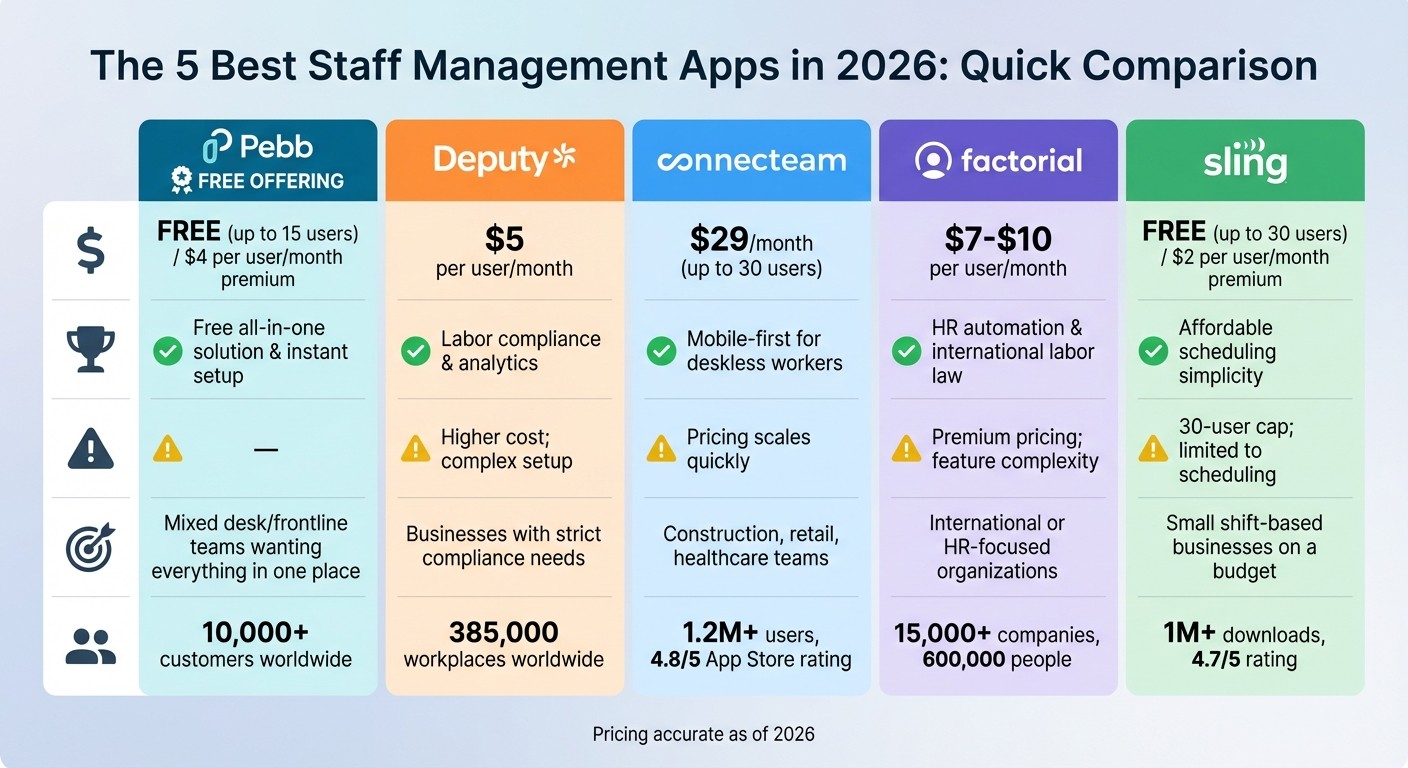
Staff Management Apps Comparison 2026: Pricing and Features
When it comes to picking the perfect staff management app, it's all about finding the right fit for your team’s unique needs. Each platform has its perks and trade-offs, so let me walk you through how they measure up.
Let’s start with Pebb. It’s the ONLY option offering a completely free all-in-one employee app for communication and operations for up to 15 employees. Plus, if you want to unlock premium features, it’s just $4 per user each month. What I love most? The single-link onboarding. Your team can be fully set up in a single day - no tech headaches, no waiting around.
Now, Deputy has carved out a niche for itself with its top-notch labor compliance tools and detailed workforce analytics. If your business has to navigate tricky regulations, this might be your go-to. The downside? It’s 25% pricier than Pebb at $5 per user each month, and smaller teams might find the setup process a bit overwhelming.
Then there’s Connecteam, which shines for teams on the move. It’s a mobile-first platform designed for deskless workers, and it’s super customizable. But here’s the catch: as your team grows, the cost can climb quickly. Also, setting up those custom workflows can feel like a bit of a learning curve for admins.
Factorial steps in as the HR automation expert, especially for companies dealing with European labor laws. It’s a powerful tool, but with pricing between $7–$10 per user each month, it’s not exactly budget-friendly. Smaller U.S.-based teams might also find its feature set a bit more than they need.
Lastly, Sling keeps things simple and affordable. It’s great for scheduling and starts at just $2 per user per month (or free for up to 30 users). That said, it’s focused solely on scheduling, so you won’t get the full suite of communication and collaboration tools that other platforms offer.
Here’s a quick comparison to sum it all up:
App | Starting Price | Key Strength | Main Limitation | Best For |
|---|---|---|---|---|
Pebb | Free (up to 15); $4/user/month | Free all-in-one solution & instant setup | - | Mixed desk/frontline teams wanting everything in one place |
Deputy | $5/user/month | Labor compliance & analytics | Higher cost; complex setup | Businesses with strict compliance needs |
Connecteam | $29/month (up to 30 users) | Mobile-first for deskless workers | Pricing scales quickly | Construction, retail, healthcare teams |
Factorial | $7–$10/user/month | HR automation & international labor law | Premium pricing; feature complexity | International or HR-focused organizations |
Sling | Free (up to 30); $2/user/month | Affordable scheduling simplicity | 30-user cap; limited to scheduling | Small shift-based businesses on a budget |
Each of these platforms brings something different to the table. It all boils down to what your team values most - whether that’s affordability, compliance, mobility, or an all-in-one solution.
Wrapping It All Up
When it comes to choosing the right staff management app, the decision really boils down to what your team needs most. Are you focused on keeping costs low? Do you need advanced compliance tools? Or maybe mobile scheduling is your top priority? Whatever the case, it’s all about finding the perfect balance between features and price.
If you’re looking for the best overall value - especially if your team includes both frontline and office workers - Pebb is hard to beat. Here’s why: we offer a completely free, all-in-one platform for teams with up to 15 employees. If you need more, our premium plan is just $4 per user per month. That’s one of the best rates out there, and it comes with the added bonus of simple onboarding via a single link - no IT headaches required.
Now, I’ll admit, some competitors have carved out their own niches. For example:
Deputy is a strong choice if labor compliance is a top concern.
Connecteam shines for industries like construction or retail that thrive on mobile-first scheduling.
Factorial is tailored for HR-heavy teams managing complex, international labor rules.
Sling offers a straightforward scheduling solution for teams on a tight budget.
But here’s the thing: most businesses don’t need to overpay for features they’ll never use. If your goal is to manage communication, scheduling, PTO, tasks, digital forms, events, and team engagement all in one place - without breaking the bank - Pebb was built with you in mind. Start with our free plan, and when your team’s needs grow, you can upgrade to unlock advanced features.
At the end of the day, the best choice is the one that fits your team size, industry demands, and budget. Go with a solution that simplifies your workday instead of complicating it. That’s what we’re here for.
FAQs
How do I choose the right staff management app for my team?
Choosing the right staff management app can feel like a big decision, but it doesn’t have to be overwhelming. Start by understanding what your team truly needs. Are you looking to streamline communication? Simplify scheduling? Boost engagement? Once you’ve nailed down your priorities, it’s time to compare your options.
Here’s what worked for us: we went for an all-in-one platform that could handle everything in one place. For example, Pebb offers tools for communication, scheduling, tasks, digital forms, and engagement - all for just $4 per user/month. That’s a small price to pay for keeping everything organized and efficient.
The key is finding something that’s easy to use, fits seamlessly into your existing workflows, and can grow with your team. And don’t skip the free trials! Testing out different platforms is the best way to see what feels right before committing.
Can Pebb replace multiple apps (chat, scheduling, and PTO) in one place?
Pebb brings everything together by combining chat, scheduling, PTO management, tasks, digital forms, and calendar events into a single platform. It’s designed to streamline communication and workforce management, making day-to-day operations easier and more efficient.
What integrations should I check before switching to a new app?
Before diving into a staff management app, it's crucial to confirm that it plays nicely with the tools your team already relies on. Think about integrations with calendar systems like Google Calendar or Outlook, communication platforms such as Slack or Teams, and even payroll or HR systems. If your industry uses specialized tools, make sure those are covered too. Look for apps that support APIs or offer pre-built integrations to save yourself a lot of headaches.
At Pebb, we’ve nailed this by bringing together communication, scheduling, and engagement features under one roof. The result? Everything works smoothly together, making your workflow not just simpler, but way more efficient.
