

Author: Ron Daniel
What Is the Best Employee Super App?
Compare four employee super apps: communication, scheduling, engagement, and pricing to choose the best all-in-one solution.
Have you ever felt like managing a team is an endless juggling act? I’ve been there. A few years ago, I was working with a retail client who relied on a mix of text messages, emails, and paper forms to manage their frontline staff. Shift schedules were scattered across group chats, PTO requests were buried in email threads, and critical updates? Well, those often got lost entirely. It was chaos, and it wasn’t just frustrating - it was costing time, energy, and team morale.
That’s when I realized something had to change. Enter the concept of the employee super app. Imagine having everything - communication, scheduling, task management, and engagement tools - all in one place. No more app-hopping or missed updates. Just a single platform that works for everyone, whether they’re behind a desk or on the frontlines.
Here’s the kicker: according to Slack, workers lose up to 2 hours a day just hunting for information or redoing tasks because of disconnected tools. That’s bad enough for office teams, but for frontline workers - who often don’t even have access to desktops - it’s a dealbreaker. The solution? A tool that brings everything together.
In this article, I’ll walk you through four top contenders in the super app space: Pebb, Slack, Microsoft Teams, and Firstup. I’ll break down what each one does well (and where they fall short) to help you figure out which platform fits your team’s needs. Let’s dive in!
1. Pebb
Pebb is like the Swiss Army knife of employee platforms, combining communication, operations, and engagement tools in one mobile-first solution. It’s designed to work seamlessly for both frontline workers and office teams, making it a game-changer for organizations juggling multiple tools. Let me walk you through its standout features and pricing.
Communication Features
At the heart of Pebb is its free group chat apps for work - a professional upgrade from the WhatsApp threads and text chains many frontline teams still use. Managers can send direct messages, set up team channels, and share company-wide updates through a news feed that pops up as soon as employees open the app. With mobile push notifications, critical updates actually reach the people who need them, right when they need them. And if you're on the Premium plan, you can even make voice and video calls without switching to another app. That’s a big win for quick check-ins and team huddles.
Operational Tools
Pebb doesn’t stop at messaging; it’s packed with tools that make day-to-day operations smoother. Here’s what stands out:
Shift scheduling: Managers can create and publish rosters, while employees can check schedules, request shift swaps, or update their availability - all from their phones.
PTO management: No more endless email chains for time-off requests. Everything is centralized for easy approvals.
Digital forms: Say goodbye to paper checklists and reports. Whether it’s incident logs or inspections, it’s all digital now.
Clock-in tracking: Employees can log their hours in real time, making attendance tracking a breeze.
For industries like retail, hospitality, or logistics, these tools alone can replace multiple systems, saving time and headaches.
Engagement Capabilities
Keeping employees engaged is a breeze with features like polls and team celebrations. The people directory connects employees across locations, helping them put faces to names. Plus, feedback forms and two-way communication tools ensure everyone feels heard. These little touches make the app feel more personal and keep employees coming back to it daily.
Pricing
Pebb keeps pricing simple and transparent.
The Standard plan is free for up to 15 users and includes essentials like chat, news feed, shift scheduling, PTO management, digital forms, clock-in tracking, tasks, and a knowledge library.
For larger teams or those needing advanced features, the Premium plan costs $4 per user per month. It includes everything in the Standard plan plus extras like voice and video calls, advanced analytics, unlimited admins, permissions control, enterprise SSO, and integrations with over 50 HR and payroll systems.
This clear pricing structure often works out cheaper than juggling multiple separate tools.
Plan | Price | Key Inclusions |
|---|---|---|
Standard | Free (up to 15 users) | Chat, news feed, scheduling, PTO, digital forms, clock-in, tasks |
Premium | $4/user/month | Everything in Standard + voice & video, analytics, SSO, 50+ integrations |
2. Slack
Slack has earned its reputation as one of the most recognized tools for workplace communication. With its focus on channels and direct messages, it’s become a go-to platform for knowledge workers and distributed teams. But while Slack excels at messaging, it leans heavily on integrations for handling operational tasks - a stark contrast to Pebb's all-in-one approach.
Communication Features
Slack’s channel-based structure is a great way to keep conversations organized. Teams can set up channels by project, department, or topic, and threaded replies help keep discussions from spiraling into chaos. One standout feature is Huddles - quick audio sessions with optional screen sharing. They’re perfect for impromptu syncs without the hassle of scheduling a formal meeting. Slack even boasts some impressive stats: paid users see a 47.5% drop in internal emails and a 23.1% reduction in meetings, making it a solid choice for desk-based teams looking to streamline communication and achieve business goals.
Operational Tools
Here’s where things get tricky. Slack doesn’t offer native tools for shift scheduling, PTO management, or digital forms. Instead, it relies on its Workflow Builder, a no-code tool that automates tasks like HR requests or IT tickets. Plus, with 2,600+ apps in its directory, you can integrate tools like Asana, Jira, and Google Workspace. While this flexibility is appealing, it means juggling multiple platforms to get the job done. For teams in industries like retail or logistics, where scheduling and operational tools are critical, Slack’s reliance on third-party apps can be limiting. This is where Pebb shines, offering these features natively without the need for extra apps.
Engagement Capabilities
Slack does a decent job of fostering engagement, but mostly in an informal way. Features like emoji reactions, third-party polls (via tools like Polly), social channels, and short video clips help remote and hybrid teams maintain a sense of connection. However, Slack lacks native features like recognition workflows or a company-wide news feed. If you’re looking for structured feedback programs or centralized communication for the entire organization, you’ll need to pair Slack with another platform - something Pebb already includes in its suite.
Pricing
Slack’s free plan is a good starting point, but it comes with limitations: message history is capped at 90 days, and you’re limited to 10 integrations. The paid plans offer more, but the costs can add up quickly.
Plan | Price (per user/month, annual) | Key Features |
|---|---|---|
Free | $0 | 90-day message history, 1:1 calls, 10 integrations |
Pro | $7.25 | Unlimited history, group video, unlimited apps |
Business+ | $12.50 | SAML SSO, 99.99% uptime SLA, advanced compliance |
Enterprise Grid | Custom | Multi-workspace, enterprise security, data residency |
Now, compare that to Pebb’s Premium plan at $4/user/month, which includes scheduling, PTO, forms, voice and video calls, and 50+ HR integrations. At $7.25, Slack’s Pro plan only covers communication - leaving you to find and pay for additional tools to handle the rest.
3. Microsoft Teams
Microsoft Teams is a powerhouse when it comes to workplace collaboration. With a jaw-dropping 320 million monthly active users across Microsoft 365, it’s woven into the fabric of how large enterprises operate. If your company already leans on Outlook, SharePoint, and OneDrive, Teams feels more like a natural extension than a brand-new tool to learn.
Communication Features
Teams nails the basics of communication: persistent channels, 1:1 and group chats, video meetings, screen sharing, and even PSTN calling if you add the right extras. It also has a standout feature called Walkie Talkie, a push-to-talk function that's perfect for industries like retail, warehouses, and hospitality. However, while Teams shines on desktop, the mobile app can feel a bit clunky - especially compared to solutions designed from scratch for frontline workers.
Operational Tools
On the operational side, Teams offers a range of tools to streamline workflows. Its Shifts app handles scheduling, while Planner manages tasks, and Power Automate takes care of automation. For digital forms and data collection, Teams taps into Microsoft Forms, Lists, and Power Apps. That said, setting these up often requires some IT involvement. On the flip side, Pebb offers features like shift scheduling, PTO management, and digital forms right out of the box - no IT headaches included.
Engagement Capabilities
When it comes to engagement, Teams leans heavily on Microsoft Viva, a suite of add-ons. Viva Connections creates a branded company home screen, Viva Engage (formerly Yammer) fosters social communities, and Viva Insights provides collaboration analytics. Without Viva, engagement tools are pretty limited - think basic badges and third-party polls. Plus, Viva requires additional investment. In contrast, Pebb wraps all these functions into a single, seamless platform without the need for add-ons.
Pricing
Teams is bundled into Microsoft 365 plans, so pricing varies depending on the package.
Plan | Price (per user/month, annual) | Key Features |
|---|---|---|
Microsoft 365 Business Basic | $6.00 | Teams, web/mobile Office apps, Exchange email, 1 TB OneDrive |
Microsoft 365 Business Standard | $12.50 | Adds desktop Office apps |
Microsoft 365 Business Premium | $22.00 | Adds advanced security and device management |
Microsoft 365 F1/F3 (Frontline) | ~$4.00–$10.00 | Teams, Shifts, limited email and Office functionality |
The frontline F1/F3 plans are budget-friendly, but they come with storage and feature restrictions. Plus, unlocking full engagement features through Viva means additional costs. By comparison, Pebb’s Premium plan offers everything - communication, scheduling, PTO, forms, and engagement tools - for just $4/user/month. No extra fees, no hidden charges.
Next, let’s see how Firstup tackles the concept of a super app.
4. Firstup
Firstup takes a focused approach to AI-powered, multichannel communication and content delivery, targeting employees across various roles. Unlike Pebb, which caters to both frontline and office teams with a broader suite of tools, Firstup zeroes in on reaching every employee - even those without a desk or company email.
Communication Features
Firstup's standout feature is its AI-driven, multichannel communication feed, designed to deliver personalized content seamlessly. It works across email, mobile apps, and desktops, with smart retargeting for employees who may have missed an update. For companies managing large, distributed workforces, this can be a game-changer. As one IT Manager from a manufacturing company noted:
"Firstup stands out from its competitors thanks to its mobile application, which allows our employees who don't necessarily have access to a computer at work to have access to the latest company information."
Operational Tools
Here's where Firstup shows its limitations. It doesn’t include native tools for operations like shift scheduling, PTO management, or time tracking. Instead, it relies on integrations with third-party platforms, which can slow things down and require extra IT resources. For teams seeking an all-in-one platform, this can be a sticking point. That said, Firstup compensates with features aimed at improving employee engagement. This is particularly vital when managing engagement in remote teams.
Engagement Capabilities
Firstup’s Premier plan introduces a unique feature called "employee journeys." These are personalized communication paths triggered by key events such as onboarding, promotions, or company-wide announcements. It also provides real-time engagement analytics, which is great for managing large-scale communication efforts. However, it falls short on day-to-day engagement tools like group spaces or built-in voice calls, which many teams find essential for collaboration.
Pricing
Firstup takes a custom quote approach to pricing, offering three tiers: Essential, Professional, and Premier. There’s no free plan or publicly available pricing, so you’ll need to request a demo to get specifics. Costs are based on the number of users and selected features, with optional add-ons for intranet capabilities. For smaller or mid-sized teams, this lack of transparency can be a hurdle.
Pros and Cons of Each Platform
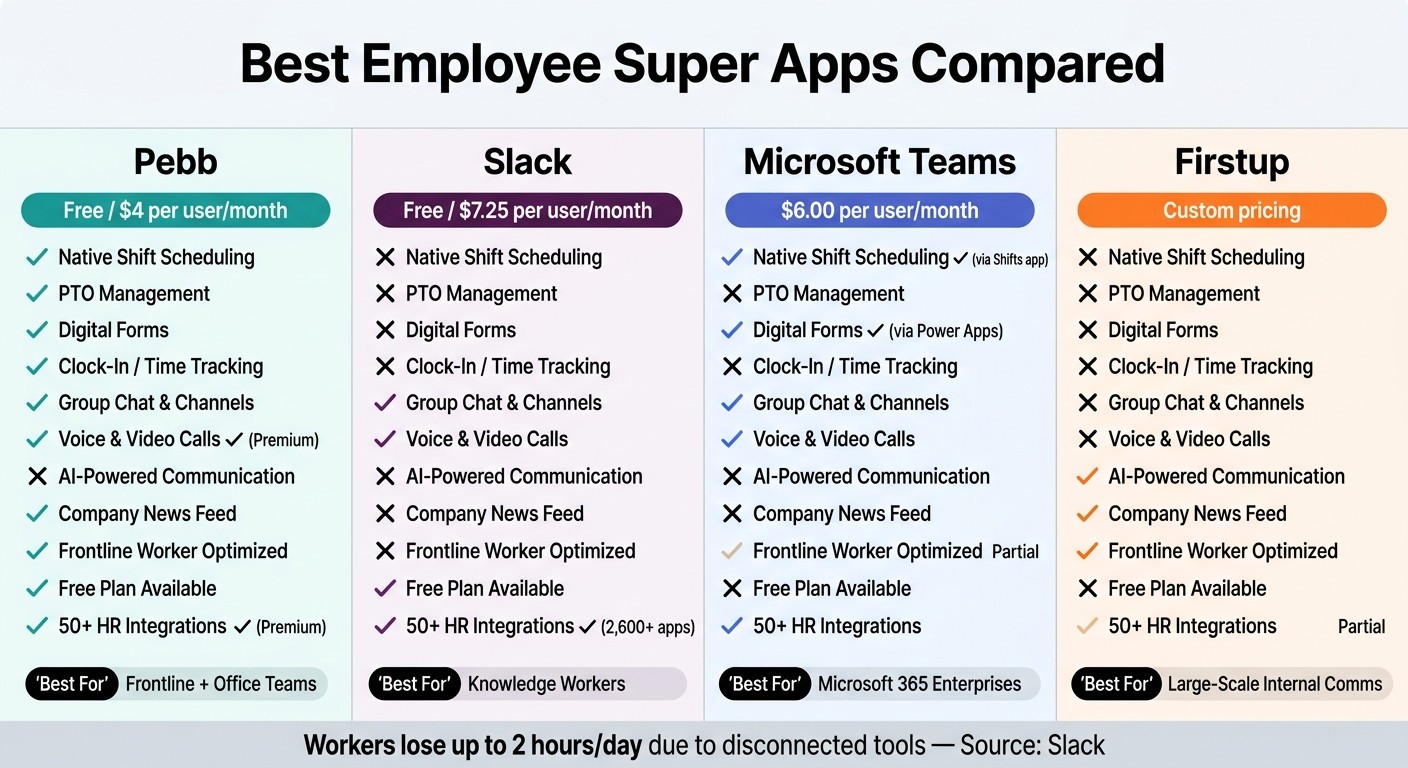
Best Employee Super Apps Compared: Pebb vs Slack vs Teams vs Firstup
After diving into the details of each platform, here's a side-by-side breakdown of where they excel and where they might fall short:
Platform | Pros | Cons |
|---|---|---|
Pebb | Free for up to 15 users; affordable premium plan at $4/user/month; combines communication, operations, and engagement in one mobile-first platform | Smaller range of integrations compared to Slack or Teams; less ideal for complex cross-company collaboration |
Slack | Outstanding real-time messaging with over 2,400 app integrations; user-friendly for knowledge workers; straightforward pricing starting at $7.25/user/month (billed annually) | Lacks native tools for shift scheduling or digital forms; can become overwhelming without strict channel organization; costs rise quickly as teams grow |
Microsoft Teams | Seamlessly integrates with Microsoft 365 (Outlook, SharePoint, OneDrive); strong on security and compliance; includes basic Shifts app | Interface can feel clunky for frontline workers; advanced features often need IT setup and additional licensing |
Firstup | AI-powered, multichannel content delivery; robust engagement analytics and personalized employee experiences | No built-in shift scheduling or task management; lacks transparent pricing; limited peer-to-peer chat options |
This comparison makes one thing clear: Pebb is the only free, all-in-one solution designed for both frontline and office teams. It tackles the common pain point of juggling disconnected tools for communication and operations, offering a unified approach that’s hard to beat.
Let’s be honest - Slack and Teams cater primarily to office environments. Slack leans heavily on app integrations for operational needs, while Teams often requires IT involvement before it’s fully functional for non-desk workers. Neither was built with frontline teams in mind.
Firstup is fantastic for enterprise-level communication, especially when you need to deliver targeted content to large groups. But it’s more of a broadcasting tool than a true all-in-one platform. Scheduling, forms, and daily operations? You’ll need other tools for that.
Pebb fills this gap by rolling everything into one platform. From shift scheduling and PTO requests to group chats and company updates, it’s all there - no patchwork of tools, no enterprise-level pricing. Just one streamlined solution that works for everyone.
Conclusion
After diving into the comparisons, one thing becomes clear: the real issue with most workplace tool stacks isn’t a single app - it’s how disconnected they are. That’s where an all-in-one employee super app shines, simplifying everything into one seamless platform.
Here’s the thing: before choosing a solution, take a step back and assess your team’s needs. Do you have frontline or hourly worker solutions who rely on mobile access? Are you juggling multiple tools that don’t quite sync up? Is low adoption a constant struggle? If you’re nodding along, it’s time to think beyond a basic chat app. What you need is a platform that brings all those scattered tools together.
Now, while Slack and Microsoft Teams are fantastic for desk-based communication, they often require extra add-ons for tasks like scheduling and forms. That’s where Pebb stands out. It’s built to handle communication, operations, and engagement all in one place. For U.S. organizations, it’s a no-brainer: Pebb offers a straightforward rollout, no IT headaches, and starts completely free for up to 15 users. The premium plan? Just $4 per user/month.
The best part? The most effective super app is the one your team will actually use. Here’s my advice: start small. Run a 30–60 day pilot with one team, track how they use it, and see the difference for yourself. I’m confident you’ll wonder how you managed without it.
FAQs
What makes an app a true employee super app?
A true employee super app brings everything a team needs into one place - think communication, scheduling, task management, and collaboration all streamlined into a single platform. No more juggling between five different tools just to get through your workday.
That’s where Pebb shines. It’s a free, all-in-one solution that covers the essentials: work chat, news feeds, shift scheduling, PTO management, and even voice/video calls. And if you’re looking to unlock even more features, there’s a premium option for just $4 per user. It’s a budget-friendly pick that works for teams of any size, whether you’re a small startup or a growing company.
How do I run a 30–60 day pilot to test adoption and ROI?
Running a 30–60 day pilot with a platform like Pebb can be a game-changer, but you need a solid plan to make it count. Start by setting clear and specific goals. For instance, are you aiming to streamline communication or make scheduling less of a headache? Once you’ve nailed down your objectives, define measurable KPIs - things like user adoption rates or hours saved can give you a real sense of impact.
Next, pick a representative group to participate. Give them full access to Pebb’s features so they can explore everything the platform has to offer. Throughout the pilot, keep a close eye on how they’re using it and actively collect their feedback. This isn’t just about numbers; hearing what’s working (and what’s not) directly from users is invaluable.
When the pilot wraps up, dive into the data. Assess the ROI by comparing your KPIs to the goals you set at the start. Look for patterns, successes, and areas where things could improve. This analysis will help you decide the next steps and refine your approach for a broader rollout.
What should I consider for frontline workers who don’t have company email?
For frontline workers who don’t have access to a company email, it’s crucial to use tools that don’t depend on email-based systems. That’s where Pebb shines. It’s a mobile-first platform designed to keep everyone in the loop with features like work chat, digital forms, notifications, and even voice and video calls. The best part? It works seamlessly offline or in areas with low connectivity, making sure workers stay connected and informed through their mobile devices. It’s a simple way to streamline operations and close those pesky communication gaps.
