

Author: Ron Daniel
5 Apps That Replace WhatsApp for Internal Team Chat
Compare five secure, business-ready chat apps that replace WhatsApp, focusing on security, integrations, pricing, and frontline features.
"Why are we still using WhatsApp for work?" That’s the question I asked myself at 2 a.m. after a coworker accidentally sent sensitive client details to the wrong group chat. It wasn’t the first time something like this had happened, and I knew it wouldn’t be the last. The truth is, WhatsApp might be great for sharing memes or planning a weekend barbecue, but for internal team communication? It’s a ticking time bomb.
Here’s the deal: businesses today need internal communication examples and tools that go beyond casual chatting. Think admin controls to secure data, integrations to keep workflows smooth, and privacy features that prevent headaches down the road. WhatsApp just doesn’t cut it. Did you know 74% of companies cite the lack of admin oversight as a major issue? Or that 41% of organizations reported privacy breaches tied to employee chats on WhatsApp in 2023? Those numbers are hard to ignore.
So, what’s the alternative? Over the years, I’ve explored platforms like Slack, Microsoft Teams, and others, but I’ve also seen firsthand how Pebb (yes, my own team’s platform) stacks up. Stick with me, and I’ll break down five tools that can replace WhatsApp for team chat. Whether you’re looking for tighter security, better integrations, or just something that makes your work life easier, I’ve got you covered.
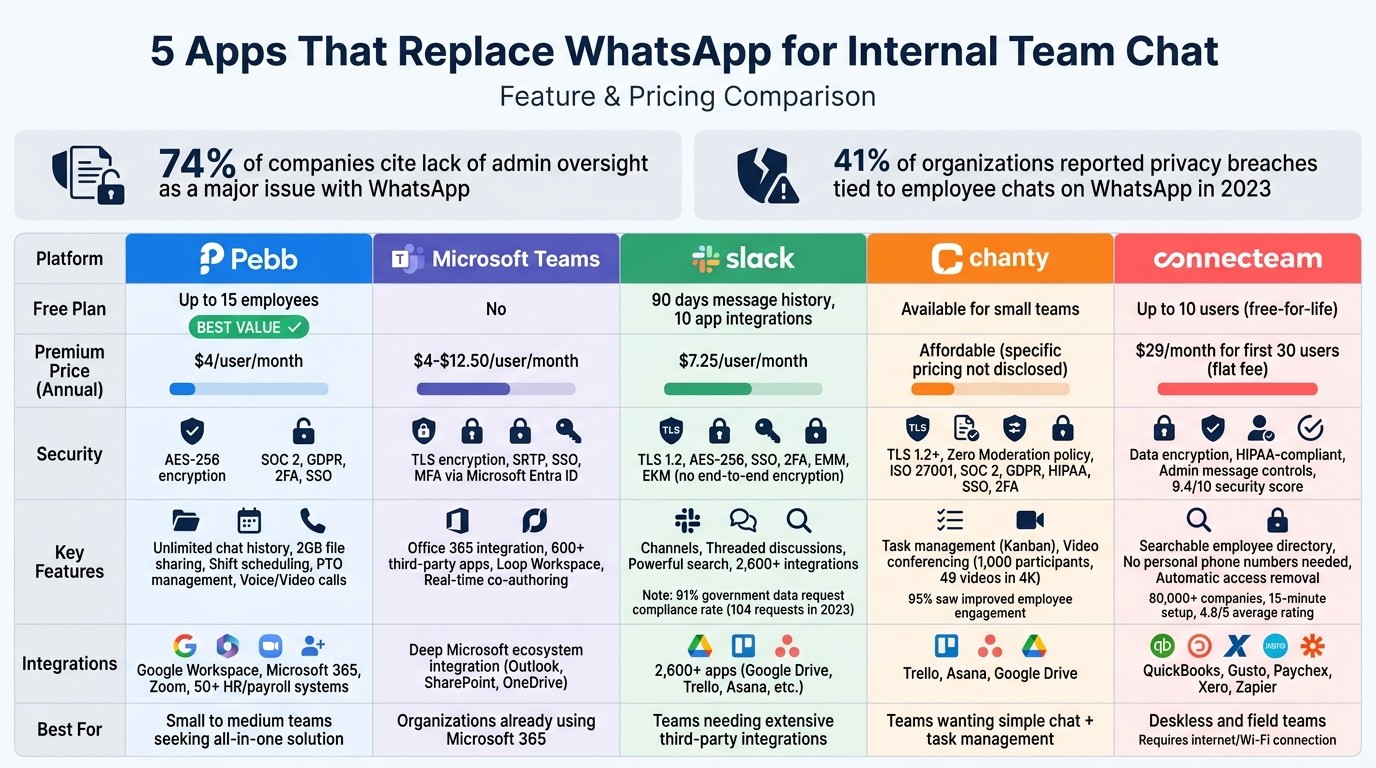
WhatsApp Alternatives Comparison: Features, Pricing & Security
1. Pebb
At Pebb, we’ve taken on the challenge of creating a workplace tool that fills the gaps left by WhatsApp when it comes to admin controls, integrations, and security. With Pebb, everything your team needs - work chat, shift scheduling, news feeds, PTO management, and voice/video calls - is all in one place. Let me walk you through the key aspects that make Pebb the go-to solution for modern teams.
Privacy and Security
When it comes to workplace communication, security isn’t something you can compromise on. That’s why Pebb delivers AES-256 encryption, SOC 2 compliance, and GDPR adherence right from the start. You can control access with role-based permissions, ensuring sensitive information stays secure. For added protection, we’ve included features like two-factor authentication (2FA) and Enterprise SSO, which are available on the Premium plan. These tools give administrators the control they need to maintain a secure environment.
Collaboration Features
Security aside, Pebb is built to make teamwork effortless. Imagine having unlimited message history, threaded conversations, and the ability to share files up to 2GB all in one app. Managers can assign tasks and monitor deadlines directly within chat threads, keeping everything organized. For frontline workers, tools like integrated shift scheduling and clock-in options ensure everyone’s on the same page - no need to juggle multiple apps.
Integration Capabilities
Here’s where Pebb really shines: it works seamlessly with the tools your team already uses. Google Workspace, Microsoft 365, Zoom, and over 50 HR and payroll systems integrate smoothly, so you can sync calendars, share documents, and even start video calls without leaving the platform. It’s all about keeping your workflow uninterrupted.
Pricing and Scalability
Let’s talk about cost because, let’s face it, budgets matter. Pebb’s Standard plan is free for up to 15 employees, giving you access to unlimited chat history, scheduling, and basic admin tools at no cost. Need more? The Premium plan is just $4 per user per month (billed annually in USD). With Premium, you get voice and video calls, advanced analytics, unlimited admins, and full integration capabilities. Whether you’re a small startup or managing a team of 1,000, Pebb grows with you - no hidden fees, no performance hiccups.
Pebb isn’t just another workplace app; it’s a complete solution designed to make your team’s life easier while keeping things secure and affordable.
2. Microsoft Teams
Microsoft Teams has become a go-to tool for workplace communication, especially for companies already deep into the Microsoft ecosystem. If your team relies on Outlook, SharePoint, or Office apps, Teams offers a level of integration that’s tough to match. That said, it does come with a steeper learning curve and higher costs. Let me walk you through how its security and collaboration features impact the overall experience.
Privacy and Security
When it comes to security, Teams doesn’t mess around. It uses TLS encryption for data in transit and SRTP for video and audio calls to keep your communication secure. Add to that Single Sign-On (SSO) and Multi-factor Authentication (MFA) powered by Microsoft Entra ID (formerly Azure AD), and you’ve got a solid defense against unauthorized access and credential theft. These enterprise-grade security features are impressive, but they’re typically locked behind higher-tier pricing plans.
Collaboration Features
Here’s where Teams shines if you’re already a Microsoft fan. Its seamless integration with Word, Excel, PowerPoint, and OneDrive makes co-authoring documents in real time a breeze. You can even work on live components directly within channels using the Loop Workspace feature. Plus, with access to over 600 third-party apps and tools like Power Automate for workflow automation, there’s a lot to explore. However, if you’re not already comfortable with Microsoft products, the sheer amount of features can feel overwhelming.
Integration Capabilities
Teams is built to work effortlessly with other Microsoft tools. It syncs your calendar with Outlook, manages files via SharePoint, and stores everything in OneDrive. For developers, the Microsoft Graph API opens up opportunities to build custom solutions. Recently, the addition of Microsoft Places has made it easier for hybrid teams to coordinate in-office schedules. If you’re already paying for the Microsoft 365 suite, this all feels like a natural fit. If not, you might find yourself paying for features you don’t fully need.
Pricing and Scalability
Pricing for Teams starts at $4.00 to $12.50 per user per month (billed annually in USD), with Enterprise plans kicking off at $8.55 per user per month. Lower-tier plans come with limitations on storage and meetings, while higher tiers include perks like desktop Office apps and webinar tools. While Teams scales beautifully for large organizations, smaller teams might find themselves paying for extras they don’t use.
Here’s where we at Pebb offer something different. Our free plan supports teams of up to 15 employees with all-in-one functionality, and our $4 Premium plan includes voice and video calls - no need to commit to a full office suite subscription. For smaller teams, it’s a simpler, cost-effective choice.
3. Slack
Slack has become a go-to workplace chat tool, offering features that help teams keep communication organized and easily searchable - something WhatsApp just can't match. But while Slack shines in collaboration, it does have its quirks, especially when it comes to privacy and pricing. Let me walk you through what you’re signing up for.
Privacy and Security
Slack takes security seriously with measures like TLS 1.2 and AES-256 encryption for data in transit and at rest. It also supports single sign-on (SSO), two-factor authentication (2FA), and Enterprise Mobility Management (EMM) to ensure that only approved users and devices can access your workspace. For organizations dealing with sensitive data, Slack’s Enterprise Key Management (EKM) allows you to use your own encryption keys for even more control. Plus, it complies with major standards like ISO 27001, SOC 2/3, HIPAA, FINRA, and GDPR.
That said, Slack doesn’t offer end-to-end encryption, which means your messages are still accessible to Slack unless you’ve enabled EKM. Another thing to consider: since 2018, Slack no longer automatically notifies employees when employers export private messages or data from private channels. In 2023, Slack received 104 government data requests and handed over data in 91% of cases. If privacy is a priority for your team, stick to private channels and regularly review permissions for the 2,600+ integrations available.
Collaboration Features
Slack keeps conversations organized with channels and threaded discussions. Unlike WhatsApp’s endless chat streams, Slack lets you create channels for specific topics, making it easier to focus on what matters. Threaded discussions also help keep conversations from spiraling into chaos. Need to find something? Slack’s search function is a lifesaver, letting you sift through old messages in seconds. And with integrations for tools like Google Drive, Trello, and Asana, you can centralize your workflows without leaving Slack. It’s a system designed to keep your team on track and in sync.
Integration Capabilities
Speaking of integrations, Slack offers over 2,600 of them, connecting with just about every tool your team might use. But there’s a catch: these integrations can pose security risks if you don’t carefully manage permissions. On the free plan, you’re limited to just 10 app integrations - fine for smaller teams but potentially frustrating if you rely on multiple tools. To fully tap into Slack’s integration potential, you’ll likely need to upgrade to a paid plan.
Pricing and Scalability
Slack’s free plan gives you 90 days of message history and up to 10 app integrations. Need more? The Pro plan starts at about $7.25 per user per month (billed annually), while the Business+ and Enterprise Grid plans offer advanced features like SAML-based SSO and custom retention policies. These extras are great but can quickly strain the budget for smaller teams.
Here’s where Pebb comes in: we offer a free plan for up to 15 employees with unlimited message history. And if you’re looking for more, our $4 Premium plan includes voice/video calls, shift scheduling, and PTO management - all in one place. It’s a budget-friendly option that doesn’t skimp on features.
4. Chanty
Chanty is a straightforward team chat app that focuses on simplicity, offering messaging and task management without unnecessary extras. If you're after a basic alternative to WhatsApp, Chanty might be worth a look. Let’s break down its strengths and where it falls short.
Privacy and Security
One of Chanty’s standout features is its "Zero Moderation" policy. This means that even Chanty’s own staff cannot access your team’s messages or databases. You maintain full ownership of your data, which is safeguarded against compliance-related exports. The platform uses TLS 1.2 and above for secure connections and meets key compliance standards, including ISO 27001, SOC 2, GDPR, HIPAA (with BAA), and FINRA. For added protection, Chanty includes features like SSO, 2FA, and customizable roles and permissions. Plus, for teams managing sensitive information, there are data residency options in the US, EU, and APAC regions.
Collaboration Features
Chanty keeps teamwork simple with real-time messaging and a built-in task management system using a Kanban view. This eliminates the hassle of juggling multiple apps. It also supports video conferencing for up to 1,000 participants, with the ability to display 49 videos on screen in 4k quality. According to user feedback, 95% of teams saw a noticeable improvement in employee engagement after adopting Chanty. However, it’s worth noting that Chanty doesn’t include some operational tools found in platforms like Pebb, such as shift scheduling, PTO management, or a company-wide news feed.
Integration Capabilities
Chanty integrates with popular productivity tools like Trello, Asana, and Google Drive, making it easier to centralize workflows. This added connectivity helps expand its utility beyond WhatsApp’s basic functionality.
Pricing and Scalability
Chanty offers a free plan for smaller teams and affordable paid options as your team grows. While it’s a solid choice for basic team chat, it doesn’t quite compete with the value provided by Pebb. For example, Pebb offers an all-in-one solution with free access for up to 15 employees and a premium plan at just $4 per user, which includes additional operational features. If all you need is simple chat functionality, Chanty does the job. But for a more comprehensive tool that covers communication and operations, Pebb provides greater bang for your buck.
5. Connecteam
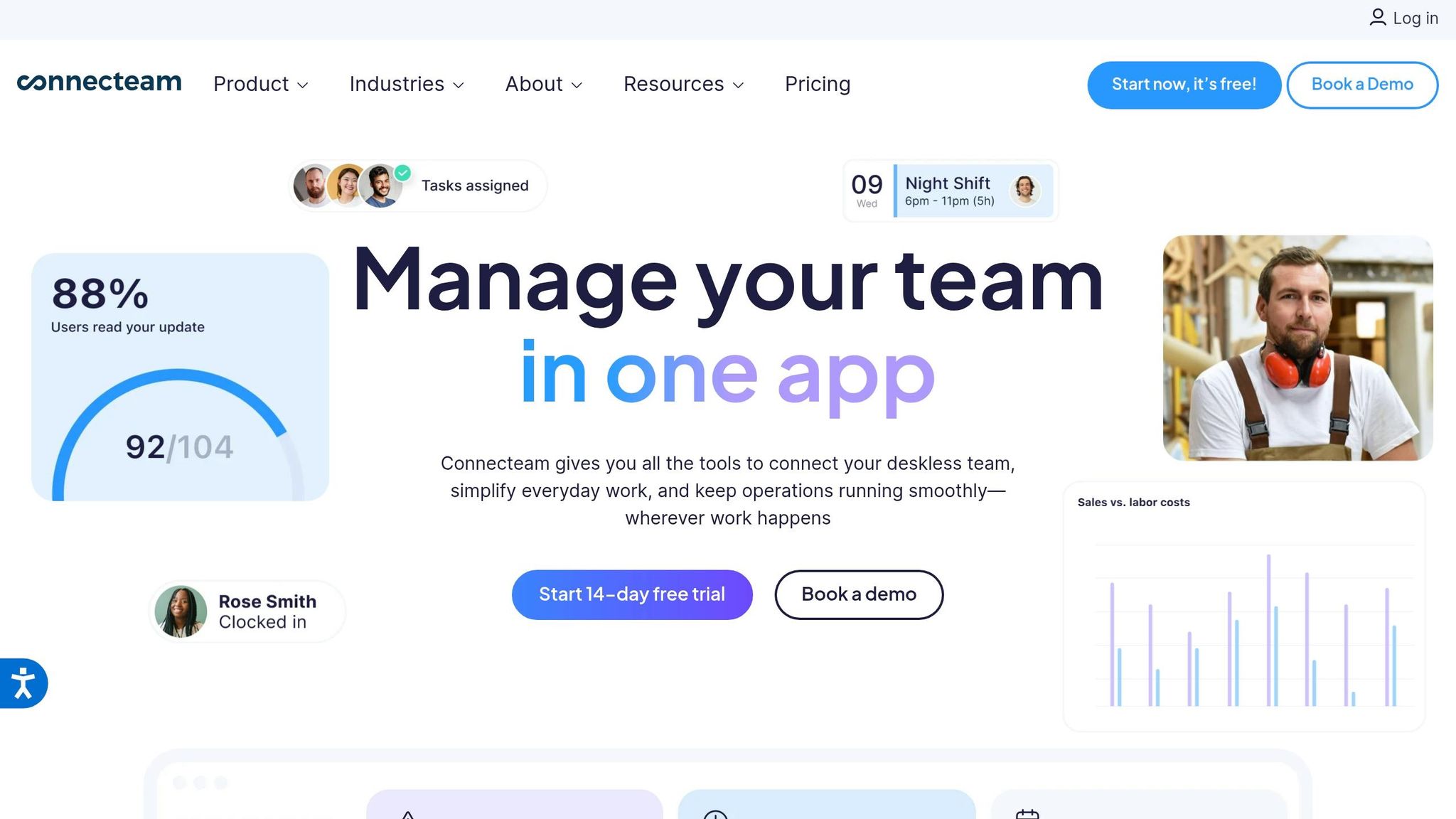
Connecteam is designed specifically for deskless and field teams, offering a solid alternative to WhatsApp for dispersed workforces. With over 80,000 companies relying on it and a setup time of just 15 minutes, it’s built for quick and easy onboarding.
Privacy and Security
When it comes to security, Connecteam doesn’t mess around. Administrators have full control over who can start chats, send messages, or leave comments. They can even lock conversations or delete messages as needed. Unlike WhatsApp, Connecteam allows managers to block employees from saving work-related media or exporting conversations. Plus, when someone leaves the company, they lose access to all chat history and company data automatically. With data encryption and HIPAA-compliant features, it’s no surprise the platform scores a 9.4/10 for its security measures.
But Connecteam isn’t just about keeping things secure - it’s also built to make teamwork easier.
Collaboration Features
One standout feature is the searchable employee directory. It lets team members find colleagues by name, role, or department without needing to exchange personal phone numbers.
As James W., COO, puts it, "Connecteam allows us to reach 100% of our workforce, no matter where they are!".
The platform boasts an impressive 4.8/5 average rating across major review sites, with users praising its ability to unite deskless teams. That said, the app does require an internet or Wi-Fi connection, which can be a hurdle for workers in remote areas.
Integration Capabilities
Connecteam plays well with other business tools, integrating seamlessly with platforms like QuickBooks, Gusto, Paychex, Xero, and Zapier. These integrations simplify workflows and make scaling up easier on the budget.
Pricing and Scalability
For smaller teams, Connecteam offers a free-for-life plan for up to 10 users. Its Basic Plan starts at $29 per month for the first 30 users.
Scott W., Director of Operations, shares, "Not only did we cut our previous costs by 80%, everything is now in a single solution."
Effective internal chat and news feeds are proven to drive productivity and help teams reach their business goals.
While Connecteam’s flat-fee pricing is appealing, Pebb offers even more value. Our free plan accommodates up to 15 employees, and our premium plan is just $4 per user. On top of that, Pebb includes features like shift scheduling, PTO management, and a company news feed - all in one platform. So while Connecteam is a strong choice for secure, integrated communication, Pebb takes it a step further by delivering a broader, more cost-effective solution.
Wrapping It All Up
After reviewing the features and options, picking the right WhatsApp alternative comes down to your team's specific needs. If you're a smaller team looking for an affordable, all-in-one solution, Pebb has you covered. Our free plan supports up to 15 employees, and for just $4 per user, the premium plan bundles work chat, shift scheduling, PTO management, news feeds, and more - no need to juggle multiple subscriptions.
For larger teams, the choice might lean toward other platforms based on your setup: Teams integrates seamlessly with Office 365, Slack offers unmatched third-party app connections, Chanty keeps things straightforward for chat-focused teams, and Connecteam is ideal for mobile-first, frontline workers.
Privacy and security are top priorities for most teams moving away from consumer chat apps, so it's smart to start by assessing your needs. Consider your team size, industry demands, existing tools, and budget. If you're already using Microsoft 365, Teams could save you money. If your team is predominantly mobile, Pebb or Connecteam might be a better fit.
Here's my advice: take advantage of free trials. Run a small pilot with a handful of team members for a few weeks, gather their feedback, and evaluate the platform's ease of use, training requirements, and overall impact on productivity. Don't forget to calculate the total cost of ownership, factoring in not just subscription fees but also onboarding best practices and the potential for improved collaboration.
At Pebb, we aim to bridge the gap between front-line and back-office teams with a solution that's both accessible and budget-friendly. Whether you go with us or another platform, the real win is finding a tool that complements how your team works - without forcing them to change the way they operate.
FAQs
How do I move my team off WhatsApp without losing chat history?
To move your team away from WhatsApp without sacrificing important communication, start by exporting your chats using WhatsApp's built-in export tool. While platforms like Pebb can’t directly import these chat logs, you can upload key files or summaries to keep everyone on the same page. With Pebb’s all-in-one solution priced at just $4 per user/month, you’ll have access to tools like chat, file sharing, and news feeds, making the shift smooth and efficient.
What security features should a work chat app have beyond encryption?
A solid work chat app isn’t just about keeping the conversation flowing - it’s about keeping it secure. That’s why features like audit trails, compliance tools, user management controls, and admin analytics are non-negotiable.
These tools do more than just tick a box. They help maintain data accuracy, ensure your workplace meets regulatory standards, and give admins the visibility they need to oversee communication effectively. It’s about creating a safe, well-managed space for teams to collaborate without worrying about vulnerabilities.
How can I test a WhatsApp alternative before rolling it out company-wide?
Start by signing up for a free plan or trial with a platform like Pebb. It's designed as an all-in-one communication hub, supporting up to 1,000 users. This gives you the perfect opportunity to test-drive features like work chat, video calls, and collaboration tools with a smaller team first.
Here’s what I recommend: use this trial period to gather honest feedback from your team. Ask them about usability - does it feel intuitive? Check how well it integrates with existing workflows and whether it actually improves communication and engagement. And don’t forget to assess security features to make sure they align with your standards. Once you’ve got a clear picture, you’ll know if it’s ready for a full rollout.
