
Security Guard Open Shift Claims Chat How to Claim Fast
Learn security guard open shift claims chat in Pebb — claim open shifts via chat, get approved fast, and stay compliant.
Dan Robin

At 2:13 a.m., nobody wants a phone tree.
A guard calls out. Another one doesn't pick up. Someone replies “maybe” in a group text, then goes quiet. Meanwhile the post is still open, the client still expects coverage, and the only thing moving fast is your stress level. If you work security long enough, you learn that the problem usually isn't the empty shift. It's the messy handoff around it.
That's why security guard open shift claims chat matters. Not as a trendy feature. As a calmer way to run coverage when the clock is moving and people are tired.
The security industry is big, and growing. The Bureau of Labor Statistics shows U.S. security guard employment rose from 1,054,400 in May 2020 to 1,272,400 in May 2024, with 1,202,940 employed in May 2023, a mean hourly wage of $19.44, and a mean annual wage of $40,440 (BLS occupational data). More guards across more sites means more handoffs, more call-outs, and more open shifts that need to be filled without drama.
Why Chat Based Open Shift Claims Beat Phone Trees
The old way looks busy. It doesn't look reliable.
A supervisor starts calling down a list. One officer says they can cover but needs the address again. Another says they're available, then later admits they're already working elsewhere. A third says “put me down” in text, but nobody confirms who approved it. By sunrise, three people think they solved the problem and the post is still half-sorted.
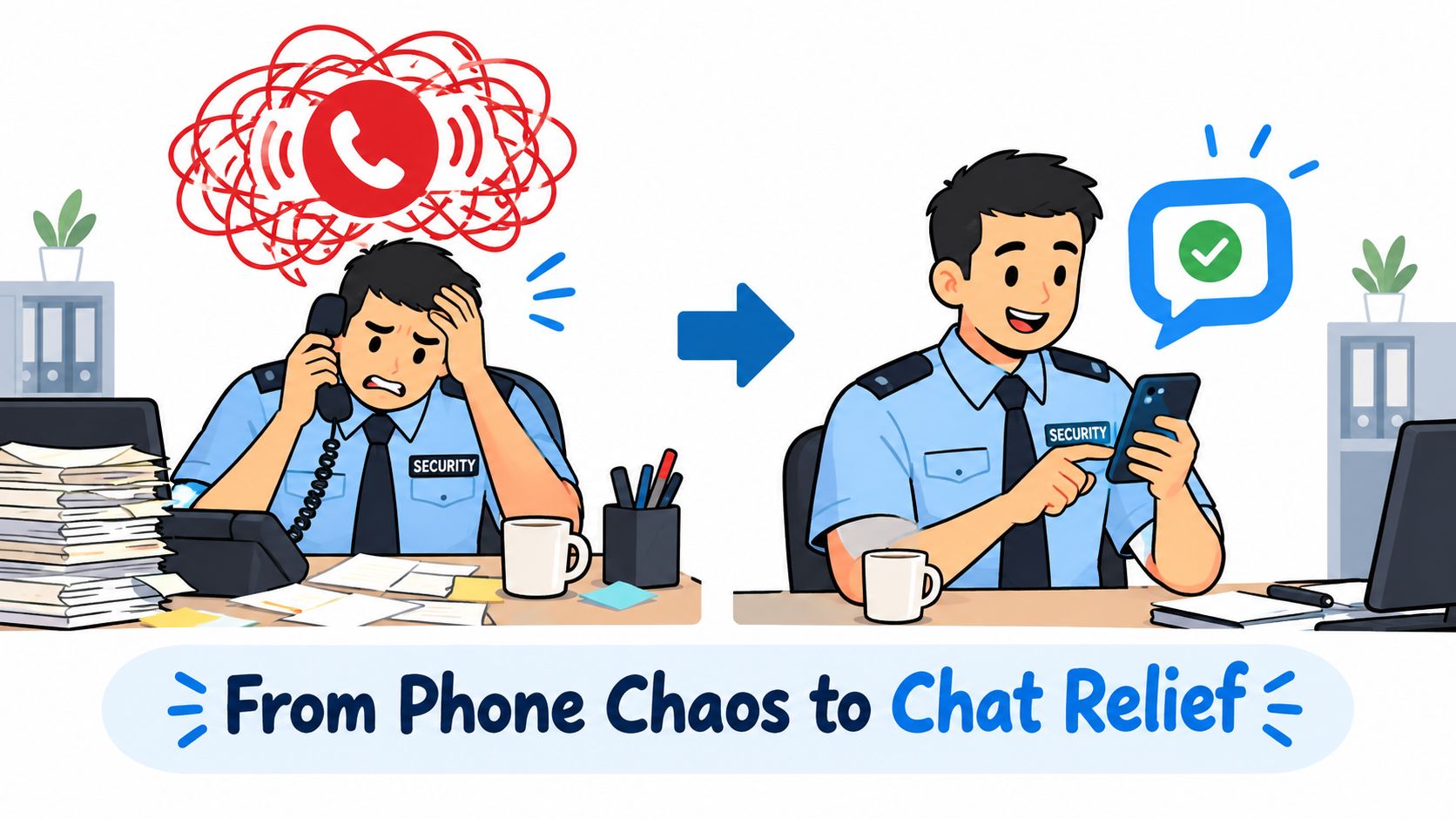
Chat cleans this up because it puts the shift, the claim, and the conversation in one visible thread. Managers publish the opening. Eligible guards see it. The first qualified claim wins, or it goes pending for approval, depending on the rules. That's a real workflow. Not a pile of side messages.
One thread beats three tools
Most teams get in trouble when scheduling lives in one app, messages in another, and attendance somewhere else. That setup almost guarantees crossed wires. A guard claims a shift in one place, asks a question in another, and clocks in with no shared record tying it all together.
A chat-first setup keeps the context attached to the work. If you want to see how that kind of team messaging works in practice, this overview of team chat in Pebb shows the basic model clearly. The point isn't novelty. The point is fewer loose ends.
Practical rule: If the shift claim and the follow-up conversation happen in different places, someone will miss part of the story.
This matters even more in lone-worker environments. If the guard taking the shift is heading to a quiet property, an industrial yard, or a remote gatehouse, coverage speed is only half the job. You also need safe check-ins and a clear escalation path. That's why teams also look at tools that protect lone workers with 3rd-i when the post itself carries extra risk.
Chat gives you proof, not just speed
The nice thing about chat is that it leaves tracks. You can see who saw the opening, who claimed it, who approved it, and what was said before the guard arrived. That beats trying to reconstruct a 3 a.m. scramble from missed calls and screenshots.
And security teams need cleaner coverage workflows. A 2026 UC Berkeley Labor Center report found annual turnover in the U.S. security industry reached 89% in 2024, compared with a 66% private-sector average, and it had topped that benchmark every year for a decade, peaking near 99% in 2022. The same report said 80.7% of security officers work full time and 87.3% work full year (UC Berkeley Labor Center report). That mix of full schedules and heavy churn is exactly why open shift communication has to be simple.
Phone trees feel personal. Chat workflows feel professional. When the post must be covered, professional wins.
How Guards Claim Open Shifts Directly in Pebb Chat
From the guard side, this should take seconds, not a negotiation.
The clean version starts with a push notification. You see an open shift in your Space, open the chat, review the shift card, and claim it there. No separate texting. No “just checking if this is still available.” No guessing whether somebody else already got it.
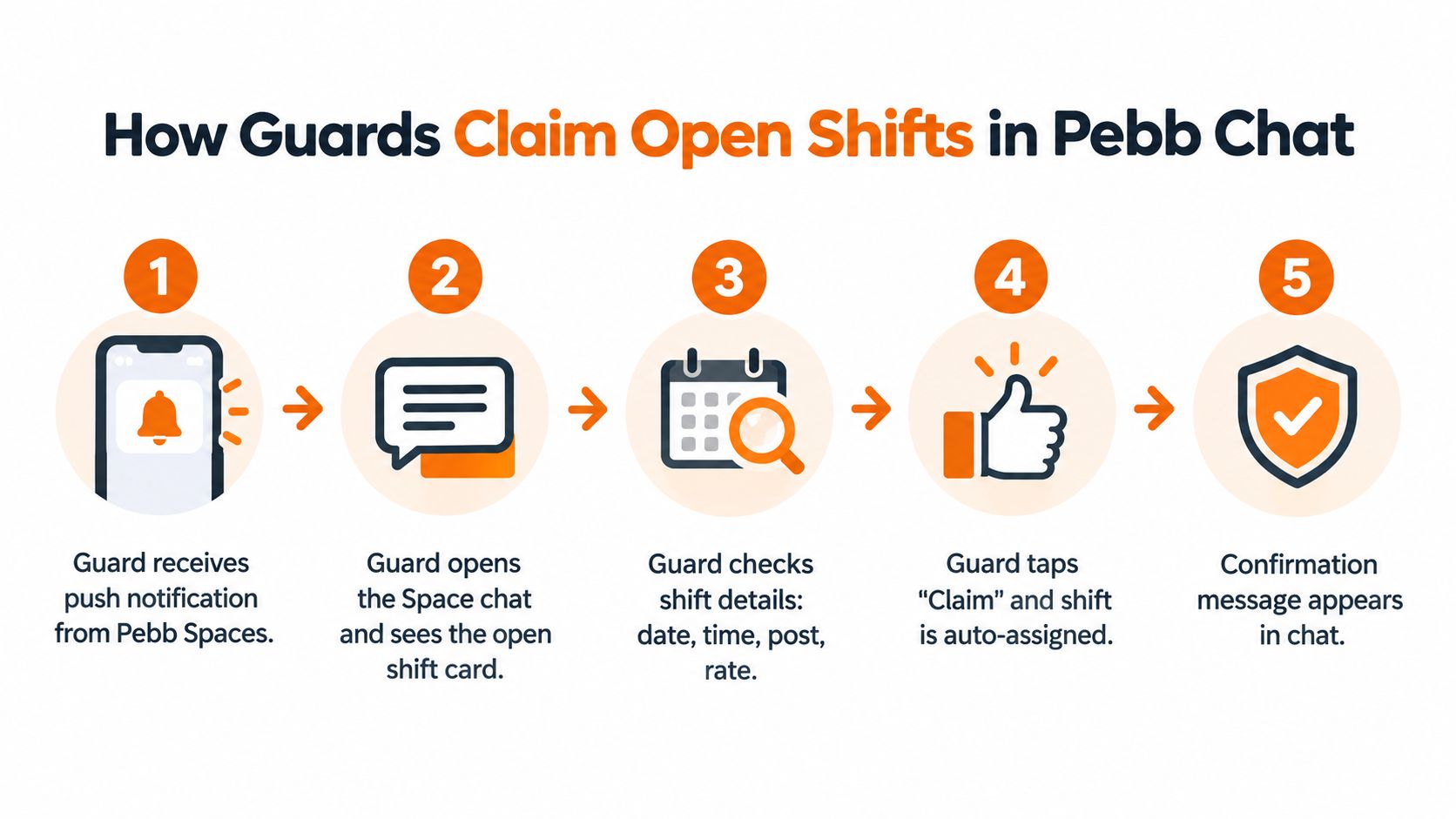
One public setup guide describes the basic open-shift flow this way: admins create an open shift, allow users to claim it, and choose how many open slots are available before publishing it (Connecteam security company setup guide). That simple structure matters because everyone can see the same offer and the same ownership rule.
What to check before you tap claim
Don't claim first and read later. That's how you create your own headache.
Look at the basics in the shift card. Date. Start time. End time. Site. Post. Any note about uniform, access, or handover. If your operation includes pay details in the posting, read that too. The point is to know what you're accepting before you hit the button.
Then claim it in the same thread.
If the workflow is instant, your message can be short:
Claiming this shift. I'm available and can report on time.
If the site needs a little context, write the context once and keep it clean:
If you're en route from another post: “Claiming. I finish my current assignment before this start time and can travel directly.”
If you need a gate code or contact name: “Claiming. I'm approved to cover. Please send access details in this thread.”
If it's a site you haven't worked recently: “Claiming. Available for full shift. Please confirm any updated post orders.”
That's enough. You don't need a speech.
When approval is required
Some teams let the first qualified guard take the opening right away. Others hold the claim for supervisor approval. Both can work. What doesn't work is double-texting a manager every two minutes after you've already claimed it.
If your claim is pending, stay in the thread. Watch for the in-chat update. If there's a legitimate timing issue, send one useful note, not four anxious ones.
A good message looks like this:
I've claimed the open shift and I'm standing by. If approved, I can confirm travel time right away.
That tells ops what they need. It also shows you understand that claim doesn't always mean assignment yet.
A clean claim says three things. I saw the shift, I can work it, and I understand I may still need approval.
What happens after the claim
The useful part starts after approval, not before.
Once assigned, the shift should show up in your schedule. You should get the clock-in reminder like any other shift. And just as important, the same chat thread should carry the handover details so you're not hunting through old texts at arrival time.
That final piece gets overlooked. A lot of articles stop at “tap claim.” Real operations don't. The right habit is to use the thread for quick pre-arrival coordination:
Ask for status: “Any active issue on post before I arrive?”
Confirm relief timing: “ETA is on schedule. Please confirm current guard remains on post until handover.”
Request anything unusual: “Any client note, incident, or access change tonight?”
That turns a claimed shift into an actual handoff. Which is the whole job.
Setting Up Claimable Open Shifts for Your Security Team
Supervisors earn or lose their night in the setup.
If you publish a vague opening to everyone, you'll spend the next hour fixing the replies. If you pre-filter the opening well, the claim flow stays quiet. Quiet is good. Quiet means the system did some of the work before your phone ever buzzed.
A practical workflow used in security operations is to broadcast the vacancy to a prefiltered pool of eligible guards, then fill it on a first-come, first-served basis while checking availability, working-time limits, and fairness before the offer goes out (Teamguard open shift workflow). That's the key idea. Filter first. Fix less later.
Build the shift so the right people see it
Inside your scheduling setup, start with the actual post requirements. Not just “night shift downtown.” Use the post name, shift window, and any must-have condition that determines who should even see the opening.
Keep the naming plain. “Warehouse B Gate 2, 1900 to 0700, vehicle patrol cert required” is better than “Urgent overnight.” One tells the truth. The other creates a pile of questions.
A good open shift setup usually includes:
Clear post identity: Site, post, and shift window in the title.
Restricted visibility: Only guards who fit the role and are available should see it.
Slot count: If you need more than one person, set the number of open spots before publishing.
Approval rule: Decide up front whether claims auto-assign or wait for a manager.
If you want a broader view of the scheduling side, this look at how shift scheduling works in Pebb covers the operational pieces in a straightforward way.
Don't post first and sort it out later
Security scheduling often runs on fixed 8-hour or 12-hour blocks, and those aren't just calendar choices. They're guardrails. One public bidding document states a shift is 12 hours and warns guards should not be deployed for more than 12 hours in violation of labor rules, while another procurement document describes uninterrupted 8-hour day and night shifts across a 24-hour model (public security service bidding document). If the guard is already at the edge of a legal or company limit, that should be screened out before the shift hits their phone.
That's where approval logic matters. Some sites can safely use instant claiming. Others can't. A hospital post, a regulated site, or a client with strict badge rules may need a human check every time.
For a useful outside perspective, Overton Security's guide on security guard scheduling best practices is worth reading because it stays close to how field operations run. The same lesson keeps coming up. Prevention beats cleanup.
Publish narrower. You'll fill faster with the right five guards than with the wrong fifty.
Notification Rules and Approval Workflows That Actually Work
Most open shift problems aren't staffing problems. They're rule problems.
The group text approach feels fast because it's informal. In reality, it creates duplicate replies, side deals, and long message chains with no clear owner. Structured chat works better because the rules are visible before anyone claims the shift.
Vendor documentation for security scheduling notes that open-shift request and bidding creates a clearer coverage process than informal first-response handling, and that claims can require manager approval or auto-assignment depending on configuration (GuardMetrics security scheduling notes). That's the right lens. Not “what's fastest in theory?” but “what stays clear under pressure?”
Use the workflow that matches the post
Different sites need different levels of control. A simple retail post with a deep bench of trained guards doesn't need the same approval path as a restricted industrial site.
Here's the short version.
Workflow Type | Speed | Control | Best For |
|---|---|---|---|
Auto-assign to first qualified claimant | High | Moderate | Familiar posts with low risk and clear eligibility |
Claim first, manager approval required | Moderate | High | Sensitive sites, newer guards, or posts with special instructions |
Broadcast only to nearby qualified guards, then approve | Moderate | High | Last-minute gaps where travel time matters |
Informal group text or call tree | Low once confusion starts | Low | Almost never worth it |
Notifications should wake the right people, not everyone
A security scheduling article aimed at operations teams says open shifts should be broadcast to qualified employees nearby, and a setup model also allows managers to require approval before the claimed shift becomes final (security scheduling article from Novagems). That's the sweet spot for many teams. You don't want every overnight opening hitting every phone. You want the right people alerted, with enough information to act.
A good notification setup usually follows a few common-sense rules:
Send the first alert narrowly: Role fit first, geography second.
Escalate if needed: If no claim comes in, widen the audience.
Keep updates in chat: Approval, denial, and reassignment belong in the same thread.
Don't reward chaos: If one guard keeps grabbing premium shifts because they stare at their phone, add approval or fairness controls.
Real-time communication still matters
Claiming a shift is one event. Running the shift is another.
A security-focused app listing describes a workflow where workers can view assigned shifts, apply for open shifts, clock in with GPS verification, and use real-time chat, push notifications, and supervisor calling in the same environment (SecurityTime app listing). That mix makes sense operationally. The guard who claims the shift may still need to ask for an access code, report a delay, or warn that the relieved officer hasn't shown up yet.
That's why I don't like treating open shifts as a stand-alone button. The better model is a claim plus a conversation plus a record. Fast enough to fill coverage. Structured enough to defend later.
Staying Compliant and Nailing the Handover After You Claim
Claiming a shift isn't just saying “I can do it.” It's accepting work that has to be documented.
That's the part people skip when they talk about security guard open shift claims chat. They focus on speed and stop there. But once a guard takes the shift, the question becomes simple. Can you prove who covered the post, when they took over, what they were told, and what happened during the handoff?
Recent guidance on shift change requests says the record should capture the original shift, replacement, reason, submission date, and manager approval, and it separates formal swap, drop, and move workflows from loose text-based arrangements (Aves Security article on shift change request forms). That distinction matters because “someone said they'd cover” is not the same thing as an approved, traceable assignment.
The claim is only half the record
Once the shift is claimed, tie the rest of the proof to the same chain.
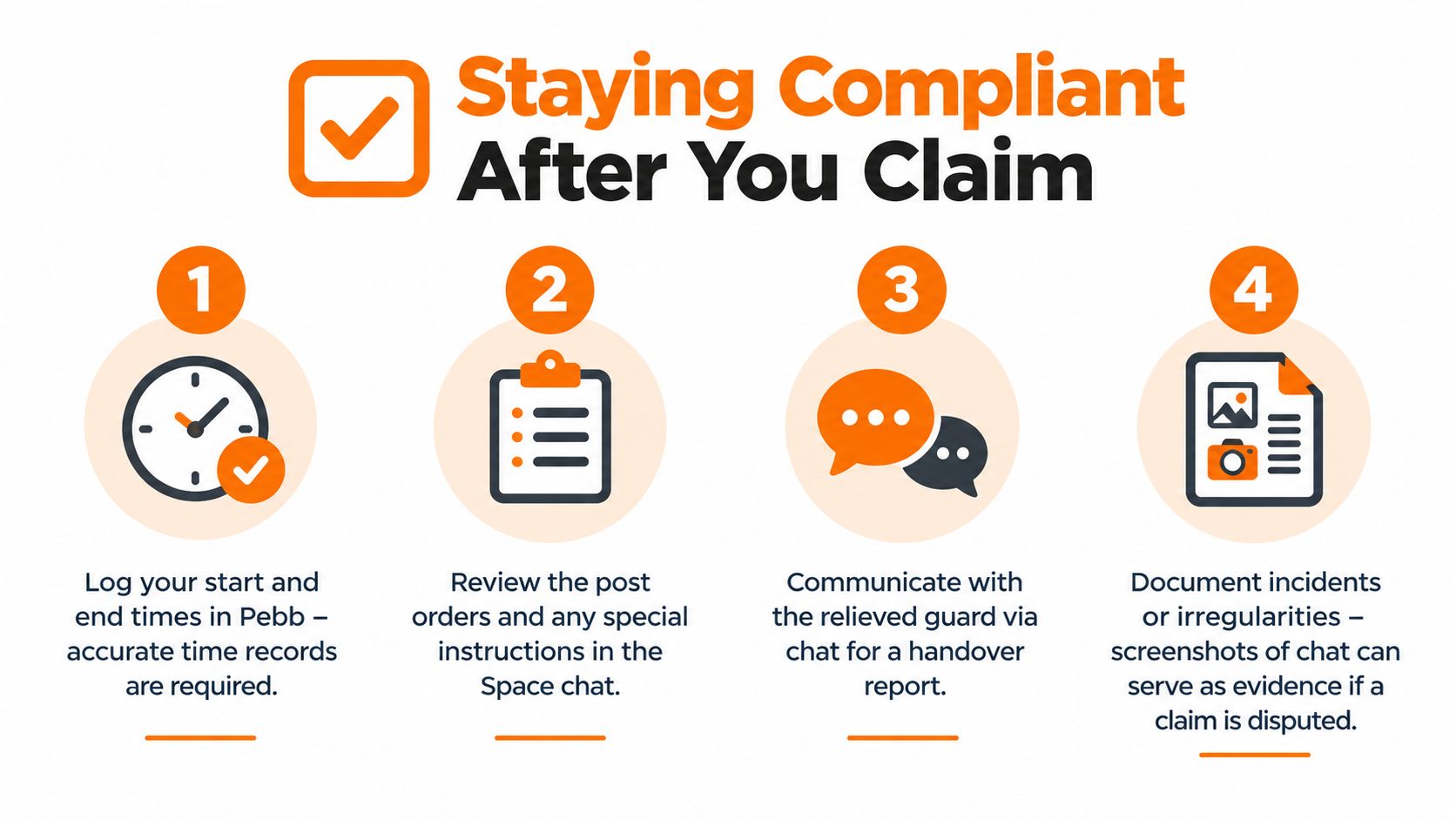
That means the guard should review post orders, confirm arrival, complete a proper handover, and clock in in a way that shows they were at the right location. One recent security app description explicitly combines open-shift claims with GPS-verified attendance, which is exactly the kind of connection multi-site teams need when they're trying to prevent silent no-shows and unauthorized coverage.
If you want a practical read on the handoff itself, GM GROUP Services has a solid piece on shift handover for venue security that lines up with what experienced supervisors already know. The shift isn't really covered until the outgoing and incoming guard have exchanged what matters.
The post doesn't care who clicked Claim. The post cares whether the right guard arrived, understood the assignment, and took responsibility on time.
Why compliance sits inside the workflow
This isn't paperwork for its own sake.
There are labor risks tied to on-call and around-the-clock security work that teams often miss when they treat open shifts as casual extra time. In California, 24-hour on-premises security duty can be fully compensable, and standby or on-call exposure can create back-pay and class-action risk if an open-shift model blurs active work, sleep time, or response expectations (Clockspot article on on-call pay). That's why approval, timestamps, and clear work records matter.
The practical routine is straightforward:
Log the assignment cleanly: The claimed shift should show who took it and who approved it.
Use location-aware attendance: A clock-in record tied to the post is stronger than a text saying “I'm here.”
Keep handover notes in-thread: If the outgoing guard mentions an incident, a broken gate, or a client instruction, that note should live with the shift conversation.
Match the record to the post order: If the post required a specific task at startup, make sure the incoming guard saw it.
For teams using mobile attendance in the same workflow, this security guard clock in app overview is useful because it keeps the attendance side tied to the operational side. That's the part that saves arguments later.
Troubleshooting Open Shift Claims and Keeping Coverage Smooth
The common assumption is that if you add a claim button, the chaos disappears. It doesn't. The chaos just changes shape.
Usually the trouble comes from one of four places. The guard can't see the claim button because they aren't eligible for that post. The claim is pending because approval is required and nobody owns the queue. The guard grabs the shift but is already tied to another site. Or they arrive and the GPS clock-in doesn't match the post boundary, which creates a fresh round of confusion.
Fix the actual failure, not the symptom
When the claim button doesn't appear, don't tell the guard to “try again later.” Check role fit, availability, and whether the shift was restricted to a smaller pool. If the claim is stuck pending, the problem usually isn't the guard. It's that the approval path wasn't staffed like the post was.
When double-booking happens, stop treating open shifts as stand-alone offers. They need to be checked against the guard's existing schedule before they become final. And when GPS doesn't match, don't argue in the abstract. Confirm the site boundary, confirm the entry point, and keep the arrival note in the same chat thread so ops can compare the attendance record with the handover timing.
Small habits prevent big messes
The best coverage teams do a few boring things well:
Update availability early: Bad availability data creates bad offers.
Confirm in one thread: Claim, approval, ETA, and handover should live together.
Name shifts clearly: Ambiguous posts produce slow claims and wrong arrivals.
Treat approval as ownership: If a site needs approval, assign that duty to a real person, not a vague “management” inbox.
Security work feels smooth when nobody has to improvise. A clean claim, a quick approval, a verified arrival, a proper handover. That's it. No scramble. No detective work at sunrise. Just a protected post and a quiet operations board.
If your team is juggling open shifts across chat, scheduling, and attendance, Pebb brings those pieces into one place so guards can claim work, supervisors can approve it, and handovers stay attached to the shift. It's a practical way to make open shift coverage less frantic and more accountable, especially when the problem starts after midnight.
