
Job Site Open Shifts WhatsApp Guide That Fills Gaps Fast
Learn how to announce and fill job site open shifts WhatsApp style, from manual broadcasts to automation, plus compliance tips and a better way with Pebb.
Dan Robin

It's 6:08 on a wet Tuesday, and the site phone is already buzzing. One foreman is asking who can cover the early pour, one worker saw the message but hasn't replied, and the paper roster in the trailer is already out of date. That's how job site open shifts WhatsApp becomes the default. Fast, messy, and strangely hard to unwind.
I've seen this pattern enough times to trust the rhythm. WhatsApp wins because everyone already has it open, and when a shift needs filling now, nobody wants to wait for a formal process to catch up. The problem is simple too. Speed helps you fill the gap, but speed alone doesn't tell you who claimed it first, who approved it, or whether the final roster ever got updated.
A 2025 UK study found that one in three workers used unsecure messaging apps like WhatsApp and Telegram for workplace communication, and 65% did so with their employer's knowledge, which shows how informal chat has already slipped into frontline operations HR Review. That's not a fringe habit. It's part of the way shift teams move when coverage is tight and time matters more than neat process.
Why Job Site Open Shifts End Up on WhatsApp
The reason WhatsApp gets used for open shifts is plain. A supervisor loses someone before sunrise, the site still has to open, and the fastest route is the app already on every phone. No login. No training. No portal to chase while the clock is running.
Speed beats process when the site is short
That shortcut makes sense in frontline work. A 2022 industry survey of frontline workers in retail, hospitality, and entertainment found 53% using unapproved messaging apps for work up to six times daily, and a January 2020 survey found 41% of 1,261 British workers used WhatsApp for work El País. The pattern reaches beyond one sector, one country, or one job type.
Practical rule: If the site needs a body in the next hour, use WhatsApp to alert people. Don't use it as the system of record.
That is the line I keep coming back to. WhatsApp already sits inside the workflow for many frontline teams, especially where the manager needs to fill a gap, assign tasks, and keep the day moving. The problem starts after the alert. Messages get buried, photos of the roster disappear, and nobody can prove the handoff later.
The convenience tax shows up later
A healthcare study of 257 midwives in India found 18.3% low, 48.2% mid, and 33.5% high WhatsApp adoption, which is another sign that this is not just a retail habit. Different sectors, same story. Chat becomes the path of least resistance because it is immediate.
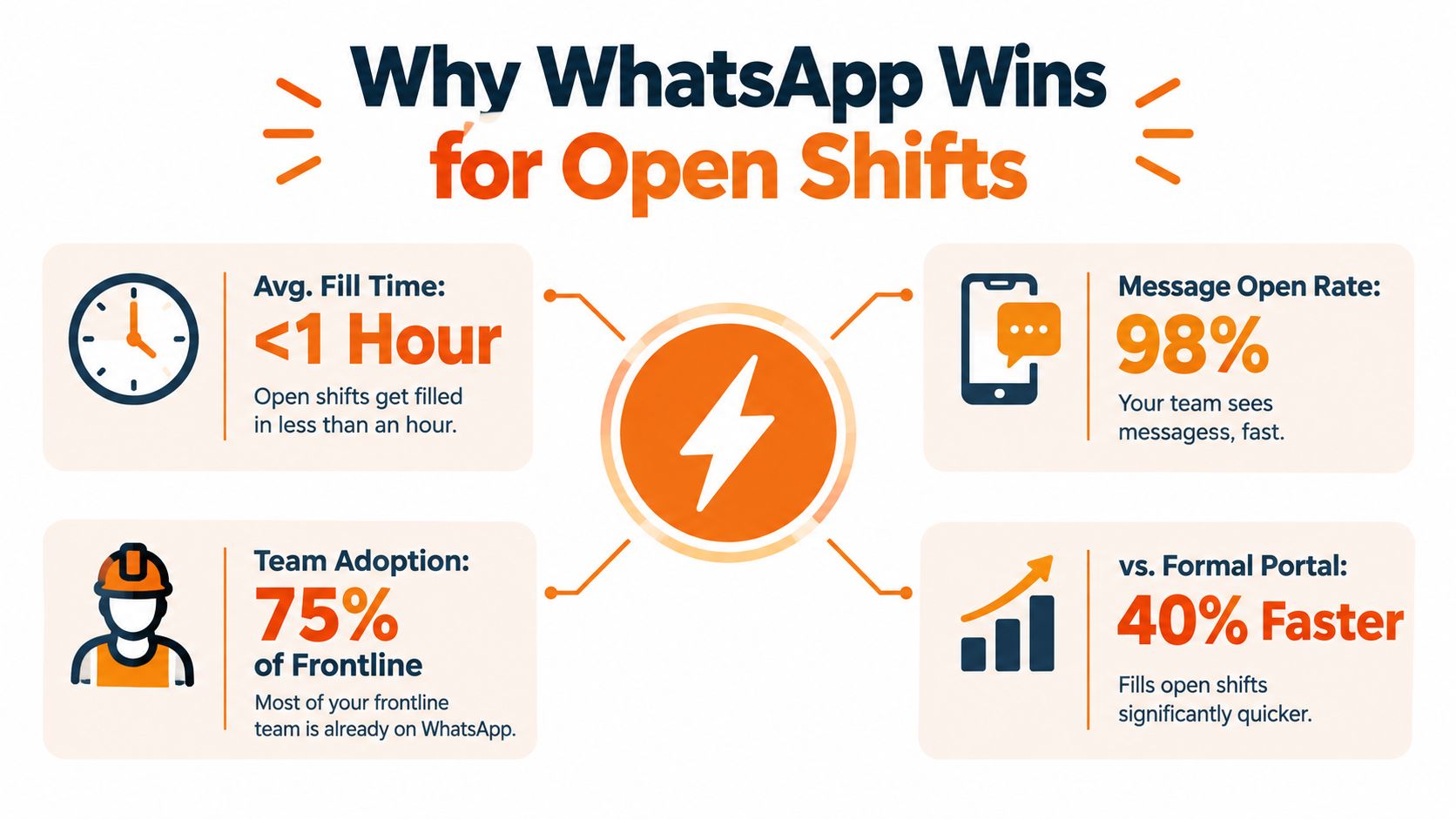
The catch is control. If two people reply at once, if someone deletes a message, or if the manager forgets to move the accepted shift into the roster, the chat thread keeps moving while the schedule drifts away from reality. WhatsApp gets attention fast, but it does not close the loop.
Setting Up WhatsApp to Announce Open Shifts Without Chaos
A messy WhatsApp group isn't inevitable. Most of the damage comes from using one big chat for everything, then pretending everyone is seeing the same thing at the same time. They aren't. The trick is to set the channel up so open shifts stand out instead of vanishing under banter.
Separate the work from the noise
For workplace use, WhatsApp Business is the cleaner starting point, and one team guide recommends splitting groups by shift, location, or role, pinning important information, and setting messaging hours so people know when replies are expected Homebase. That basic structure matters more than fancy features. If the same group handles jokes, photos, policy chatter, and open shifts, coverage messages get lost.
A good setup looks boring on purpose. One group for the site or crew. One place for urgent shift posts. One clear rule for when work messages are acceptable. If a message needs a response at 6am, it should not be buried under last night's banter from three different crews.
No work messages after 10 PM unless there's a real emergency. If people see “seen” and no reply, that is not a confirmed claim.
That boundary keeps the channel usable. It also protects workers from the feeling that every late-night notification might be their problem. A work group can be responsive without becoming a constant interruption.
Groups and broadcast lists serve different jobs
Use a group when the conversation matters. Use a broadcast list when you want the same alert delivered without turning the thread into a pile-on. For open shifts, groups usually work better because the first qualified reply matters and other people need to see the slot fill in real time. Broadcasts are quieter, but they don't give you the same visible claim flow.
If the team is split across sites, the channel should match the operational unit. A downtown crew does not need to fight through messages meant for the warehouse team. Keep the audience narrow. The more focused the group, the less likely a qualified worker misses the alert because it got lost in a flood of unrelated posts.
A clean channel doesn't solve scheduling by itself. It just makes the alert visible long enough for a real workflow to happen. That's the point. WhatsApp should carry the signal, not the whole roster.
How to Post and Fill an Open Shift on WhatsApp
The message has to do the work of a mini shift card. If it's vague, people ask follow-up questions. If it's complete, the first eligible person can reply without a back-and-forth that wastes time. That's how you turn a frantic group chat into something repeatable.
Write the post like a claimable notice
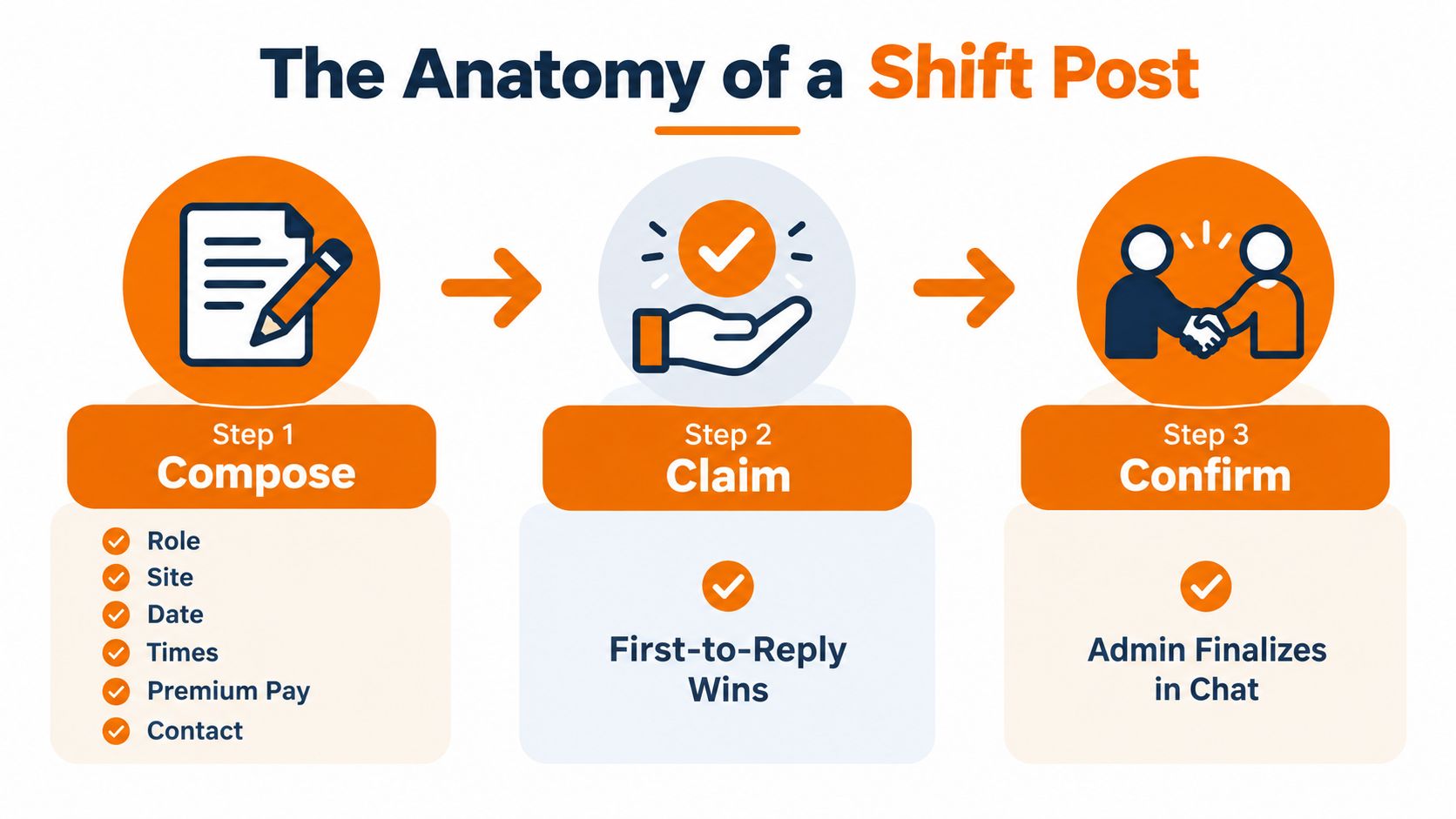
A strong post includes role, site, date, start time, end time, premium pay, required skills, manager contact, and a claim keyword. That's the minimum I'd trust when the site is moving fast. If any of those pieces are missing, you're asking people to chase details in the thread, and that slows the fill.
The wording should be direct. Say what the shift is, who can take it, and how to claim it. Then use a first-qualified-reply-wins rule so the team knows the process isn't based on who texts loudest or who has the manager's private number. The workflow should be obvious enough that nobody needs to guess.
Practical rule: one open shift, one thread, one decision.
That simple rule keeps the channel from splintering. A shared sheet or log should record the date, role, person, and approver, while the confirmed reply gets pinned in chat and the rest of the team gets told the slot is filled. If you skip the log, you'll be reconstructing the decision later from screenshots and memory.
Keep the claim path narrow
The fastest way to ruin this is to let people DM the manager privately and then try to figure out who was first. Don't do that. Keep the claim in the thread, check eligibility before confirming, and then close the loop publicly so nobody assumes the shift is still open.
A practical scheduling post can look like this in plain language: “Roofing helper needed at Site B, Thursday, 6am to 2pm, extra pay for late notice, need fall-protection cert, reply CLAIM if you're eligible, text me at this number if you have a question.” The specifics matter because they stop the job from turning into a scavenger hunt.
A useful companion note is the scheduling detail inside Pebb's open-shift scheduling guidance, which fits the same principle. The message should be simple, but the decision should be governed. Alert in chat, assign in a controlled place.
Finish with a visible confirmation
Once someone claims the shift, pin the accepted reply, log the assignment, and send one final note that the slot is filled. That closing step matters more than people think. It tells the rest of the crew to stop chasing the opening and prevents two managers from filling the same gap twice.
The goal is not just to get a yes. The goal is to make the yes durable. If the schedule doesn't change, the message wasn't enough.
Automating Open Shift Alerts With WhatsApp Business and API
Manual copy-and-paste works until open shifts become a daily thing. Then the supervisor starts living inside the chat, pasting the same template, chasing replies, and re-checking the same names. That's where automation earns its keep, not by replacing the manager, but by making the alerting part less fragile.
Move from one-off posts to structured templates
WhatsApp Business is the right place to start because it gives you a more professional work channel than a personal phone. Keep the alerts short, keep the format stable, and use quick replies for the common follow-ups. If you have someone building the workflow, it's worth looking at how to hire an AI chatbot developer when you want the routing and claim logic to feel less manual.
At the simple end, automation can send the alert to eligible workers first, then widen the blast if nobody claims it, then escalate to a manager call if the shift stays open. That keeps the urgent problem moving without forcing every supervisor to babysit the thread. The schedule stays the source of truth. WhatsApp just carries the alert.
Use automation to reduce chasing, not judgment
The cleanest flow is narrow, then wider, then human. First, notify the workers who fit the role and site. If nobody replies, broaden the audience. If that still fails, pick up the phone.
That keeps the system from spamming everyone for every gap. It also respects the fact that not every open shift deserves the same level of noise. A late-night emergency is different from a routine gap for the next afternoon.
A dedicated scheduling app can help here too, especially if you want alerts, approvals, and roster changes to live together. A useful reference point is Pebb's employee scheduling software, which reflects the broader move from chat-only coordination to a more governed flow.
Don't let the tools outgrow the roster
The mistake I see most often is trying to automate the alert but leaving the actual decision split across chat, memory, and a spreadsheet nobody trusts. If the alert went out automatically, the claim and approval still need a clear owner. Otherwise, the volume goes up and the certainty stays low.
Automation should take pressure off the manager, not create another system to monitor. When it works, the right people get the right alert, the reply path is obvious, and the final assignment lands where the schedule can prove it happened.
Privacy Compliance and Recordkeeping for WhatsApp Shift Messages
WhatsApp moves fast. That speed still leaves the hard questions behind. Who saw the message? Who claimed the shift? Who approved it? If those answers live only in chat, the record is weak.
Employers already know informal shift coordination happens on site. The issue is whether they can prove what happened after the fact.
Consent and boundaries matter
Work chat needs clear boundaries. One team communication guide recommends written consent for work messages, separating operational chat from social chat, and using WhatsApp for urgency rather than recordkeeping Teamazing. That gives workers a clean rule: the app is for alerts, not for running the roster.
A separate guide warns against treating a seen receipt as proof that a shift has been covered Homebase. Anyone who has handled a 6am gap knows why. A message can be read and still not be accepted. Read receipts help you know the alert landed. They do not prove ownership.
Auditability has to live outside chat
The record needs to sit somewhere better than a group thread. If you need to show who took the open shift, log the claim in a shared system the manager can trust later. Tie it back to the schedule. Keep WhatsApp as the alert layer, not the source of truth.
A useful record shows the claim, the approver, and the final assignment. It also shows when the rest of the team was told the slot was filled. That may feel strict, but it saves time later. Screenshots and memory do not hold up well when the pressure is on.
Chat is where the request starts. The roster is where the decision lives.
That split matters. If the decision stays in chat, the business depends on a thread that can be buried, forwarded badly, or disputed later. If the decision is logged elsewhere, you keep the speed of WhatsApp and still have a clear trail for fairness and compliance.
A Smarter Way to Fill Open Shifts Beyond WhatsApp
WhatsApp can absolutely help you fill a gap fast. The question is whether you want it to be the whole workflow or just the alerting layer. Those are very different jobs.
A useful comparison looks like this.
Criteria | WhatsApp Only | Dedicated App Like Pebb |
|---|---|---|
Speed of alert | Fast for urgent reach | Fast, with structured targeting |
Claim tracking | Easy to lose in chat | Built into the workflow |
Fairness | First seen, not always first eligible | Narrower targeting by site and role |
Audit trail | Scattered across messages | Logged beside the schedule |
Manager effort | High during busy shifts | Lower once the process is set |
Source of truth | The thread tries to become the roster | The roster stays the roster |
The trade-off is pretty clear. WhatsApp-only coordination is quick, but it can get messy at scale, especially when multiple sites, rotating crews, and last-minute changes all hit at once. A dedicated workflow keeps the open shift, the claim, and the approval together.
If you're deciding whether to move on, this guide on replacing WhatsApp for work teams is the useful next read. The central question is not whether chat works. It's whether chat can still carry the load once fairness, permissions, and recordkeeping start to matter.
For small crews, WhatsApp may be enough if the rules are tight and the logging is disciplined. For larger frontline teams, the pressure usually pushes you toward something more structured. The moment open shifts become routine, the cost of confusion starts to show up in missed messages, uneven access, and extra manager work.
I'd keep WhatsApp for urgency and move the roster into a system that can prove what happened. That's the cleaner line. It respects people's time, and it keeps the business from relying on memory when the shift was supposed to be handled in writing.
Pebb brings chat, scheduling, and open-shift claims into one place, so you're not stitching coverage together from threads and screenshots. If you're tired of chasing replies at 6am, take a look at Pebb and see how a calmer workflow handles the same problem without the mess.
