
Job Site Open Shifts WhatsApp Guide That Fills Fast
Learn how to share job site open shifts WhatsApp style without chaos — groups vs broadcasts, templates, tracking and privacy tips.
Dan Robin

At 5 a.m., the phone starts buzzing before the kettle's even boiled. Someone's sick, the site lead is already on the road, and the message goes out in WhatsApp because that's where the crew looks. A few people reply fast, one person reacts with a thumbs up, and by the time you've scrolled back through the thread, you still don't know who's really covering the shift.
That's the whole job, right there. Not sending the message. Filling the shift without creating a mess for the rest of the day.
WhatsApp feels natural because it's already part of the workday. It sits on the same phone workers use for family, transport, and everything else, which is why it's so good at getting attention fast. But the same ease is what makes it slippery when the roster matters, because a chat thread is not a schedule, and a reply is not a governed assignment.

Why WhatsApp Works for Open Shifts Until It Does Not
A job site open shift on WhatsApp usually starts the same way. Someone posts the gap, a few workers answer, and the fastest reply gets attention because speed is all anyone can see in the moment. On a small crew, that is often enough. Once the crew gets larger, the thread turns into a blur of names, emojis, deleted messages, and side conversations, and the answer gets harder to trust.
WhatsApp works because it is already part of the workday. Workers keep it open for family, transport, and crew chatter, so a shift alert reaches the same phone they already check all day. That matters on site, where email sits ignored and a desktop system can feel too far from the action. The app also has the scale to match that habit, with WhatsApp crossing 3 billion monthly active users in March 2025 (WhatsApp stats and usage estimates). On job sites, that reach is useful because the message is already where the crew is.
Speed is real, control is not
The weak point is control. WhatsApp is built for fast conversation, and support writing patterns in messaging show the same pressure to keep texts short and immediate (SupportGPT text messaging tips). That is fine for alerting people. It is poor for managing eligibility, approval, and final assignment. A shift offer can be seen quickly and still not be managed cleanly.
Practical rule: use WhatsApp to alert people, not to run the roster.
That rule keeps a 5 a.m. scramble from turning into a permanent admin headache. Send the notice where people will see it. Then move the decision, the approval, and the final assignment back into something governed. When the thread is the only record, fairness starts to slip. The first person to spot the message wins, even if someone else was better suited or already approved for the job.
At small scale, that mess is annoying. At larger scale, it becomes the bottleneck. Replies stack up in private chats, managers lose track of who saw what, and the thread stops behaving like a notice board. It starts acting like a hidden system of record, which is exactly what it is not.
Choosing Between Groups Broadcast Lists and Communities
WhatsApp has three obvious ways to push a shift notice, and they're not equal. Groups are noisy but simple. Broadcast Lists are quieter but depend on how contacts are saved. Communities organize more structure, which helps once you have multiple sites or crews, but they still need clear rules or they just become a bigger container for the same mess.
The right choice depends on how much control you need over replies and visibility. A small crew on one site can tolerate a blunt group message. A multi-site operation usually can't. If you're already thinking about structure, the HVAC plumbing AI playbook is useful in a broader sense because it shows how trades teams think about repeatable field communication, not just one-off messages.
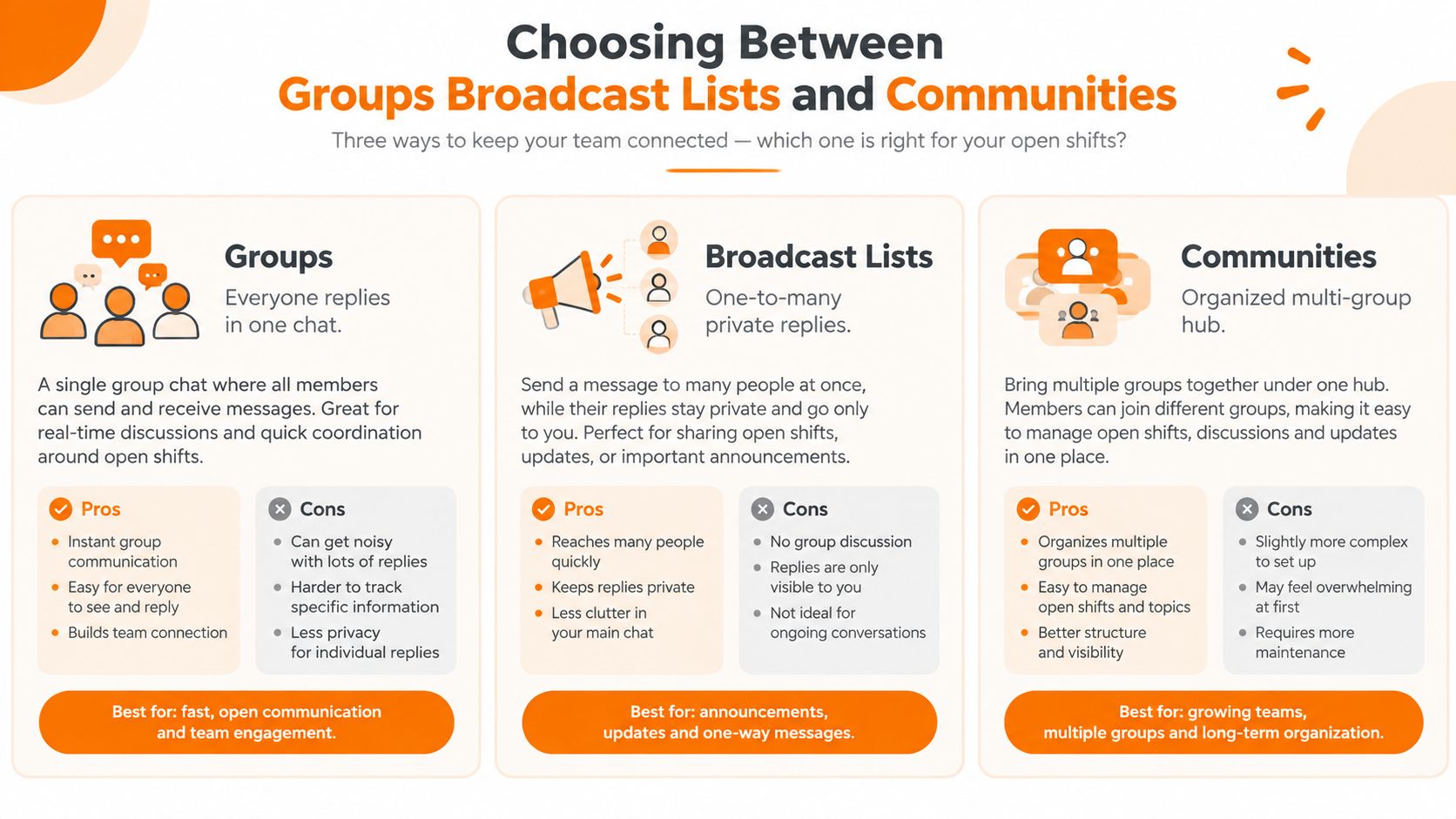
Groups, Broadcast Lists, and Communities side by side
Option | What workers see | How replies behave | Best use | Main drawback |
|---|---|---|---|---|
Groups | Everyone sees the same thread | Replies are visible to the whole group | Small crews, fast back-and-forth | Noise grows fast, and shift messages get mixed with chatter |
Broadcast Lists | Each person gets a private copy | Replies come back one to one | Quiet alerts to a selected set of contacts | Contact management can get awkward, and it's easy to lose the sense of a shared roster |
Communities | Multiple related groups sit under one umbrella | Replies stay within the relevant group | Multi-site teams, site-specific segmentation | More setup, more rules, and more chances to make the structure too loose |
For open shifts, the best setup is usually the one that narrows the audience before the message goes out. Segment by site, role, or shift, and keep the naming plain. A group called “Site A Nights” is better than a vague crew chat that contains everyone from supervisors to floaters to part-timers who never work that location.
If everyone is in one chat, you don't have a broadcast channel. You have a noise problem.
That's why admin-only posting helps. It reduces cross-talk and keeps the original offer visible. If you do use replies, make them predictable. One thread for the offer. One clear claim. One confirmation from the manager. Anything else should go somewhere else.
For a deeper look at workplace group-chat setup, the guide on how to create a group chat in the workplace) is a good companion read. The point isn't to worship structure. It's to stop a useful tool from becoming a pile of messages nobody can untangle at 6 a.m.
What to Include in Every Open Shift Message and How to Handle Claims
A shift message has one job. It should make it easy for the right person to claim the right work without asking three follow-up questions. If the message leaves out the role, the site, or the time window, you've already created avoidable friction. If it leaves out skills or approval rules, you may also create a compliance problem.
The message needs a fixed shape
A solid open-shift post should always include role, site, date, start and end time, pay or premium if there is one, skills required, manager contact, and a simple claim keyword. Keep the wording plain. Workers should be able to read it once and know whether they qualify.
A construction version might look like this in practice:
Role: General laborer
Site: North Yard
Date: Tuesday
Time: 6 a.m. to 2 p.m.
Skills: PPE, site induction complete
Contact: Maya
Claim keyword: “TAKE NORTH”
A hospitality version would be different but just as direct:
Role: Banquet server
Site: Riverfront Hotel
Date: Saturday
Time: 4 p.m. to midnight
Skills: Banquet service training, black uniform
Contact: Luis
Claim keyword: “TAKE BANQUET”
The point is not style. The point is reducing confusion. If the shift takes special certification, name it. If the site matters, name it. If the start time is tricky because of transport or handover, don't hide it in a paragraph.
First qualified reply wins, not first random reply
The cleanest claim rule is simple. First qualified reply wins, but only after eligibility is checked. That means the manager or scheduler should confirm the person is right for the role, site, timing, and skills before the assignment is closed. If the worker is not eligible, the next qualified reply gets the shift.
Fairness starts before the reply, not after it.
That's why filtering matters. Open shifts shouldn't go to everyone in the company chat if only one location, one role, and one skill set can cover them. The broader the blast, the noisier the response and the weaker the audit trail. A smaller, targeted pool is more respectful to workers and safer for operations.
A useful habit is to ask for one exact claim phrase, then one confirmation line from the manager. That keeps the thread readable. It also makes it easier to scan when you're doing the work in a hurry, which is usually when mistakes happen.
Keep the message short enough to forward, but specific enough that nobody has to guess. That balance is what turns a chat post into a workable shift offer.
Tracking Responses and Closing the Loop Without Losing Control
The hard part isn't posting the shift. It's knowing what happened after the post. Who saw it, who claimed it, who got confirmed, and whether the roster changed. A WhatsApp thread can help with the first mile, but it gets weak fast if you rely on memory or screenshots for the rest.
Lightweight tracking works until volume shows up
For a small crew, I'd keep it simple. Pin the confirmed reply. Use one thread per open shift. Log the claim in a shared sheet with the date, role, person, and manager who approved it. That's enough to avoid losing track when the conversation gets busy. It's also enough to notice when the same shift starts bouncing around because the approval step is unclear.
A practical workflow guide from Deputy recommends treating WhatsApp as an intake or notification layer, not the system of record, and reconciling the final assignment back into the roster after eligibility is checked (open-shift broadcast workflow and roster reconciliation). That's the right instinct. You want the chat to move the process forward, not become the process itself.
The loop has to end in the roster
Once the shift is claimed, close the loop. Update the schedule, notify the worker, and tell the rest of the team the slot is filled. If you skip that final step, someone else will keep messaging, or worse, show up thinking the shift is still open.
That's also where a governed scheduling tool earns its keep. Microsoft's Shifts tool lets managers assign open shifts as a draft workflow, choose a schedule group, review auto-assignment rules, and publish after edits. The documented rules include maximum weekly hours, maximum daily hours, maximum consecutive days worked, and minimum rest periods, and those rules apply the next time open shifts are assigned (Microsoft Shifts open-shift auto-assign rules). Frontline workers can also view open shifts in their schedule groups and request open shifts at their own location for manager approval across desktop, web, and mobile (Microsoft Shifts open-shift access).
If the roster and the chat disagree, trust the roster only after you've reconciled it.
That sounds obvious, but it's where teams drift. A quick message in WhatsApp can feel complete while the schedule still says OPEN. The fix is a habit, not a miracle. Record the claim, confirm it, update the schedule, and send one final message so nobody's guessing.
That loop is what keeps the next open shift from becoming a duplicate of the last one.
Consent Privacy and Overload Rules You Cannot Skip
The fast answer is often the dangerous one. Just because someone gave you their number doesn't mean they agreed to work messages on that number forever, at any hour, for any purpose. If personal WhatsApp numbers are part of the workflow, you need explicit written consent with the date and scope documented, especially in stricter privacy environments like GDPR-covered workplaces.
A 2026 HR communication guide makes that point plainly and also warns that WhatsApp should be used for quick reminders or urgent updates, not as a replacement for formal HR systems (WhatsApp for HR communication and consent guidance). That matches common sense on the floor. People can handle a short shift ping. They should not have to manage sensitive workforce records in a personal chat app.
Too much chat makes shifts harder to fill
WhatsApp use at work can create information overload, communication overload, and social overload, and those overloads can increase technostress according to peer-reviewed research (WhatsApp use and technostress). That matters because overload doesn't just annoy people. It makes them miss the message that matters. When shift alerts sit beside jokes, GIFs, and unrelated updates, workers stop treating the thread as operational.
A second practical warning comes from independent shift communication guidance, which points out that WhatsApp conversations sprawl on personal phones, make it hard to tell who confirmed which shift, and don't reliably tie messages to schedules or roles (shift communication and workflow limits). That's the core issue. The thread feels fast, but it becomes hard to defend later.
A simple boundary helps. Keep shift alerts separate from general chat. Use one place for urgent work notices and another for everything else. That alone reduces missed messages and makes it easier for workers to know what needs attention.
A few rules keep the channel respectful
Ask for written consent: Document that the employee agreed to work-related WhatsApp messages, and note the scope.
Limit off-hours noise: Don't turn every gap into a midnight broadcast.
Separate operational chat from social chat: Keep shift alerts clean and easy to scan.
Use WhatsApp for urgency, not recordkeeping: Sensitive scheduling history belongs somewhere governed.
If your current setup mixes all of that together, the problem isn't just compliance. It's fatigue. People start ignoring what looks like another noisy thread, and that's how a useful channel stops working.
When to Keep WhatsApp and When to Move to a Governed Tool Like Pebb
WhatsApp is still fine for very small crews where one person owns the roster, everyone works the same place, and a quick reply is enough to settle the gap. The minute you need segmentation, permissions, or reliable confirmation tracking, the channel starts getting in the way of the work. That's not a moral judgment. It's just a tool hitting its edge.
The same basic rule shows up in broader frontline communication advice, where WhatsApp is treated as useful for reminders and exceptions, not as a replacement for formal process. The article on why WhatsApp isn't ideal for employee communication and 3 better alternatives makes that distinction well. If you're comparing tools for a busier operation, the AI workforce software for CIOs roundup is a decent place to see how different platforms approach scheduling, communication, and control.
When the roster needs to stay true, I'd look for three things. First, role and site segmentation. Second, permission-based claims. Third, confirmation tracking tied back to the schedule. If a tool can't do those three things cleanly, WhatsApp will keep acting like the emergency fix that slowly becomes the main system.
Pebb is one option in that category. It keeps shifts, chat, tasks, files, and Spaces together, so teams can manage open shifts with approvals instead of letting the whole process live inside a chat thread. That kind of setup matters when you've outgrown the quick fix and still need something your crew will use.
If your open shifts are still living in WhatsApp, Pebb can give you a cleaner place to post them, track them, and close the loop without losing the roster. Take a look at Pebb if you want a work app that keeps chat, shifts, and approvals in one place instead of scattered across personal phones and late-night threads.
