
Internal Portal for Employees: Building a Real Digital Home
Most company intranets fail because they ignore the people who need them most. Learn how to build an internal portal for employees that actually gets used.
Dan Robin
Most company intranets fail for a simple reason. They're treated like a publishing project, not a work tool. A team launches the site, posts a wave of policy PDFs and company updates, then assumes adoption will follow. It usually doesn't.
The hard truth is that deployment is not use. A portal can exist for years and still miss the daily work people need to do. That gap shows up fast when employees can't find the latest answer, can't reach it on a phone, or stop checking because the experience feels slower than asking a coworker. If you want a useful reference on how internal systems get tied to service and operations, the DataLunix ITSM blog is a good place to keep in your back pocket.
Why Most Company Intranets Fail Before They Launch
The usual mistake is thinking the intranet itself is the win. It isn't. The win is whether employees use it to get something done without hunting through five tools and three old documents.
Prescient Digital Media's research makes that gap plain. 77% of organizations used a content-management system for their intranet, up from 63% in September 2009 Prescient Digital Media report. That sounds like progress, and it is, but the same study also showed that many portals had been around for years, while a large share of organizations still didn't know their own traffic. Longevity is not the same as relevance.
A portal can be old and still be ignored
That's the part people miss. An intranet can survive leadership changes, platform upgrades, and a dozen content pushes, yet remain a digital waiting room. Employees open it only when they're forced to, then close it because it doesn't help them move faster.
Practical rule: if people use the portal only for announcements, it's not a digital home. It's a notice board with a login.
An internal portal for employees needs to earn repeat visits. That means it has to sit inside real workflows, not beside them. People should use it to check policy, look up a contact, confirm a schedule, or find the current procedure without wondering who owns the content.
Adoption starts with usefulness, not volume
More content rarely fixes weak adoption. It often makes the problem worse. A pile of PDFs creates the illusion of completeness while making search harder and ownership blurrier.
The better question is simple: what do people need to do every week, every shift, or every day? If the portal can't answer that, it's just another place to store things. That's why a useful internal portal for employees behaves more like a working surface than a library, with clear paths to action and clear signals about what's current.
Redefining the Internal Portal for Employees
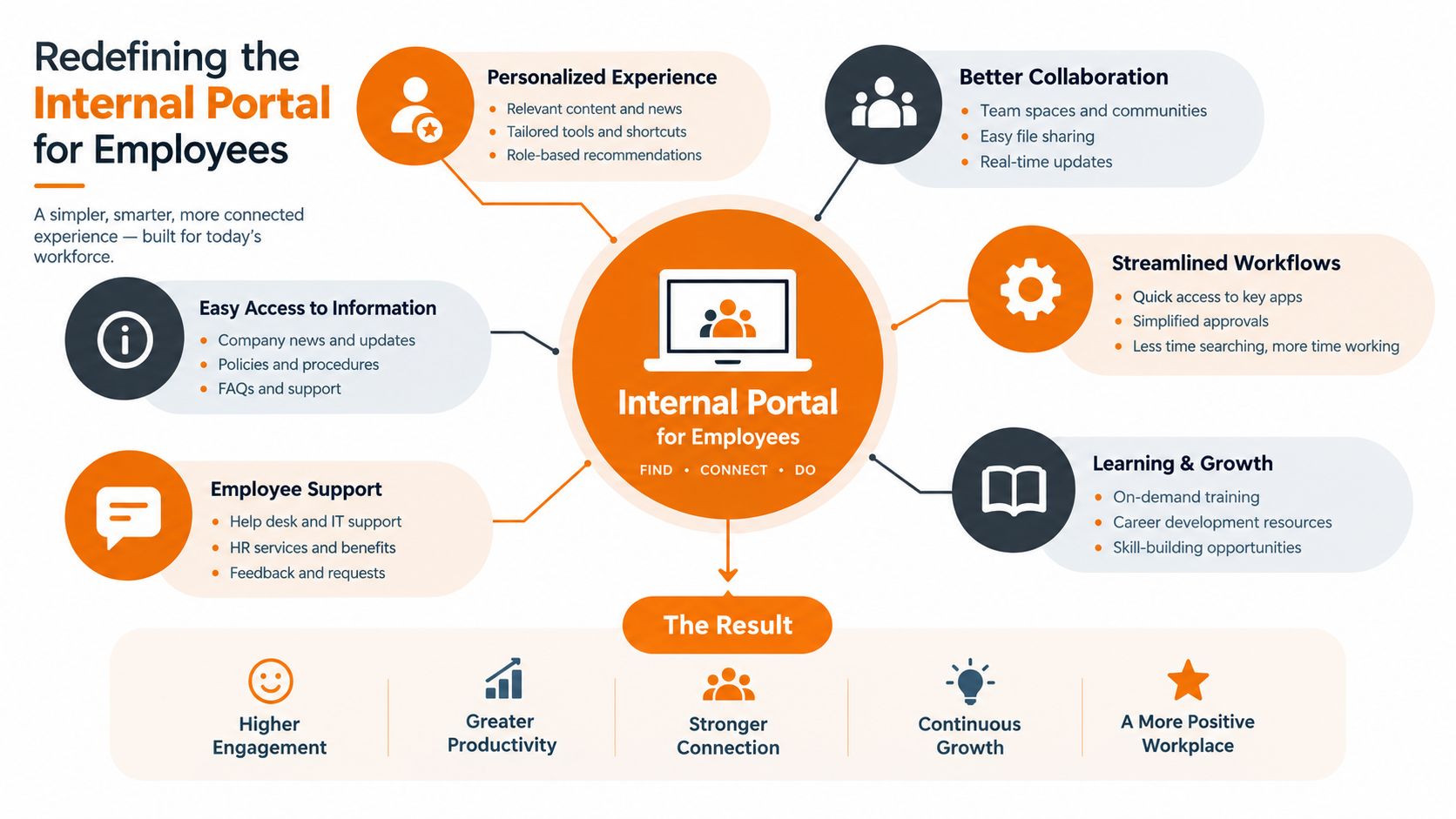
An internal portal for employees shouldn't be a fancy folder drawer. It should be the place where communication, tasks, and people all live together in one flow. When those pieces are split across chat, email, shared drives, and separate HR systems, employees spend their day stitching the job back together.
The better model is a single space that feels familiar from the first click. Pebb takes that direction with private chat, group updates, a news feed, and team Spaces where tasks, file sharing, events, shift scheduling, clock-in, and PTO tracking can sit in one place. That matters because people don't think in departments. They think in what needs doing next.
One place beats a scattered stack
Most intranets break because they assume employees enjoy searching. They don't. They want the answer, the form, the contact, or the next step. If they have to jump between systems to get there, the portal becomes one more tab to ignore.
A unified environment helps in a more subtle way too. It reduces the mental cost of switching between “reading” and “doing.” A policy page, a task list, and a team update should feel connected, because in real work they are connected. If a manager posts a shift change and the related task lives elsewhere, people miss things.
Teams need spaces, not just pages
Dedicated team Spaces change the rhythm of the portal. A retail location, a clinic, and a warehouse don't need the same home page, but they do need the same basic promise. Their work should be easy to find, easy to update, and easy to act on.
That's where structure matters. A good portal doesn't force everyone into one generic feed. It gives each group a place where their documents, tasks, posts, and schedules are close together. The result feels less like a scavenger hunt and more like a working desk that happens to live on a phone.
See how that approach is laid out in Pebb's employee communication platform, where communication and operations sit in the same system.
Designing for the Frontline and the Deskless
A portal designed around quiet laptop work will fail the people who keep operations running. Global employee-experience research across 499 companies found that 86.4% of organizations gave intranet access to desk or office workers, compared with 79.4% for customer-facing employees and 71.5% for frontline workers without desks Metrigy intranet benchmark. Access has improved, yet office-first assumptions still shape too many portal decisions.
Frontline employees work while moving, wearing gloves, serving customers, handling equipment, or sharing devices. They need information quickly, often between tasks. Deep menus, small text, unreliable logins, and pages built for long reading sessions create friction at exactly the wrong moment.
Mobile access is the baseline
Microsoft's survey of 9,600 frontline employees and managers found that one-third of frontline workers said they lacked the technology needed to do their jobs effectively. The share rose to 41% among non-management workers Microsoft frontline research. The design requirement goes beyond responsive layouts. The portal must remain usable under pressure, on a small screen, with limited time and attention.
Keep high-frequency tasks close to the surface. Schedules, onboarding steps, safety alerts, and policy updates should take minimal taps to reach. For a deeper look at the tools that support this kind of access, see Pebb's frontline employee app. If an employee has to wait until getting home to check a schedule or rule, the portal has already missed its operational purpose.
Shared devices need different thinking
Some teams use kiosks, tablets, or shared terminals rather than individual work phones. Their portal needs quick sign-in, short sessions, clear separation between users, and a layout that stays usable when several people access the same device during a shift.
Practical rule: design for the break room before you polish the boardroom.
Email also cannot carry the entire communication load. Time-sensitive updates should reach people through the channels they can access during work. For shift-based teams, missing a schedule change can disrupt staffing, handoffs, and customer service.
Access has to match the workday
Work happens across early mornings, late evenings, and awkward handoffs. Microsoft's broader workday research found that 40% of employees online at 6 a.m. were already reviewing email, while meetings after 8 p.m. had increased 16% year over year Microsoft workday research. A portal that only works comfortably during office hours leaves predictable gaps in access.
Put schedules, procedures, alerts, and approvals within reach on a phone, kiosk, or shared terminal. Meeting the workday where it happens is the core requirement, not an optional extra.
Cutting Through the Noise with Intent-Based Search
Employees don't wake up thinking, “I need the HR policy stored under the legal folder.” They think, “Can I find the right rule before my shift starts?” That's the difference between a document archive and a useful portal.
Microsoft's 2025 work research said employees using Microsoft 365 were interrupted by a meeting, email, or notification every two minutes on average, and 48% said their work felt chaotic and fragmented Microsoft infinite workday research. In that kind of environment, a portal should reduce noise, not add to it.
Search should follow employee intent
A strong search bar isn't enough on its own. The portal needs to understand what people are trying to do. A nurse searching for a policy, a warehouse associate checking a procedure, and a manager looking for an onboarding checklist all need different paths to the same kind of confidence.
That's why visible document owners matter. So do effective dates, version control, and clear labels for current versus outdated content. If employees can't tell whether the page they found is the latest one, they'll stop trusting search and go back to asking around.
Make the answer obvious
Navigation should be built around tasks, not departmental pride. A person looking for benefits doesn't care who owns the page. They care whether the page has the answer, whether it's current, and whether they can use it now.
A practical portal should make these things easy to spot:
Clear document ownership: every policy or procedure should show who maintains it.
Visible effective dates: people need to know what's current without guessing.
Role-aware results: frontline and office workers shouldn't see the same irrelevant clutter.
Fewer dead ends: when search fails, the portal should offer a next step, not a blank page.
Those habits matter because they replace scavenger hunts with confidence. And confidence is what turns a portal into a daily tool instead of a last resort.
“If the answer is hard to verify, the content isn't done yet.”
A useful internal portal for employees should be measured by task completion and time to verified answer, not just page views. That's the kind of metric that tells you whether the system helps people work or just decorates the browser.
Building Culture Without the Surveillance Creep
Analytics have a place in any internal portal for employees. Without them, you're guessing. But analytics can drift into something uglier when leaders start using activity data as a proxy for trust, effort, or worth.
A UKG survey of 8,200 frontline workers found that 74% said technology improves their work experience, but the value depends on whether they can use it privately and without being penalized for low digital activity UKG frontline workforce report. That's the line worth keeping in view. Measurement should help people do their jobs, not make them feel watched.
Measure operations, not personalities
A healthy portal tracks signals that point to friction. Missed safety updates, unanswered tasks, and broken onboarding flows are useful. So are search failures and outdated content reports. Those are operational problems.
What doesn't belong is a culture of scoring people for how often they click. Low digital activity doesn't always mean low commitment. Sometimes it means the person already got the answer, works away from a desk, or doesn't live in the portal all day.
Privacy has to be built in
Accessibility belongs here too, because privacy and access are tied together. A portal that's awkward with a screen reader or keyboard, or that exposes sensitive HR details on a shared screen, makes basic tasks harder for the people who already have the fewest margins.
A few rules keep the system honest:
Publish what's measured: people should know what the portal tracks.
Explain why it's measured: operational data needs a clear purpose.
Limit who can see it: dashboards should not turn into open surveillance.
Use minimum-group thresholds: avoid exposing tiny teams or individuals.
Offer non-scored alternatives: some tasks should never depend on engagement points.
That's not softness. It's discipline. If people feel the portal is there to police them, adoption will sag no matter how polished the design is.
Culture grows through trust
The portal should support recognition, updates, and shared information without turning every tap into a data point. Leaders can still see whether a site, shift, or role is being left behind. They just don't need to expose individual employees to do it.
A culture hub works best when employees feel safe using it. That's the ultimate test. If the tool helps people find what they need and keeps the noise down, they'll come back on their own.
Creating a Digital Home That Earns Its Place
The best internal portal for employees doesn't feel like a project. It feels like part of the workplace. People open it because it saves them time, answers real questions, and stays out of the way when they don't need it.
That takes more than launch-day excitement. It takes clean onboarding, steady maintenance, and systems that connect with the HR and payroll tools people already use. It also takes restraint. Not every shiny feature belongs in the same place, and not every employee needs the same screen.
Useful portals grow with the work
The portals that last usually do a few things well. They keep the entry point simple. They make it easy to find the right people. They let teams update content without filing a ticket for every small change. Most of all, they stay close to the rhythm of the business.
A portal earns its place when a new hire can find what they need on day one, a manager can post an update without friction, and a frontline worker can check the right answer between tasks. That's not glamorous. It's better than glamorous. It's useful.
A platform like Pebb fits that pattern because it ties chat, updates, tasks, file sharing, scheduling, clock-ins, PTO, and a searchable People Directory into one app, with quick onboarding through a single invite link. That kind of setup doesn't solve culture by itself, but it does remove a lot of the friction that usually gets in the way.
The question isn't whether your company has a portal. It's whether people trust it enough to use it when the shift is busy, the answer matters, and nobody has time to dig. Build for that moment, and the portal starts to feel like a real digital home.
If you're rethinking your internal portal for employees, Pebb is worth a look. It brings communication, tasks, schedules, files, and directories into one place, so people don't have to chase the same information across half a dozen tools. Visit Pebb and see whether a simpler home for work makes more sense for your team.
