
Employee Communication Board: Key Features 2026
Discover how to build an employee communication board that keeps your team informed and engaged. Key features, benefits, and tips for 2026.
Dan Robin

At 2 a.m. in a hospital break room, a policy update can sit on a corkboard for two weeks without reaching the nurse who needs it. The email went to an account she rarely checks. The notice was technically available. It just wasn't available where her work happened.
That failure is familiar in warehouses, restaurants, retail stores, clinics, and field teams. Leaders publish information, then assume communication is finished. Frontline employees experience something else: missed updates, repeated questions, outdated instructions, and managers filling the gaps by hand.
An employee communication board still matters in 2026 because the underlying problem hasn't changed. People need one visible place for essential information, but that place can't be only a wall, an intranet, or an email inbox. It needs to be a mobile-first distribution system with ownership, targeting, and a way for employees to respond.
The Notice on the Board Nobody Saw
The corkboard in that break room wasn't badly designed. It had a clear heading, a printed policy, and a date. It was placed near the lockers, beside the coffee machine, exactly where someone thought employees would look.
The problem was timing. Night-shift staff didn't stop there. Some employees entered through another door. Others heard about the change from a supervisor, who had heard about it from an email. The organization had published the message, but it hadn't delivered it.
That distinction matters. Publishing is an internal action. Communication is an employee outcome. If the person who needs the update can't find it, understand it, or act on it, the message hasn't done its job.
Frontline access makes the gap obvious. In a survey of 1,000 frontline employees, 67% reported access to email, 66% to face-to-face communication, and 57% to text messaging, while only 25% had access to an employee app and printed materials reached 18%. The figures come from the 2023 frontline worker communication survey.
Email still has a place. So do huddles, printed notices, manager conversations, and text messages. But no single channel reaches everyone reliably. A board works when it becomes the shared reference point across those channels, not when it replaces them.
A message isn't successful because a manager sent it. It's successful when the right employees can use it.
The old physical board understood one thing modern systems often forget: information should live where employees already work. The digital version keeps that principle and adds search, mobile access, audience targeting, acknowledgement, multimedia, and feedback. That's who this is for: teams that keep operations moving while the communication system assumes everyone sits at a desk.
What an Employee Communication Board Actually Does
Purdue University Extension describes the employee bulletin board as an official site for workplace policies and procedures and as a forum where employees can communicate with the company and one another through both top-down and peer-to-peer communication. That definition still holds, even when the board is digital. You can read the employee communication board guidance from Purdue University Extension for the original operating logic.
A useful board has four jobs:
Broadcast the important: Share policy changes, safety notices, operational updates, events, and leadership messages.
Keep information findable: Preserve procedures, handbooks, onboarding material, and recurring answers in a searchable library.
Make work visible: Recognize useful contributions, welcome new colleagues, and share milestones without burying practical updates.
Let people talk back: Give employees a clear way to ask questions, suggest improvements, and report concerns.
That makes the board a combination of feed, library, and feedback surface. It isn't an intranet, because it shouldn't force employees to browse a maze of pages. It isn't a chat tool, because urgent company information shouldn't disappear inside a private conversation. It isn't a newsletter, because employees need to respond and find older information.

Think of it as a public square inside the tools people already use. A company-wide update can sit beside a local shift notice, a policy document, a recognition post, and a question waiting for an answer. The structure matters because employees don't experience communication as a department. They experience it as one stream of decisions, instructions, and conversations.
That same principle applies to compliance. A training reminder shouldn't be a dead-end announcement. It should lead to clear material, a practical next step, and a way to confirm understanding. Teams building that kind of experience can use this guide on engaging employee compliance training as a useful reference.
For a simple digital example, a team update news feed can provide the visible stream, while a separate knowledge area holds information employees need to retrieve later. Keep those jobs distinct. A board that tries to act like every workplace tool becomes difficult to trust.
Designing for the People Who Rarely Sit at a Desk
The first design question isn't whether the board looks polished. It's whether a nurse, picker, cashier, driver, or line worker can use it during a real shift.
A 2025 global survey of internal-communications professionals identified frontline engagement as the leading challenge for 60% of respondents. Information overload affected 62%, and limited digital access affected 31%, according to the 2025 State of Internal Communications report.
Those numbers point to two opposing mistakes. Some organizations make information hard to reach. Others make it impossible to filter. Both failures produce the same result: employees miss what matters.
Start with the channel, not the screen
Mobile-first doesn't mean shrinking a desktop intranet until it fits on a phone. It means writing and designing for a quick check between tasks. Posts need a clear headline, short context, a visible action, and an obvious owner.
Keep a physical fallback where phones aren't permitted or connectivity is unreliable. Ask whether urgent messages can be delivered through a manager, a printed notice, a huddle, or a text alert. The fallback should be part of the publishing rule, not an emergency improvisation.
Target the message
A warehouse associate doesn't need every office announcement. A night-shift nurse needs different timing from a daytime administrator. Location, role, shift, and urgency should shape who sees a post and when.
Use labels employees can understand:
Urgent: Read and acknowledge this before the next relevant task.
Action required: Complete a defined step by a stated date.
Reference: Keep this available for later.
Recognition: Celebrate work without competing with operational instructions.
Targeting reduces noise, but it also creates responsibility. Someone must check that the right audience was selected. A badly targeted message can be as harmful as a missing one.
Measure delivery, not activity
A publishing dashboard can tell you that a message went live. That isn't enough. Track targeted recipients, views, acknowledgements, questions, and follow-up actions. For urgent content, define what happens when people haven't seen it. The manager may need to confirm it during a huddle or use a fallback channel.
A good test is simple: can you identify which employees needed the message, whether they saw it, and what happened when they didn't?
More posts don't equal better communication. A governed feed beats a noisy feed.
That is also the core of user-centered design. If you're evaluating layouts, permissions, or onboarding flows, creating products users love is a helpful way to think beyond attractive screens and focus on actual behavior.
A frontline employee app should answer these questions before you pilot it: Does it work on a phone? Can employees find old information? Can a supervisor target one location? Can someone acknowledge an urgent update? Can a worker participate without being exposed publicly? If the vendor can't answer plainly, keep looking.
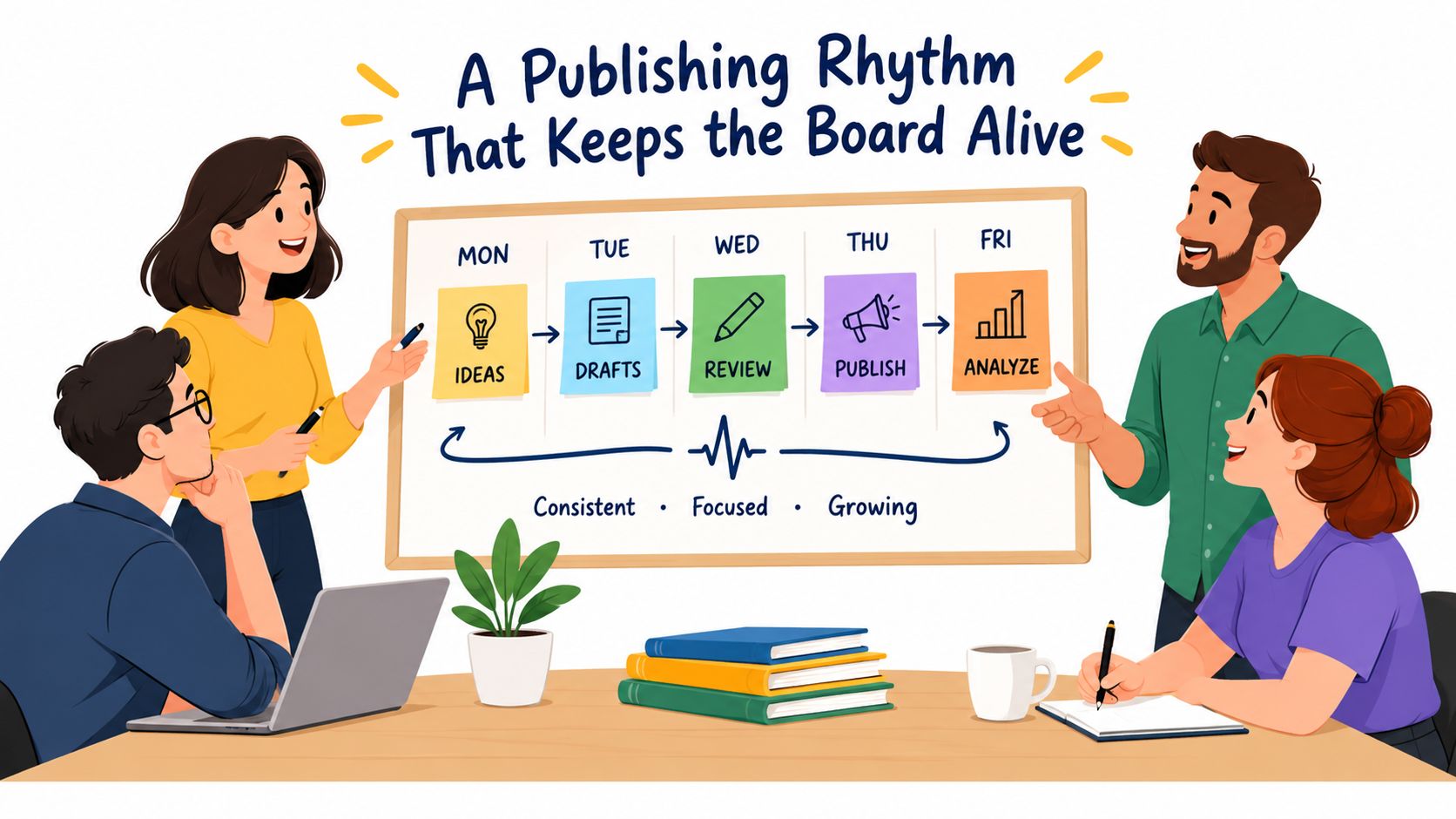
A Publishing Rhythm That Keeps the Board Alive
Every neglected board starts with good intentions. Someone creates the space, publishes a welcome message, and waits for the organization to develop a habit.
It won't. A board needs an editor.
Assign one person to own the calendar and a named backup for absences. Department leaders can submit material, but they shouldn't all publish directly. The owner decides whether a message belongs on the board, which audience needs it, how long it should remain visible, and where the permanent version should live.
A practical weekly rhythm can be modest:
Weekly priorities: What teams need to focus on now.
Policy or process changes: What changed, who it affects, and where the full instruction lives.
Recognition: Specific work worth noticing, not vague praise.
Open question: One question leadership wants answered.
Clean-up: Archive expired notices and review unanswered comments.
The point isn't to fill the feed. It's to make the board predictable. Employees should know where to look for current priorities and what kind of information they'll find there.
Give every post a shelf life
Urgent notices need a clear acknowledgement path. Reference material needs an owner and review date. Events need an end date. Recognition can move through the feed without pretending to be permanent policy.
Use an expiry date even when the platform doesn't require one. Outdated information is not harmless. It teaches employees that the board contains clutter, and clutter trains people to stop checking.
Gallup's U.S. data showed that only 23% of employees strongly agreed in mid-2024 that they'd received meaningful feedback during the previous week, even as engagement moved slightly off an 11-year low, as reported in Gallup's employee engagement update. A board can't fix feedback by itself, but a reliable rhythm gives managers a place to share priorities, answer recurring questions, and show follow-through.
Use interaction without turning the board into chat
Polls work when a decision is genuinely open. A quick question can surface a shift preference, identify a confusing procedure, or gather reactions before a change. Don't use polls to create fake participation around decisions that have already been made.
A tool such as Pebb polls can support that narrow job. Keep the result visible when appropriate, explain what leadership decided, and close the loop. Otherwise employees learn that participation only creates another form to complete.
The publishing rule I trust is this: every post needs an audience, an owner, an action or purpose, and an expiry decision. If it has none of those, it probably belongs in a private working document rather than the company board.
From Announcements to a Real Feedback Loop
A notice wall talks at people. A working communication board lets people answer.
That difference becomes important when employees see a problem before leadership does. In a 2025 survey of 300 U.S. frontline manufacturing workers, 62% had suggested process improvements, but only 38% said their ideas consistently reached decision-makers, while 68% said poor communication harmed job performance. Those findings are reported in frontline safety and AI research from ISHN.
The lesson isn't to add a comment box and call the system participatory. Feedback needs a route. Employees need to know where to post, who will review the issue, when they'll receive an answer, and what happens if the first manager can't resolve it.
Build three routes for response
Routine ideas can use open discussion. Employees might suggest a better handoff process, ask why a form changed, or share a practical improvement from their shift. Public replies help others learn from the answer.
Sensitive issues need a confidential or anonymous route. A worker may not report a safety concern, harassment issue, or manager problem in a thread where colleagues and supervisors can identify them. But anonymity creates a tradeoff. It protects the person, while making follow-up harder.
Resolved themes need a visible outcome. A short you said, we did update shows that feedback moved somewhere. It can say the idea was adopted, rejected with a reason, or sent for further review. Silence is the part employees remember.
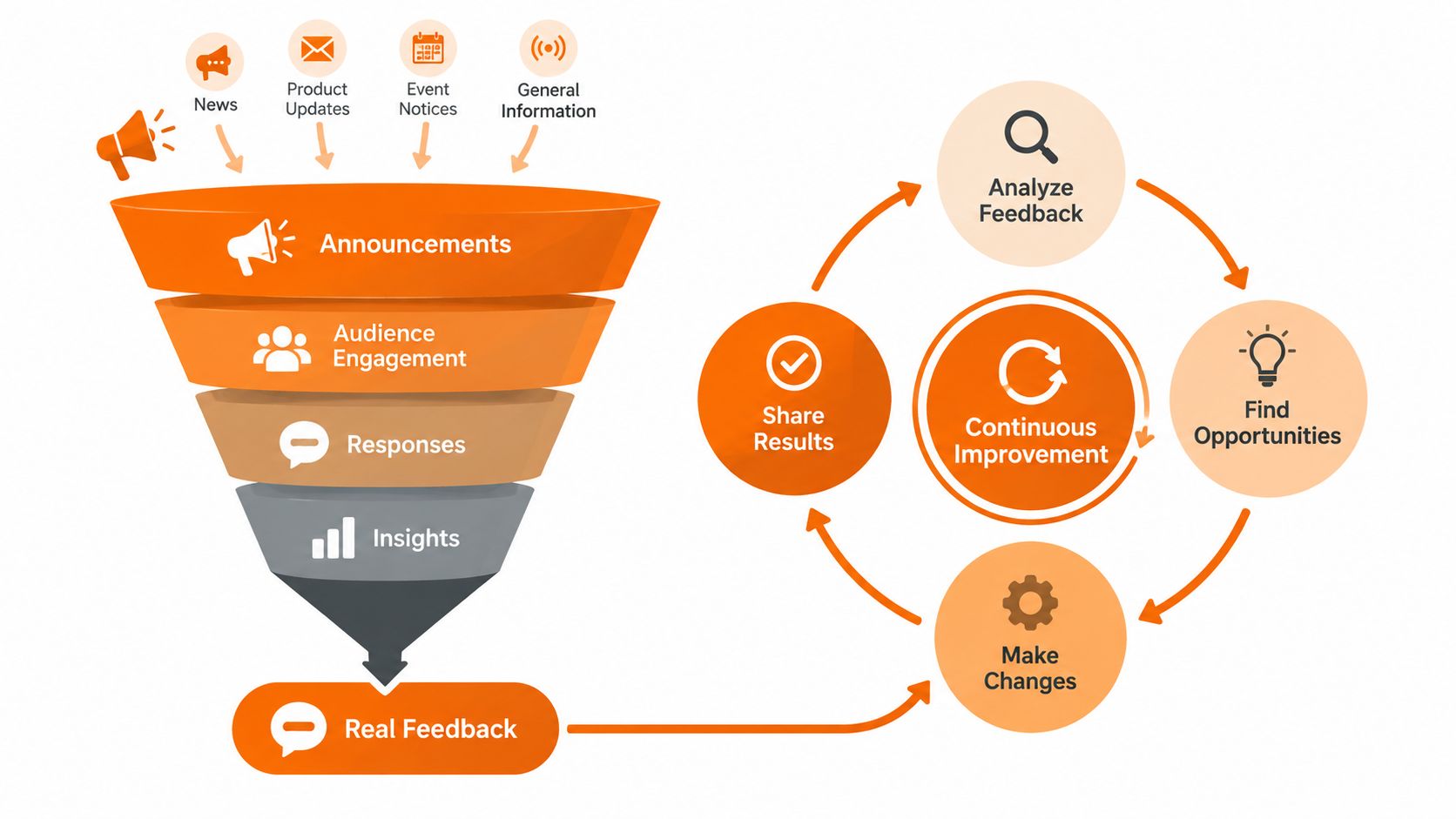
Set a response standard that managers can meet. Don't promise instant answers if the organization can't provide them. Promise acknowledgement, assign an owner, and publish the next step. That creates accountability without pretending every question has a quick solution.
Measure voice, not vanity
Views and reactions are useful, but they don't prove trust. Count questions answered, ideas routed, issues resolved, repeated themes, and employees who received a follow-up. A board with high activity and no visible decisions may be performing badly.
Product teams use similar thinking in a feedback loop for SaaS. The same discipline applies internally: collect input, classify it, assign it, act on it, and tell people what happened.
The board becomes valuable when employees stop asking, “Did anyone see this?” and start believing that the organization has a process for doing something with it.
What This Looks Like in Pebb
A practical setup in Pebb starts with one company-wide Space. The comms lead publishes major announcements there, while separate Spaces or channels handle locations, departments, and shifts. A hospital might keep organization-wide updates apart from nursing, facilities, and each site. A retailer might separate company news from store operations and regional notices.
The structure keeps one board from becoming a dumping ground. Employees see the updates intended for them, while shared information remains available to everyone who needs it.
Within those areas, the comms lead can use different tools for different jobs:
Updates and posts: Publish announcements, celebrations, daily messages, polls, media, and shout-outs.
Channels: Organize conversations by team, location, or shift.
Tasks: Turn an announcement into a defined action with an owner.
Knowledge Library: Store policies, onboarding material, and instructions that employees need to retrieve later.
Profiles and People Directory: Help employees recognize colleagues and find the right person without searching through old messages.
The operating pattern is straightforward. A policy owner drafts the update, the comms lead selects the audience, and the relevant supervisor reinforces it during the next shift touchpoint. Employees can read it on web or mobile, acknowledge urgent information, ask a question, or find the permanent document in the Knowledge Library.
Pebb also supports roles, permissions, file sharing, events, shift scheduling, clock-in, and PTO tracking inside configurable Spaces. That doesn't mean every feature belongs on the board. It means the communication layer can sit closer to the work instead of sending employees across disconnected tools.
A board setup you can finish in an afternoon
Start with a small publishing map:
Create the company Space.
Add location, role, or shift areas only where they solve a real audience problem.
Put evergreen policies in the Knowledge Library.
Create a naming rule for urgent, action-required, reference, and recognition posts.
Turn on acknowledgements for instructions that require proof of reach.
Give supervisors access to the posts they need to reinforce.
Review analytics for views, activity, and unanswered questions.
Single-link onboarding helps a comms lead invite employees without building a complicated enrollment process. Analytics then show whether the message reached the intended audience and where attention is thin.
That is the useful distinction. Pebb can serve as the digital board, but the board still needs an editor, a publishing rule, and managers who treat communication as part of the work.
Governance, Security, and the Quiet Work That Builds Trust
Mobile access creates responsibility. Employees may use personal phones, shared devices, or phones outside controlled work areas. NIST's mobile-device control AC-19 requires organizations to establish configuration and connection requirements for organization-controlled mobile devices, plus authentication before accessing organizational resources, as described in this NIST AC-19 reference.
For an employee communication board, decide who can read, post, edit, pin, export, and delete. Remove access when someone leaves. Plan for a lost phone. Keep public notices broad, but restrict payroll, health, incident, and personnel information to the people who need it. Preserve enough history to show what was published and when.
The governance checklist is short:
Ownership: One accountable editor and a backup.
Cadence: A predictable publishing rhythm.
Targeting: Role, location, shift, and urgency controls.
Acknowledgement: A clear route for urgent instructions.
Feedback: Public, confidential, and resolution paths.
Mobile access: A usable phone experience plus fallback channels.
Permissions: Defined posting, editing, viewing, and removal rights.
Measurement: Reach, response, resolution, and unanswered questions.
A board isn't the goal. The goal is a frontline employee who knows what changed, what to do next, where to find the full answer, and whether anyone heard their concern. The board is just the daily proof that the company is paying attention.
Pebb brings company updates, team Spaces, tasks, knowledge, polls, profiles, and mobile access into one employee app for frontline and office teams. If your current board is a corkboard, an inbox, and a pile of unanswered questions, visit Pebb and see how to build a clearer communication system.
