
Is Anyone Listening? On Finding a Real Chat App for Employees
Discover how a chat app for employees can streamline teamwork, boost speed, and improve operations—learn how to pick a tool your team will love.
Dan Robin
Ever feel like you’re sending messages into a black hole at work? You craft the perfect email, hit send, and… silence. It disappears into an inbox abyss, buried under a hundred other "urgent" notifications. Or you pin a notice to a physical bulletin board, knowing full well it’s just wallpaper for most people. We’ve all been there. It’s communication chaos, and we’ve somehow accepted it as the cost of doing business.
But it doesn't have to be this way. A proper chat app for employees isn't just another messaging tool. When it's done right, it's the central nervous system for your whole company. A single, calm place for company news, project updates, and daily logistics that connects everyone, from the front desk to the factory floor.
The Quiet Cost of Disconnected Teams

For years, we’ve tried to patch this problem together. We use a messy combination of email chains, unofficial group texts, and maybe a few printed flyers for good measure. Let's be honest. This patchwork system isn't just messy; it’s actively slowing you down.
The Slow Burn of Bad Communication
Every missed update or delayed answer adds a bit of friction. A little grit in the gears. On its own, it’s a small annoyance. But it adds up. A 2024 McKinsey study found that the average employee spends nearly 20% of their week—that’s a full day—just searching for information or tracking down a coworker who might have the answer.
But the real damage goes deeper than lost time. It’s about how it makes people feel. When communication is scattered, your team feels disconnected, out of the loop. That uncertainty erodes trust and fosters a culture where no one’s ever quite sure what’s going on.
The problem with poor internal communication isn't just inefficiency; it's the slow erosion of culture. When people don’t feel connected, they stop feeling like part of something bigger.
More Than Just Another App
This is why we need to think about workplace communication differently. A dedicated chat app for employees isn’t just another piece of software to manage. It's a deliberate choice to build a more transparent, aligned, and connected company from the ground up.
It’s a tool built for the reality of modern work—that it doesn't just happen at a desk. The person stocking shelves needs the same timely information as the marketing manager. A good app replaces the chaos of scattered conversations with a single source of truth everyone can rely on.
The point isn’t just to send messages faster. It’s to create a digital space where work actually happens. Where questions find answers, ideas find the right audience, and everyone, no matter their role, feels like they belong. If you're tired of endless email threads and conversations scattered across five different platforms, you already get it. Now, let’s talk about what a real tool should do.
What a Good Employee Chat App Should Actually Do
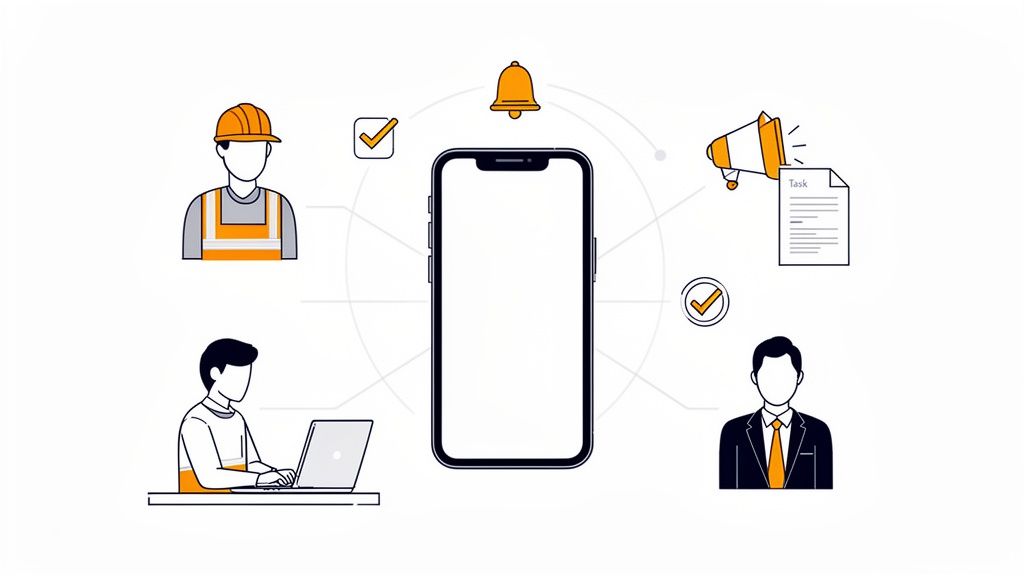
When you hear "chat app," your mind probably goes to DMs and a few group channels. That’s a start, but it's like saying a car is just an engine on wheels. A true chat app for employees should be the digital heart of your company.
Think of it as the one place everyone—from the front desk to the factory floor, from marketing to management—goes to connect, find answers, and move work forward. This isn’t just another notification to swipe away. It’s a tool that puts everyone in the same room, even when they’re miles apart.
It's About Connecting People to Their Work
Let’s be honest. The real problem isn't just a lack of chat; it's that communication is completely disconnected from the work itself. We send a text about a shift change, then have to log into a totally different system to update the schedule. We email a policy update, then upload the document to a separate drive. It’s a mess.
A great employee app fixes this by weaving communication and operations together. The conversation should happen right alongside the task, the schedule, or the document it's about. It’s the difference between talking about work and actually doing it.
A chat app should do more than just connect people; it should connect people to their work. It’s a subtle but profound shift from a simple communication tool to an operational hub.
This shift creates a single source of truth that’s easy for everyone to access. And it seems businesses are catching on. The enterprise chat market is expected to jump from $13.2 billion in 2025 to $23.1 billion by 2033—a clear signal that companies are tired of juggling a dozen different tools. When you realize that poor communication can cost a business up to 20% in lost productivity, a unified tool starts to look less like a luxury and more like a necessity.
Let's look at the before-and-after.
From Scattered Tools to a Single Hub
The Old Way (Multiple Apps) | The New Way (One Unified App) |
|---|---|
Texting for urgent news | Instant announcements in a dedicated channel |
Emailing policy documents | Policies stored and accessible in the app |
Separate scheduling software | Scheduling, shift swaps, and PTO in one place |
Information lost in long chains | Centralized, searchable conversations |
Deskless workers feel out of the loop | Everyone gets the same info on their phone |
The difference is stark. Moving to one central app doesn't just clean up your digital toolkit; it fundamentally changes how your team works together.
Built for How People Actually Work
Thinking mobile-first isn’t just a nice phrase; it's a reality. Most of your team isn’t chained to a desk. Their most important tool is the phone in their pocket. A proper employee chat app has to be designed for someone on their feet who needs a quick answer and can’t be bothered to navigate a clunky desktop site on a tiny screen.
It has to be ridiculously simple to use. The design should feel obvious because the only tool that matters is the one people want to open. Beyond just chatting, it should be one of the effective tools to boost employee engagement and make everyone feel included.
This is about choosing a better way to operate. It’s a move away from siloed information and confusing top-down memos, toward a more open, connected, and efficient culture. It’s about giving your people a tool that respects their time, clarifies their work, and makes them feel like part of a team.
The Features That Actually Matter
When you start looking for an employee chat app, it’s easy to get lost. Every website throws a long list of features at you, and they all start to sound the same. But here's the thing: the number of features doesn't matter nearly as much as having the right ones. The ones that solve real problems.
Look, any basic messaging tool can handle a one-on-one chat. That's the bare minimum. The real challenge is finding a tool that can become the central nervous system for your company—a platform that simplifies work, not just adds another app to the pile.
Beyond Simple Chat Channels
Let’s get the basics out of the way. Of course you need solid private and group messaging. That’s a given. But if that’s all your app does, you’ve just bought a digital water cooler. A truly great employee chat app understands that not all communication is equal.
Push notifications, for instance, are crucial for keeping everyone in the loop, especially your frontline staff. But there’s a fine line between a helpful alert and a constant, annoying buzz. Understanding effective push notification strategies is key to finding a tool that informs without creating fatigue.
A real employee app needs more structure than a free-for-all of chat rooms. It needs things like:
A Company-Wide News Feed: Think of this as your official town square. It’s the one place for must-see announcements—a major policy change, a new safety protocol—so they don't get buried in the daily chatter.
A Searchable People Directory: Ever needed to find "the person in accounting who handles expenses" but had no idea who to ask? A simple, visual directory with faces, roles, and context is one of those quiet, brilliant features you’ll use every day.
These are the foundational pieces that separate a simple messaging app from a true communication hub.
Turning Conversation into Action
Here’s where it gets interesting. The best tools don't just help your team talk; they help them get things done. They bridge the gap between a conversation and the work that needs to follow.
This is about bringing communication and operations under one roof. No more bouncing between ten different apps for ten different tasks.
An employee app should be a tool for action, not just a place for discussion. If you can't go from a conversation to a completed task without leaving the app, it’s not doing its job.
The market shows this is what businesses want. The chat application market was valued at a massive $63.78 billion in 2023 and is projected to explode to $213.4 billion by 2030. That growth isn't about sending more emojis; it’s driven by demand for tools that help run the business. You can read more on the booming chat application market to see the full picture.
The Operational Essentials
So, what are these operational features that make all the difference? They're the practical tools that handle the daily grind of managing a team.
A modern chat app for employees should bake these right in:
Simple Task Management: The ability to assign a quick task, set a deadline, and track it to completion, all from within a chat.
A Knowledge Library: One central, searchable spot for everything from the employee handbook and training guides to company policies. No more hunting through messy shared drives.
Shift Scheduling and PTO: For any business with frontline teams, this is a game-changer. An app that lets employees view schedules, swap shifts, and request time off saves managers from endless administrative headaches.
These aren't just fancy add-ons. They’re what turn an app from a potential distraction into a tool your team can't work without. For a closer look, we've broken down the must-haves in our guide on the top 10 features every employee communication app should have.
Picking the right app isn't about ticking off the most boxes. It's about finding a platform that feels thoughtful—one that has the right ingredients to make work, and life, a little bit easier for everyone.
How to Choose the Right Tool for Your Team
The market for employee chat apps is crowded. Every vendor has a slick website promising to solve all your problems. So, how do you cut through the noise and find the one that’s actually right for your people—the one they’ll see as a help, not a chore?
It starts by asking better questions. This isn't about finding the app with the most features. It's about finding the one with the right philosophy for how your business really works.
Start with Who, Not What
Before you even look at a feature list, you have to answer one question: Who is this for?
Is your team made up of desk workers who live in spreadsheets? Or is your workforce on their feet all day in a warehouse, a hospital, or a retail store? The needs of these two groups couldn't be more different. A tool built for an office will feel clunky and irrelevant to a frontline employee.
Be honest about your team’s daily reality. For a frontline team, a simple, mobile-first interface isn’t a nice-to-have; it’s the only thing that will get used.
Prioritize Simplicity and Speed
Next up is adoption. How easy is it for someone to get started? If a new hire needs a two-hour training session just to figure out how to send a message, you’ve already failed. The experience should feel obvious from the moment they log in.
The best tools fade into the background. They don't make you think about how to use them; they just help you get your job done. Cluttered interfaces and confusing menus are red flags. They suggest a tool is trying to be everything to everyone, which usually means it isn’t great at anything.
A great chat app for employees should feel less like software and more like a well-organized digital workspace. If it adds friction to your team's day, it has missed the mark.
The market for these tools is growing at a blistering pace. Projections show the instant messaging app market is set to hit $32,491.6 million in 2025 and more than double by 2034. For managers in logistics and HR leaders in healthcare, this means that unified apps with file sharing and task management are becoming non-negotiable. You can dive deeper into the trends by checking out the rapidly expanding instant messaging app market.
Employee Chat App Evaluation Checklist
To cut through the noise, you need a simple framework. Don't get lost comparing every single feature. Focus on the core principles that determine whether a tool actually gets used. We put together a detailed guide on how to pick the right team chat app for your business, but this checklist is a great place to start.
Here’s a practical list to guide HR and Operations leaders in selecting the right tool.
Evaluation Criteria | Key Questions to Ask | What to Look For |
|---|---|---|
Unified Workspace | Can we manage tasks, share files, and handle schedules without leaving the app? Or is it just another silo? | A single, integrated hub for work. Avoid tools that force you to jump between different apps. |
All-Employee Accessibility | Is it built for all our employees? Does the mobile app feel just as powerful and easy to use as the desktop version? | A seamless experience on both mobile and desktop. Look for a true mobile-first design, not a shrunken website. |
Speed to Value | Can we get started today? Is onboarding a matter of minutes or weeks? | A simple, frictionless setup. The best tools let you invite your team and get to work in under an hour. |
Scalability & Security | Will it grow with us? Does it offer the security and admin controls we’ll need as we scale? | Enterprise-grade security, robust admin dashboards, and analytics that can support your growth. |
User Experience (UX) | Does it feel intuitive? Will our least tech-savvy team member be able to pick it up without a manual? | A clean, uncluttered interface that feels natural. The less training required, the better. |
Choosing a chat app for employees is a big decision, but it doesn’t have to be complicated. By focusing on your people first and making simplicity a priority, you can confidently pick a tool that actually makes work better for everyone.
Launching Without the Headaches
So, you’ve picked a tool. You've weighed the options, and you're confident it's the right fit. Now comes the hard part: getting your people to actually use it.
A successful launch has little to do with technology and everything to do with people. It’s about building momentum and clearly showing your team what’s in it for them. Simply sending a company-wide email announcing a new app is a recipe for failure.
Start Small to Win Big
The temptation is to go for a big, all-at-once launch. Don't. The single best piece of advice I can offer is to start with a small pilot group. Pick one team, one department, or one location—a group that’s generally open to new things and can give you honest feedback.
This isn’t just about testing the tech; it’s about creating your first believers. These initial users become your champions. They’ll be the ones who can honestly tell their colleagues, “Hey, this new app actually makes swapping shifts way easier,” which is a thousand times more powerful than any memo from management.
Choosing the right chat app for employees is a process. You have to understand your needs, evaluate your options, and then make a choice.
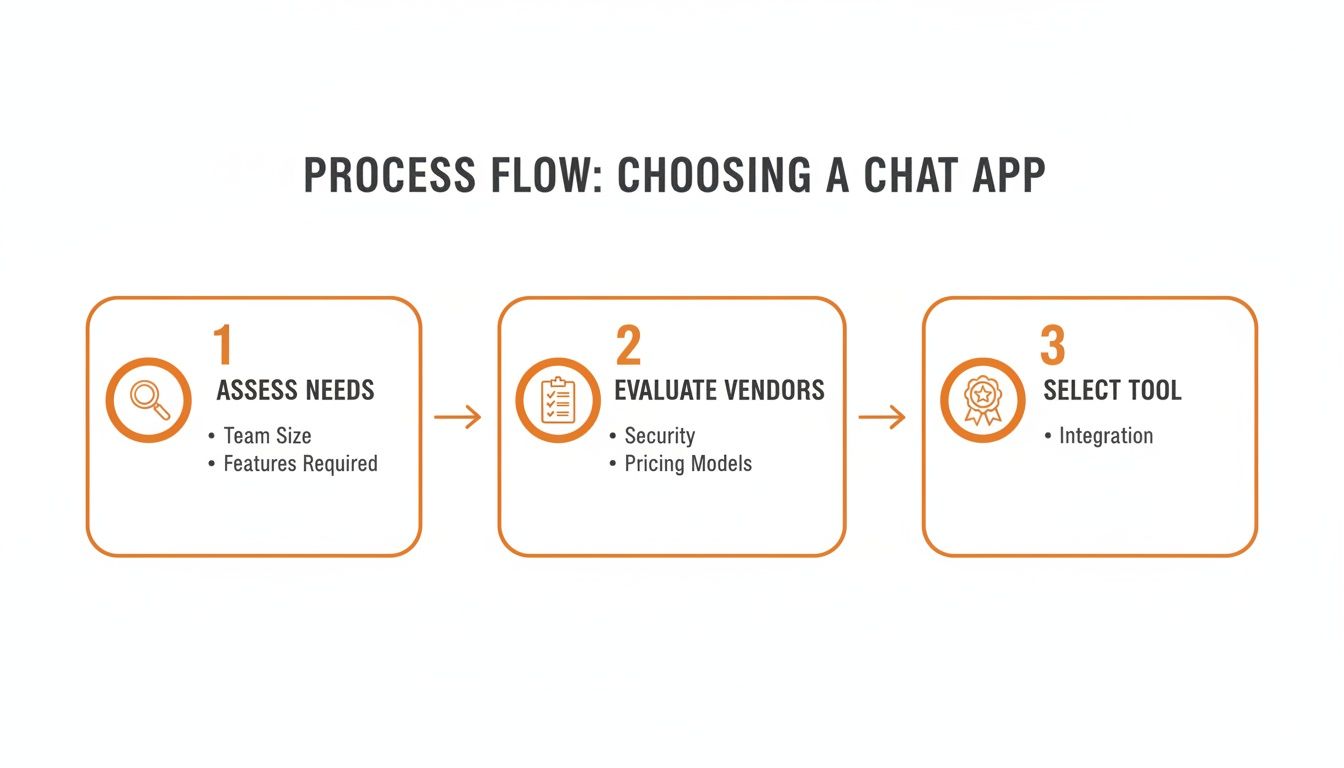
This visual breaks down the simple path from figuring out what your team really needs to confidently picking the tool that just works.
Communicate the Why, Not Just the What
When you do start talking about the new app, lead with the "why." Your team doesn’t care about a long list of features. What they care about is how this will make their workday better.
Instead of just saying, "We’re launching a new communication platform," try something more personal. Frame it around solving the real headaches they face every day.
Adoption is a human challenge, not a technical one. A successful rollout feels less like a mandate and more like a shared discovery of a better way to work.
Here’s how that reframing might look in practice:
Instead of: "The new app has a scheduling feature."
Try: "No more confusing text chains to swap shifts. You can now do it with two taps right from your phone."
Instead of: "We’ve implemented a knowledge library."
Try: "Tired of hunting for that outdated training manual? Now, every policy and guide is in one place, instantly searchable."
This approach turns the launch from another top-down directive into a welcome solution. It's about inviting people in, not pushing a tool on them.
What Success Really Looks Like

The job isn't done once everyone has downloaded the app. That's just the start. True success shows up quietly, when the tool becomes so woven into daily work that people hardly notice they’re using it anymore.
So, how do you measure that? If your first thought is to check daily active users, you’re looking at the wrong numbers. That’s a vanity metric. It tells you people are logging in, but it says nothing about whether their work is getting better.
Here’s the thing: success isn’t about counting clicks. It’s about the quality of the interactions happening within the app.
The Real KPIs Are Human
The true signs of a successful chat app for employees are the small, human-scale changes that ripple across your organization. These are the shifts in behavior you can feel.
Are better questions being asked in public channels? That’s a sign that people feel safe admitting they don’t know something.
Are teams from different departments—say, marketing and logistics—collaborating on their own, without a manager forcing an introduction? That means silos are breaking down naturally.
Success isn't a number on a dashboard. It’s the sound of a quieter, more efficient company—the silence of problems being solved before they escalate and the hum of teams that are truly in sync.
Information is the lifeblood of a business. A recent Microsoft study on AI at Work highlighted just how much time is wasted hunting for it. A great employee app fixes that. You see it when a critical update about a supply chain delay reaches the warehouse floor in minutes, not hours.
Listening for the Right Signals
Instead of obsessing over usage stats, look for these indicators. They represent the real return on your investment.
Quicker Resolutions: How fast are operational issues—like a broken machine or a scheduling conflict—being reported and resolved? When employees can flag a problem and get a response in minutes, you’re winning.
Higher Engagement with News: Are people reacting to and commenting on company announcements? A lively discussion on a post about new benefits is a far better sign of health than a silent "read" receipt.
Unsolicited Feedback: The real magic is when you hear things like, "I finally feel like I know what’s going on," or "It’s so much easier to get help now." This is the sound of employees who feel seen, heard, and connected.
This is the long game. The goal isn't to install new software. It’s to build a workplace where communication is effortless, information is transparent, and your culture is something everyone lives, every single day.
A Few Honest Questions
Whenever we talk to teams about a new chat app for employees, the same questions come up. And they should. App fatigue is real, and it's smart to be skeptical.
Here are some straight answers to the questions we hear all the time.
How Is This Different from Slack or Teams?
This is the big one. Tools like Slack and Microsoft Teams are great, but they were born in a world of desktops and office chairs. For companies with large frontline teams or a distributed workforce, they can feel overly complicated.
A dedicated employee app is built from the ground up with a mobile-first mindset. It’s not just chat; it’s a streamlined hub that blends communication with practical tools like shift schedules, task lists, and PTO requests. The point is to have one simple, central place for every single person, no matter where they work.
Will Our Team Actually Use Another App?
The million-dollar question. No one wants another app cluttering their phone. People will only adopt a new tool if it genuinely makes their work life easier.
But think about it this way: if you can replace a messy web of different systems—email threads, chaotic group texts, a separate scheduling portal—with one clean app, your team will thank you. The magic happens when you bring communication, daily operations, and company culture together in one intuitive spot. It’s not about adding clutter; it’s about clearing it away.
Adoption isn't about forcing a new tool on people. It’s about offering them a simpler way to work that they genuinely prefer.
How Do We Keep Important Stuff from Getting Lost?
We've all been there. Chat flies by, and it’s easy for a critical announcement to get buried. A well-designed employee app anticipates this.
It solves the problem by creating distinct spaces for different kinds of information. A good tool will include a company-wide news feed for top-down announcements that need to cut through the noise. A searchable resource library for handbooks and policies, plus a clear employee directory, ensures that important information is always a tap away. It’s about separating the urgent from the important.
If you’re looking for a single, modern app to connect and manage your entire team, Pebb might be the right fit. It’s the all-in-one workspace that brings communication, operations, and culture together in one place for everyone. See how it works.
