

Author: Ron Daniel
Why Teams Are Leaving Deputy & Homebase for Pebb in 2026
Why frontline teams switch from standalone schedulers to one mobile app that unifies chat, schedules, tasks, forms, and SOPs.
Most frontline teams don’t switch tools because scheduling failed. They switch because the rest of the workday is a mess.
At Pebb.io, I keep seeing the same pattern in 2026: a team starts with Deputy or Homebase for schedules, then adds chat, forms, docs, and task tools on top. Before long, staff are bouncing across 4 to 6 apps just to get through one shift. That stack costs more, slows managers down, and leads to missed updates. Even the article data points to the bigger issue: employees using more than 10 apps report communication problems at a 54% rate, versus 34% for those using fewer than five.
So instead of rehashing every feature line by line, I want to get to the point. I’m going to show you why teams outgrow Deputy and Homebase, where each tool still fits, and why more managers are moving to Pebb when they want chat, schedules, forms, tasks, news, and SOPs in one app for $4/user/month - or even starting on the free plan.
Deputy: Where It Works and Where It Falls Short
I’ve seen this pattern up close at Pebb.io. A team starts with Deputy because scheduling is the fire they need to put out first. And to be fair, Deputy does that part well.
Where Deputy works well for operations-heavy teams
If you run restaurants, retail stores, warehouses, or multi-site service teams, Deputy can handle a lot. It’s built for scheduling and attendance control, and that shows fast.
Managers can set up complex weekly rosters with split shifts, staggered start times, and role-based assignments. They can also factor in labor budgets and demand forecasting. When labor costs are under a microscope, that kind of control matters. I’ve talked with operators who lean hard on Deputy’s AI-powered auto-scheduling because it saves them hours every week and helps keep staffing in line.
The time clock side is strong too. Deputy supports:
mobile GPS clock-in
web clock-in
tablet kiosk mode
PIN entry
biometric facial recognition
That gives managers a few ways to verify attendance and cut down on time theft. So if the main goal is tight scheduling and attendance control, Deputy does its job. That’s where it shines.
But here’s the thing: being good at operations control isn’t the same as being the place where the team actually works together all day.
Why Deputy often requires additional apps
This is where I’ve seen teams hit friction.
Deputy starts to feel thin when people need communication, forms, and task follow-up in the same app. Its communication setup is mostly about shift notifications and one-way announcements. That’s useful, but it’s not the same as day-to-day team conversation.
There’s no interactive news feed. There’s no structured knowledge base. There’s no built-in task coordination. And if a team wants fuller messaging features, they often need the Messaging+ add-on, which doesn’t come with the base plan.
Let me tell you what happened next in a lot of these setups. Managers at busy restaurants or retail chains end up stitching together a stack of other apps:
Google Forms for incident reports
Google Drive for SOPs
Trello for task tracking
I’ve watched this happen again and again. At first, it feels fine. One app for schedules, another for chat, another for forms. No big deal, right?
Then the cracks show.
A store manager posts an update in one place, a checklist lives somewhere else, and a policy doc gets buried in a drive folder no one can find during a rush. Every extra app means more logins, more training, and one more place where updates can vanish. That’s usually the moment when teams start talking to us at Pebb.io instead of adding yet another tool.
The gap becomes pretty obvious in daily work:
Workflow Area | Pebb | Deputy |
|---|---|---|
Work Chat | Built-in group and 1:1 chat with unlimited history | Basic messaging; full features require Messaging+ add-on |
News Feed | Interactive, social-style feed with comments and reactions | One-way updates only |
Digital Forms | Built-in forms for reports, checklists, and approvals | Not a core feature; requires external tools |
Knowledge Base | Centralized library for SOPs, policies, and training materials | File sharing in chat, not a real knowledge base |
Tasks | Assignable, trackable tasks included | Not available natively |
From what I’ve seen, Deputy works well when scheduling is the main need. Homebase runs into a similar wall. It can fit smaller teams early on, but once communication starts to matter more day to day, those gaps show up fast.
Homebase: Where It Works and Where It Falls Short
I’ve seen Homebase do its job well in the early days. A small café, a salon, a local shop, a clinic with one front desk and a tight team - it makes sense fast. You can move from paper schedules and messy group texts to something cleaner without paying on day one, and for a lot of small hourly teams, that feels like a win.
Where Homebase fits smaller hourly businesses
Homebase fits small, single-location hourly businesses like cafés, salons, retail shops, or clinics. The free Basic plan covers scheduling, basic time tracking, and simple team messaging for up to 10 employees at one location. Staff can clock in from their phones, managers can publish weekly schedules, and for a small team that wants to stop using paper schedules and group texts, that's a meaningful upgrade with zero upfront cost.
I’ve watched teams get a lot of mileage out of that setup. When all you need is, “Who’s opening on Tuesday?” or “Can you cover my shift?” Homebase keeps things moving.
But here’s the thing: that works best when scheduling is the main problem you’re trying to solve.
That works until communication starts to matter as much as scheduling.
Why teams move on when communication becomes a bigger priority
This is usually where the cracks start to show. I’ve seen it happen when a business adds a second or third location, or when the team gets big enough that shift updates are only part of the daily picture.
Homebase messaging is built around shifts, so it works for schedule changes and reminders, but it's not designed for organized chats by topic, company-wide announcements with read tracking, or keeping frontline and office staff in the same conversation.
Let me tell you what happened next in cases like this. Teams start needing one place for updates, SOPs, task follow-through, and day-to-day chat. That’s where Homebase starts to feel narrow. There’s no native knowledge base, task management is limited beyond shift checklists, and because per-location pricing adds up fast, costs climb quickly as you add sites. Teams then add Slack or WhatsApp for chat, Drive for documents, and another tool for tasks.
I’ve seen that stack grow little by little. One app for schedules. One for chat. One for files. One more for tasks. Before long, people are bouncing between tools just to get through a normal shift.
Once those gaps appear, teams start looking for a single platform instead of another add-on.
Here's the difference once communication becomes part of daily operations:
Feature / Capability | Pebb | Homebase |
|---|---|---|
Shift scheduling & rostering | Built-in, with support for multi-location coordination and role-based planning | Strong for single or a few locations; less suited for complex multi-site setups |
Time clock & attendance | Integrated, with data connected to tasks, communication, and reporting | Well-established; a strong fit for basic hourly time tracking and payroll exports |
Work group chat | Full-featured, organized by teams, topics, and locations | Basic messaging tied mainly to shift notifications |
Company-wide news feed | Central feed with segmented targeting and engagement metrics | Limited; not built for structured announcements with analytics |
Knowledge base | Built-in and searchable, right where employees already work | Not available natively; teams rely on external tools |
Digital forms | Native forms for incidents, requests, and feedback | Minimal; many teams use paper or separate tools |
Task management | Assignable, trackable tasks with completion oversight | Limited to basic shift-related duties |
Multi-location cost | Per-user pricing, with no extra location fees | Per-location fees that stack with each new site |
PTO management | Included | Requires the Plus plan |
Voice & video calls | Included in Premium | Not available |
From what I’ve seen at Pebb.io, this is the turning point. Once communication becomes part of daily operations - not just an extra layer on top of scheduling - teams want one app that keeps everything in the same place: schedules, chat, forms, updates, and tasks.
That’s why teams that outgrow Homebase look for one app that handles scheduling, communication, forms, and tasks together.
How Pebb Replaces Fragmented Apps
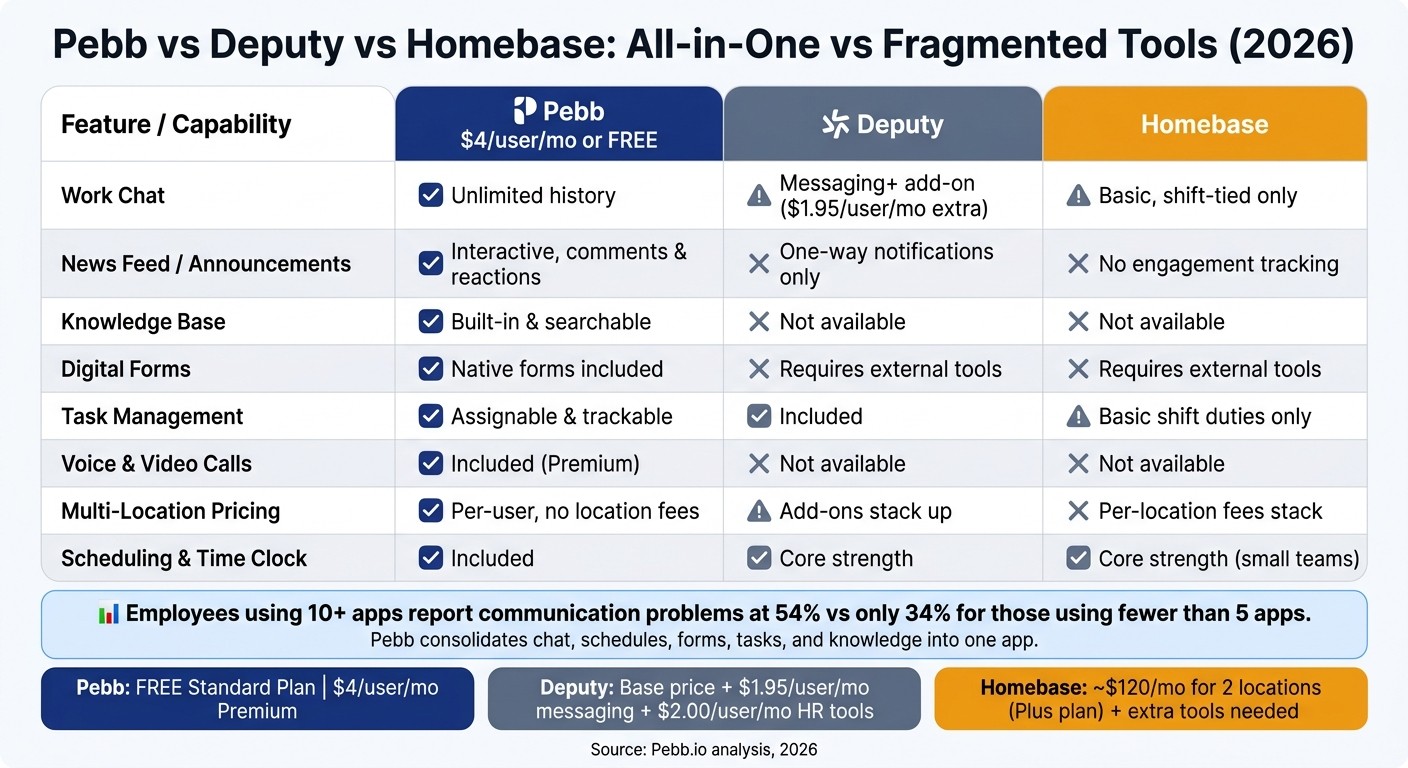
Pebb vs Deputy vs Homebase: Feature & Pricing Comparison 2026
One app for communication, operations, and daily coordination
I’ve seen this play out more times than I can count at Pebb.io. Before teams move over, a manager is usually bouncing between WhatsApp, Slack, Google Docs, email, and a pile of forms just to keep a single shift from going off the rails.
That mess adds up fast.
With Pebb, we pull that stack into one app. I can publish a store opening update in the news feed, confirm shift coverage in work chat, assign setup tasks, save the SOP in the knowledge base, and collect a finished incident or onboarding form without leaving the same system. New hires get onboarding checklists. Shift swaps happen in the same place as the schedule. PTO requests don’t need some other tool sitting off to the side.
Here’s the thing: that’s the part that hits managers first when they move off Deputy or Homebase. It’s not just about having another scheduling app. It’s about having fewer places to check before a shift starts.
That matters a lot for frontline teams. At Pebb.io, we built it so everything lives in one mobile app, because that’s where work happens for most hourly staff. Employees can check schedules, read updates, message coworkers, clock in, submit forms, and look up coworkers right from their phones.
When you put the main workflows side by side, the gap gets pretty obvious.
Feature / Capability | Pebb | Deputy | Homebase |
|---|---|---|---|
Work chat | Included, unlimited history | Available with Messaging+ add-on | Basic messaging tied to shift notifications |
News feed / announcements | Interactive, social-style feed with comments, reactions, and read tracking | One-way shift and update notifications | Basic announcements without engagement tracking |
Tasks & digital forms | Included | Tasks included; forms require separate tools | Separate tools needed for forms and workflows |
Knowledge base | Built in and searchable | Not available | Not available |
People directory | Included | Limited | Limited |
Voice & video calls | Included on Premium | Not available | Not available |
Groups / Spaces | Full-featured | Limited | Limited |
Best fit | All-in-one communication and operations | Scheduling and attendance | Basic hourly scheduling |
How Pebb's pricing changes the decision
Let me tell you what happened next when I started looking at the pricing side with teams.
Once you combine the app stack, the buying call gets a lot easier. Pebb’s Standard plan is free - and it’s not a stripped-down trial. It includes work chat with unlimited history, news feed, knowledge base, tasks, digital forms, clock-in, shift scheduling, PTO management, and unlimited Spaces. The Premium plan is $4 per user per month, and that adds voice and video calls, advanced analytics, enterprise SSO, permissions control, and priority support.
Now compare that with what managers often deal with elsewhere. Deputy charges extra for messaging at $1.95 per user per month, and HR tools add another $2.00 per user per month on top of base pricing. Homebase can run about $120/month for a team across two locations on the Plus plan - and that’s before adding extra chat or document tools.
From where I sit at Pebb.io, that’s the math managers should look at when weighing Deputy or Homebase:
Fewer apps
Fewer handoffs
Less admin
And in day-to-day work, that usually means less scrambling before the shift even begins.
Why Pebb Works for Frontline and Office Teams in 2026
What switching to Pebb solves day-to-day
I’ve seen this play out up close at Pebb.io: the moment a team splits schedules, chat, forms, and tasks across a bunch of tools, daily work starts to feel heavier than it should.
The first sign something’s off is small, but it shows up everywhere. Employees keep asking, “Where do I find that?” Managers repeat the same update three or four times in three or four places. A schedule change gets posted in one app, a task lives in another, and an announcement gets buried somewhere else. That’s where the drag starts.
Here’s the thing: when all of that sits in one app, the noise drops fast.
With Pebb, announcements, schedule updates, and tasks stay in one place. That cuts out a lot of the back-and-forth that eats up a manager’s day and frustrates teams.
I think this hits hardest on day one.
When a new hire joins, that first shift or first week can either feel smooth or chaotic. I’ve watched managers lose a ton of time just explaining where everything lives. One link for training. Another app for the schedule. A different place for forms. Chat somewhere else. It’s messy, and new people feel that mess right away.
With Pebb, new hires open one app and find their schedule, onboarding content, chat, and required forms. Managers spend less time playing tour guide and more time doing the part that matters most: training people well.
For office managers, it’s a different kind of pain, but it’s still pain. If you’re trying to keep multiple locations aligned, chasing read receipts and task updates across tools gets old fast. Pebb gives a single view across locations, with read tracking for updates and task visibility without follow-up chasing.
That matters more than it may seem at first glance. The fewer places employees need to check, the less confusion builds up. And when confusion drops, follow-up work drops with it.
The data backs that up. Employees using more than 10 apps report communication problems at a 54% rate, versus 34% for those using fewer than five. Pebb is built to cut that gap.
The bottom line for managers evaluating a move
When I talk to managers looking at a switch, this is usually what it comes down to in plain English: do you want one system, or do you want a patchwork?
That’s the operational difference they’re paying for.
If you’re running a team that uses Deputy or Homebase today, both do a good job at what they were made to do. I want to be fair about that. But once communication, tasks, knowledge, and engagement sit in separate tools, the overhead starts piling up. And frontline staff usually feel that pain first.
They’re the ones bouncing between the most apps with the least time to stop and figure them out.
At Pebb.io, we built Pebb around a simple idea: one app for the whole team, whether they’re at a desk or out on the floor. The free Standard plan covers the core of what most teams need. The $4/user/month Premium plan adds voice and video calls, analytics, permissions control, and enterprise SSO.
Let me tell you what happened next when teams started leaning into that setup: they spent less time stitching tools together and less time dealing with digital duct tape. That’s usually the hidden cost no one talks about enough.
For business owners, HR leaders, and operations managers weighing this move in 2026, I’d keep my eye on three things:
Adoption
Simplicity
Total value
From what I’ve seen inside Pebb.io, that’s where Pebb lands.
FAQs
Is Pebb a good fit for small teams too?
I’ve seen this up close at Pebb.io: yes, Pebb is a strong fit for small teams.
When we talked to small business owners, the same problem kept coming up. They were juggling too many apps, too many logins, and too many extra fees just to keep a small team on the same page. That gets old fast.
Here’s the thing: our free Standard plan covers up to 15 employees, which makes it a solid starting point for smaller teams that want one place to run day-to-day work without piling on more subscriptions.
With that plan, small businesses get access to the tools they usually end up piecing together elsewhere:
Shift scheduling
Work chat
PTO management
Digital forms
Task coordination
A news feed
I like that because it keeps things simple. Instead of paying for one tool for messaging, another for schedules, and another for time-off requests, teams can handle it in one place.
And when a team starts growing, the pricing doesn’t suddenly go off the rails. The premium plan stays affordable at $4 per user per month, which matters a lot when every dollar counts.
How hard is it to switch to Pebb from multiple apps?
I’ve watched this happen more times than I can count at Pebb.io: a team starts out juggling one app for schedules, another for chat, and something else for PTO. On paper, it works. In practice, it’s a mess. People miss updates, managers chase logins, and simple tasks take way too long.
That’s why switching to Pebb from a stack of disconnected apps is built to feel easy. We designed it as an all-in-one platform, so instead of bouncing between separate tools for scheduling, messaging, and PTO, teams get one mobile-first place to handle it all.
Here’s the thing: most teams don’t want another long setup project. They want to get in, invite people, and start working. That’s exactly how we approached it. Setup is streamlined, which means managers can get teams up and running in minutes with a single invite link.
I’ve seen managers send one link and have their team jump in without the usual back-and-forth. No digging through different systems. No wondering where to request time off. No chasing the latest schedule in a group text.
The design is intuitive too, which sounds simple, but it matters a lot in day-to-day work. Teams can start using:
Shift swaps
Clock-ins
Work chat
…without the friction that comes from managing multiple systems.
Let me tell you what happens next when that friction goes away: people stop wasting energy figuring out where to do the work, and they just do the work. That small change can save a ton of time for both managers and frontline teams.
What does Pebb replace in a typical team stack?
I’ve seen this problem up close at Pebb.io. A lot of frontline and hybrid teams aren’t short on tools - they’re drowning in them.
One team chats in WhatsApp. Another uses Slack. Schedules live in a spreadsheet. Time-off requests get buried in email. On paper, it looks manageable. In real life, it turns into a mess fast.
That’s exactly where Pebb steps in.
Pebb replaces that scattered stack of tools many frontline and hybrid teams use for chat, scheduling, and time-off tracking. We built it so teams don’t have to bounce from app to app just to get through a normal workday.
Here’s what that looks like in practice: instead of switching between WhatsApp, Slack, email, and spreadsheets, teams can handle communication, operations, and engagement in one place.
Inside Pebb, we bring together:
messaging, voice, and video calls
clock-ins and PTO
digital forms and shift planning
news feeds, directories, and knowledge bases
Here’s the thing: when everything lives in one place, work feels less chaotic. People know where to go, managers waste less time chasing updates, and frontline staff aren’t stuck hunting for links, files, or schedule changes across five different systems.
That’s the shift we’re after at Pebb.io - less tool-hopping, more getting work done.
