
Author: Ron Daniel
Why Instant Messaging Matters for Deskless Teams
Mobile-first messaging that reduces delays, cuts errors, and boosts coordination and engagement for frontline teams.
Have you ever tried to reach someone during a busy shift, only to waste precious minutes tracking them down? That’s exactly what happened to one of our warehouse managers last year. A pallet of inventory was misplaced, and by the time the team figured out what went wrong, hours had been lost. The issue wasn’t the team’s effort - it was the tools they were using. Outdated bulletin boards and scattered phone calls just couldn’t keep up with the pace of the work.
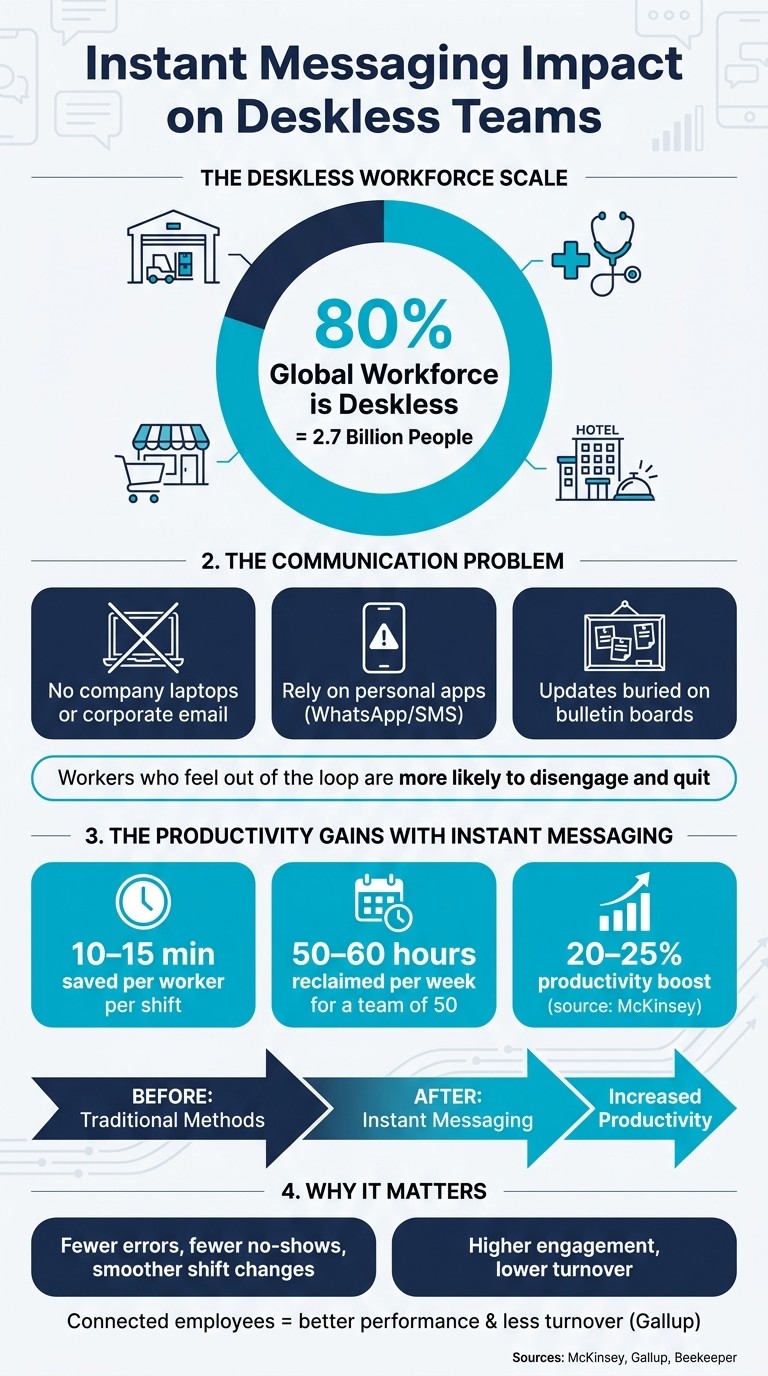
Here’s the kicker: this isn’t just a warehouse problem. Across industries like retail, healthcare, and hospitality, deskless workers - who make up 80% of the global workforce - face similar hurdles. They’re constantly on the move, juggling tasks, and rarely have time to sit down at a computer or check email. That’s where instant messaging comes in. It’s fast, mobile, and fits seamlessly into their day-to-day, solving communication gaps that slow everything down.
At Pebb, we’ve seen firsthand how a simple shift to real-time messaging can transform how teams work. From streamlining shift swaps to sharing updates instantly, the impact is undeniable. In this article, I’ll walk you through the challenges deskless teams face, how messaging tools can address them, and how we’ve built a platform that keeps everything - from chat to task management - in one place. Let’s dive in.
Communication Challenges Deskless Teams Face
Instant Messaging Impact on Deskless Teams: Key Stats & Benefits
The Reality of the Deskless Workforce
Did you know that deskless workers make up a staggering 80% of the global workforce? That’s about 2.7 billion people. Yet, the tools we often rely on for workplace communication - email, intranets, and office software - are built with desk jobs in mind. For nurses, warehouse teams, retail staff, and field technicians, these tools just don’t cut it. Most of them don’t have company laptops, corporate email accounts, or even consistent access to intranets. So, how do they get the information they need? Usually, it’s on their phones - while they’re mid-shift or juggling tasks. And if the message doesn’t land at the right time, it might not land at all.
Common Communication Pain Points
Here’s where it gets tricky: important updates like shift changes, new policies, or safety protocols often end up buried on bulletin boards or in group chats that no one checks. Many teams turn to personal apps like WhatsApp or SMS to stay connected. Sure, they’re quick and familiar, but they come with major downsides. There’s no way to manage these channels properly - no oversight, no way to confirm if messages are read, and a messy overlap between personal and work life.
Without a single, mobile-first platform to bring everyone together, communication becomes a chaotic mix of texts, calls, printed memos, and word-of-mouth. The result? Employees are left working with incomplete or outdated information. And it’s not just inconvenient - it’s costly. Studies show that workers who feel out of the loop are more likely to disengage and eventually quit. This revolving door of disengagement hits industries like retail, hospitality, and healthcare especially hard.
When communication breaks down like this, productivity takes a hit, and teams lose their sense of connection. It’s clear that bridging these gaps isn’t just about efficiency - it’s about keeping teams aligned and motivated. That’s where instant messaging can step in, offering real-time solutions to keep everyone on the same page.
How Instant Messaging Improves Productivity
Faster Information Flow and Fewer Delays
Let me paint a picture for you. Imagine a frontline worker scrambling to get an answer while a customer waits impatiently. Without the right tools, they might have to leave the floor, search for a manager, or make a phone call. Those "small" delays? They pile up fast. Now, think about this: if every deskless worker could save just 10–15 minutes per shift by sending a quick message instead of chasing someone down, a team of 50 could reclaim around 50–60 hours every week. That’s a game-changer for productivity and customer experience alike.
Shift changes? They get a major boost, too. Instead of frantically making calls when someone calls in sick, a manager can drop one message into a team channel. Whoever’s available can respond instantly, and the schedule gets updated without the usual chaos. Beekeeper's case studies back this up, showing that moving from paper schedules to a mobile-first messaging approach slashed coordination time for logistics and hospitality teams. Even better, it led to fewer no-shows. And here’s the kicker: McKinsey reports that messaging tools can boost productivity by 20–25%, especially for teams that don’t have the luxury of sitting at desks to check email.
This kind of real-time communication doesn’t just save time - it also sets the stage for clearer instructions and fewer mistakes.
Better Coordination and Fewer Errors
Here’s the thing: operational errors often come down to unclear communication. A verbal update might get misheard, or a process change shared with one shift might not make it to the next. And let’s be honest, how often do people actually read those safety protocols tacked onto bulletin boards?
This is where written messages shine. A simple post like, "New closing checklist: lock the side door first, then count the tills," stays in the chat, ready for anyone to reference later. Need to double-check the correct temperature for a storage unit? No problem - just search the conversation. This kind of clarity helps cut down on rework, prevents safety mishaps, and creates a natural accountability system.
At Pebb, we’ve built our messaging system to fit seamlessly into daily workflows. Schedules, tasks, shift requests - it’s all in one place. When a manager updates a checklist or assigns a task, the team can ask questions and confirm details without hopping between apps. That’s the friction we’ve worked hard to eliminate, and it makes all the difference when every minute counts.
How Messaging Builds Engagement and Team Connection
Helping Employees Feel Connected
Let me tell you, one of the biggest challenges for deskless teams is missing out on those watercooler moments - the casual chats that make people feel they belong. Without these interactions, it’s easy for frontline workers to feel cut off, and that sense of isolation can quietly chip away at frontline employee engagement. That’s where messaging steps in. Tools like group chats, team channels, and a shared news feed create a digital version of those spontaneous moments, no matter the shift or location.
At Pebb, we designed our team channels and news feed with this exact problem in mind. When a manager shares a key update and the whole team can jump in with reactions and responses, it creates a sense of togetherness. It’s not just about broadcasting information - it’s about making everyone feel like they’re part of one team, not just scattered individuals working at different times. That shared space becomes the foundation for real conversations, not just top-down announcements.
Opening Up Two-Way Communication
Once that sense of connection is in place, two-way messaging takes things to the next level. Sure, one-way updates are great for keeping everyone in the loop, but they don’t invite engagement. Real dialogue happens when employees can react, comment, or even ask a quick follow-up question. This back-and-forth turns what could’ve been a passive update into an active conversation, making people feel heard and valued.
For example, a quick poll after a hectic shift or a shoutout recognizing great work can turn a routine message into something meaningful. These moments don’t just share information - they build trust and strengthen the team’s bond. It’s these small but powerful exchanges that make messaging more than just a tool - it becomes the glue that holds the team together.
How to Build Instant Messaging That Works for Deskless Teams
Mobile-First and Easy to Use
Picture this: you're a retail associate trying to handle a line of customers or a warehouse worker grabbing a quick breather. The last thing you want is to wrestle with a clunky app just to check a message or update. That’s why a mobile-first, user-friendly interface isn’t just nice to have - it’s non-negotiable. The app needs to be quick, intuitive, and simple enough to use with one hand on a small screen.
Here’s what really makes a difference:
Large tap targets and clear icons so there’s no fumbling around.
Plain language that’s easy to understand.
Instant push notifications to stay in the loop without constant checking.
Offline functionality so workers can draft messages, check schedules, or access contacts even without a signal - syncing automatically when they’re back online.
Honestly, if an app requires a full training session just to send a message, it’s doomed. Teams will ditch it for WhatsApp or other personal tools, which can lead to compliance headaches and privacy risks. That’s exactly why we designed Pebb to be mobile-first from the ground up. With Pebb, anyone can log in and start chatting with their team in minutes - no fuss, no steep learning curve.
But here’s the thing: even the slickest interface isn’t enough if messaging doesn’t fit into the daily grind.
Connecting Messaging to Daily Workflows
Standalone chat apps might seem helpful at first, but they only scratch the surface. The real magic happens when messaging becomes part of the bigger picture - a one-stop hub where everything from schedules to tasks and updates comes together.
Imagine this: a manager updates a shift schedule. With Pebb, affected team members see the change instantly, right in the same app they’re already using for chat and tasks. No need to bounce between tools or risk missing an important update. It’s all in one place. A store manager can post a schedule change, assign tasks, and answer questions, all without switching apps. That’s the kind of integration that keeps everyone on the same page and cuts through the chaos.
But while seamless integration is key, it’s just as important to set boundaries and protect your team’s downtime.
Setting Clear Rules and Protecting Privacy
Even the best messaging tool can backfire if it’s not used thoughtfully. Let’s face it - after-hours messages are a huge pain point, especially for deskless teams working irregular schedules. That’s why setting clear rules is critical. Define what’s urgent, which channel to use for emergencies, and when employees are actually expected to respond. Routine updates? Those can wait until the next shift. A staffing crisis? Sure, that might need immediate attention.
Security matters just as much. A solid enterprise messaging app should include:
Role-based access controls to ensure the right people see the right information.
Encrypted data transmission to keep sensitive details safe.
Admin tools for managing permissions, especially for conversations involving HR topics or customer data.
And don’t forget to give employees the ability to mute notifications or activate “do not disturb” during their off-hours. This keeps communication healthy while ensuring urgent alerts still get through when they’re needed most.
That’s how you create a messaging system that works - not just for the business, but for the people who keep it running.
Conclusion: Instant Messaging as a Game-Changer for Deskless Teams
Deskless workers often miss out on crucial updates, but instant messaging completely flips that script. Imagine this: a store manager sends out a promo update at 6:30 a.m., and by the time the morning crew arrives, everyone’s already on the same page. Or a maintenance tech snaps a quick photo of an issue and gets real-time guidance, skipping the hours of back-and-forth phone calls. These small changes can make a huge difference.
When updates are clear and immediate, teams make fewer mistakes, transitions are smoother, and morale gets a boost. It’s simple - when employees feel informed and like their input matters, they’re naturally more engaged. Gallup’s research backs this up, showing that staying connected leads to better performance and less turnover. And in industries where high turnover is the norm, losing even one worker can cost thousands in hiring and training. That’s why integrating messaging into daily operations isn’t just helpful - it’s essential.
But here’s the kicker: messaging alone won’t cut it. The real magic happens when you bring everything together - messaging, schedules, tasks, announcements - all in one place. That’s exactly what we’ve created with Pebb. No more juggling between WhatsApp, scheduling apps, and email. Pebb is built for teams who are constantly on the move, not tied to a desk.
And let’s talk cost. Unlike tools designed for office workers, like Slack at $7.25 per user or Microsoft Teams with its complex IT requirements, Pebb is free for teams of up to 15 people. Need more? Premium plans start at just $4 per user per month, giving you access to everything: chat, shift scheduling, PTO management, tasks, a news feed, voice and video calls - you name it.
If your team is still relying on group texts or outdated bulletin boards to stay in sync, that’s not a strategy - it’s a communication gap. For deskless teams, integrating instant messaging isn’t just about convenience - it’s a game-changing advantage.
FAQs
How do we get deskless teams to actually use a messaging app?
To get deskless teams to embrace a messaging app, it’s all about focusing on what works for their fast-paced, on-the-go routines. Start by ensuring the platform is mobile-first - because let’s face it, their phones are their lifelines. Keep the app simple to use, with features that make sense for their daily tasks. For example, look for tools with offline access, so no one’s left hanging without a signal, and make onboarding a breeze with options like QR code setup.
Real-time push notifications are a must - no one wants to miss an important update. And here’s the key: pick a platform that does more than just messaging. When an app combines communication, scheduling, and task management in one place, it becomes an essential part of their workflow. Highlight perks like instant communication and easier shift management to show how it simplifies their day. That’s how you keep teams engaged and motivated.
How can we prevent after-hours messaging from becoming the norm?
Managing after-hours messaging can be tricky, but it’s all about setting boundaries and using the right tools. Start with clear communication practices - make sure everyone knows what’s truly urgent and what can wait. Role-based filtering is a game-changer here. By sending updates only to the teams or shifts that need them, you avoid bombarding everyone with unnecessary pings.
At Pebb, we’ve taken this a step further with smart notifications. These group messages logically and highlight the critical ones, so no one misses what’s important, but they’re not drowning in alerts either.
And here’s a big one: encourage a culture where messaging after hours is strictly for emergencies. Let your team know it’s okay to unplug when they’re off-duty. When people feel supported in disconnecting, they come back more refreshed and ready to tackle the day.
What should we look for in a secure messaging app for frontline teams?
When picking a messaging app for frontline teams, there are a few key things to keep in mind. First up, security and privacy are non-negotiable. Look for apps with advanced encryption and admin controls to protect sensitive data and meet compliance requirements.
Next, the app needs to be reliable. Spotty connections are a reality for many frontline workers, so features like offline access and real-time notifications are crucial to keeping everyone in the loop.
Finally, focus on a mobile-first, user-friendly design. Tools like role-based filtering, voice and video calls, and integrations with existing systems can make workflows smoother and boost team engagement. It’s all about finding a solution that works as hard as your team does.
