
Author: Ron Daniel
How to Track Employee Availability for Better Scheduling
Follow a 5-step process to collect, centralize, and use employee availability to create accurate schedules.
Have you ever spent hours piecing together a schedule, only to have it fall apart because someone forgot to mention they’d be out of town? I’ve been there. A few months ago, I thought I had the perfect weekly schedule locked in for our team. Then, boom - three last-minute callouts, one double-booked shift, and a handful of frustrated employees later, I realized something had to change. Sound familiar?
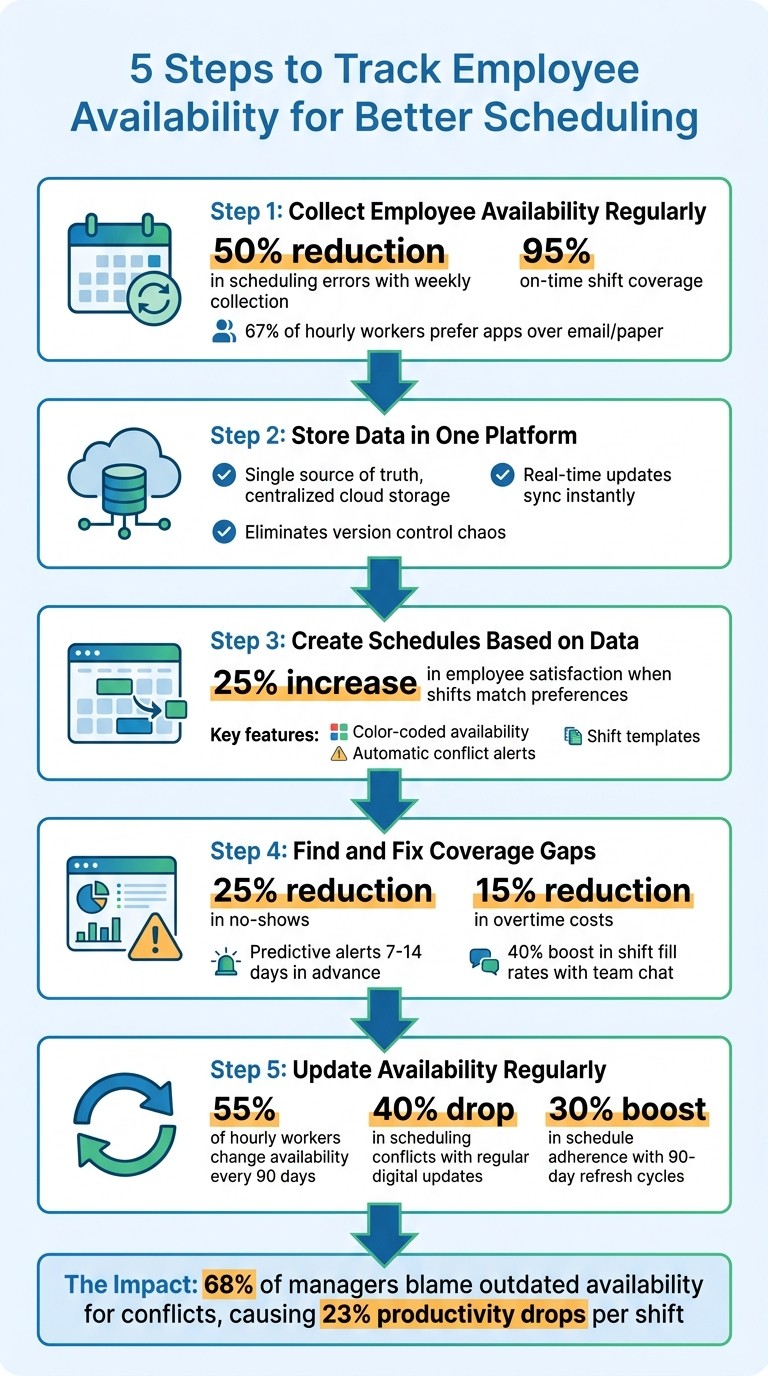
Here’s the kicker: outdated or unclear availability isn’t just an inconvenience - it’s a productivity killer. Research shows that 68% of managers blame outdated availability for scheduling conflicts, and these conflicts can drop productivity by 23% per shift. That’s a huge problem, especially when you consider how much this inefficiency costs businesses every year.
But here’s the good news: there’s a way to fix it. At Pebb, we’ve built tools for HR technology integration that make tracking availability simple, accurate, and fast. In this article, I’ll walk you through the steps we’ve seen work best - steps that not only save time but also help you create schedules that work for everyone. Let’s dive in.
5-Step Employee Availability Tracking Process for Better Scheduling
Step 1: Collect Employee Availability on a Regular Basis
Let me tell you, one of the biggest lessons I’ve learned is that employee availability is anything but fixed. Life happens - kids start new school schedules, personal commitments shift, and side gigs pop up. If you’re relying on outdated availability forms, you’re setting yourself up for a scheduling nightmare. Keeping things current isn’t just a nice-to-have; it’s a must.
The trick? Make collecting availability a regular habit. Whether it’s every Sunday evening for the week ahead or the first of the month for longer-term planning, consistency is key. When your team knows exactly when and how to submit their availability, it becomes second nature. And here’s the payoff: businesses that gather availability weekly see scheduling errors drop by 50% and on-time shift coverage soar to 95%. That’s a game-changer.
Ditch Paper and Go Digital
Let’s be real - paper forms and spreadsheets are relics of the past. They’re messy, prone to errors, and downright inefficient. I’ve wasted countless hours cross-referencing sticky notes, group texts, and outdated Excel files labeled “Schedule_Final_FINAL_v2.xlsx.” Sound familiar?
That’s where digital tools come in to save the day. With Pebb's Shifts Scheduling, employees can update their availability directly from their phones in just a few taps. No printing, no emails, no headaches. Everything syncs instantly to your scheduling dashboard, cutting down collection time from hours to mere minutes. Plus, automated reminders and one-tap confirmations make the process foolproof. And here’s the kicker: 67% of hourly workers prefer apps over email or paper for submitting availability. So, not only is it efficient - it’s exactly what your team wants.
Build a Culture of Communication
Now, technology is only part of the solution. It works best when paired with open and honest communication. If your team doesn’t understand why you’re collecting availability, they’re less likely to engage. So, be upfront. Let them know it’s about creating schedules that respect their lives and priorities.
Here’s what’s worked for us: quick team huddles to explain how this data helps everyone, and using Pebb's Work Group Chat for anonymous feedback. This gives employees a chance to share their thoughts without feeling judged. And don’t underestimate the power of a simple “thank you.” When someone submits their availability on time, acknowledge it. Managers who show empathy and appreciation see participation rates jump by 40%.
One last thing - never penalize someone for marking themselves unavailable. The moment employees feel like being honest about their limitations could backfire, trust erodes. Instead, work with what they give you. The more you respect their constraints, the more likely they’ll keep you updated when things shift. Trust me, that trust makes all the difference when you’re trying to build a team that communicates openly and effectively.
Step 2: Store All Availability Data in One Platform
Gathering employee availability is just the beginning. The real challenge? Making sure that information doesn’t get lost in a maze of group texts, sticky notes, endless email threads, or those infamous "Schedule_FINAL_v3" spreadsheets. I’ve been there - spending hours piecing together who said what and when. It’s exhausting.
The solution? Keep all your data in one place. When you centralize availability information, you eliminate the headaches of cross-referencing and version control. Everyone - managers and employees alike - gets access to the same, up-to-date information. No more chaos, no more confusion.
Create a Single Source of Truth
Centralizing your data means everyone is on the same page - literally. Imagine this: one manager schedules Sarah for a Tuesday shift, only to find out another manager has already assigned her elsewhere. Frustrating, right? A single source of truth ensures that doesn’t happen.
When all updates are logged in one system, you can track who made changes and when. This transparency makes scheduling decisions easier to verify and keeps everyone accountable. If conflicts pop up, you can resolve them quickly, knowing you’re working with accurate, current data.
That’s exactly why we built Pebb. It’s more than just a scheduling tool - it’s a unified hub where availability, schedules, and team communication come together. Instead of juggling Slack, spreadsheets, and separate apps, Pebb simplifies everything. Once your data is centralized, staying updated becomes a breeze.
Access Real-Time Updates Instantly
Static availability data just doesn’t cut it when life happens. Someone gets sick, their class schedule shifts, or an emergency pops up - if your system can’t handle real-time updates, you’re always behind.
With Pebb, employees can update their availability right from their phones in seconds. Those updates sync instantly across all manager dashboards, so you’re never left guessing. Real-time notifications keep you in the loop the moment something changes. Plus, our integrated Work Group Chat lets employees flag availability changes immediately, making it easy to reassign shifts without hopping between apps.
Step 3: Create Schedules Based on Availability Data
Here's where the magic happens - building the actual schedule. Forget juggling spreadsheets or endless text threads. With Pebb's Shift Scheduling, you get a drag-and-drop interface that lets you create weekly or monthly schedules in just minutes. The color-coded calendar is a game changer. Green shows who's available, red flags time-off requests, and other colors indicate who's already scheduled. You can see everything at a glance - no more flipping between tabs or dealing with outdated files.
This streamlined view makes assigning shifts not just faster but smarter, especially when factoring in employee preferences.
Assign Shifts That Match Employee Preferences
Pebb's system takes the guesswork out of scheduling by automatically checking each shift against real-time availability and approved PTO. If you try to assign someone a shift during their requested time off or when they’ve marked themselves unavailable, the system gives you an instant alert. It's like having a built-in safety net.
Shift templates are another lifesaver. For recurring roles like "Morning Barista" or "Weekend Inventory Manager", you can create templates that include required skills or certifications. When you apply a template, Pebb filters out anyone who doesn’t meet the criteria, showing only qualified, available employees. Need extra coverage? Post open shifts directly in the app, and team members can claim them with just a tap. Research even backs this up - when shifts align with employee preferences, satisfaction scores can jump by 25%.
Once you've got preferences covered, it's time to tackle potential conflicts head-on.
Prevent Scheduling Conflicts and Gaps
Double-bookings, back-to-back shifts with little rest, and accidental overtime can wreak havoc on morale - and even land you in legal trouble. Pebb prevents these issues by flagging them automatically. For example, if you assign someone to close one night and open the next morning, the system stops you and suggests alternative options. Assigning more than 40 hours in a week? You’ll get an overtime alert before it turns into a budget headache.
Coverage gaps don’t slip through the cracks either. Pebb analyzes your schedule in real time and highlights any shifts that are understaffed. Let’s say your Tuesday dinner rush from 5:00 PM to 9:00 PM is short two people. The system flags it and suggests available employees who can step in. From there, you can use the integrated Work Group Chat to quickly reach out and see who’s up for some extra hours.
It’s all about making scheduling as seamless and stress-free as possible - for you and your team.
Step 4: Find and Fix Coverage Gaps Before They Happen
At Pebb, we’ve learned that the best managers don’t just react to staffing problems - they anticipate them. That’s why our analytics dashboard is built to give you a heads-up before coverage issues even arise. Forget the last-minute scramble when someone calls out sick or the frustration of realizing too late that Friday nights are understaffed. With Pebb, you can spot potential gaps days - or even weeks - before they become a problem.
Predict Staffing Needs with Pebb's Analytics
Our platform dives into 6–12 months of historical shift data to forecast future staffing needs. It picks up on patterns like frequent absences on certain days, peak busy hours, and overall trends in employee availability. Even better, it sends you alerts 7–14 days ahead of time if it detects potential coverage issues.
For instance, after uploading your sales and shift data, you might discover that Friday evenings are consistently short by two employees, especially after holidays when no-shows spike. Armed with this intel, you can post open shifts 48 hours early, avoiding headaches like a 20% sales dip during your busiest hours.
The dashboard also tracks important metrics like your availability compliance rate (shooting for 90% or higher), historical no-show rates, and peak demand hours. You can set custom thresholds - say, a minimum of five cashiers on Saturdays - and get instant alerts if projections fall below your target. Based on our data, businesses using tools like ours have seen no-shows drop by 25% and overtime costs cut by 15% on average.
With these insights in your pocket, you’ll be ready to tackle gaps before they even have a chance to disrupt your day.
Fill Last-Minute Gaps with Team Communication
Of course, even the best forecasts can’t prevent every last-minute absence. That’s where our Work Group Chat steps in to save the day. With just one tap, you can broadcast an open shift to your team - or a specific group like "Weekend Warriors."
Here’s how it works: Imagine it’s a hectic Saturday morning, and your analytics flag a sudden no-show for the 2:00 PM to 6:00 PM cashier shift. You open the group chat and send a quick message: "Need 1 cashier 2–6 PM today. Available? Reply YES." Push notifications ensure your team sees it instantly, and shifts get claimed fast, helping you avoid unnecessary overtime costs.
This kind of quick action isn’t just theoretical. During the 2022 holiday season, Home Depot used similar in-app chat notifications to fill 15,000 last-minute shifts, reducing understaffing incidents by 35% across 200 stores.
At Pebb, we recommend setting up workflows to make this process even smoother. Create eligibility groups based on skills, use message templates for common scenarios, and enable one-tap shift acceptance so employees can respond without endless back-and-forth. You can even automate alerts so your analytics forecasts trigger "Gap Alerts" in the chat if projected coverage drops below 80%. This approach has boosted shift fill rates by 40% and eliminated the chaos of traditional group texts.
Step 5: Update Availability Data on a Regular Schedule
When we talk about scheduling, keeping availability data up-to-date is the glue that holds everything together. You can have the best tools and processes in place, but if the data you're working with is outdated, you're setting yourself up for scheduling headaches. And trust me, I've been there - it's not fun.
Employee availability isn't static. Things change - class schedules shift, daycare hours adjust, or someone moves further away from work. If you’re not updating availability regularly, you’re essentially flying blind, and that’s how scheduling conflicts creep in.
Build a Routine for Availability Updates
Here’s what works: create a clear, repeatable schedule for updates. A good starting point is quarterly updates - think the first Friday of January, April, July, and October. But if you’re working in industries like retail or hospitality, where turnover is higher, monthly updates might be your best bet. According to a 2024 Shiftboard study, 55% of hourly workers experience changes in their availability every 90 days. That stat alone shows how vital it is to stay on top of this.
Timing matters, too. For example, post-holiday updates capture availability changes after seasonal shifts. Similarly, before peak periods - like summer in hospitality or the holiday rush in retail - you’ll want fresh data to avoid scrambling. A 2023 Homebase survey revealed that outdated availability is the number one cause of shift conflicts for 62% of managers. But here’s the kicker: teams that used regular digital updates saw a 40% drop in those conflicts. That’s a game-changer.
To keep things organized, document your process in one place. Outline steps like sending out digital forms on the 1st, reviewing them by the 5th, and integrating updates into your schedule by the 7th. Assign roles - who sends reminders, who reviews submissions, and who updates the system. This structure not only keeps everyone accountable but also makes onboarding new managers a breeze.
Simplify Updates with Pebb's Tools
Here’s where Pebb comes in. We’ve designed our platform to make these updates as seamless as possible. Our Shifts Scheduling feature automates the entire process. Set it up once, and the system takes over - sending reminders and forms on your schedule, whether it’s monthly, quarterly, or whenever you need. Employees get push notifications through our work chat apps, so there’s no chance of missing it.
What I love most is how easy it is for employees to update their availability. They just open the app, tweak their preferred hours or commitments, and hit submit. Everything syncs instantly to your scheduling dashboard, giving you a live, up-to-date view of your team’s availability. No more chasing down paper forms or trying to decipher chaotic group messages. And here’s a stat to back it up: Deputy Software found that teams refreshing availability every 90 days saw a 30% boost in schedule adherence.
To make updates even quicker, our platform pre-fills previous data. Employees only need to adjust what’s changed - no starting from scratch. This cuts update time in half and makes it more likely that everyone participates. You can even track compliance in the dashboard (shoot for 95% or higher) and review it monthly. With Pebb doing the heavy lifting, you’ll save hours on admin work and spend more time focusing on what really matters - running your business efficiently.
Wrapping It Up
Let me show you how Pebb makes all of this come together.
With Pebb, tracking employee availability becomes effortless. You can centralize digital schedules, create shifts that align with team preferences, predict staffing gaps using analytics, and make updates easily. This streamlined approach not only saves time but also provides your team with the structure they need to excel.
When you're juggling fragmented systems, it’s easy to waste hours and overlook key issues - like those dreaded back-to-back "clopening" shifts or compliance with labor laws. That’s where Pebb’s all-in-one solution changes the game. Features like Shifts Scheduling and Work Group Chat keep everything in sync. You’ll get instant notifications, automatic PTO syncing, and predictive analytics that flag potential staffing problems before they even happen. No more scrambling or letting things fall through the cracks.
And here’s the kicker: all of this comes at just $4 per user per month. That’s right, you get access to tools like shift scheduling, unlimited chat history, voice and video calls, and advanced analytics - all wrapped up in one app. If you’re not ready to commit yet, no problem! Our free Standard plan covers up to 15 users, so you can take it for a spin without any risk.
Ready to simplify scheduling? Try Pebb’s premium plan for just $4 per user per month and see how easy managing your team can be.
FAQs
How often should I ask employees to update availability?
When it comes to keeping schedules running smoothly, staying on top of availability updates is key. While there’s no one-size-fits-all rule, asking employees to refresh their availability at least once a week - or whenever something changes - is a smart move, especially in fast-paced industries like retail or hospitality. That’s where tools like Pebb come in handy. With real-time updates, it’s easier to keep schedules accurate and adaptable, no matter how quickly things shift.
What’s the best way to handle last-minute availability changes?
Managing last-minute availability changes can feel like juggling flaming torches, but here's what works for us: using a centralized platform like Pebb. With Pebb, employees can update their availability in real time and even request shift swaps directly within the app. This means managers are instantly in the loop - no more chasing down updates through scattered group texts or endless email threads.
What really makes a difference is Pebb’s automated updates and approval features. They allow us to adjust schedules on the fly, minimizing conflicts while ensuring the team stays covered. It’s a game changer for keeping everything running smoothly, especially when time is tight.
How do I track availability without hurting trust or morale?
Tracking employee availability can be tricky - you want to stay organized without making people feel micromanaged. Here's what works for us: transparency and giving employees control over their schedules.
We use tools like Pebb to keep everything in one place. It handles shift scheduling, PTO requests, and team communication seamlessly. The best part? It updates in real time, so everyone stays on the same page and those frustrating "I thought you were covering this shift" moments disappear.
We also encourage open communication and make it easy for employees to swap shifts when needed. Forget clunky spreadsheets and scattered systems - they waste time and send the wrong message. By showing you value their time, you're not just improving organization; you're building trust and keeping morale high.
