
Author: Ron Daniel
Schedule, Swap, Request Time Off - Do It All With Pebb
Streamline shift scheduling, swaps, and PTO with real-time mobile updates, conflict checks, and analytics built for frontline teams.
Have you ever spent an entire afternoon untangling a scheduling mess that could’ve been avoided? I have. A few years ago, I was managing a team where every shift change felt like a mini-crisis. Someone would call out, I'd scramble to find coverage, and before I knew it, the schedule was a patchwork of sticky notes, group texts, and crossed fingers. Sound familiar?
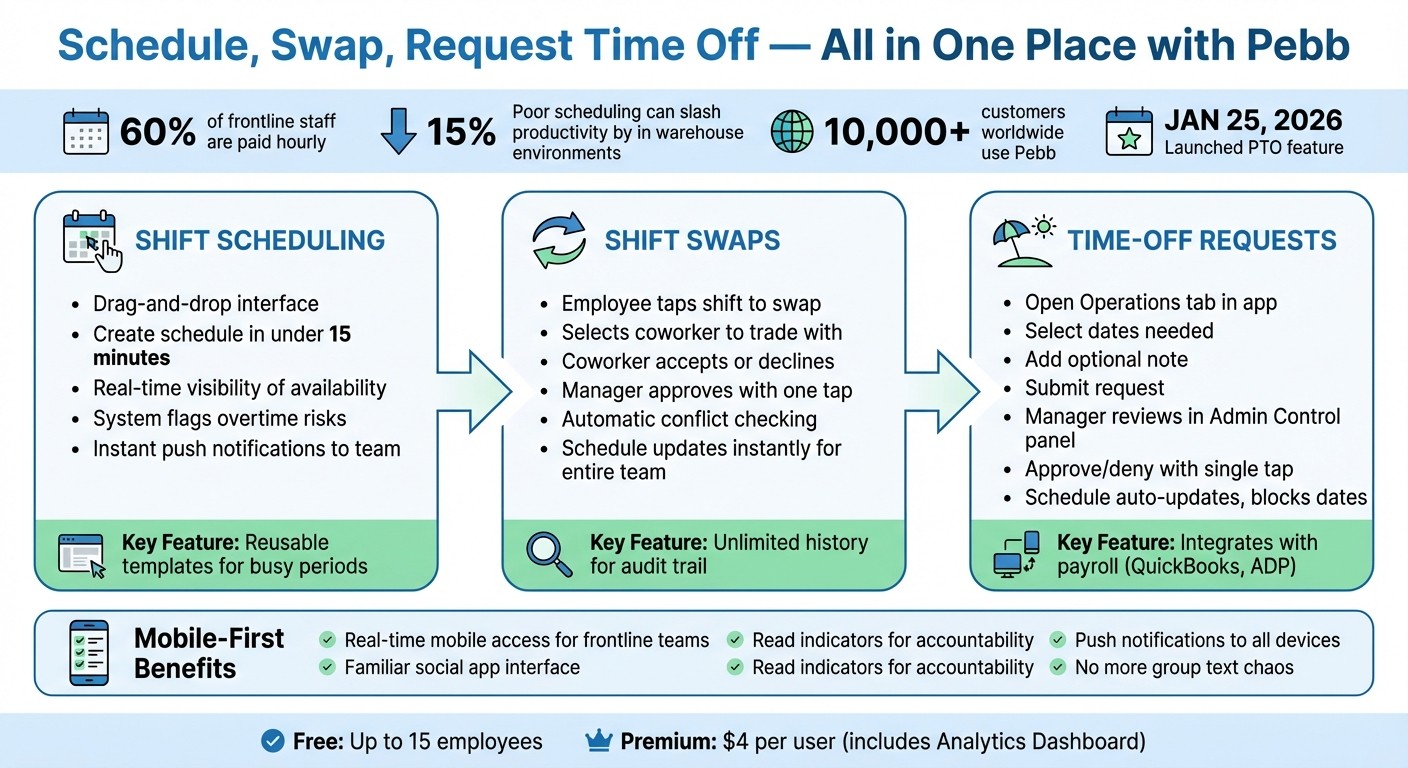
Here’s the kicker: 60% of frontline staff are paid hourly, and for them, an unpredictable schedule isn’t just inconvenient - it’s disruptive. Planning childcare, attending a class, or even taking a day off turns into a guessing game. And for managers like me? Wasted hours and stressed-out teams mean lost productivity and higher costs. In warehouse environments alone, poor scheduling can slash productivity by 15%. That’s a big deal.
That’s why we built Pebb. It’s not just another tool - it’s the solution I wish I’d had back then. With Pebb, shift scheduling, swaps, and time-off requests happen in one place, with real-time updates sent straight to employees’ phones. No more chasing people down or dealing with last-minute surprises. Let me walk you through how it works and how it’s changing the game for teams everywhere.
How Pebb Streamlines Shift Management: Schedule, Swap, and Request Time Off
How Pebb Handles Shift Scheduling
Let me tell you, we’ve all been there - wrestling with clunky spreadsheets or trying to untangle group texts when someone calls out last minute. It’s chaos. That’s exactly why we built Pebb’s scheduling feature to simplify everything. Picture this: a clean, drag-and-drop interface that lets you knock out an entire week’s schedule in under 15 minutes. Yep, it’s that smooth.
Here’s the kicker: real-time visibility. Before you assign a shift, Pebb shows you exactly who’s available and who’s already requested time off. No more awkward “I told you I couldn’t work Tuesday” chats. Plus, for those busy times - like holiday rushes or packed weekends - you can create templates and reuse them. No need to start over every week. It’s like having a shortcut button for your busiest days.
When you’re ready to publish the schedule, Pebb sends instant push notifications to your team. Forget taping printouts to the breakroom wall or sending late-night emails that might get buried. The schedule lives in the app, updates in real-time, and ensures everyone is on the same page - literally.
Creating Shifts in Pebb
Crafting a schedule in Pebb is straightforward. Start by selecting the role, time, and location for each shift. You can assign shifts directly to employees or post them as "open" for qualified team members to claim. And here’s a lifesaver: the system flags overtime risks as you build, so you’re not blindsided by unexpected labor costs later.
I’ll share a quick story. Jessica S., an Operations Manager at a resort, told us how Pebb transformed her scheduling process. She manages multiple locations and used to spend hours chasing people down for weekend shifts. Now, she creates schedules in minutes, sends instant notifications, and keeps overtime costs in check - all thanks to the drag-and-drop builder and those handy alerts. It’s a game-changer.
Once the shifts are set, your team gets instant access through the mobile app. No chasing down updates. No confusion. Just clarity.
Mobile Access for Frontline Teams
Here’s the thing: your frontline team is often on the move, so mobile access isn’t just a nice-to-have - it’s essential. That’s why we made sure Pebb’s app works seamlessly for real-time updates. Employees can check their shifts, see who they’re working with, request swaps, or update their availability - all from their phones.
This kind of access makes a huge difference. Employees can plan their lives around accurate, up-to-date schedules instead of second-guessing. And when they update their availability directly in the app, you’re working with real-time data - not guesswork.
We also designed the mobile experience to feel familiar, like the social apps people already use every day. The result? More people actually use it, and you hear fewer “I didn’t see the schedule” excuses. It’s all about making things easier for everyone involved.
How Shift Swaps Work in Pebb
Let me paint you a picture: shift swaps handled through chaotic group texts, forgotten manager approvals, and the dreaded double-booking - or worse, a no-show. Sound familiar? That’s exactly the headache we designed Pebb’s shift swap feature to solve. With built-in approval workflows, we’ve made swaps organized, seamless, and conflict-free.
Here’s how it works: an employee opens the app, taps the shift they want to swap, and selects a coworker to trade with. That coworker gets an instant notification and can either accept or decline. Once they accept, the manager gets a notification to approve or reject the swap with a single tap. It’s all in real-time, and the system automatically checks for conflicts - like overlapping shifts or approved time off - before finalizing anything. This means no more crossed wires or last-minute chaos.
What makes this feature shine is the automatic synchronization. The moment a manager approves a swap, the schedule updates instantly for the entire team. Everyone sees the change at the same time, eliminating any “he said, she said” confusion. Plus, every request, message, and approval is stored in the app’s unlimited history, giving you a clear audit trail for payroll and compliance.
Let’s break down two ways this system keeps things running smoothly.
Coordinating Swaps Efficiently
One tip we always recommend to our customers: create a dedicated "#shift-swaps" work chat channel. Use it to centralize all swap coordination. Pin your ground rules - like “All swaps must be submitted 48 hours in advance” - right at the top. This keeps your main scheduling channel clutter-free and makes it easy to track requests.
Even better, Pebb’s read indicators let you see who’s viewed a request, so you can nudge anyone who’s taking their sweet time to respond. It’s a simple way to keep everyone accountable and on the same page.
Real-Time Notifications for Shift Changes
Here’s where it gets even better: the second a swap is approved, Pebb sends push notifications directly to everyone involved. These real-time alerts hit employees’ phones immediately, so there’s no waiting on an email that might get lost in the shuffle - or worse, a frantic phone call when someone shows up for the wrong shift.
And because these notifications live right in the same Spaces and chat channels your team already uses, scheduling updates feel like just another part of the daily workflow. For urgent updates or major changes, you can post announcements to a real-time news feed, which is the first thing employees see when they open the app. Want to make sure everyone’s seen their updated shifts? Ask your team to drop a thumbs-up emoji as confirmation. It’s a quick, visual way to ensure everyone’s on board without endless follow-ups.
Managing Time-Off Requests in Pebb
Let’s talk about time-off requests. It’s one of those things that should be straightforward but often turns into a headache. No one wants to chase down their manager in the middle of a busy shift or send endless emails just to confirm a vacation. That’s where Pebb steps in. We’ve made managing PTO (Paid Time Off) as smooth as possible: submit, review, approve - done. Everything happens within the app, so there’s no need to juggle multiple tools or learn complicated processes.
Since launching this feature, it’s already become a game-changer for teams worldwide. From hospitals and warehouses to restaurants and retail stores, businesses are using Pebb to simplify time-off management.
Submitting PTO Requests: Easy for Employees
Submitting time-off requests should feel effortless, and with Pebb, it is. Employees can handle everything directly through the app. Here’s how it works:
Open the app and head to the Operations tab (where shifts, forms, and clock-ins are conveniently located).
Select the dates you need off - say, April 12-15, 2026, for a long weekend.
Add a quick note if needed (like “Family wedding in Chicago”), then hit submit.
That’s it. The request pops up as a neat little card in the manager’s queue, and its status - whether pending, approved, or denied - is visible on both the employee’s and manager’s dashboards. No back-and-forth emails. No confusion.
Quick and Clear Approvals for Managers
For managers, reviewing requests is just as intuitive. When a time-off request rolls in, they get a notification and can check all the details in their Admin Control panel. They’ll see:
The employee’s name and requested dates
Any accompanying notes
A snapshot of the current schedule to spot potential conflicts or gaps
With this information at their fingertips, managers can approve or deny requests with a single tap. The Analytics dashboard even highlights staffing needs, eliminating the need for spreadsheets or lengthy phone calls.
Real-Time Schedule Updates
Here’s the best part: once a request is approved, the schedule updates automatically. No manual adjustments, no guesswork. Employees see a "confirmed" status on their dashboard, and the system blocks out the approved dates to avoid double-bookings or accidental shift assignments.
And because everything’s integrated into one platform, payroll teams have instant access to accurate records - no paper trails or follow-ups required. This seamless process keeps everyone on the same page, making time-off management one less thing to stress about.
Tips for Using Pebb's Scheduling Features
Let me share a few ways you can get the most out of Pebb's scheduling features. These tips have made my life - and my team's - so much easier.
Organizing Teams by Department or Location
When you're juggling multiple locations or departments, things can get chaotic fast. But trust me, setting up your teams the right way in Pebb from the start is a total lifesaver. For instance, you can create spaces like "Front Desk - Downtown" or "Housekeeping - Resort" for a hotel setup, or "Kitchen - Main St." and "Servers - Beach Location" if you're running a restaurant chain.
This approach ensures that updates, schedules, and announcements only go to the people who actually need them. Each group has its own dedicated space for schedules, chats, files, and more, so there's no overlap or confusion. To get started, head to the team management section in the app, invite your employees, and assign them to specific groups based on department, location, or role. Once that's done, everything - shift planning, PTO requests, you name it - stays neatly organized.
When your teams are set up like this, you can take it a step further by using data to fine-tune your staffing.
Using Analytics to Plan Staffing Needs
If you're on our Premium plan (just $4/user/month), you get access to the Analytics Dashboard. And let me tell you, this tool is a game-changer. It gives you insights into attendance trends, flags shifts with recurring issues, and even highlights your most dependable team members. For example, if you notice a spike in Saturday no-shows, you can dive into the weekend data, set up overtime alerts, and tweak the schedule with the system's auto-suggestions.
The dashboard connects scheduled hours with actual clock-ins, so you're not guessing - you're working with real numbers. Plus, you'll get alerts when someone's approaching overtime, which helps you keep labor costs in check and avoid overworking your team. And here's the cherry on top: Pebb includes integrations to keep your tools connected. That means your time clock data flows directly into your payroll system, saving you from manual entry and cutting down on errors. It’s all about keeping things smooth and connected.
With your teams organized and data at your fingertips, you can also avoid some common scheduling headaches.
Avoiding Common Scheduling Mistakes
We’ve all been there - over-scheduling, double-booking, or dealing with missed shifts. It’s a nightmare for both managers and employees. But Pebb has a few built-in tools to help you dodge these headaches. For starters, organizing your teams by department or location keeps schedules contained, so you’re not accidentally assigning someone to the wrong place. Real-time notifications are another lifesaver. When you make a change, employees get an instant alert on their phones, which cuts down on no-shows.
Shift swaps are also super easy. Employees can post swap requests that only their team can see. Managers get notified and can approve or deny the request with just one tap. It’s quick, transparent, and keeps everyone on the same page. These little features go a long way in reducing friction and making scheduling less of a hassle.
With these tips, you’ll be running a tight ship in no time!
Wrapping It Up
Let me leave you with this: managing schedules doesn’t have to be a constant source of stress. With Pebb, we’ve said goodbye to the chaos of spreadsheets, endless group texts, and sticky notes. Instead, everything - from scheduling to shift swaps to time-off requests - lives in one place, giving managers the freedom to focus on leading their teams.
Here's what makes it even better: your team can instantly access updated shifts, swap requests, and PTO details without wading through email chains or waiting for callbacks. It all happens in real time, right on their phones, in an app that feels as intuitive as the social platforms they already know and use every day.
"A schedule built on accurate availability is the foundation of trust. It shows your team you see them as people, not just resources to be managed." – Pebb Insights
This seamless approach doesn’t just simplify communication - it transforms how teams operate. With features like drag-and-drop scheduling and real-time mobile notifications, Pebb keeps everyone aligned and decisions moving forward.
Whether you're running a small team or a larger operation, Pebb ensures everyone stays connected and informed. Plus, with our free plan for up to 15 employees or our Premium option at just $4 per user, it’s affordable and accessible. Why not give it a shot? Your team - and your sanity - will thank you.
FAQs
Can employees swap shifts without manager approval?
Employees can exchange shifts with one another if the system settings permit it, but here's the catch - most of the time, manager approval is still a must. Why? It helps keep the schedule on track and avoids any potential conflicts. Always double-check your organization's policy to understand the exact rules and guidelines.
Does Pebb prevent overtime and scheduling conflicts automatically?
Pebb doesn't outright block overtime or scheduling conflicts, but it equips managers with tools to handle shift planning more effectively. These features are designed to minimize the chances of such issues cropping up, making the scheduling process smoother for both managers and employees.
Can I use Pebb for multiple locations and departments?
Pebb makes handling multiple locations and departments a breeze. With its all-in-one platform, you can streamline communication, scheduling, and daily operations across various teams and sites. It’s designed to keep everything organized and ensure everyone stays connected, no matter where they’re working.
