

Author: Ron Daniel
How to run pulse surveys and polls for frontline employees
Short, mobile-friendly pulse surveys for frontline teams—target timing, protect anonymity, and act quickly on feedback.
Most frontline survey problems start before the first question goes out.
I’ve seen teams blame low response rates on “disengaged staff,” when the actual issue was much simpler: the survey was too long, sent at the wrong time, or buried in a tool nobody used during a shift. On frontline teams, that mistake adds up fast. If people miss the survey, managers miss early warning signs on staffing, safety, morale, and communication.
At Pebb.io, we’ve learned that short check-ins work best when they match the pace of the job. A 1-question poll can help a manager make a same-day call. A 5–10 question pulse survey can show patterns over time. That difference matters, especially when deskless employees are working mixed shifts, sharing devices, or answering on a short break. Data in the article backs that up: 1–3 question micro-surveys average 24 seconds, while long surveys can stretch past 18 minutes.
So I want to break down what’s been working for us: how I choose between a poll and a pulse survey, how I keep questions short, where I send them, and how I close the loop fast enough that employees keep answering the next one.
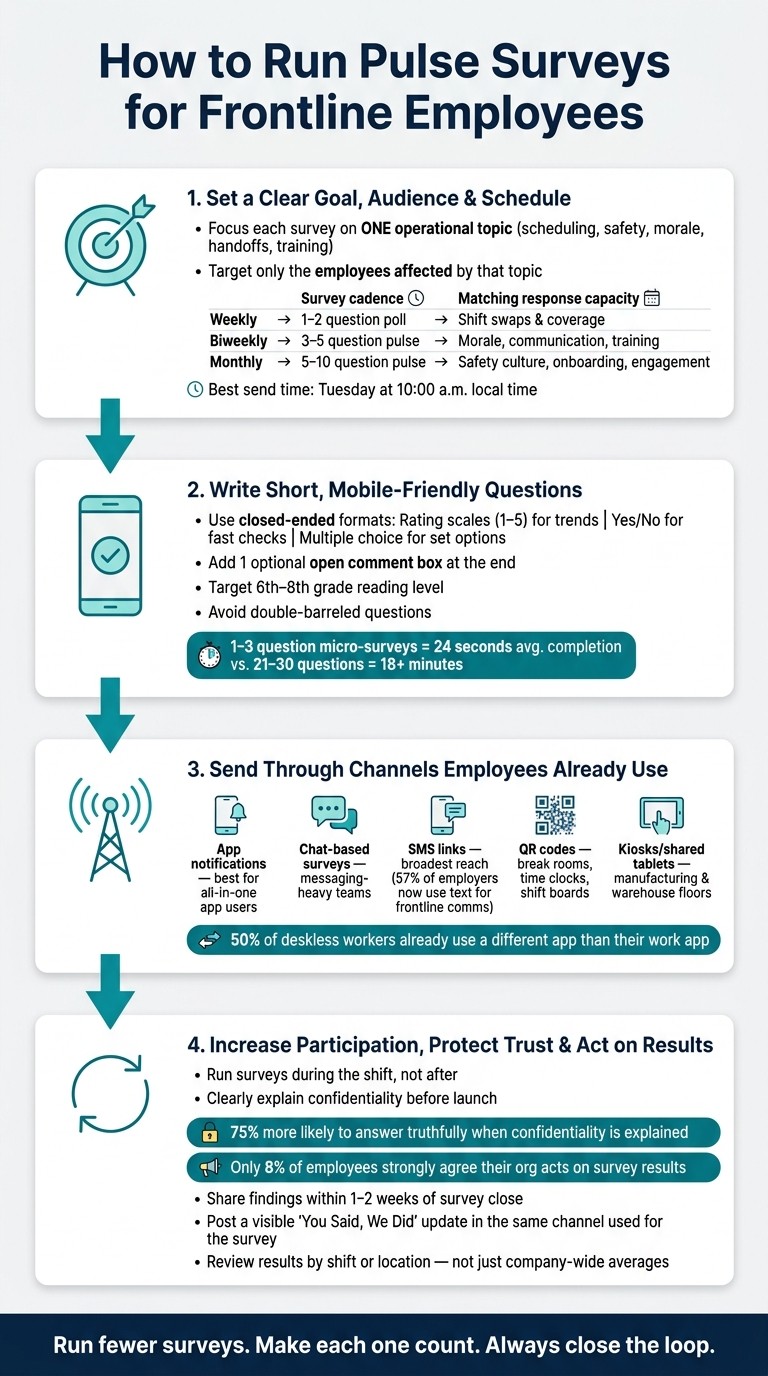
How to Run Pulse Surveys for Frontline Employees: 4-Step Process
Step 1: Set a clear goal, audience, and survey schedule
I’ve seen this mistake up close at Pebb.io: a team gets excited about pulse surveys, sends one broad survey to everyone, and then wonders why the answers are all over the place.
Here’s the thing: if the survey is too broad, the data is almost useless.
Once we choose pulse surveys and how they work or quick polls, I narrow the scope before anything goes out. I start with one operational question, one audience, and one schedule. If I skip that step, I usually get vague feedback that sounds nice but doesn’t help anyone make a call. And frontline teams, in my experience, only respond when the survey fits their shift, role, and workload.
Focus each survey on one topic
Every pulse survey should answer one specific operational question.
Not something fuzzy like “how’s the team doing?” I mean a tighter question, like: Do employees feel their schedules are fair and predictable? Or: Are shift handoff notes clear enough to avoid mistakes at the start of each shift?
That level of focus changes everything.
When we keep the survey centered on a single theme - like scheduling, safety, handoffs, morale, training, or manager communication - we get answers we can use. When teams mix topics into one survey, the feedback tends to blur together. Then nobody knows what to fix first.
I’ve learned to send each survey only to the employees whose day is shaped by that issue. If the topic is shift handoffs, I don’t need input from people who never deal with them. That kind of targeting cuts noise and helps employees feel like the questions fit their actual work, not some generic HR exercise.
Pick send times that fit U.S. shift patterns
Let me tell you what happened next when we looked at timing more closely: it turned out timing wasn’t a small detail. It was half the battle.
Once the topic and audience are clear, send time decides whether employees even see the survey.
Data shows that messages sent on Tuesday mornings get higher engagement than those sent on Friday afternoons. That tracks with what I’ve seen. For frontline teams, mid-week mornings tend to work well because people are in the flow of the week, but they haven’t hit the weekend rush yet.
A few send-time examples that work well:
Send a morale pulse on Tuesday at 10:00 a.m. local time
Send a safety check-in right after a closing shift
Always use local time zones so each location gets the survey at the right moment
I also avoid peak retail hours, weekend rushes, and month-end crunch periods. If people are slammed, they won’t stop to think through a survey. And even if they do answer, the feedback may be rushed.
Set a cadence you can actually keep up with
This part matters more than most teams expect.
I never want us to survey faster than we can respond. If employees keep giving feedback and nothing happens, participation drops. Fast.
So I set a pace the team can keep. Survey only as often as the team can visibly act on what comes back.
A practical starting point for most frontline managers looks like this:
Cadence | Format | Best for |
|---|---|---|
Weekly | 1–2 question poll | Shift swaps and coverage |
Biweekly | 3–5 question pulse | Morale, communication, training clarity |
Monthly | 5–10 question pulse | Safety culture, onboarding, broader engagement |
At Pebb.io, I’ve found it’s smarter to start a little slower than you think you need. That gives managers room to respond, share updates, and show employees their input led to something. Once people see action, participation tends to go up. Then you can add weekly polls later without burning trust.
With the topic, audience, and schedule set, the next step is to write questions employees can answer fast.
Step 2: Write short, mobile-friendly questions frontline employees will answer
I’ve learned this the hard way at Pebb.io: a survey sent at the right time can still flop if the questions are clunky.
We once had a pulse survey that went out on schedule, looked fine in a desktop preview, and checked all the boxes on paper. Then the replies came in slower than expected. When we looked closer, the problem wasn’t timing. It was the questions. They took too long to read, too long to answer, and on a phone screen they felt like work.
For frontline teams, the rule is simple: every question should be answerable in a few seconds on a phone. That’s what gets faster, more honest feedback from deskless employees. I also keep the survey short enough to match the cadence we picked in Step 1. If we said this would be a light weekly pulse, it can’t suddenly feel like a mini exam.
Use question formats that are fast to complete
Here’s the thing: format matters just as much as wording.
For frontline pulse surveys, closed-ended questions are the best starting point. In my experience, the three that work best are Likert scales, yes/no questions, and multiple choice.
A 1–5 rating scale works best when I want to track something over time. Let’s say I ask, "How clear were today's shift instructions?" That gives us a score we can compare week over week, so we can spot patterns instead of guessing.
A yes/no question is the fastest way to check one thing fast. Something like "Did you receive your schedule at least 7 days in advance?" gives a clean answer in one tap. No friction. No overthinking.
Multiple choice helps when there are a few set options. For example: "How far in advance did you see your schedule for this week?" with choices like Same day, 1–2 days, 3–6 days, 7+ days. That gives us more detail without making people type.
Then, at the end, I like to add one optional comment box, such as "Anything else about your last shift?" That one field has saved us more than once. It gives people room to flag something we didn’t see coming, without forcing everyone to type on a small screen.
If I had to boil it down, I’d say it like this:
Rating scales for trends
Yes/no for fast checks
Multiple choice for a short set of options
Ask about issues that affect daily frontline work
One mistake I try hard to avoid is asking vague, high-level questions about the company when what I need is feedback on the shift that just happened.
At Pebb.io, we’ve seen better response quality when the questions stay close to daily work. That usually means focusing on five core areas: scheduling and workload, process clarity, safety, supervisor communication, and morale or recognition.
Category | Example question | Format |
|---|---|---|
Scheduling & workload | "How fair was your workload on your last shift?" | 1–5 scale |
Process clarity | "How clear are the steps for today's main task?" | 1–5 scale |
Safety | "Did you have the safety equipment you needed on your last shift?" | Yes/No |
Supervisor communication | "Can you reach your supervisor quickly when needed?" | Multiple choice |
Morale & recognition | "In the last 7 days, has someone at work recognized your effort?" | Yes/No |
What worked for us was rotating one category per survey cycle. That kept feedback focused and cut down on fatigue. Instead of asking everything, every time, we picked one area and went deeper.
Avoid survey fatigue and unclear wording
Let me tell you what happened next when we started trimming surveys down: completion rates got better almost right away.
That tracks with the data too. Research shows that micro-surveys of 1–3 questions have a median completion time of 24 seconds, while 21–30-question surveys take more than 18 minutes. For frontline workers trying to answer during a short break, that gap is huge. It can make or break participation.
I also push for a 6th–8th grade reading level. Not because employees can’t handle more, but because speed matters. If someone has to stop and decode the question, we’ve already lost.
So instead of asking, "How satisfied are you with our revised SOP 2.3?" I’d ask, "How clear are the steps for closing the store?" Same topic. Much easier to answer.
I also avoid double-barreled questions. Those are questions that ask two things at once, like "How clear and fair was your schedule this week?" If the schedule was clear but not fair, what is someone supposed to tap? That kind of wording muddies the data fast.
What’s worked best for me is using a small set of benchmark questions in every cycle, then adding 1–3 rotating questions tied to current changes. That gives us a steady way to track trends while still staying connected to what’s happening on the ground.
And one more thing matters here: if leadership can’t act on a question anytime soon, I cut it. I’ve seen employees lose faith in surveys when they answer the same thing again and again and nothing changes. Once that trust slips, it’s tough to win back.
Once the questions are tight, send them where frontline employees already spend time.
Step 3: Send surveys through channels frontline employees already use
I’ve seen this play out more than once at Pebb: we write a short survey, feel good about it, hit send... and then almost nobody answers.
Here’s the thing: the problem usually isn’t the question. It’s where we send it.
If a frontline employee has to hunt for a link, log into some extra tool, or switch apps mid-shift, the survey is dead on arrival. That’s why distribution matters just as much as question length. I’ve learned the hard way that the best survey is the one people can answer in the flow of work.
Choose the right delivery method for deskless teams
The right channel depends on where your team already spends time and what they can access during a shift.
Mobile app notifications work best when employees already use the app for schedules and updates. A notification pops up, they tap, they answer, done.
Chat-based surveys fit well when employees already use work chat. Dropping a one-question poll there feels like part of the conversation.
SMS links give you the broadest reach. One survey covered by HR Dive found that 57% of employers were using text messaging to communicate with frontline employees - up 13 points from the prior year. For retail, logistics, and transportation teams, text links often work best.
QR codes posted in break rooms, near time clocks, or at shift-change boards let workers scan and respond during downtime - no login required.
Kiosks or shared tablets: Use kiosks or shared tablets when personal phone use is restricted on the floor, as is common in manufacturing and warehouse environments.
One stat jumped out at me when I first read it: half of deskless workers are already forced to use a different app than the one they use to actually do their job.
That’s a mess. And if you add one more tool just to ask one question, response rates can fall off fast.
Run surveys inside Pebb to cut down on tool switching
At Pebb, we’ve found that the best channel is usually the one already built into the workday.
Managers can post a quick poll directly in the news feed, drop a question into a group chat for a specific location, or follow up on shift feedback in the same app where employees check schedules, request PTO, and message their team.
Let me tell you what happened next in one case like this. A team changed a shift rotation and wanted fast feedback. Instead of sending people somewhere else, they posted a one-question poll right where the schedule update was announced. That small move mattered. The poll sat beside the change itself, so employees answered with the full context in front of them.
That’s the big win here: fewer steps, less friction, more replies.
Pebb's free plan is available, and the premium plan is $4 per user/month. It includes work chat, news feed, shift scheduling, PTO management, digital forms, groups, people directory, voice and video calls, and more.
Table: Best delivery channels for frontline pulse surveys
Channel | Accessibility | Response Speed | Setup Effort | Best Use Case |
|---|---|---|---|---|
App notifications | High for teams already using an employee app | Fast | Low | Teams using an all-in-one app like Pebb for chat, scheduling, and updates |
Chat-based surveys | High in messaging-heavy workplaces | Fast | Low | Quick pulse questions for teams already communicating in work chat |
QR codes | High for on-site workers with phones | Fast once posted | Low | Break rooms, time clocks, shift boards, and locker areas |
SMS links | Very high, including workers without email | Very fast | Low | Broad frontline reach across retail, hospitality, logistics, and transportation |
Kiosks/shared tablets | High for workers without personal devices | Moderate | Medium | Manufacturing floors, warehouses, and facilities with limited device access |
Once access is easy, the next part is making participation feel safe and then doing something with what people share.
Step 4: Increase participation, protect trust, and act on results
I’ve learned this the hard way at Pebb.io: sending a survey is the easy part. Getting honest answers, then doing something with them, is where trust is won or lost.
Once a survey goes out in chat, SMS, or the app, my job isn’t done. That’s when the part that matters starts.
Make participation easy and safe
One thing we’ve seen work again and again is simple: run the survey during the shift.
If I ask people to fill it out on their own time, response rates drop fast. Life gets busy. Messages pile up. Good intentions disappear. So we set aside a few minutes during the shift and let people answer right there in the moment. I also keep reminders light. One or two is enough. More than that starts to feel like nagging.
But here’s the thing: convenience helps participation, yet trust is the bigger issue.
Before any survey goes live, I make sure we explain who sees the results, how the data is grouped, and how we’ll use it. If the topic is sensitive - safety concerns, manager feedback, harassment - I get even more specific. People need clarity before they speak up. Studies show that 75% of respondents are more likely to answer truthfully when confidentiality is clearly explained.
And that doubt runs deep. 37% of employees don’t believe engagement surveys are ever truly anonymous. I get why. A lot of teams have heard “this is anonymous” before, then watched leaders handle the results in ways that made people nervous.
So at Pebb.io, we don’t just say it once and move on. We repeat the rules, keep the grouping clear, and never use survey replies to single out one employee. That steady pattern matters more than one promise in a launch message.
After that comes the part many teams miss: follow-through. People need to see that speaking up led to something real.
Turn feedback into visible changes
This stat hits hard: only 8% of employees strongly agree that their organization actually acts on survey results.
That’s not a survey issue. It’s a follow-through issue, highlighting the role of employee surveys in engagement as a tool for action, not just measurement.
When we review feedback, we use the same shift or location groups we used in the survey. That matters because company-wide averages can hide what’s going on in one store, one team, or one shift. I’ve seen a broad average look fine while one group was clearly struggling.
So we keep it practical:
Review results by shift or location
Pick one or two problems we can fix
Give each action a clear owner
Set a deadline
Tell the team what’s changing and why
Let me tell you what happened next on one of our own rollouts. We had feedback come in through the same mobile flow people already used every day. The responses pointed to a small but annoying issue in how updates were being shared across teams. It wasn’t dramatic, but it slowed people down. Instead of turning it into a big internal project, we picked one fix, gave it an owner, set a date, and posted the update where people had already replied. That one move did more for trust than a long all-hands talk ever could.
Speed matters here. I aim to share early findings and next steps within 1–2 weeks after a survey closes. If the feedback touches safety, I move faster. Silence after a survey can do more damage than skipping the survey in the first place.
That’s why I like posting a short “you said, we did” update in Pebb’s news feed, using the same channel employees used to answer. The loop stays in one place. People don’t have to hunt for the result.
And when we can’t make a change right away, I don’t pretend otherwise. I say what’s possible, what isn’t, why, and when we’ll revisit it. If you stay silent, people usually read that as disregard.
Conclusion: Run fewer surveys, get better feedback, and close the loop
From what I’ve seen at Pebb.io, this only works when each part connects to the next.
You need one clear goal per survey. You need short, mobile-friendly questions sent through channels employees already use, whether that’s a chat group, a news feed post, or an SMS link. You need plain communication about who sees the data. Then you need a fast, visible response that proves the feedback mattered.
That’s one reason platforms like Pebb help. The survey, the follow-up message, and the team update can all live in the same mobile-friendly place. Fewer steps means less friction, and people can see the full picture without jumping between tools.
My rule now is simple: run fewer surveys, make each one count, and when employees tell you something, show them what you did about it.
FAQs
How do I choose between a poll and a pulse survey?
At Pebb.io, I learned this the hard way: if I ask for too much feedback at once, people stop answering.
We saw it happen during one of our internal rollouts. A few teammates wanted to weigh in, but the moment the ask felt long or fuzzy, response rates dipped. So we got simpler. We matched the format to the goal.
If I need a fast read on a small decision, I go with a quick poll. That works well for simple preferences or gut reactions, like picking team outing ideas or getting input on a new policy.
If I need a steadier read on how the team is doing, I use a pulse survey. That gives us short, recurring feedback on team health, sentiment trends, or day-to-day pain points. Here's the thing: people are far more likely to respond when the questions are focused and easy to answer.
Inside Pebb, we support both right in the workflow, which helps us get more people to take part without adding extra friction.
What response rate should I expect from frontline employees?
I learned this one the hard way at Pebb.io.
Early on, we sent a survey that looked fine on paper. But the response rate came in way lower than we wanted. That was a wake-up call. When people don’t answer, it usually means one of two things: the survey feels like a chore, or they’re not sure anything will change after they speak up.
Now, we treat 70% as the line to beat. Inside Pebb, I’ve seen teams hit 80% or more, and a big reason is simple: the platform works well on mobile and feels easy to use. No friction. No hunting for links. People can respond in a minute or two between meetings, on the train, or while grabbing coffee.
Here’s the thing: when response rates fall below 40%, I stop and pay attention. That can point to survey fatigue or low trust. And if trust is the issue, sending more surveys won’t fix it.
What’s worked for us is pretty straightforward:
Keep surveys short
Send gentle reminders
Act on the results
Tell the team what changed
That last part matters more than most people think. Let me tell you what happened next when we got better at closing the loop: participation went up, but so did the quality of the feedback. People were more open because they could see their input wasn’t disappearing into a black hole.
At Pebb.io, I’ve found that high response rates don’t come from pushing harder. They come from making it easy to respond and proving that speaking up leads to action.
How can I keep surveys anonymous on shared devices?
I learned this one early at Pebb.io, and honestly, it changed how I think about frontline feedback.
When people use shared devices, privacy isn’t a nice extra. It’s the whole game.
If employees think their comments might be seen by a manager, a coworker, or the next person who logs in on the same tablet, they’ll hold back. I’ve seen it happen. The feedback gets softer, safer, and a lot less useful.
That’s why we use a tool that guarantees anonymity on shared devices, and we make that clear from day one. Here’s the thing: when employees know their privacy is protected, trust starts to grow. And once that trust is there, people are far more likely to say what they actually think.
At Pebb.io, we’ve seen how much that matters for frontline teams. A secure, mobile-friendly platform like Pebb helps keep feedback private, even on shared hardware, so it stays personal instead of turning into a public issue.
That one shift can make the difference between surface-level responses and honest input people can use.
