
Author: Ron Daniel
Replacing WhatsApp for work: A guide to secure employee chat
How to replace WhatsApp with a secure, admin-controlled employee chat—risks, key features, and a 4-step migration plan.
Have you ever tried searching for an important work message in a sea of memes and family group chats? A few years ago, I found myself scrolling endlessly through WhatsApp, trying to locate a critical update for a project. It wasn’t just frustrating - it was a wake-up call. That’s when I realized WhatsApp, for all its convenience, wasn’t cut out for workplace communication. And honestly, the risks we were taking as a team were far bigger than just lost messages.
Here’s the thing: WhatsApp is great for personal use, but when it comes to work, it leaves companies exposed. No admin controls, no audit trails, and no way to manage sensitive data once it’s sent. I’ve seen managers struggle with orphaned chat groups when employees leave, and I’ve watched frontline teams drown in disorganized threads. It’s not just inconvenient - it’s risky. And if you’re in a regulated industry, the stakes are even higher.
So, what’s the solution? Over the past few years, my team at Pebb has worked with businesses to tackle these exact challenges. We’ve learned what works and what doesn’t when it comes to replacing WhatsApp with a secure, purpose-built platform. In this guide, I’ll share the risks of sticking with WhatsApp, how to choose the best internal comms platforms, and how to make the switch without disrupting your team. Let’s dive in.
The Risks of Using WhatsApp for Work
You might not realize the risks of using WhatsApp for work until a compliance audit or data breach throws them into the spotlight. What starts as a convenient tool can quickly turn into a major problem, bringing legal headaches, privacy concerns, and even operational chaos.
Security and Privacy Gaps
Here’s the deal: WhatsApp puts all the power in the hands of individual users. There’s no central admin dashboard for companies, no way for IT to step in and remotely wipe sensitive conversations, and no clear oversight of what’s being shared across the organization. If an employee loses their phone - or worse, shares it - your business data is suddenly out in the wild.
Messages and files don’t live on company-controlled servers; they live on personal devices. That means when an employee leaves, they can walk away with everything they’ve ever sent or received. This setup leaves companies with zero control over critical information, which is a ticking time bomb for operational continuity.
Compliance and Legal Exposure
This is where the risks start to hit your wallet. Meta doesn’t provide a Data Processing Agreement (DPA) for personal WhatsApp accounts. That means your business shoulders the full legal responsibility for any privacy violations, including those under laws like CCPA. And if you’re in a regulated industry like healthcare, where HIPAA comes into play, the stakes are even higher. HIPAA requires secure, retrievable records of any protected health information (PHI), and WhatsApp simply doesn’t meet those standards.
There are no audit trails, no custom retention policies, and no way to export message logs. So, if a legal dispute arises or a regulator comes knocking, you’ll have nothing to show.
"The moment a compliance audit, a legal discovery request, or a data breach surfaces those messages, the risk stops feeling theoretical." - Sociabble
On top of that, WhatsApp can blur the line between work and personal life, creating new challenges for employees.
Blurred Lines Between Work and Personal Life
Using WhatsApp for work means employees are communicating through the same app they use to chat with their friends and family. This setup has two major downsides. First, personal phone numbers become visible to coworkers and managers, which can feel like an invasion of privacy - especially for frontline staff. Second, the always-on nature of WhatsApp makes it hard to disconnect. Late-night pings and constant notifications can wear down employees, slowly eroding their work-life balance.
Communication Breakdowns and Disorganization
Let’s talk about the chaos that comes with unstructured communication. Important updates can easily get buried under memes or off-topic chatter. Files shared in group chats? They’re stored on individual devices, not in a centralized location. Worse yet, when employees leave, their chat history - and all the institutional knowledge it contains - disappears with them.
There’s also no integration with essential tools like scheduling, payroll, or task management systems. This forces teams to manually input data, increasing the risk of human error and wasting valuable time.
In short, while WhatsApp might seem like a quick and easy solution, the risks far outweigh the convenience.
What to Look for in a Secure Employee Chat Platform
When I think about the gaps in tools like WhatsApp - limited admin control, no audit trails, exposed personal numbers, and disappearing conversations - it becomes clear what a solid work chat platform needs to offer. It’s not just about communication; it’s about giving admins the power to manage, secure, and ensure compliance across the board.
Security and Admin Controls to Prioritize
Here’s the deal: a centralized admin console is non-negotiable. Why? Because it gives IT or HR the ability to manage accounts, assign roles, and revoke access in seconds - no more chasing down personal phone numbers to solve issues. Pair that with role-based access control (RBAC), and you can fine-tune permissions so that, say, a frontline worker doesn’t have the same access as a regional manager. It’s all about the right people having the right tools.
Then there’s compliance. This is where features like data retention policies and audit logs shine. Since 2021, regulators have handed out over $2.6 billion in fines to companies using unmanaged apps like WhatsApp without proper recordkeeping. Just this year, 11 firms were fined a combined $289 million for similar violations. A platform that tracks who accessed what and when isn’t just a nice-to-have - it’s a lifeline for staying on the right side of the law.
Communication and Collaboration Tools That Actually Work
Of course, security is only half the battle. The platform has to be something employees actually want to use. That starts with structured channels - think teams, locations, or projects - to keep critical updates from getting lost in the noise. And let’s not forget searchable message history with filters for dates, keywords, or specific users. Imagine a manager needing that policy update from three months ago - they should be able to find it in seconds, not hours.
For frontline workers, mobile-first design is a must. Over 70% of these employees don’t even have a corporate email address, so their phone is their go-to work tool. If the platform is clunky on mobile, adoption will tank. Add in essentials like voice/video calls, file sharing, and reliable connectivity, and you’ve got a tool that works for everyone.
Why Pebb Fits the Bill
Here’s why I’m proud of what we’ve built at Pebb. It’s more than a secure chat app - it’s an all-in-one solution. We’ve combined work chat, voice/video calls, shift scheduling, PTO management, a news feed, and even a people directory into a single app. That means no juggling multiple tools or racking up extra costs for basic features.
For smaller teams, our Standard plan is free - yep, free - for up to 15 employees. It includes unlimited chat history, shift scheduling, PTO tracking, and digital forms. Larger teams that need advanced admin controls, enterprise SSO, analytics, or permissions management can upgrade to the Premium plan for $4 per user per month. No hidden fees, no surprises. Plus, Pebb’s mobile experience is built with frontline workers in mind - it’s fast, intuitive, and practically training-free.
How to Move Your Team from WhatsApp to a Secure Chat Platform
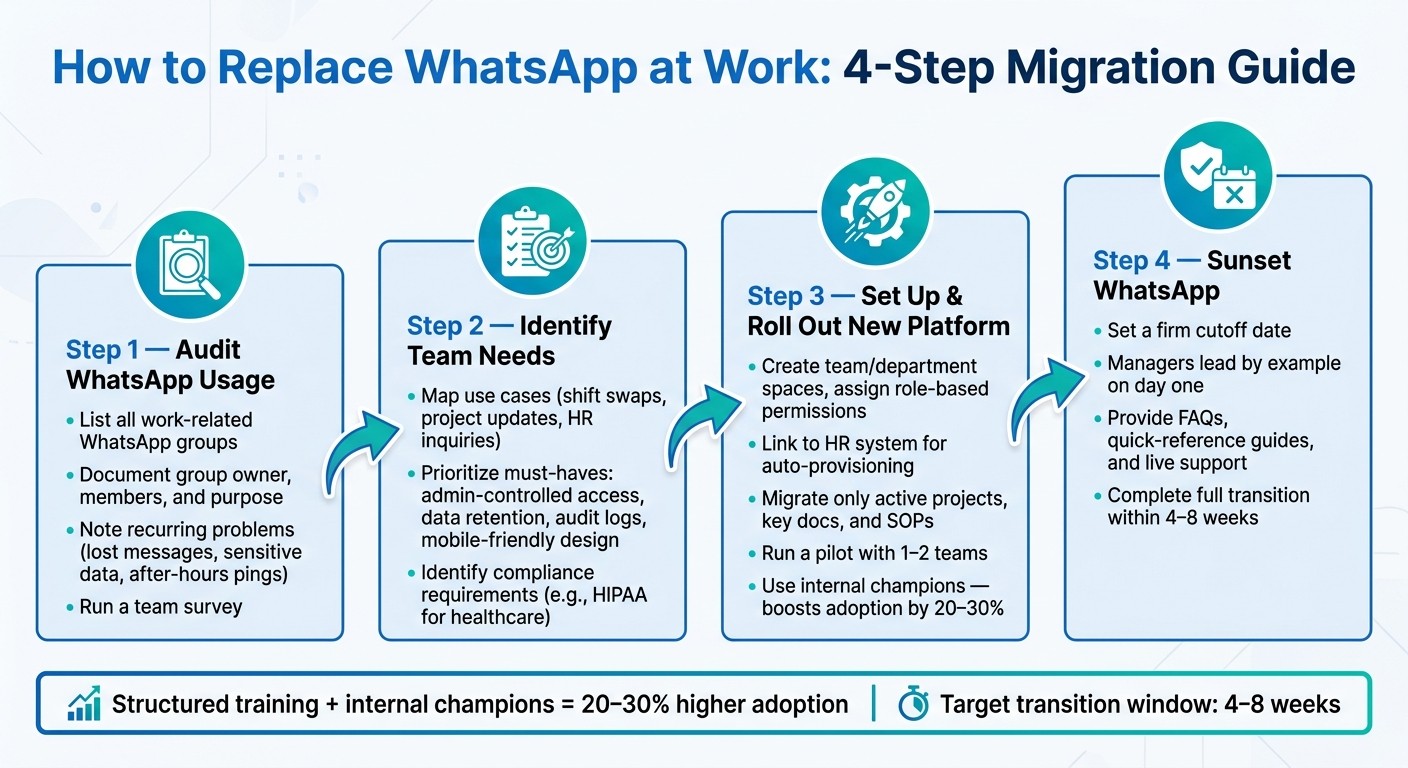
How to Replace WhatsApp at Work: 4-Step Migration Guide
Switching your team off WhatsApp doesn’t have to be a logistical nightmare. With a clear plan, you can make the transition smooth and keep everything running without a hitch. Let me walk you through how we’ve done it.
Step 1: Take Stock of How Your Team Uses WhatsApp
Before making any changes, you need to understand how WhatsApp is being used in your organization. Start by listing all work-related WhatsApp groups. Document each group’s owner, members, and purpose. Is it used for shift swaps, incident reporting, HR inquiries, or customer interactions? Maybe it’s just casual conversations? While you’re at it, note recurring problems like lost messages, sensitive data being shared, or after-hours interruptions.
We also found it helpful to run a quick survey and sit down with key team members to uncover less obvious issues. This step gives you a solid starting point for the transition.
Step 2: Identify What Your Team Actually Needs
Once you’ve mapped out how WhatsApp is being used, it’s time to figure out what your team truly needs from a communication platform. For example:
If your warehouse team struggles with missed shift swaps, they’ll benefit from built-in scheduling tools and manager approval workflows.
If your office team loses track of project decisions in endless threads, they’ll need searchable, organized channels.
If you’re in healthcare or a similar field, sharing employee health data will require HIPAA-compliant safeguards.
After identifying the essentials, prioritize them. Focus on must-haves like admin-controlled access, data retention, audit logs, and mobile-friendly design. Extras like reactions or polls can be nice bonuses, but they shouldn’t distract from the core needs.
Step 3: Set Up and Roll Out the New Platform
Now comes the fun part - setting up your new platform. In our case, we used Pebb, and here’s how we approached it:
Create spaces for different teams or departments based on their roles or locations.
Assign permissions carefully - for instance, only certain people can post in announcement channels, while others can respond.
If possible, link user access to your HR system. This way, new hires get instant access, and departing employees lose it just as quickly.
When it comes to migrating data, don’t go overboard. Only move active projects, key documents, and critical standard operating procedures (SOPs). Then, run a pilot with one or two teams for a few weeks. Gather feedback, make adjustments, and roll it out across the company. Research shows that structured training and having internal champions can boost adoption by as much as 20–30% compared to just sending out a sign-up link and hoping for the best.
Step 4: Say Goodbye to WhatsApp
Here’s where many transitions hit a snag - teams cling to WhatsApp “just in case.” Don’t let that happen. Set a firm cutoff date for WhatsApp use and communicate it clearly. Managers should lead by example and use the new platform exclusively from day one.
To make the switch easier, provide resources like FAQs, quick-reference guides, and live support sessions during the first couple of weeks. In our experience, this is usually enough to get everyone on board without major disruptions. By sticking to a strict 4–8 week transition period, you can avoid tool sprawl and ensure your team fully embraces a secure, tailored solution like Pebb.
Keeping Your Communication System Secure and Running Well
Getting everyone on board with a new communication system is just the beginning. The real challenge? Keeping it secure and running smoothly over time. It takes consistent effort and some smart policies to make it happen.
Set Clear Communication Policies
Once you’ve rolled out the platform, the next step is to lay down some ground rules. A communication charter can help everyone understand what goes where. For instance:
Use chat for quick questions, coordination, or urgent updates.
Save formal approvals for email, task assignments for project tools, and detailed procedures for the knowledge base.
Clearly define response times to manage expectations.
It’s also important to set boundaries. Introduce quiet hours and create an emergency-only channel for after-hours issues. Encourage scheduling non-urgent messages during work hours. Why? Because a 2021 survey revealed that 54% of remote workers felt pressured to respond outside normal hours - a major contributor to burnout and disengagement.
One more thing: avoid consumer apps like WhatsApp for work-related communication. They lack audit trails, centralized control, and e-discovery tools. Make sure this policy is available in Pebb’s knowledge base and pinned in your main welcome channel so it’s always easy to find.
Track Usage and Fix What Isn't Working
Policies are great, but they only work if people follow them. That’s why monitoring your system is key. Keep an eye on metrics like:
Adoption: Are team members logging in and using the platform regularly?
Engagement quality: Are conversations happening in the right channels, or is everyone stuck in private messages?
If you notice heavy reliance on direct messages or a lack of activity in team channels, it might signal a deeper issue. Maybe employees aren’t sure where to post publicly, or they feel uncomfortable doing so. These are cultural hurdles, not just technical ones, and they need to be addressed.
Regular reviews also help keep things tidy. Every quarter, archive inactive channels and standardize naming conventions (think: #team-ops, #announcements, #hr-questions). Staying on top of this prevents confusion and minimizes the risk of unauthorized tools creeping in.
Keep Employees Trained and Supported Over Time
Training isn’t a one-and-done deal. Ongoing support and periodic refreshers are essential to keep everyone on track and reduce the temptation to fall back on unsecured apps. It’s also a big factor in long-term success.
Start on day one. Integrate Pebb into your frontline employee onboarding process with a quick walkthrough, a review of the communication policy, and a simple acknowledgment that they’ve read it. Pebb’s straightforward design makes onboarding a breeze and reinforces its role as a secure alternative to WhatsApp.
For managers, refresher training is equally important. Focus on how to use chat without creating that dreaded 24/7 pressure. This includes setting a good example - like avoiding non-urgent messages after hours - and gently steering employees away from using consumer apps for work tasks.
Here’s a stat that might convince you: McKinsey research shows that companies using collaboration tools during onboarding see 20–25% faster time-to-productivity for new hires. If that’s not a reason to invest in ongoing training, I don’t know what is.
Conclusion: A More Connected, Secure Team Starts Here
Let’s be honest - WhatsApp didn’t sneak into your workplace because someone made a strategic IT decision. It happened naturally, almost by accident. As the team at Sociabble wisely puts it:
"The organization does not decide to use WhatsApp. It discovers, often too late, that it already does."
And that’s where the trouble begins. Without proper admin controls, compliance safeguards, or ownership over your data, WhatsApp creates a chaotic blend of personal and professional communication. The longer it sticks around, the more you’re exposing your business to legal, operational, and even reputational risks.
So, where do you go from here? Start by taking a hard look at how WhatsApp is currently being used in your workplace. Then, map out a clear, step-by-step plan to phase it out entirely. The goal? Transition to a secure, all-in-one platform that brings everything - communication, scheduling, and collaboration - under one roof.
That’s exactly where Pebb comes in. We’ve built a platform designed to bridge the gap between frontline and office teams. It’s packed with tools to keep your operations running smoothly, and here’s the kicker: you can start for free with up to 15 employees. Need more? Premium features are just $4 per user per month.
The bottom line? A secure, connected team isn’t just a pipe dream - it’s achievable. By moving away from consumer messaging apps and embracing a purpose-built solution, you’ll not only dodge the risks but also unlock a new level of efficiency and compliance for your business.
FAQs
Is WhatsApp compliant for work use?
WhatsApp might seem like a convenient option for workplace communication, but it's not built for professional use. Sure, it has end-to-end encryption, which sounds secure, but it falls short in areas that matter for businesses. It lacks centralized admin controls, enterprise-level archiving, and audit trails - all critical for maintaining oversight and compliance.
Another big issue? It ties communication to personal phone numbers, blurring the lines between personal and work life. Plus, there are serious regulatory risks. For example, metadata exposure and weak governance can lead to compliance headaches, including potential violations of GDPR regulations. Bottom line: it’s just not designed to meet the demands of a professional, regulated environment.
What admin controls should a work chat have?
When it comes to keeping workplace communication secure and organized, admin controls are the unsung heroes. At Pebb, we’ve built a suite of tools designed to make this job easier and more effective. For starters, role-based permissions let admins decide who gets access to what, ensuring sensitive information stays in the right hands. If someone leaves the company, immediate data revocation ensures they can no longer access critical files or conversations.
We’ve also added layers of security with features like two-factor authentication and secure data retention. These not only keep your communication safe but also ensure everything stays centralized and professional. Plus, with compliance monitoring baked into the platform, you can rest easy knowing your team’s communication aligns with industry standards. And let’s face it - keeping work chats separate from personal messaging apps isn’t just about security; it’s about creating boundaries that help everyone stay focused.
How long does switching off WhatsApp take?
Switching from WhatsApp to a professional platform isn’t a one-size-fits-all process - it depends on how you approach change management. Here’s how we tackle it at Pebb. First, we start with an audit of the tools being used. This helps us understand what’s working, what isn’t, and where gaps exist. Next comes training. Employees need to feel confident using the new platform, so we focus on hands-on learning sessions that address their specific needs. Finally, there’s the migration of conversations. This step is crucial because no one wants to lose important history or context.
Here’s where Pebb shines. By offering an all-in-one solution that combines communication and operations, we make the transition smoother. It’s designed to minimize disruptions, so productivity stays on track while your team adjusts. Trust me, a streamlined platform makes all the difference during a change like this.
