
Author: Ron Daniel
Real-Time Collaboration for Frontline Teams
Mobile-first real-time tools that replace email by unifying chat, scheduling, tasks and knowledge for frontline teams.
Here’s a question for you: How often do you think frontline workers actually see those company-wide emails managers send out? If you guessed “not often,” you’re spot on. When I first joined Pebb, I was shocked to learn that most frontline employees don’t even have business email accounts. That’s when it hit me - traditional tools like email or desktop platforms weren’t built for the fast-paced, always-on-the-move nature of frontline teams. And honestly, it’s costing companies time, money, and a whole lot of frustration.
Let me paint you a quick picture. A few months ago, I spoke with a manager at a hotel chain who was juggling communication across 11 locations. Before switching to a mobile-first platform, she could only reach 20% of her employees. That’s it. The rest? Completely out of the loop. But after adopting a real-time collaboration tool, her reach skyrocketed to over 90%. The difference was night and day.
Here’s the deal: frontline teams don’t have the luxury of sitting at a desk all day. They’re on their feet, solving problems, and serving customers. They need tools that work as fast as they do. In this article, I’ll share how real-time collaboration tools like Pebb are transforming the way frontline teams communicate, manage tasks, and stay connected - all from their phones. Let’s dive in.
Core Features of Real-Time Collaboration Tools
Must-Have Features for Frontline Collaboration
Frontline teams need tools that fit their unique day-to-day challenges. What works for a warehouse crew or retail associate is a far cry from what a desk-based team might find useful.
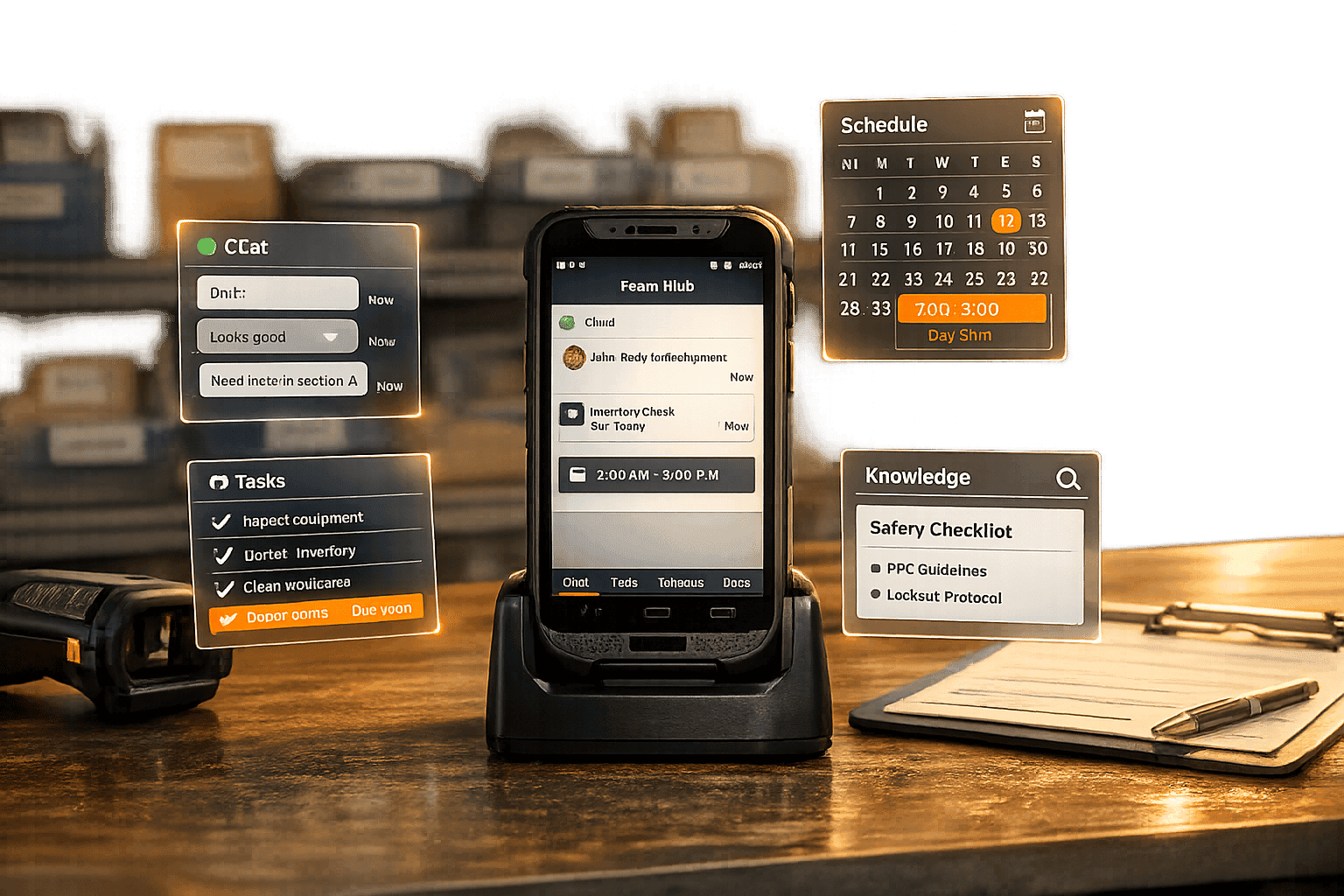
At its core, a frontline collaboration tool must offer instant messaging - both one-on-one and in group channels - along with voice and video calls. This ensures teams can communicate naturally without resorting to personal apps. But communication alone isn’t enough. To truly support frontline operations, these tools need to handle essentials like shift scheduling, time-off tracking, and digital forms in a single platform. Features like shift swaps and direct messaging within the same app can streamline operations significantly.
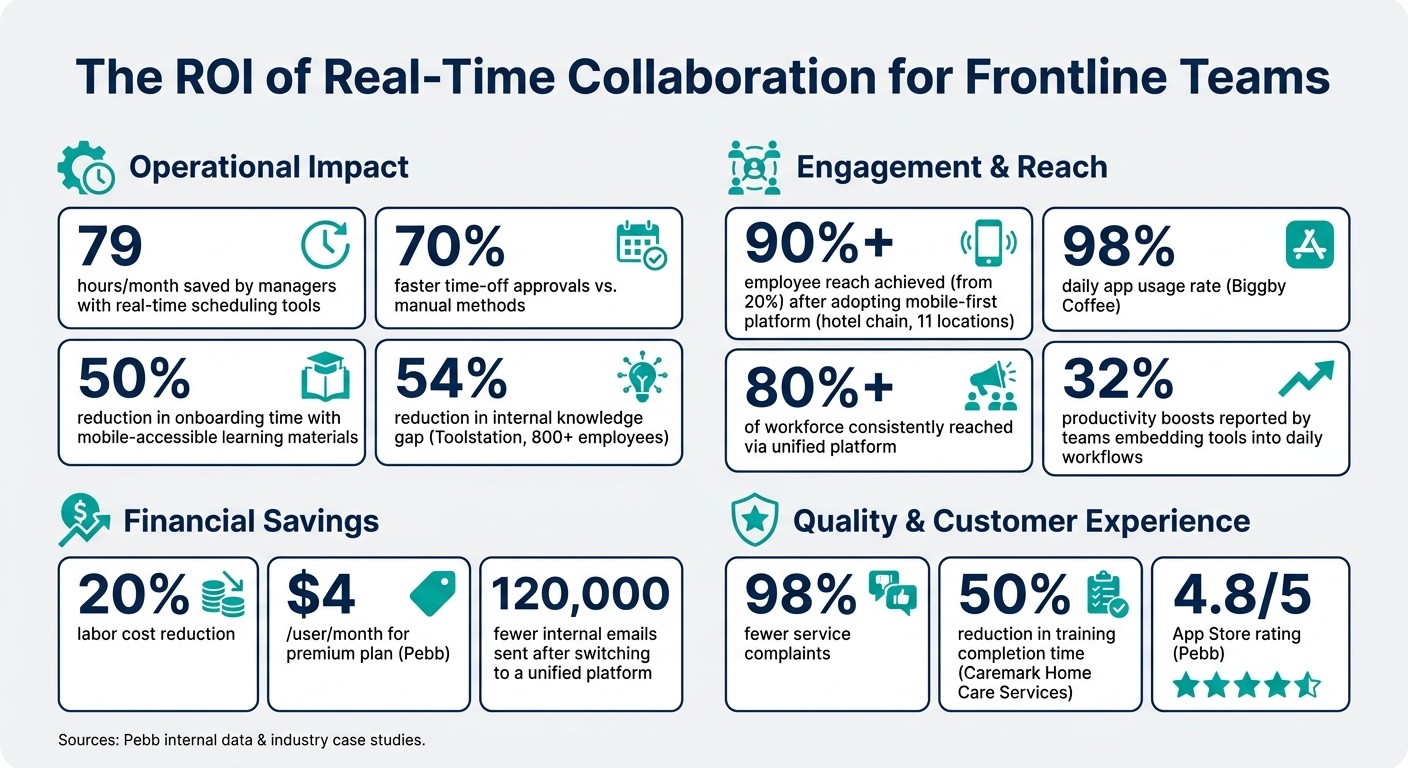
Another key feature? Task management. Frontline workers need real-time updates on what’s expected of them - not outdated checklists pinned in the breakroom. Pair this with a searchable knowledge library for policies, training materials, and how-to guides, and you’ve got a game-changer. Take Toolstation, for example. This UK-based retailer, with over 800 employees, slashed their internal knowledge gap by 54% after switching to a centralized communication and knowledge-sharing platform. These features are the backbone of an effective, mobile-first experience.
Why Mobile-First Design Matters
Here’s the thing: no tool will succeed if frontline workers don’t use it. And since they’re rarely sitting at a desk, mobile-first design is non-negotiable. Frontline employees are constantly on the move, balancing tasks, customers, and multiple locations. That’s where push notifications shine - ensuring last-minute schedule changes or urgent updates reach them instantly, not hours later via email.
Biggby Coffee is a perfect example. By adopting a mobile-first platform for scheduling and training, they achieved a staggering 98% daily app usage rate among employees. That’s the kind of engagement every company dreams of.
Mobile tools also open the door to practical features like GPS-enabled geofencing, letting managers confirm employees are on-site when clocking in. And a social media–like interface - familiar, intuitive, and easy to navigate - drives adoption without requiring formal training. The less time spent figuring out the tool, the more time spent actually using it.
With these mobile essentials in mind, let me show you how Pebb takes things to the next level.
How Pebb Brings It All Together
At Pebb, we knew frontline teams needed more than just another app - they needed a unified solution. That’s why we built Pebb to combine all the critical tools frontline workers rely on into one seamless platform.
With Pebb, a team member can check their shift, message a coworker, read a company announcement, submit a time-off request, and complete a task - all without ever leaving the app. It’s everything they need in one place.
Our free Standard plan supports up to 15 employees and covers all the essentials: work chat, shift scheduling, PTO management, a news feed, a knowledge library, tasks, and digital forms. For larger teams, our Premium plan is just $4 per user per month and adds features like voice and video calls, advanced analytics, permissions controls, and enterprise integrations. Whether you’re running a single location or managing a nationwide chain, Pebb is built to grow with you.
Real-Time Collaboration in Action: Use Cases
Managing Shifts and Last-Minute Updates
Let’s face it - scheduling can feel like a never-ending game of whack-a-mole. Someone calls in sick just before their shift, and suddenly, you’re stuck in a frenzy of texts and calls, trying to find a replacement. Sound familiar? That’s where real-time collaboration tools step in and save the day.
With Pebb, posting an open shift is as simple as a few taps. The app instantly notifies qualified employees, and whoever claims it first gets the shift. Employees can even arrange their own swaps, leaving managers with just one task - approving the change.
"Instead of texting back and forth, employees can swap shifts in the app. All I do is approve the swap." - Dangerous Man
The impact is massive. According to the numbers, managers can save up to 79 hours a month with real-time scheduling tools. And time-off approvals? They’re up to 70% faster compared to manual methods. That’s time you can reinvest into keeping the operation running smoothly, instead of chasing down shift replacements.
But it’s not just about schedules - real-time updates also make handling unexpected problems a breeze.
Fixing Problems in the Field or on the Floor
Picture this: you’re on the floor, and you notice a problem - a damaged display in a store or a restaurant fridge that’s running too warm. Before, you’d have to find a manager and explain the issue, hoping it gets escalated fast enough. Now, with real-time collaboration tools, the process couldn’t be easier.
Using Pebb, you can snap a photo or record a short video of the problem and send it directly to the right person in the app. No more juggling separate ticketing systems or waiting for someone to find the right form. This kind of instant reporting ensures issues are resolved before they snowball, protecting both your customers’ experience and your bottom line.
And while quick problem-solving keeps things running smoothly, real-time collaboration also helps teams grow and learn every single day.
Sharing Knowledge and Learning on the Job
Here’s the thing: learning doesn’t have to wait for formal training sessions. With real-time collaboration, frontline teams can ask questions in group chats and get answers almost immediately. It’s like having a mentor in your pocket.
Take Caremark Home Care Services, for example - they cut their training completion time by 50% just by making learning materials accessible on mobile devices. And the benefits are clear. Confident employees create better customer experiences. As Caroline Bosman from Amrâth Hôtels said:
"The frontline employees are more confident on the floor and can therefore offer the best possible experience to our guests."
With Pebb, we’ve made sure that knowledge sharing is seamless. Our integrated knowledge base sits right alongside chat, shifts, and tasks. Need the return policy? It’s there. Want to share a quick how-to guide? Done. No app-switching, no searching through endless emails - just fast, clear answers when and where you need them.
Best Practices for Real-Time Collaboration
How to Pick the Right Tool - and Why Pebb Works
Here's the thing: juggling too many tools can backfire. You start with a scheduling app, then tack on a chat tool, and before you know it, your team is buried under a pile of apps. This patchwork approach creates friction, and when things get complicated, people stop using the tools altogether.
The solution? Find a platform that brings everything together in one place. You need something that handles chat, shift schedules, task tracking, a news feed, and even a knowledge base - all accessible on a mobile device without requiring a business email. Remember, many frontline workers only have their phones to rely on, and platforms like Slack or Microsoft Teams often miss the mark for this group.
That’s exactly why we designed Pebb the way we did. It’s free for teams with up to 15 members, and if you need more, the premium plan costs just $4 per user per month. It’s one of the most affordable all-in-one solutions out there, and it’s built with frontline teams in mind.
Now, let me share how organizing your communication channels can make everything run even smoother.
How to Organize Channels and Groups
Picking the right tool is step one, but how you set it up is what really matters. A common misstep? Throwing everyone into one massive group chat. It quickly becomes a chaotic mess, and people start ignoring messages altogether.
Instead, organize your channels by context - think location, role, or specific topics. For example, if you’re running a retail chain or a restaurant, you might create separate groups for each location. Then, add role-specific channels for shift leads, floor staff, or kitchen teams. Finally, have one shared announcement channel for updates that affect everyone. This way, the server working in Chicago doesn’t get flooded with irrelevant pings about a maintenance issue in Denver.
The idea is simple: every message should feel like it matters to the person reading it. When people only see updates relevant to their role or shift, they’re far more likely to pay attention and respond.
Making Collaboration Part of the Daily Routine
Once your tool is set up and channels are in place, the next step is to weave it into your team’s everyday habits. Even the best tools can collect dust if they’re not naturally integrated into daily workflows. The key is to build the tool into what your team is already doing, rather than forcing them to adopt something entirely new.
Take shift handovers, for instance. Instead of relying on verbal updates that can be easily forgotten, use a digital checklist within the app. This checklist can capture end-of-shift notes, open tasks, and flagged issues, keeping everything in one place for the next person coming on duty. Adding a quick feature for post-shift recognition - like a “shout-out” for a job well done - can make the tool feel like a natural part of wrapping up the day.
The results speak for themselves. Teams that embed collaboration tools into their daily workflows have reported productivity boosts of up to 32%, with daily active usage rates reaching an impressive 98% of their workforce. When collaboration becomes second nature, everyone wins.
Measuring the Impact of Real-Time Collaboration
Real-Time Collaboration for Frontline Teams: Key Stats & ROI
Metrics Worth Tracking
Once you’ve got your collaboration system in place, the next step is figuring out if it’s actually delivering results. Numbers don’t lie, and the right platform gives you data you can act on across four main areas:
Metric Category | What to Track | Target Outcomes |
|---|---|---|
Operational | Task completion rate, scheduling time, frontline onboarding best practices | 30–50% faster processes |
Engagement | Daily app usage, survey response rates, message volume | 80%+ of workforce reached |
Financial | Labor costs, overtime pay, tool consolidation savings | Up to 20% labor cost reduction |
Quality | Response times, customer complaints, audit scores | Up to 98% fewer service complaints |
Here’s one stat that always raises eyebrows: companies that switched to a unified frontline platform reported sending 120,000 fewer internal emails after implementation. That’s not a typo. When communication has a dedicated space, the clutter fades away - fast.
But numbers only tell part of the story, and that’s where listening to your team comes in.
Using Employee Feedback to Improve
Dashboards give you the quantitative side, but the qualitative insights come straight from your team. Tools like pulse surveys - quick, frequent check-ins sent through the app - are game-changers for spotting issues before they snowball into bigger problems.
The trick? Closing the loop. When someone flags a problem in a post-shift form or survey, you’ve got to act on it. Teams are much more likely to keep sharing their thoughts when they see their feedback leading to real changes. And when your platform reaches everyone - not just a handful of folks in the break room - the feedback becomes a true reflection of your workforce.
This ongoing cycle of feedback and action creates results you can see and feel.
Connecting Collaboration Efforts to Results
Here’s the golden rule: always tie initiatives to outcomes. If you roll out digital shift-swapping, track whether absenteeism improves. Launch a knowledge base? Measure if onboarding gets faster - studies show it can cut onboarding time by up to 50%.
This approach keeps things honest. It forces you to ask, what problem were we solving, and did we actually solve it? Over time, this clarity helps refine your strategy - from adding new features to tweaking team structures. At Pebb, we’ve seen how linking every initiative to measurable outcomes transforms everyday collaboration into results that matter. It’s about turning communication into a real driver of success.
Conclusion: Building Stronger Frontline Teams with Real-Time Collaboration
Our frontline teams work hard every single day, and they deserve tools that work just as hard for them. At Pebb, we’ve seen how real-time collaboration bridges communication gaps, simplifies daily tasks, and fosters a sense of connection, no matter where or when someone clocks in. It’s been incredible to witness this shift firsthand, powered by the tools we’ve designed to keep everyone on the same page.
Here’s what we’ve learned: the right tools make all the difference. When outdated systems are replaced with ones that are intuitive and effective, the impact is undeniable. Productivity improves, engagement rises, and teams feel more connected. For us, it’s all about simplicity. The best tools aren’t the ones with endless bells and whistles - they’re the ones your team actually uses every day. That’s why we built Pebb to bring everything together in one place: chat, shifts, tasks, news, and recognition. No app-hopping, no chasing down updates, and no gaps in communication. It’s no wonder we’re proud to hold a 4.8/5 rating on the App Store.
"Pebb has entirely redefined our communication. It feels like Facebook, but for work." - Verified Customer, Pebb
When every part of the communication process clicks into place, the results are undeniable. For us, the takeaway is simple: real-time collaboration isn’t just a helpful tool for frontline teams - it’s the backbone of everything they do. When teams communicate better, they work smarter, retain talent longer, and achieve results that matter. And that’s a goal we’ll continue striving toward.
FAQs
How do I get frontline employees to actually use a collaboration app?
Getting frontline employees to embrace a collaboration app can feel like a challenge, but here’s what works: keep it simple, accessible, and relevant. Focus on the features that actually make their day smoother - things like shift management or quick, no-fuss chats.
Make onboarding a breeze. The app should work on any device they already use, whether it’s a company tablet or their personal phone. And here’s a big one: managers need to set the tone. When leaders consistently use the app for updates, feedback, and communication, it sends a clear message - it’s not just another tool, it’s the tool.
With Pebb’s user-friendly design and all-in-one platform, we’ve seen firsthand how easy it is to get teams connected and engaged. It’s not about overwhelming them with features; it’s about giving them exactly what they need, right when they need it. Simple as that.
What should we measure to prove real-time collaboration is working?
Tracking real-time collaboration success comes down to measuring a few key areas. Start with employee engagement - look at how often people participate in chats, post updates, and complete tasks. These numbers can give you a clear picture of how involved your team is.
Next, keep an eye on the speed and accuracy of information sharing. Are updates being communicated quickly? Are they correct the first time? These factors can reveal how smoothly your team is working together.
Finally, assess how effectively your team uses digital tools like forms, checklists, and dashboards. These tools are critical for staying aligned and tackling issues without delay. When these metrics are in good shape, you’ll know your collaboration efforts are paying off.
How do we set up groups so messages don’t turn into noise?
Let me tell you what’s worked for us. To avoid messages becoming a chaotic mess, we’ve created focused, purpose-driven Spaces for different teams, departments, and projects. It starts with an Everyone Space - this is where company-wide updates live, so everyone stays in the loop.
From there, we break it down: specific Spaces for locations, project teams, or departments. Each Space comes with its own news feed and chat, keeping discussions on-topic and organized. It’s been a game-changer for cutting down on irrelevant chatter and keeping communication streamlined.
