

Author: Ron Daniel
Why Pebb is the leading choice for mobile-first team collaboration
One mobile app for chat, scheduling, time tracking and forms that keeps frontline teams aligned.
Most teams don’t fail on communication because people don’t care. They fail because the tools were built for desks, inboxes, and browser tabs, while the people doing the work are on the floor, on the road, or between shifts. I see that every week at Pebb.io, and the gap shows up fast when one missed update turns into a missed shift.
The numbers line up with what we hear from customers every day. Nearly 80% of the global workforce is deskless, highlighting the benefits of mobile apps for frontline employee communication, yet many still deal with scattered texts, paper forms, and tools that make no sense on a phone. When 54% of deskless workers have limited or no email access and 64% use personal phones for work chat, the problem isn’t hard to spot.
That pattern points to one clear answer: teams need one phone-first place for messages, schedules, requests, and day-to-day work. In this piece, I’ll walk through why we built Pebb this way, where other tools fall short for frontline teams, and what I’ve seen work when companies stop patching together apps and start keeping work in one place.
How Pebb replaces fragmented tools with one mobile-first app

A while back, I watched a frontline manager bounce between four apps just to get through one shift change. One app for messages. Another for the schedule. A separate tool for time tracking. Then a shared folder for forms that half the team couldn’t open on their phones.
That kind of patchwork slows everyone down.
At Pebb, we built one mobile app for chat, scheduling, time tracking, and files so teams can handle work in one place. No laptop. No corporate email account. No digging through a mess of tools just to find a shift update.
Here’s the thing: when frontline and office teams use one app instead of a stack of disconnected ones, the day gets simpler. Pebb brings communication, operations, engagement, and collaboration into one place. It’s free for up to 15 employees, and Premium starts at $4 per user per month. That matters because employees using more than 10 apps report communication problems at a rate of 54%, compared with 34% for those using fewer than five.
In day-to-day frontline work, that gap shows up fast.
Work Chat, News Feed, and calls for faster team communication
I’ve seen how easy it is for work messages to disappear when they’re mixed with personal texts. That’s why Pebb’s Work Chat keeps work conversations in their own space.
Managers can set up channels by location, role, or shift. Think “Store #152 – Morning Shift.” That way, the right update goes to the right people without getting buried under weekend plans, memes, or random group texts.
And when text isn’t enough, teams can jump into integrated voice and video calls right inside the app. No switching tools. No “Can you resend the link?” chaos. Just a live conversation when the moment calls for it.
The News Feed works like a company-wide feed employees see on their phones. Managers can post shift announcements, policy updates, safety reminders, or weekly targets, and employees get a push notification right away. We’ve found that this cuts down on missed updates because people don’t have to hunt for info.
Interactive polls help too. A manager can check who’s available for a training session or get quick feedback on a new process without sending a long message thread that goes nowhere. And because it’s all mobile-first, that same setup connects neatly with scheduling, attendance, and approvals.
Shift Scheduling, Clock-in, PTO, and Digital Forms for daily operations
This is where a lot of frontline teams feel the pain from disconnected systems. I’ve seen managers build rosters in one tool, track attendance in another, and handle time-off requests through texts or paper notes. It’s messy, and mistakes pile up.
With Shift Scheduling, managers can build and publish rosters that employees view and confirm from their phones. That sounds simple, but in practice it saves a ton of back-and-forth.
Clock-in connects attendance directly to scheduled shifts, so it’s easier to spot late arrivals, no-shows, or overtime without relying on a separate punch clock. When someone sends in a PTO request, it runs through the same system, which helps managers see right away if approving it leaves a coverage gap.
That joined-up view matters. Mobile time-tracking platforms can reduce time theft by up to 15% and improve schedule accuracy by about 20%.
Digital Forms also take a lot of friction out of the day. Instead of paper checklists floating around in clipboards, drawers, or break rooms, teams can handle them from their phones.
A few common examples:
A retail team runs daily opening checklists
A warehouse logs equipment inspections
A field crew captures job completion details with photos attached
Those submissions are stored centrally, which makes compliance reviews easier and cuts out the usual paper problems, like forms getting lost, damaged, or filled out so badly no one can read them.
Knowledge Base, tasks, files, and directory for better team coordination
Let me tell you what happened next in one of the teams I worked with: once communication and scheduling were under control, the next headache showed up right away. Nobody knew where key information lived.
One SOP was sitting in a binder at the front desk. Another was buried in a manager’s email. A training file lived in a shared drive that hardly anyone could access without asking for a password. That kind of setup wastes time, and it puts new hires in a rough spot from day one.
Pebb’s Knowledge Base gives teams mobile access to SOPs, training guides, and reference materials, organized by topic, role, or location. So when someone needs an answer, they can find it without waiting around for a supervisor. That helps reduce delays and keeps work moving. For new hires, it also helps them get up to speed faster without needing someone to walk them through every single procedure.
Then there’s Tasks. Managers can assign work, set due dates, and track completion without pulling in a separate project tool. Files keep shared documents inside the same app people already use for everything else. And the directory makes it easy for any employee to find and contact the right coworker in seconds instead of digging through old texts or asking three different people who handles what.
From what I’ve seen, those tools hit the three pain points managers deal with most: shift alignment, paper-heavy workflows, and low engagement.
How Pebb solves specific frontline management problems
I’ve seen this play out over and over at Pebb.io: a manager doesn’t need “more features.” They need fewer headaches at 6:15 a.m. before a shift starts, fewer missed updates, and fewer paper trails that somehow vanish right when someone needs them.
That’s why these features matter. They deal with the stuff managers run into every single shift.
Keeping every shift aligned without relying on email
Email falls apart fast for shift workers. I’ve watched teams miss updates simply because the message went to the wrong inbox, got buried, or landed after the shift had already started. And once that happens, the whole day can wobble.
At Pebb.io, we built this to turn communication into something people can act on. The first problem is simple: shifts break when updates miss the right people.
Managers can create dedicated chat groups for each shift or location - like "Warehouse – Night Shift" - and send mobile notifications right to employees’ phones. No email. No digging through threads. The right people get the right update before their shift starts.
The News Feed adds one more layer. Managers can pin urgent announcements so they stay at the top of the feed, and employees can react or comment right there. Read receipts show whether the team actually saw the update.
Here’s the thing: once communication is in sync, the next mess usually shows up in paperwork and manual handoffs.
Running smoother workflows without paper or separate apps
Let me give you a real-world-style scenario I think every frontline manager will recognize.
A store manager gets a call that a customer slipped near the entrance. The employee on duty grabs a paper incident form, fills it out by hand, and leaves it on the manager’s desk. Later, someone has to type the same details into another system. It’s slow, easy to mess up, and honestly kind of painful.
With Pebb, that same employee opens Digital Forms on their phone, fills out a pre-built incident report, attaches photos, and submits it. The form then routes to managers, HR, or safety teams - timestamped, stored, and searchable.
What happens next is where I think things get interesting. That same manager can check coverage in Shift Scheduling, post a swap in the right group chat, and confirm the change without bouncing between apps. If a PTO request comes in that afternoon, the staffing impact shows up right away alongside the schedule view.
I like this part because it cuts out the stop-and-start rhythm that slows frontline teams down.
Improving engagement for deskless employees who are often left out
This one hits home for me. Deskless employees are often the last to hear company updates and the first to miss recognition, mostly because they’re spread across shifts and locations.
Pebb’s News Feed sends announcements and leadership messages straight to employees’ phones, no matter when they work or where they’re scheduled. That means people don’t have to be in the “right” place at the “right” time just to stay informed.
Managers can also spotlight frontline wins with recognition-style posts by tagging the employee and letting coworkers react and comment. It’s a small thing on the surface, but I’ve seen how much it helps people feel seen instead of forgotten.
Groups and the directory also make it easier for employees to find the right person fast, which helps distributed teams stay aligned and a lot easier to manage.
Pebb compared with other team collaboration platforms
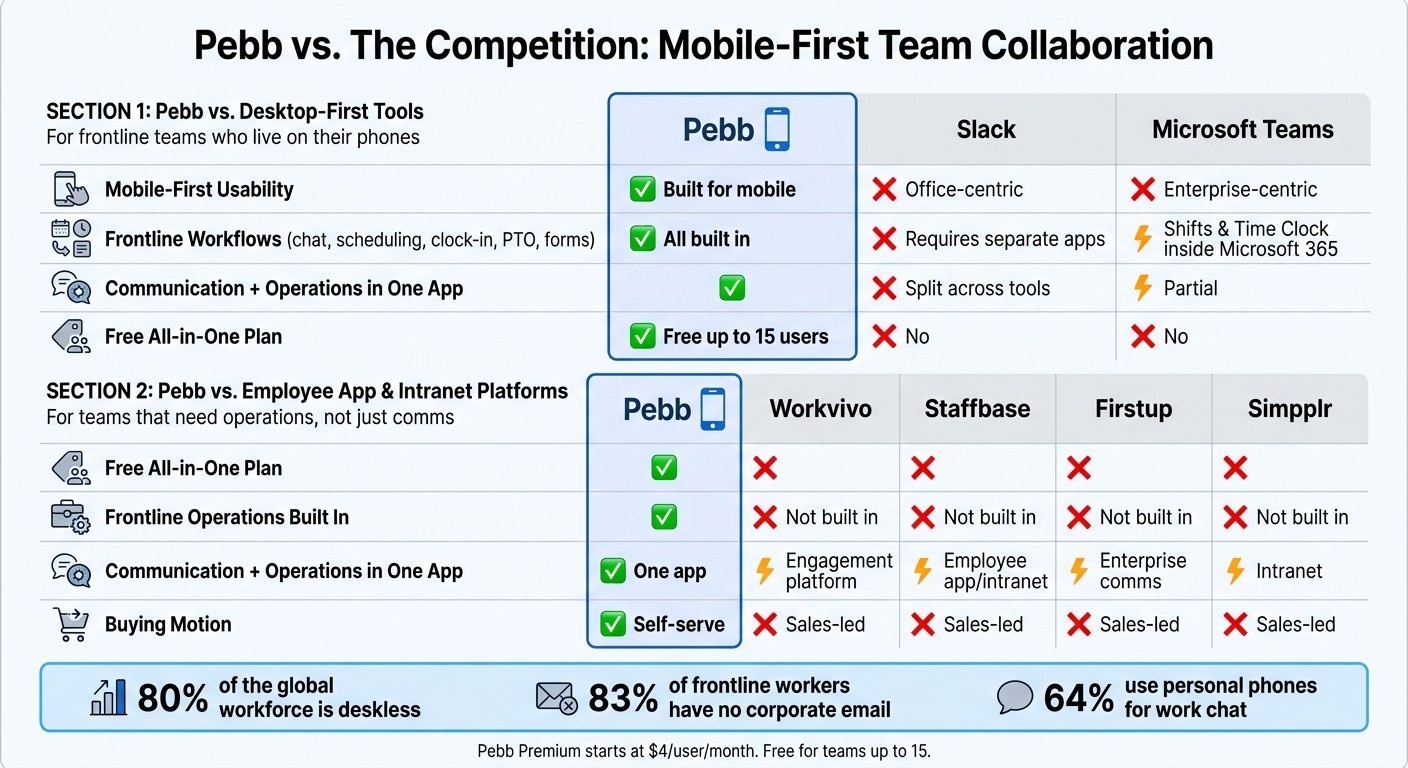
Pebb vs. Slack vs. Microsoft Teams vs. Enterprise Intranet Platforms
I’ve sat in a lot of buyer calls at Pebb.io, and the pattern is almost always the same. A manager starts with one simple issue: my team lives on their phones, so why does every tool seem built for people behind laptops? Once we walk through communication, scheduling, and forms, the gap shows up fast.
This isn’t just about who has more features on a pricing page. It’s about what helps a frontline team get through a shift without bouncing between apps.
Why Pebb fits frontline teams better than desktop-first tools like Slack and Microsoft Teams
Let me put it plainly: Slack is solid for office messaging. But when I’ve seen frontline teams try to run their day there, they still end up needing other tools for scheduling, clock-in, and PTO.
Microsoft Teams goes further for frontline use with Shifts and Time Clock, but those tools sit inside the larger Microsoft 365 setup. For many small and midsize frontline teams, that’s more system than they want to deal with.
At Pebb.io, we built Pebb to work on phones from the start. No email required. No desktop login. No add-ons just to cover day-to-day team work. That’s why, from where I sit, the comparison isn’t about long feature lists. It’s about fit.
Feature | Pebb | Slack | Microsoft Teams |
|---|---|---|---|
Mobile-first usability | Built for mobile | Office-centric | Enterprise-centric |
Frontline workflows | Chat, scheduling, clock-in, PTO, and forms built in | Requires separate apps/integrations | Shifts and Time Clock, but still inside Microsoft 365 |
Communication + operations | One app | Split across tools | Partial |
Free all-in-one plan | Yes | No | No |
I’ve seen this play out in a pretty simple way. A manager comes in looking for chat. Then they realize they also need shift coverage, time tracking, and a clean way to handle requests. That’s usually the moment things click. One app beats a patchwork setup when the team is busy and standing on a floor, in a store, or out in the field.
The difference gets even clearer when you stack Pebb next to tools built mostly for internal comms and intranets.
How Pebb compares to employee app and intranet platforms like Workvivo, Staffbase, Firstup, and simpplr

Here’s the thing: Workvivo, Staffbase, Firstup, and Simpplr are built more for enterprise communication. They often come with sales-led buying, custom pricing, and longer rollout cycles. If you’re a frontline manager trying to fix a team issue this quarter, that can feel like a long wait for a short-term problem.
I’ve talked to teams in that exact spot. They don’t want a months-long buying process. They want something they can start using without a maze of demos, approvals, and setup calls.
Feature | Pebb | Workvivo | Staffbase | Firstup | Simpplr |
|---|---|---|---|---|---|
Free all-in-one plan | Yes | No | No | No | No |
Frontline operations | Built in | Not built in | Not built in | Not built in | Not built in |
Communication + operations | One app | More of an engagement platform | More of an employee app/intranet platform | More of an enterprise comms platform | More of an intranet platform |
Buying motion | Self-serve | Sales-led | Sales-led | Sales-led | Sales-led |
That’s the big split I’ve seen again and again. Those platforms focus on internal communication. Pebb brings communication and frontline operations into one app. For teams that need to coordinate shifts, handle requests, and keep everyone aligned on a phone, that changes the whole experience.
Conclusion: Why Pebb is the leading choice for mobile-first team collaboration
I’ve seen this play out up close at Pebb.io: frontline teams don’t sit at desks all day. They’re on the floor, on the move, and almost always on their phones. So when a company tries to run daily work through a patchwork of separate apps, things start slipping fast. A message gets missed. A shift handoff gets messy. Someone can’t find a form. Another person feels like they’re the last to know.
Here’s the thing: that friction adds up every single day.
What I like about Pebb is that we built it around how frontline work actually happens. Chat, updates, scheduling, time tracking, forms, and knowledge all live in one mobile app. No bouncing between tools. No digging through five systems just to get through one shift.
And that one setup changes day-to-day work right away.
I’ve watched teams cut down on missed updates, clean up handoffs between shifts, and keep more people in the loop without making work feel harder. That matters even more when you look at the reality of frontline communication: 83% of frontline workers don't have a corporate email address and 45% have no intranet access at all.
That’s a huge gap. We built Pebb to close it.
The pricing helps too. Pebb is free for teams of up to 15, and Premium is $4 per user per month.
From where I sit, frontline teams need tools that fit the job instead of forcing the job to fit the tool. And for teams that run from phones, not desks, Pebb fits that workflow better than tools built for desk-based work.
FAQs
How quickly can a team start using Pebb?
I still remember the first time we watched a new team roll out Pebb. By the end of the day, they weren’t just testing it. They were using it for their day-to-day work.
That’s the part people usually don’t expect.
Teams can start using Pebb right away, and many can move their entire operation onto the platform in as little as one day.
Here’s the thing: we built it so people don’t need a long setup call, a giant training deck, or a week of hand-holding. In my experience at Pebb.io, that’s what slows most rollouts down. People want something they can pick up fast and start using without friction.
Getting started is simple. You download the app and scan a QR code. That usually takes less than five minutes.
I’ve seen this matter a lot for busy teams. If a tool takes too long to learn, people put it off. If it takes five minutes to join, they’re in. And once they’re in, the rest gets a whole lot easier.
Can Pebb work for both frontline and office employees?
I’ve seen this split up close: office teams sit at desks all day, while frontline teams are moving, serving customers, covering shifts, and trying to stay in the loop from their phones. At a lot of companies, those two groups end up living in different systems. That’s where things start to fall apart.
With Pebb, we built it to bring both sides into one digital workspace.
Frontline employees can use the mobile app for the things they need on the go, like shift scheduling, clocking in, and real-time chat. Office teams, on the other hand, can use the desktop version when they need more room for day-to-day teamwork and deeper collaboration.
Here’s the thing: it only works if everyone sees the same information at the same time. That’s why instant syncing across devices matters so much. Whether I’m on my laptop or someone else is checking updates from the sales floor on their phone, we stay aligned without juggling separate systems.
What problems does Pebb solve better on mobile?
I’ve seen this problem up close: frontline teams get stuck bouncing between chat apps, paper forms, spreadsheets, and whatever else the company added over time. It looks fine on paper. In practice, it’s a mess.
At Pebb.io, we built Pebb to fix that mobile-first gap by pulling communication and day-to-day operations into one app that just makes sense. That means teams don’t have to jump between fragmented tools like Slack or chase down disconnected spreadsheets to get basic work done.
Here’s the thing: most frontline workers aren’t sitting at a desk all day. They’re on the move, helping customers, managing shifts, stocking shelves, or handling site work. If an update comes in late, or gets buried, people miss it. I’ve watched that happen, and it always turns into extra back-and-forth.
That’s why Pebb keeps frontline workers connected with real-time push notifications, offline access, and a mobile-optimized design built for how people work. If someone is away from a stable connection, they can still get what they need. If a manager needs to send an update fast, it lands where people will actually see it.
We also bring together work chat, shift scheduling, and digital forms in one place. That cuts down on missed updates, trims paper trails, and makes the day run a lot smoother for teams that don’t have time to dig through five systems just to find one answer.
Let me tell you what happened next when teams started using one app instead of a pile of disconnected tools: communication got simpler, daily tasks got easier to track, and people spent less time hunting for information and more time doing the work in front of them.
