
Author: Ron Daniel
Best Way to Manage Workplace Compliance Forms
Map requirements, digitize forms, automate distribution, and keep records secure so your team stays audit-ready and efficient.
Have you ever tried finding a single form in a sea of paperwork, only to feel like you’re starring in your own episode of a workplace drama? I’ve been there. A few years ago, I was managing compliance forms for a growing team, and let me tell you - it felt like playing a never-ending game of hide-and-seek. I-9s, W-4s, OSHA logs... they were scattered across emails, filing cabinets, and spreadsheets. One day, during a surprise audit, I spent hours piecing together missing forms. It was a wake-up call, and I knew we needed a better way - fast.
Here’s the kicker: 20% of administrative time is wasted on outdated processes like these. That’s money and energy down the drain. And with compliance rules evolving constantly, the stakes are higher than ever. But what if there was a way to make managing forms simple, efficient, and stress-free?
At Pebb, we’ve built a system that does just that. In this guide, I’ll share how we tackled the compliance chaos - mapping out requirements, digitizing forms, automating workflows, and staying audit-ready without breaking a sweat. Ready to take control of your compliance forms? Let’s dive in.
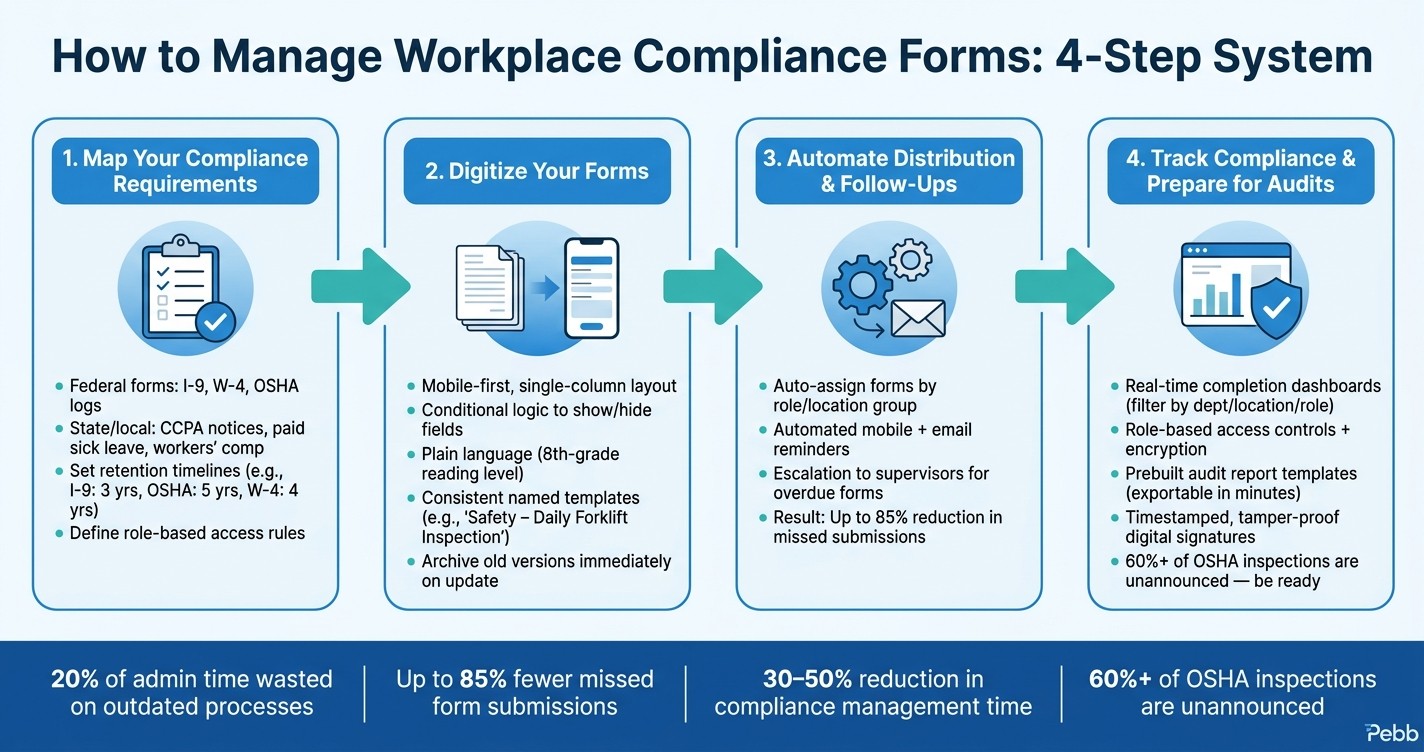
Compliance Form Management: 4-Step Workflow to Stay Audit-Ready
Map Out Your Compliance Requirements
Let me tell you, before you dive into forms or start experimenting with tools, you’ve got to get crystal clear on your compliance requirements. Skipping this step? That’s like building a house without a blueprint - you’ll end up with missed obligations, duplicated work, and gaps that are a nightmare to fix later.
Know Your Core Compliance Obligations
If you’re running a business in the U.S., compliance isn’t a one-size-fits-all deal. There are federal rules, like the I-9 and W-4 forms you handle during onboarding, but that’s just scratching the surface. You’ve also got OSHA incident reports, equipment inspection logs, training completion records, harassment prevention sign-offs, direct deposit authorizations, and benefits enrollment forms. Each of these comes with its own deadlines, retention rules, and responsible parties.
Now, layer on state and local requirements, and things get even trickier. Think about California’s employee notices tied to the CCPA, New York’s paid sick leave acknowledgments, or Texas-specific workers’ compensation forms. These rules aren’t static - they evolve constantly, demanding you stay on top of them.
Once you’ve identified these obligations, it’s time to figure out how they’re being managed in your current setup.
Review Your Current Form Processes
Here’s where you roll up your sleeves. Take stock of every form your organization uses - whether it’s a paper document, a PDF, or even an email template. Then, categorize them by lifecycle stage: pre-hire, onboarding, active employment, or offboarding. For each form, pinpoint who owns it, how it’s distributed, and how it’s returned.
If you’re relying on manual processes, chances are you’re running into inefficiencies. Re-entering data from paper forms into spreadsheets, chasing down signatures, or misplacing completed forms? These aren’t just annoyances - they’re your biggest opportunities for improvement.
Set Retention Timelines and Access Rules
Retention rules are a must-know if you want to stay compliant. For example, I-9 forms need to be kept for three years from the hire date or one year after termination - whichever comes later. OSHA 300 logs? Five years. W-4s? At least four years after the tax is due or paid.
But here’s the thing: it’s not just about how long you keep these forms - it’s also about who can access them. Payroll forms, for instance, contain sensitive information and should only be visible to HR and finance teams. On the other hand, safety acknowledgments might need to be accessible to department managers. Check out this quick guide:
Form Type | Retention Requirement | Who Should Have Access |
|---|---|---|
I-9 (Employment Eligibility) | 3 years post-hire or 1 year post-termination | HR only |
W-4 (Tax Withholding) | 4 years after tax due/paid | HR, Payroll |
OSHA Incident Reports | 5 years | Safety Officer, HR, Management |
Safety/Policy Acknowledgments | Duration of employment + 3 years | Direct Manager, HR |
Training Completion Records | Per program requirements (typically 3–5 years) | HR, Department Manager |
With Pebb’s Digital Forms, you can set these retention and access rules directly in the platform. That means no more relying on memory or chance - permissions are locked in, ensuring the right people see the right forms at the right time. It’s all about creating a system that’s both secure and efficient.
Convert Compliance Forms to Digital Formats
Let’s talk about taking those old-school compliance forms and giving them a modern makeover. Simply scanning a paper form and uploading it as a PDF doesn’t cut it anymore. True digital forms are interactive, error-proof, and smart - they guide employees through the process, flag mistakes on the spot, and send completed forms to the right person automatically. Once you’ve nailed down which forms you need and who’s responsible for them, it’s time to bring them into the digital age.
"The problem with paper is that it has no brain. It can't tell you if a field is missing, it can't route itself to the right person, and it certainly can't update your other systems." - Dan Robin, Author, Pebb Insights
Build Forms That Work on Mobile
Here’s a fact: most employees are filling out forms on their phones. So, if your forms don’t work well on mobile, you’re setting everyone up for frustration. A good mobile-friendly form is clean and simple. Break it into manageable steps, stick to a single-column layout, and use big, easy-to-tap buttons. Replace free-text fields with dropdowns, checkboxes, or radio buttons to cut down on typos and make data easier to process.
Another game-changer is conditional logic. Let’s say an employee reports an incident - if they select "Yes", you can reveal follow-up questions like the date, location, or even an option to upload a photo. If they select "No", those extra fields vanish, keeping the form neat and focused. And don’t forget to pre-fill known details like names, departments, or employee IDs to save time and reduce repetitive typing.
Write Clearly and Use Consistent Templates
Clear, straightforward language is non-negotiable when it comes to compliance forms. If employees don’t understand what a form is asking, errors are inevitable - and those mistakes can cause headaches during audits. Keep the language simple, aiming for an 8th-grade reading level. Swap out legalese like "herein acknowledged" for plain statements like "I understand and agree to this policy." Add short, helpful hints where people might trip up.
For processes you use regularly - like onboarding best practices, monthly safety checks, or annual policy reviews - create templates with a consistent structure. Start with basic employee info, include a plain-language summary of the policy, add an acknowledgment section, and finish with a signature field. Use clear, descriptive names for your templates (like "Safety – Daily Forklift Inspection – Warehouse Operators (US)") so it’s obvious who should use them.
Store and Organize Templates in Pebb
Once your templates are ready, save them in Pebb's Knowledge Library. Organize them into categories like "HR & Onboarding", "Safety & OSHA", or "Training & Certification." To keep things tidy and compliant, limit editing access to compliance and HR admins, but allow local managers to tweak specific details when necessary. And here’s a pro tip: the moment you update a form, mark the old version as "Archived – Do Not Use" to avoid any mix-ups. This small step can save you from big compliance headaches down the road.
Automate Form Distribution, Tracking, and Follow-Ups
Once your compliance forms are digitized and neatly organized, the next challenge is getting them into the right hands - without it consuming your entire day. Let's face it, manual distribution is a recipe for disaster. An updated safety checklist might never make it to the right team, or a new hire could miss signing an acknowledgment form, leaving you scrambling when an audit rolls around. That’s where automation saves the day.
Centralize Employee Access to All Forms
Imagine this: every form your team needs is stored in one place, accessible anytime, anywhere. That’s what Pebb does. Whether your employees are on their phones or at their desks, they’ll be working with the latest version of every document. No more guessing, no more outdated forms floating around - it’s all in one centralized hub.
Target Form Distribution with Groups
Here’s the thing - nobody wants to sift through forms that don’t apply to them. A forklift inspection checklist isn’t going to help a remote sales rep, and a client confidentiality agreement isn’t relevant to warehouse staff. With Pebb, this problem vanishes. When employees join, they’re automatically assigned to the right Spaces based on their role or location - like "Kitchen Staff", "Drivers", or "Warehouse Operators." Admins can then assign forms directly to these groups, ensuring the right people get the right forms without any manual sorting.
Set Up Automated Reminders and Escalations
Let’s talk follow-ups. Chasing down submissions is a headache, but with Pebb, it’s all automated. The platform assigns due dates, shoots out mobile and email reminders, and even escalates overdue submissions to supervisors. This approach has cut missed submissions by up to 85%.
Now here’s where it gets even better: the escalation feature. If someone still hasn’t submitted their form after the initial reminder, the system automatically loops in their supervisor. It’s like having a built-in accountability partner, so managers don’t have to spend their time hunting down every single submission.
Pro tip: not all forms are created equal. A daily equipment inspection probably needs a quicker response than an annual policy acknowledgment. Use Pebb to adjust your reminder frequency and escalation timelines based on each form’s urgency. That way, you avoid overwhelming your team with notifications while keeping the most critical tasks on track.
With distribution and follow-ups on autopilot, you’re free to focus on tracking compliance and getting audit-ready.
Track Compliance and Stay Ready for Audits
Once you’ve automated distribution and follow-ups, the final step is keeping tabs on compliance status and being ready to prove it when inspections come knocking. This last piece ties your automated compliance workflow together, ensuring your records are audit-ready at all times.
Monitor Who’s Completed Forms - and Who Hasn’t
Pebb's analytics dashboard gives you a clear, real-time snapshot of form completion rates across your organization. You can filter by department, location, or role to pinpoint where things stand. Let me give you an example: if the Phoenix warehouse team is lagging at 60% compliance for annual harassment training while other locations are hitting 95%, you can immediately pull a detailed list of who’s behind, send out targeted reminders, and notify local supervisors - all from within the platform.
We’ve found that reviewing high-priority forms, like OSHA or harassment training, on a weekly basis and lower-priority ones monthly makes a huge difference. In fact, organizations that stick to at least monthly reviews of completion data tend to avoid audit findings caused by missing documents.
Keep Compliance Records Secure and Easy to Access
Here’s the thing: sensitive records, like ADA accommodation forms or medical attestations, don’t belong on a shared drive. With Pebb, you can assign role-based access controls, so frontline managers can only view their team’s records, while HR and legal teams have broader access. Add encryption (both in transit and at rest) and detailed access logs that track every view, edit, or export, and you’ve got a solid, defensible paper trail.
To stay organized, I recommend using a consistent folder structure - something like "Compliance > Safety > 2026" - and clear naming conventions, such as "Harassment_Training_Acknowledgment_v3_2026." Pebb also takes it a step further with automated retention rules. For example, you can set I-9 forms to be retained for three years after hire or one year after termination, and OSHA training records for at least three years. This way, you’re not accidentally deleting important records too soon - or holding onto personal data longer than necessary.
Be Prepared for Inspections and Audits
Here’s a fact that might make your heart race: over 60% of OSHA inspections are unannounced. That means you need to be ready to provide documentation immediately - not after a weekend of frantic digging. With Pebb, you can create prebuilt report templates that generate in just a few clicks. For example, you can quickly pull reports like "All safety training completed in the last 12 months by site" or "Employees missing code-of-conduct acknowledgment for 2026."
Every submission in Pebb includes an original timestamp, user ID, and version history, so auditors can confirm that employees signed the correct version of each form at the right time.
"Every digital signature is automatically timestamped and locked into a tamper-proof audit trail... this is actually more secure and easier to verify than a wet ink signature." - Dan Robin, Pebb.io
We also run quarterly internal mock audits using Pebb’s dashboard. It’s a lifesaver for spotting missing forms, expired training, or version mismatches before an external reviewer does. When the real inspection day comes, your HR team can export a complete audit pack in minutes instead of scrambling to piece together scattered files. Tools like Pebb don’t just make audits smoother - they strengthen your overall compliance game.
Conclusion: Manage Compliance Forms More Efficiently with Pebb
Let’s face it - compliance forms can feel like a never-ending headache. But they don’t have to be. In this guide, I walked through how to map out your compliance needs, digitize forms, automate distribution, and stay ready for audits. When you stack these steps together, they transform what used to be a chaotic process into a smooth, reliable system that saves time and reduces mistakes.
The key? Stop relying on email threads, shared drives, and spreadsheets. Instead, bring everything into one system where forms are standardized, routed to the right people automatically, and tracked in real time. Organizations that have made this switch report cutting compliance time by 30–50% and missing far fewer deadlines. That’s a game-changer for anyone drowning in admin work.
Here’s how Pebb helps: no more chasing down policy acknowledgments or sending endless reminders. Forms are sent to the right employees automatically, reminders go out on schedule, and you can see completion statuses instantly. My advice? Start small - digitize one high-frequency form, like a safety checklist or onboarding document, and build from there. Plus, it’s affordable. Pebb’s Premium plan is just $4 per user per month, and there’s even a free plan for teams of up to 15.
Compliance forms aren’t going anywhere, but managing them doesn’t have to be a hassle. With Pebb, you can centralize everything and spend more time on the work that matters most.
FAQs
How can I determine which compliance forms my team needs?
When tackling compliance, the first step is understanding the rules and requirements that apply to your industry and location. Take the U.S., for instance - compliance here frequently involves health benefits forms, dependent certifications, and safety reports. It’s important to assess your team’s specific responsibilities, such as managing health benefits or handling safety documentation, and pinpoint the forms that matter most.
Here’s where tools like Pebb’s Digital Forms come into play. They make it easier to create, distribute, and track only the forms you actually need. By streamlining this process, you not only stay compliant but also cut down on the time spent buried in paperwork. It’s compliance made simpler and smarter.
What’s the best way to digitize paper forms without creating new errors?
Digitizing paper forms can feel like a daunting task, but with Pebb’s Digital Forms, it’s a breeze. Here’s why: the platform is packed with features designed to minimize errors and streamline the entire process. Think validation rules that catch mistakes before they happen, automatic organization that keeps everything in its rightful place, and instant notifications to keep you updated in real-time.
What’s even better? These forms are fully customizable and mobile-friendly. Need to attach a photo, collect a signature, or control access based on roles? No problem - it’s all built in. By swapping outdated, clunky processes for this automated solution, you’ll not only save time but also ensure accuracy every step of the way. It’s like giving your workflow a much-needed upgrade!
How can I prove compliance fast during an unannounced audit?
When an unannounced audit happens, speed and organization are everything. That’s where tools like Pebb’s Digital Forms come into play. With a digital, centralized system, you can pull up crucial records - like safety checks, incident reports, and policy acknowledgments - in real time.
Here’s the key: make sure all your forms are not only up-to-date but also easy to search. Attachments like photos or signatures? Those are a must. They provide that extra layer of evidence auditors love, making the whole process smoother and cutting down the chance of missing something important.
