
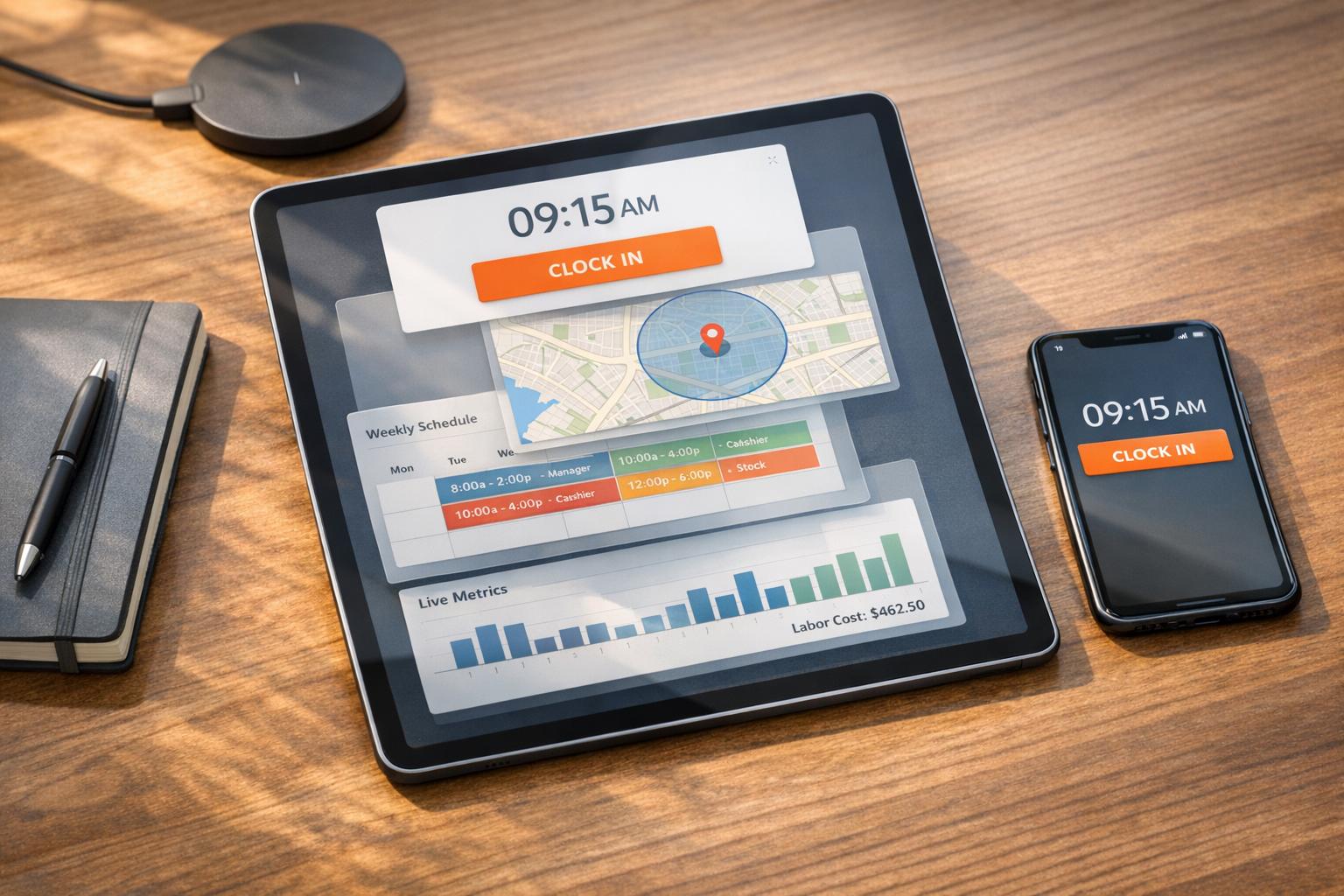
Author: Ron Daniel
How to Manage Employee Hours Without Spreadsheets
Replace spreadsheets with digital clock-ins, geofencing, automated scheduling, and real-time reports to reduce payroll errors and control labor costs.
Most managers I know have been there: frantically scrolling through a sea of spreadsheets, trying to figure out who clocked in late or why payroll numbers don’t add up. It’s a mess. I’ve seen shifts get double-booked, overtime hours sneak past unnoticed, and PTO requests buried in email threads. The worst part? It’s not just frustrating - it’s expensive. Did you know businesses lose $50 billion a year to time theft alone? That’s not even counting the hours HR teams spend fixing errors.
Here’s the reality: spreadsheets weren’t built for managing people. They’re static, prone to mistakes, and don’t give you the real-time visibility you need to stay on top of things. That’s why at Pebb, we decided to ditch them altogether. Instead, we built a platform that handles everything - clock-ins, schedules, PTO, and more - in one place. No more guesswork or late-night email chains. Just accurate, up-to-date data that makes managing your team easier.
In this article, I’ll share how we’ve helped businesses move away from spreadsheets and toward smarter, digital tools. From cutting down payroll errors to automating schedules, I’ll break it all down step by step. Let’s dive in.
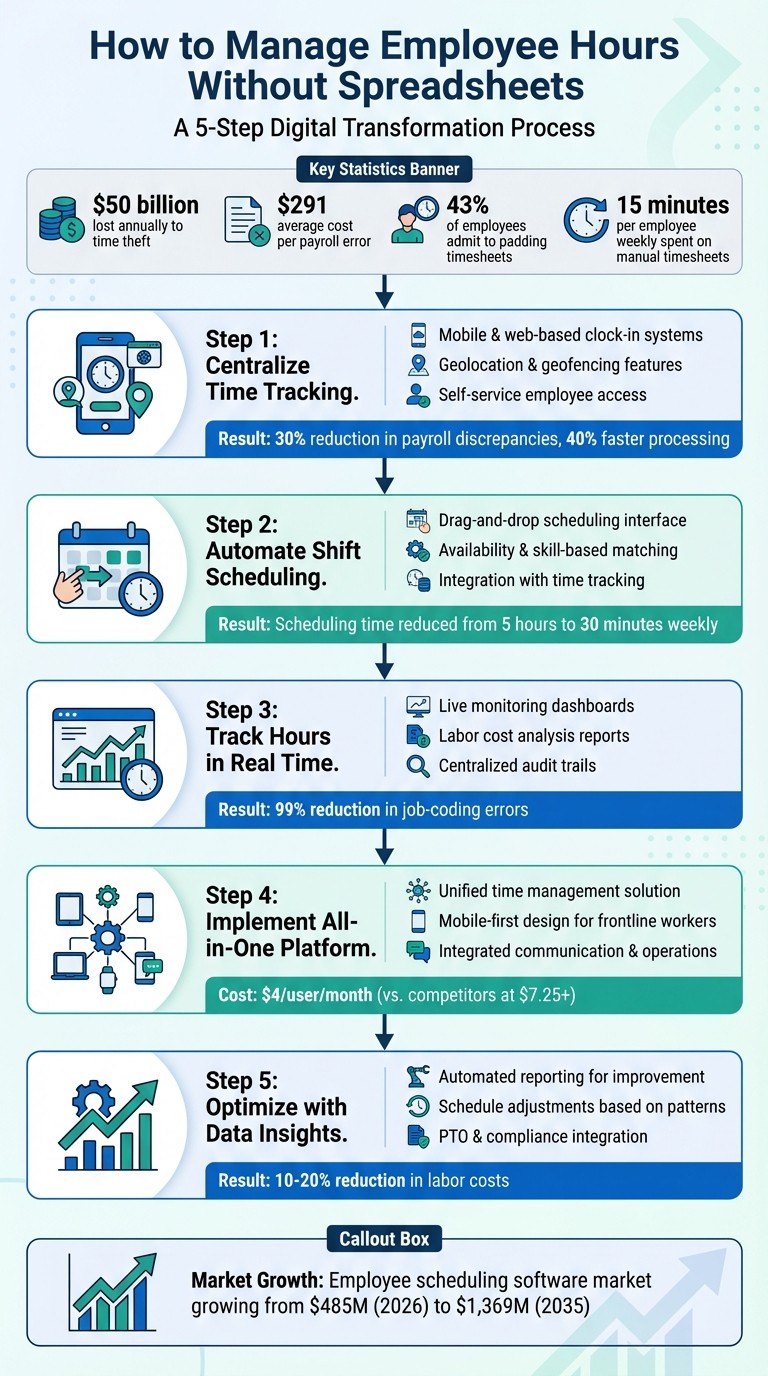
5-Step Process to Manage Employee Hours Without Spreadsheets
Problems with Spreadsheet-Based Time Tracking
Let me tell you, spreadsheets might seem like a simple solution for tracking employee hours, but they come with a host of headaches. And these aren't just small hiccups - they can lead to serious financial losses. Let’s break down why spreadsheets just don’t cut it.
Manual Data Entry Errors
Here’s the thing: every time someone manually inputs data into a spreadsheet, there’s room for error. A "7" can easily turn into a "1", someone might forget to log a shift until days later, or an important formula calculating overtime could accidentally get deleted. These mistakes aren’t just annoying - they’re expensive. On average, payroll errors cost businesses about $291 per mistake. Over the course of a year, companies with 1,000 employees can lose $78,700 just from missing or incorrect time punches.
And it doesn’t stop there. Manual systems struggle with keeping up with overtime thresholds, tracking overlapping shifts, and separating billable from non-billable hours - all of which can throw off project costs and profitability. Plus, without proper identity verification, some employees might engage in "buddy punching", a practice that costs U.S. businesses a staggering $373 million annually.
If that wasn’t enough, these manual processes also eat up a ton of time for managers.
Time-Consuming Updates
When you rely on spreadsheets, even small changes can snowball into hours of extra work. Imagine a last-minute shift change - it’s not just a quick fix. You’re copying, pasting, recalculating, and double-checking everything.
Dan Robin, one of my colleagues at Pebb, put it perfectly:
"Spreadsheets were built for numbers, not people. They were never designed to manage fluctuating human availability, complex overtime laws, or last-minute shift swaps".
Managers spend an average of 15 minutes per employee every week reviewing and updating manual timesheets. If you’re managing a team of 30, that’s 7.5 hours a week wasted on administrative tasks - time that could be spent on training, coaching, or just focusing on bigger priorities.
No Real-Time Collaboration
Here’s another big issue: spreadsheets don’t play well with real-time updates. You might create a schedule, save it as a PDF, and email it to your team. But what happens when someone calls in sick or a shift needs to change? Suddenly, you’re juggling revised schedules sent through texts or emails, and before you know it, there are multiple versions floating around.
This lack of transparency causes confusion. Managers can’t quickly verify clock-ins, monitor overtime, or ensure everyone’s on the same page. Employees, meanwhile, are left frustrated when they don’t have clear, up-to-date information about their schedules.
In short, spreadsheets might seem like a simple solution at first, but they create more problems than they solve. And as teams grow or schedules get more complex, these issues only multiply.
Step 1: Centralize Time Tracking with Digital Clock-In Tools
Let me tell you, nothing eats up time like juggling paper timesheets, scattered texts, and endless email threads. That’s why we rely on a centralized digital clock-in system at Pebb. It’s a game-changer - employees clock in and out with ease, and managers get a real-time view of everything in one place. No more spreadsheet chaos or second-guessing whether you’re looking at the latest schedule updates.
Mobile and Web-Based Clock-In Systems
Here’s the beauty of digital clock-in tools: they work wherever your team does. Whether someone’s logging hours from their phone on the warehouse floor or a desktop at the front desk, all the data flows seamlessly into one central system. It’s instant, automatic, and eliminates the headache of outdated or mismatched schedules.
At Pebb, our clock-in feature is designed to be quick and user-friendly. Employees just tap a button to log their hours, and managers get real-time updates through a dashboard. Considering that 60% of frontline staff are paid hourly, getting time tracking right isn’t just about convenience - it’s about ensuring accuracy and keeping morale high.
But here’s the thing: universal access alone isn’t enough. You’ve got to verify where the clock-ins happen.
Geolocation and Geofencing Features
This is where geofencing steps in. Think of it as drawing an invisible boundary around your job site. Employees can only clock in when they’re physically within that boundary. It’s a simple way to stop “buddy punching” (when one employee clocks in for another) and cut down on timesheet padding. And trust me, the numbers are staggering: 43% of employees admit to padding their timesheets, and timesheet fraud can cost businesses up to 7% of total payroll.
With geolocation-based tracking, you get tamper-proof records showing exactly when and where employees clock in. For mobile or field teams, this is a lifesaver. Managers can instantly see who’s arrived at which location, making payroll not just faster but far more accurate. Businesses using location-based systems have reported payroll discrepancies dropping by up to 30% and processing time slashed by as much as 40%.
Once you’ve got location tracking locked down, the next step is giving employees the tools to take charge of their own schedules.
Self-Service Access for Employees
One of the best perks of digital tools? Employees can manage their own time. They can check their logged hours, view upcoming shifts, request time off, or even swap shifts - all from their phones. No more constant questions like, “When’s my next shift?” or “How many hours did I work last week?”
This kind of self-service access is a game-changer for both employees and managers. Employees feel more in control, and managers aren’t buried under a mountain of texts and requests. Approving or denying a shift swap takes just a click, freeing up time for more important tasks. It’s a win-win that builds trust, reduces admin work, and keeps the entire team running smoothly.
Next, I’ll dive into how automated scheduling can take workforce management to the next level.
Step 2: Automate Shift Scheduling and Availability Management
Once you've got time tracking under control, the next step is to automate shift scheduling. Why? Because manual scheduling is a breeding ground for mistakes - think double-bookings, missed time-off requests, and overtime headaches. Automated tools take care of these issues by offering visual interfaces, real-time availability updates, and instant conflict detection.
Drag-and-Drop Scheduling
Picture this: instead of wrestling with spreadsheets, you’re dragging and dropping shifts into a calendar. That’s the beauty of drag-and-drop scheduling. It’s fast, intuitive, and flags problems like overlapping shifts or overtime risks right away. Tools like Shyftplan even use AI to help managers create rosters in seconds, ensuring compliance with labor laws for industries that deal with frequent schedule changes. Some managers have shaved their scheduling time from five hours a week to just 30 minutes by switching to these tools.
At Pebb, our shift scheduling feature works the same way. You simply drag a shift, drop it onto someone’s calendar, and the system instantly checks for conflicts. Got a double-booking? It’ll flag it. Someone nearing overtime? You’ll know before it becomes a problem. Plus, you can save templates for recurring schedules - like the weekend rush or holiday shifts - so you’re not starting from scratch every week.
Availability and Skill-Based Scheduling
Here’s where things get even easier: employees can update their own availability. No more chasing people down with emails or texts. Instead, you get a dashboard that shows exactly who’s free and who isn’t. This cuts out the guesswork and ensures you’re scheduling people who can actually work those shifts.
But availability is only half the story. You also need to make sure the right person is in the right role. That’s where skill tagging comes in. For example, if you’re running a restaurant and need a certified bartender for Friday night, skill-based scheduling lets you tag employees by role (bartender, server, host) and filters your options to show only qualified staff. This approach can improve efficiency by 20-25%, making sure you’ve got the right skills on the floor at the right time. And since this data feeds directly into your time tracking system, everything stays aligned.
Integration with Time Tracking
Now, let’s talk integration. Your scheduling tool should sync with your time tracking system. Why? Because when schedules and clock-in data are connected, you can spot issues in real time. For example, if someone clocks in early or stays late without approval, you’ll know immediately. This keeps you compliant with labor laws and avoids overstaffing during slower periods.
Tools like Shyftplan make this seamless by linking scheduling and time tracking. They even send automatic alerts for overtime risks, so you can adjust shifts before labor costs spiral. At Pebb, our Shifts Scheduling and Clock-In features work hand-in-hand. The schedule you create flows directly into the clock-in system, flagging any deviations - like unscheduled shifts - right away. This kind of real-time monitoring has helped businesses cut payroll discrepancies and reduce labor costs by 10-20% through smarter staffing decisions.
Bottom line? Automating your scheduling process doesn’t just save you hours - it slashes errors, keeps labor costs in check, and gives your team clarity about their schedules. Up next, let’s dive into tracking and reporting those hours in real time.
Step 3: Track and Report Employee Hours in Real Time
Once scheduling is automated, the next step is keeping tabs on employee hours as they happen. That’s where real-time tracking comes in. With Pebb's tools, you get an up-to-the-minute view of your workforce. Imagine having a dashboard that tells you exactly who’s clocked in, who’s inching toward overtime, and how labor costs are shaping up - all in real time. This isn’t just about knowing what’s happening; it’s about making quick, informed adjustments when needed.
Dashboards for Real-Time Monitoring
Think of the dashboard as your command center. It gives you a snapshot of who’s working, who’s running late, and who’s close to hitting overtime. For fast-paced environments like warehouses, where poor scheduling can slash productivity by 15%, this kind of visibility is a game-changer. At Pebb, our dashboard doesn’t just show you the basics - it flags any anomalies, like missed clock-ins or overtime thresholds being crossed. And here’s the kicker: Pebb is an all-in-one employee app for communication and operations that works for both frontline and office teams. Considering that 86% of employees say the right tech reduces job stress, it’s clear that this level of transparency helps everyone work better and feel better.
Reports for Labor Cost Analysis
Now let’s talk numbers. Automated reports give you insights into attendance trends, time-off patterns, and labor costs, whether by department, location, or individual shift. These reports integrate seamlessly with payroll systems, so you can say goodbye to manual data entry errors. Take Miller Construction, for example - they slashed job and cost-coding errors by 99% after syncing their time-tracking tool with their ERP system. Pairing Pebb with payroll providers like Gusto or ADP doesn’t just save time; it also eliminates the copy-paste mistakes that lead to payroll disputes. Plus, all this data feeds into a centralized audit trail, making sure every change is documented.
Centralized Audit Trails
Here’s where things get airtight. Digital platforms like ours create detailed, timestamped records of every single clock-in, shift swap, and manager approval. So if there’s ever a question about a shift not being recorded, you’ve got the evidence at your fingertips. This kind of oversight is crucial, especially when labor costs can eat up 15–25% of sales in retail - and can balloon to 50–60% without proper tracking. With Pebb, every action is logged automatically, giving you a reliable record for compliance and dispute resolution.
Step 4: How Pebb Simplifies Time Tracking and Scheduling
Let me tell you, juggling schedules, tracking time, and managing PTO used to feel like a never-ending game of whack-a-mole. But Pebb? It changes the game entirely. By pulling all those moving parts into one mobile-first app, we’ve made it ridiculously easy to keep everything in sync. No more spreadsheets, random texts, or sticky notes scattered everywhere. It’s all in one place - clean, organized, and accessible for both frontline and office teams.
All-in-One Solution for Time Management
Here’s the deal: we built Pebb so scheduling happens right where your team is already chatting - in their communication Spaces. Post a shift or approve a swap, and boom - it’s in the News Feed, front and center when employees log in. This isn’t just a nice-to-have; it’s smart. The employee scheduling software market is expected to grow from $485.32 million in 2026 to a whopping $1,369.44 million by 2035. Companies are catching on that juggling disconnected tools is a recipe for inefficiency.
With Pebb, your team can do it all in-app: view schedules, clock in, request time off, and swap shifts. And forget about needing a corporate email - employees can join with a simple custom invite link. It’s seamless, especially for frontline workers who don’t sit behind desks all day. This kind of integration doesn’t just save time - it sets the stage for smarter, more efficient operations.
Cost-Effective Premium Features
Let’s talk numbers. Our Standard plan? Completely free for up to 15 employees. You get work chat with unlimited history, a news feed, a knowledge library, tasks, digital forms, a calendar, clock in, shift scheduling, PTO management, apps, and unlimited Spaces, Teams & Branches right out of the gate. Want more? Our Premium plan is just $4.00 per user per month. That unlocks advanced analytics, unlimited admins, permissions control, advanced work chat, advanced posts, built-in voice and video calls, integrations, enterprise SSO, and premium SLA support.
Here’s a quick comparison: Slack Pro runs $7.25 per user, and Microsoft Teams starts at $4.00+ per user with a setup that’s anything but straightforward. Pebb isn’t just more affordable - it’s built specifically for teams that need operations and communication rolled into one. No extra fluff, just what you need.
Comparison to Competitors
Let me break it down for you:
Feature | Pebb (Premium) | Slack (Pro) | Microsoft Teams |
|---|---|---|---|
Monthly Cost | $4.00/user | $7.25/user | $4.00+/user |
Scheduling | Native Shift Scheduling | Third-party only | Included (Shifts app) |
Frontline Focus | High (Mobile-first) | Low (Desk-centric) | Medium (Complex) |
All-in-One | Yes (Chat + Schedule + PTO + Tasks + Forms) | No (Chat only) | Yes (but complex) |
Voice/Video | Included | Included | Included |
Sure, Slack and Teams are solid for messaging, but let’s be real - they weren’t built with shift workers in mind. Slack needs third-party tools for scheduling, and Teams’ Shifts app? It’s clunky and disconnected. Pebb is the only platform that truly combines chat, scheduling, and operations into one simple, affordable solution.
As Dan Robin, one of our team leads at Pebb, puts it:
"Scheduling isn't just about plugging names into a calendar; it's a constant act of communication and negotiation. It's about fairness, predictability, and respect".
That mindset is baked into everything we do. Up next, I’ll show you how we use data-driven insights to make employee hours work even harder. Stay tuned!
Step 5: Optimize Employee Hours with Data Insights
Once the digital tools are up and running, the next step is using the data they generate to refine how employee hours are managed. It’s about spotting trends, tweaking schedules, and keeping labor costs in check - all without losing sight of employee well-being.
Using Reports for Continuous Improvement
Here’s where Pebb really shines. The platform’s automated reports make it easy to identify inefficiencies and adjust schedules strategically. You get a clear view of hours worked, attendance patterns, and time-off trends - all in one dashboard. Let me give you an example: if you notice that three employees are consistently hitting overtime every Friday, that’s a red flag. With Pebb's automated alerts, you’ll get a heads-up before those overtime hours pile up, giving you the chance to reassign shifts and avoid unnecessary costs or employee burnout.
I’ve seen firsthand how inefficient scheduling can drag down productivity. By reviewing these reports weekly, you can pinpoint low-utilization shifts, set performance benchmarks, and fine-tune your scheduling process. It’s not just about fixing immediate issues; it’s about building a system that works smarter over time.
Adjusting Schedules Based on Insights
When you let data guide your scheduling decisions, you not only save money but also create a more balanced workload for your team. Say your reports reveal chronic understaffing on Tuesday mornings - that’s your cue to reassign staff using Pebb’s real-time availability data. Or maybe you notice $5,000 in weekly overtime costs. By cross-referencing hours and using Pebb’s drag-and-drop scheduling feature, you can redistribute shifts and bring those costs down. Other tools, like Hourly.io, also let you set rules like capping shifts at eight hours, which helps streamline payroll and eliminates unnecessary expenses.
Integrating PTO and Compliance Data
Once you’ve nailed down scheduling adjustments, the next step is integrating PTO (Paid Time Off) data. This ensures compliance and keeps your operation running smoothly. For example, in the U.S., 16 states require payouts for unused PTO. That means accurate tracking isn’t just nice to have - it’s legally essential. With Pebb, PTO approvals sync directly into your schedule, giving you a single, up-to-date view of who’s available and when.
But here’s the thing: PTO tracking isn’t just about compliance. It’s also about supporting your team’s well-being. Did you know that around 62% of workers don’t use all their vacation time? That’s an opportunity to check in. If you spot employees with unusually high PTO balances, it’s worth having a conversation. As Dan Robin says:
"Good PTO tracking isn't about enforcing rules; it's about enabling rest. The data should prompt curiosity, not just compliance checks." - Dan Robin
Wrapping It All Up
Managing employee hours doesn’t have to feel like juggling flaming swords. With today’s digital tools - think mobile clock-ins, drag-and-drop scheduling, and automated alerts - you can ditch the spreadsheets, group texts, and manual entry hassles for good. These tools not only cut down on errors but also help you stick to your labor budget while keeping everyone on the same page.
Here’s the reality: spreadsheets just can’t keep up as your business grows. They’re clunky, prone to compliance risks, and make even small schedule tweaks a headache. Platforms like Pebb take all that chaos and simplify it. Time tracking, shift planning, PTO management, labor cost reporting - it’s all centralized in one mobile-friendly hub that works whether your team’s on the frontlines or behind a desk.
At Pebb, we’ve designed our tools with one clear mission: making operations simpler and more affordable. For just $4 per user per month (or free if you’ve got 15 employees or fewer), you’ll get features like analytics, unlimited admins, permissions control, advanced work chat, advanced posts, built-in voice and video calls, integrations, enterprise SSO, and premium SLA support. It’s not just about filling shifts; it’s about creating a system that’s fair, efficient, and respects everyone’s time.
If you’re still clinging to spreadsheets in 2026, you’re not just slowing yourself down - you’re leaving money and productivity on the table. The workforce management market is set to hit $12.04 billion by 2031, and it’s no surprise why. Businesses are realizing that centralized, automated systems give managers control and employees clarity. The benefits - keeping your labor budget in check, reducing mistakes, and improving transparency - are the bedrock of smart time management.
Switch to Pebb, and you’ll start seeing the difference almost immediately. Your team will appreciate it, and your bottom line will, too.
FAQs
How do I switch from spreadsheets to Pebb without disrupting payroll?
To get things rolling without a hitch, the first step is setting up Pebb's scheduling and time-tracking tools. These tools are designed to simplify managing hours and shifts, so you’ll want to start here. Next, take your current spreadsheet data and import it into Pebb. This part is crucial - double-check everything to ensure the data is accurate and lines up with your payroll records.
Once that’s squared away, use Pebb’s detailed reporting features to sync everything with your payroll system. This integration not only saves time but also reduces the chances of errors. Finally, make sure your team is in the loop. Communicate the changes clearly so everyone knows how the new process works, helping you avoid any confusion or interruptions.
What do I need to set up geofencing for clock-ins?
To get geofencing up and running for clock-ins, you’ll start by setting up virtual boundaries around specific work locations. These boundaries rely on GPS, Wi-Fi, or cellphone data to track movement. Once the zones are defined, you’ll configure your time tracking system to recognize when employees enter or leave these areas.
Here’s a key step: make sure employees enable GPS on their devices and allow the app to access their location. With Pebb’s tools, integrating geofencing into your workflow becomes a smooth process, making clock-ins effortless and precise.
How can I use real-time reports to reduce overtime fast?
Real-time reports are a game-changer when it comes to managing overtime and keeping labor costs in check. With Pebb’s shift scheduling tools, you get automatic reports packed with clear insights into hours worked, attendance records, and time-off patterns. By regularly reviewing these reports, managers can quickly spot overtime trends and make staffing adjustments on the fly.
What makes it even better? Pebb’s mobile access and instant updates mean any schedule changes are communicated right away. This keeps everyone on the same page and ensures overtime stays under control without missing a beat.
