

Author: Ron Daniel
The HR Toolkit: Essential Templates for Onboarding and Performance Tracking
Practical onboarding, 30-60-90 plans, and performance review templates to streamline HR workflows and improve retention.
Have you ever felt like HR processes are stuck in the Stone Age? I used to. Every new hire meant juggling endless forms, missed steps, and scattered templates - Google Drive here, email attachments there, maybe even a dusty binder somewhere. It felt like running a marathon but never reaching the finish line.
The numbers back it up too. Did you know HR teams lose over 30 hours of admin time per hire, and nearly half of onboarding steps often go unfinished? That’s not just frustrating - it’s costly. Worse, it leaves new hires feeling disconnected before they’ve even settled in.
But here’s the good news: I’ve seen firsthand how the right templates can change everything. At Pebb, we’ve built a system that doesn’t just organize your HR tasks - it transforms them into a smooth, manageable process. And it’s free for small teams, with Premium costing just $4 per user.
In this guide, I’ll walk you through the templates we use daily - onboarding checklists, 30-60-90 day plans, performance reviews - and show you how they’ve saved us time and reduced errors. Ready to simplify your HR workflow? Let’s dive in.
Onboarding Checklist Template: Getting New Hires Started Right
Let’s face it - onboarding can quickly spiral into chaos without a clear plan. That’s why having a solid checklist is a game-changer. At Pebb, we stick to the "5 C's" framework to keep things on track: Compliance (handling legal docs like I-9s and W-4s), Clarification (spelling out role responsibilities), Confidence (offering training and support), Connection (team introductions), and Culture (sharing company values). Nail these, and new hires won’t just show up - they’ll hit the ground running.
Here’s how we break down onboarding into three easy-to-follow phases.
Preboarding: Setting the Stage Before Day One
Preboarding starts the moment a candidate accepts the offer and runs up to their first day. It’s all about making sure their first day feels smooth, not scattered. Within 24 hours of the offer, send a welcome email outlining key details like their Day One agenda, dress code, parking info, and links to complete forms like the W-4 and I-9 Section 1. If they’re a remote hire, make sure their equipment ships out 5–7 days in advance.
We’ve also found that assigning a peer buddy before their start date works wonders. It gives them someone to lean on for quick questions - without feeling awkward about asking their manager.
First Day: Creating a Memorable First Impression
Day One is where the Confidence and Connection pieces really shine. Start the day by knocking out I-9 Section 2 verification. Sure, you’ve got three business days to handle it, but getting it done within the first 90 minutes sets the tone for efficiency. After that, focus on the human side of things: a quick workspace tour, team introductions, and a one-on-one with their manager to align on priorities.
One thing we never overlook? Making sure their system logins work flawlessly. Nothing kills Day One enthusiasm faster than tech issues. The goal here isn’t to overload them - it’s to make them feel confident they made the right choice in joining us.
First 30 Days: Building Momentum
The first month is where the real integration happens. Weekly check-ins are non-negotiable - they help nip potential issues in the bud. Keep the peer buddy actively involved, too, so the new hire has a go-to person for guidance. Start rolling out role-specific training and ease them into project responsibilities.
At the 30-day mark, we schedule a progress review. This isn’t about grading their performance; it’s a chance to see how they’re feeling, what’s working, and what’s not. It’s like a pulse check to make sure they have everything they need to succeed. And here’s a stat that keeps us motivated: employees with great onboarding experiences are 69% more likely to stay for at least three years.
With Pebb’s centralized template system, all of these steps stay organized and easy to manage, so nothing slips through the cracks. That’s how we keep onboarding smooth, simple, and stress-free.
30-60-90 Day Onboarding Plan Template: Breaking Down the First Three Months
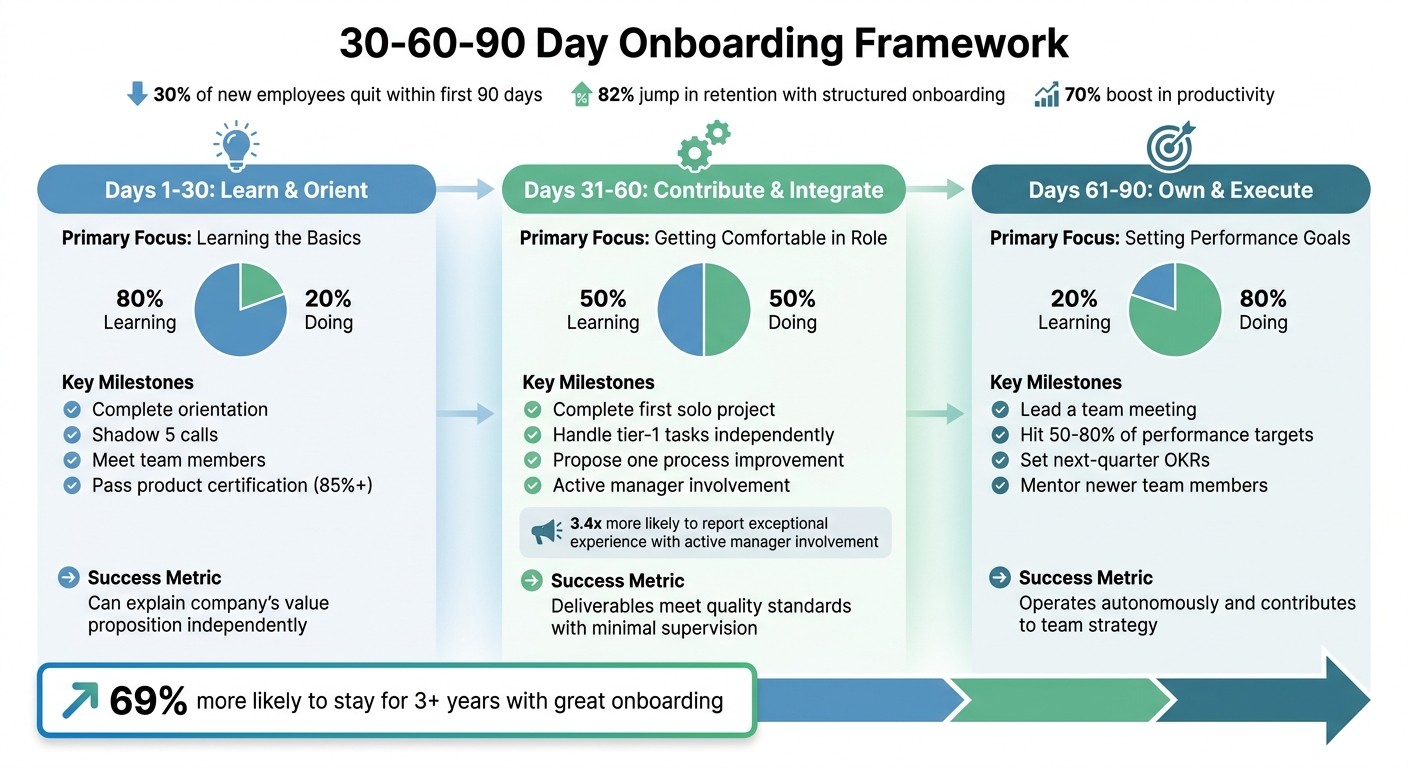
30-60-90 Day Onboarding Framework with Key Milestones and Success Metrics
Did you know that 30% of new employees quit within their first 90 days? That stat always stops me in my tracks. It’s a brutal reminder of how critical those first three months are. But here’s the good news: the 30-60-90 day framework can make all the difference. By breaking onboarding into three clear phases, each with its own milestones, we set new hires up for success instead of leaving them to figure it out alone. And the results speak for themselves - companies with structured onboarding report an 82% jump in retention and a 70% boost in productivity.
What I love about this framework is how it evolves with the new hire. The first 30 days are all about learning the ropes. By the second month, they’re starting to contribute. And by the end of the third month, they’re taking ownership and delivering results. Each phase focuses on 3–5 measurable goals, which keeps things manageable and prevents that overwhelming “drinking from a firehose” feeling.
One thing I’ve learned the hard way? Pushing for results too soon is a mistake. Even seasoned professionals need time to absorb the company’s context and way of working. That’s why we follow the 80/20 rule: in the first month, new hires spend 80% of their time learning and just 20% doing. By day 90, those numbers flip, and they’re fully in the driver’s seat.
Let’s break this down phase by phase.
Phase | Primary Focus | Key Milestone Examples | Success Metric |
|---|---|---|---|
Days 1-30 | Learn & Orient | Complete orientation; Shadow 5 calls; Meet team. | Can explain the company’s value proposition independently. |
Days 31-60 | Contribute & Integrate | Complete first solo project; Handle tier-1 tasks; Propose one process fix. | Deliverables meet quality standards with minimal supervision. |
Days 61-90 | Own & Execute | Lead a team meeting; Hit 50–80% of performance targets; Set next-quarter OKRs. | Operates autonomously and contributes to team strategy. |
Now, let’s dive into each phase, starting with the first 30 days.
First 30 Days: Learning the Basics
The first month is all about getting the lay of the land. New hires focus on compliance training, meeting their team (and cross-functional partners), and understanding the company’s mission. Shadowing is a game-changer here - whether it’s sitting in on customer calls or watching workflows in action. For remote hires, we rely on screen-shares and recorded walkthroughs to replicate that experience.
Here’s a tip: avoid vague goals like “learn the product.” Instead, set specific targets like “Pass the product certification quiz with 85% or higher by Day 30”. It’s amazing how much clarity and motivation that kind of precision can bring. Oh, and don’t skip those weekly check-ins - they’re your chance to catch and fix issues before they escalate.
Days 31-60: Getting Comfortable in the Role
By the second month, new hires should be applying what they’ve learned. This is the time for real deliverables - handling tasks independently, contributing to team projects, and even suggesting one process improvement. Encouraging that kind of critical thinking early on helps them feel like a true part of the team.
Remember that 30-day review you did? Now’s the time to act on the feedback. If they need more exposure to a tool or team, make it happen. Here’s a stat that always sticks with me: new hires are 3.4 times more likely to report an exceptional onboarding experience when managers stay actively involved. So don’t hit autopilot during this phase - your engagement matters.
Days 61-90: Setting Performance Goals
The final phase is where things really come together. By now, new hires should be owning a specific project or process, meeting performance targets, and maybe even mentoring someone newer. This is also when we set long-term SMART goals for the next 6–12 months, aligning their objectives with the team’s broader goals.
We always schedule the 90-day review well in advance - usually a 45–60 minute session. It’s not just about evaluating performance; it’s about making sure the new hire feels confident and connected. And honestly, with Pebb’s built-in tracking features, this process is a breeze. No messy spreadsheets, no confusion - just clear milestones and progress at a glance. It’s a win-win for everyone.
Performance Review Form Template: Organizing Feedback and Development
Let me tell you, a great performance review form can make all the difference when it comes to keeping employees engaged and on track. Did you know that 72% of workers don’t trust their company’s performance management process? That’s a staggering number. But here’s the thing - when employees know exactly how their success is measured, they’re more than twice as likely to feel motivated. It all comes down to having a clear, standardized template that turns vague feedback into actionable steps.
So, what makes a performance review form work? It’s all about structure. A solid form should include three essential sections: self-assessment, manager feedback, and goal-setting. These pieces work together to create a complete and productive conversation. Think of it as a roadmap for development rather than just another HR task.
"A well-designed employee performance review template is the simplest way to bring structure without sacrificing personalization." - Leapsome Team
Keep It Simple: The Power of a 3-5 Point Scale
When it comes to the rating system, less is more. A 3-5 point scale works best - anything larger tends to confuse people or inflate grades unnecessarily. And forget about those vague phrases like "strong communicator." Instead, focus on specifics, like "reduced project delays by 20% through weekly team meetings". The more concrete the feedback, the more actionable it becomes.
Also, don’t rush the process. Plan for 60-90 minutes per review meeting. Trying to squeeze everything into a shorter time frame just doesn’t do justice to the conversation.
Self-Assessment Section
This part is all about giving employees the chance to reflect before the meeting even starts. It’s not just a box to check - it’s their opportunity to highlight wins, acknowledge challenges, and pinpoint areas where they need support. When someone comes prepared with their own thoughts, the discussion becomes a two-way street. Suddenly, it’s not just about receiving feedback but collaborating on solutions and growth.
Manager Feedback Section
Here’s where you, as the manager, get to provide the official record. Start with the good stuff - accomplishments and strengths - before diving into areas for improvement. One tip? Don’t let recency bias creep in. Keep notes throughout the year so your feedback feels balanced and fair, not just focused on the last quarter. Employees notice when you take the time to see the bigger picture.
Goal Setting and Development Plans
Finally, every review should wrap up with a clear action plan. This is where you and your employee set SMART goals (Specific, Measurable, Achievable, Relevant, and Time-bound) for the next review period. Don’t stop there - include training needs, deadlines, and milestones. With Pebb’s built-in tracking tools, you can ditch the spreadsheets and keep everything in one place. Both you and your team member can monitor progress and stay aligned, making accountability a breeze.
Performance reviews don’t have to feel like a chore. With the right template, they become a powerful tool for growth - for both employees and the company.
Goal-Setting and Tracking Template: Keeping Objectives Clear and Measurable
Here’s something that’s stuck with me: less is more when it comes to goal-setting. The best HR teams I’ve worked with zero in on just 2–3 goals per review period. Why? Because trying to juggle too many objectives at once dilutes focus and, honestly, makes it harder to excel.
Now, let’s talk about what makes a solid goal-setting template. Start with the SMART framework - Specific, Measurable, Attainable, Relevant, and Time-bound. It’s like turning a vague idea into a step-by-step plan. For each goal, spell out how it ties back to company objectives, list 1–3 actionable steps along with the resources you’ll need, and don’t forget to highlight potential challenges [29, 31].
"If it's worth doing, it's worth measuring. Tracking progress on goals is key to driving accountability." – Lattice
Setting Objectives and Key Results (OKRs)
OKRs are a game changer for breaking down big goals into bite-sized, measurable pieces. Think of objectives as the destination and key results as the mile markers along the way. To make it even more effective, use a mix of leading indicators (those that predict performance) and lagging indicators (those that show results). For instance, if the goal is to boost customer satisfaction, a leading indicator might be cutting response times to under two hours, while a lagging indicator could be hitting a 90% satisfaction score by the end of 2026.
And don’t shy away from stretch goals - those ambitious targets that push the team a little further without being unrealistic. One tip: keep your tracking tools easy to find. With Pebb, everything - goal templates, performance reviews, check-in notes - sits in one place. No more digging through endless folders or emails. Plus, regular check-ins help keep things on track.
Tracking Progress with Regular Check-Ins
Here’s the thing: annual reviews are outdated. To keep goals relevant and on course, schedule monthly or quarterly check-ins. These meetings are like checkpoints, giving you a chance to spot issues early and adjust as priorities shift [21, 31]. Come prepared with objective data - like project milestones or KPIs - so the conversation stays grounded in facts, not vague opinions.
Make these check-ins a two-way street. Ask open-ended questions to uncover what’s working, what’s not, and where the team might need extra support. And with Pebb, it’s all streamlined. You can set reminders, track progress in real time, and update goals right in the platform. It’s a lifesaver when it comes to keeping everyone aligned and avoiding the chaos of scattered spreadsheets or forgotten emails.
Using These Templates in Pebb: Bringing Everything Together
Let me tell you, one of the biggest headaches in HR is juggling a million tools for simple tasks. Slack for chatting, Google Sheets for tracking, email for reminders - it’s like playing an endless game of app hopscotch. That’s exactly why we built Pebb. We wanted to create a single place where everything HR-related could live, work, and thrive.
With Pebb, you can upload your onboarding checklists, performance review forms, and goal templates straight into the Knowledge Library, making them accessible to everyone on your team. No more digging through email threads or shared drives. Everything is right there, ready when you need it.
Here’s where it gets even better: automation. When a new hire joins, Pebb takes over the heavy lifting. It can automatically set up their 30-60-90 day tasks, send a warm welcome message, and assign them to role-specific Spaces like "Shift Schedules" or "HIPAA Compliance." This isn’t just a little time-saver - it cuts manual admin work by a whopping 65%.
"A checklist, on its own, is just a list of tasks. It's sterile. It lacks a pulse. What a thoughtful process can do, however, is show people you care." – Dan Robin, Pebb
Now, let’s dive into how you can add and tweak these templates to fit your team like a glove.
Adding and Customizing Templates in Pebb
Uploading your HR templates into Pebb is as easy as drag-and-drop. Once they’re in the Knowledge Library, you can break down bulky documents like the employee handbook into bite-sized articles. No more overwhelming PDFs! Plus, you can require digital acknowledgment, so you’ve got a built-in audit trail.
Need something more tailored? Let’s say you’re creating equipment checklists for different roles - developers versus retail staff, for instance. You can customize these templates for each team and assign them directly to IT or Ops with clear deadlines. It’s all about making sure the right people see the right tasks at the right time.
And if you ever need to tweak a template, no problem. You can edit it in real time, and the changes instantly update for everyone. No version control nightmares here.
Once your templates are set, Pebb takes it a step further by tracking progress seamlessly.
Using Pebb's Built-In Features for Tracking
Here’s where Pebb really shines. Those 30-60-90 day goals? You can turn them into tasks with specific due dates, and Pebb automatically schedules recurring check-ins at the 30, 60, and 90-day marks. Employees get instant notifications about incomplete forms or upcoming certification renewals, so you don’t have to play reminder police.
Managers and employees can also use Private Spaces to keep everything in one place - check-in notes, feedback, goal updates, you name it. And because Pebb is mobile-first, frontline workers can access everything from their phones, whether it’s training videos, shift schedules, or task updates. No need for multiple apps like Slack or Teams, which often require separate tools for scheduling, tracking, and file sharing.
Here’s the kicker: Pebb does all this for just $4 per user per month on our Premium plan. It’s the simplest, most affordable way to keep your team aligned and avoid the chaos of tool overload.
Wrapping It All Up
Let’s talk about how these templates can transform the way HR operates.
HR doesn’t have to feel like putting out fires all day. With the right templates for onboarding and performance tracking, you’re creating a clear roadmap that ensures everyone stays aligned. Think of it as a safety net - no more missed forms, skipped check-ins, or confused new hires wandering in the dark.
Here’s a stat that might surprise you: about 20% of employee turnover happens within the first 45 days. And when someone leaves, it’s not just a hit to morale - it can cost anywhere from half to two times their annual salary. So, yeah, getting this right is more than important - it’s non-negotiable.
"The best template is one that not only informs but also engages new employees, making their transition smooth and building a foundation for long-term success." – Notion
Templates are great, but they’re only as effective as the system managing them. That’s where Pebb comes in. For just $4 per user per month, you get a centralized platform that handles it all - communication, scheduling, tracking, and file sharing. Your onboarding checklists, performance reviews, and goal-setting templates? They’re all tucked away in the Knowledge Library, ready to go whenever you need them.
We created Pebb because we’ve been there - juggling HR tasks across multiple tools is exhausting. By streamlining everything into one place, you can focus on what really matters: building a team that’s set up to succeed.
FAQs
What should I include in an onboarding checklist?
When it comes to onboarding new employees, having a solid checklist can make all the difference. Think of it as your roadmap to guide new hires through key phases like pre-boarding, Day 1 essentials, and ongoing training. Here’s what I’ve found works best:
Pre-boarding: Send out warm welcome emails, set up their accounts, and get their workspace ready. First impressions matter, and these small touches go a long way.
Day 1 activities: Focus on introductions, reviewing company policies, and walking through the basics of their role. This is the time to make them feel part of the team.
Ongoing training: Tailor role-specific training and set clear 30-60-90 day goals. This gives them a sense of direction and measurable progress.
Don’t forget the nitty-gritty like completing compliance paperwork - trust me, you don’t want to overlook that. And if you’re looking for ways to make this process even smoother, tools like Pebb can be a game-changer. For just $4 per user, Pebb offers features like shift scheduling, PTO management, and work chat to streamline onboarding. It’s all about setting the stage for success from Day 1.
How do I tailor a 30-60-90 day plan for different roles?
To create a solid 30-60-90 day plan, break it into three clear phases: learn (days 1–30), contribute (days 31–60), and own (days 61–90). Each phase should have specific, actionable goals tailored to the role’s responsibilities.
Take a sales position, for example. In the first 30 days, the focus might be on mastering product knowledge and understanding the sales process. During the next 30 days, the emphasis could shift to reaching out to clients and building relationships. By the final phase, the goal might be to take full ownership of key accounts and drive measurable results.
By aligning these objectives with the role’s core tasks, you’ll set a clear path for success.
How often should managers do goal check-ins?
Managers should plan mid-cycle goal check-ins - ideally every 3 to 6 months. These meetings are a chance to review progress, tweak goals if needed, and tackle any obstacles to keep everything aligned with the team's objectives. It's all about staying on track and ensuring everyone is moving in the same direction.
