

Author: Ron Daniel
Homebase vs Pebb (2026): Scheduling vs All-in-One Platform
Compare Homebase’s scheduling and time tracking with Pebb’s all-in-one app for chat, tasks, forms, PTO, and pricing.
Most teams don’t have a scheduling problem. They have a tool mess.
I see it all the time at Pebb.io. A manager uses one app for shifts, another for chat, a spreadsheet for PTO, and a shared drive for SOPs. Then something small breaks - a missed update, an unfilled shift, a checklist nobody saw - and the whole day gets harder than it should be.
That pattern shows up in the data too. Quinyx found frontline workers often juggle 2 to 3 mobile apps just for scheduling, pay, and chat, and in some cases far more. Staffbase also found only 10% of non-desk U.S. employees are very satisfied with internal communication. From my side, that gap usually comes from one issue: work lives in too many places.
So in this piece, I’m cutting through the noise. I’ll show where Homebase fits best if you want scheduling and time tracking, and where Pebb makes more sense if you want one app for shifts, chat, updates, tasks, forms, and team knowledge.
Quick overview:
Choose Homebase if your main goal is scheduling hourly staff and tracking time.
Choose Pebb if you want to run more of the workday in one place.
Watch the pricing model: Homebase charges by location, while Pebb starts free for up to 15 users and Premium is $4/user/month.
If you’re trying to decide between a scheduling-first tool and a broader employee app, this breakdown will help you get there faster.
Pebb: one platform for frontline and office teams
I’ve seen this play out more times than I can count at Pebb.io: a frontline team starts the day in one app for schedules, jumps to another for chat, checks a third for pay, and still ends up texting someone because nothing talks to each other. It’s messy. It slows people down. And for busy managers, it turns simple work into a daily scramble.
That’s the gap we built Pebb to fix.
Pebb was built to replace the tool sprawl frontline teams use every day. Pebb replaces the app sprawl frontline teams use for shift changes, updates, and coordination. According to a Quinyx study, frontline workers juggle an average of 2–3 mobile apps just to access scheduling, pay, and chat - and sometimes as many as 20. I’ve found that this mess usually shows up in the same four places: chat, scheduling, tasks, and knowledge access.
At its core, Pebb is a mobile-first, all-in-one workforce platform for frontline and office teams in retail, hospitality, logistics, manufacturing, and transportation. We kept pricing simple too. The free plan supports up to 15 users, and Premium costs $4 per user/month.
Chat, news feed, scheduling, PTO, and clock-in in one app
Here’s the thing: when a manager has to bounce between tools just to fill one shift, work gets harder than it should be.
Inside Pebb, a manager can publish a schedule, approve PTO, and coordinate coverage in one flow without leaving the app. I’ve watched teams cut out a ton of back-and-forth just by having these pieces in one place.
Work chat handles the fast-moving stuff like shift swaps, urgent questions, and team coordination. The news feed handles the bigger updates like policy changes, announcements, and company news. And because clock-in, scheduling, PTO, and the people directory sit right next to chat, adoption tends to go a lot smoother than rolling out a stack of separate tools.
Let me tell you what happened next on a few teams I worked with: once communication and scheduling started living together, the next pain point showed up right away. It was tasks and forms.
Tasks, digital forms, and knowledge sharing built in
A lot of scheduling tools stop at the schedule. We didn’t.
Beyond communication and scheduling, Pebb handles the day-to-day work that most scheduling tools skip entirely. Managers can assign store walk tasks, create opening and closing checklists, collect incident reports through digital forms, and store SOPs and onboarding documents in the built-in knowledge base - without a separate intranet or form tool.
That matters more than it may seem at first glance. When procedures live in one system, tasks are easier to follow, and handoffs don’t fall through the cracks as often. I’ve seen teams struggle when one update lives in email, a checklist sits on paper, and a report is buried in some form app no one wants to open.
There’s data behind that pain too. A Staffbase study found that only 10% of non-desk U.S. employees are very satisfied with internal communication. When procedures live in one place and tasks are tracked alongside chat, those gaps shrink fast.
When Pebb makes sense for teams replacing multiple apps
In my experience, Pebb makes the most sense for teams trying to replace WhatsApp, paper schedules, and scattered emails with one mobile app. That’s usually the moment when people stop patching systems together and start working from one shared place.
For teams that need more, the Premium plan at $4/user adds:
voice and video calls
analytics
permissions control
single sign-on
It’s a practical step up without a big jump in cost.
Homebase takes a narrower route, with scheduling and time tracking at the center.
Homebase: scheduling-first software for hourly teams
I’ve talked to a lot of hourly-team managers who started with paper schedules taped to a wall, then moved to spreadsheets, and then hit that moment where everything felt messy at once. That’s usually where Homebase comes into the picture.
Homebase is scheduling-first software for hourly teams. It replaces paper schedules, spreadsheets, and manual timecards with shift planning and time tracking. From what I’ve seen, that’s its lane. And compared with Pebb’s all-in-one setup, Homebase stays focused on scheduling and timekeeping.
Where Homebase stands out: shift scheduling and time tracking
This is the part Homebase does best.
Managers can copy last week’s schedule, adjust for availability, post open shifts, and approve shift swaps, then push everything to employees’ phones. I’ve seen why that matters. When you’re running a restaurant, retail store, or clinic, shaving even 15 minutes off schedule building each week adds up fast.
Employees can also submit availability and time-off requests in the app, which helps managers see who is free before assigning shifts. That sounds simple, but it saves a lot of back-and-forth. No more chasing people down with texts like, “Can you work Saturday?”
Time tracking is another strong point. Staff can clock in from a tablet, POS device, or phone, with GPS/geofencing on mobile. The system tracks hours, breaks, and overtime, and flags overtime or break issues. For teams with hourly staff, that kind of control can take a lot of stress off managers.
And when the week wraps up, timesheets are ready to export to payroll tools like Gusto or QuickBooks without manual re-entry. Let me tell you what happened next in a lot of teams I’ve watched: fewer payroll mistakes, less admin work, and fewer Sunday-night cleanups.
Homebase prices by location, with a free Basic tier and paid plans that scale by location.
That focus is where Homebase is strongest - and where its limits start to show.
What Homebase does not cover well
Here’s the thing: being great at scheduling doesn’t mean you cover the whole employee experience.
Homebase includes messaging, but it lacks a news feed, SOP library, and task checklists. Homebase also offers hiring tools, HR compliance alerts, and optional payroll, but those remain tied to the core scheduling and hours data.
From my side at Pebb.io, this is usually where the gap gets more obvious. A manager may handle shifts just fine, but then asks, “Where do I post company updates?” or “How do I store process docs?” or “How do I make sure opening and closing tasks get done the same way every time?”
Homebase includes messaging, but it lacks a news feed, SOP library, and task workflows. That gap becomes clearer in the feature-by-feature comparison below.
Next, the feature-by-feature comparison shows exactly where the two platforms diverge.
Pebb vs Homebase: feature-by-feature comparison
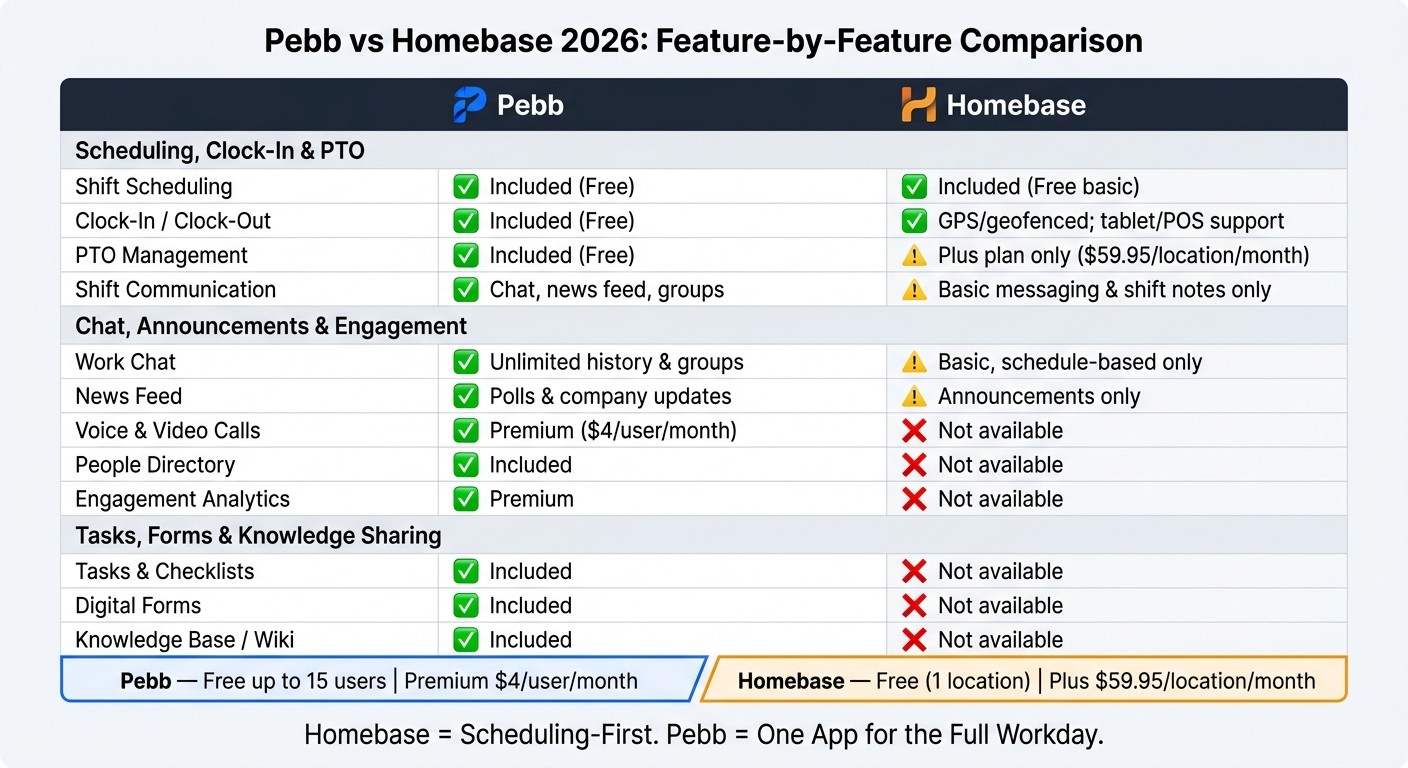
Pebb vs Homebase 2026: Feature-by-Feature Comparison
I’ve seen this comparison come up again and again at Pebb.io, and it almost always starts the same way. A manager wants to fix scheduling. Then a week later, they’re also trying to clean up shift communication, PTO requests, and day-to-day task follow-through. That’s when the gap becomes hard to ignore.
The split comes down to three workflows: scheduling, communication, and daily operations. In my experience, the best place to start is with the stuff managers touch every day: schedule changes, clock-ins, and PTO.
Pebb vs Homebase: scheduling, clock-in, and PTO
Here’s how it plays out in the real world. In Pebb, a manager can post a schedule, and the team can view it, talk about it, request PTO, and clock in from the same app. That sounds simple, but when you’ve worked with frontline teams, you know that keeping all of that in one place saves a lot of back-and-forth.
Homebase does a solid job with scheduling and time tracking. It’s polished in those areas. But PTO management only opens up on the Plus plan at $59.95 per location per month.
Feature | Pebb | Homebase |
|---|---|---|
Shift Scheduling | ✓ Included (Free) | ✓ Included (Free basic) |
Clock-In / Clock-Out | ✓ Included (Free) | ✓ GPS/geofenced time clock; tablet/POS support |
PTO Management | ✓ Included (Free) | ✓ Available on Plus plan ($59.95/location/month) |
Shift Communication | ✓ Chat, news feed, groups | Basic messaging, shift notes, notifications |
Let me tell you what happened next in one of the scenarios we often talk through. For a team with two locations and 15 employees, Homebase’s Plus plan lands at $119.90/month. Pebb covers PTO, scheduling, clock-in, and team communication on the free plan.
That’s usually the moment people stop looking at this as a feature checklist and start looking at it as a workflow question.
From there, the bigger difference is how each platform handles communication.
Pebb vs Homebase: chat, announcements, and engagement
Here’s the thing: shift-based teams don’t just need schedule alerts. They need a place to talk, share updates, find coworkers, and keep everyone on the same page without chasing texts or bouncing between apps.
In Pebb, we built that around the full workday. That includes work chat, a news feed, groups, a people directory, and voice and video calls on Premium at $4/user/month. It’s meant for shift coordination, announcements, and coverage, not just one-off schedule pings.
Homebase keeps messaging tied much more closely to the schedule. You get shift notes and schedule updates, but not a broader company-wide feed.
Feature | Pebb | Homebase |
|---|---|---|
Work Chat | ✓ Unlimited history, groups | Basic messaging, schedule-based |
News Feed | ✓ Polls, updates | Company announcements only |
Voice & Video Calls | ✓ Premium ($4/user/month) | ✗ Not available |
People Directory | ✓ Included | ✗ Not available |
Engagement Analytics | ✓ Premium | ✗ Not available |
I’ve found that this difference matters most when a team grows past “just get the schedule out.” Once managers want store updates, coverage chats, team polls, or one place for company news, schedule-only messaging starts to feel tight.
The next question is whether the platform also handles tasks, forms, and SOPs.
Pebb vs Homebase: tasks, forms, and knowledge sharing
This is where the comparison shifts from scheduling software to daily execution.
In Pebb, task checklists, digital forms, and a knowledge base are part of how frontline teams run the day, even on the free plan. A retail manager can assign opening tasks to the morning crew, collect a daily safety form, and point the team to the right SOP without leaving the app.
That kind of flow matters more than it sounds on paper. If someone has to jump between tools just to open the store, report an issue, and check process steps, things slip.
Homebase has no equivalent for any of these workflows.
Feature | Pebb | Homebase |
|---|---|---|
Tasks & Checklists | ✓ Included | ✗ Not available |
Digital Forms | ✓ Included | ✗ Not available |
Knowledge Base / Wiki | ✓ Included | ✗ Not available |
That’s the core tradeoff: scheduling only, or one app for the full workday. That’s the decision this comparison is built to answer.
Which platform should you choose in 2026?
I’ve seen this choice trip teams up more than once, and it usually comes down to one simple fork in the road. Are you just trying to build schedules and track hours, or are you trying to run the whole workday in one place?
Here’s the thing... that difference sounds small at first. It isn’t. One path helps you staff shifts. The other helps you staff shifts and keep people aligned once the shift starts.
Choose Homebase if scheduling is your main need
From what I’ve seen, Homebase makes the most sense when you run an hourly business and your top needs are scheduling and time tracking. Its free plan starts at $0/month for one location, and the paid plans add tools like GPS time clocks and PTO tracking.
If your day-to-day pain is mostly, “Who’s working, when are they clocking in, and how do I track hours?” then Homebase is a solid pick.
That said, I’ve also watched teams hit a wall once they need more than a schedule. The moment chat lives in one tool, announcements in another, forms somewhere else, and SOPs in a folder nobody opens, work starts to feel scattered fast. That’s usually where we see Pebb pull ahead.
Choose Pebb if you want one app for daily team operations
At Pebb.io, this is the use case I know best because I live it with our team. If you want scheduling, chat, announcements, tasks, digital forms, and a knowledge base in one app, Pebb is the better fit.
Our free plan includes those core tools, and Premium starts at $4/user/month with voice and video calls, analytics, permissions control, and SSO. In plain English, that means you can stop bouncing between disconnected apps and give your team one place to work.
Let me tell you what happened next for a few teams I’ve seen: once they moved from split-up tools to one connected system, the biggest win wasn’t just convenience. It was fewer missed updates, less duplicate work, and a lot less “Wait, where was that posted?”
So if your main goal is scheduling first, Homebase is the better match. If you want one connected app for the full workday, Pebb is the stronger choice.
FAQs
Do I need scheduling only or an all-in-one app?
I’ve seen this play out a lot with smaller teams. If you’re running a single location with fewer than 10 people and you just need basic scheduling plus POS integration, Homebase may do the job.
Here’s the thing - we’ve talked to plenty of teams that start there because it feels simple. And for a very small setup, that can be enough for a while.
But once a business starts growing, the cracks tend to show. One app for schedules. Another for chat. A different tool for time-off requests. Then someone misses an update, and now your frontline staff and office team are working from two different playbooks. I’ve watched that happen, and it gets messy fast.
That’s where Pebb comes in. At Pebb.io, we built Pebb to bring the day-to-day stuff into one mobile-first platform:
chat
tasks
scheduling
PTO management
a news feed
We did that because app switching eats up time, and scattered tools create data silos that slow everyone down. When everything lives in one place, it’s much easier to keep teams aligned - especially when you’re trying to connect people on the floor with people in the office.
On top of that, we offer a free plan, and our paid option starts at $4 per user. For a lot of growing businesses, that price point makes the move a pretty easy one.
Is Pebb enough to replace our other team tools?
Yes. I’ve seen this up close at Pebb: we built Pebb to replace the messy patchwork of apps most teams end up juggling.
Here’s the thing: when chat lives in one tool, schedules in another, video calls somewhere else, and forms buried in a fourth app, work starts to feel heavier than it should. I’ve watched teams waste time just switching tabs and hunting for basic info. That’s exactly the problem we set out to fix.
Pebb brings communication and frontline operations into one hub.
That means it can replace separate tools for:
work chat
scheduling and time clocks
video calls
knowledge libraries and digital forms
And it doesn’t stop there. We also include news feeds, PTO management, and task tracking in the same place. So instead of stitching together a bunch of apps and hoping they play nicely, teams can run more of their day-to-day work inside Pebb.
On pricing, we keep it simple. Pebb is free for up to 15 users, and Premium starts at $4 per user per month.
Which option is more affordable for multi-location teams?
I’ve seen this play out firsthand at Pebb. A team starts with one site, the math looks fine, and then they open a second or third location. That’s when the bill starts to creep up.
Here’s the thing: Pebb is more affordable for multi-location teams because our pricing is based on users, not locations.
With Pebb, we charge $4 per user/month for premium features, and we also offer a free plan for up to 15 employees. That means a growing team can add locations without getting hit with a new charge for every site.
Homebase works differently. It charges per location, usually between $24.95 and $120.00/month for each site. So if your business adds more locations, your costs can climb fast.
In plain English, the difference looks like this:
Pebb: pay by user
Homebase: pay by location
For multi-location companies, that pricing model can make a big dent in the monthly budget.
