

Author: Ron Daniel
Top features to look for in a frontline workforce management app
Essential features for a frontline workforce app: scheduling, mobile clock-in, chat, forms, tasks, knowledge, and engagement.
Most frontline teams don’t have a people problem. They have a tool problem.
At Pebb.io, I’ve watched managers lose the first 30 to 60 minutes of a shift just trying to piece together who’s working, who called out, what changed, and which update people missed. When scheduling sits in one app, chat in another, and forms somewhere else, small gaps turn into missed shifts, payroll issues, and a lot of avoidable stress.
So I look at this question in a simple way: can one app help a team run a full shift from start to finish? In this piece, I’ll walk through the features I’d put at the top of the list, what they fix, and where teams often get stuck when those features live in separate tools.
Quick overview of what I’d check first:
Shift scheduling with mobile access and open-shift handling
Clock-in and attendance with time-stamped records and location checks
Work chat for day-of coordination
News feed updates for company-wide posts and policy changes
Digital forms for checklists, incidents, and inspections
Task management tied to shifts and roles
Knowledge access for SOPs and step-by-step guides
Engagement tools like polls, recognition, and feedback
If an app can’t cover most of that in one place, teams usually end up paying for it later in time, confusion, and extra admin work.
Why Frontline Teams Need More Than a Basic Messaging App
A while back, I was talking with a team that thought chat was enough. On paper, it looked fine. Messages were flying, managers were posting updates, and everyone assumed the team was in sync. But once we looked closer, the cracks showed up fast.
Here’s the thing: chat helps people talk, but it does not run frontline work.
A group chat can tell you that something happened. It can’t tell you who was scheduled, who actually showed up, whether the opening checklist got done, or if the new safety policy was read. I’ve seen that gap turn into missed tasks, confused managers, and messy handoffs across locations. That’s where operational failure starts.
At Pebb.io, we’ve learned that messaging covers conversation, not coordination. Those are not the same thing.
A manager on the frontline usually needs to do a lot more than send a message. They need to publish shifts, track clock-ins, assign tasks, collect forms, and send updates. When all of that lives in separate tools, things get messy fast.
What happens next is predictable:
Shifts go uncovered
Payroll discrepancies show up
Compliance checks get missed
Visibility across locations drops
I’ve seen teams try to patch this with one app for chat, another for scheduling, another for forms, and maybe a shared drive for policies. It sounds manageable until someone misses a shift, a form gets lost, or a store opens without the checklist being done.
That’s why frontline teams need more than a basic messaging app. They need one place where scheduling, clock-ins, tasks, digital forms, updates, and knowledge access all work together. When that happens, the team gets one source of truth for frontline execution instead of five disconnected systems.
That’s the problem we built Pebb to solve. Pebb brings those functions into one app.
Let me tell you what happened next when teams made that shift: communication stopped being just talk, and it started driving action. The next features show how a frontline app turns communication into coordination. Start with scheduling, because it anchors the rest of frontline coordination.
1. Shift Scheduling
I learned this one fast at Pebb.io: if shift scheduling isn’t inside the same app your frontline team already uses, things get messy in a hurry.
We’ve seen it happen. A manager updates a shift in one place, a team member checks another, and suddenly nobody knows who’s covering the 7:00 a.m. open. That’s not a small glitch. It hits staffing, handoffs, and the whole day’s flow.
For frontline teams, shift scheduling is usually the first thing they need in one app. Without it, managers lose sight of coverage and shift changes, and the team pays for that confusion.
Real-time mobile access
Frontline workers need schedule updates on their phones, not buried in email.
Here’s the thing: most people on the floor aren’t sitting at a desk refreshing their inbox. They’re moving, serving customers, stocking shelves, or heading into the next shift. A good scheduling feature sends shift updates right away, lets employees confirm availability, and shows open shifts they can claim.
That one change cuts a lot of back-and-forth. Instead of “Did you see my message?” managers get a live answer.
Operational accountability
One thing I like about in-app scheduling is that it creates a single live record.
You can see who is scheduled, who accepted changes, and what still needs coverage. That makes follow-up much easier when a shift goes uncovered. It also gives managers a clearer picture before the day even starts.
Let me tell you what happened next in one case we watched closely: a manager stopped chasing screenshots and text threads and started checking one live schedule view. The result was simple but huge - less guesswork and faster follow-up when coverage started to slip.
Unified workflow
This is where the day-to-day friction starts to drop.
When scheduling lives in the same app as chat, clock-in, and tasks, teams don’t have to bounce between tools or re-enter the same info by hand. That means fewer version conflicts, fewer copy-paste mistakes, and fewer “I thought that was updated already” moments.
At Pebb.io, we’ve seen how much smoother things feel when the workflow stays in one place:
Schedule changes happen where people are already working
Managers don’t have to re-enter shift info into other systems
Teams spend less time double-checking which version is right
It sounds simple, and it is. But simple wins.
Manager visibility
Managers need one live view that tells the truth.
The right tool shows open shifts, flags under-covered days, and highlights repeat no-shows early. That gives managers a single view of what’s scheduled and what’s still uncovered across the team.
And that matters before the doors open, not after things go sideways.
Once shifts are published, the next priority is confirming who actually shows up.
2. Clock-In and Attendance Tracking
I’ve seen this play out more times than I can count at Pebb.io: a manager builds the schedule, posts every shift, and then the same question hits the floor the next morning - did everyone actually show up on time? That’s where attendance tracking stops being a “nice to have” and starts doing the heavy lifting.
It gives us a straight answer. We can see who showed up, when they clocked in, and whether the shift still has the coverage we planned for.
Mobile clock-in
For frontline teams, clock-in has to be fast. If it takes too many taps or sends people hunting through different tools, things fall apart fast. That’s why having mobile clock-in inside the same app matters so much.
At Pebb.io, we’ve learned that workers want something that feels familiar and simple. They open the app, clock in, and move on with their day. For distributed teams, location checks add another layer of control by blocking off-site clock-ins. That helps stop one employee from clocking in for someone else, which sounds rare until you’ve had to deal with it.
Operational accountability
Here’s the thing: every clock-in should leave a trail. Each one creates a timestamped record tied to a specific shift, so there’s less guessing and fewer messy follow-ups later.
That record makes it much easier to spot issues like:
Late arrivals
Early departures
Missed clock-ins
Missed breaks
Break tracking matters just as much. Dedicated start and stop timers keep a clean record of rest periods, which makes reviews a lot less painful when questions come up later.
Connected time tracking
One lesson we learned early at Pebb.io was that attendance data gets messy when it lives in one tool, schedules live in another, and PTO sits somewhere else. Managers waste time bouncing between tabs just to answer a basic question.
When clock-in lives in the same app as scheduling and PTO, they can check attendance, approved time off, and payroll data in one place. That saves time, but it also cuts down on mistakes. Approved timesheets can then be exported straight into payroll processing, with no manual re-entry.
Let me tell you what happened next when teams started doing this in one system: fewer back-and-forth messages, fewer payroll fixes, and a lot less end-of-week scrambling.
Manager visibility
Managers also need to know what’s happening right now, not two hours later. A live attendance dashboard gives them that view right away. They can see who clocked in, who’s on break, and who missed a shift.
That kind of visibility matters during busy hours. If someone doesn’t show, the manager can act before service slips. Alerts for unapproved overtime help too, since they surface labor issues early, before costs run over.
Once attendance is tracked clearly, the next job is making the rest of the shift easier to coordinate.
3. Work Chat
I’ve seen this happen more times than I can count at Pebb.io: attendance looks fine on paper, but the shift still drifts because people miss a small update at the wrong moment. That’s where work chat starts doing the heavy lifting. When it works well, a fast message turns into action right away.
Real-time mobile access
For frontline teams, chat has to work on mobile. No lag. No hunting around for updates. We need push alerts, read receipts, and the option to send a photo or voice note on the spot.
Here’s the thing: a quick photo of damaged equipment says more than a long text ever could. I’ve watched teams save time just by snapping a picture, sending it in chat, and moving on. That kind of speed keeps work moving.
Operational accountability
This part matters more than most people think. Read receipts and acknowledgments show exactly who saw a critical update, which means managers don’t have to chase everyone. They can follow up with the right people.
If a manager posts a shift priority or a store procedure change, they can see who acknowledged it and who didn’t. Let me tell you what happened next in cases like that: handoffs got faster, missed updates dropped, and ownership became a lot clearer.
Tool consolidation
I’ve also seen what happens when messaging, scheduling, and announcements sit in different tools. Stuff slips through the cracks. People miss updates, repeat questions, or work off old info.
That’s why having chat in the same app as scheduling, tasks, and the news feed makes such a big difference. The full shift context stays in one place. Team groups can connect right to open shifts and handoffs, so people don’t have to piece the story together from three or four apps.
Manager visibility
Managers also need a simple view into what’s happening. They should be able to see which groups are active and which updates haven’t been acknowledged yet.
At Pebb.io, we’ve learned that role-based permissions help a lot here. Managers can see the conversations they need to see without opening up everything to everyone. That gives them control, but it doesn’t bog down frontline communication.
Once chat keeps the shift moving, the next thing teams need is a steady way to send official updates to everyone at once.
4. News Feed Updates
At Pebb.io, I learned this one the hard way: chat keeps people moving, but it doesn't always keep everyone aligned.
We had days when a manager dropped an update in chat, a few people saw it, a few missed it, and by the next shift, half the team was working off old info. Let me tell you what happened next: we stopped treating chat like the place for everything.
Once chat keeps the shift moving, teams still need a steady way to send official updates to everyone at once. A news feed gives managers one place to post official updates, policy changes, safety alerts, shift changes, and recognition. Chat handles fast back-and-forth; the news feed handles official updates that need broad visibility.
Real-time mobile access
In my experience, speed matters, but access matters just as much. A strong news feed delivers pinned posts for time-sensitive updates and offline access so workers can see critical announcements even when connections are weak.
That sounds simple, but it saves a lot of confusion. If someone's on a warehouse floor, in transit, or dealing with spotty service, they still need the update. The post can't just vanish because the signal does.
Operational accountability
Here's the thing: posting an update isn't the same as knowing people saw it.
When a manager posts a new safety procedure or policy update, acknowledgments and read tracking show exactly who has seen it - so follow-up goes only to the people who still need to act.
We like this because it cuts out the guessing. No more blasting reminders to the whole team when only a small group still needs to respond. It keeps follow-up tighter and saves managers time.
Tool consolidation
This is where things start to click. One post can link directly to a shift, task, form, or policy - turning a single announcement into an immediately actionable item. When a post needs a response, the next step is collecting it through digital forms.
I've seen the mess that happens when updates live in one place, tasks in another, and forms somewhere else entirely. People mean well, but they miss steps. Putting the next action right inside the post makes it much easier to move from reading to doing.
Manager visibility
One thing I like a lot is that managers don't have to guess whether a message landed. Built-in analytics show views, acknowledgments, and reach by location or role - making it easy to spot where messages aren't landing before it becomes a real problem. That visibility makes it easier to turn announcements into tracked action.
If one store, team, or role is falling behind, you can see it early and fix it early. That's a lot better than finding out after a policy was missed or a shift change never got through.
Those same posts should also link into digital forms when teams need confirmations, approvals, or responses.
5. Digital Forms
I’ve seen this play out more times than I can count at Pebb.io: a manager needs an answer NOW, but the old process depends on paper, text messages, or someone remembering to follow up later. That’s where digital forms change the game.
Instead of chasing people down, we use mobile forms that employees can fill out right on the floor or out in the field. Things like checklists, incident reports, inspections, and delivery confirmations get done on the spot. No clipboards. No messy handoff. No digging through disconnected systems later.
Here’s the thing: once the form is submitted, the work doesn’t just disappear into a folder. It sets up the next step, so follow-up can actually be tracked.
Mobile access matters
This part sounds simple, but it matters a lot in day-to-day work. A solid app lets employees complete forms on iOS or Android, add photos, sign with e-signatures, and keep working even when they lose service.
I’ve watched teams in low-signal areas finish forms offline and move on with their shift. Then, once the connection comes back, everything syncs on its own. That saves time and cuts down on the usual back-and-forth.
Operational accountability
This is where forms stop being just digital paperwork and start doing real work.
Required fields and validation rules help stop skipped steps before they happen. Each submission becomes a timestamped record tied to a specific employee and location. So if something was missed, delayed, or done right, managers can see it clearly instead of guessing.
In my experience, that kind of record makes follow-through much easier. You’re not dealing with vague updates like “I think it got done.” You’ve got a clear trail.
Tool consolidation
One thing I like inside Pebb is that forms don’t sit off in some separate tool that people forget to open. They live alongside scheduling, chat, and tasks, which means teams aren’t juggling extra logins or dealing with siloed data.
Let me tell you what happened next when we started leaning into this setup: adoption got easier. Why? Because employees were already in the app. A form could be assigned at the start of a shift or triggered by a task, and the flow felt natural instead of forced.
Manager visibility
Managers need more than completed forms. They need to see what’s happening across teams without digging for it.
Submitted forms feed into dashboards that can be filtered by date, site, team, or form type. If a critical form comes in, real-time alerts let managers know right away. And when audit time rolls around, exportable records with timestamps and user IDs make life a whole lot easier.
That visibility is a big deal. Once forms capture the work, task management keeps it moving.
6. Task Management
I’ve seen this happen more times than I can count at Pebb.io: a team finally gets form submissions flowing, everyone feels good for about five minutes, and then the next problem shows up. The work is visible now, but it still needs to get done.
That’s where task management steps in.
Here’s the thing: frontline task management is a different beast from the project boards office teams use. We’re not talking about long planning cycles or giant roadmaps. We’re talking about short, repeatable, shift-based work like opening checklists, safety inspections, merchandising resets, cleaning routines, and equipment checks. The goal isn’t to dump more tasks on people. It’s to help teams close the loop on the work they already have.
Real-time mobile access
When someone clocks in, they need to know what matters right then, not after digging through messages or asking a supervisor. Frontline workers need tasks on their phone the moment their shift starts, plus push notifications when priorities change.
At Pebb, we built this around how shifts work in the field. Managers can assign tasks by role or shift, so the right people see the work right away. That sounds simple, but it saves a ton of back-and-forth.
Operational accountability
Let me tell you what happened next in one rollout I worked on. A manager told us, “My team says tasks are done in chat, but I still have to double-check half of them.” That’s the issue in plain English.
Managers need proof, not status updates. A task marked “done” in a message is not the same as a task completed in a structured system. In a proper task workflow, completion creates a timestamped record tied to the user - verified, not just reported. That matters for food safety logs, OSHA checks, and brand standards across locations.
Verification matters, but so does getting that work into the same workflow.
Tool consolidation
I’ve watched teams lose time copying updates from one app to another, and honestly, it’s a mess. One tool for chat. Another for schedules. Another for tasks. Then someone has to play detective.
When task management sits in the same app as communication and scheduling, teams stop copying updates between tools. Managers assign work to the people actually on shift, and the task stays linked to the shift.
That one link matters more than people think. It cuts confusion and makes handoffs much cleaner.
Manager visibility
Managers also need one place to see what’s happening without chasing ten different screens. A single dashboard for completion rates, overdue items, and location or shift filters gives them that view.
I like this part because it turns small misses into things you can fix early. That dashboard shows where attention is needed before a minor gap becomes a service issue.
Once leaders can track execution, workers also need fast access to the right instructions.
7. Knowledge Base Access
I’ve seen this happen more times than I can count at Pebb.io: the schedule is set, the task is assigned, everyone knows what to do - and then the whole thing slows down because someone still needs to ask, “Wait, what’s the right process here?”
That’s the next gap.
Once work is moving, people still need clear instructions they can get to fast. If that part is messy, even a well-run team starts tripping over small stuff. That’s why we use the app as a searchable mobile reference library for SOPs, safety procedures, how-to guides, and customer service scripts. Everything sits in the same place people already use for scheduling and chat, often within a frontline employee portal. No binders. No random PDFs buried in old folders.
Real-time mobile access
Here’s the thing: if people can’t find the answer on their phone in a few seconds, they’ll either guess or ask a manager.
Neither is great.
So mobile access has to be dead simple. I’d put the focus on mobile search, role-based content, and easy-to-scan formats like video, photos, and step-by-step guides. At Pebb, our knowledge library works on iOS and Android, which means workers can pull up the right procedure on the floor or out in the field without breaking their flow.
Let me tell you what happened next when teams started using this the right way: fewer repeat questions, less back-and-forth in chat, and a lot less time wasted hunting for answers.
Operational accountability
One approved procedure makes life easier for everyone.
When teams all follow the same version, standards are a lot easier to enforce. That’s where version control and mandatory reads come in. They help make sure people are using one approved procedure, not three old versions floating around from six months ago. Managers can also track completion, which makes follow-through much less of a guessing game.
I’ve learned this the hard way. If you don’t lock down the source of truth, people will fill in the blanks on their own.
Tool consolidation
This is one of my favorite parts because it saves people from app-hopping all day.
A task should link straight to the matching knowledge article. A closing checklist should open the closing SOP. One tap, and the employee sees the right procedure right away without switching tools. That small connection matters more than it sounds like it would. It turns instructions into action instead of leaving them buried in a separate library nobody checks in the moment.
Manager visibility
Managers also need to see where the weak spots are.
Track top searches, article views, and read completion rates so you can spot knowledge gaps across the team. If a critical update isn’t being read, that’s a signal. Maybe the content is hard to follow. Maybe it’s too long. Maybe the team needs that update backed up with training.
Either way, you can’t fix what you can’t see.
Once knowledge is easy to find, the next step is keeping people engaged enough to use the app consistently.
8. Employee Engagement Features
I’ve seen this play out over and over at Pebb.io. First, people need to find the right answer fast. But that’s only step one. The next test is simple: will they come back and keep using the app when the workday gets messy?
Here’s the thing: once the basics are set, engagement is what keeps the app alive. It gets people to reply faster, stay in the loop, and feel like they’re still part of the team instead of just clocking in and out. That matters a lot in retail, hospitality, and logistics, where turnover can hit hard and spread fast.
Real-time mobile access
What I’ve found works best is a mobile-first feed built for the way people actually work. Not long memos. Not clunky screens. Just quick recognition, short updates, comments, and polls people can deal with from their phones in seconds.
At Pebb, that’s exactly how we built our news feed. Team members can scroll photo and video posts, react, comment, and give recognition without waiting forever for a page to load. It works fast on any phone, during any shift, which makes a bigger difference than most teams expect.
Operational accountability
This is where engagement stops being fluffy and starts tying back to the day-to-day work managers already watch. I’m talking about task completion, acknowledgments, and pulse checks.
When employees can see that their feedback leads to visible changes, like schedule updates, better tools, or smoother processes, they’re far more likely to speak up again. I’ve watched that happen firsthand. Let me tell you what happened next: participation didn’t just inch up, it became part of the routine.
And on the manager side, being able to track who answered a survey or acknowledged an update turns engagement into something you can measure, not just guess at.
Tool consolidation
One of the fastest ways to lose people is to make them jump between five different apps just to get through one shift.
When recognition, surveys, and feedback sit inside the same workflow as shifts and chat, people stick with it. At Pebb, our news feed updates, polls, and recognition live right alongside shifts and chat, so the team stays in one app instead of bouncing all over the place.
That may sound like a small thing, but in practice, it cuts friction in a big way.
Manager visibility
Managers also need a clean view of what’s going on. Otherwise, they’re flying blind.
The dashboards I like most show things like:
survey response rates by location or shift
which announcements people aren’t reading
where recognition activity is low
That kind of data helps us spot where communication fell flat, where coaching may be needed, and which locations need more support.
When engagement is built into daily workflows, choosing the app becomes less about nice extras and more about which platform can handle the most needs in one place.
How to Pick the Right App for Your Team
I’ve seen this go sideways more than once at Pebb.io. A team thinks they’ve got their stack sorted, then one busy week exposes the cracks. Scheduling lives in one tool. Chat happens somewhere else. Forms get buried in email. Tasks sit in a manager’s notebook. On paper, it looks fine. In practice, people miss things.
Here’s the test I always come back to: can your team get through a full shift in ONE app? I mean the whole thing: schedule, clock in, chat, read updates, submit forms, and finish tasks. If the answer is no, then the app isn’t fully integrated. It’s only handling part of the job.
That simple check tells you a lot. It separates top frontline worker apps from tools that only cover one slice of the workflow.
When I look at apps with a team, I want one place that handles the day-to-day work without forcing people to jump between tabs or download extra tools. That means the app should cover scheduling, clock-in, chat, updates, forms, tasks, knowledge, and engagement.
But I never stop at the feature list. Let me tell you what happened next the last time we reviewed a tool internally: it looked smooth in a desktop demo, then fell apart on a mid-range smartphone with weak cellular data. That’s the kind of test that matters. If your team is in the field, on the floor, or moving all day, you need to know the app still works in real conditions, not just in a sales demo.
After that, I’d check whether it scales cleanly from one site to many. That part gets missed all the time.
Single-site and multi-site teams don’t need the same level of control. If you run one location, I’d keep it simple. Fast setup matters. So does an interface people can figure out without sitting through a training session. If your crew needs a 45-minute walkthrough just to swap shifts or read an update, that’s a red flag.
For multi-location teams, the bar is higher. You need:
location-level schedule separation
role-based permissions for area managers
site-level report filtering so you can see which location is always short-staffed or missing task completions
That last piece matters more than most teams think. If managers assign work but can’t see what got done, they’re flying blind. The right app closes that gap by making work visible in one place.
At Pebb, we built our pricing around that reality too. Pebb offers a free plan for up to 15 employees and Premium at $4 per user/month, which can cost less than stitching together separate scheduling, messaging, and forms tools. Use the comparison table below to weigh those tradeoffs side by side.
Comparison Table
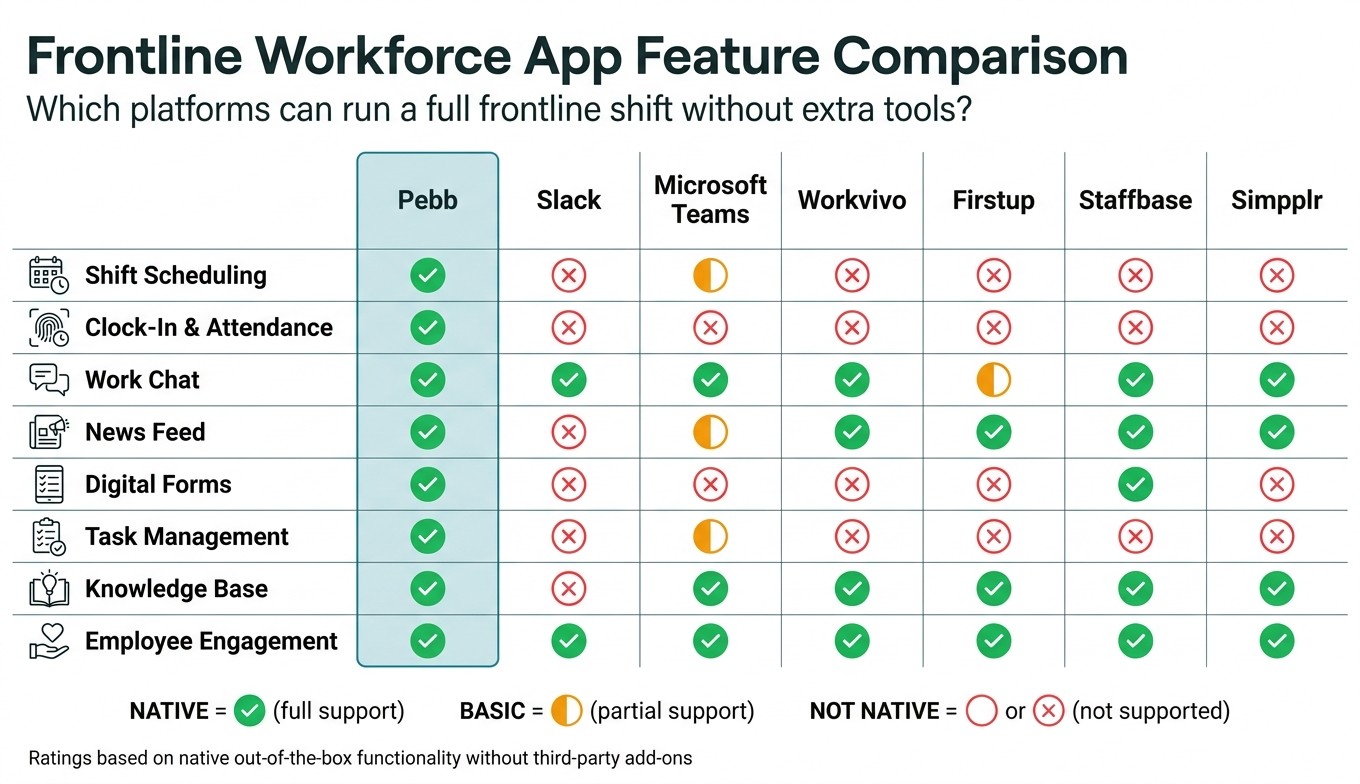
Frontline Workforce App Feature Comparison: Pebb vs. Top Competitors
I’ve sat in enough buyer calls at Pebb.io to know how this part usually goes. Someone loves a chat tool. Someone else needs help with shifts, attendance, and store tasks. Then the room gets quiet when we ask one simple thing: can this app run a shift without extra tools?
That’s why this table matters. If you’re weighing chat-first tools against frontline platforms, this side-by-side view makes the gaps easy to spot.
Ratings: Native, Basic, or Not native.
Feature | Pebb | ||||||
|---|---|---|---|---|---|---|---|
Scheduling | Native - shift scheduling for hourly teams | Not native | Basic - requires Microsoft 365 | Not native | Not native | Not native | Not native |
Clock-In & Attendance | Native - GPS, time-stamped mobile clock-ins | Not native | Not native | Not native | Not native | Not native | Not native |
Work Chat | Native - team and shift chats in app | Native - channels, DMs, and threads | Native - chat, meetings, and channels | Native - communities and group discussions | Basic - broadcast-first messaging | Native - internal messaging and updates | Native - intranet messaging and content |
News Feed | Native - mobile-first feed for store updates | Not native | Basic - depends on SharePoint | Native - social feed and campaigns | Native - targeted content delivery | Native - internal news and updates | Native - intranet news and content |
Digital Forms | Native - checklists, inspection, and incident forms | Not native | Not native | Not native | Not native | Native | Not native |
Task Management | Native - assign tasks by role, store, or shift | Not native | Native - via Planner; not frontline-specific | Not native | Not native | Not native | Not native |
Knowledge Base | Native - searchable SOPs and playbooks on mobile | Not native | Native - SharePoint-based | Native | Native | Native | Native - AI-powered content discovery |
Engagement | Native - polls, recognition, and feedback in one app | Native - reactions, emoji, and integrations | Native | Native - recognition and surveys | Native | Native | Native |
Here’s the thing: a lot of tools look similar until you map them against what frontline teams do all day. Chat? Plenty of apps do that well. But once you add scheduling, clock-ins, forms, and shift-level task tracking, the shortlist usually gets much smaller.
I’ve seen teams miss this the first time around. They pick a strong communication app, then patch the rest with add-ons. Let me tell you what happened next: more logins, more admin work, and more “where do I find that?” messages from the field.
Use the gaps here to narrow your shortlist before you compare deployment and cost.
Conclusion
I’ve seen this play out up close at Pebb.io: the best frontline worker management app doesn’t just send messages and call it a day. It helps run the whole shift, from the second we post a schedule to the minute that shift wraps up.
Here’s the thing: frontline work falls apart fast when the tools are scattered. One app for chat. Another for schedules. A third for tasks. Then someone misses an update, a manager starts chasing answers, and the whole day gets messier than it needs to be.
That’s why the eight features covered here matter so much. They’re not nice-to-have extras. They’re the basic parts frontline teams lean on every day to plan work, run shifts, and support their people.
From my side at Pebb.io, that’s the whole point of good workforce management software. It should remove the chase for information. It should cut down the back-and-forth. It should give teams one place to see what’s happening and what needs to happen next.
That’s the real value of Pebb: one place to manage the full shift. We bring scheduling, time tracking, chat, updates, tasks, forms, and knowledge into one mobile app. Let me tell you what happened next when teams started doing that: less app-switching, fewer dropped details, and a much clearer picture of what was going on during the day.
If your current setup takes more than one login to run a shift, that’s a red flag. At that point, I’d step back and compare your stack against the eight features above. The payoff is simple: faster work, fewer misses, and clearer visibility. And when that happens, frontline work stops feeling like scattered follow-up and starts moving as one coordinated flow.
FAQs
How do I know if one app can truly run a full shift?
I learned this the hard way at Pebb.io.
Early on, I watched teams bounce between chat apps, email threads, scheduling tools, and task trackers just to get through one shift. On paper, it looked organized. In practice, it was a mess. Someone would update a schedule in one place, share a note somewhere else, and then send a follow-up in chat because nobody was sure who saw what.
Here’s the thing: when your tools don’t talk to each other, your team ends up doing the talking twice.
That’s why I always tell people to look for an app that handles operations and communication in one workflow, instead of stitching together a pile of disconnected tools. At Pebb, for example, we built that around the day-to-day stuff teams use most:
shift scheduling
GPS-verified clock-ins
PTO management
task lists
real-time team messaging
When those pieces live in one place, work feels a lot less chaotic. Managers don’t have to copy updates from one system into another. Frontline staff don’t have to hunt through three apps just to figure out where they’re supposed to be and what needs to get done.
I’d also push hard for a mobile-first app with offline support. That part matters more than many teams expect. A desk-based setup might look fine during a demo, but shift teams live on their phones. And when someone loses signal in a warehouse, on a job site, or during travel between locations, the app still needs to work.
If you’re still copying updates between chat, email, and scheduling tools, the app isn’t helping your shift. It’s adding manual work on top of it.
Which features matter most for multi-location frontline teams?
I’ve seen this play out up close at Pebb.io: the features people lean on most are the ones that pull daily work and team communication into one mobile-first platform. That sounds simple, but it fixes a messy problem a lot of teams deal with every day - too many disconnected tools, too many missed updates, and too much back-and-forth.
Here’s the thing: when scheduling lives in one app, chat in another, and time tracking somewhere else, work starts to slip through the cracks. We built Pebb to cut that mess down. What makes Pebb stand out is how we bring shift scheduling, clock-in tracking, PTO management, work chat, news feeds, and video calls into one place.
I’ve watched teams move from app-hopping all day to handling most of their work from their phones in a few taps. That change matters a lot for frontline staff. They’re not sitting at desks. They need tools that work fast, on the go, and without a long learning curve.
Offline access matters too - and I don’t say that lightly. In spots with weak or unreliable connectivity, that feature can be the difference between staying on track and losing the thread completely. We’ve seen how much smoother things run when people can still get what they need without depending on a perfect signal.
A few other features make a big difference in day-to-day use:
Searchable employee directories help people find the right coworker fast
Targeted group spaces keep branch, role, or team updates in the right place
Centralized task management helps teams stay aligned and do the work the same way across locations
Let me tell you what happened next when teams started using these tools together: coordination got easier, branch-to-branch consistency got better, and managers spent less time chasing updates. That’s usually the big win - not just having more features, but having the right ones in one place.
What should I test before choosing a frontline workforce app?
I’ve seen a lot of teams juggle five or six tools just to run one shift-based business. One app for schedules. Another for chat. A third for time tracking. Then someone’s still texting a photo of a paper form at 10:30 p.m. That mess is exactly what I’d test first here: whether the app brings operations and communication into one mobile-first platform instead of pretending to.
From my side at Pebb.io, that’s the whole point. I’d go feature by feature and check if the app handles the daily stuff without piling on manual work.
I’d start with the core workflows that make or break adoption:
Drag-and-drop scheduling to see if managers can build and adjust shifts fast
GPS-verified clock-ins to check time tracking and location accuracy
Automated PTO management to cut back-and-forth approvals and admin work
Work chat for fast team communication
News feed updates so employees don’t miss company posts, shift notes, or team news
Here’s the thing: features on a sales page are easy. What matters is whether they work together in a way that saves time. If scheduling lives in one corner, chat in another, and updates get lost, people go right back to spreadsheets and group texts.
I’d also verify the day-to-day tools that teams lean on once the week gets busy. That means checking offline access, task management, and digital forms to make sure employees can still get work done when signal drops or when they’re moving between job sites. I’d pay close attention to data security too, because if employee records, messages, and forms all sit in one place, that part can’t be an afterthought.
What makes Pebb stand out to me is that these pieces live in one app instead of being patched together. And from a pricing angle, it’s hard to ignore: there’s a free plan for up to 15 employees and a premium plan at $4 per user per month.
That combination matters because it gives smaller teams a way to get started without a big budget, while still giving growing companies room to run scheduling, communication, and daily operations from one place.
