
Author: Ron Daniel
Free Excel Shift Schedule Template (And Better Alternatives)
Spreadsheets work for tiny, predictable teams—but real-time scheduling tools save hours and prevent costly errors.
Let me paint a quick picture for you: It’s Monday morning, and I’m staring at a spreadsheet trying to piece together next week’s schedule. Two hours in, I’ve balanced everyone’s availability, avoided double-booking, and hit the labor budget. I send it out feeling accomplished - until the texts and emails start rolling in. Someone’s sick. Another needs a shift swap. Oh, and I forgot about that Saturday-off request. Suddenly, my “finalized” schedule is outdated, and I’m back to juggling cells in Excel. Sound familiar?
Here’s the thing: Excel is great for small, steady teams. But as soon as schedules get even a little unpredictable, it turns into a time sink. I know because I’ve been there. That’s why we built Pebb - a tool that takes the chaos out of scheduling. With real-time updates, drag-and-drop simplicity, and built-in error detection, it’s like upgrading from a flip phone to a smartphone.
In this article, I’ll walk you through how Excel templates can work for small teams, why they don’t scale, and how tools like Pebb can save you hours every week while keeping your team on the same page. Let’s get into it.
1. Excel Shift Schedule Templates
Let me tell you, if you’re managing a small team - say fewer than 10 people - Excel shift schedule templates might feel like a lifesaver. These pre-formatted spreadsheets let you plug in employee names, shift times, and days of the week without needing any fancy software or extra training. Plus, they’re completely free. For teams with predictable schedules, they’re a solid go-to. You can even tweak the layout, toss in your company logo, and use basic formulas to calculate total weekly hours. That way, you can avoid accidentally scheduling someone for 50 hours when they’re supposed to max out at 40 hours a week.
One of the best parts of using templates is their consistency. You’ve got a clear, standardized grid to work with. Add in shift codes - like "M" for morning, "E" for evening, and "N" for night - and maybe a bit of color-coding, and you’ve got a system that helps cut down on mistakes. But here’s the catch: while this setup is great for avoiding errors in the initial schedule, it doesn’t handle last-minute changes well.
That’s Excel’s biggest drawback - it’s static. Once you save and share the file, it’s locked in time. If an employee calls out sick or swaps a shift, you’ll need to manually update the file and send it out again. And don’t expect Excel to flag potential problems like double-booking someone or scheduling back-to-back closing and opening shifts without enough rest. You’re on your own there.
Time-wise? Building a schedule in Excel can take anywhere from one to two hours every week. And that’s assuming you’re not juggling time-off requests, shift preferences, or last-minute PTO. Collaboration can be a headache, too. Unless you’re using a cloud-based version like Google Sheets, version control becomes a real issue. One person might be looking at an outdated version while another has the latest, leaving everyone confused about what’s current.
So, here’s the deal: Excel templates are free and work well for small teams with steady schedules. But if your team is growing, your schedule changes often, or you’re sinking hours into manual updates, it might be time to consider a modern tool. That’s where Pebb’s real-time scheduling steps in to handle the chaos. Let’s dive into how digital solutions like Pebb can tackle these challenges head-on.
2. Pebb
Let me tell you, Pebb has completely redefined how scheduling gets done. If you've ever spent hours wrestling with Excel spreadsheets, you'll know exactly what I mean. With Pebb, you can create and publish a full weekly schedule in under five minutes - yes, you read that right. That’s an 80% reduction in scheduling time. Imagine getting those hours back to focus on what really matters: running your business.
Here’s the magic behind it: automation and real-time updates. When you tweak a shift in Pebb, that change instantly syncs to every employee’s phone. No more confusion over which version of "Schedule_v3_FINAL.xlsx" is the right one! The drag-and-drop interface makes assigning shifts, repeating patterns, and adjusting coverage as simple as moving puzzle pieces. And if an employee requests a shift swap or marks themselves unavailable? It’s all handled right in the app, complete with manager approval workflows.
Pebb also has your back when it comes to catching those sneaky errors that Excel tends to miss. It automatically flags double-bookings, overtime issues, and conflicts with approved time-off before you even hit publish. Independent benchmarks show that Pebb users deal with 90% fewer compliance errors compared to Excel users. One coffee chain in the US with 50 locations was able to slash their scheduling time from 10 hours a week to just 2 hours. On top of that, they cut no-shows by 25% and saved $15,000 annually in overtime costs. Those are some serious wins.
But it’s not just about accuracy; it’s about making teamwork effortless. Employees can check their schedules, request swaps, submit PTO, and even clock in - all from their phones. Forget endless WhatsApp threads or chasing down text confirmations. Everything lives in one hub: unlimited chat history, a news feed for updates, and even voice and video calls if you’re on our Premium plan. In fact, restaurant chains in the US have seen 40% better shift fill rates just by centralizing communication.
Now, let’s talk pricing. Our Standard plan is free for up to 15 users and includes all the essentials: shift scheduling, unlimited chat, a news feed, clock-in tools, and PTO management. Need more? The Premium plan is just $4 per user per month, unlocking voice and video calls, advanced analytics, integrations, and enterprise SSO. It’s hands down the best value for an all-in-one solution. Plus, importing your existing Excel schedules via CSV takes about 15 minutes. We’ve even got full support for US date formats (MM/DD/YYYY) and payroll integrations like QuickBooks, ready to go right out of the box.
If you’re tired of wasting hours on outdated tools, Pebb is the answer. It’s fast, accurate, and built to make your life easier. Let’s face it - your time is worth more than fighting with spreadsheets.
3. Other Digital Scheduling Tools
Let’s talk about the other players in the digital scheduling space. While Pebb offers a unified solution, there are several other options out there, each with its own quirks and limitations.
Take Slack, for example. It’s a workplace favorite, boasting 12 million daily users as of 2019. But here’s the catch: scheduling on Slack relies heavily on third-party tools like TurnShift or custom workflows. Sure, they get the job done, but let’s be honest - they can feel clunky and time-consuming. Even a Slack Engineering Manager noted that rigid schedules can seriously dent productivity. If you’ve ever wrestled with integrations, you know exactly what I mean.
Then there are dedicated scheduling tools like Sling, When I Work, Deputy, Homebase, and Connecteam. These platforms focus on shift planning and come with price tags ranging from $1.70 to $9.00 per user or location-based fees between $20 and $120 per month. Most of them offer free trials lasting 14 to 31 days, but once that trial ends, you’re locked into a paid subscription. While they offer solid scheduling features, they’re often just that - scheduling tools. Pebb, on the other hand, combines scheduling with communication, PTO tracking, and collaboration, all in one place.
Here’s the thing: inefficient scheduling doesn’t just waste time - it can slash productivity by 10–15% during shift transitions. And while these other platforms cover the basics, they often lack the streamlined simplicity and real-time updates that keep teams running smoothly. That’s where Pebb stands out, offering a truly connected experience that’s hard to beat.
Pros and Cons Comparison
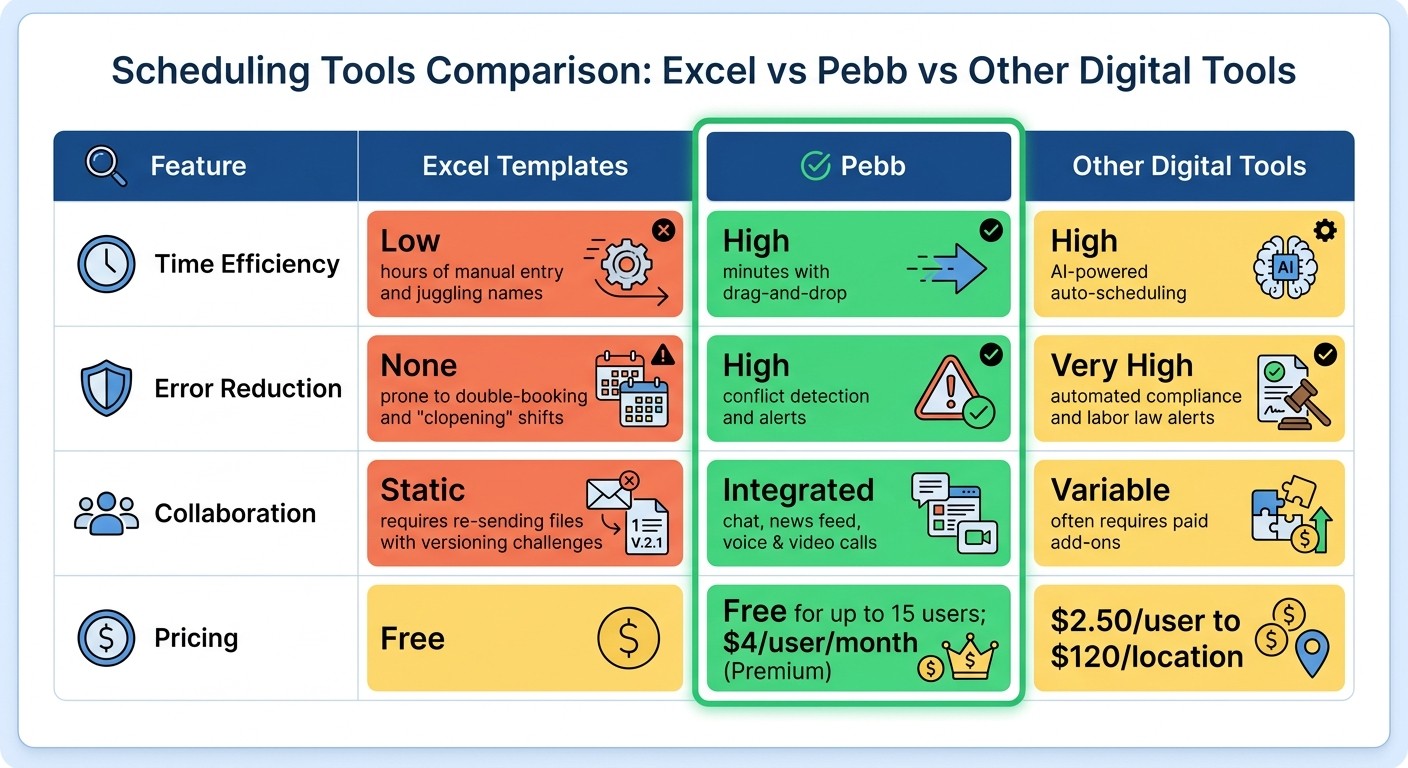
Excel vs Pebb vs Other Scheduling Tools Comparison Chart
Let me break it down for you: when it comes to scheduling, not all tools are created equal. Here’s a quick side-by-side look at how Excel templates, Pebb, and other digital tools stack up against each other.
Feature | Excel Templates | Pebb | Other Digital Tools |
|---|---|---|---|
Time Efficiency | Low (hours of manual entry and juggling names) | High (minutes with drag-and-drop) | High (AI-powered auto-scheduling) |
Error Reduction | None (prone to double-booking and "clopening" shifts) | High (conflict detection and alerts) | Very High (automated compliance and labor law alerts) |
Collaboration | Static (requires re-sending files with versioning challenges) | Integrated (chat, news feed, voice & video calls) | Variable (often requires paid add-ons) |
Pricing | Free | Free for up to 15 users; $4/user/month (Premium) | $2.50/user to $120/location |
Here’s the thing: Excel templates might seem like a budget-friendly option at first glance, but they come with hidden costs - mainly your time and the headaches of manual updates. Trust me, I’ve been there, juggling spreadsheets only to realize I’d accidentally scheduled someone for a dreaded “clopening” shift (closing late and opening early). It’s not fun.
Now, let’s talk about Pebb. It’s designed to save you time - think drag-and-drop simplicity - and reduce errors with built-in conflict detection. Plus, everything’s in one place: scheduling, communication, even voice and video calls. No more jumping between apps or chasing down team members for updates.
Other digital tools like Deputy or Sling are also solid options. For example, Sling boasts a glowing 4.7/5 rating on the Apple App Store with 21,000+ reviews. But here’s the catch: many of these tools require pricey add-ons to match Pebb’s all-in-one approach. And if you’re managing a growing team, those costs can add up fast.
Let’s not forget the stats - unified scheduling apps can cut errors by up to 40%. That’s a game-changer, especially when nearly 48% of workers rely on to-do lists to stay organized. The need for clarity and structure is only growing.
Bottom line? Whether you’re managing a small team or dealing with complex schedules, the right tool can save you hours, reduce stress, and keep your team running smoothly. Pebb hits that sweet spot by combining real-time scheduling with employee communication apps, all without breaking the bank. It’s like having a personal assistant for your operations - minus the hefty price tag.
Wrapping It Up
Excel shift schedule templates might do the trick for tiny teams (we’re talking fewer than 10 people) with fixed schedules. But here’s the thing - once your team starts growing or your scheduling needs get even slightly complex, those templates can quickly become a time drain. Did you know switching to a digital scheduling tool can save you over 8 hours every month? That’s a whole workday handed back to you. And with the employee scheduling software market expected to leap from $481.5 million in 2023 to $1.2 billion by 2032, it’s pretty clear this is the future.
At Pebb, we’ve designed our platform for teams that are ready to scale. We’re free for up to 15 users, and our Premium plan is just $4 per user per month. That includes everything - drag-and-drop scheduling, integrated chat, voice and video calls, and even conflict detection. If you’re still stuck manually updating spreadsheets, it’s time to rethink your approach.
"The goal isn't just to cover shifts. It's to build a rhythm the team can depend on. To free up their mental energy for the actual work." – Dan Robin, Pebb
Here’s the bottom line: Excel works fine for static, small teams, but if you’re looking to grow, you need something smarter. Pebb gives you an all-in-one solution that saves time, cuts down on scheduling errors, and keeps your team connected in real-time.
So, let me ask you - are you spending more time managing schedules than managing your business? If the answer is yes, it’s time to make the switch. Pebb was built to give you back those hours and keep your team running like clockwork, no matter where they’re working from.
FAQs
What should an Excel shift schedule template include?
When creating an Excel shift schedule template, it's important to include the essentials. Make sure to list employee names, shift start and end times, break times, workdays, days off, and job roles. These details keep everything organized and make it easier to manage schedules efficiently.
When should I switch from Excel to Pebb for scheduling?
When Excel starts feeling like more of a hassle than a help - think endless hours fixing errors, dealing with outdated data, or struggling to keep everyone on the same page - it’s time to make the switch to Pebb. It’s a game-changer for managing complex schedules, coordinating multi-location teams, or keeping frontline employees in the loop. With Pebb, scheduling becomes simpler, teamwork gets smoother, and those frustrating mistakes? They fade into the background.
How do I import my Excel schedule into Pebb?
Importing your Excel schedule into Pebb is straightforward, but a little preparation goes a long way. First, double-check that your file is set up correctly - include all the essentials like shift details, employee names, and times. Once that’s squared away, head to Pebb’s import feature. Upload your file, assign shifts, and manage time-off requests directly within the platform.
If something doesn’t look right during the process, don’t worry. Review any errors, make the necessary tweaks, and re-upload. This approach keeps your scheduling seamless and ensures everything stays neatly organized in one place.
