
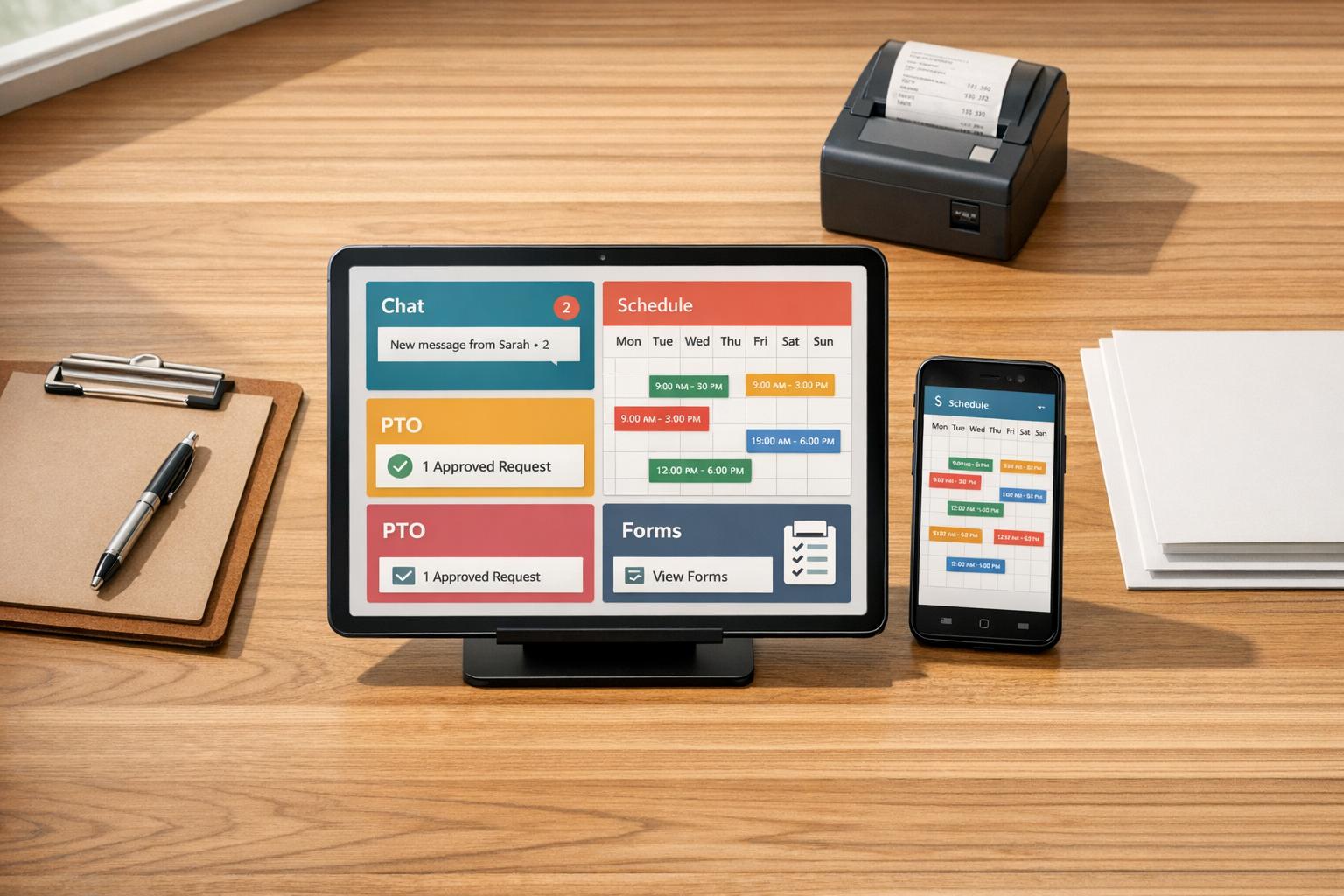
Author: Ron Daniel
Employee Management App for Small Businesses: What to Look For
Centralize chat, scheduling, PTO, and digital forms to eliminate shift chaos and save managers hours every week.
Most small business owners I know have been there - you’re juggling schedules in a messy Google Sheet, fielding last-minute shift swaps via text, and trying to keep track of PTO requests scribbled on sticky notes or buried in random emails. It’s chaos. I’ve seen firsthand how this patchwork of tools can eat up hours of your week and leave you feeling like you’re barely holding it all together.
Here’s the kicker: According to the McKinsey Global Institute, employees spend 28% of their workweek on emails and another 20% searching for information or colleagues. That’s almost half their week gone, and for small teams, that time loss hits even harder. I’ve worked with businesses where a missed message meant an unstaffed shift or two employees showing up for the same job. It’s exhausting, and it pulls you away from the reason you started your business in the first place.
That’s exactly why we built Pebb. We wanted to create a single app that keeps everything - chat, schedules, PTO, tasks, announcements - in one place. No more cobbling together tools or chasing down updates. In this article, I’ll walk you through the features that make an employee management app effective and how Pebb can help simplify your day-to-day operations. Let’s dive in.
Key Features to Look For in an Employee Management App
Finding the right employee management app is all about solving everyday headaches without piling on extra complexity. So, what really counts? Let me walk you through the features that make a difference, starting with tools that keep communication flowing.
Communication Tools
Pebb's Work Chat is more than just a messaging tool - it’s designed to make workplace communication effortless and professional. Picture this: group chats tailored by location or role, like "Weekend Crew" or "Front Desk – Morning." Add to that the ability to share photos, documents, and @mentions, plus a searchable message history so nothing important slips through the cracks.
According to a 2021 Skynova survey, 40% of workers said collaboration apps boosted productivity, while 36% noticed clearer communication. With Pebb's Work Chat, managers can post closing instructions, upload a photo of the perfect setup, and tag the team responsible - all in one go. Employees can even reply with confirmation photos, ensuring everyone’s on the same page.
And when a quick back-and-forth isn’t enough? Built-in voice and video calls let you handle issues immediately, no need to jump between apps.
Shift Scheduling and PTO Management
Let’s be honest - spreadsheets just don’t cut it for scheduling anymore. A good app should bring everything together: shifts, availability, PTO requests, and approved time off, all in one clear calendar view.
With Pebb's Shifts feature, you can copy last week's schedule, tweak it for time-off requests, and send it straight to everyone’s phones. No more "When do I work?" texts or endless phone tag. Employees can submit PTO requests directly in the app, and managers can approve or deny them with a single tap. The best part? The schedule updates automatically. On average, small businesses in the U.S. using digital scheduling tools like this save about 5 hours a week. It’s a win for both your team and your sanity.
Task Tracking and Digital Forms
A solid employee management app doesn’t just track schedules - it keeps tasks on track too. You can assign tasks with clear deadlines, monitor progress, and even set up recurring checklists for daily routines like opening procedures or equipment inspections.
Paper logs? A thing of the past. Digital forms in Pebb handle everything from incident reports to inventory counts and daily temperature logs (°F), making documentation and follow-ups a breeze. For example, if a manager gets a maintenance report, they can instantly turn it into a task, assign it, and notify the right team - all without leaving the app.
These tools work together to ensure smooth operations and build accountability across the board.
Making Employee Information Accessible and Transparent
At Pebb, we’ve learned that having a unified platform isn’t just about managing schedules - it’s about creating a central hub for all the critical employee information that keeps operations running smoothly. When your workforce spans multiple shifts, locations, and roles, even small information gaps can snowball into big disruptions. Think about it: a supply issue arises, and no one knows who to contact. A new hire is clueless about who’s in charge of the back-of-house. Or a part-time employee misses an important policy update because they weren’t on-site that day. These minor hiccups can pile up fast.
The fix? Make sure the right information is always at everyone’s fingertips. At Pebb, we focus on two key tools to make this happen: the employee directory and real-time updates.
Employee Directory
You might think a employee directory software is a no-brainer, but you’d be surprised how much time gets wasted without one. This feature empowers teams to operate more independently. Instead of constantly texting a manager for answers, team members can search by name, role, or location to find exactly who they need. If you're starting from scratch, you can create an employee directory in just a few minutes.
Our directory isn’t just a static list - it’s a tool for instant collaboration. For example, new hires can quickly locate shift leads, check role responsibilities, and even start a chat - all without looping in a manager. Dan Robin from Pebb summed it up perfectly:
"The goal isn't to 'manage' people. It's to build a system so clear and intuitive that the team almost manages itself."
This kind of clarity not only streamlines daily interactions but also frees up managers from answering repetitive “who do I contact?” questions, letting them focus on bigger priorities.
Company Updates and Announcements
Let’s be honest: bulletin boards and group texts are outdated, especially when your team works across different shifts and locations. That’s why we built a centralized news feed into Pebb. It’s where managers can post everything from schedule changes and safety updates to new policies and shift coverage requests - all in one spot.
Here’s the best part: updates go straight to employees’ phones. No more missed memos or “I didn’t see that” excuses. Managers can even pin critical posts to the top of the feed so they’re the first thing employees see when they open the app. Need confirmation that everyone’s on the same page? Attach a digital form to the update and track acknowledgments automatically.
This approach keeps everyone informed, whether they’re on-site or working remotely, and eliminates the communication gaps that can throw a wrench in your operations. It’s like having a real-time bulletin board that works for everyone, everywhere.
Why Mobile Access Matters for Frontline Teams
Think about this: 80% of the global workforce isn’t sitting at a desk. They’re in restaurants, retail stores, construction sites - places where a computer isn’t exactly part of the scenery. Yet, most workplace software is still built with office workers in mind - those with laptops and email accounts. So, what happens to everyone else? They’re stuck relying on paper schedules, last-minute texts, and missed updates. The result? No-shows, overlooked details, and a growing sense of disconnection. This is where a mobile-first app becomes a game-changer for frontline teams.
Here’s the proof: Gallup’s research shows that highly engaged teams experience 41% less absenteeism. And mobile apps designed specifically for frontline employees are key to building frontline employee engagement. A Harvard Business Review Analytic Services study backs this up, revealing that companies with strong communication to their frontline teams are 3.5x more likely to significantly outperform competitors. Plus, mobile apps that digitize tasks like forms and workflows save frontline employees an average of 42 minutes per day. That’s not just a productivity boost - it’s a lifeline for teams juggling a million things at once.
User-Friendly Mobile Design
Here’s the thing: a mobile-first app has to actually work for the people using it. That means big, tap-friendly buttons, simple workflows, and a home screen that puts the essentials - like today’s shift details, unread messages, and pending forms - front and center. At Pebb, we designed our app with these needs in mind. Features like Shifts, Work Group Chat, and Digital Forms are just one tap away, thanks to a bottom navigation bar that’s easy to access even when you’re on the move. And because we know connectivity isn’t always a guarantee, our app caches schedules and key data to keep things running smoothly, even in low-signal areas.
Typing? We keep that to a minimum. Instead, we use checkboxes, dropdowns, and pre-filled fields wherever possible. Whether it’s a retail associate wrapping up a closing checklist or a field technician filing an incident report, tasks are quick, straightforward, and don’t interrupt the flow of their day.
Here’s the bottom line: if your app isn’t genuinely intuitive on a phone, your frontline team won’t use it. They’ll go back to personal texts and other makeshift solutions, leaving your efforts to streamline operations in the dust. That’s why we’ve poured so much into making Pebb’s mobile experience seamless - combining shift scheduling, communication tools, and digital forms in one easy-to-use platform. It’s all about keeping teams connected and efficient, no matter where they are.
Pricing and Value: What Small Businesses Should Expect
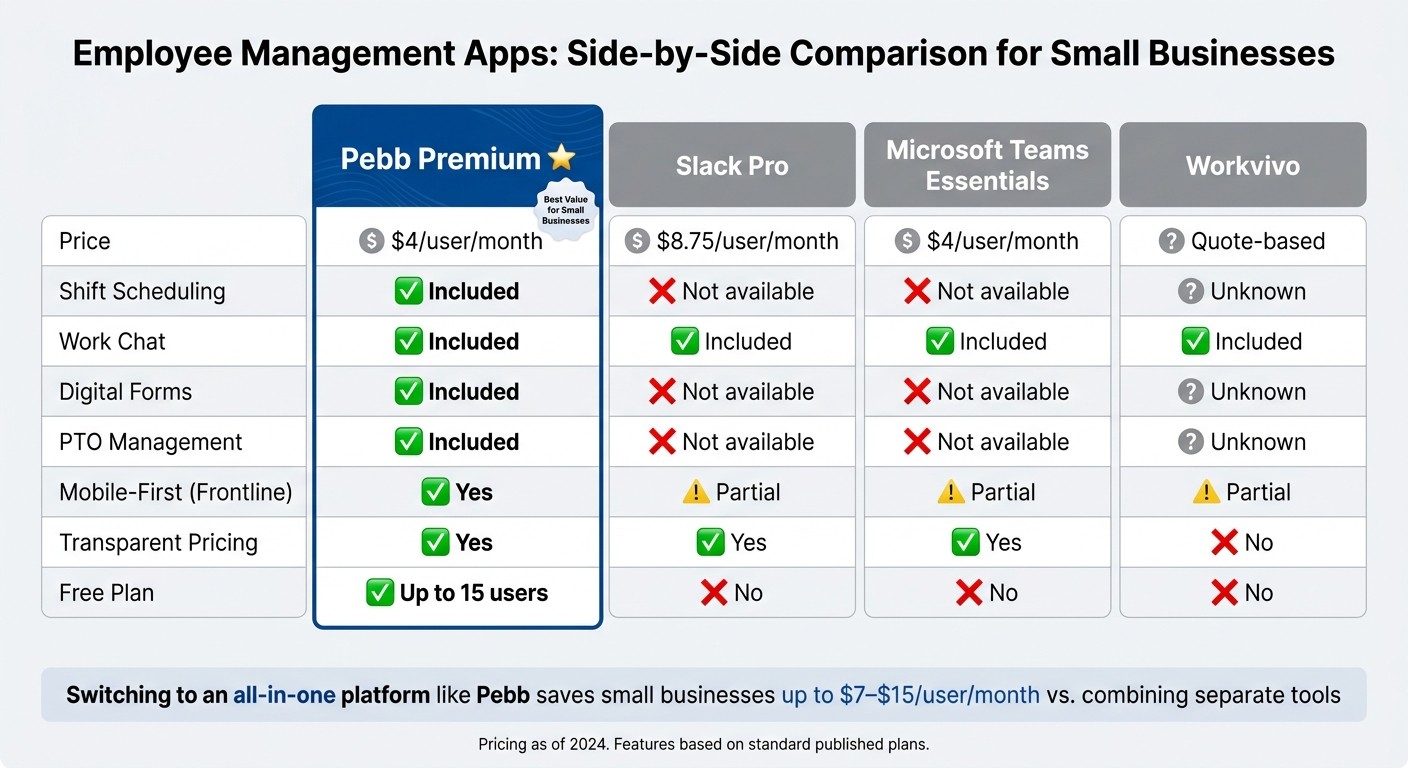
Employee Management App Comparison: Pebb vs. Competitors (2024)
When you're running a small business, finding the right tools to streamline operations can feel like walking a tightrope. You need something affordable but also packed with the features that actually make a difference. Here's the thing: it's not just about the price tag - it's about what you're really getting for that investment.
Take a $7/user/month chat tool, for instance. Sounds cheap, right? But if you need separate apps for scheduling and forms, that price can quickly balloon to $14–$19 per user per month. That's why the smarter question isn't, "How much does it cost?" but rather, "What am I actually paying for?"
Free vs. Premium Plans: What’s Right for You?
At Pebb, we’ve built our pricing to work for small businesses, whether you’re just starting out or scaling up. Our free Standard plan is perfect for small teams of up to 15 users. It covers the essentials like work chat, shift scheduling, digital forms, PTO management, and a news feed. If you're new to digital tools or running a tight-knit team, this plan gives you everything you need to stay connected without spending a dime.
When your team grows or your needs expand, our Premium plan steps in at just $4 per user per month. This unlocks features like voice and video calls, advanced analytics, unlimited admins, enterprise single sign-on, and integrations with tools like QuickBooks and ADP. Essentially, it bundles everything - chat, scheduling, forms - into one platform, saving you from juggling multiple apps.
Here’s how we stack up against other platforms:
Platform | Pricing | Missing Features |
|---|---|---|
Pebb Premium | $4/user/month | Nothing - scheduling, chat, and forms are all included |
Slack Pro | $8.75/user/month | No native shift scheduling or digital forms |
Microsoft Teams Essentials | $4/user/month | Less tailored for frontline/hourly workers on mobile |
Quote-based | Opaque pricing; typically built for larger organizations |
Why Pebb Makes Sense for Small Businesses
Let’s break this down. Slack is great for desk-based teams with IT support, but you'll likely need to add extra tools to match Pebb’s functionality. Microsoft Teams can seem like a bargain if you’re already using Microsoft 365, but it’s not built with frontline workers in mind. And Workvivo? Its quote-only pricing can make budgeting a headache, which is the last thing a small business owner needs.
Here’s a simple rule I live by: if a tool saves you more time than it costs, it’s worth every penny. At $4/user/month, even saving just 30 minutes of a manager’s time per week covers the cost - and then some. Plus, with transparent pricing like ours, you’ll know exactly what you’re paying for, which is a rare find in a market full of hidden fees and vague quotes.
Wrapping Up: Simplify Your Team’s Workflow with Pebb
Let’s face it - juggling multiple apps to manage your small business team can be a headache. That’s exactly why we created Pebb.
In this guide, I’ve walked you through the tools that truly make a difference for small businesses: real-time work chat, shift scheduling, PTO tracking, digital forms, a people directory, and company announcements. Each feature tackles common challenges - like missed shifts, scattered communication, or outdated paper checklists - helping you run your team more smoothly.
Here’s the best part: Pebb combines ease of use with everything you need in one place. You can get started for free with up to 15 users - no credit card or IT expertise required. Most teams are up and running in just a few hours. And if your team grows, the Premium plan is just $4 per user per month, so you won’t have to worry about costs spiraling out of control from piecing together separate tools.
Try it for yourself. If you’re still relying on group texts, spreadsheets, or paper forms, it’s time for a change. Start small - schedule next week’s shifts, create a digital form, or send out a team announcement using Pebb. Once your team gets a taste of a unified platform, you’ll see how much smoother everything can run.
FAQs
How fast can my team start using Pebb?
Your team can jump into Pebb without any hassle. Just sign up, and you’ll instantly unlock all the platform's features. From simplifying communication to organizing schedules and boosting collaboration, everything you need is ready to go - right from the start.
What should I switch to Pebb first - chat, schedules, or forms?
Start with chat and communication - this is the quickest way to get everyone on the same page. Pebb's messaging, news feeds, and group chats make it easy to connect your team right away. Once communication flows smoothly, shift your attention to schedules. Pebb takes the headache out of shift planning and PTO management, streamlining the process for everyone involved. Finally, when the team is comfortable with communication and scheduling, introduce forms and task management. This gradual rollout ensures a seamless transition while keeping things efficient and stress-free.
Will Pebb work for hourly teams without company email?
Pebb is designed to work effortlessly for hourly teams, even if they don’t have company email addresses. With features like team communication, shift scheduling, and task management, staying connected and organized becomes simple and efficient - no email required.
