

Author: Ron Daniel
How to create private team spaces for different departments
Set up invitation-only department spaces with clear names, owners, permissions, and focused tools to keep work organized.
Most teams don’t break down because people stop talking. They break down because work gets scattered across too many places. At Pebb.io, I’ve seen HR updates sit in email, shift notes live in text threads, and sales info get buried in spreadsheets - and then everyone wonders why people miss the message.
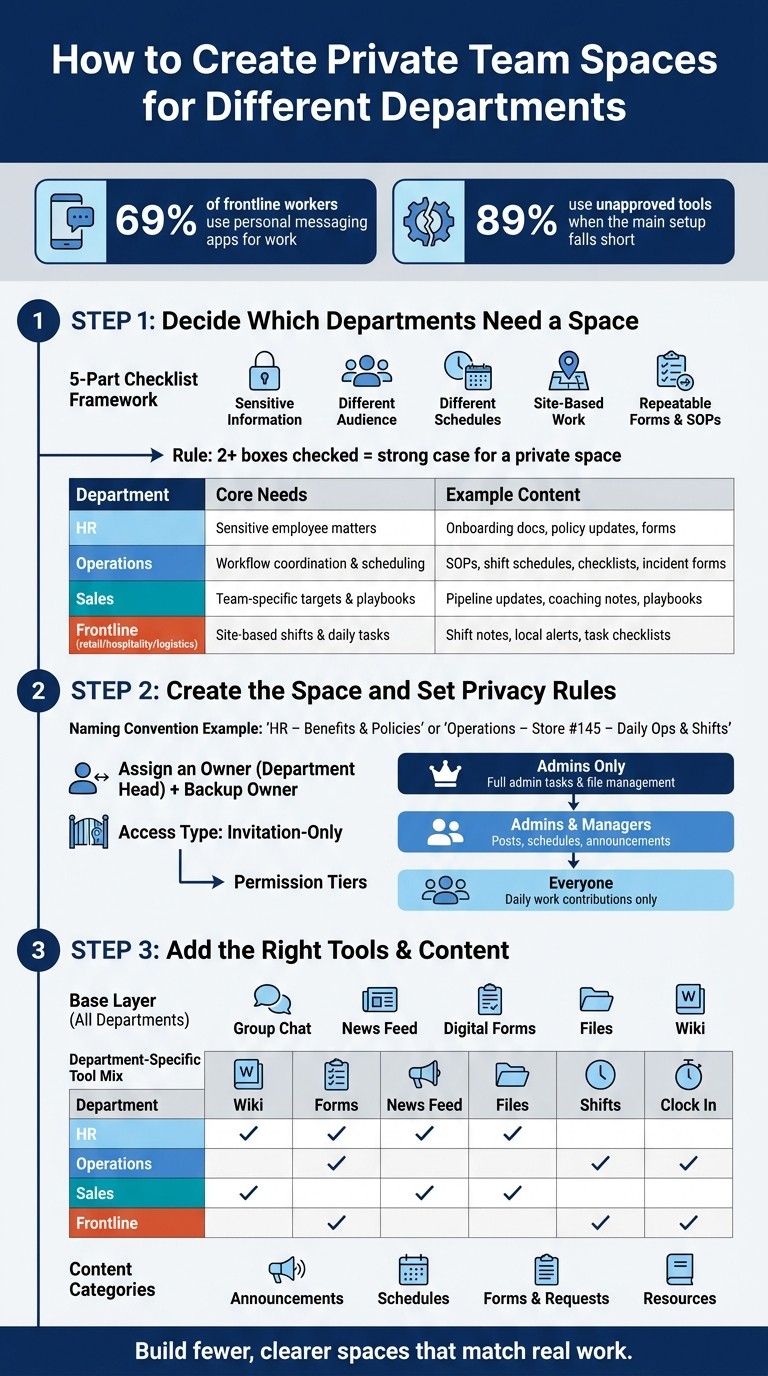
The data backs that up. 69% of frontline workers use personal messaging apps for work, and 89% use tools their company hasn’t approved when the main setup falls short. That usually leads to missed updates, loose access, and a lot of cleanup later. We built private team spaces in Pebb to fix that by giving each department its own place for chat, updates, forms, files, and daily work.
Based on what I’ve seen on our team and with customers, the best setups follow a simple pattern: keep spaces few, name them clearly, lock access down early, and only add tools people will use. In this guide, I’ll walk through how I decide which departments need their own space, how I set permissions, and how we keep those spaces clean as teams grow.
How to Set Up Private Team Spaces by Department (Step-by-Step)
Step 1: decide which departments need separate spaces
When we started setting up spaces at Pebb.io, I saw a pattern fast: teams wanted to create a space for everything. On paper, that sounds neat. In practice, it turns into clutter. More spaces don’t mean better organization. They just give people more places to miss updates.
That’s why I always use a simple check before creating anything new.
A simple framework for deciding which departments get a space
Here’s the thing: before I create a department space, I run it through a quick five-part check. A team should get its own private space if it handles sensitive information, has a different audience, follows different schedules, does site-based work, or depends on repeatable forms and SOPs.
If a department checks off two or more of those boxes, I treat it as a strong case for its own space.
I’ve learned that one shared space works well when the whole company needs the same updates. But once a department starts splitting by region, store, shift, or function, separate spaces make life a lot easier. Let me give you a simple example. An operations team might use one main space for company-wide SOPs, then set up separate spaces for each warehouse or store location. Why? Because daily checklists and schedule changes are different at each site.
And if key information would drown in a general company space, that’s my cue to give that department a private space.
Examples: HR, operations, sales, and frontline teams
This rule gets even clearer when I apply it to the departments I see most often.
HR is the easiest call. It deals with employee relations, policy changes, onboarding documents, and benefits. That kind of content should never sit in a space the whole company can see. A private HR space keeps those files and conversations limited to approved staff.
Operations usually needs more structure than people expect. These teams often manage repeatable workflows like shift planning, safety SOPs, maintenance requests, and incident forms. If a company has multiple stores, warehouses, or service regions, I’ve found that operations usually needs one main space plus separate spaces for each warehouse or store location. That keeps schedules, checklists, and local updates tied to the right site instead of mixing everything together.
Sales often works better with a private space too. Targets, pipeline updates, call coaching notes, and playbooks can pile up fast. When that content has its own home, the sales team can stay focused, and the rest of the company doesn’t have to scroll past updates that have nothing to do with their day.
Frontline teams in retail, hospitality, logistics, and manufacturing almost always make more sense grouped by store, branch, or site. I’ve seen what happens when everyone gets pushed into one big space: shift notes get missed, local alerts get buried, and task checklists lose context. A location-based space fixes that by sending the right updates to the right people.
Department | Primary reason for a private space | Typical content |
|---|---|---|
HR | Sensitive employee matters and policy | Onboarding docs, policy updates, forms |
Operations | Workflow coordination and scheduling | SOPs, shift schedules, checklists, incident forms |
Sales | Team-specific targets and playbooks | Pipeline updates, coaching notes, playbooks |
Frontline (retail, hospitality, logistics) | Site-based shifts and daily tasks | Shift notes, local alerts, task checklists |
Once I know which departments need a private space, I create it in Pebb and set the access rules.
Step 2: create the space and set privacy rules in Pebb
I learned this one the hard way at Pebb: if we rush the setup, we pay for it later.
Early on, we had spaces with fuzzy names, no clear owner, and loose access. It didn’t take long for posts to land in the wrong place, files to get buried, and people to ask, “Wait, am I even supposed to be in here?” Cleaning that up was a pain. So now, when we know a department needs its own space, we slow down for a few minutes and set it up right.
Name the space clearly and assign an owner
I always name a space so its job is obvious at a glance. Something like "HR – Benefits & Policies" or "Operations – Store #145 – Daily Ops & Shifts" works well because the right people can spot it fast and know what belongs there.
Then I add a short purpose line in the description. I keep it plain and tied to the team’s day-to-day work. For example: "This space is for HR managers and team members to share policy updates, benefits information, and confidential process changes." That single line does more work than people expect. It gives members a simple filter for what to post, and it gives the owner an easy way to steer off-topic posts back where they belong.
One thing I like in Pebb is that each Space can have its own Space Admin, separate from the organization-wide admin. In practice, we usually assign the department head or team lead as the main owner, then add a backup owner, often an assistant manager or another lead. I also list both names in the description so nobody has to guess who’s in charge when something needs approval or cleanup.
Once the space has a clear name and a clear owner, I move straight to visibility. That’s where a lot of teams slip.
Set private membership and role-based permissions
Here’s the thing: the same reason a team needs its own space should also decide who gets in.
If the space exists for HR, store ops, leadership, or any group dealing with private day-to-day work, I set it to invitation-only from the start. That way, only approved staff can view the content. It keeps the space clean, protects private details, and cuts down on awkward mistakes.
After that, I set permissions around what people actually need to do. In Pebb, permissions can be set at the Space level to control who can create or modify content, with options like Everyone, Admins & Managers, or Admins Only.
That matters more than it sounds.
For an HR space, I’ve seen it work best when HR managers handle admin tasks and file management, while junior HR staff get contributor access for noncritical content. For a frontline space, supervisors can manage shift posts and announcements, while frontline employees can share shift confirmations and incident notes in the right places.
I try to keep it simple:
Managers and leads get control over posts, files, and admin tasks
Team members get access only to the parts they need for daily work
That “only what’s needed” approach saves a lot of trouble later. Fewer errors. Less confusion. Far less cleanup.
Once access is set, I fill the space with the files, updates, and workflows that team uses every day, effectively building a knowledge base for the department.
Step 3: add the right tools and content to each department space
I’ve seen this mistake more than once at Pebb.io: a team gets its private space, everyone feels good for about five minutes, and then the clutter starts. Too many tabs. Too many tools. Too much stuff nobody touches.
Here’s the thing: setting access is only half the job. Once that’s done, I fill each space with the tools that team uses every day. Not the tools they might use someday. Not the tools that look nice in a demo. Just the ones they need to do the work in front of them.
I usually start with the basics: group chat, news feed, forms, files, and a wiki. Keeping those in one workspace matters a lot. It means people can go from a message to a request form to a document without bouncing between apps all day.
And I’m careful not to overload the space. If a department doesn’t run shifts, I leave the shift scheduler out. If they almost never need long reference docs, I keep the wiki light and put more focus on forms and chat. A messy space can annoy people just as much as scattered apps.
Base setup every private department space should have
When I build a private department space, I start with the same base layer and then shape it around the team.
That baseline includes:
Group chat for day-to-day coordination
News feed for updates people need to come back to
Digital forms for repeat requests, checklists, and process-driven tasks
Files for docs people use often
Wiki for SOPs and guides that need to stay current and easy to search
That setup gives teams a clean home base. From there, we only add what fits their day-to-day work.
What to include in HR, operations, sales, and frontline spaces
This is where a lot of companies go generic, and that’s usually where the setup starts to drift. I’ve learned that the tool mix should change by department.
Department | Best-fit tools | Key content & workflows |
|---|---|---|
HR | Wiki, forms, news feed, files | Employee handbook, onboarding guides, PTO/leave requests, new hire forms, policy updates |
Operations | Shifts, clock in, forms | Weekly schedules, time tracking, opening/closing checklists, incident reports, inventory counts |
Sales | News feed, wiki, files | Campaign updates, pricing sheets, sales targets, pitch decks, pipeline notes |
Frontline | Shifts, clock in, forms, wiki | Shift claiming, GPS-verified clock-in, PTO/shift swap requests, safety SOPs, emergency contacts |
One thing I always point out for frontline teams: Pebb's Clock In module supports GPS validation, so managers can confirm staff are actually on-site when they start a shift. It sounds small, but let me tell you what happened next when teams started using it: store managers spent less time chasing attendance issues, and field supervisors had fewer “I was there” disputes to sort through.
Keep content organized with categories and posting rules
Once the tools are in place, I don’t leave posting wide open. That’s where spaces get noisy fast.
At Pebb.io, I like to organize posts into four simple categories: Announcements, Schedules, Forms & Requests, and Resources. Those four handle most of what any department needs. Some teams add one more if it makes sense. Sales might use Promotions. Operations might add Safety & Compliance.
Just as important, each category needs a clear owner. I’ve found that this part saves people a lot of back-and-forth later.
Announcements should come from managers or designated editors
Schedules should belong to the scheduling owner
Forms should be created and kept up by the content owner - HR owns leave forms, operations owns incident forms
Resources should be updated by the person responsible for that content area
I also pin a short rules post at the top of the space. Nothing long. Just enough so a new team member can join, scan it in 30 seconds, and know where to post, what belongs where, and who owns what.
Maintain private spaces and scale them as the business grows
I’ve seen this part get overlooked more times than I’d like to admit. At Pebb.io, we’ve had teams set up a private space with the best intentions, only to watch it get messy a few months later. Files pile up. Old members still have access. People stop checking the space because they’re back in side chats. And just like that, a space that was meant to make work easier starts doing the opposite.
Once a private space is live, the job isn’t done. That’s when the upkeep starts.
Review membership, archive old content, and track usage
Private spaces need monthly or quarterly audits if you want them to stay useful. I always come back to one simple rule: only the people doing the work should be in the space.
So we audit access monthly and remove former employees, people who changed roles, and inactive members. It sounds small, but it makes a big difference. A tighter member list means fewer distractions, less confusion, and less risk around private info.
Content needs the same kind of cleanup. We keep only current files in Resources, then move older versions into dated archive categories like "HR – Archived Policies" or "Operations – Past Schedules." That way, the files people need right now don’t get buried under last quarter’s docs. And when something changes, we post a quick "What’s New" update in the news feed so nobody has to go digging.
On the analytics side, we use Pebb analytics to track active spaces, content views, and form submissions. Here’s the thing: low usage usually tells a pretty clear story. The space may be too hard to use, or the team may still be doing the work somewhere else. When we spot that, we don’t just let it sit. We simplify the setup, retrain the team, or merge spaces before clutter creeps back in.
I’ve also learned that growth can tempt teams to create new spaces too fast. Let me tell you what happened next in one case: a team wanted separate spaces for work that still had almost the same members and the same topics. On paper, it looked organized. In practice, it split updates across two places and made daily work harder. So now we add a new space only when workflows or private content are clearly separate. If two spaces overlap in membership and topic, we merge them.
Operations is a good example. One team might start with a single location and one shared space. Later, it may expand to several locations, each with its own schedule, daily checklist, or incident log. That’s when splitting can make sense - but only when the work no longer fits cleanly inside the current space.
Conclusion: build fewer, clearer spaces that match real work
From what I’ve seen at Pebb.io, private department spaces work best when there are fewer of them, not more. They should be clear, easy to manage, and tied to the way people already work. We audit them on a regular basis so communication, files, and daily tasks stay in one place.
FAQs
How many private spaces should we create?
I still remember how we set this up at Pebb.io the first time. We didn’t try to build the whole house in one day. We started with one simple space: Everyone.
That gave the whole company one shared place for updates, announcements, and the kind of day-to-day communication that shouldn’t get lost in email or scattered chats. From there, we added more spaces as we needed them for teams, departments, branches, and job sites.
Here’s the thing: there’s no fixed limit. We can create as many spaces as the company needs, so every group gets its own place to handle daily work, tasks, and files without stepping on each other.
As our team grew, we used spaces to group people in the way that made the most sense for how they actually worked:
by location
by role
by shift
by department
That made a big difference. Instead of forcing everyone into one crowded stream, we gave each group a place that fit their day-to-day reality. And when new teams formed or the company expanded, we just added more spaces and kept moving.
Who should manage each private department space?
I learned this one early at Pebb.io after we tried being a little too loose with permissions.
At first, it seemed harmless. We figured one or two top-level admins could handle everything across the company. In practice, it slowed people down. Team leads had to wait for simple changes, department managers couldn’t adjust access on the fly, and small day-to-day tasks started piling up.
Here’s what worked better for us: each private department space should be run by the people closest to that team, usually team leads or department managers, with admin roles for that space.
That setup gives them room to manage the stuff that changes every day, like:
daily workflows
shift schedules
member access
The big win is that they can handle their own space without getting control over the entire organization.
Then we keep broader oversight with Organization Admins, like HR or operations managers. They can supervise multiple spaces, keep an eye on the bigger picture, and step in when needed, while local leaders stay focused on day-to-day communication.
It’s a cleaner split of control, and in my experience, it keeps teams moving without turning every small update into a bottleneck.
When should we split one team space into multiple spaces?
I’ve seen this happen a lot at Pebb.io: one team space starts out clean and useful, then little by little it turns into a busy hallway. Sales is posting updates, HR is sharing files, one project team is deep in task talk, and another office is asking about local plans. Before long, people have to dig through posts that have nothing to do with their day.
That’s usually when we split one team space into multiple spaces.
We do it when we need more focus, tighter confidentiality, or just less cross-team noise. It’s a simple move, but it changes how people work. Instead of dumping everything into one place, we create separate spaces for departments, branches, locations, or projects.
Here’s the thing: when people see only what matters to their daily work, they move faster and miss less.
With separate spaces, each team gets its own lane for:
communication
files
tasks
That keeps everything organized, searchable, and tied to the people who need it. Our HR team doesn’t have to scroll past product updates. A branch office doesn’t have to sort through posts meant for another location. A project crew can stay locked in without extra chatter pulling them off track.
I’ve found that this setup also helps with privacy. Some conversations should stay within a smaller group, and separate spaces make that much easier to manage without making the whole company feel closed off.
It’s not about making work feel fragmented. It’s about giving each team a cleaner place to do its job without the clutter.
