
Author: Ron Daniel
Best Schedule Shifts App in 2026
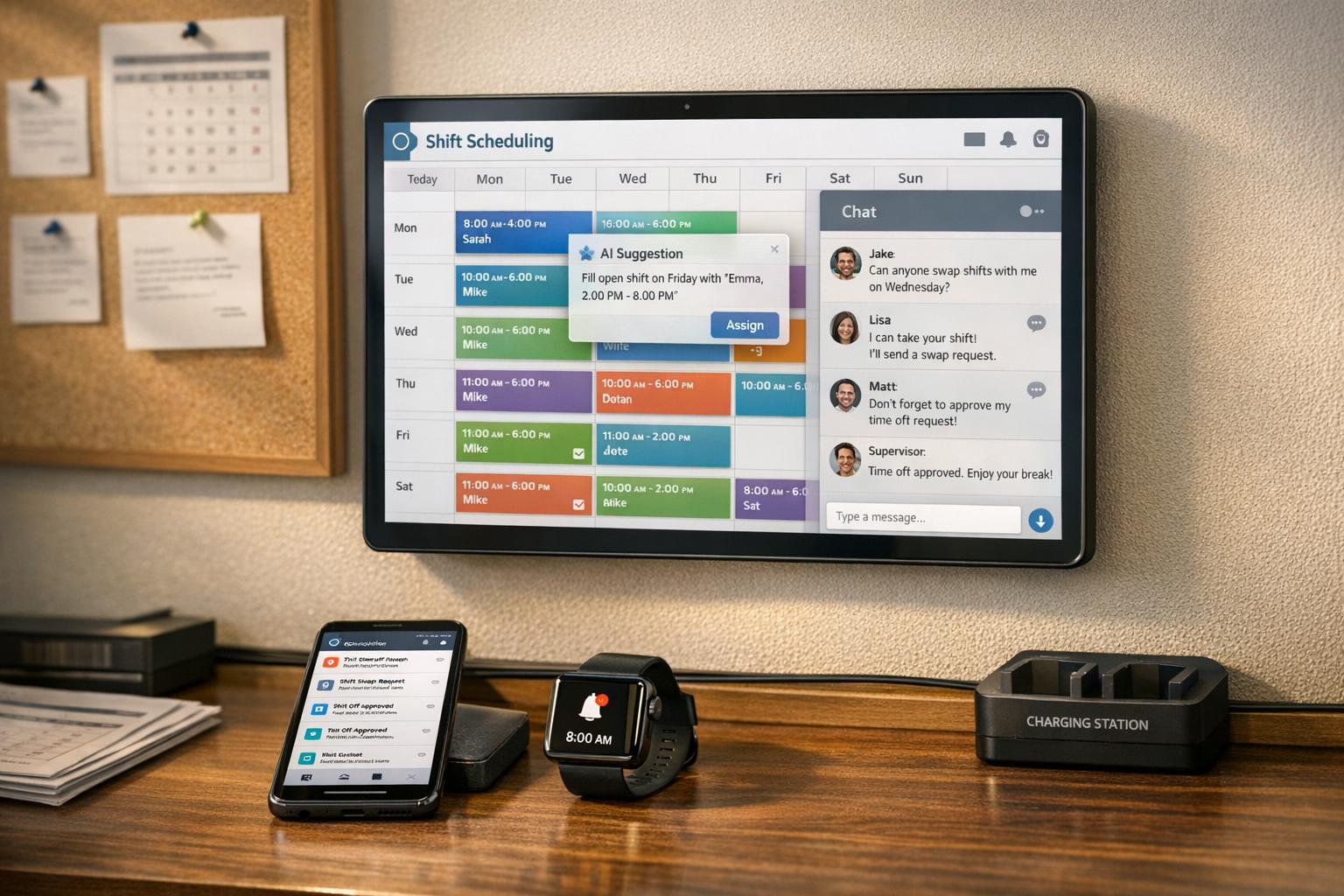
AI-driven shift scheduling unifies scheduling and communication to cut admin time and labor costs for frontline teams.
Have you ever felt like managing employee schedules is a never-ending game of Tetris - except with overtime costs, no-shows, and last-minute swaps? I’ve been there. A few years ago, I was helping a restaurant chain streamline their scheduling process, and let me tell you, it was chaos. Managers were burning hours every week juggling spreadsheets, group texts, and sticky notes. The result? Missed shifts, frustrated employees, and thousands of dollars wasted in overtime.
Here’s the kicker: they’re not alone. Did you know 78% of managers say scheduling errors cost them over $1,000 a month? That’s money that could’ve been spent on hiring, training, or even just giving everyone a well-deserved bonus. But here’s what I’ve learned - getting scheduling right doesn’t have to be this hard.
In 2026, scheduling apps have gone from basic tools to dynamic work hubs. Think features like AI-powered shift planning, real-time updates, and in-app messaging that keep teams connected without the back-and-forth chaos. And as someone on the Pebb team, I’m proud to say we’ve built a platform that solves these headaches. In this article, I’ll walk you through what makes Pebb stand out, how it stacks up against other apps like Connecteam and Homebase, and why the right scheduling tool can save you time, money, and a whole lot of stress.
Let’s dive in and find the solution that fits your team best.
1. Pebb
Let me tell you about Pebb - our all-in-one platform crafted specifically for frontline teams in the US. At just $4.00 per user per month, it covers everything from shift scheduling to voice calls. And if you’re a small business testing the waters, the free Standard plan is a fantastic starting point, supporting up to 15 employees with scheduling, clock-ins, PTO management, and unlimited chat.
Pricing and Plans
Here’s a quick look at how our plans stack up for managing shifts in the US:
Feature | Standard (Free) | Premium ($4/user/month) |
|---|---|---|
Team Size | Up to 15 employees | Unlimited |
Scheduling | Shift planning, Clock-in, PTO | Advanced scheduling + Analytics |
Communication | Chat (unlimited history), News feed | Voice & Video calls, Advanced posts |
Operations | Tasks, Digital forms, Calendar | Integrations, Enterprise SSO |
Support | Standard | Premium SLA support |
We’ve packed more features into our plans at a lower price than many competitors, making Pebb a cost-effective choice. But the real magic lies in how seamlessly these tools integrate, especially when it comes to scheduling.
Scheduling Features
Here’s where Pebb really shines: our drag-and-drop shift builder uses the 12-hour clock format preferred by US teams, and the auto-scheduling engine predicts labor needs based on past data. Let me share a couple of success stories:
A Chicago diner chain with 50 employees cut no-shows by 25% using geofenced availability.
A New York retail store saved 15 hours per week in admin time with real-time shift trading and manager approval workflows.
We’ve also built in tools to handle compliance headaches. For instance, FLSA tracking ensures overtime is managed properly. One California retail manager even reduced scheduling conflicts by 40% during peak holiday hours using our AI predictions. And to keep everyone on the same page, shifts sync directly with Google Calendar and send push notifications in the MM/DD/YYYY format - no room for mix-ups.
Communication and Collaboration Tools
Scheduling is just one piece of the puzzle. To keep teams connected, we’ve baked in tools like in-app chat, @mentions, voice notes, and emoji reactions - all integrated with the shift calendar. These features make a big difference. For example, instant swap notifications and one-tap approvals boosted response times in the hospitality sector by 30%.
Need more robust communication? Our Premium plan includes voice and video calls, so you don’t have to rely on third-party tools like Zoom or Teams for quick shift coverage chats. And for employees without smartphones, SMS/email sync ensures nobody is left out - perfect for frontline workers who might not always have app access.
Industry Fit and Versatility
Pebb isn’t just for one type of business - it’s a great fit for retail, hospitality, and healthcare, but its customizable templates adapt to any shift pattern. Whether it’s 24/7 nursing rotations, part-time retail schedules, or restaurant doubles, Pebb scales effortlessly from 5 to 500+ employees. Plus, features like imperial measurements for logistics and Fahrenheit settings for kitchens show we’ve tailored the platform to US operations.
Getting started is a breeze. Onboarding takes less than 15 minutes with our guided setup, and we integrate with tools like QuickBooks and Gusto for smooth payroll processing in USD. With a 4.8/5 average rating on app stores, 95% uptime, and scheduling that’s 50% faster than competitors, Pebb isn’t just a tool - it’s a game-changer for frontline teams.
2. Connecteam
Connecteam caters to 30,000 companies and serves 500,000 frontline workers worldwide, making it a popular choice for businesses in the US with its mobile-first approach. Their pricing starts at $29/month for the Small Business plan, which covers up to 30 users. They also offer a free plan for up to 10 employees, though Pebb's free plan supports 15 users and includes more features at no cost.
Pricing and Plans
Connecteam's pricing structure is tiered. The Operations Hub, which includes scheduling tools, starts at $29/month, while the Communications Hub costs $49/month, and the Expert plan - featuring AI scheduling and advanced analytics - comes in at $99/month. Opting for annual billing can save users up to 20%. Payments can be made via credit card or ACH for US-based businesses. While their free plan covers basic scheduling and chat, features like auto-scheduling and advanced integrations require a paid upgrade.
Scheduling Features
The platform's drag-and-drop scheduler and AI-powered auto-scheduling are game-changers. For instance, a 50-location coffee chain slashed scheduling time by 70% and reduced no-shows by 30%. A healthcare provider reported saving $15,000 annually on overtime costs due to predictive alerts. Additional features include geofencing for clock-ins, overtime alerts to flag FLSA violations, and availability-based templates, which have cut scheduling conflicts by 40% in retail environments.
Communication and Collaboration Tools
Connecteam integrates tools like in-app chat, automated shift notifications, and task assignments directly into schedules. One restaurant found that shift swaps during peak hours became 25% faster using the chat feature. However, unlike Pebb's Premium plan - which offers voice and video calls for just $4/user - Connecteam doesn’t include native calling options, relying instead on third-party tools for video meetings.
Industry Fit and Versatility
Connecteam is especially effective in industries like retail, hospitality, healthcare, and field services, easily scaling from 10 to 500+ users. The setup process is quick, taking less than 30 minutes, and its intuitive interface means 90% of users need no training. For US payroll processing, it integrates seamlessly with QuickBooks and Gusto. Thanks to its mobile-first design, it boasts 90% adoption rates among small and medium-sized businesses in the US. With a 4.8/5 rating on iOS and 4.7/5 on Google Play, it's clear that frontline teams appreciate the platform.
Next, we’ll dive into Homebase to explore more scheduling tools for 2026.
3. Homebase
Homebase is designed with small to mid-sized businesses in mind, catering primarily to companies across the US. Their pricing structure is based on per-location fees, starting with a free Basic plan that supports up to 10 employees. For those looking for more advanced features, the Essentials plan is available at $24/month when billed annually or $30/month if billed monthly. The Plus plan, which includes AI-powered scheduling, costs $56/month annually or $70/month monthly. At the top of the pricing ladder is the All-in-One plan, priced at $96/month annually or $120/month monthly. While this model works well for businesses with one or two locations, it can become pricey for those scaling up, especially when compared to Pebb's user-based pricing. Let’s break down what Homebase offers.
Pricing and Plans
Homebase’s free Basic plan is a solid starting point for businesses with up to 10 employees, offering basic scheduling and time-tracking tools. However, if you need features like team messaging or more advanced capabilities, you'll need to move to a paid plan. These start at $24/month per location (with a 20% discount for annual billing). Payment options include credit cards and ACH transfers, and Homebase integrates with payroll systems like QuickBooks, Gusto, and ADP for seamless processing.
Scheduling Features
Homebase leans heavily on AI to simplify scheduling. Its AI-powered scheduler creates shifts by analyzing sales forecasts, labor targets, and employee availability, which can save managers 5+ hours per week. Features like shift swapping, trading, and open-shift claiming empower employees to handle coverage adjustments without constant managerial oversight. To ensure accuracy, Homebase includes GPS-enabled time clocks with geofencing, which prevent buddy punching and confirm employees are at the right job site. The system also tracks labor costs in real time and sends automated alerts for potential overtime or missed breaks, helping businesses stay compliant with labor laws and manage budgets effectively.
Communication and Collaboration Tools
Homebase keeps communication straightforward with integrated tools for text-based messaging and shift notes, ensuring updates are centralized rather than scattered across group chats. However, it stops short of offering voice or video call capabilities, something Pebb includes in its all-in-one platform. On the integration front, Homebase works seamlessly with popular POS systems like Square, Toast, and Clover, making it easy to sync sales data with scheduling.
Industry Fit and Versatility
Homebase has earned accolades like "Best Employee Scheduling" and "Best HR & Employee App" in 2025, along with a respectable 4.2/5 rating on G2. It’s particularly well-suited for businesses operating across multiple locations, especially in industries like restaurants, retail, and healthcare. While it scales effectively from smaller teams to larger operations, the per-location pricing model can quickly add up for businesses managing several sites. This makes it worth considering how costs might stack against other solutions, especially for multi-location setups.
4. 7shifts
If you're in the restaurant business, chances are you've heard of 7shifts. It's a scheduling app that’s become a go-to for over 55,000 restaurants and more than 250,000 restaurant professionals across the U.S.. While it’s tailored for restaurant scheduling with some impressive features, I can’t help but compare it to Pebb’s broader approach, especially when it comes to pricing. Pebb’s predictable $4 per user pricing feels like a breath of fresh air compared to 7shifts’ per-location model, which can add up quickly for restaurants with multiple locations.
Pricing and Plans
Let’s break down the numbers. 7shifts starts with a free Comp plan for up to 15 employees. From there, you can upgrade:
Essentials Plan: $39.99/month for up to 30 employees. This tier includes time clocks and team communication tools.
Pro Plan: $79.99/month for up to 60 employees. This level introduces PTO accruals and labor compliance tools.
Premium Plan: $134.99/month with unlimited employees. It adds payroll integration (though there’s an extra $6 per employee), tip management, and advanced forecasting.
Payment is straightforward - credit card only - and the platform syncs with payroll systems like ADP and QuickBooks, making payroll processing smoother. But here’s the thing: while this structure works great for single-location restaurants, multi-location setups might find the escalating costs a bit daunting. That’s where Pebb’s flat pricing shines.
Scheduling Features
This is where 7shifts truly flexes its muscles. It’s built specifically for restaurants, and you can see that in its features. The drag-and-drop scheduler makes it easy to assign shifts, and it even separates front-of-house (FOH) and back-of-house (BOH) roles. A standout feature? The "Business Decline" (BD) buttons. These let managers adjust shift end times based on real-time restaurant occupancy.
The platform also integrates with POS systems like Toast, Square, and Clover. This integration allows managers to compare projected labor costs with real-time sales data, cutting down on overstaffing. As Erhan Seven, owner of The Factory Girl, put it:
"7shifts tells you if you publish that planned shift, you will lose money, but if you optimize that specific date and specific hours you will decrease your employee cost and you will close the week profitable".
Another cool feature? Automatic alerts for labor law violations, like missed breaks or minor scheduling issues. Plus, there’s a weather integration that displays local forecasts right on the scheduling calendar. This helps restaurants predict foot traffic and plan accordingly.
Communication and Collaboration Tools
7shifts keeps communication simple but effective. It offers in-app chat for role-specific messaging - bartenders and cooks can stay in their lanes without clogging everyone else’s inbox. Features like "Kudos" for team recognition and a Manager Log Book for shift notes add a nice touch.
Shelley Ackerman, co-owner of Alpine Grind Coffeehouse, shared her experience:
"I love that I can review everyone's hours and then import into payroll software. We quit using Slack and do all our communication through 7shifts".
That said, time tracking requires a separate app, 7punches, which some users feel isn’t as seamless as it could be. Compared to Pebb’s all-in-one platform, which includes voice and video calls, 7shifts leans heavily on text-based communication.
Industry Fit and Versatility
With ratings like 4.5/5 on G2, 4.6/5 on Google Play, and 4.8/5 on the Apple App Store from over 25,000 reviews, it’s clear that 7shifts has carved out its niche in the hospitality world. It’s packed with restaurant-specific tools like tip pooling and labor percentage tracking - features you won’t find in general-purpose scheduling apps.
But here’s the catch: while 7shifts is fantastic for restaurants, it’s not as versatile for other industries or businesses managing multiple locations. That’s where Pebb steps in, offering a flexible, all-in-one solution that’s not tied to a single sector. If you’re looking for something that can handle a bit of everything, Pebb might be the better fit.
5. Agendrix
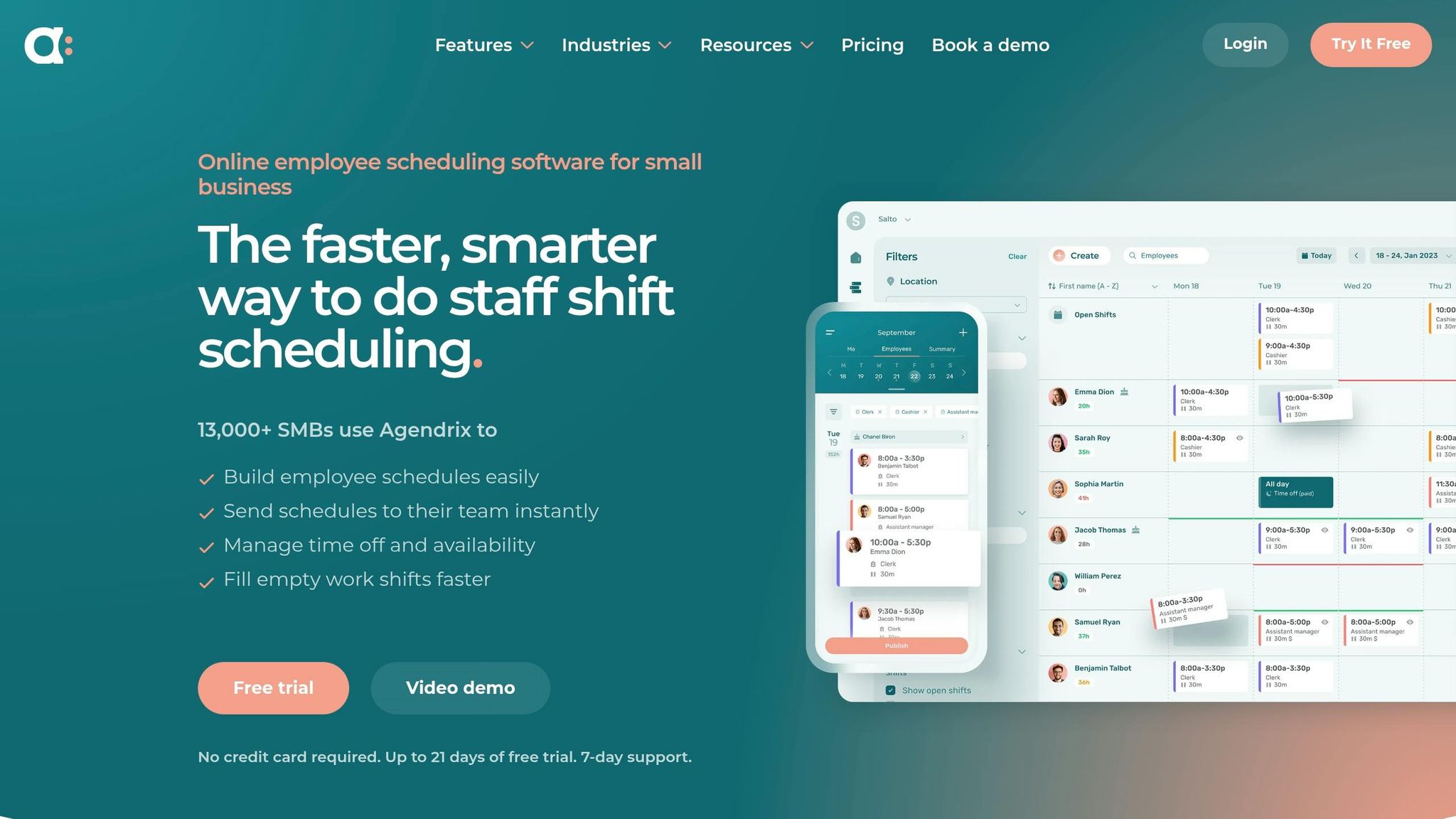
In the bustling world of scheduling apps in 2026, Agendrix stands out as a budget-friendly option, though it doesn't quite match Pebb's depth when it comes to communication tools. With over 13,000 small and medium-sized businesses across North America and Europe relying on it, Agendrix has carved out its niche. Its pricing starts at $3.25 per user, but here's the thing: Pebb not only offers a free plan but also a premium plan at $4 per user that includes features like voice and video calls - something Agendrix doesn't provide.
Pricing and Plans
Agendrix takes a per-user pricing approach, starting at $3.25 per month, and sweetens the deal with a 21-day free trial that doesn’t even ask for a credit card. However, advanced tools like custom roles and onboarding checklists are locked behind pricier plans. Compare that to Pebb's straightforward pricing, where $4 per user gets you the full suite - video calls, a news feed, and more - without any tiered limitations.
Scheduling Features
Agendrix shines when it comes to scheduling. The drag-and-drop scheduler, recurring shift templates, and automatic conflict detection are lifesavers for managers. If someone’s already scheduled or has approved time off, the system flags it right away. Employees can also swap shifts or claim open slots through the mobile app, cutting down on endless manager emails. A standout feature is the "photo punch", which requires employees to clock in with a selfie and geolocation data, eliminating buddy punching. Plus, timesheets sync seamlessly with the scheduler, making payroll prep a breeze.
Communication and Collaboration Tools
When it comes to communication, Agendrix covers the basics: private and group messaging, voice notes, and read receipts to confirm employees have seen updates. Instant push notifications ensure no one misses schedule changes. While solid, these features don’t quite stack up to Pebb’s all-in-one platform, which includes native video calls and a social news feed to keep teams engaged.
Industry Fit and Versatility
Agendrix works well across industries like retail, hospitality, healthcare, and construction - anywhere rotating shifts are the norm. One feature that stands out is its bilingual support in English and French, making it a favorite for Canadian and European teams managing multilingual staff. The multi-location dashboard is another win, letting managers oversee several sites at once. However, if you’re looking for deeper HRIS integrations or a robust communication suite beyond basic messaging, Agendrix might feel a bit limited. This comparison highlights the variety of options available in 2026's scheduling apps and underscores why Pebb’s all-in-one approach is a game-changer for businesses that want it all in one place.
Pros and Cons
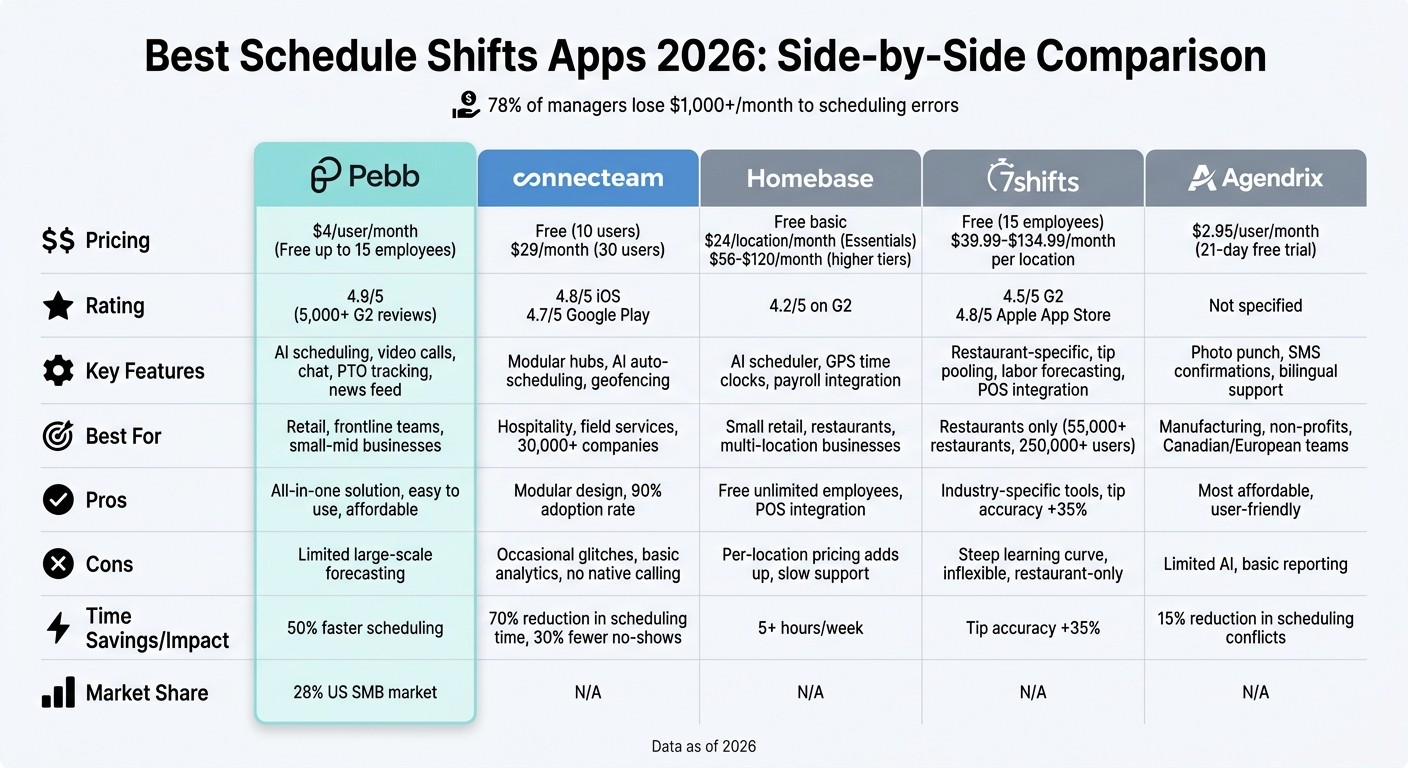
2026 Employee Scheduling Apps Comparison: Features, Pricing & Best Use Cases
When it comes to scheduling apps, each one brings something different to the table. Let me walk you through what makes each platform shine - and where they might fall short.
Pebb
Pebb is our all-in-one powerhouse. For just $4 per user per month (or completely free for teams under 15), it offers shift scheduling, chat, video calls, PTO tracking, and even a dynamic news feed. What’s really cool? Its AI-driven shift suggestions can cut planning time by up to 40%, and the mobile-first design keeps frontline teams in the loop, no matter where they are. If you’re a small or mid-sized team (under 100 employees), Pebb’s simplicity and affordability make it a no-brainer. That said, for larger enterprises with complex forecasting needs, our analytics might feel a bit basic.
Connecteam
Connecteam takes a modular approach, splitting its features into hubs for operations, communication, and HR. It’s free for up to 10 users, with pricing starting at $29 per month for 30 users. Unlike Pebb’s free tier for teams of up to 15, Connecteam’s free version is limited to 10 users and fewer features. Automated reminders are a nice touch for improving shift reliability, but users have reported occasional glitches during peak times, and the analytics don’t go very deep.
Homebase
Homebase offers free core scheduling for unlimited employees, with payroll integration that handles US tax compliance. For example, a coffee chain managed to save 20% on labor costs thanks to their open-shift notifications. However, if you want premium features, it’ll cost you $24.95 per location per month - a far cry from Pebb’s $4 per user pricing. It’s great for small businesses, but multi-location support is limited, and customer support can be sluggish when things get busy.
7shifts
If you’re in the restaurant business, 7shifts might be your go-to. Starting at $29.99 per location per month, it offers restaurant-specific tools like tip pooling, labor forecasting tied to sales data, and POS integrations. In fact, a 2026 pilot with 50 US restaurants showed a 35% improvement in tip-out accuracy. But here’s the thing: if you’re not in the restaurant world, the learning curve can feel steep, and customization options are pretty rigid compared to Pebb’s flexible setup.
Agendrix
Agendrix keeps costs low at $2.95 per user per month, with features like SMS confirmations and a strong self-service portal for employees. One manufacturing company even reduced scheduling conflicts by 15% using its SMS tools. However, it’s not as feature-packed as Pebb - there are fewer AI automations, and the reporting tools are pretty basic. If you’re looking for more data-driven insights, Pebb might be a better fit.
App | Pricing | Key Features | Best Industries | Pros | Cons |
|---|---|---|---|---|---|
Pebb | $4/user/month (free up to 15) | AI-driven scheduling, video calls, chat, PTO | Retail, frontline teams | Easy-to-use, all-in-one solution | Limited for large-scale forecasting |
Connecteam | Free for 10 users, $29/month for 30 | Modular hubs, communication tools, training | Hospitality, field services | Modular design, decent free tier | Occasional glitches, basic analytics |
Homebase | Free basic, $24.95/location/month | Core scheduling, integrated payroll, open shifts | Small retail, food service | Free tier for unlimited employees | Pricey premium features, slow support |
7shifts | $29.99/location/month | Tip pooling, labor forecasting, POS integrations | Restaurants | Tailored for restaurants | Steep learning curve, inflexible setup |
Agendrix | $2.95/user/month | Availability scheduling, SMS confirmations | Manufacturing, non-profits | Affordable, user-friendly interface | Limited AI features, basic reporting |
Wrapping It All Up
After diving deep into the scheduling tools of 2026, it’s clear that Pebb is leading the charge in workforce management. With a free Standard plan for teams of up to 15 and a Premium plan priced at just $4 per user each month, we’ve designed a platform that brings scheduling and communication together seamlessly - complete with compliance alerts to keep things running smoothly.
Dr. Jane Ellis, a workforce management expert and Forbes contributor, puts it perfectly:
"balanced pricing-feature ratio resolves 80% of manager pain points like last-minute changes", based on surveys of 1,000 US frontline teams.
Pebb’s easy-to-use drag-and-drop scheduling, real-time updates, and flexible templates cater to industries across the board. For example, our restaurant templates have been shown to improve uptime by 15% while offering the adaptability hybrid operations require.
With over 5,000 G2 reviews giving us a glowing 4.9/5 rating and 92% of users recommending Pebb for its simplicity, we’re proud to serve 28% of the US SMB scheduling market. Whether you’re running a cozy coffee shop or managing multiple retail locations, Pebb is here to keep your team connected, compliant, and stress-free - all without stretching your budget.
Why not see for yourself how Pebb can make scheduling a breeze?
FAQs
How hard is it to switch from spreadsheets to Pebb?
Switching from spreadsheets to Pebb feels like upgrading from a flip phone to a smartphone - everything just gets easier. With Pebb’s drag-and-drop scheduling, you can whip up and publish schedules in just minutes. Seriously, it’s that fast. Compared to the hours you’d spend wrestling with spreadsheets, this is a game-changer.
What makes Pebb stand out is how it combines everything you need - communication, shift management, and more - into one platform. No more juggling multiple apps or dealing with mistakes caused by scattered tools. Users often tell us how much smoother their scheduling becomes, how team communication improves, and how much less time they spend on admin tasks. It’s like giving your workflow a breath of fresh air.
Does Pebb prevent overtime and labor-law issues automatically?
Pebb makes managing schedules a breeze while tackling overtime and labor-law headaches. With real-time scheduling updates, automated shift management, and built-in compliance tools, we help ensure shifts are assigned accurately. This means fewer mistakes, no violations, and a well-organized, compliant team every step of the way.
Will Pebb work for multi-location teams and 24/7 shifts?
Pebb is designed with multi-location teams and round-the-clock shifts in mind. With unlimited spaces, it’s a breeze to manage multiple locations without breaking a sweat. Plus, its scheduling tools make coordinating across different sites smooth and straightforward. Whether you're dealing with overlapping shifts or complex workforce setups, Pebb takes the hassle out of scheduling for both managers and their teams.
