
Author: Ron Daniel
Best Google Forms Alternative For Work
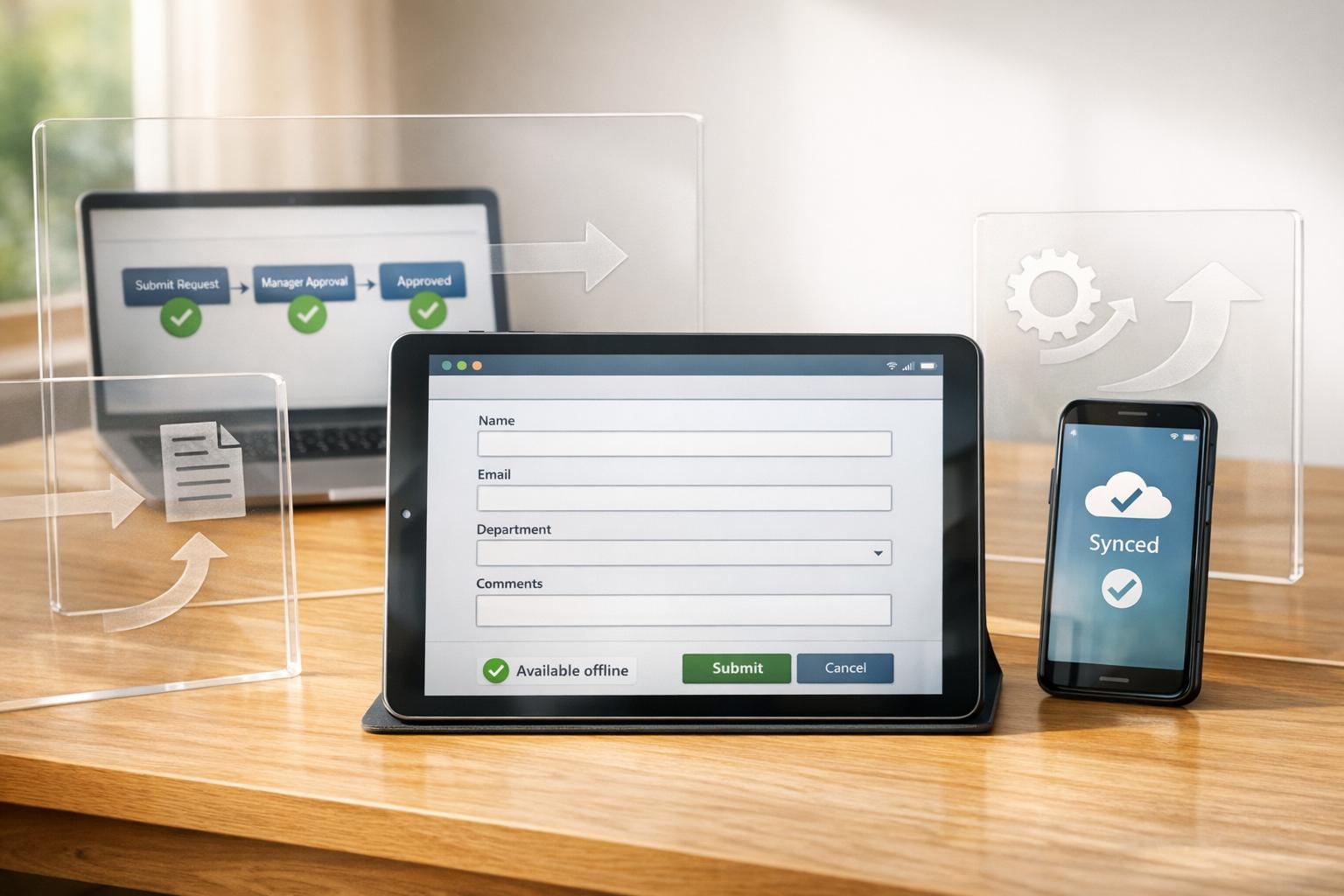
Turn static forms into workflow engines with mobile, offline-capable digital forms that automate approvals and boost productivity.
Let me tell you a story. A few months ago, I was juggling spreadsheets, email threads, and Slack messages, trying to track down a simple time-off request from one of our team members. It was chaos. The form responses were sitting in a Google Sheet, untouched, and I spent hours manually notifying managers and updating calendars. I remember thinking, There has to be a better way to handle this without losing my mind.
Here’s the reality: Google Forms is great for quick surveys or basic data collection, but when it comes to managing workflows, automating tasks, or keeping a team aligned, it just doesn’t cut it. And I’m not alone in this frustration - so many teams hit the same wall when trying to scale their processes with tools that weren’t built for the job.
That’s why we built Pebb Digital Forms. It’s not just a form builder; it’s a tool designed to take the headaches out of workplace communication and task management. In this guide, I’ll walk you through why Pebb is the go-to alternative for teams like ours, plus how it stacks up against other options like Microsoft Forms, Jotform, and Typeform. Let’s dive in.
1. Pebb Digital Forms
At Pebb, we set out to solve a big problem: teams juggling disconnected tools. So, we created Digital Forms, not as a simple data collection tool, but as a core feature of our all-in-one workplace platform. This platform brings together everything - work chat, shift scheduling, PTO management, and task tracking. And here's the game-changer: when someone fills out a form, it doesn’t just gather dust in a spreadsheet. Instead, it kicks off real actions, like notifying a manager in chat or automatically creating follow-up tasks. Pretty seamless, right?
We’ve added conditional logic to make forms smarter. Questions appear or disappear based on previous answers, turning a static checklist into an interactive experience. This is a big deal for frontline teams. Studies show that 68% of successful companies rely on mobile internet for real-time data collection. Our mobile app, which even works offline, ensures teams stay connected and productive no matter where they are.
Pricing
Now, let’s talk about cost. Our Standard plan is completely free for up to 15 employees. It includes unlimited form submissions, work chat with unlimited history, shift scheduling, and digital forms. For larger teams or those needing extras like analytics, voice and video calls, or enterprise SSO, our Premium plan is just $4 per user per month. Compare that to Slack’s $8.75 per user per month or Jotform’s $34 per month, and you can see why our pricing stands out.
Workplace Integrations
The beauty of our forms is how deeply they integrate into daily workflows. Say someone submits a time-off request. The form doesn’t just sit there - it syncs with team calendars, notifies managers through our built-in work chat, and can even create follow-up tasks automatically. Plus, we’ve added AI-powered tools like document verification and receipt scanning to flag anomalies and cut down on manual reviews. This approach has led to an average 11.5% boost in productivity by automating routine tasks. And since all of this extends to mobile, your team can stay efficient no matter where they’re working.
Mobile Accessibility
We designed our iOS and Android apps with frontline workers in mind. The "one-thumb" operation makes it easy to use on the go. And with offline functionality, workers can complete safety checklists or incident reports even without internet - data syncs seamlessly when they’re back online. For US-based teams, we’ve built in features like imperial units (inches, °F), geolocation tagging, and photo uploads. In one manufacturing case study, this mobile-first approach led to a 95% form completion rate, compared to Google Forms’ 70%, which still leans heavily on desktop submissions.
Team Collaboration Features
Collaboration is another area where we shine. Our platform supports real-time co-editing, so multiple people can work on a form at the same time. Add role-based permissions, shared template libraries, and activity logs, and you’ve got a system that’s built for teamwork. Managers can assign forms directly using @mentions, and instant in-app notifications make sure nothing gets missed. In one example with a major US retail chain, these tools reduced response times from 48 hours (using Google Forms) to just 2 hours. The result? A 25% boost in engagement.
2. Microsoft Forms
If your team is already using Microsoft 365 tools like Outlook, Teams, or SharePoint, Microsoft Forms might feel like a natural fit. It comes bundled with Microsoft 365, but here's the catch: you'll need a Microsoft 365 plan to use it. The free version allows up to 200 responses per form, while business plans start at $6 per user per month, and enterprise options can handle up to 5,000,000 responses.
Workplace Integrations
The real strength of Microsoft Forms lies in how smoothly it integrates with the broader Microsoft ecosystem. For example:
Responses sync directly with Excel Online for real-time analysis.
Uploaded files are automatically saved to OneDrive.
Forms can be embedded right into Teams channels or SharePoint pages.
If you're into automation, Power Automate lets you set up workflows like routing form data to specific teams or sending follow-up emails. However, some of the more advanced automation features may require you to shell out for additional licenses.
That said, if your workplace relies on tools outside the Microsoft bubble - like Slack or Zapier - you might hit a wall. Microsoft Forms doesn't offer native API integrations with non-Microsoft platforms. You'll likely need to invest in paid connectors to bridge the gap. While this tight integration with Microsoft's suite is great for office environments, it’s a sharp contrast to platforms like Pebb, which offer broader connectivity across various tools.
Mobile Accessibility
When it comes to mobile use, Microsoft Forms is responsive on your phone's browser, but there’s no dedicated mobile app. Even worse, it doesn’t support offline functionality. This can be a real headache for teams working in places with spotty internet, like warehouses, construction sites, or remote locations.
In comparison, Pebb's offline mobile capabilities make it a more practical choice for fieldwork. This limitation in mobile accessibility might make you rethink if your team frequently works outside traditional office settings.
Team Collaboration Features
For teams on Business or Education plans, Microsoft Forms offers some handy collaboration features. You can co-author forms in real time, and Microsoft Copilot can help draft questions or analyze trends. Its drag-and-drop builder is straightforward, but here's the downside: the conditional branching feature can feel clunky if you're trying to set up more complex workflows.
While Microsoft Forms plays well within the Microsoft ecosystem, its struggles with advanced logic and limited integration options highlight why tools like Pebb shine when it comes to seamless workplace communication and flexibility.
3. Jotform
Let’s dive into Jotform, another solid option we looked at after Microsoft Forms. This platform, launched back in 2006, has carved out a niche for businesses with more advanced needs. With an impressive $144.9 million in annual revenue, Jotform offers features like conditional logic, e-signatures, HIPAA compliance, and payment processing through over 40 gateways. It’s clearly designed for teams that need more than just basic forms.
Pricing
Here’s how the pricing shakes out: Jotform’s free plan gives you 5 forms, 100 monthly submissions, and 100 MB of storage. If you’re looking for more capacity, the Bronze plan costs between $34 and $39 per month, offering 25 forms and 1,000 submissions. The Silver plan, at $39 to $49 per month, ups the ante to 50 forms and 2,500 submissions. For larger needs, the Gold plan ranges from $99 to $129 monthly, while Enterprise pricing is tailored to your specific requirements.
Now, here’s where Pebb shines. Our premium plan is just $4 per user and includes not only forms but also chat, scheduling, PTO management, and more. It’s a comprehensive solution for workplace needs at a fraction of the cost.
Workplace Integrations
Jotform does a great job of playing well with others. It integrates with over 150 third-party apps like Slack, Microsoft Teams, Salesforce, HubSpot, Mailchimp, and Trello. You can also use Webhooks or their REST API for custom setups, and Zapier opens the door to even more integrations. That said, some of these advanced automation features are locked behind the higher-tier plans. In contrast, Pebb’s pricing includes all features, keeping things simple and accessible.
Mobile Accessibility
Jotform’s mobile apps for iOS and Android are another plus. They even let you build and complete forms offline, which can be a lifesaver when you’re working without internet access. However, users have mentioned that the interface can feel a bit sluggish, especially when using heavy conditional logic.
Team Collaboration Features
Collaboration gets a boost starting with the Bronze plan, which introduces multi-user accounts. The Enterprise plan takes it further with advanced permissions, form assignments, and SSO (SAML). Jotform also offers tools like a Report Builder, Form Analytics, and automated workflows to streamline submission routing. With a 4.7/5 rating on G2 from nearly 5,000 reviews, it’s clearly a well-loved tool. That said, new users might feel overwhelmed by the sheer number of options.
4. Typeform
Let’s talk about Typeform - a tool that takes a fresh approach to workplace communication apps. Instead of bombarding users with a long list of questions, Typeform’s interface feels more like a conversation, presenting one question at a time. This design isn’t just for show; it works. In fact, 75% of users say Typeform has helped them boost completion rates, with some seeing improvements as high as 34%.
Pricing
Typeform has five pricing tiers, starting with a free plan that includes GDPR and WCAG 2.1 compliance, data syncing, and customizable welcome and thank-you pages. For those looking to unlock advanced features like payment collection, custom subdomains, UTM tracking, and priority support, paid plans are available. While Typeform’s offerings are robust, Pebb’s premium plan stands out by bundling forms with a full suite of workplace tools - at just $4 per user.
Workplace Integrations
Typeform connects seamlessly with over 120 popular workplace tools, including Salesforce, HubSpot, Slack, Notion, monday.com, Zendesk, Mailchimp, and Microsoft Teams. It also syncs data automatically with Google Sheets and integrates with more than 2,600 apps through Zapier or Make. Its advanced conditional logic helps craft personalized experiences by incorporating calculations, scoring, and external data.
Mobile Accessibility
Every Typeform form is mobile-responsive right out of the gate, ensuring a smooth experience on smartphones and tablets. The platform also uses AI to enhance functionality. Features like "Clarify with AI" automatically follow up on unclear responses, while "Smart Insights" detects patterns and trends in the data. Impressively, 87% of users report that Typeform helps them uncover deeper insights from their data.
Team Collaboration Features
Typeform doesn’t just stop at integrations and mobile optimization - it’s built for teamwork too. Multiple team members can collaborate on surveys in real time. With over 3,000 customizable templates and detailed drop-off analysis for each question, teams can quickly fine-tune surveys to improve engagement. Plus, its compliance with PCI, HIPAA, GDPR, and WCAG 2.1 standards makes it a reliable option for managing sensitive data in the workplace.
Pros and Cons
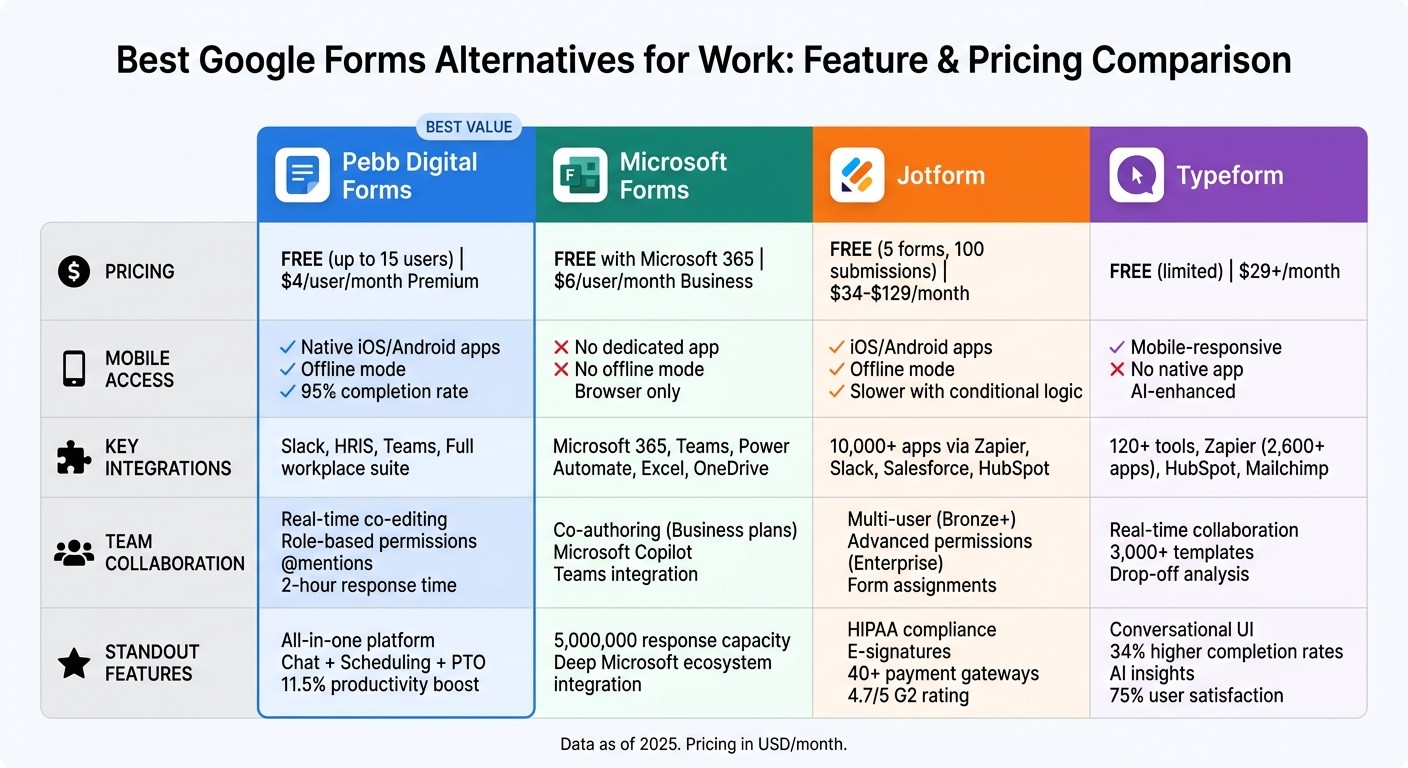
Google Forms Alternatives Comparison: Pricing, Features, and Mobile Access
Let’s break down the strengths and limitations of each platform for workplace use:
Feature | Pebb | Microsoft Forms | Jotform | Typeform |
|---|---|---|---|---|
Starting Price (USD/month) | Free (up to 15 users); $4/user | Free with Microsoft 365 | Free (limited); $34+ | $29+ |
Key Integrations | Slack, HRIS, full Pebb suite | Microsoft 365, Teams, Power Automate | 10,000+ via Zapier, Google Workspace | HubSpot, Mailchimp, Zapier |
Mobile Access | Native iOS/Android apps | Responsive web, Teams app | Full mobile app with offline mode | Mobile-optimized, responsive |
Team Collaboration | Real-time editing, role-based access | Shared via Teams/OneDrive | Team workspaces (paid plans) | Shared projects (paid plans) |
Breaking Down the Comparison
Here’s how these platforms stack up:
Pebb: Our platform is designed to be more than just a form builder - it’s a complete hub for communication and task management. At just $4 per user, it’s a budget-friendly solution that includes real-time editing, seamless Slack and HRIS integrations, and mobile apps to keep everyone connected on the go.
Microsoft Forms: If your team already uses Microsoft 365, Forms fits neatly into the ecosystem, with integrations like Teams and Power Automate. However, its mobile experience is less robust, relying on responsive web design rather than dedicated apps.
Jotform: With over 10,000 integrations (thanks to Zapier) and features like HIPAA compliance, Jotform is a powerhouse for specialized needs. But the free plan has tight restrictions - only 100 submissions per month - and the pricing escalates quickly for larger teams.
Typeform: Known for its conversational form design, Typeform can increase completion rates by up to 30% compared to traditional forms. That said, its $29+ starting price might be a stretch for smaller teams or those with simpler needs.
If your goal is to go beyond basic forms and adopt a fully integrated solution, Pebb stands out as the clear winner. It’s affordable, packed with features, and built to keep your team productive and connected.
Conclusion
When you're picking a forms tool for your workplace, it all boils down to what you need to get done. Google Forms works for quick surveys, but if your team relies on real-time collaboration, mobile access, and workflow automation, you'll probably find it lacking pretty quickly.
That's exactly why we created Pebb Digital Forms. For just $4 per user per month, you get unlimited forms plus extras like chat, shift scheduling, and PTO tracking - all in one platform. Sure, tools like Microsoft Forms, Jotform, and Typeform have their place, but none offer the same mobile-first, all-in-one solution at this price point.
Here’s how teams can make the most of Pebb:
Small teams (under 10 people): Start with our free plan to try out basic workflows and see how it fits.
Medium teams (10-50 members): Our Premium plan is ideal, offering advanced analytics and integrations. Teams on this plan often report a 3x faster task completion rate, which means serious time saved.
Large enterprises (50+ employees): Take advantage of our scalability and compliance features. Many large teams have seen a 65% drop in administrative time after switching to Pebb.
These aren’t just numbers - they’re based on real results from teams like yours.
Sarah Chen, a SHRM-certified HR expert, summed it up perfectly:
"Pebb transforms forms from static data collectors to dynamic workflow engines, ideal for US teams navigating hybrid work." - Sarah Chen, Forbes Contributor, March 2025
Whether your team is on the frontlines or in the office, Pebb bridges the gap. Frontline employees stay connected through our mobile app, while office teams enjoy seamless integrations with tools like Slack and Teams. Remote, hybrid, or in-office - Pebb works wherever your team does. If you're ready to turn forms into actionable workflows and speed up how your team gets things done, Pebb is the way to go.
FAQs
How is Pebb different from a regular form tool?
Pebb takes workplace tools to the next level by blending digital forms with a platform that covers all your communication and operational needs. Most form tools stop at data collection, but Pebb goes further. It combines forms with features like work chat, shift scheduling, PTO management, and even voice/video calls. This not only simplifies workflows but also cuts down on the constant back-and-forth between apps. Whether it's handling HR onboarding or conducting safety checks, Pebb is designed to meet the unique challenges of both frontline workers and office teams.
Can Pebb forms trigger tasks and manager approvals automatically?
Pebb's digital forms do more than just collect information - they’re designed to work smarter. With smart workflows, these forms can automatically kick off tasks and notify managers for approvals as soon as a submission is made. It’s like having an invisible assistant that keeps everything organized, ensures managers are alerted instantly, and simplifies the entire approval process. The result? Less time wasted and a smoother, more efficient way to get things done.
Will Pebb forms work offline for frontline teams?
Pebb forms are designed to work seamlessly offline, making them a reliable tool for frontline employees even in areas with limited or no internet access. Employees can access and submit forms without any hassle, and the data automatically syncs as soon as the device reconnects to the internet. This ensures updates happen smoothly without disrupting workflow.
