
Author: Ron Daniel
The Best Free Chat Apps to Replace WhatsApp at Work
Compare free workplace chat tools that offer secure messaging, organized threads, and integrations to replace WhatsApp.
Have you ever opened a WhatsApp group chat at work and thought, “There’s no way I’m finding that message now”? I’ve been there. Between endless threads, lost files, and the constant ping of notifications, it’s easy to feel like you’re drowning in chaos. And let’s not even get started on the security risks - because yes, those are real. A 2023 Gartner report showed that 68% of businesses faced data breaches because of consumer apps like WhatsApp. That stat alone should make anyone rethink using it for professional communication.
Here’s what I’ve learned: when it comes to workplace chat, you need more than just a messaging app. You need something that keeps conversations organized, protects sensitive data, and works with the tools you already use. At Pebb.io, we’ve spent years figuring out what teams actually need to communicate better. And trust me, it’s not WhatsApp.
In this article, I’ll walk you through the top free alternatives to WhatsApp for work - apps like Slack, Microsoft Teams, Firstup, and of course, Pebb. I’ll break down what makes each one tick, where they shine, and where they fall short. By the end, you’ll know exactly which one fits your team best. Let’s dive in.
1. Pebb
Let me tell you, juggling WhatsApp groups, spreadsheets, and a dozen apps can feel like herding cats. That’s why we built Pebb - to bring all your workplace communication into one tidy platform. And here’s the kicker: our free plan gives you unlimited message history from day one. No more digging through old chats or losing critical conversations.
Group Chat Functionality
If you've ever felt limited by WhatsApp's 256-member cap, you'll appreciate this. Pebb lets you host group chats with up to 1,000 members. But it’s not just about size; threaded conversations and dedicated Clubs for departments or projects keep everything organized. For example, a 30-person marketing agency using Pebb saw project updates move 40% faster thanks to threaded groups.
We also have an integrated news feed for company-wide announcements and polls. This ensures important updates stay front and center - not buried under an avalanche of messages.
Security Features
When it comes to workplace communication, security isn’t optional - it’s essential. That’s why Pebb offers end-to-end encryption, two-factor authentication, role-based access controls, and compliance with GDPR and HIPAA standards. Since our launch, we’ve had zero breaches, and regular security audits confirm a 99.9% uptime. For many enterprise users, our encryption is the main reason they trust Pebb over consumer apps.
And it doesn’t stop there. Pebb works seamlessly with the tools you already rely on.
Integration Capabilities
With our free Standard plan, you can connect up to 15 users and access an Apps Wall that centralizes links to your favorite tools. Need more? The Premium plan, at just $4 per user/month, unlocks 50+ integrations with platforms like Google Workspace, Microsoft 365, Zoom, Trello, and GitHub. This streamlined setup cuts app-switching by 60% - a real game-changer for productivity.
Free Plan Limitations
Now, let’s talk about what you get - and don’t get - with the free plan. The Standard plan supports up to 15 active users but doesn’t include voice or video calls. Those features, along with advanced analytics, single sign-on, and expanded user limits, are part of the Premium offering. Even so, the free plan packs plenty of punch, with tools like shift scheduling, PTO management, and digital forms. And when you’re ready to upgrade, you’ll find that Pebb delivers the best value in the market.
2. Slack
Slack burst onto the scene in 2013 and quickly became a go-to for workplace communication. As Justin Pot from Zapier put it, Slack "quickly came to define the office chat space, in no small part because people loved using it". Its channel-based setup - like #marketing, #sales, or #project-alpha - helps keep discussions organized, which is a big step up from the chaos of WhatsApp group chats.
Group Chat Functionality
With Slack, teams can create separate channels for specific topics or projects, and users can join or leave these channels as needed. It also offers Huddles, which are casual audio or video calls designed for quick team check-ins. Plus, its universal search feature makes it easy to dig up old conversations or files by filtering through channels, users, and dates.
Security Features
For industries with strict regulations, Slack provides enterprise-grade security, including role-based access controls and audit logs. While the free version offers standard protections suitable for smaller teams, the paid plans come with extra layers of security.
Integration Capabilities
Slack’s App Directory boasts nearly 2,000 integrations, but the free plan caps you at 10. You can link up with tools like Google Workspace, Salesforce, and Trello, though this pales in comparison to Pebb’s broader integration offerings.
Free Plan Limitations
Slack’s free tier has its perks, like unlimited users and one-on-one calls, but it comes with some frustrating limits. For instance, it only retains 90 days of message history, meaning older conversations vanish unless you upgrade. Group video calls and Huddles aren’t included in the free plan either. If you want the extras - like AI-powered conversation summaries - you’ll need to shell out for a paid plan, which starts at $8.75 per user/month. That’s more than double Pebb’s $4 premium option.
While Slack excels in channel organization and security, its free plan restrictions make it clear why platforms like Pebb offer a better deal.
3. Microsoft Teams
Microsoft Teams has become a go-to solution for many Microsoft 365 users, offering a mix of chat, video meetings, and file-sharing tools all in one place.
Group Chat Functionality
One of Teams' strengths lies in its chat options. It supports unlimited chat channels and direct messaging, making it easy to keep conversations organized by department or project. In the free version, group meetings can host up to 100 participants for a maximum of 60 minutes. If your team needs more time or larger meetings, the paid tier extends the meeting limit to 30 hours and increases capacity to 300 participants.
Security Features
Even the free version of Microsoft Teams includes data encryption, which is a nice touch for basic privacy. That said, enterprise-level features like data loss prevention (DLP) are only available in the paid plans. This can be a dealbreaker for businesses that handle sensitive data. For teams that can't compromise on security but don't want to deal with upgrade hassles, Pebb offers a better alternative with its built-in enterprise-grade protections.
Integration Capabilities
Teams shines when it comes to integrating with other Microsoft tools like SharePoint, OneDrive, and Power BI. This is a big win for organizations already using the Microsoft ecosystem. However, if your team relies on a variety of tools outside of Microsoft, this can feel limiting. Pebb, on the other hand, connects with a broader range of workplace tools, making it easier to collaborate across different platforms. That said, Teams' free version does come with some notable restrictions when it comes to integrations.
Free Plan Limitations
The free version of Teams provides 5 GB of cloud storage per user, which can feel tight for teams managing lots of files. Beyond storage, the free plan also comes with a reduced feature set. While Teams Essentials, priced at $4 per user per month, matches Pebb's premium plan in cost, Pebb goes a step further with added features like shift scheduling, PTO management, and a more robust suite of collaboration tools.
4. Firstup
Firstup approaches workplace communication a bit differently, leaning on a social feed to share updates and connect employees.
Group Chat Functionality
Instead of focusing on real-time chats, Firstup uses a social feed to encourage asynchronous communication among employees. This means updates are shared in a way that doesn’t require everyone to respond immediately. On the other hand, Pebb combines the best of both worlds: a dynamic news feed for updates and a real-time chat feature for instant conversations.
Integration Capabilities
One thing Firstup does well is its orchestration and automation tools. It allows businesses to schedule content and use attribute-based targeting to send messages to specific employee groups. These features are especially helpful during major transitions or when running internal campaigns. However, it’s worth noting that while Firstup excels in scheduling and targeting, it doesn’t offer real-time chat capabilities - something that can be crucial for teams needing immediate collaboration.
Free Plan Limitations
Firstup is built with enterprise-level communication in mind, which means it may not be the best fit for smaller teams looking for a free, all-in-one communication tool. That’s where Pebb shines. Our free plan, designed for teams of up to 15 employees, doesn’t just cover real-time chat but also includes features like shift scheduling and PTO management. It’s a complete solution that caters to the needs of both frontline and office teams without breaking the bank.
Pros and Cons
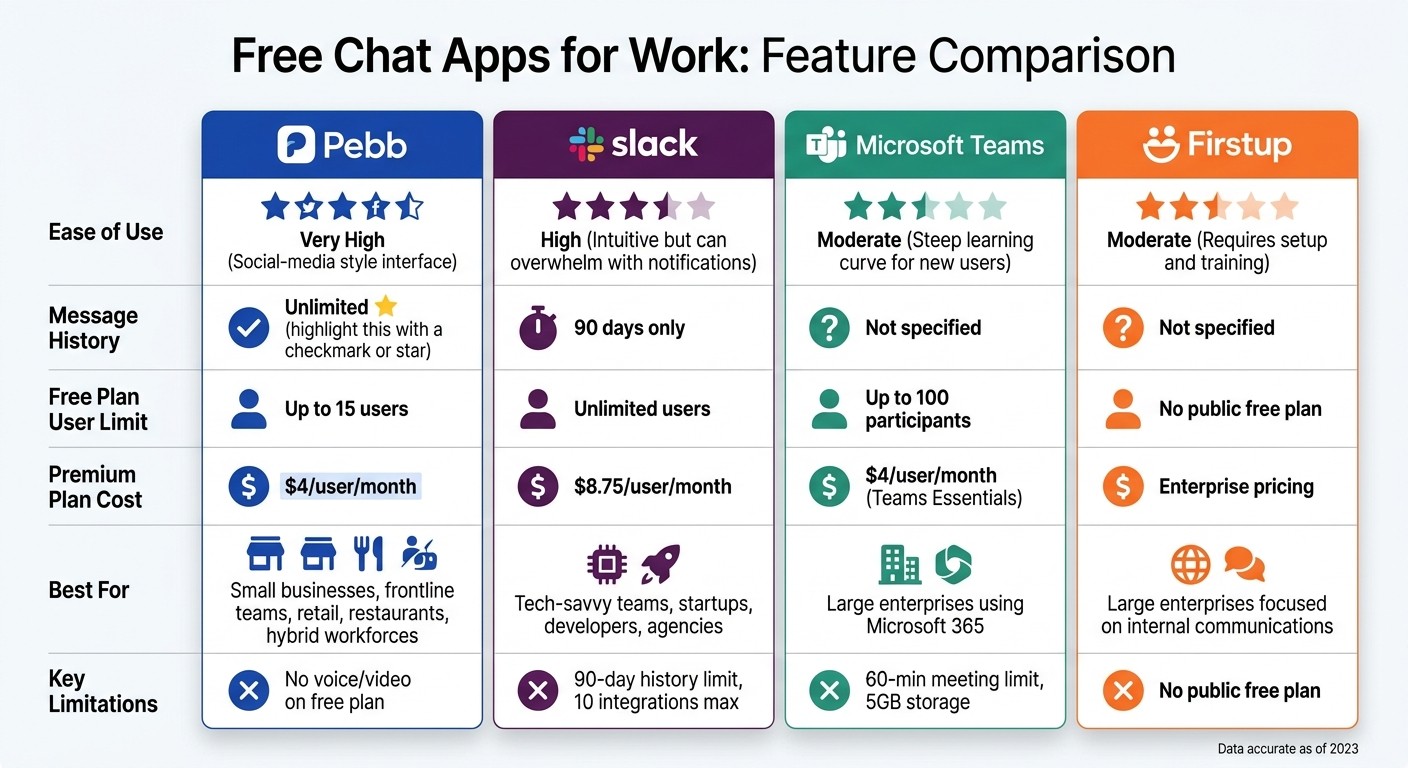
WhatsApp Alternatives for Work: Feature Comparison of Free Chat Apps
Let me break this down for you: we’re comparing ease of use, free plan limitations, and which businesses each app fits best. Here's how they stack up:
App | Ease of Use | Free Plan Restrictions | Best Business Type |
|---|---|---|---|
Pebb | Very High (Social-media style interface) | Free for up to 15 users; unlimited message history | Small businesses, frontline teams, retail, restaurants, and hybrid workforces |
Slack | High (Intuitive but can overwhelm with notifications) | Limited to 90-day history unlike Pebb's unlimited history | Tech-savvy teams, startups, developers, and agencies |
Microsoft Teams | Moderate (Steep learning curve for new users) | 60-minute group meetings; 5GB storage | Large enterprises already using Microsoft 365 |
Firstup | Moderate (Requires setup and training) | No public free plan available | Ideal for large enterprises focused on internal communications |
Now, here’s the thing: Pebb really shines as the only free, all-in-one communication tool that works for both frontline and office teams. It’s perfect if you’re juggling shift schedules and need reliable, unlimited chat history.
If your team thrives on third-party integrations, Slack could be your go-to, though its free plan limits you to just 90 days of message history. And while Microsoft Teams is a solid choice for large companies already using Microsoft 365, it can feel like a maze for new users. Lastly, Firstup caters to massive organizations centered on employee engagement campaigns rather than everyday chats.
Let’s talk costs for a second. Work chat apps aren’t cheap. Slack’s premium plan kicks off at $8.75 per user/month - and still limits you to 90 days of history. Compare that to Pebb’s premium plan at just $4 per user/month, which unlocks advanced features like analytics and voice calls. That 90-day limit on Slack’s free plan? It can be a real headache if you need to revisit old conversations. Pebb’s free plan doesn’t have that problem.
Looking at all this, it’s clear why Pebb stands out. It’s affordable, user-friendly, and built for teams that need both flexibility and reliability. Stick around, because we’ll dive deeper into recommendations in the conclusion.
Wrapping It Up
Let me break it down for you: Pebb is the go-to choice for small businesses and frontline teams. Why? Because we designed it to handle chat, scheduling, and PTO management in one place - no need to wrestle with multiple tools. Our free plan covers up to 15 users with unlimited message history, and if you need more, our premium plan is just $4 per user/month.
Now, if you're running a tech-heavy startup or a creative team that thrives on integrations, Slack might be your thing. Just keep in mind, their free plan only keeps your message history for 90 days. On the other hand, Microsoft Teams is perfect for large enterprises already using Microsoft 365. And for companies that put employee engagement front and center, Firstup stands out, even if it’s less about constant team chats.
For those leaning toward Pebb, setting up your workspace is a breeze. In under an hour, you can create groups, invite your team, and hit the ground running. Of course, each platform has its own onboarding process, but we’ve worked hard to make ours quick and painless.
At the end of the day, the right tool to communicate with employees depends on your team’s size and priorities. If simplicity, affordability, and streamlined communication are what you’re after, Pebb checks all the boxes for small businesses and frontline workers. It’s all about keeping things straightforward and efficient.
FAQs
How do I migrate our WhatsApp chats and files to Pebb?
Migrating your WhatsApp chats and files to Pebb is straightforward. Start by backing up your WhatsApp chat history: head to Chats > Chat backup and tap "Back up." Once that's done, install Pebb, sign in, and follow the on-screen instructions to import your data. Just make sure your backup is up-to-date and saved in either Google Drive or iCloud to ensure a seamless switch to Pebb’s all-in-one platform.
Can Pebb separate work chats from personal phones and numbers?
Pebb makes sure work chats stay entirely separate from your personal phone and number. By keeping work communication in its own space, it’s easier to stay organized and draw a clear line between your job and your personal life.
What security controls does Pebb offer for sensitive work data?
When it comes to protecting sensitive work data, Pebb doesn’t cut corners. We’ve packed in features like encryption to keep your information safe from prying eyes, role-based access controls to ensure only the right people have access, and searchable audit trails so you can track every action and change. On top of that, our automated monitoring works around the clock to safeguard your workplace communication and ensure everything stays secure and compliant.
