
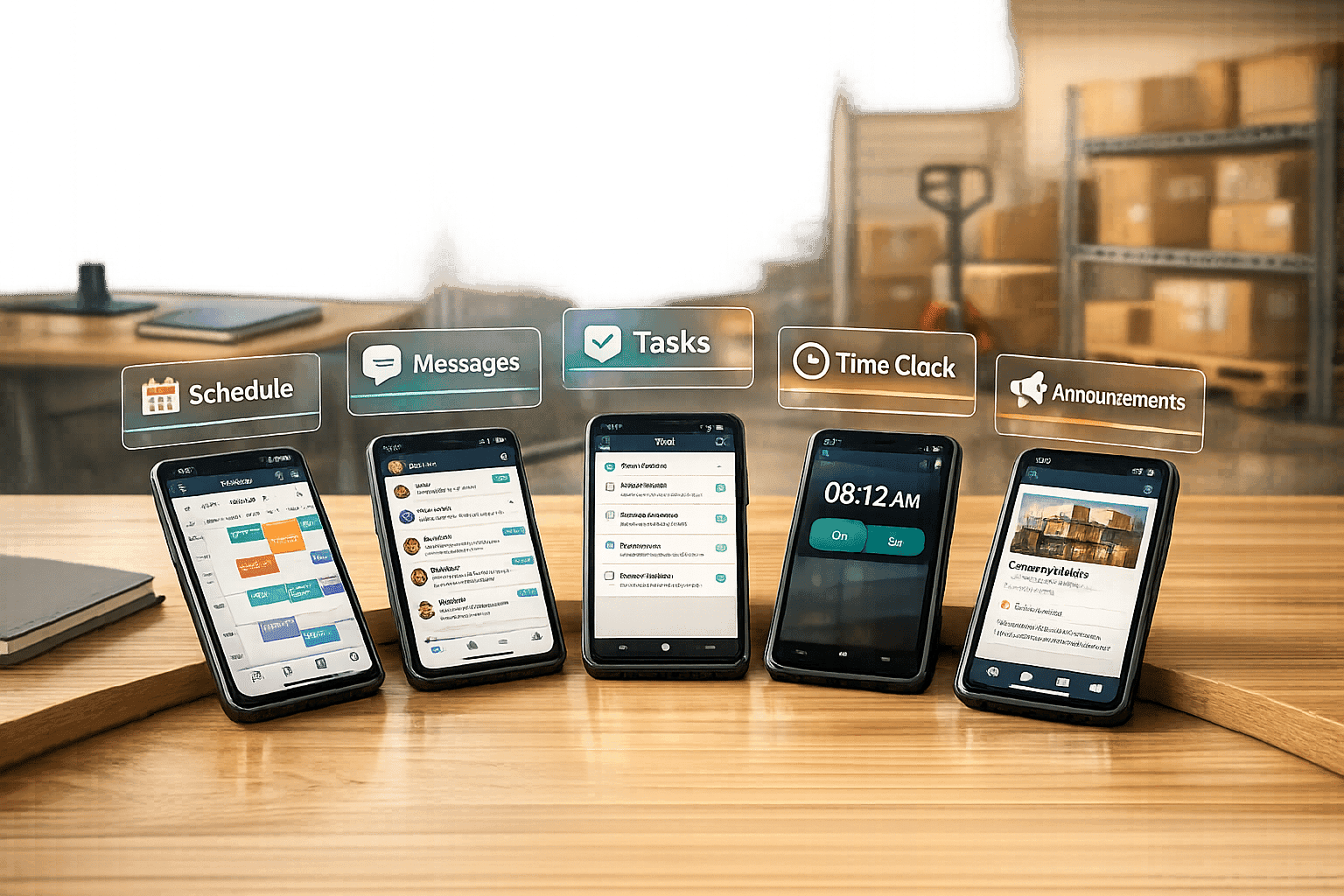
Author: Ron Daniel
5 Best Employee Management App for Frontline and Office Teams
Too many tools fragment frontline and office teams; compare five mobile-first apps for unified scheduling, communication, and engagement.
Let me tell you - managing teams used to feel like running a marathon while juggling flaming batons. A few years ago, I worked with a retail client who was constantly drowning in spreadsheets, group chats, and scheduling apps. Their frontline workers were missing updates, office teams were buried in emails, and everyone was frustrated. Sound familiar? Here’s the kicker: they were using six different tools just to keep things running - and it wasn’t working.
Here’s what hit me: they’re not alone. Gartner says 70% of organizations rely on five or more tools for employee management, and it’s eating up 15-20% of their time. That’s time wasted hopping between apps instead of focusing on what really matters. And for frontline workers - who make up 80% of the global workforce - this mess leaves them feeling disconnected, with only 21% reporting they’re engaged. That’s a recipe for burnout, miscommunication, and employee retention issues.
But what if you could combine scheduling, communication, and task tracking into one simple, mobile-friendly platform? That’s exactly what we built at Pebb. And today, I’m breaking down five employee management apps - including Pebb - that can help you ditch the chaos and get your teams back on track. Whether you’re running a small retail shop or a massive healthcare network, I’ll show you what works, what doesn’t, and how to pick the best fit for your team.
Let’s dive in.
1. Pebb
At Pebb, we’ve simplified the chaos of managing teams by combining scheduling, communication, task management, and engagement tools into one easy-to-use mobile platform. Imagine ditching the endless juggling of separate apps for chat, spreadsheets for PTO, and those long, messy email threads. That’s exactly why we built Pebb - to streamline everything into a single hub that works for everyone, from the warehouse floor to the corporate office.
Pricing
Here’s the best part: we offer a free tier for up to 15 users. This includes full access to work chat, shift scheduling, PTO management, tasks, and digital forms - no credit card required, no sneaky fees. If you’ve got a larger team, our Premium plan is just $4 per user per month (billed annually). To put it in perspective, a 50-person retail team saves about $1,200 a year compared to platforms like Connecteam, which charges $29 per location. Talk about bang for your buck!
Shift Scheduling
Our drag-and-drop scheduler is a game-changer. It combines shift planning with real-time availability checks and even lets employees swap shifts (with manager approval) right from their phones. We’ve also included FLSA-compliant overtime alerts, so you don’t have to worry about overscheduling. One restaurant chain that switched to Pebb slashed scheduling conflicts by 40%, cut admin time in half, and boosted on-time shift coverage to 98%. Plus, the scheduler works offline - perfect for job sites or warehouses where Wi-Fi can be spotty. By keeping everything in one place, teams avoid the constant app-switching that kills productivity.
Communication Tools
Tired of juggling WhatsApp threads, emails, and random texts? Pebb brings everything together with in-app chat, unlimited message history, and channel-based messaging (think #warehouse or #sales-team). You can @mention teammates, share files up to 1GB, and even send broadcast announcements with push notifications. Premium users can take it up a notch with voice and video calls for up to 50 participants. One manufacturing company with 200 frontline workers cut email volume by 60% and reduced response times from hours to minutes. And for employees who haven’t downloaded the app yet, we’ve got SMS integration to keep them in the loop.
Task Management
Our task management tools are built for simplicity and speed. Using Kanban boards and checklists, you can assign tasks with due dates, set up recurring workflows, and even integrate with calendars (using the US date format: MM/DD/YYYY). A logistics team used Pebb’s task system with GPS check-ins and saw delivery errors drop by 25%. On Capterra, users report 35% faster task completion thanks to the clean interface and real-time updates. It’s all about eliminating the hassle of juggling different tools for different teams.
Employee Engagement Features
Keeping employees engaged is a big deal, and Pebb makes it easy with features like pulse surveys, badges, goal tracking, and a dynamic news feed. Our analytics dashboard gives you real-time engagement scores, with an impressive 85% response rate benchmark. According to HR consultant Jane Doe in Forbes, Pebb’s gamification features can boost retention by 28% in frontline roles (Forbes, 2025). One of our retail clients in the US saw turnover drop 15% after implementing shout-outs and NPS surveys. Whether it’s celebrating work anniversaries or running team challenges, you can customize these tools to fit your team’s vibe.
Feature | Pebb Standard (Free) | Pebb Premium ($4/user/month) |
|---|---|---|
Users | Up to 15 | Unlimited |
Communication | Unlimited Chat, News Feed | Voice & Video Calls, Advanced Posts |
Scheduling | Shift Planning, Clock-in, PTO | Advanced Analytics, Labor Cost Estimator |
Operations | Tasks, Digital Forms, Knowledge Base | Integrations, Enterprise SSO, Permissions |
Support | Standard | Premium SLA Support |
2. Connecteam
If you've ever worked with frontline teams, you know that juggling schedules, tasks, and communication can feel like trying to solve a 1,000-piece puzzle. Connecteam aims to ease that chaos with its modular system, designed specifically for frontline operations. With over 80,000 companies on board worldwide, it’s clearly making waves. But here’s the catch: to unlock its full potential, you’ll need to add on extras for things like scheduling, task management, and communication.
Pricing
Let’s talk numbers. Connecteam’s pricing starts at $29/month for 30 users, with an extra $0.50 per user for the Operations Hub. If you’re going for the Expert tier, it’ll cost you $99/month for 30 users, plus $3.00 per additional user. Compare that to Pebb, which keeps it simple with a flat $4 per user - and that includes everything, from scheduling to integrated voice and video calls. No hidden add-ons, no surprises.
Shift Scheduling
Connecteam’s scheduling tool is powered by AI, which sounds fancy - and it is. With just one click, it creates optimized schedules based on availability, qualifications, and even fair hour distribution. Features like drag-and-drop editing, recurring shift templates, and real-time conflict alerts make it easier to avoid those dreaded double bookings or PTO mishaps. Plus, for industries like healthcare or construction, it tracks certifications and license expiration dates, which is a big deal.
But here’s a snag: Connecteam doesn’t work offline. So, if you’re in an area with spotty Wi-Fi, you might hit a wall. That’s a hurdle Pebb doesn’t have, thanks to its all-in-one, always-connected design.
Communication Tools
When it comes to communication, Connecteam offers the basics: 1:1 and group chats with status indicators. However, if you need voice or video calls, you’ll have to look elsewhere. That’s where Pebb shines, with built-in calling features that eliminate the need for third-party tools.
Task Management
On the task management front, Connecteam steps up with digital forms, checklists, and even an AI tool that converts paper forms into digital ones. You can attach tasks and notes directly to shifts, keeping everything neatly organized. And with certifications like ISO 27001, SOC 2, and HIPAA, it’s a solid choice for regulated industries like healthcare.
Still, there’s something to be said for simplicity. Pebb’s all-in-one platform delivers everything you need without the hassle of juggling multiple add-ons, making it a smoother, more efficient solution overall.
3. Blink
Blink is a mobile-first platform tailored for frontline teams in industries like retail, hospitality, and manufacturing. It’s trusted by over 20,000 organizations worldwide, including major names like PepsiCo and IKEA. The platform aims to simplify communication by replacing fragmented tools like WhatsApp and reducing the need for lengthy email threads. Essentially, Blink centralizes workforce management, much like how Pebb focuses on team management and operational efficiency for mobile-first teams.
Pricing
Here’s where things get interesting. Blink uses a tiered pricing model with three options:
Starter: $4.49 per user/month
Pro: $6.99 per user/month (includes features like shift scheduling and engagement tools)
Enterprise: Custom pricing based on specific needs
In contrast, Pebb keeps things simpler with a flat $4 per user/month, bundling all features without the need for upgrades. This straightforward pricing often appeals to teams looking for an all-in-one solution without surprise costs.
Shift Scheduling
Blink’s Pro plan introduces Blink Shifts, a scheduling tool that managers can access directly from their mobile devices. With this feature, employees get push notifications for schedule updates, can swap shifts with coworkers, and even update their availability in real time. While this functionality is undeniably helpful, the added cost of the Pro plan makes it less appealing compared to Pebb’s integrated scheduling tools, which come standard at a lower price.
Communication Tools
Blink’s communication tools are designed to streamline team interactions. Features include direct messaging, group channels, and broadcast announcements. It also integrates with platforms like Microsoft Teams and Slack, making it a good fit for teams juggling multiple communication tools. Blink’s internal data from 2024 shows that 95% of users reported better communication, and companies saw a 50% drop in email volume.
These communication tools are a strong selling point, but Pebb’s unified platform eliminates the need for external integrations, offering similar functionality at a lower cost.
Employee Engagement Features
Blink offers several engagement tools, but they’re only available at higher pricing tiers. These include peer recognition with badges, pulse surveys for quick feedback, and a social newsfeed for sharing updates and celebrating wins. These features are great for keeping dispersed teams connected, and Blink’s mobile app often earns praise for its ease of use. G2 reviewers rate it 4.7/5, with many highlighting the intuitive design and smooth onboarding.
A retail manager on Capterra shared, "It transformed shift communication in our 500-store chain".
However, the nearly $7 per user cost for these tools can be a tough pill to swallow, especially for smaller teams or lean operations. Pebb’s approach combines these tools into a single, affordable package, making it a more budget-friendly option for teams that want engagement features without the added expense.
4. Workvivo
Workvivo, now part of Zoom, blends a social media–style news feed with the functionality of a company intranet. It’s a space where employees can share updates, celebrate achievements, and connect with colleagues across departments. With support for over 90 languages, it's particularly suited for global teams.
Pricing
Here's the tricky part: Workvivo doesn’t share its pricing details publicly. Some features, like instant messaging, are considered add-ons, which means extra costs. This lack of transparency can make budgeting a challenge, especially when compared to Pebb's all-inclusive $4 per user/month plan. With Pebb, you get messaging, shift scheduling, and all core features - no hidden fees. Let’s dive into how Workvivo approaches internal communication for frontline employees.
Communication Tools
Workvivo provides direct messaging, group chats, and Zoom-powered video calls. It also delivers company news and updates through its mobile app. For office-based teams, desktop integrations with Slack, Microsoft Teams, and Google Workspace help centralize communication. While these integrations can be convenient, they also mean relying on multiple platforms. Pebb, on the other hand, keeps everything in one place by offering these tools natively.
Employee Engagement Features
When it comes to engagement, Workvivo offers some interesting tools. Employees can give "Shoutouts" to recognize peers, earn digital badges, and participate in pulse surveys to share feedback. For live events like town halls or announcements, there’s Workvivo TV. Frontline workers can also view updates on digital signage in breakrooms, while office teams use the platform for various culture-building activities. The "Spaces" feature helps teams collaborate on specific projects or departmental goals.
However, Workvivo has some gaps. It doesn’t offer built-in shift scheduling or task management. Teams often need to rely on third-party tools like Google Calendar or When I Work, which can lead to juggling multiple platforms and increased costs. Pebb simplifies this by including shift scheduling, PTO management, and communication tools in one seamless platform - no extra integrations required.
5. Microsoft Teams
Microsoft Teams has become a heavyweight in corporate collaboration, boasting over 320 million monthly active users as of 2024. Since it's part of the Microsoft 365 suite, it integrates effortlessly with tools like Outlook, Word, and Excel, making it a go-to for office teams. But when it comes to frontline workers, the experience is a bit more nuanced.
Pricing
Teams does offer a free version, which includes unlimited chat, 60-minute meetings for up to 100 participants, and 5 GB of cloud storage per user. But if you're looking for features like employee management or advanced tools, you'll need to upgrade. Here's a quick breakdown of the paid plans:
Microsoft 365 Business Basic: $6 per user/month (annual commitment), includes Teams, email, and 1 TB of OneDrive storage.
Microsoft 365 Business Standard: $12.50 per user/month, which adds full desktop Office apps.
Microsoft 365 F3 (for frontline workers): $8 per user/month, offering the Shifts app, walkie-talkie, and basic Office apps.
The free version works fine for smaller teams, but the real value comes with the paid plans - especially if you’re already deep into the Microsoft ecosystem. That said, Pebb offers an all-in-one solution for just $4 per user/month. With Pebb, you get shift scheduling, PTO management, work chat, and more - without needing to stack on extra costs. It’s a simpler, more budget-friendly approach compared to Teams' layered pricing.
Shift Scheduling
The Shifts app in Microsoft Teams is built with frontline teams in mind. It offers features like drag-and-drop scheduling, shift templates, open shift requests, time-off management, and clock-in/out with geofencing. Plus, you can integrate it with Outlook and Excel to import existing schedules. For example, DHL Supply Chain uses Teams Shifts for its 50,000 frontline workers in the U.S., cutting no-shows by 15% in 2024.
However, here’s the catch: Shifts leans heavily on Excel for managing schedules, which can feel clunky for those who aren’t spreadsheet-savvy. Pebb, on the other hand, simplifies everything with a mobile-first design - no spreadsheets or IT support required. Just open the app, tap, and schedule.
Communication Tools
Microsoft Teams shines in communication, especially for office-based users. It offers:
1:1 and group chats
Video and audio calls (up to 1,000 participants)
Team channels for discussions
A walkie-talkie feature for frontline workers using WiFi or cellular networks
Office teams also get perks like screen sharing, breakout rooms, and live transcription. But if you’re on the move, Teams' desktop-first design can feel a bit clunky on mobile devices. That’s where Pebb takes the lead. Built with a mobile-first interface, Pebb feels just as natural for someone in a warehouse as it does for someone in a boardroom.
Task Management
When it comes to task management, Teams integrates tools like Microsoft Planner, To Do, and Outlook tasks into a single view through its Tasks app. This allows you to create tasks, assign them using @mentions, set due dates, add checklists, and track progress visually. According to a 2025 report, this setup improved task completion rates by 25%.
While this system works well for office teams juggling projects, it can feel overly complex for frontline workers. Linking tasks to shift schedules often adds unnecessary steps. Pebb keeps things simple by embedding task management directly into the daily workflow - no need to jump between apps.
Employee Engagement Features
Teams offers several tools to improve frontline employee engagement, including:
Praise badges for peer recognition
In-chat polls and quizzes
Viva Engage (formerly Yammer) for community posts and company updates
In fact, Hilton saw a 20% boost in engagement scores by using Viva Connections to deliver personalized employee dashboards (2025 study). As Forbes contributor Jane Doe put it:
"Teams' AI-powered insights in Viva analyze sentiment from chats, helping managers address burnout early."
These features are great for large enterprises but often come with a learning curve. While Teams earns high marks on G2 (4.5/5 from over 10,000 users), about 20% of reviewers mention that frontline workers struggle with adoption due to mobile app glitches and complexity. By contrast, Pebb’s engagement tools - like a news feed, groups, and a people directory - are designed to be intuitive and require zero training. It’s engagement without the headaches.
Pros and Cons
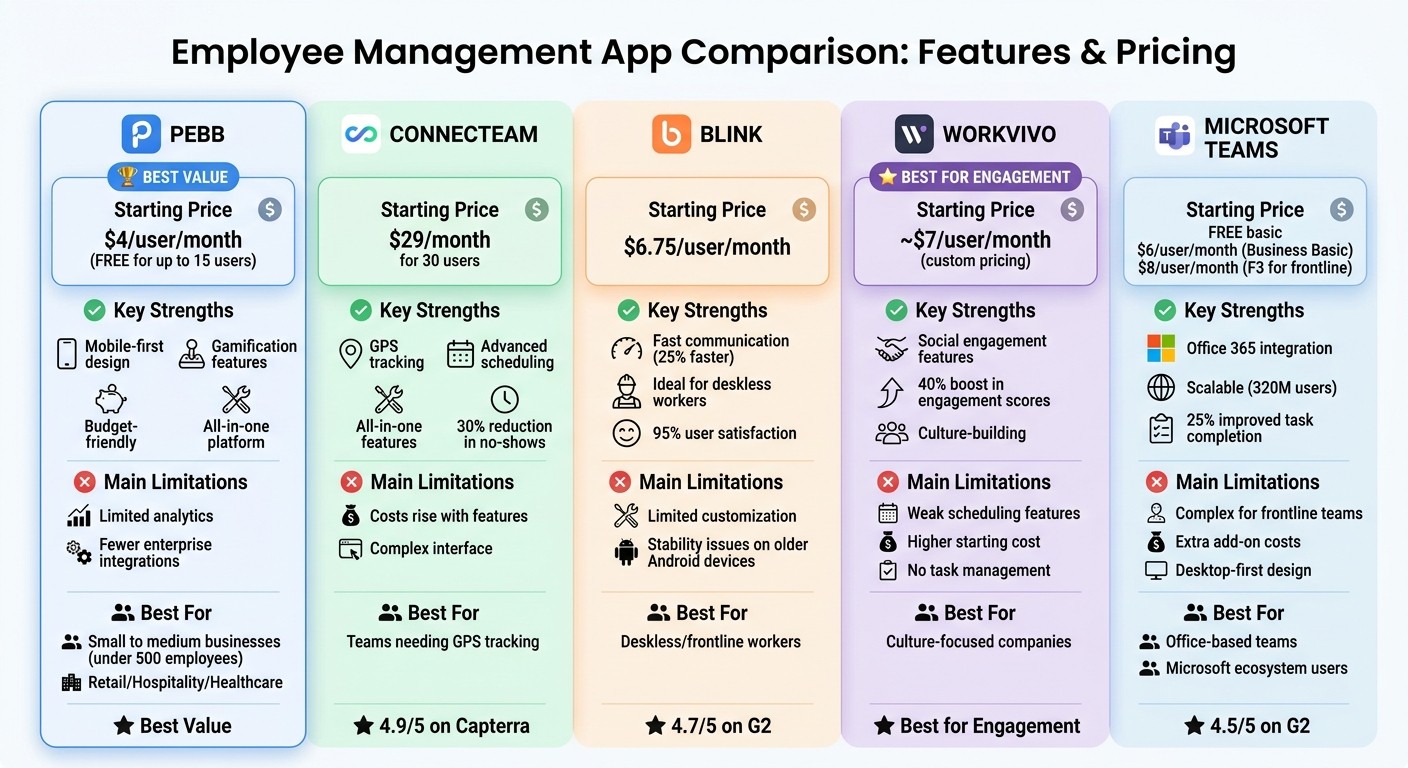
Employee Management App Comparison: Features and Pricing
Choosing the right employee management app can feel like walking a tightrope - balancing strengths and trade-offs is key. Let me break down how Pebb, Connecteam, Blink, Workvivo, and Microsoft Teams stack up when it comes to simplifying operations and keeping team communication on point.
Pebb
Pebb stands out with its mobile-first design and a premium plan priced at just $4 per user per month. It wraps everything you need into one solution, eliminating the chaos of juggling multiple tools. Plus, the gamification features are a neat touch, helping to keep employees engaged. That said, it does fall short in offering detailed analytics and lacks some of the enterprise integrations that larger platforms provide.
Connecteam
Here’s where things get interesting. Connecteam’s pricing starts at $29 per month for 30 users, but costs can balloon quickly as you add more operational features. On the bright side, it’s loaded with GPS tracking and scheduling tools, and its 4.9/5 Capterra rating is a testament to its popularity. In fact, some users report a 30% drop in no-shows after adopting it. The downside? The interface can feel overwhelming, especially for smaller teams. Pebb, by comparison, keeps things simple no matter your team size.
Blink
Blink focuses on fast, instant communication, which makes it a hit for deskless workers. It boasts a 4.7/5 G2 rating, and some case studies show it speeds up communication by 25%. But here’s the catch: customization options are limited, and older Android devices sometimes struggle with stability. At $6.75 per user per month, it’s also pricier than Pebb’s all-in-one rate.
Workvivo
Workvivo is all about creating a social, engaging environment for employees. Its social media–style feed reportedly boosts engagement scores by 40%, which is pretty impressive. However, it lags behind Pebb when it comes to operational features like shift scheduling and task management. With custom pricing that starts around $7 per user per month, it’s also on the higher end for teams that need a more complete management solution.
Microsoft Teams
Microsoft Teams is a powerhouse for Office 365 users, offering seamless integration and scalability. There’s even a free basic version, but to unlock scheduling features, you’ll need add-ons like Shifts, which can cost around $8 per user per month for the F3 plan. While it’s great for office-based teams, frontline workers often find the platform too complex, and the mobile experience doesn’t match Pebb’s smooth, mobile-first approach.
Summary Table
Here’s a quick side-by-side comparison to help you decide:
App | Starting Price | Key Strengths | Main Limitations |
|---|---|---|---|
Pebb | $4/user/month (free for up to 15 users) | Mobile-first, gamification, budget-friendly | Limited analytics, fewer enterprise integrations |
Connecteam | $29/month for 30 users | GPS tracking, scheduling, all-in-one features | Costs rise with features, complex interface |
Blink | $6.75/user/month | Fast communication, ideal for deskless workers | Limited customization, stability issues |
Workvivo | ~$7/user/month (custom pricing) | Social engagement, culture-building | Weak scheduling, higher starting cost |
Microsoft Teams | Free basic; $6/user/month | Office 365 integration, scalable | Complex for frontline teams, extra add-on costs |
Each of these tools has its own strengths and quirks. The trick is figuring out which one aligns best with your team’s needs and budget.
Wrapping It All Up
After diving into these five apps, it’s clear to me that Pebb stands out as the ultimate all-in-one platform for teams dealing with the headache of juggling too many tools. We designed Pebb with one goal in mind: to tackle the tool fragmentation issue that so many workplaces face. At just $4 per user per month, it bundles everything from shift scheduling to voice calls, offering incredible value for teams that blend frontline and office staff.
Of course, the right choice depends on your team’s structure and size. If you’re running a small to medium business with fewer than 500 employees, especially in industries like retail, hospitality, or healthcare where frontline workers are key, Pebb’s mobile-first approach and unified platform can simplify your operations. Plus, our free tier for up to 15 users gives you a risk-free way to see how it fits. For larger enterprises with over 1,000 employees, the option to add advanced compliance features might make sense, but for most teams, Pebb’s streamlined design solves fragmentation without breaking the bank.
Now, if your team is heavily office-based and already tied to Microsoft tools, Teams might be your best bet thanks to its seamless Office 365 integration - just keep in mind you’ll likely need to add separate scheduling tools. Alternatively, for companies prioritizing culture and engagement over operational needs, Workvivo’s social feed approach could be a good fit, though you’d still need additional tools for tasks like scheduling and task management.
The next step? Start with a 14-day trial and focus on solving your biggest challenges - whether it’s filling shift gaps, improving communication, or boosting employee engagement. Track your key metrics over 30 days. Most teams that make the switch to a unified platform like Pebb quickly discover it saves time, cuts costs, and keeps everyone truly connected.
FAQs
How do I pick the right employee management app for my team?
When picking the perfect employee management app, aim for something that does it all - communication, scheduling, task tracking, and keeping your team engaged. It’s important to match the app to your team’s setup, whether they’re on the frontline, in the office, or working a hybrid model. Features like mobile access, real-time notifications, and PTO management can make a big difference in day-to-day efficiency.
And let’s talk pricing - Pebb keeps it simple with a free plan and a premium option at just $4 per user. It’s a budget-friendly way to keep your operations running smoothly while packing in the features you need.
Will Pebb work for both frontline and office employees?
Pebb is designed to bring both frontline and office teams together seamlessly. With tools like communication features, shift scheduling, task tracking, and engagement solutions, it caters to the unique needs of a diverse workforce. Whether you're managing a retail store or running a corporate office, Pebb has the essentials to keep everyone connected and on track.
What should I track in the first 30 days after rollout?
In the first 30 days, I always focus on tracking a few critical areas to ensure everything’s running smoothly:
Communication usage: I keep an eye on how active the team is in chats, groups, and calls. This helps me gauge how connected everyone feels.
Shift and attendance tracking: Accurate scheduling is a must, so I double-check attendance and punctuality to avoid any scheduling hiccups.
Engagement and morale: Participation in news feeds and recognition tools is a great way to measure team spirit. If people are engaging, it’s a good sign morale is high.
PTO management: Reviewing time-off requests early on helps me spot and fix any potential issues with the process.
User adoption: I track how many people are actively using the platform and tackle any technical challenges right away to avoid roadblocks.
These metrics give me a clear picture of how things are shaping up and where I might need to step in.
