
The 2026 Shift Scheduling App Experience Every Frontline Team Should Try
James Dean
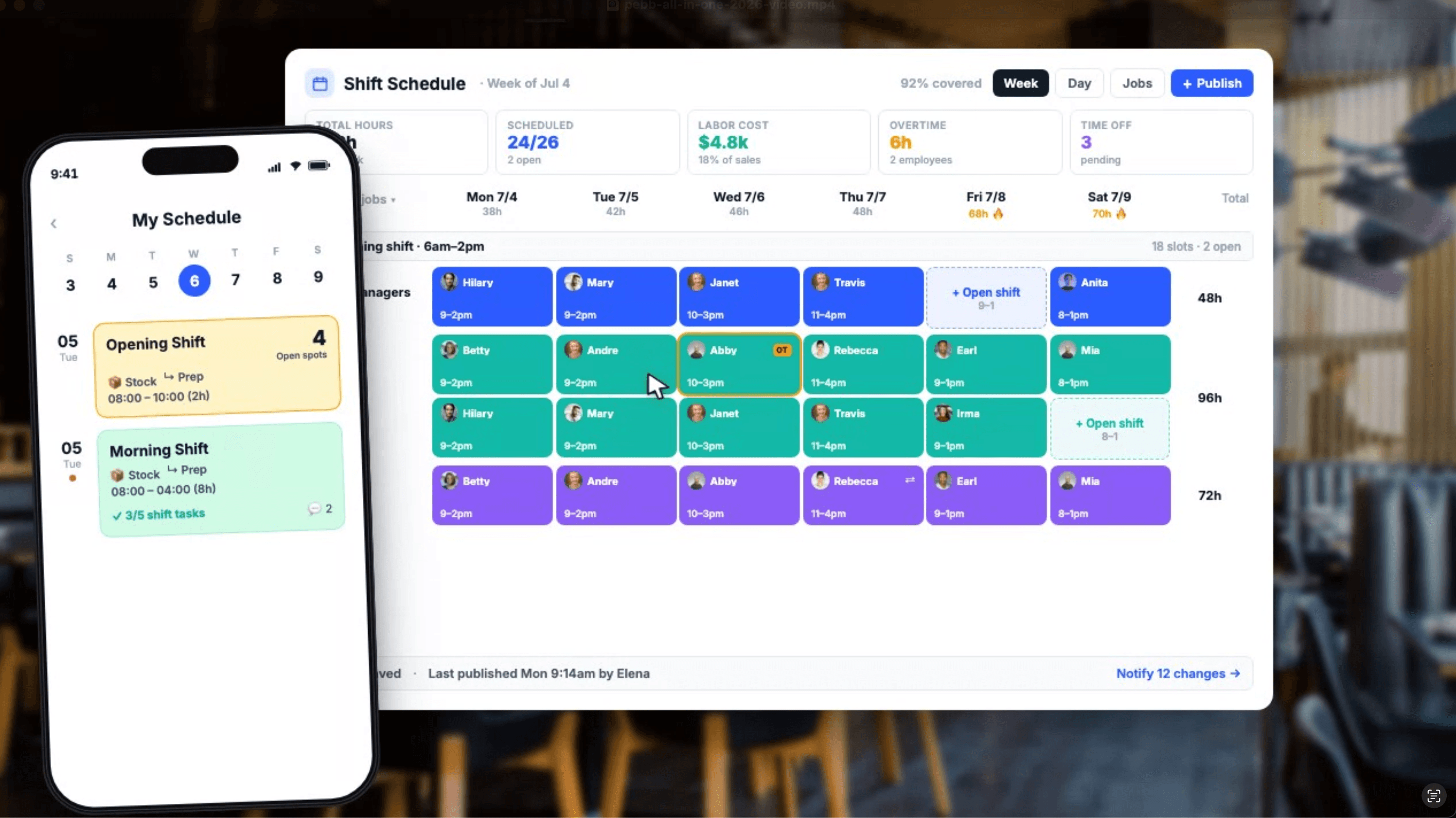
A good shift schedule looks simple when it’s done right.
But anyone who manages a team knows the truth.
Behind one clean weekly schedule, there are a hundred tiny moving pieces. Someone is off next Tuesday. Someone can only work mornings. A branch needs extra coverage. A restaurant has a busy weekend coming up. A construction crew needs the right people on the right site. A retail store needs the afternoon shift filled before the schedule goes live.
And somehow, all of that needs to happen without a mess of WhatsApp messages, screenshots, spreadsheets, and last-minute calls.
That’s exactly why we improved Shifts inside Pebb.
Over the past months, we heard from so many of you: retail teams, restaurants, construction companies, field teams, hospitality businesses, and many more. You told us what was working. You told us what was missing. You showed us where scheduling felt too slow, too manual, or too hard to manage across different locations.
So we went back, listened carefully, and made the Shifts feature much better.
Not just a small update. A real improvement to how schedules are created, managed, shared, and updated inside Pebb.
Built for Teams With More Than One Moving Part

Most companies don’t manage one perfect little team sitting in the same room.
They manage locations. Branches. Departments. Crews. Sites. Stores. Restaurants. Front desks. Warehouses. Field teams.
That’s why Shifts in Pebb works beautifully with Spaces.
You can create different Spaces for different locations, branches, teams, or departments. For example:
A retail company can create a Space for each store.
A restaurant group can create a Space for each location.
A construction company can create a Space for each project or crew.
A hotel can create Spaces for housekeeping, front desk, maintenance, and management.
Inside each Space, you can create and manage the shifts that belong to that specific team or location.
This keeps everything clean. Managers see what they need. Employees see what’s relevant to them. And the whole company doesn’t have to live inside one giant, confusing schedule.
Daily Templates: Stop Rebuilding the Same Day Again and Again
Some workdays repeat themselves.
Maybe your store always needs an opener, a mid-day shift, and a closer. Maybe your restaurant has the same lunch and dinner structure. Maybe your construction crew has a standard morning setup.
With daily templates, managers can now create a day once and reuse it again.
No more rebuilding the same shift structure from scratch every time. You can start with a template, adjust what’s needed, and move on.
It’s faster. Cleaner. And much easier for managers who already know what a normal day should look like.
Weekly Templates: Build the Week Once, Then Reuse It
Some teams work with the same weekly rhythm.
Monday to Friday. Weekend coverage. Rotating teams. Fixed morning and evening shifts.
With weekly templates, you can create a full week structure and use it again whenever you need it.
This is especially useful for teams that have a mostly stable schedule but still need flexibility. You can bring in last week’s structure, make small changes, and publish the new week without starting from zero.
For busy managers, this is one of those features that quietly saves a lot of time.
Open Shifts Employees Can Claim
Sometimes you don’t want to assign a shift right away.
You just know the shift needs to be covered.
That’s where open shifts come in.
Managers can create shifts that employees can claim. This makes it much easier to fill gaps without chasing people one by one.
Need someone for Saturday morning? Create an open shift.
Need extra coverage for a busy evening? Add an open shift.
Need another person on-site tomorrow? Let the right employees claim it.
It gives employees more flexibility, and it gives managers a faster way to fill the schedule.
Draft Mode: Plan First, Publish When Ready
A schedule should not go live before it’s ready.
Managers often need time to build the week, check availability, review time off, move people around, and make sure everything looks right.
That’s why the improved Shifts feature includes draft mode.
You can work on the schedule privately before employees see it. Once everything is ready, you can publish it.
This helps avoid confusion, especially when managers are still making changes. Employees don’t get notified too early. Nobody sees half-finished schedules. And the manager has room to plan properly.
Employees Can Set Their Availability
Scheduling gets much easier when you know when people can actually work.
Employees can now set their availability, so managers have better visibility before assigning shifts.
This helps reduce mistakes like assigning someone who can’t work that day, building a schedule that creates back-and-forth, or discovering too late that a shift will not be covered.
Availability makes scheduling feel less like guessing and more like planning.
Time Off Is Visible Inside the Same Calendar
This one is simple, but important.
When you build a schedule, you need to know who is off.
With the improved Shifts feature, managers can see employee time off directly inside the same calendar while planning shifts.
That means fewer scheduling mistakes. Fewer awkward changes. Fewer “I’m actually on vacation that day” messages.
Everything is in one place: shifts, availability, and time off.
That’s how scheduling should work.
Better Permissions for Managers and Teams
Not everyone should be able to do everything.
Some companies want branch managers to manage their own location. Some want only admins to publish schedules. Some want team leads to help plan shifts but not change bigger settings.
With Pebb, you can manage permissions so the right people have the right access.
This is especially helpful for companies with multiple locations or teams. You can give managers the tools they need without opening everything to everyone.
Clean permissions mean cleaner operations.
Works on Web and Mobile
Scheduling cannot be desktop-only anymore.
Managers may build schedules from the office. Employees may check shifts from the bus. A store manager may update coverage from the floor. A construction lead may need to check tomorrow’s crew from the field.
That’s why the improved Shifts feature works smoothly on both the website and the mobile app.
Managers can create and manage schedules from the web. Employees can view their shifts from their phones. And the whole team stays updated wherever they are.
No screenshots. No spreadsheets. No “did you see the new schedule?” messages.
Just one shared place where everyone can see what’s happening.
Why We Made These Improvements
We didn’t improve Shifts because we wanted to add another feature to a list.
We improved it because scheduling sits at the heart of daily operations.
For many teams, the schedule is the day.
It tells people where to go, when to show up, who they’re working with, and what needs to be covered. When scheduling is messy, the whole day feels messy. When scheduling is clear, the team moves better.
That’s what we heard from you.
Retail teams told us they needed a cleaner way to manage different stores.
Restaurants told us they needed fast updates and open shifts.
Construction teams told us they needed schedules by crew or site.
Hospitality teams told us they needed visibility into time off and availability.
Managers told us they needed drafts and templates.
Employees told us they needed a simple mobile experience.
So we built around that.
Shifts Are Better When They Live With the Rest of Your Team
The real power of Shifts in Pebb is that it doesn’t live alone.
Your schedule sits inside the same platform where your team already communicates, checks updates, reads company posts, uses Spaces, views the directory, submits forms, manages time off, and stays connected.
That matters.
Because a shift schedule is not just a calendar. It’s part of the way your team works.
A manager can publish shifts.
Employees can check them from mobile.
Teams can stay connected in the same Space.
Important updates can go to the news feed.
Time off is visible while planning.
Permissions keep everything organized.
It all connects.
And for teams with frontline workers, mobile employees, or multiple locations, that connection makes a real difference.
What’s New in Pebb Shifts
Here’s the simple version:
Pebb’s improved Shifts feature now includes:
Daily templates to reuse common day structures.
Weekly templates to build full schedules faster.
Open shifts that employees can claim.
Draft mode so managers can plan before publishing.
Employee availability to avoid scheduling conflicts.
Time off visibility directly inside the calendar.
Permission management for admins, managers, and team leads.
Spaces-based scheduling for locations, departments, branches, teams, and crews.
Full web and mobile support so everyone can stay updated from anywhere.
It’s a much stronger, cleaner, and more flexible scheduling experience.
Built With You, Not Just For You
This update came directly from customer feedback.
From the retail manager trying to handle several stores.
From the restaurant owner filling weekend shifts.
From the construction team organizing crews across different sites.
From the hospitality team balancing time off and coverage.
From the small business owner who just wants scheduling to stop being a headache.
You told us what you needed.
We listened.
And now Shifts in Pebb is much better because of it.
Try the New Shifts Experience
The improved Shifts feature is now part of Pebb, and it works across web and mobile.
Create Spaces for your locations. Build daily or weekly templates. Add open shifts. Check availability. Review time off. Work in draft mode. Publish when ready.
Your team gets a clear schedule.
Your managers save time.
Your employees know exactly when and where they’re needed.
That’s the goal.
Less chaos. Better planning. One simple app for the whole team.
