
How PTO and Time Off Work in Pebb (Requests, Approvals & History)
James Dean
How PTO and Time Off Work in Pebb (Requests, Approvals & History)
This is the how-it-works page for PTO and time off in Pebb — not a “best HR leave app” trophy and not a competitor money page. If you need the roster that should respect approved leave, start with how shift scheduling works in Pebb.
Pebb is an all-in-one employee app. Time Off sits next to the People Directory — org-wide on purpose — while shifts and clock-in live inside unlimited Spaces. Basic is $2.50; Premium is $4. There is no free plan. Trial is the full product, no credit card. Time Off is on Premium ($4).If you need Spaces context, read What are Pebb Spaces?. Here we walk the product: where Time Off lives (People area, org-wide), request flow, types, approvers, pending approvals, paid vs unpaid summary, history filters, reports, how leave shows next to the schedule, and the limits we will not paper over.
GPS on clock-in is a stamp ± optional near-branch — not live breadcrumbs. No payroll, LMS, or ATS.
Start full trial — no card · Pebb pricing
Watch the Pebb product walkthrough on YouTube
Product UI walkthrough: Time Off in Pebb — complete guide.
Time Off is org-wide (not trapped in one Space)
Unlike Shifts, Clock In, Forms, Tasks, Files, Wiki, Events, and News Feed, Time Off lives under People, next to the directory — company-wide. Leave does not get stuck inside one store’s Space while another manager plans a different roster.
A person can work across sites; PTO is about the person, not the room. Spaces stay unlimited on Basic and Premium for site tools. Time Off stays org-wide on Premium so approvals and history are one truth. What are Pebb Spaces?
Chat also stays org-wide on Basic. The system of record is still Time Off — not a thumbs-up emoji in WhatsApp. How clock-in works in Pebb.
How it works: request time off
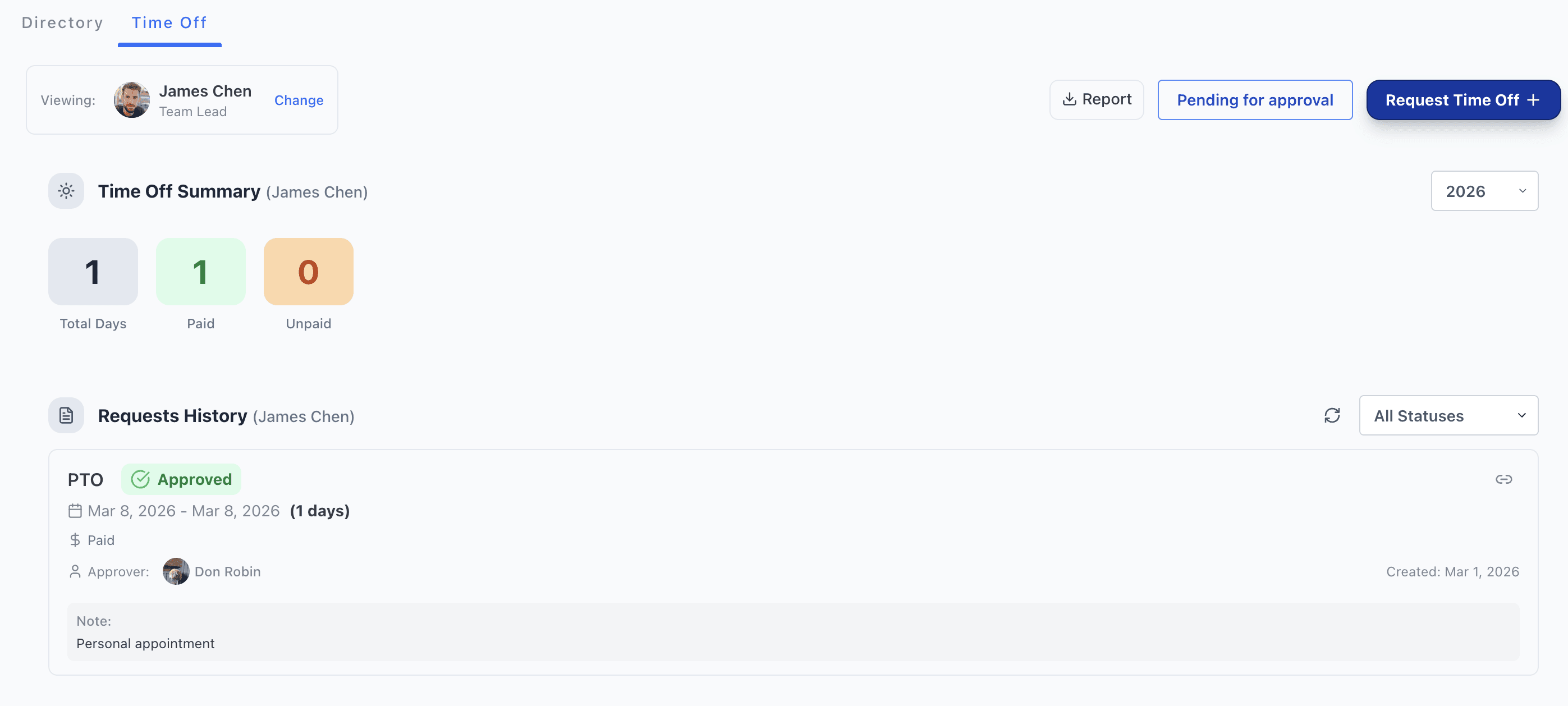
Open Time Off from People. The dashboard shows who you are Viewing, a year selector, summary cards, request history, Pending for approval, Report, and Request Time Off.
Tap Request Time Off. Set:
Start and end dates (total days calculate from the range)
Time Off Type — PTO, holiday paid, sick leave, unpaid leave, personal day, or a custom type
Send request to — choose the approver
Notes — appointment, travel, or context your process allows
Submit. The request enters Pending until someone approves or declines.Employees can reach leave from scheduling surfaces when availability and time-off paths are connected. Use Time Off for PTO, sick, vacation, and unpaid leave; use My Availability for recurring unavailability that is not formal leave.
How it works: approvals, history, and reports
Managers and designated approvers review Pending for approval. Approve or decline with type, dates, paid/unpaid framing, notes, and requester visible.
Requests history lists past and current requests with status filters (All / Pending / Approved / Declined / Cancelled as available). Rows show date range, paid vs unpaid marker, approver, created date, and notes.Yearly summary cards track total days, paid, and unpaid for the member and year you are viewing.
Report downloads time-off data by year and member selection for HR review or handoff. That is export honesty — not a payroll run.
Managers use Change / member select to view another person’s summary and history. The same mobile path supports requests and approvals; history remains searchable on web.
Time Off next to the shift schedule
Best practice: review Time Off before you publish the week. Approved leave and unavailable blocks can show on the schedule so you do not assign someone into a booked medical day.
Shifts are on Basic. Time Off visibility on the roster belongs next to Basic scheduling — one login. Check pending/approved leave → publish roster → punch with GPS stamp ± near-branch → coverage talk in org-wide chat.
Time Off on Premium — plan honesty
Time Off is a Premium ($4) feature. Basic ($2.50) includes org-wide chat, shifts, clock-in, timesheets, directory, and unlimited Spaces. Premium adds Time Off plus calls, news feed, tasks, forms, wiki, analytics, and SSO — still one seat price, still unlimited Spaces. Trial includes everything so you can run real leave requests before you commit seats.
Mobile + web
Employees request leave from mobile. Approvers clear pending from mobile when on site. Web is where year summaries, multi-member review, and report downloads usually happen. Same Pebb login as chat, shifts, and clock-in — no second HR leave password.
Honest limits
Read these before you migrate:
No free plan. Budget Basic ($2.50) or Premium ($4) seats. Time Off needs Premium. Evaluate with the full trial, no card.
No payroll, LMS, or ATS. Time Off tracks requests, approvals, paid/unpaid days, and reports — it does not run payroll, teach courses, or hire candidates.
GPS is a stamp ± near-branch on clock-in, not live breadcrumbs.
Not the deepest policy engine. If you need union rules, predictive-scheduling penalties, or intricate accrual math, keep that requirement on the table.
Availability ≠ Time Off. Unavailability on the schedule is not the same as an approved PTO request — use both correctly.
Pebb is Connecteam-class all-in-one on purpose — not a pivot into a standalone HRIS or payroll suite. If that match is wrong for your desk, the trial will show it in a week.
FAQ
Where does Time Off live?
Under People, next to the directory — org-wide, not locked inside one Space.
Is Time Off on Basic or Premium?
Time Off is on Premium ($4). Basic is $2.50 without Time Off. Trial includes Premium features.
Can employees request PTO on mobile?
Yes. Request, pending review, and manager approval paths work from the Pebb mobile app.
Does approved leave show on the schedule?
Unavailable time and time off can appear on the shift schedule so managers avoid assigning into known gaps.
Does Time Off replace payroll?
No. No payroll, LMS, or ATS. Download reports; payroll stays payroll.
Is there a free plan?
No. Full trial, no credit card. Then pricing.
Where is the step-by-step UI guide?
Time Off in Pebb — complete guide in the help center.
Approve leave next to the roster people already open
PTO and time off in Pebb are org-wide requests, approvals, paid/unpaid history, and reports on Premium ($4) — in the same app as chat, shifts, and clock-in, billed per person. No free plan. Full trial, no card. Basic $2.50 / Premium $4.
Start full trial — no card · See Pebb pricing
Sibling reads: how shift scheduling works in Pebb · how clock-in works in Pebb · What are Pebb Spaces? · how team chat works in Pebb · how digital forms work in Pebb
