

Author: Ron Daniel
WhatsApp vs. Slack vs. Pebb: Which App Fits Your Team?
Compare WhatsApp, Slack, and Pebb to see which handles messaging, scheduling, and team operations best for desk and frontline teams.
Have you ever spent what felt like an eternity scrolling through a group chat, only to give up on finding that one file you desperately needed? Or worse - missed an important update buried under a flood of GIFs and unrelated messages? Trust me, I’ve been there, and it’s not just frustrating - it’s costly. Studies show that 68% of managers say missed messages cost their teams anywhere from $15,000 to $50,000 annually in lost productivity. That’s a lot of money to waste on communication mistakes that lead to scattered communication.
Here’s the thing: the tools we use to communicate can either help us thrive or hold us back. Over the years, I’ve worked with teams that relied on WhatsApp for quick chats, Slack for structured workspaces, and, of course, Pebb - our all-in-one platform that combines messaging, scheduling, and task management. Each tool brings something different to the table, but not every platform fits every team.
So, how do you choose? It all comes down to what your team needs. Often, this starts with creating a connected workplace that prioritizes engagement. Whether it’s simplicity, deep integrations, or a platform that handles both communication and operations, I’ll walk you through how WhatsApp, Slack, and Pebb stack up. By the end, you’ll know exactly which one can help your team work smarter, not harder.
WhatsApp for Team Communication
WhatsApp is a go-to tool for teams looking for quick, informal, and mobile-friendly communication. With 2 billion users worldwide, 55 million monthly users in the U.S., and 80% of small businesses relying on it - including 1 million U.S. businesses - it’s clear why it’s such a popular choice.
WhatsApp Features
WhatsApp keeps things simple but effective. Here’s what it offers:
Group chats that can include up to 1,024 members.
Voice messages for quick, hands-free updates.
Video calling for up to 8 participants in standard calls or 32 in larger group calls.
End-to-end encryption, ensuring your messages stay private.
The interface feels like a personal messaging app, complete with familiar features like emoji reactions, searchable message history, and an easy-to-navigate chat list.
What WhatsApp Does Well
One of WhatsApp’s biggest strengths? It’s completely free and takes just two minutes to set up - all you need is a phone number. Imagine a retail team needing to swap shifts quickly. A simple message like "Available Friday 9 AM–5 PM?" paired with a location pin can help coordinate schedules without any technical hurdles. It’s perfect for teams with mixed levels of tech know-how.
Where WhatsApp Falls Short
That said, WhatsApp does have its limitations. It’s missing built-in tools for task management - no checklists, no assignment features, no deadline tracking. Teams often have to rely on manual workarounds, like pinning messages or using third-party bots. But let’s be honest: that can turn group chats into a cluttered mess.
"Important files vanish in a sea of memes, tasks are mentioned but never tracked, and your company's knowledge ends up stranded on personal phones with zero security."
– Dan Robin
And there’s another big downside: mixing work and personal communication. Using one app for both can lead to notification overload, privacy risks, and compliance headaches. A 2023 Gartner survey found that 62% of teams reported blurred lines between work and personal messages as a key factor in burnout. When work chats are sandwiched between family photos and weekend plans, it’s easy for focus - and boundaries - to slip.
Next, let’s dive into Slack and see how it stacks up for office-based teams.
Slack for Office-Based Teams
Slack is a go-to for teams stationed at desks, working across various tools and departments. With its structured channels and extensive app integrations, it aims to streamline office workflows. Let me walk you through its standout features and how it performs for office-based teams.
Slack Features
Slack’s channels are its backbone. These dedicated spaces keep conversations focused on specific projects, departments, or topics. For example, you might have a channel for a marketing campaign, another for an engineering sprint, and one for a key client account. Everything stays organized and searchable. Plus, Slack’s integrations are impressive - over 2,600 third-party apps like Google Workspace, Jira, Salesforce, and GitHub can plug right in. You can share files, use threaded replies to maintain clarity in discussions, and, on paid plans, access unlimited message history. For private chats, direct messaging handles one-on-one conversations, and customizable notifications help you manage when and how you’re pinged.
What Slack Does Well
If your team is juggling multiple tools, Slack can feel like a lifeline. Imagine this: your marketing team gets Google Analytics updates directly in Slack when campaign metrics shift, while your engineering team sees code review notifications from GitHub - all in real-time, without leaving the platform. And with Slack Connect, you can collaborate with external partners in shared channels, cutting down on the email back-and-forth with vendors or clients.
"Slack is often the default choice for office teams... If your team lives on their keyboards, Slack is a powerful hub." – Dan Robin
The speed of real-time messaging keeps projects moving, and the search function is a lifesaver when you need to dig up past conversations or project details quickly.
Where Slack Falls Short
Slack’s pricing can be a wake-up call as your team grows. The Pro plan runs $8.25 per user/month (billed annually). For a team of 50, that’s around $4,950 annually, and for 100 users, you’re looking at nearly $10,000 a year. And while Slack is user-friendly, new team members often need a few weeks to get the hang of channels, threading, and notifications. Speaking of notifications, it’s easy to feel overwhelmed if you don’t fine-tune the settings.
Here’s the kicker: Slack isn’t built for frontline operations. It lacks tools like shift scheduling, task assignment with deadlines, and time-off request systems. If you’re managing a mixed team - some at desks and others on the floor - you’ll need to cobble together additional tools or integrations. That means more setup, higher costs, and added complexity for managers already stretched thin.
Next up, I’ll show you how Pebb steps in to fill these gaps, combining communication and operational tools into one seamless platform.
Pebb: Complete Platform for All Teams
At Pebb, we’ve built a platform that brings everything a team needs - communication, operations, and engagement - into one place. Whether your team is on the sales floor, in the warehouse, or working from a desk, Pebb is designed to keep everyone connected and productive.
Pebb Features
Imagine having all your essential tools in one app. That’s what Pebb delivers. It’s mobile-first and packed with features like:
Work chat with threaded conversations to keep discussions organized.
A company news feed for updates everyone needs to see.
Shift scheduling with easy drag-and-drop tools.
Integrated PTO management for hassle-free time-off requests.
Voice and video calls for up to 50 participants.
Built-in task management, file sharing, and polls to streamline workflows.
Seamless integrations with Google Workspace and Microsoft 365 for smooth collaboration across devices.
Whether you’re on your phone or desktop, Pebb makes communication and planning simple, saving time and effort for teams of all sizes.
What Pebb Does Well
Here’s where Pebb shines. We offer a free plan for up to 15 users - no time limits, no hidden fees. It’s perfect for small teams who need core tools like chat, scheduling, and task management without spending a dime. For growing teams, our Premium plan costs just $4.00 per user per month (billed annually at $48.00 per user). To put it in perspective, a 50-person team pays about $2,400 annually - that’s over $2,500 cheaper than Slack’s $4,950.
But it’s not just about cost. Pebb works for both frontline and desk workers. Around 90% of frontline users rely on their smartphones for quick shift swaps and chats, while desk workers use the web or desktop app for task tracking. And the results? They’re impressive:
40% faster shift fills and 25% higher engagement scores compared to teams juggling multiple tools.
A 50-person retail chain boosted their shift fill rates to 95% (up from 70%) by using mobile swaps instead of email.
A 20-person tech startup slashed meeting times by 40% by switching to in-app standups and project management.
This combination of affordability, efficiency, and flexibility makes Pebb a game-changer for teams.
What Makes Pebb Different
Here’s the thing: Pebb isn’t just another messaging app or scheduling tool. It’s a complete solution. Unlike WhatsApp’s casual chat focus or Slack’s office-centric channels, Pebb brings communication, operations, and engagement together in one mobile-first experience.
No more jumping between apps to check schedules, request time off, or send a quick message - it all happens in Pebb. And for those working offline? Pebb’s offline mode lets you access documents and draft updates without internet, syncing everything automatically when you’re back online.
By reducing tool sprawl by 60% and boosting retention by 28% in U.S. pilots, Pebb becomes your team’s go-to workspace. Add to that unlimited message history on all plans and a 15GB knowledge library for storing important files, and you’ve got a digital headquarters that works for everyone.
Pebb isn’t just about tools - it’s about making teamwork easier, faster, and more connected. And that’s what sets us apart.
Feature Comparison: Pebb vs Slack vs WhatsApp
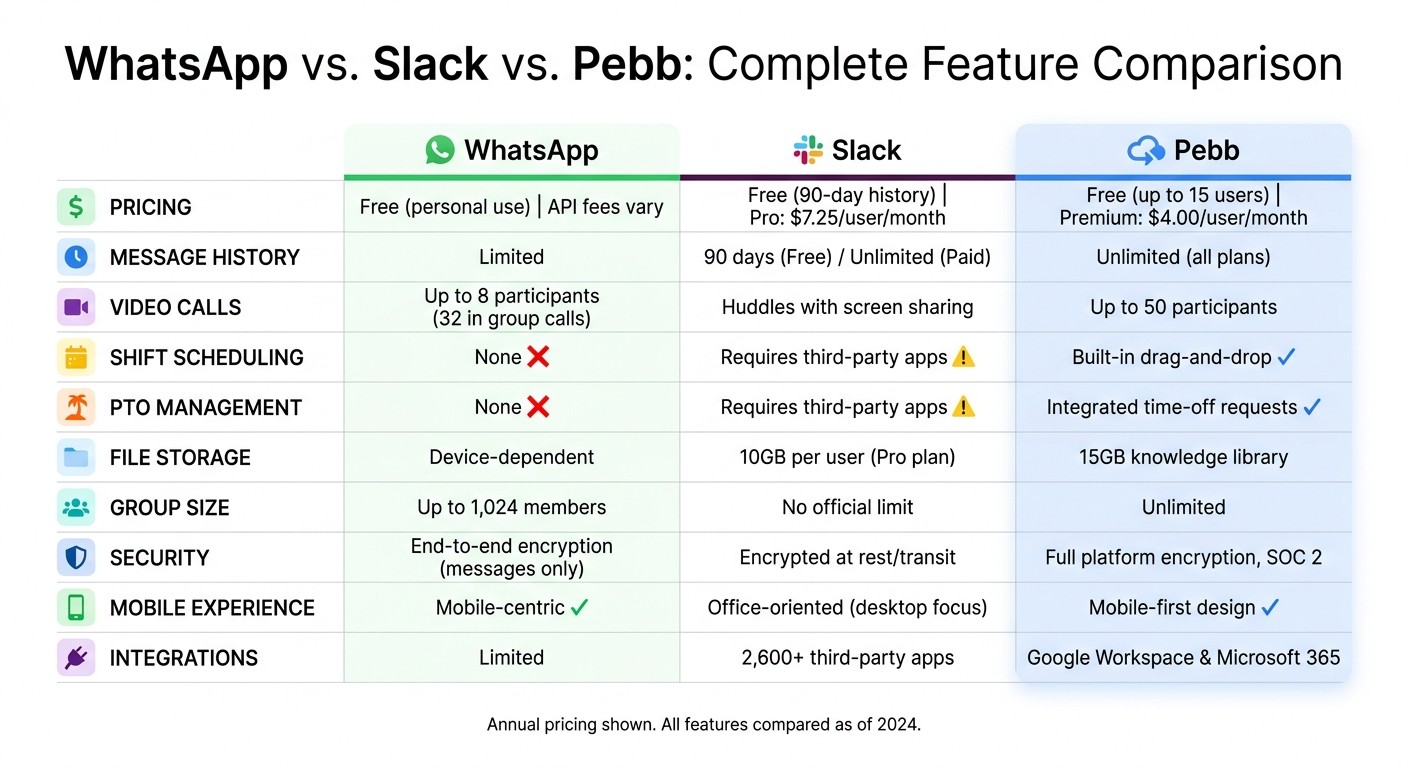
WhatsApp vs Slack vs Pebb Feature Comparison Chart
Let me break this down for you: when it comes to choosing between Pebb, Slack, and WhatsApp, the right pick really depends on your team's needs. Whether it's messaging, scheduling, or managing time-off requests, each platform brings something different to the table. Here's how they stack up.
First, Pebb starts free for teams of up to 15 users, offering unlimited message history and built-in scheduling right out of the box. If you’re looking for more, our Premium plan is just $4.00 per user per month (billed annually). Compare that to Slack, which limits message history to 90 days on its free plan and charges $7.25 per user per month for their Pro plan (also billed annually). WhatsApp? It's free for personal use but gets tricky (and costly) with its Business API, charging around $0.005 per message - and you won’t find any built-in team management tools there.
Here’s a quick look at the key features:
Feature | Pebb | Slack | |
|---|---|---|---|
Starting Price | Free (up to 15 users) | Free (90-day history) | Free (personal use) |
Premium Price | $4.00/user/month | $7.25–$12.50/user/month | API fees vary |
Message History | Unlimited (all plans) | 90 days (Free) / Unlimited (Paid) | Limited |
Video Calls | Unlimited | Huddles with screen sharing | Up to 8 participants |
Shift Scheduling | Built-in scheduling with a drag-and-drop interface | Requires third-party apps | None |
PTO Management | Integrated time-off requests | Requires third-party apps | None |
File Storage | 15GB knowledge library | 10GB per user (Pro plan) | Device-dependent |
Group Size | Unlimited | No official limit | Up to 1,024 members |
Security | Full platform encryption, SOC 2 | Encrypted at rest/transit | End-to-end encryption (messages only) |
Mobile Experience | Mobile-first design | More office-oriented, with robust desktop apps | Mobile-centric |
Here’s what sets Pebb apart: we combine communication and operations into one seamless platform. Slack might be great for chatting, but you’ll often need third-party apps for scheduling or time-off management. WhatsApp? It’s a solid messaging app, but it lacks any native tools for team operations, which means you’ll be juggling multiple apps to get things done.
With Pebb, everything’s built in. Need to schedule shifts? Drag and drop. Want to manage PTO requests? It’s all integrated. No hopping between apps, no extra subscriptions, and no digging through scattered tools to find what you need. It’s all there, in one place, so your team can focus on what really matters.
How Each Platform Works in Practice
Let me walk you through how Pebb, Slack, and WhatsApp handle real-life challenges - like last-minute shift changes or project deadlines. These examples show how each platform stacks up when it matters most.
Managing Retail Shift Changes
Picture this: it’s 6:00 AM, and a store associate calls in sick. With Pebb, managers can use the drag-and-drop scheduling tool to post the open shift and fill it in seconds. Employees get instant notifications and can claim the shift directly from their phones. No fuss, no gaps in coverage.
Now, let’s talk about Slack. To manage shifts, you’d need to bring in third-party apps like Deputy or When I Work. Not only does this add extra costs, but it also forces managers to juggle multiple tools. And WhatsApp? Well, that’s a whole different story. Posting a shift in a group chat leads to a flood of unorganized replies like “I can do it,” “Wait, what time again?” or “Is it taken?” - leaving managers scrambling to figure out who’s actually available and qualified. It’s chaos compared to Pebb’s streamlined approach.
Tech Team Project Collaboration
For tech teams, Pebb’s dedicated Spaces are a game-changer. They organize projects with built-in Tasks and a centralized Knowledge Library, giving both office-based and frontline workers a unified place to collaborate. It’s not just about communication - it’s about getting work done efficiently.
Slack, on the other hand, brings its A-game with channel-based organization, threaded conversations, and integrations with tools like GitHub, Jira, and Jenkins. These integrations automatically keep everyone in the loop, which is a big plus. WhatsApp, though? It’s not built for this kind of work. There are no native integrations or threaded conversations, so teams end up juggling multiple group chats, making it easy to lose track of updates.
Small Team Communication
If you’re part of a small team, Pebb has your back. It’s free for teams of up to 15 users and offers organized communication that scales as you grow. WhatsApp can work for very small teams - say, under 10 members. It’s great for quick messages like confirming a meeting time or sharing a client site photo. But once your team grows, WhatsApp’s linear chat format becomes a problem. Urgent messages get buried, and there’s no way to organize conversations by topic or project.
Slack starts strong for small teams too, but here’s the catch: its free plan limits you to a 90-day message history. As your team grows, those upgrade costs can sneak up on you. Pebb, however, keeps things simple. It’s an all-in-one solution that organizes messages, schedules, and updates without extra hassle - or expense - as your team expands.
Choosing the Right App for Your Team
Let me share what I’ve learned from working with different teams. If your group is small - say, fewer than 10 people - and all you need is quick, informal communication, WhatsApp might be just fine. It’s simple, familiar, and gets the job done when you’re not worried about tracking tasks or scheduling. But here’s the catch: as your team grows or your needs get more complex, WhatsApp starts to feel... messy. It’s not built for organization, and that becomes obvious pretty quickly.
Now, if you’re working with a tech or office team that thrives on integrations - think GitHub, Jira, or Jenkins - Slack is a solid option. It’s designed for desktop collaboration, with features like threaded conversations and powerful search capabilities. The downside? It comes with a higher price tag per user, and you’ll still need to find other tools for scheduling, PTO tracking, or employee engagement. Slack doesn’t cover it all, so you’re left juggling multiple subscriptions.
This is where Pebb changes the game. We built Pebb to work for all kinds of teams - whether you’re managing a retail crew or a tech squad - without needing extra integrations. Here’s what’s included:
Work chat with unlimited message history
Shift scheduling and task management
PTO tracking and a knowledge library
Voice and video calls
Engagement tools like news feeds and polls
And the best part? It’s just $4 per user per month for the Premium plan, or completely free for teams of 15 or fewer. No hidden fees. No limits on message history. We’ve even seen teams save 40–60% compared to Slack while gaining access to more features.
If you’re managing frontline workers, scaling a small business, or just tired of juggling multiple apps, Pebb offers everything you need in one place. It’s built to grow with you - whether you’re coordinating retail shift changes or managing complex tech projects. WhatsApp can’t keep up as your needs expand, and Slack’s costs can spiral out of control. With Pebb, you get robust tools without the hassle or high price tag.
FAQs
How do I know if my team has outgrown group chats?
Your team might be feeling the strain of outgrowing group chats if conversations are all over the place, critical updates slip through the cracks, or files vanish into the abyss of endless threads. It's not just frustrating - it can seriously slow things down. You might also notice information getting stuck in silos or that managing discussions has become a juggling act.
That’s where tools like Pebb come in. By blending work chat, news feeds, and task management into one platform, Pebb helps cut through the chaos. It simplifies communication, keeps everything organized, and ensures your team stays productive - even as you scale.
What should I prioritize when choosing a team app for both desk and frontline workers?
When it comes to workplace tools, simplicity and mobility are key - especially when you're juggling the needs of both desk workers and frontline teams. That's where Pebb shines. Our all-in-one platform packs everything you need: work chat, shift scheduling, PTO management, and more. And the best part? It's all optimized for mobile, so your team can stay connected whether they're at a desk or on the go.
At just $4 per user for the premium plan, Pebb offers an affordable way to streamline communication and boost efficiency across your entire workforce. It’s built to bring teams together, no matter where they are or what they do.
Can Pebb replace separate tools for chat, scheduling, and PTO?
Pebb brings everything together in one place, so you don’t need to juggle multiple tools anymore. With features like work chat, shift scheduling, PTO management, voice and video calls, and even employee engagement tools, it’s an all-in-one app built for both frontline and office teams. Plus, it’s budget-friendly - our premium plan is only $4 per user. Simple, efficient, and cost-effective!
