

Author: Ron Daniel
Top benefits of using a unified app for chat and scheduling
One app for chat, scheduling, PTO, and clock-ins reduces missed shifts, speeds coverage, and keeps managers from switching tools.
Most frontline teams don’t have a people problem. They have a tool problem.
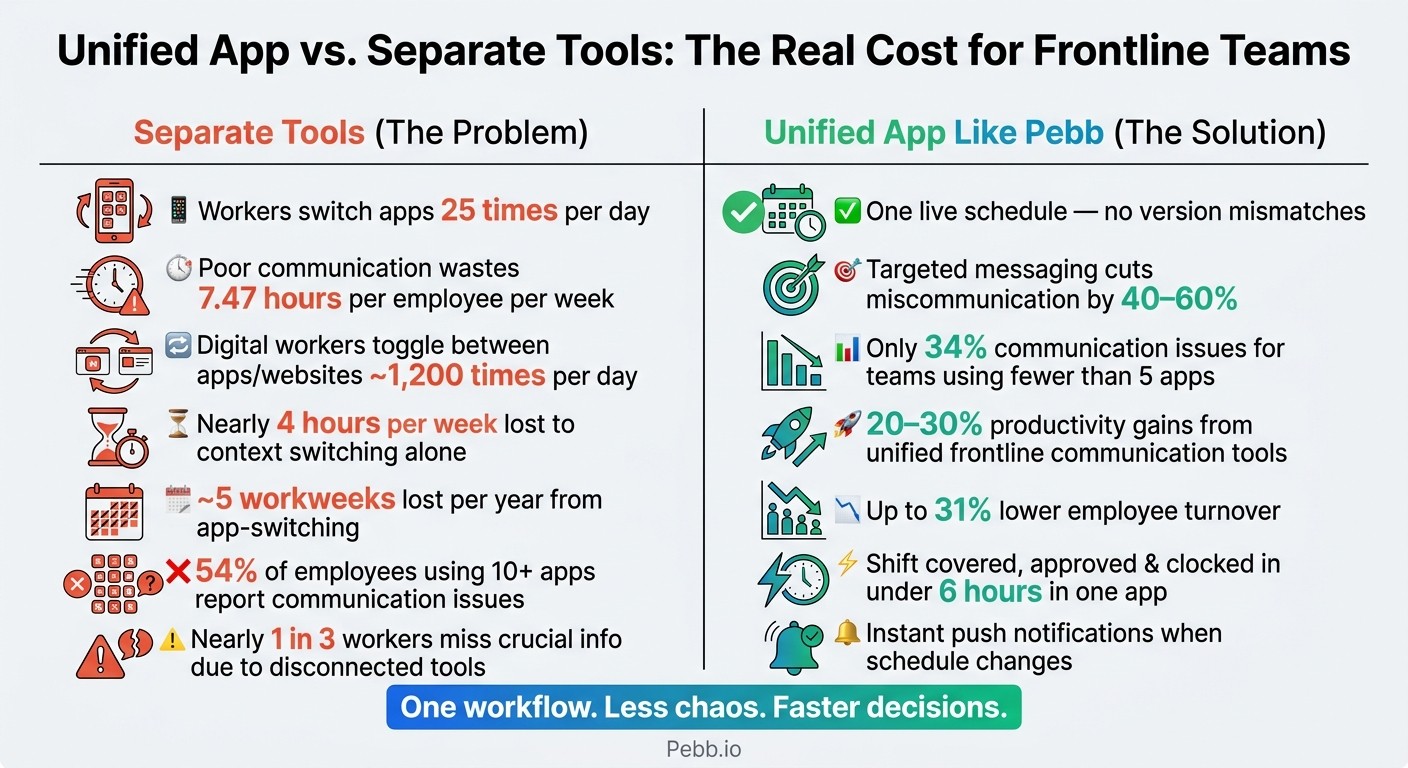
At Pebb.io, I’ve watched managers lose time every day because chat sits in one app, scheduling in another, and PTO somewhere else. That split creates missed updates, old schedule versions, and too many “I didn’t see that” moments. The data lines up with what I’ve seen: workers switch apps 25 times a day, and poor communication can eat up 7.47 hours per employee per week.
So I want to keep this simple. I’ll walk through why one app for chat and scheduling cuts errors, trims back-and-forth, helps managers deal with call-outs, and makes the day easier for employees too.
Why separate tools create daily chaos
A while back, I was looking at one of those early-morning scramble moments that happen way too often in frontline teams. At 6:30 AM, a warehouse supervisor got a sick call and sent out one update. Sounds simple, right? Let me tell you what happened next. Different people saw that message at different times, in different tools, and by 7:00 AM the team was still working from different schedule versions.
I’ve seen this up close at Pebb.io, and here’s the thing: that’s not a people problem. It’s a tools problem.
When teams rely on separate apps, they end up with separate versions of the truth. One manager checks email. Another checks chat. Someone else is buried in a form. Meanwhile, nobody feels fully sure they’re looking at the latest update, so they start chasing confirmation instead of getting work done.
That’s when the day starts slipping.
Approvals get buried across email, chat, and forms. Shift coverage gets missed. PTO updates don’t reach everyone at once. And the longer that chain gets, the easier it is for no-shows and coverage gaps to sneak in.
The cost adds up fast. Poor communication wastes 7.47 hours per employee per week, and workers switch apps 25 times a day. I don’t need a study to tell me that feels draining, but the numbers make it plain. More app-switching means slower shift swaps, slower approvals, and slower coverage calls when time is tight.
What does that look like on the ground?
Missed shift coverage
No-shows
Approvals nobody can track
That’s the mess we built Pebb to stop. We keep chat, scheduling, PTO, and updates in one place, so teams aren’t stuck piecing the day together from five different systems.
And that’s exactly what Pebb fixes in the next section.
1. Pebb
I’ve seen this play out more times than I can count at Pebb.io: a manager starts a shift already juggling five things, then gets hit with the usual mess - Who’s late? Who swapped shifts? Did anyone see that update? That’s exactly the kind of day we built Pebb for.
Pebb puts team chat, shift scheduling, clock-in tracking, PTO, and company updates in one app. That matters because each part removes a different daily slowdown.
Let me make that real. A retail or restaurant manager can open Pebb at the start of a shift and see who’s scheduled, who’s already clocked in, and any unread messages or alerts on one screen. No bouncing between tools. No texting three people just to confirm coverage. When a schedule changes, the update goes out as an in-app alert, so the whole team gets the same message at the same time. In my experience, that’s where you start seeing fewer errors and much faster schedule changes.
Here’s the thing: the win isn’t just chat or scheduling on its own. It’s how the tools work together.
Pebb also includes forms, tasks, a news feed, a people directory, and voice and video calls. So if you’re running a food-service team, you can assign a daily temperature log as a digital form, track completion as a task, and post a policy update in the news feed without leaving the app. I’ve watched teams go from scattered, app-hopping workflows to one steady flow in a single place. It feels a lot less chaotic, and frankly, people miss less.
We also made the entry point simple. Pebb’s Standard plan is free for teams up to 15 employees, and it covers chat, shift scheduling, clock-in, PTO, tasks, and digital forms. That base setup is what opens the door to the next set of gains.
First, here’s how one app reduces scheduling errors.
2. Fewer scheduling errors
I’ve seen this play out more times than I’d like to admit. A shift swap gets approved over text, but the spreadsheet never changes. PTO gets the green light in email, yet the schedule still shows that person on the floor. Then 5:00 PM hits, someone doesn’t show up, and the manager is left scrambling.
Here’s the thing: the mess usually starts when chat lives in one place and scheduling lives somewhere else.
At Pebb, we built this so both sit in the same app, and that changes the day-to-day in a big way. There’s one live schedule, not three half-updated versions floating around. When a manager approves a shift swap or a time-off request in Pebb, the schedule updates right away, and both employees get a push notification confirming the change.
That sounds small. It’s not.
Let me tell you what happened next in one case I remember well: instead of digging through texts, checking email, and opening a spreadsheet, the manager could see the full day in one view - who was scheduled, who had clocked in, who was late, and who was on approved PTO that day. When someone sent a message saying, "I can't make my 5:00 PM shift," that alert showed up right next to the day’s schedule. No guesswork. No backtracking. Just the context they needed, right when they needed it.
PTO and scheduling also have to work together. If leave approvals sit apart from the schedule, it’s way too easy to approve time off and only later notice you’ve left a coverage hole. We’ve seen teams deal with that exact headache.
With Pebb, approved PTO automatically blocks that employee’s availability, and the system blocks shifts for approved PTO. So managers don’t have to rely on memory or a second manual check. And when last-minute call-outs or shift changes happen, that same live schedule makes the fix much easier to handle.
3. Faster response to call-outs and shift changes
I’ve seen this happen more times than I’d like to admit. The schedule is finally done, everyone breathes for a second, and then boom - someone calls out 30 minutes before a shift.
That’s when the mess usually starts.
One manager texts one person. Another pings a group in WhatsApp. Someone else opens a spreadsheet that may or may not be up to date. Then the site lead gets a call because, honestly, nobody fully trusts the spreadsheet anyway.
Here’s the thing: that kind of scramble eats time fast.
A call-out shouldn’t kick off four side conversations in four different places. It should start one in-app workflow: check availability, notify the right people, and update the schedule.
That’s exactly how we think about it at Pebb. Inside our app, the whole process happens in just a few steps. The moment a call-out comes in, a manager can see who’s available right now without jumping into a second tool. That check takes into account existing shifts and overtime limits, so they’re not guessing or doing mental math on the fly.
Then they can send a message only to employees who are both available and trained for that shift. That matters more than most teams think. Targeted messaging by role or shift can cut miscommunication in frontline operations by 40% to 60%.
Let me tell you what happened next in cases like this: once someone says yes, the manager updates the schedule in the same app, right there. The employee gets the change on their phone at once. No sending a new file. No “just making sure you saw my text.” No chasing people down.
What I like most is that it turns a frantic chain of messages into one clean conversation tied to one live schedule. There’s also one live record showing who accepted the shift and when, so managers can confirm coverage on the spot.
And if you’ve ever bounced between apps just to fill one shift, you already know why that matters.
4. Less app-switching for managers and employees
A while back, I watched one of our frontline managers bounce between a scheduling tool, email, chat, a spreadsheet, and a clock-in system just to deal with one call-out. By the time she figured out who was available, ten minutes had disappeared. Let me tell you what happened next: the issue got solved, but everyone felt the drag.
That’s why this point matters so much to me.
Research cited by Harvard Business Review found that the average digital worker toggles between apps and websites nearly 1,200 times per day, losing close to four hours per week just getting back into context after each switch. Put that together over a year, and it adds up to nearly five workweeks lost just from context switching.
Here’s the thing: it’s not only about time. Every time someone jumps from one tool to another, they lose the thread of the task in front of them.
For frontline managers, that can look painfully familiar. They check the schedule in one app, respond to a call-out in another, update attendance in a spreadsheet, then send reminders by email. Each jump means they have to piece the situation back together. And when a call-out hits, that delay hurts. The last thing a manager needs in that moment is a messy handoff between tools.
Managers aren’t the only ones paying for it, either. Nearly one-third of workers say they've missed crucial information because of toggling between disconnected systems.
We’ve seen the flip side too. When chat, shift scheduling, clock-in, PTO, and news feed updates all live in the same app, the day feels a lot less scattered. A manager can open one place, see who’s clocked in, check whether the shift is covered, message the right people, and keep moving.
That same simplicity helps employees just as much. They can check shifts, read updates, and clock in without bouncing between logins or hunting for the right tab. It sounds small until you see how much friction it cuts out.
The data backs that up. Employees using more than 10 apps report communication issues at a rate of 54%, compared to 34% for those using fewer than five.
From my seat at Pebb.io, that’s the part people often miss. Fewer tools doesn’t just make work feel cleaner. It makes the schedule easier to trust, cuts down on missed info, and helps people act faster when something changes.
Once everyone stays in one workflow, attendance and PTO become easier to see at a glance.
5. Better visibility into attendance and PTO
I’ve seen this play out more times than I can count at Pebb.io: attendance and PTO look simple until they’re spread across too many tools.
One of the biggest wins from using a single workflow is that managers finally get one live view of attendance and PTO. And honestly, that changes a lot. When schedules, clock-ins, and PTO requests sit in separate systems, things get messy fast. A PTO approval is buried in email, the shift still shows up in a spreadsheet, and the time clock doesn’t reflect any of it. That disconnect leads to unstaffed shifts and payroll mistakes.
Here’s the thing: managers shouldn’t have to play detective.
In Pebb, we made it so managers can see who’s clocked in, who’s on approved PTO, and which requests are still pending from one screen. No jumping between tabs. No stitching together half the story from three different places. It’s all there, live, in one view.
Let me tell you what happened next when teams started using that setup more consistently: decisions got a lot faster. During a busy week, a manager can check coverage, approve two PTO requests, decline one, and message the team about open shifts from that same screen. That kind of speed matters when the schedule is tight and every hour counts.
Employees feel the difference too. They can check their PTO balance, see the status of a request, and look at upcoming shifts without having to chase down a manager for answers. That cuts back on follow-up questions, saves time on both sides, and helps people feel more confident about how time off is being handled.
6. Stronger accountability with one record of work
I’ve seen this problem up close at Pebb.io, and honestly, it gets messy fast.
When chat sits in one app, scheduling lives in another, and clock-ins happen somewhere else, people stop trusting the record. One person says they were told to come in late. A manager says the shift swap never got approved. The time clock shows one thing, the spreadsheet shows another. Let me tell you what happened next in cases like that: instead of leading the team, managers end up playing detective.
That’s the part most people don’t talk about. The issue isn’t just confusion. It’s the time you lose trying to piece together what happened.
Inside Pebb, we built this differently. Every action leaves a clear, time-stamped trail. That means shift changes, clock-ins, PTO requests, and call-out messages all live on the same work timeline. We use it as a live timeline, so both managers and employees can check what happened in real time without jumping between tools.
Here’s the thing: when everything sits in one place, small disputes don’t turn into long back-and-forth threads.
If someone questions a late clock-in, a shift swap, or a call-out, the manager can pull up:
the clock-in log
the schedule
the related chat
It’s all there in one place. No digging through texts. No comparing spreadsheets. No guessing which version is right.
I’ve found that this changes the tone of the conversation, too. People spend less time arguing about what happened because the record is already there, complete and consistent. That makes accountability feel less like blame and more like clarity.
For U.S. teams, that same recordkeeping also helps with FLSA compliance. It gives managers a simpler way to verify hours and avoid manual reconciliation, which can eat up a surprising amount of time. And for frontline teams, that kind of trust shows up in the day-to-day experience more than you’d think.
7. Better experience for frontline employees
I’ve seen this play out more times than I can count at Pebb.io: a frontline employee starts the morning already behind, not because they’re late or unprepared, but because their tools are all over the place.
One app for chat. Another for scheduling. A separate place for PTO. Maybe a text thread from a manager thrown into the mix. Before the shift even starts, people are hunting for basic answers. That kind of confusion wears people down fast.
Here’s the thing: when schedule, PTO, and updates sit in separate tools, uncertainty shows up before the work does.
That’s why bringing the day’s basics into one app makes such a big difference. Instead of bouncing between text, HR software, and chat, employees can handle what they need in one place. I’ve watched teams settle in faster when that switching stops. There’s less friction, fewer missed details, and a much smoother start to the day.
And the data backs that up. Frontline communication tools have been linked to 20%–30% productivity gains and up to 31% lower turnover.
Inside Pebb, this is pretty straightforward. An employee can:
Check today’s shift
Read manager updates
Submit PTO
All in one app.
That may sound simple, but in frontline work, simple wins. When employees can see the day and act on it from the same place, the workflow gets easier almost right away.
Let me tell you what happened next on teams that worked this way: that same clarity didn’t stop at the schedule. It carried into daily operations too, where tasks, forms, and updates stayed tied to the shift instead of floating around in disconnected systems.
8. Simpler daily operations with forms, tasks, and updates
I’ve seen this play out more times than I can count at Pebb.io: frontline operations don’t usually fall apart because people don’t care. They fall apart because the basics live in five different places.
The schedule is in one tool. Tasks are in another. Checklists are on paper or buried in a folder. Updates? Half the team misses them because they’re stuck on a break-room wall no one looks at during a busy shift.
Here’s the thing: once forms, tasks, and updates sit inside the same workflow as scheduling, the day gets a whole lot less messy.
Digital forms make routine work easier because they live in the same app as scheduling and chat. So if a store associate is opening for the day, they can complete an opening checklist right on their phone, tied to the current shift. I like this because the manager doesn’t have to chase anyone down or dig through paperwork. The form is saved where they can see it right away, in the same place the rest of the shift is already being managed.
Tasks follow the same pattern. A manager can assign closing duties in the app, and when someone finishes them, the completion update shows up instantly. That sounds simple, but in day-to-day operations, it saves a lot of friction. The assigned duties stay tied to the same live record the team is already using throughout the shift, instead of floating around in a separate system or getting lost in a text thread.
And then there are updates, which are just as important as checklists. I’ve worked with teams where printed memos sat in the break room for days, unread and ignored, not because people were careless, but because the workday moved too fast. A paper notice can’t compete with a live shift.
So instead of relying on those missed break-room memos, managers can post a daily briefing in the app and send it to the right team, department, or location. That gives everyone one visible update stream inside the workflow, right where work is already happening.
Let me tell you what happened next when teams started doing this: fewer missed steps, less back-and-forth, and a lot less guessing about who saw what and when.
Next, here’s how each feature maps to the problem it solves.
Which feature solves which problem?
Unified App vs. Separate Tools: Frontline Team Communication Stats
I’ve seen this play out over and over at Pebb.io: a team doesn’t usually struggle because people don’t care. They struggle because the tools are all over the place.
One manager is texting schedule updates. Another is using a spreadsheet. Someone else is chasing PTO requests in email. Then a shift gets missed, a policy update gets buried, and everyone feels the pain.
Here’s the thing: the fastest way I explain Pebb to frontline teams is simple. I match each feature to the day-to-day problem it fixes.
Benefit | Feature in the app | Manager result | Employee result |
|---|---|---|---|
Fewer missed messages | Group chat | One searchable channel for shift questions | No digging through personal messages |
Fewer scheduling errors | Shift scheduling | One live schedule | Instant mobile access to the current schedule, with notifications when anything changes |
Faster response to call-outs and shift changes | Group chat + shift scheduling | Message the right people in seconds | Clear visibility into open shifts and coverage needs |
Better attendance visibility | Clock-in / time tracking | Spot attendance gaps immediately | Clock in from the same app used for everything else |
Simpler PTO management | PTO management | All PTO in one view | Submit time off in a few taps and track approval status without chasing anyone down |
Clearer team-wide updates | News feed | One announcement to the right team or location | A reliable, central place for policy changes and updates |
Stronger accountability | Digital forms + tasks | Assign and verify tasks in real time | Clear ownership of daily duties with no ambiguity about what's expected |
Let me tell you what happened next when teams started using these pieces together.
The big shift wasn’t just that each tool did one job. It was that all the features shared the same live data. So when a schedule changed, PTO, clock-ins, and team visibility stayed in sync on their own. That’s the part that saves managers from playing middleman all day.
I think that’s where a lot of workplace apps fall short. They give you a pile of parts. What frontline teams need is one workflow that actually holds together when the day gets messy.
And that’s what this sets up for: schedule changes, time-off requests, attendance, updates, and daily tasks all moving in the same system instead of fighting each other.
Next, here’s what that looks like in a real frontline workflow.
What this looks like in a real frontline workflow
A while back, I watched one of our customers handle a messy shift change on a busy Tuesday, and it stuck with me. Not because it was dramatic. Because it was normal. This is the kind of frontline scramble that happens every day, and at Pebb.io, we built the app for moments exactly like this.
Here’s what it looked like in a quick-service restaurant with about 30 employees when a shift changed fast.
At 10:15 a.m., Alex, a cashier scheduled for the 4:00–10:00 p.m. shift, sent his manager Maria a message through Pebb saying he was sick and couldn’t come in. Maria opened Pebb, went straight to the schedule view, and assigned the open cashier shift. The schedule updated instantly for everyone involved.
Five minutes later, at 10:20 a.m., Maria posted in the "Evening Shift – Frontline" group chat: "Open cashier shift today 4–10 p.m. at Main Street. Reply if you can take it." Pebb showed three available cashiers who were still within overtime limits. Jordan, who was at 24 hours for the week, replied: "I can take it." By 10:27 a.m., Maria assigned the shift. The schedule updated instantly for everyone involved - no separate texts, no follow-up calls.
Here’s the thing: this is where managers usually get dragged into app-switching chaos. One tool for messages. Another for scheduling. Maybe a paper note somewhere in the middle. But in this case, Maria stayed in one workflow.
Then another request came in, and she handled that the same way. At 2:05 p.m., another employee submitted a PTO request to leave at 6:00 p.m. Maria got an in-app notification, checked the request against the current schedule, and approved it in a few taps.
By 3:55 p.m., Jordan arrived and clocked in through Pebb on his phone. Maria checked that every position was covered from the same app and sent a quick chat message to the evening crew about expected rush times.
Let me tell you what happened next: nothing blew up. And that’s kind of the point.
The shift was covered, approved, and clocked in inside one app in under six hours.
That’s what I mean when I talk about keeping chat, scheduling, PTO, and clock-ins on one live record. In the frontline world, speed matters, but so does context. When everything sits in the same place, managers don’t waste time piecing the day together. They just handle the issue and keep the shift moving.
That single workflow is why Pebb fits frontline scheduling so well.
Why Pebb fits this all-in-one model well
I’ve seen this play out up close at Pebb.io. A shift issue pops up, someone calls out, and for a few minutes, it can feel like everything might slide off the rails. Here’s the thing: it usually doesn’t, because the work stays inside one app.
That’s why this workflow lands so well for frontline teams. At Pebb, chat, scheduling, and attendance sit inside the same flow. So when a call-out comes in, the coverage change, the follow-up messages, and the team updates all happen in one place. We’re not bouncing between tools or chasing people across different systems.
Let me tell you what happened next in one of these moments. A shift changed, and instead of someone updating the schedule in one tool, sending a message in another, and hoping attendance matched later, everything moved together. Chat, schedule, and attendance updated at the same time. That sounds small until you’ve worked through the mess of version mix-ups before.
And that’s the part that matters most.
When a shift changes in Pebb, everyone sees:
the same schedule
the same messages
the same clock-in data
So there’s no version mismatch, no missed update, and no manual syncing between systems.
From my side, the features that keep proving their worth are the same ones this article keeps circling back to: group chat for fast coverage calls, shift scheduling for one live schedule, and PTO visibility so teams can spot gaps before they turn into a scramble.
We also made it easy for teams to get started. They can start free, and Premium is $4 per user per month.
That’s the simplest version of the all-in-one model.
Conclusion
I’ve seen this play out again and again with frontline teams at Pebb.io. The teams that move fastest usually aren’t using more tools. They’re using fewer, and those tools actually talk to each other.
When chat, scheduling, attendance, and PTO live in one workflow, the day just runs better. People make fewer mistakes. Shift changes happen with less back-and-forth. Managers stop digging through five different systems to find one answer. And employees know exactly where to go instead of bouncing between apps and hoping they didn’t miss something.
Here’s the thing: shared visibility changes how a team works day to day. It turns one app into the place where work happens, not just another icon on someone’s phone. That’s the model we’ve built at Pebb - all-in-one communication and scheduling, free to start, with Premium at $4 per user per month.
If your team is still splitting chat and scheduling across separate tools, I’d bring them together in one system as soon as you can.
FAQs
How does one app reduce scheduling mistakes?
I’ve seen this play out the hard way at Pebb.io. Before teams put scheduling, PTO, and team chat in one place, small mix-ups had a nasty habit of turning into big headaches. A missed shift change here. An approved day off that someone forgot to note there. It doesn’t sound like much until you’re the one trying to fix coverage at 8:15 a.m.
Here’s the thing: a unified app cuts down scheduling mistakes because it gives everyone one single source of truth.
When scheduling, PTO management, and team communication all live in one platform like Pebb, updates go out in real time. That means employees don’t miss changes because the message got buried in email, lost in chat, or stuck in some other tool nobody checked.
Let me tell you what happened next when teams started using one system instead of a pile of disconnected apps: the platform could cross-check PTO requests against the schedule before problems piled up. That helped stop double-bookings and staffing gaps before they hit the team.
And that’s the part people tend to miss. It’s not just about keeping things tidy. It’s about making sure the left hand knows what the right hand is doing.
By replacing disconnected tools with one centralized system, teams can see a 55% reduction in scheduling errors.
Can a unified app help with last-minute call-outs?
Yes - I’ve seen this play out firsthand at Pebb.io. Last-minute call-outs used to throw a wrench into the day fast. One person called out, a manager jumped between messages, schedules, and notes, and suddenly a small issue turned into a scramble.
With a unified app like Pebb, that gets a lot easier to handle because communication and scheduling live in the same place.
Here’s the thing: when a shift opens up at the last minute, managers don’t have time to dig through different tools. They need to act fast. Inside Pebb, they can share the open shift with the team right away or reach out to available employees directly.
What makes the process smoother is having chat, the schedule, and shift-swapping tools all together. That means managers can check, in real time:
who’s available
who has the right skills
who’s on PTO
Let me tell you what happened next in one case I remember well: instead of sending a bunch of back-and-forth messages and hoping someone replied, the manager could spot the best fit almost at once and move on. Less chaos, fewer missed details, and a much better shot at filling the shift without the usual headache.
What should teams look for in a chat and scheduling app?
I learned this the hard way. Early on at Pebb.io, I watched teams try to juggle one app for chat, another for shift swaps, and yet another for company updates. On paper, it looked fine. In practice? It was a mess.
A missed message here. A schedule mix-up there. No one was quite sure who saw what, and accountability got blurry fast. When people have to hop between tools just to get through a normal workday, things slip through the cracks.
That’s why I always tell teams to start with a mobile-first app that brings communication, operations, and scheduling into one place. If your workforce is on the move, at a deskless job, or checking updates between tasks, mobile can’t be an afterthought. It has to be the main experience.
Here’s the thing: separate tools for chat, shift swaps, and updates often create the exact problems they’re supposed to solve:
Miscommunication
Scheduling errors
Less accountability
At Pebb.io, we’ve seen that teams move better when everything lives in one system. That’s why I’d put tools like Pebb at the top of the list. You want one place that gives your team:
Real-time chat
Scheduling
PTO management
A central news feed
But features alone don’t cut it. Let me tell you what happened next when teams tried to patch together disconnected systems: adoption dropped, managers spent more time chasing answers, and employees stopped trusting the process.
What makes the biggest difference is having:
Reliable mobile access
Unified workflows
Real-time visibility
Easy adoption
When those pieces are in place, day-to-day work feels a lot less chaotic. People know where to check updates, where to message coworkers, and where to handle schedule changes without playing phone tag across three different apps.
