
Author: Ron Daniel
Ultimate Guide to Time Management for Teams
Practical strategies to reduce wasted hours: audits, scheduling, async communication, and tools for mixed teams.
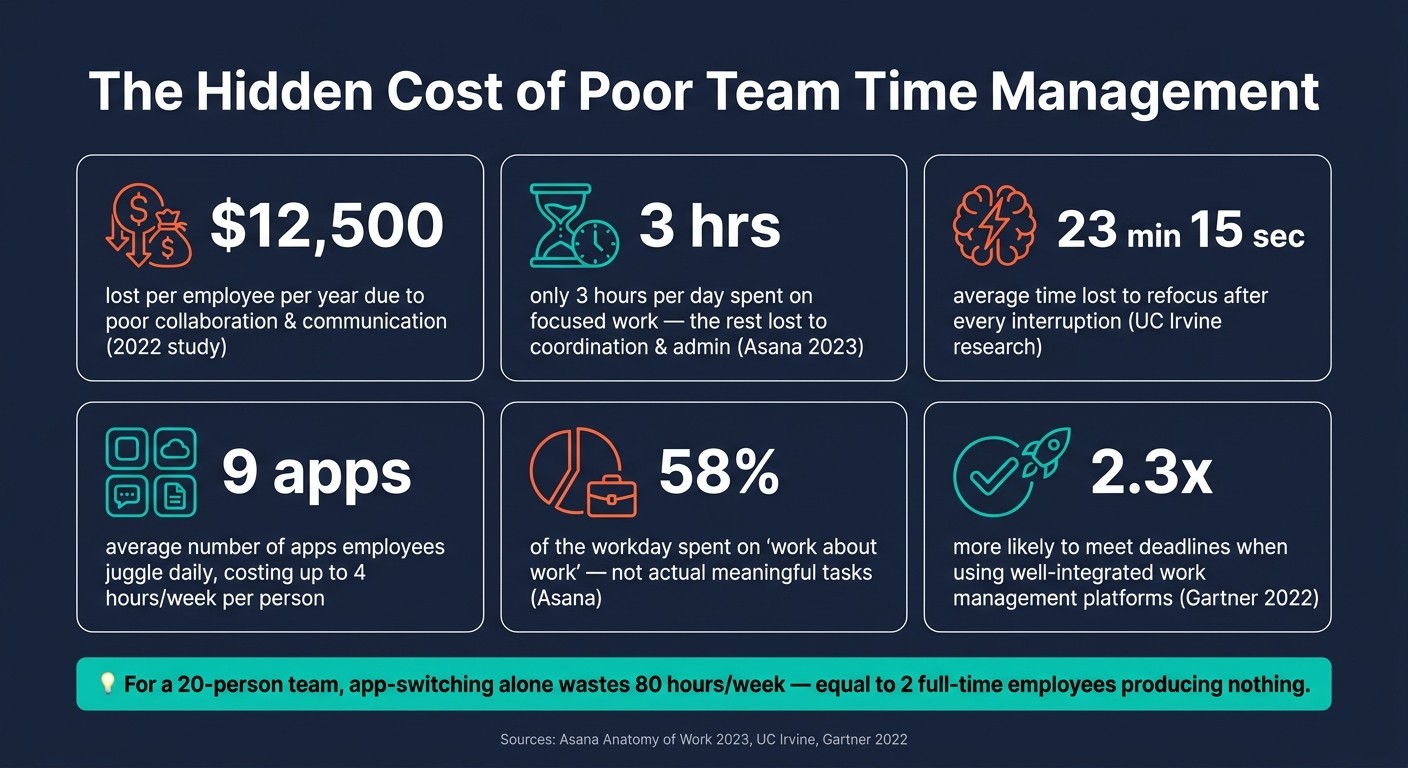
It’s wild how much time can slip through the cracks when you’re working in a team. I remember this one project last year where everything felt like it was moving in slow motion. Meetings that dragged on without clear outcomes, endless email chains, and tasks that kept getting delayed because someone was waiting for feedback. Sound familiar? Turns out, we weren’t alone. A 2022 study found that poor collaboration and communication cost businesses over $12,500 per employee every year. That’s a jaw-dropping amount of wasted productivity.
Here’s what I’ve learned at Pebb: managing time as a team is a completely different ballgame from managing your personal schedule. It’s not just about squeezing more into the day - it’s about making sure everyone is aligned, tasks flow smoothly, and communication doesn’t feel like a full-time job. And when you throw in the complexity of mixed teams - like frontline workers and remote staff - it gets even trickier. But the good news? With the right strategies and tools, you can turn things around.
In this guide, I’ll walk you through everything we’ve discovered about managing team time effectively - from running a time audit to setting up smarter schedules and cutting down on wasted hours. Whether you’re leading a restaurant crew, a remote tech team, or a mix of both, there’s something here for you. Let’s dive in!
The Hidden Cost of Poor Team Time Management: Key Stats
Core Principles of Team Time Management
Before diving into tools and systems, let me share the basics we’ve seen work wonders at Pebb. Teams that excel at managing time have a few things in common: they know where their time actually goes, they’re aligned on what’s most important, and they structure work around how people actually operate - not just when they’re physically present.
How to Run a Team Time Audit
We like to think we know how we spend our time, but trust me, an audit often reveals a completely different story. For example, the 2023 Asana Anatomy of Work report found that workers spend only 3 hours a day on focused work, with the rest eaten up by coordination, admin, and communication tasks. That gap between perception and reality is exactly what a time audit uncovers.
Here’s how we keep it simple: ask everyone to track their time for one to two weeks. Break it into four categories - deep work, collaboration, admin, and reactive interruptions. You can use a shared spreadsheet, calendar tools, or, for frontline teams, shift logs and task data from a platform like Pebb to spot patterns in how time is spent during a shift.
When you review the results together, the red flags usually jump out: recurring meetings with no clear purpose, scattered days with no real focus time, or key projects crammed into the last hour. One thing we’ve noticed repeatedly? A big chunk of time goes to status meetings that could easily be replaced with a quick async update.
Aligning on Priorities and Decision Rules
Here’s a scenario we’ve all faced: when everything feels urgent, nothing gets done. The solution isn’t to work faster - it’s to agree upfront on what truly matters.
A single, visible priority list can change the game. Keep it straightforward: categorize tasks as Now, Next, or Later. Share this list with the whole team and limit the “Now” column to items that genuinely need attention this week. Tie these tasks to broader team goals so everyone understands not just what they’re working on, but why it’s important.
Equally important are decision rules - the guidelines that keep new requests from derailing the day. For instance, decide who has the authority to adjust deadlines, what issues require immediate escalation versus asynchronous handling, and what warrants a live discussion versus a quick message. One restaurant team we know created a simple rule: only kitchen safety issues or major customer complaints could interrupt prep time. Everything else went into a shared channel to be addressed later. That one small change made a big difference.
Once priorities and decision rules are set, the next step is syncing schedules with the natural rhythms of work.
Matching Schedules to Energy and Work Rhythms
Now that priorities are clear, let’s talk about aligning schedules with how people work best. Not all hours are created equal - most of us are sharper in the morning, with a natural energy dip after lunch. Instead of fighting against this, why not design schedules that work with it?
For desk-based and remote teams, this could mean protecting a morning block - say, 9:00–11:00 a.m. - as a no-meeting zone for deep work, while clustering collaboration and check-ins in the afternoon. For frontline teams in industries like retail or hospitality, the approach is a little different. Use low-traffic windows for internal stand-ups, training, or admin tasks. With Pebb’s shift scheduling, managers can align staffing with peak demand and save heavier cognitive tasks for quieter times of the day. As Dan Robin from our team puts it:
"A schedule built on accurate availability is the foundation of trust. It shows your team you see them as people, not just resources to be managed."
The goal isn’t to create a perfect schedule but a thoughtful one. When schedules reflect how people work best, productivity naturally improves without anyone having to push harder. At Pebb, we’ve found that applying these principles helps every team member thrive, whether they’re working on the frontline or behind a desk.
Systems for Structuring Team Time
After tackling our time audit and setting clear priorities, the next step is to create systems that make effective time management feel effortless. Think of this as building a framework that automates good habits for everyone on the team.
Time Blocking and Batching for Teams
Here's the thing about time blocking: it works great for individuals until the team starts pulling in different directions. If one person reserves their morning for uninterrupted focus, but others fill it with meetings, the whole system collapses.
The fix? Shared time blocks that everyone commits to. It’s like creating a rhythm the entire team can follow. A straightforward schedule might look like this:
Deep Work Block (e.g., 9:00–11:00 a.m. on Mon/Wed/Thu): No meetings, minimal chat, just pure focus time.
Collaboration Block (e.g., 1:00–3:00 p.m. on Tue/Thu): Dedicated time for team sessions, brainstorming, and tackling problems together.
Admin/Ops Block (e.g., 3:30–4:30 p.m. daily): A slot for emails, updates, and task handoffs.
For frontline teams, these blocks can align with shift patterns. For example, use opening hours for prep work and save peak service times for all-hands focus. At Pebb, we make this seamless by using our shift scheduling tool to integrate these blocks directly into workflows. Each block comes with focus notes, so everyone knows exactly what to prioritize during that time.
The key is to ease into it. Start by mapping your current meeting load, then pilot the new schedule for a couple of weeks. Wrap it up with a quick retrospective to fine-tune the process based on what worked and what didn’t.
Once the blocks are in place, the next step is to make meetings more efficient. Let’s dive into that.
How to Run Leaner, More Useful Meetings
Here’s a game-changing mindset shift: meetings should be for decisions, alignment, or solving conflicts - not just for sharing updates. That’s what async tools are for. Every meeting invite should spell out:
The purpose
The desired outcome
A brief agenda
A designated decision owner
No agenda? No meeting. Simple as that.
Another trick? Shorten meeting lengths. Instead of defaulting to 30 or 60 minutes, try 25 or 50. That extra 5–10 minutes becomes a buffer for recaps or task updates. And speaking of recaps, always end meetings with a quick wrap-up: decisions made, next steps, owners, and deadlines. At Pebb, we post these recaps in the relevant group so even those who missed the meeting stay in the loop.
"Scheduling isn't just about plugging names into a calendar; it's a constant act of communication and negotiation." - Dan Robin
Building an Async-First Communication Workflow
Adopting an async-first approach doesn’t mean ditching meetings altogether. It just means prioritizing written or recorded updates and saving live discussions for when they’re absolutely necessary.
For us, this approach pairs perfectly with structured scheduling. Major updates go straight to Pebb’s news feed instead of clogging calendars. Tasks are assigned with clear owners, deadlines, and all the context needed - no endless check-ins required. Since Pebb groups are tied to specific teams or projects, the right people get the info they need when they’re actually working.
But async only works when everyone’s on the same page. At Pebb, we’ve set clear response times: async posts get a reply within one business day, direct messages within 2–4 hours during working hours, and urgent issues follow a clear escalation path. Having these rules written down makes async communication feel less chaotic and more like a well-oiled machine.
Daily Habits That Improve Team Time Management
Once you've set up effective systems, the real magic happens when you back them up with solid daily habits. Even the best systems can crumble without consistent follow-through.
Managing Email, Chat, and Notification Overload
Let’s talk about a major productivity killer: constant interruptions. According to research from the University of California, Irvine, every interruption costs an average of 23 minutes and 15 seconds to fully refocus on your original task. Now imagine getting 10 unnecessary pings a day - that’s over 3 hours of lost deep-focus time every week. Ouch.
Here’s what works: time-box your communication. Instead of keeping email or chat open all day, set 2–4 specific times to check in - like 9:30 a.m., noon, 2:30 p.m., and 4:30 p.m. Research by Kostadin Kushlev backs this up, showing that checking email just three times a day can significantly reduce stress. At Pebb, we go a step further by organizing notifications into tiers: urgent items like @mentions or shift changes trigger push alerts, while general announcements stay in-app, and social chatter is muted by default. This simple tweak cuts out a ton of noise.
Another game-changer? Standardize how you write messages. A clear, concise format like this works wonders: "Context: Friday night shift coverage. Ask: Can anyone cover 6–10 p.m.? When: Please respond by 3 p.m. today." It saves time and eliminates back-and-forth clarifications.
Once you’ve got communication under control, it’s time to focus on tasks and handoffs.
Better Task Management and Handoffs
Here’s the deal: if tasks are scattered in someone’s head or buried in a chat thread, things WILL get missed. That’s why visible task management is a must. A simple Kanban board with columns like Backlog, In Progress, Blocked, Done can work wonders. Studies on Kanban in software teams show it can reduce cycle time by up to 37% when teams visualize their workflow and limit work in progress.
But visibility is only half the battle. Handoffs are where things often fall apart. A good handoff answers three key questions: What’s the current status? What needs to happen next? What are the risks? At Pebb, we’ve seen frontline teams master this by leaving a quick note or photo on a task at shift changes. For example: "@Ana taking over from here; see attached photo of display so you can match the layout in the second store." That 30-second update can save hours of follow-up questions later.
To make this process foolproof, create a short handoff checklist for recurring workflows like shift changes, client transitions, or project handoffs. That way, it becomes second nature rather than something people have to remember.
With tasks and handoffs running smoothly, let’s dive into role-specific strategies.
Time Tips by Role: Managers, Contributors, and Frontline Staff
Not everyone’s day looks the same, so why should time management habits be one-size-fits-all? Here’s what works best for different roles:
Managers: The biggest bottlenecks often come from managers without them realizing it. To avoid this, batch approvals and decisions into 1–2 daily windows, like 10:00–11:00 a.m. and 3:00–3:30 p.m. This keeps the team moving forward. Also, try scheduling 1:1s and meetings on specific days to protect your own focused work time.
Individual contributors: These folks thrive in focused blocks of time. Group similar tasks - like writing, analysis, or calls - together to cut down on mental switching costs. Keeping just 2–3 active tasks at a time (a personal "WIP limit") prevents overwhelm and keeps progress steady.
Frontline staff: Their workday flows differently. Starting shifts with a quick task overview and updates on Pebb sets the tone. During slower moments, use 10–20 minute micro-blocks to tackle small tasks. At the end of the shift, spend 5 minutes updating task statuses and leaving notes for the next person. This small habit ensures those handoff processes we talked about actually stick.
Tools That Support Team Time Management
Why Disconnected Tools Hurt Team Productivity
Did you know that employees spend a staggering 58% of their workday on "work about work"? That’s the time wasted on tasks like hunting down information, toggling between apps, and chasing updates, according to Asana's Anatomy of Work Index. That leaves only 42% of the day for actual, meaningful work. It’s no wonder teams feel like they’re spinning their wheels.
The root of the problem? Tool overload. On average, workers juggle 9 different apps daily, and all that app-switching adds up fast - costing teams as much as 4 hours per week per person. Multiply that by a 20-person team, and you’re looking at 80 hours a week lost to context switching. That’s the equivalent of two full-time employees doing... nothing of real value.
Mixed workforces feel this pain even more, especially when trying to improve communication with frontline employees. Office staff rely on tools like Slack and email, while frontline employees often stick to text messages and printed schedules. Managers end up playing middleman, repeating the same updates across multiple platforms to make sure everyone’s on the same page. It’s exhausting and inefficient.
Here’s the kicker: a 2022 Gartner report found that companies using well-integrated work management platforms are 2.3x more likely to meet deadlines and productivity goals than those relying on fragmented tools. The tools you choose don’t just make life easier - they determine how much time your team actually has to focus on what matters. That’s where an all-in-one solution like Pebb can transform the way teams operate.
Pebb: One Platform for Communication and Operations
This is exactly why we built Pebb - to bring everything into one place and keep teams aligned. With Pebb, there’s no need to cobble together multiple apps. Managers can handle everything - from shift schedules and PTO to tasks and team updates - all in one spot.
For employees, it’s just as simple. They open Pebb at the start of their shift and see everything they need: their schedule, today’s tasks, important announcements, and a work chat for quick questions or handoff notes. No emails. No app-hopping. Just one seamless workflow.
"Pebb has entirely redefined our communication. It feels like Facebook, but for work." - Pebb User Testimonial
Even better, Pebb’s free plan supports up to 15 users and includes essentials like work chat, shift scheduling, PTO management, tasks, and a news feed. That’s enough to run a team without spending a dime. For those who need more, the premium plan costs just $4 per user per month. For a 10-person team, that’s $40 a month - way less than the cost of one scheduling error or unnecessary overtime caused by poor communication.
With everything integrated, let’s talk about how to pick the right tools for your team.
How to Choose the Right Tools for Your Team
Here’s the thing: fragmented tools are a time sink, so choosing the right platform is crucial. The first question you should ask yourself is: "Will this tool cut down on meetings, messages, or manual updates?" If the answer is no, it’s probably just adding to the noise.
Beyond that, there are three key factors to consider:
Ease of onboarding: A tool only saves time if your team actually uses it. Look for something intuitive that your team can learn in under an hour. For example, Pebb doesn’t even require employee email addresses, which is a game-changer for frontline workers.
Mobile access: If your frontline team can’t use the tool easily on their phones, it won’t stick. Mobile-friendly platforms are non-negotiable for mixed workforces.
Built-in communication rules: Tools that allow you to set quiet hours, create announcement-only channels, or send role-specific notifications help reinforce good communication habits rather than undermining them.
For teams that include both desk-based and frontline workers, Pebb offers a single source of truth - no more juggling tools or acting as a go-between. It’s all right there, in one app.
Conclusion: Building a Team Culture Around Time
Let’s wrap this up by focusing on how to make time management an integral part of your team’s DNA.
Key Takeaways
Here’s the thing: team time management isn’t about individuals working harder; it’s about creating systems that work smarter. When calendars are jammed, messages disappear into the void, and tasks slip through the cracks, it’s not because people aren’t trying. It’s because the team hasn’t set up shared norms and systems to protect everyone’s time.
Start with a time audit to see where the hours are really going. Then, set clear priorities and put systems in place - like focus blocks and streamlined meetings. But don’t stop there. Reinforce these habits daily with norms around notifications, handoffs, and role-specific expectations. And, of course, make sure your tools are up to the task. For teams balancing everything from retail shifts to remote collaboration, having a unified approach isn’t just helpful - it’s essential. When done well, these systems can reclaim hours of lost time. For example, restructuring meetings alone has freed up significant time at some of the most efficient companies out there. These steps don’t just save time; they create a culture where every minute matters.
Making Time Management Part of Your Team Culture
Cultural shifts don’t happen overnight, but they start with leadership. Leaders who protect focus time, trim unnecessary meetings, and clearly communicate shared expectations can drive big results. In fact, this approach has been shown to boost team engagement by 18% and profitability by 23%.
You don’t need a full overhaul to see results. Even cutting a couple of redundant meetings or tightening up handoffs can unlock hours of productive time each week.
At Pebb, we’ve seen firsthand how an integrated tool can make a difference. By moving scattered updates and shift changes into one place, teams have reclaimed hours every week. Of course, no tool can fix a broken culture, but when your team already values each other’s time, having everything in one spot makes it easier to stick to good habits. That’s the goal here - not perfection, but steady, meaningful progress. One shared norm at a time.
FAQs
What’s the fastest way to run a team time audit?
The fastest way to conduct a team time audit is by leveraging Pebb's tools for real-time tracking and actionable insights. Start with Shift Reports and Analytics to get a clear picture of attendance patterns, hours worked, and time-off trends. Then, use the Schedule View to identify any gaps or scheduling conflicts. For precise data, the digital clock-in/out feature is a game-changer. Everything comes together on Pebb’s dashboard, making it easy to stay organized and make quick, informed decisions.
How can we decide what’s truly urgent without constant meetings?
Deciding what’s urgent shouldn’t mean getting trapped in back-to-back meetings. At Pebb, we’ve found that using a centralized platform makes all the difference. By having updates, schedules, and tasks available in real time, everyone stays on the same page without the need for constant interruptions.
Features like instant notifications for shift changes or urgent updates ensure that no one misses critical information. This setup keeps things clear, reduces unnecessary disruptions, and allows teams to concentrate on what truly matters - without the endless check-ins. It’s a simple way to bring clarity and efficiency to the chaos.
How can mixed frontline and remote teams protect focus time?
Protecting focus time for mixed teams can feel like a juggling act, but it becomes so much simpler with a unified platform like Pebb. By bringing communication, scheduling, and notifications under one roof, Pebb cuts down on constant app-switching and those pesky interruptions that derail productivity.
Here’s what makes it work: features like real-time updates, shift schedules, and time-off requests ensure everyone’s on the same page, avoiding last-minute surprises. And with an offline mode available, even frontline workers stay in the loop. This way, focus time isn’t just a nice idea - it’s actually respected, and productivity stays steady.
