

Author: Ron Daniel
How to transition from Slack to a restaurant-specific chat tool
Replace Slack with a restaurant-focused chat: audit active content, map workflows, migrate in phases, and train frontline staff.
Most restaurant teams don’t outgrow Slack slowly. They hit a wall all at once. I’ve seen it happen at Pebb.io: one missed update turns into a bad handoff, a shift change gets buried, and managers start patching the mess with texts, calls, and extra reminders. What looked simple in week one turns into noise by week four.
The pattern is hard to miss. Restaurant teams don’t work in neat desktop channels. They work by shift, store, role, and time of day. When chat lives apart from schedules, forms, PTO, and clock-ins, people bounce between apps and miss what matters. One 2025 study found that 22% of employees lose 2+ hours per week from app switching alone. In restaurants, that lost time shows up during prep, handoff, and service.
To fix it, I’ve learned not to “move Slack” at all. I rebuild communication around the work people are doing right now, keep only the content staff still use, and roll the new setup out in small steps. In this guide, I’ll walk through the parts that matter most so the switch feels clear, light, and easier for frontline teams to use.
Audit your current Slack setup before you switch
When we started helping teams move off Slack at Pebb.io, I saw the same mistake again and again: people tried to copy their whole setup over, channel by channel, file by file, like they were moving boxes out of a garage without checking what was inside.
That sounds safe. It usually isn't.
Here's the thing: before you rebuild anything, you need to look hard at what your team is still using in Slack today. Not what you built six months ago. Not what looked smart during rollout. What people open, post in, and rely on right now. Then sort those active pieces by workflow, not by Slack channel name.
List the channels, files, and recurring messages that still matter
I’d start with Slack’s analytics and audit data from the last 60–90 days. That window tells a much better story than old setup docs ever will. I look at message counts, unique contributors, and thread activity first.
That’s where the patterns show up fast.
If a channel is basically one-way, it’s often a sign that it should be archived, not moved. But channels with active back-and-forth use? Those are the ones I pay attention to. In restaurant teams, that usually means things like shift coverage, kitchen updates, manager threads, and schedule changes.
The files matter too, and this part gets missed a lot. I’ve seen teams move hundreds of uploads only to find out staff only open a handful during service. What we flag are the files people still use on the job:
active SOPs
food safety checklists
training sheets
HR policy references
Everything else needs a hard review. Old versions, event assets, campaign files, and duplicate uploads usually belong in the archive, not in your new workspace.
Map your Slack channels to restaurant workflows
Once I know what’s active, I stop thinking in channels and start thinking in workflows. That shift changes everything.
Don’t recreate Slack. Use the old setup as a reference point, then rebuild communication around how the restaurant actually runs day to day. That means looking at where updates belong, where live coordination happens, where checklists need tracking, and where managers need a private space.
Here’s the structure we use as a starting point:
Slack Setup | Pebb Feature | Primary Use |
|---|---|---|
#announcements | News Feed | One-way updates such as daily specials and policy changes |
#kitchen-updates | BOH Group | Real-time coordination between cooks and prep staff |
#manager-only | Manager Group | Private leadership coordination and sensitive issues |
#shift-swaps | Shift Scheduling Module | Self-service swaps, availability, and schedule viewing |
#opening-closing | Tasks / Digital Forms | Opening and closing checklists with tracked completion |
#pto-requests | PTO Management | Submitting and approving time-off requests |
#general-chat | Groups | Casual team conversation and recognition, if still actively used |
Pinned SOP files | Searchable SOPs | Searchable recipes, manuals, and safety protocols |
Let me tell you what happened next when we followed this approach with restaurant teams: the move got a lot cleaner. Instead of dragging over clutter, we built the new communication structure around chat, announcements, and tasks - the stuff people actually need to do their jobs.
Build a communication structure around restaurant work
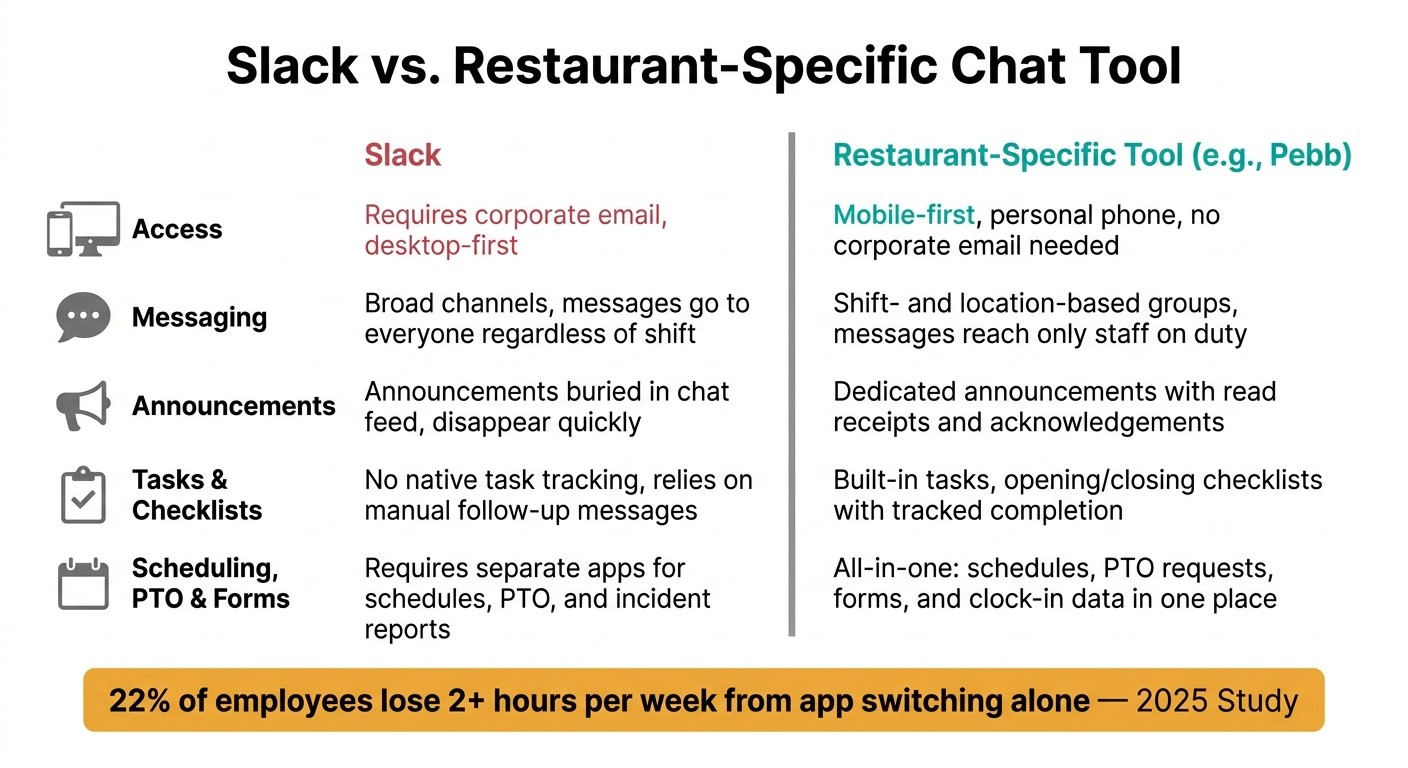
Slack vs. Restaurant-Specific Chat Tool: Feature Comparison for Restaurant Teams
When we started cleaning up restaurant communication at Pebb.io, one thing hit me fast: most teams didn’t have a messaging problem. They had a structure problem.
I’ve seen it play out the same way over and over. A manager opens Slack, spots 27 channels, misses the one note about a fryer issue, then gets a text from the night lead asking who approved a shift swap. Meanwhile, the staff on the floor just need one thing: the right message in the right place at the right time.
So once you know which workflows are still active, rebuild around those. That means fewer places to check, clear ownership, and a setup built around how restaurants actually run: shifts, locations, tasks, forms, and SOPs. That’s the backbone. Then you let those active workflows decide where each message goes.
Use chat, announcements, and tasks for different message types
Here’s the thing: if you rebuild the same channel mess you had before, nothing changes.
We learned to route every message into one of four homes.
Team chat is for in-the-moment coordination. Think shift coverage questions, a big party walking in, or a prep update from the kitchen.
Announcements are for top-down updates that everyone needs to see, like new menu items, policy changes, or inspection reminders. These can’t sit in chat where they disappear in ten minutes.
Tasks take over from all those “don’t forget to…” messages that vanish with no follow-up. Opening checklists, temperature logs, fryer cleanouts - each one gets an owner and a due time.
SOP library is where SOPs, allergy steps, and training guides live, so staff can pull them up on their phone during a shift.
At Pebb, these four homes are built in from day one. That saves managers from making up their own system or teaching staff some custom channel naming setup that nobody remembers a week later.
Connect messaging to schedules, clock-ins, PTO, and forms
This is where I’ve seen a restaurant-first tool pull away from Slack by a mile.
When chat connects to the schedule, a message to the PM kitchen team goes only to the people working that shift. Not to a stale channel packed with people who are off that day, transferred stores last month, or shouldn’t even be looped in.
Let me tell you what happened next in one rollout we worked on. A manager needed to alert the evening back-of-house team about a late produce delivery. In a general chat tool, that would’ve gone into a broad channel and hoped for the best. Inside a schedule-linked setup, it went straight to the PM crew on shift. No noise. No guessing.
Clock-in data adds another layer. Instead of checking one app for time punches and then jumping into Slack to send a message, managers can see who’s on the floor right now and contact them at once.
PTO works the same way. Staff submit a request in the app, managers approve or decline it with the full schedule in view, and the update appears right away without a pile of follow-up texts.
Forms matter too, maybe more than most people think. Incident reports, temperature logs, and maintenance requests stay in the same place. So if a line cook spots a leaking fryer, they can submit a form with a photo on the spot and turn that into a task that alerts the right manager. No paper trail. No “I thought someone already sent that.”
Cut missed messages for frontline staff
This kind of setup matters because general chat tools miss frontline staff all the time. I’ve seen teams assume everyone saw an update, only to learn half the staff never had access in the first place.
Most restaurant workers don’t use corporate email or an intranet. So if your communication system depends on either one, you’ve already lost a big part of your team before the first message goes out.
Feature | How Pebb handles it | Why it matters in restaurants |
|---|---|---|
Mobile-first access | Full app on personal phones, no corporate email required | Reaches staff before and during shifts |
Read receipts | Read receipts or acknowledgements on critical announcements | Helps managers know important updates were seen |
Shift- and location-based groups | Auto-organized by schedule and role | Staff only see messages relevant to their shift |
Integrated tasks and forms | Checklists and reports inside the same app | No app-switching during a busy service |
PTO and scheduling in one place | Requests, approvals, and schedule updates connected | Fewer back-and-forth messages for managers |
From what I’ve seen at Pebb.io, this is where the mess starts to clear. Staff stop hunting for updates. Managers stop repeating themselves. And the team on the floor gets one place to check instead of five.
Next, move only the active content and roll out the change in phases.
Move the right information and roll out the tool in phases
I’ve seen teams make this part way harder than it needs to be.
At Pebb.io, one of the biggest rollout mistakes we kept running into was simple: people tried to move everything. Old chats. Dead threads. Random files no one had opened in months. It felt safe in the moment, but it made the new workspace messy from day one.
Here’s the thing: once the workflow structure is clear, I only move the content that supports that structure.
Migrate only active operating content
My rule is simple: move only what staff need for the next shift.
That usually means current menus, SOPs, checklists, policies, and manager contacts. That’s the stuff people need when they’re on the floor and moving fast. Campaign threads and inactive chat history? I leave those behind.
What worked best for us was a three-bucket framework:
migrate - content staff use today to run the restaurant
archive - compliance records or reference material that rarely gets touched
delete - anything that no longer affects daily operations
That one filter keeps the workspace lean. And when the workspace stays lean, staff can find active content fast without digging through digital junk.
Run a short overlap period with a clear cut-off date
Once the active content is in place, I don’t push it to everyone at once.
I start with one location or one shift group first. Let me tell you what happened next the first time we did this the right way: within days, little issues popped up that would’ve been a nightmare at full scale. We found missing permissions, confusing group names, and workflows that looked fine on paper but broke in real use.
That’s why I train managers first, then pilot one location or shift group for one to two weeks. That short window gives us room to catch problems before they spread across every location.
During the overlap, new operational communication happens in the new tool only for operational messages. That part matters. A firm cut-off date stops teams from drifting back into Slack just because it feels familiar.
Migration Approach | Pros | Cons | Best Fit |
|---|---|---|---|
Clean Slate | Low noise; fast setup; forces adoption of new workflows | Loss of historical context for old projects | High-turnover restaurants; single locations |
Phased Migration | Minimizes disruption; allows location-specific testing | Longer transition; requires managing two apps briefly | Multi-unit groups; large full-service teams |
I’ve found that Clean Slate works well when a team wants a hard reset and doesn’t have much old material worth keeping close. Phased Migration tends to make more sense when there are multiple units, more managers, and more moving parts.
Train frontline teams in short, shift-friendly sessions
After the pilot works, I train staff in the same short format they’ll use on the floor.
Long training sessions sound nice in theory. In practice, they usually flop. People are tired, distracted, or thinking about the next table, the next delivery, or the next clock-in.
So I keep it short: 5- to 10-minute pre-shift sessions.
I focus on the few actions staff use most: check the schedule, acknowledge announcements, open SOPs, submit PTO, and complete logs. I show it live on a phone, ask a couple of people to try it themselves, and repeat that across a few shifts until it becomes second nature.
One thing that helped us a lot was naming one app owner per location. This person answers questions, catches posting mistakes, and handles the classic, “where does this go?” in the moment. They know the setup, they keep things clean, and they help the rest of the team build the habit without turning every small issue into a manager problem.
Finish the transition and keep communication simple
I’ve seen teams make the same mistake again and again during a rollout: they leave Slack, then quietly rebuild Slack somewhere else.
Let me tell you what happened next on a few of our smoother rollouts at Pebb.io. The teams that did best didn’t try to copy every channel, every file dump, or every messy habit from the old setup. We kept it tight. We organized communication by location, shift, and role so people knew where to look without digging around mid-shift.
Key points to carry into your rollout
Here’s the thing: the big win isn’t adding more. It’s cutting the clutter.
What helped us most was being ruthless about what stayed and what didn’t. No dead channels sitting around. No duplicate files with three “final” versions. No staff bouncing between places trying to find the latest update while the lunch rush is already starting.
When I think about a clean finish, it looks simple: the right update gets to the right person in one place during a shift.
As we closed things out, these were the rules I’d stick to:
Keep only active channels, files, and workflows
Keep communication organized by location, shift, and role
Give one location owner final responsibility for adoption
Set a hard cut-off date and stop posting in Slack
Use one app for chat, announcements, schedules, tasks, and forms
That last point made the biggest difference for us.
Why? Because app switching sounds small until you watch it play out in a restaurant. A manager checks one tool for chat, another for schedules, another for forms, and suddenly a shift change gets missed or an urgent handoff slips through the cracks. A 2025 study found that 22% of employees lose 2+ hours per week just from switching between apps, causing missed handoffs, overlooked schedule changes, and delays right when service can least afford them.
At Pebb.io, I’ve noticed our smoothest rollouts happen when the new tool replaces multiple apps, not just Slack. Once staff can check their schedule, acknowledge a manager announcement, submit a PTO request, and complete a form all in one place, people stop resisting the change. They use it because it makes the shift easier.
That’s the point of the switch.
FAQs
How long should a restaurant migration take?
I’ve seen this play out up close at Pebb.io, and one thing still surprises people: the move usually feels a lot lighter than they expect.
When teams switch to Pebb, it’s built to be low-friction. We don’t see long training cycles. We don’t see heavy IT hand-holding. In most cases, teams hit 80% adoption within the first week.
Here’s the thing: that kind of early traction doesn’t happen by accident. The smoothest rollouts I’ve been part of usually start small.
A simple 30-day pilot gives everyone room to test the waters before going all in company-wide. That’s the route I’d take if I were leading the rollout myself. It keeps the pressure low, helps teams build habits, and lets you spot small issues before they turn into annoying ones.
What’s worked best for us is keeping the first phase tight:
Start with chat
Add news feeds
Bring in more features over time
Let me tell you what happened next in one rollout I watched closely: once people got comfortable with the basics, adoption came more naturally. No big push. No flood of support tickets. Just a steady shift as teams started using the platform in their day-to-day work.
What Slack content should we not move over?
I’ve seen this go sideways more than once.
At Pebb.io, one of the first mistakes teams make during a move is bringing everything over. Old channels. Random app connections. Threads nobody has touched in months. It feels safe in the moment, but it usually creates the same mess in a new place.
Here’s the thing: not all content deserves a second life.
Leave behind the clutter that blocks your team’s view, such as:
general-purpose channels with little structure
third-party integrations used to fill Slack’s gaps
archived status updates or non-critical temporary threads
What I’ve found works best is simple. We move only the materials people still need to do their jobs well. That usually means training docs, team playbooks, and day-to-day operating guidelines.
Those belong in Pebb’s permanent knowledge library or the news feed, where people can actually find them later instead of digging through old conversations.
Let me tell you what happened next on one rollout. A team wanted to migrate years of channel history “just in case.” We pushed back and kept the move tight. The result? People got into Pebb and found what mattered in minutes, not hours. No digital junk drawer. Just the stuff they needed to work.
That small bit of restraint saved a lot of cleanup later.
How do we get hourly staff to actually use the new app?
I learned this one the hard way at Pebb.io. We once rolled out a new workspace with good intentions and bad timing. Invites went out in scattered messages, a few people joined, a few ignored them, and a few had no clue what the app was for. It felt messy fast.
Let me tell you what happened next: when we reset and started with managers and shift leaders, things changed. Once they began posting first and replying first, everyone else had a clear example to follow. That early behavior mattered more than any big announcement we could’ve made.
So now, we start with managers and shift leaders. We get them active first so the team sees that posting, replying, and checking updates is part of the workday, not just another app sitting on a phone.
We also send invites during a team meeting, not through random one-off messages that get buried. In person, or even in a live group setting, people can join on the spot, ask questions, and get moving right away. It cuts down confusion and saves a lot of back-and-forth later.
And here’s the thing: push notifications can help, but too many of them backfire. We keep them for critical updates only. If every post pings people, they’ll tune it out. If only the big stuff comes through, people pay attention.
For onboarding, we keep it simple. No long training deck. No info dump. Just quick, hands-on 15-minute training that covers the basics people need on day one:
checking schedules
clocking in
joining the right groups
That short session works because people can do the actions as they learn them. It’s practical, and it sticks better than a long walkthrough.
After that, we reinforce the habit in the flow of the day. Shift notes help. Regular updates help. Small reminders inside the normal rhythm of work do a lot more than one big launch speech ever will.
